
Spring MVC 的xml一些配置
1.可以自动加载注解驱动,通过注解找到对应Controller
    <!-- spring MVC 注解驱动 -->

    <mvc:annotation-driven></mvc:annotation-driven>

    <!-- 配置自动扫描包 -->

    <context:component-scan base-package="com.cc8w.Controller"></context:component-scan>

     <!-- 配置视图解析器 -->

    <bean

        class="org.springframework.web.servlet.view.InternalResourceViewResolver">

        <property name="prefix" value="/WEB-INF/view/"></property>

        <property name="suffix" value=".jsp"></property>

    </bean>
package com.cc8w.Controller;

import org.springframework.stereotype.Controller;

import org.springframework.ui.Model;

import org.springframework.web.bind.annotation.RequestMapping;

@Controller

@RequestMapping("/HelloWorld")

public class HelloWorld {

    @RequestMapping("/hi.do")

    public String hi(String names,Model model)

    {

        System.out.println("hi.dodo");

        model.addAttribute("hi", "hi123456");

        return "hi";

    }

}
显示结果正确.
2.配置HandlerMapping,根据beanName找到对应Controller
web.xml配置
<?xml version="1.0" encoding="UTF-8"?>

<web-app xmlns:xsi="http://www.w3.org/2001/XMLSchema-instance" xmlns="http://xmlns.jcp.org/xml/ns/javaee" xsi:schemaLocation="http://xmlns.jcp.org/xml/ns/javaee http://xmlns.jcp.org/xml/ns/javaee/web-app_3_1.xsd" id="WebApp_ID" version="3.1">

  <display-name>Spring-web02</display-name>

  <welcome-file-list>

    <welcome-file>index.html</welcome-file>

    <welcome-file>index.htm</welcome-file>

    <welcome-file>index.jsp</welcome-file>

    <welcome-file>default.html</welcome-file>

    <welcome-file>default.htm</welcome-file>

    <welcome-file>default.jsp</welcome-file>

  </welcome-file-list>

  <!-- The front controller of this Spring Web application, responsible for handling all application requests -->

    <servlet>

        <servlet-name>springDispatcherServlet</servlet-name>

        <servlet-class>org.springframework.web.servlet.DispatcherServlet</servlet-class>

        <init-param>

            <param-name>contextConfigLocation</param-name>

            <param-value>classpath:applicationContext.xml</param-value>

        </init-param>

        <load-on-startup>1</load-on-startup>

    </servlet>

    <!-- Map all requests to the DispatcherServlet for handling -->

    <servlet-mapping>

        <servlet-name>springDispatcherServlet</servlet-name>

        <url-pattern>/</url-pattern>

    </servlet-mapping>

</web-app>
applicationContext.xml
<?xml version="1.0" encoding="UTF-8"?>

<beans xmlns="http://www.springframework.org/schema/beans"

    xmlns:xsi="http://www.w3.org/2001/XMLSchema-instance"

    xmlns:aop="http://www.springframework.org/schema/aop"

    xmlns:context="http://www.springframework.org/schema/context"

    xmlns:mvc="http://www.springframework.org/schema/mvc"

    xsi:schemaLocation="http://www.springframework.org/schema/mvc http://www.springframework.org/schema/mvc/spring-mvc-4.3.xsd

        http://www.springframework.org/schema/beans http://www.springframework.org/schema/beans/spring-beans.xsd

        http://www.springframework.org/schema/context http://www.springframework.org/schema/context/spring-context-4.3.xsd

        http://www.springframework.org/schema/aop http://www.springframework.org/schema/aop/spring-aop-4.3.xsd">

    <!-- 配置HandlerMapping 根据beanname找到对应Controller -->

     <bean class="org.springframework.web.servlet.mvc.support.ControllerBeanNameHandlerMapping"></bean>

     <!--配置beanname找到对应的Controller -->

     <bean name = "/dogcontrollerdog" class = "com.cc8w.Controller.Dog"></bean>

     <!-- 配置视图解析器 -->

    <bean

        class="org.springframework.web.servlet.view.InternalResourceViewResolver">

        <property name="prefix" value="/WEB-INF/view/"></property>

        <property name="suffix" value=".jsp"></property>

    </bean>

</beans>
测试类(这里一定要继承org.springframework.web.servlet.mvc.AbstractController接口)
package com.cc8w.Controller;

import javax.servlet.http.HttpServletRequest;

import javax.servlet.http.HttpServletResponse;

import org.springframework.web.servlet.ModelAndView;

import org.springframework.web.servlet.mvc.AbstractController;

public class Dog extends AbstractController {

     public Dog()

     {

        System.out.println("13213");

     }

    @Override

    protected ModelAndView handleRequestInternal(HttpServletRequest request, HttpServletResponse response) throws Exception {

        // TODO Auto-generated method stub

        System.out.println("456--访问到了---");

        ModelAndView mav = new ModelAndView("dog");

        mav.addObject("hi", "467 th");

        return mav;

    }

}
模版目录和结果

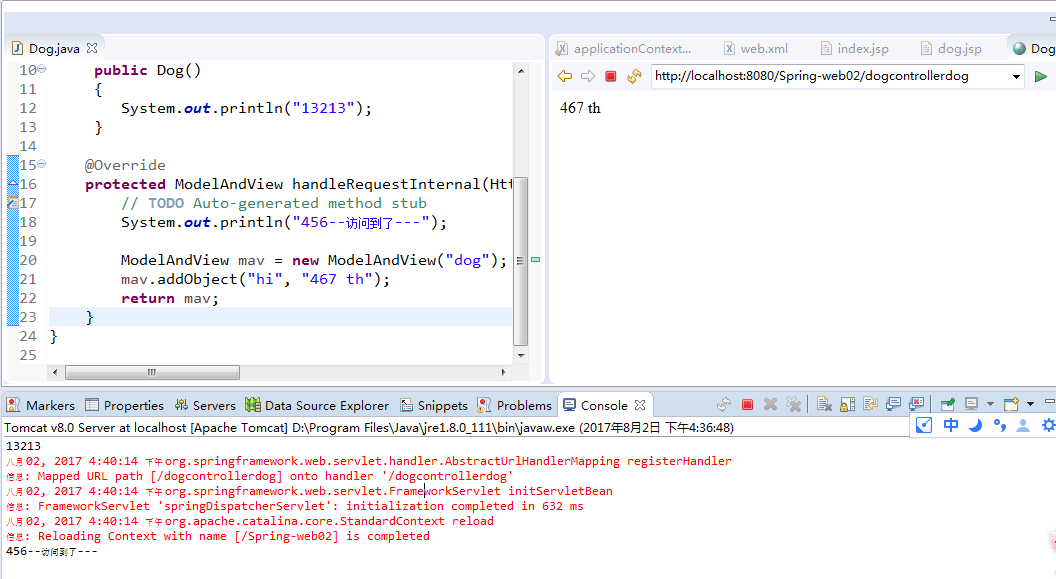
3.配置HandlerMapping,根据URL找到对应Controller(主要是applicationContext.xml或<bean-name>-Servlet.xml的区别)
<?xml version="1.0" encoding="UTF-8"?>

<beans xmlns="http://www.springframework.org/schema/beans"

    xmlns:xsi="http://www.w3.org/2001/XMLSchema-instance"

    xmlns:aop="http://www.springframework.org/schema/aop"

    xmlns:context="http://www.springframework.org/schema/context"

    xmlns:mvc="http://www.springframework.org/schema/mvc"

    xsi:schemaLocation="http://www.springframework.org/schema/mvc http://www.springframework.org/schema/mvc/spring-mvc-4.3.xsd

        http://www.springframework.org/schema/beans http://www.springframework.org/schema/beans/spring-beans.xsd

        http://www.springframework.org/schema/context http://www.springframework.org/schema/context/spring-context-4.3.xsd

        http://www.springframework.org/schema/aop http://www.springframework.org/schema/aop/spring-aop-4.3.xsd">

    <!-- 配置HandlerMapping 根据简单URL找到对应Controller -->

     <bean class = "org.springframework.web.servlet.handler.SimpleUrlHandlerMapping">

         <property name="mappings">

             <props>

                 <prop key="/dogcontroller">dog</prop>

             </props>

         </property>

     </bean>

     <!--bean类 -->

     <bean id = "dog"  class = "com.cc8w.Controller.Dog"></bean>

     <!-- 配置视图解析器 -->

    <bean

        class="org.springframework.web.servlet.view.InternalResourceViewResolver">

        <property name="prefix" value="/WEB-INF/view/"></property>

        <property name="suffix" value=".jsp"></property>

    </bean>

</beans>
上面的类,这个spring MVC配置文件,可以找到控制器,就不截 结果了.
4.配置HandlerMapping,通过控制器类名访问Controller,访问时类名首字母小写 小写
<?xml version="1.0" encoding="UTF-8"?>

<beans xmlns="http://www.springframework.org/schema/beans"

    xmlns:xsi="http://www.w3.org/2001/XMLSchema-instance"

    xmlns:aop="http://www.springframework.org/schema/aop"

    xmlns:context="http://www.springframework.org/schema/context"

    xmlns:mvc="http://www.springframework.org/schema/mvc"

    xsi:schemaLocation="http://www.springframework.org/schema/mvc http://www.springframework.org/schema/mvc/spring-mvc-4.3.xsd

        http://www.springframework.org/schema/beans http://www.springframework.org/schema/beans/spring-beans.xsd

        http://www.springframework.org/schema/context http://www.springframework.org/schema/context/spring-context-4.3.xsd

        http://www.springframework.org/schema/aop http://www.springframework.org/schema/aop/spring-aop-4.3.xsd">

    <!-- 配置HandlerMapping 通过控制器类名访问Controller,访问时类名首字母小写 -->

    <bean class = "org.springframework.web.servlet.mvc.support.ControllerClassNameHandlerMapping"></bean>

     <!--bean类 -->

     <bean  class = "com.cc8w.Controller.Dog"></bean>

     <!-- 配置视图解析器 -->

    <bean

        class="org.springframework.web.servlet.view.InternalResourceViewResolver">

        <property name="prefix" value="/WEB-INF/view/"></property>

        <property name="suffix" value=".jsp"></property>

    </bean>

</beans>
http://localhost:8080/Spring-web02/dog 这样访问...
注意, 还呀配置下日志.
https://www.cnblogs.com/fps2tao/p/12809867.html
Spring MVC 的xml一些配置的更多相关文章
- Spring MVC 的 XML 配置方式
索引: 开源Spring解决方案--lm.solution 参看代码 GitHub: solution/pom.xml solution/webapi/pom.xml solution/mapper/ ...
- Spring MVC Web.xml配置
Web.xml spring&spring mvc 在web.xml中定义contextConfigLocation参数,Spring会使用这个参数去加载所有逗号分隔的xml文件,如果没有这个 ...
- Spring MVC 返回 xml json pdf 数据的配置方法
<!-- Spring MVC 返回 xml 数据的配置方法 --> <bean class="org.springframework.web.servlet.vi ...
- Spring MVC 使用tomcat中配置的数据源
Spring MVC 使用tomcat中配置的数据源 配置tomcat数据源 打开tomcat目录下的conf目录,编辑sever.xml目录.在<GlobalNamingResources&g ...
- Spring mvc web.xml中 urlpatten的配置问题
在使用spring mvc 是我们会配置spring 的DispatcherServlet作为请求的转发器. <servlet> <servlet-name>spring< ...
- Spring配置文件beans.xml头部配置解释
Spring配置文件beans.xml头部配置解释 - EasonJim - 博客园https://www.cnblogs.com/EasonJim/p/6880329.html
- 跟着刚哥学习Spring框架--通过XML方式配置Bean(三)
Spring配置Bean有两种形式(XML和注解) 今天我们学习通过XML方式配置Bean 1. Bean的配置方式 通过全类名(反射)的方式 √ id:标识容器中的bean.id唯一. √ cl ...
- Spring MVC 3.x 基本配置
WEB-INF/web.xml 例1 <?xml version="1.0" encoding="UTF-8"?> <web-app xmln ...
- 使用高性能xml序列化框架jibx作为spring mvc的xml view
package org.springframework.web.servlet.view.xml; import java.io.ByteArrayOutputStream; import java. ...
随机推荐
- 如何使用屏幕取色工具ColorPixl
ColorPix可以屏幕取色,假如现在想要取色桌面徽标键的颜色,按任意键可以锁定这个区域(press any key to lock)这样我们就可以在放大的区域更清楚的取色,加号按钮可以设置该软件是否 ...
- 翻译记忆软件-塔多思TRADO经典教程_2
Trados 中文简明教程Trados 中文简明教程1. 准备工作 . . . . . . . . . . . . . . . . . . . . . . . . . . . . . . . . . ...
- 安全删除U盘或其他硬件 unlocker的使用方法
1 假如我在优盘里新建一个文档,并且正在读写文件. 点击右下角的安全删除的时候弹出如下对话框. 2 在该优盘上右击,Unlocker,弹出的对话框显示NOTEPAD.EXE正在使用. 3 在确保左侧是 ...
- VS2017桌面应用程序打包成.msi或者.exe
百度很难搜索到相关内容,分享下,需要的盆友拿去,不谢. http://xm2013.com/#/d/12 youtube地址:https://www.youtube.com/watch?v=z0v6h ...
- git命令 add -a和add .和add -u 的区别
总结: git add -a 所有的更改操作--新建,更改,删除: git add . 只包括 新建 ,修改操作:无删除: git add -u 只包括修改,删除操作,无新建: 示例: git ini ...
- Java面试处理高并发
经过查资料,方案如下所示. 1 从最基础的地方做起,优化我们写的代码,减少必要的资源浪费. a.避免频繁的使用new对象,对于整个应用只需要存在一个实例的类,我们可以使用单例模 ...
- 在Html.ActionLink中运用二维判断语句
@Html.ActionLink("公告信息", "notice", "article", null, new { @class = Vie ...
- wso2esb安装及helloworld
1.系统环境 Ubuntu12.04 192.168.0.97 root/password找管理员 Ubuntu12.04 192.168.0.99 root/password ...
- 对opencv MeanShift 融合矩形框的改进
OPENCV 中的代码改进.当然要依据自己的实际情况来,OPENCV 中行人检測有两种矩形框的融合算法.这里仅仅对meanshift 方法做改进 假设有更好的方法.希望能够跟我讲下. 对于去除重合部分 ...
- 【BIEE】导出数据报错
使用BIEE导出数据的时候,发现个问题,导出过程中,报错如下: 问题解决: 找到文件opmn.xml,路径为:/Middleware/instances/instance1/config/OPMN/o ...