
确定有限自动机 valid number
原题地址:http://oj.leetcode.com/problems/valid-number/
题意:判断输入的字符串是否是合法的数。
解题思路:这题只能用确定有穷状态自动机(DFA)来写会比较优雅。本文参考了http://www.cnblogs.com/zuoyuan/p/3703075.html里面的内容,在此致谢!
先要知道到底哪些数是合理的。
e之前呢。
123
.123
123.456
123.
+123
+.123
e之后
123
+123
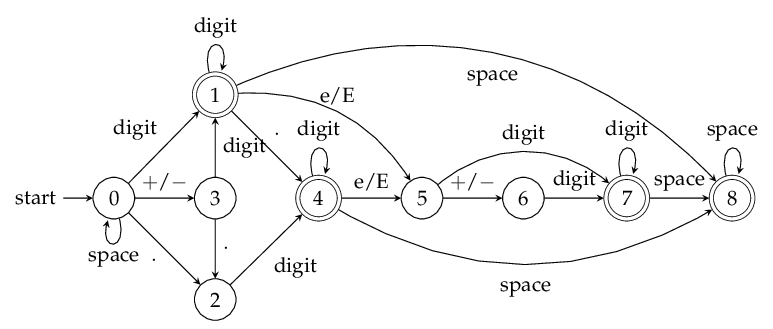
首先这个题有9种状态:
0初始无输入或者只有space的状态
1输入了数字之后的状态
2前面无数字,只输入了dot的状态
3输入了符号状态
4前面有数字和有dot的状态
5'e' or 'E'输入后的状态
6输入e之后输入Sign的状态
7输入e后输入数字的状态
8前面有有效数输入之后,输入space的状态
共9种状态了,难设计的是6,7,8状态。
分好之后就好办了,设计出根据输入进行状态转换就OK了。
这里的输入可以分:
INVALID=0;#无效输入包括: Alphas, '(', '&' ans so on
SPACE=1
SIGN=2 # '+' or '-'
DIGIT=3 # numbers
DOT=4 # '.'
EXPONENT=5 # 'e' or 'E'
转移矩阵A(9X6)如下:
-1, 0, 3, 1, 2, -1
-1, 8, -1, 1, 4, 5
-1, -1, -1, 4, -1, -1
-1, -1, -1, 1, 2, -1
-1, 8, -1, 4, -1, 5
-1, -1, 6, 7, -1, -1
-1, -1, -1, 7, -1, -1
-1, 8, -1, 7, -1, -1
-1, 8, -1, -1, -1, -1
行代表了9种状态,列代表了6种输入方式也就是6种跳转方式。举个例子:A[0][2]=3,这有什么含义呢?意思是:第0种状态为【0初始无输入或者只有space的状态】,在输入第2种输入【SIGN=2 # '+' or '-'】后,会跳转到第3种状态【3输入了符号状态】。A[1][1]=8是什么意思呢?意思是:第1种状态为【1输入了数字之后的状态】,在输入第1种输入【SPACE=1】后,跳转到了第8种状态【8前面有有效数输入之后,输入space的状态】。
根据以上的解释,大家应该明白什么事状态间的跳转了,这个共9种状态,所以是确定有穷自动机。其实难点在于状态的分割,要把每种情况都想到。
而这9种状态中:只有1、4、7、8这四种状态合法,所以最后state跳转到这四种状态之一时,说明输入是合法的!
状态转移图 from leetcode discuss:
代码:
按 Ctrl+C 复制代码

class Solution:

    # @param s, a string

    # @return a boolean

    # @finite automation

    def isNumber(self, s):

        INVALID=0; SPACE=1; SIGN=2; DIGIT=3; DOT=4; EXPONENT=5;

        #0invalid,1space,2sign,3digit,4dot,5exponent,6num_inputs

        transitionTable=[[-1,  0,  3,  1,  2, -1],    #0 no input or just spaces

                         [-1,  8, -1,  1,  4,  5],    #1 input is digits

                         [-1, -1, -1,  4, -1, -1],    #2 no digits in front just Dot

                         [-1, -1, -1,  1,  2, -1],    #3 sign

                         [-1,  8, -1,  4, -1,  5],    #4 digits and dot in front

                         [-1, -1,  6,  7, -1, -1],    #5 input 'e' or 'E'

                         [-1, -1, -1,  7, -1, -1],    #6 after 'e' input sign

                         [-1,  8, -1,  7, -1, -1],    #7 after 'e' input digits

                         [-1,  8, -1, -1, -1, -1]]    #8 after valid input input space

        state=0; i=0

        while i<len(s):

            inputtype = INVALID

            if s[i]==' ': inputtype=SPACE

            elif s[i]=='-' or s[i]=='+': inputtype=SIGN

            elif s[i] in '0123456789': inputtype=DIGIT

            elif s[i]=='.': inputtype=DOT

            elif s[i]=='e' or s[i]=='E': inputtype=EXPONENT

            state=transitionTable[state][inputtype]

            if state==-1: return False

            else: i+=1

        return state == 1 or state == 4 or state == 7 or state == 8
确定有限自动机 valid number的更多相关文章
- 【leetcode】Valid Number
Valid Number Validate if a given string is numeric. Some examples:"0" => true" 0.1 ...
- [LintCode] Valid Number 验证数字
Validate if a given string is numeric. Have you met this question in a real interview? Yes Example & ...
- Valid Number @python
Valid Number Validate if a given string is numeric. Some examples:"0" => true" 0.1 ...
- 配置域名服务器报错named[822]: dns_rdata_fromtext /etc/bind/db.asertest.com mail not a valid number
问题描述: 为了配置邮件服务器,更改了相关域名,改完后,重启bind9报错 Mar 17 14:39:39 DnsServer2 named[822]: dns_rdata_fromtext: /et ...
- [Swift]LeetCode65. 有效数字 | Valid Number
Validate if a given string is numeric. Some examples:"0" => true" 0.1 " => ...
- [leetcode]65. Valid Number 有效数值
Validate if a given string can be interpreted as a decimal number. Some examples:"0" => ...
- 【LeetCode】65. Valid Number
Difficulty: Hard More:[目录]LeetCode Java实现 Description Validate if a given string can be interpreted ...
- LeetCode: Valid Number 解题报告
Valid NumberValidate if a given string is numeric. Some examples:"0" => true" 0.1 ...
- leetCode 65.Valid Number (有效数字)
Valid Number Validate if a given string is numeric. Some examples: "0" => true " ...
随机推荐
- zabbix使用问题
1中文乱码 https://www.linuxidc.com/Linux/2017-08/146162.htm 软件 说明 备注 zabbix 3.4.7 操作系统 Centos7 问题描述:图表内容 ...
- leetCode题解之删除单链表中指定的元素
1.问题描述 Remove all elements from a linked list of integers that have value val. ExampleGiven: 1 --> ...
- 树莓派2 raspyberry Pi2 交叉编译app
Pi 使用的是ARMV7架构的BCM2836, 下载交叉编译器 arm-linux-gnueabihf-gcc 即可. 本地环境: Ubuntu14 + x86_64 1. 下载编译器地址: 1). ...
- commonjs详解
marked here a well written artical http://javascript.ruanyifeng.com/nodejs/module.html
- windows下查看端口占用以及进程名称
http://www.cnblogs.com/rollenholt/archive/2012/08/17/2644657.html
- [WinCE] Win CE 屏幕截图
VS2005自带了这个工具,这个工具的名称为:“远程放大”,其路径为:"C:\Program Files\CE Remote Tools\5.01\bin\cczoom.exe" ...
- [C# | XML] XML 反序列化解析错误:<xml xmlns=''> was not expected. 附通用XML到类解析方法
使用 XML 反化时出现错误: public static TResult GetObjectFromXml<TResult>(string xmlString) { TResult re ...
- Office 365实现单点登录系列(2)—Azure AD Connect安装与配置
前言 第一篇文章我已经为大家分享了在在Azure上搭建域控服务器的方法,如果大家本地已经有了域环境,可以直接从这一篇文章开始阅读.Azure AD Connect的前身是DirSync,是专门用于目录 ...
- Alpha 冲刺报告
Alpha 冲刺报告(4/10) 队名:洛基小队 峻雄(组长) 已完成:继续行动脚本的编写 明日计划:尽量完成角色的移动 剩余任务:物品背包交互代码 困难:具体编码进展比较缓慢 ----------- ...
- 加密算法--->对称加密与非对称加密算举例说明
目前主流的加密方式有:(对称加密)AES.DES (非对称加密)RSA.DSA 对称加密例子:des对称加密 des对称加密,对称加密,是一种比较传统的加密方式,其加密运算.解密运算使用 ...