
漂亮的SVG时钟
漂亮的SVG时钟
效果图:
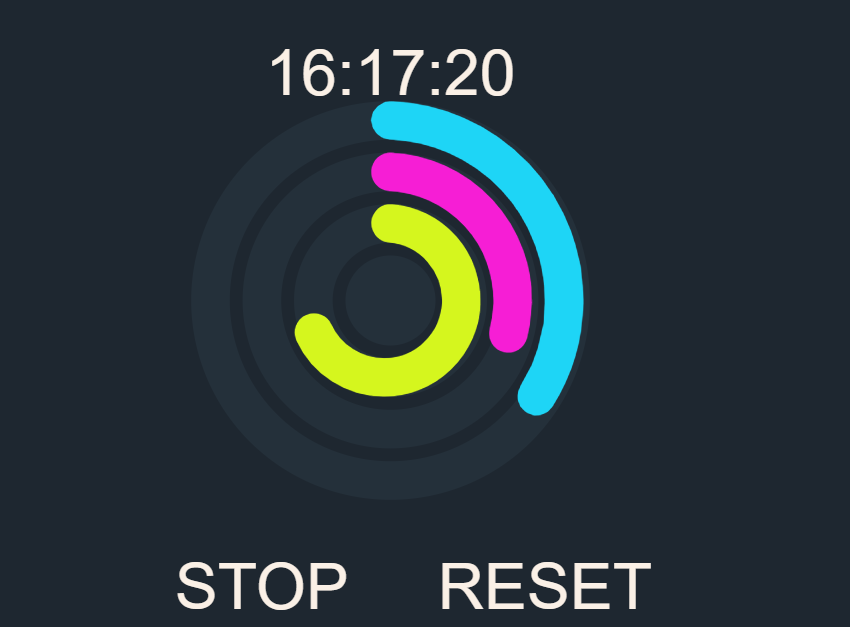
代码如下,复制即可使用:
<!DOCTYPE html>

<html lang="en">

<head>

    <meta charset="UTF-8">

    <title>漂亮的SVG时钟</title>

<style>

    body {

        background: #1e2730;

        font-family: Arial;

    }

    svg {

        width: 100vmin;

        margin: 0 auto;

        display: block;

    }

    circle {

        fill: none;

        stroke-width: 3;

    }

    #secondsPath {

        stroke-width: 3;

        pointer-events: none;

        stroke-linecap: round;

    }

    #minPath {

        stroke-width: 3;

        pointer-events: none;

        stroke-linecap: round;

    }

    #hoursPath {

        stroke-width: 3;

        pointer-events: none;

        stroke-linecap: round;

    }

    text {

        dominant-baseline: central;

        text-anchor: middle;

        font-size: 5px;

        fill: Linen;

    }

    svg text::selection {

        background: none;

    }

    #hub {

        fill: #24303a;

        stroke-width: 0;

    }

    #toggle,

    #reset {

        cursor: pointer;

    }

</style>

</head>

<body>

<svg viewBox="0 0 50 50">

    <g>

        <circle id="secondsCirc" r="14" stroke="#24303a" />

        <path id="secondsPath" d="" fill="transparent" stroke="#1ed5f6" ></path>

        <circle id="minCirc" r="10" stroke="#24303a" />

        <path id="minPath" d="" fill="transparent" stroke="#f61ed5" ></path>

        <circle id="hoursCirc" r="6" stroke="#24303a" />

        <path id="hoursPath" d="" fill="transparent" stroke="#d5f61e" ></path>

        <circle id="hub" cx="0" cy="0" r="3.5" fill="#24303a" />

    </g>

    <text id="text"  transform="translate(25 5)">00:00:00</text>

    <text id="toggle" transform="translate(15 45)">STOP</text>

    <text id="reset" transform="translate(37 45)">RESET</text>

</svg>

</body>

<script>

    const rad = Math.PI / 180;

    let requestId = null;

    let stop = false;

    const svg = document.querySelector("svg");

    const g = document.querySelector("g");

    const TIME = "16:07:50";

    // counters

    let h = parseInt(TIME.split(":")[0]);

    let m = h * 60 + parseInt(TIME.split(":")[1]);

    let s = h * 60 * 60 + m * 60 + parseInt(TIME.split(":")[2]);

    //data

    let circles = {

        s: {

            path: secondsPath,

            divisions: 60,

            r: secondsCirc.getAttribute("r"),

            stroke: "#1ed5f6",

            start: (parseInt(TIME.split(":")[2]))%60

        },

        m: {

            path: minPath,

            divisions: 60,

            r: minCirc.getAttribute("r"),

            stroke: "#f61ed5",

            start: (parseInt(TIME.split(":")[1]))%60

        },

        h: {

            path: hoursPath,

            divisions: 24,

            r: hoursCirc.getAttribute("r"),

            stroke: "#d5f61e",

            start: (parseInt(TIME.split(":")[0]))%24

        }

    };

    let translation = { x: 25, y: 25 }; //translate

    let rotation = -90;

    let rot = -(rotation * rad);

    g.setAttributeNS(

        null,

        "transform",

        `translate(${translation.x} ${translation.y}) rotate(${rotation})`

    );

    const spring = 0.09;

    const friction = 0.8;

    class Clock {

        constructor(o) {

            this.path = o.path;

            this.divisions = o.divisions; //24 || 60

            this.R = o.r;

            this.start = o.start;

            this.strokeDashoffset = 0;

            this.definePath(this.path);

            this.vel = 0;

        }

        update(time) {

            let t = time % this.divisions;

            this.strokeLength = this.target;

            this.target = t * this.pathLength / this.divisions;

            if (this.pathLength - this.strokeLength <= this.delta) {

                this.strokeDashoffset += this.pathLength;

                this.strokeLength = 0.1;

            }

        }

        updateStrokeLength() {

            this.dist = this.target - this.strokeLength;

            this.acc = this.dist * spring;

            this.vel += this.acc;

            this.vel *= friction;

            this.strokeLength += this.vel;

            this.path.style.strokeDasharray = `${this.strokeLength},${this.pathLength -

            this.strokeLength}`;

            this.path.style.strokeDashoffset = this.strokeDashoffset;

        }

        definePath() {

            let d =

                "M" +

                this.R +

                "," +

                0 +

                "  A" +

                this.R +

                "," +

                this.R +

                " 0 " +

                1 +

                "," +

                1 +

                this.R +

                "," +

                -1 +

                "z";

            //y-1: the circles are rotated 90 degs

            this.path.setAttributeNS(null, "d", d);

            this.pathLength = this.path.getTotalLength();

            this.delta = this.pathLength / this.divisions;

            this.strokeLength = this.start * this.delta;

            this.target = this.strokeLength;

            this.path.style.strokeDasharray = `${this.strokeLength},${this.pathLength -

            this.strokeLength}`;

            this.path.style.strokeDashoffset = this.strokeDashoffset;

        }

    }

    let secondsTrack = new Clock(circles.s);

    let minTrack = new Clock(circles.m);

    let hoursTrack = new Clock(circles.h);

    let sid = setInterval(setCron, 1000);

    function addZero(i) {

        if (i < 10) {

            i = "0" + i;

        }

        return i;

    }

    function setText(h, m, s) {

        text.textContent =

            addZero(h % 24) + ":" + addZero(m % 60) + ":" + addZero(s % 60);

    }

    setText(h, m, s);

    function Animation() {

        requestId = window.requestAnimationFrame(Animation);

        secondsTrack.updateStrokeLength();

        minTrack.updateStrokeLength();

        hoursTrack.updateStrokeLength();

    }

    Animation();

    reset.addEventListener("click",resetCron,false);

    function resetCron(){

        secondsTrack = new Clock(circles.s);

        minTrack = new Clock(circles.m);

        hoursTrack = new Clock(circles.h);

        h = parseInt(TIME.split(":")[0]);

        m = h * 60 + parseInt(TIME.split(":")[1]);

        s = h * 60 * 60 + m * 60 + parseInt(TIME.split(":")[2]);

        setText(h, m, s);

    }

    function setCron() {

        secondsTrack.update(s);

        if (s % 60 == 0) {

            minTrack.update(m);

        }

        if (s % (60 * 60) == 0) {

            hoursTrack.update(h);

        }

        setText(h, m, s);

        s++;

        if (s % 60 == 0) {

            m++;

        }

        if (s % (60 * 60) == 0) {

            h++;

        }

    }

    toggle.addEventListener("click",function(){

        if(stop) {

            stop = false;

            toggle.textContent = "STOP";

            sid = setInterval(setCron, 1000);

        }else{

            stop = true;

            toggle.textContent ="GO";

            clearInterval(sid);

        }

    },false);

</script>

</html>
如有错误,欢迎联系我改正,非常感谢!!!
漂亮的SVG时钟的更多相关文章
- 使用 CSS & jQuery 制作一款漂亮的多彩时钟
大家可能见过各种各样的时钟效果,比如多年前非常流行的 Flash 制作的各种新奇的动画时钟,现在的 Web 开发者们又开始应用 CSS3 和 Canvas 等最新技术来实现.而今天这里要分享的这款漂亮 ...
- C#开发漂亮的数字时钟
今天用C#做了一个漂亮的数字时钟.界面如下. 实现技术:主要是通过Graphics类的DrawImage方法来绘制数字时钟中所有的数字,这些数字是从网上找的一些图片文件.时钟使用DateTime中No ...
- JavaScript+svg绘制的一个动态时钟
结果图: 代码如下: <!DOCTYPE html> <html> <head> <title>动态时钟</title> </head ...
- 【应用】SVG动态 时钟
没有做秒针,只做了分针和时针,5分钟以后来看应该可以看到效果╮(╯-╰)╭ <!DOCTYPE html> <html> <head> <title>& ...
- 15个超强悍的CSS3圆盘时钟动画赏析
在网页上,特别是个人博客中经常会用到时钟插件,一款个性化的时钟插件不仅可以让页面显得美观,而且可以让访客看到当前的日期和时间.今天我们给大家收集了15个超强悍的圆盘时钟动画,很多都是基于CSS3,也有 ...
- Trianglify - 生成五彩缤纷的 SVG 背景图案
Trianglify 是一个能够生成五颜六色的三角形图案的 JavaScript 库,可以用来作为 SVG 图像和 CSS 背景.它的灵感来自于 Btmills 的 Geopattern,并使用 d3 ...
- 8个实用的SVG工具,20 个有用的 SVG 工具,五款超实用的开源SVG工具
8个实用的SVG工具 [导读] 你还在为没有好用的SVG工具而发愁吗?开发人员的福音来啦!小编为大家收集罗列了8款实用的SVG工具,让我们一起来看看吧! SVG可缩放矢量图形(Scalable Vec ...
- 制作WPF时钟之2
原文:制作WPF时钟之2 前段时间写了一篇"制作简单的WPF时钟",今天再制作了一个更漂亮的WPF时钟,目前仅完成了设计部分,准备将它制作成一个无边框窗体式的时钟. 效果图: ...
- 8款超好用的SVG编辑工具用起来
随着响应式网页的发展,对于内容呈现的要求也越来越高,尤其是图像.为了在各种设备上能实现自然伸缩或扩展而不影响图片质量,所以矢量图形(SVG)正变得越来越受欢迎. 大家都知道,在计算机图形学中,有两种主 ...
随机推荐
- SenseTime Ace Coder Challenge 暨 商汤在线编程挑战赛 E. 疯狂计数
1.改高精度 :float/double的精度为x位,小数部分最多x+x位(乘法和加法),整数部分<1000000*1000000/2=5 * 10^11 2.分成整数部分和小数部分分别存储,貌 ...
- mac go2shell 安裝
配合Finder打开Finder,按住command键,拖动Go2Shell的图标到Finder菜单就可以在Finder快捷打开Go2Shell了
- TOML 详解
TOML的由来 配置文件的使用由来已久,从.ini.XML.JSON.YAML再到TOML,语言的表达能力越来越强,同时书写便捷性也在不断提升. TOML是前GitHub CEO, Tom Prest ...
- Hadoop生态圈-注册并加载协处理器(coprocessor)的三种方式
Hadoop生态圈-注册并加载协处理器(coprocessor)的三种方式 作者:尹正杰 版权声明:原创作品,谢绝转载!否则将追究法律责任. 到目前为止,大家已经掌握了如何使用过滤器来减少服务器端通过 ...
- np.diff函数
np.diff函数 觉得有用的话,欢迎一起讨论相互学习~Follow Me 数组中a[n]-a[n-1] import numpy as np a=np.array([1, 6, 7, 8, 12]) ...
- 51 nod 1046 A^B Mod C
1046 A^B Mod C 基准时间限制:1 秒 空间限制:131072 KB 分值: 0 难度:基础题 收藏 关注 给出3个正整数A B C,求A^B Mod C. 例如,3 5 8,3^ ...
- nginx.conf 基础配置
### 全局块开始### #配置允许运行nginx服务器的用户和用户组 user nobody; #配置允许nginx进程生成的worker process 数 worker_processes 1; ...
- [转载]asp.net mvc: why is Html.CheckBox generating an additional hidden input
http://stackoverflow.com/questions/2697299/asp-net-mvc-why-is-html-checkbox-generating-an-additional ...
- [转载]内存的一些magic number和debug crt
原文:http://www.360doc.com/content/13/0105/17/6295074_258392439.shtml 调试过debug版本的vc程序的人一定对0xCCCCCCCC和0 ...
- 悲催的IE6 七宗罪大吐槽(带解决方法)第一部分
一.奇数宽高 悲剧的IE6啊,为何有如此多bug,但用户市场又那么大,真让我们搞网站的纠结.今天就遇到了一个非常奇怪但又很细节的一个bug,一个外部的相对定位div,内部一个绝对定位的div(righ ...