
内核升极2.6.18 升级到 2.6.32 装systemtap 原创
系统: redhat serever 5.3 linux 2.6.18
现在要升级到 LINUX 内核 2.6.32
安装步骤:
1.下载装源代码:
https://www.kernel.org/
找到 https://www.kernel.org/pub/ 链接
查找linux->kernel->v2.6->linux-2.6.32.tar.bz2
2.拖动虚拟机 放到目录 /usr/src/kernels/下解压 为 linux -3.2.26.
3 .配制内核
1. yum install ncurses-devel.x86_64
2. 打补丁utrace, (补丁下载 https://web.elastic.org/~fche/frob-utrace/)
3. 补丁安装.
[root@localhost kernels]# ls -al

--

-rw-r--r--   root root   Sep  : tracehook.patch

-rw-r--r--   root root  Sep  : utrace.patch

-rwxrw-rw-   root root   Sep  : utrace-ptrace.patch

[root@localhost linux-2.6.]# patch -p1 <../tracehook.patch

patching file arch/powerpc/include/asm/ptrace.h

patching file arch/powerpc/kernel/traps.c

patching file arch/s390/kernel/traps.c

patching file arch/x86/include/asm/ptrace.h

patching file arch/x86/kernel/ptrace.c

patching file include/linux/ptrace.h

patching file include/linux/sched.h

patching file include/linux/tracehook.h

patching file kernel/ptrace.c

patching file kernel/signal.c

[root@localhost linux-2.6.]#

[root@localhost linux-2.6.]# patch -p1 <../utrace.patch

patching file Documentation/DocBook/Makefile

patching file Documentation/DocBook/utrace.tmpl

patching file fs/proc/array.c

patching file include/linux/sched.h

patching file include/linux/tracehook.h

patching file include/linux/utrace.h

patching file init/Kconfig

patching file kernel/Makefile

patching file kernel/fork.c

patching file kernel/ptrace.c

patching file kernel/utrace.c

[root@localhost linux-2.6.]#

[root@localhost linux-2.6.]# patch -p1 <../utrace-ptrace.patch

patching file include/linux/ptrace.h

patching file kernel/Makefile

patching file kernel/ptrace-utrace.c

patching file kernel/ptrace.c

patching file kernel/utrace.c
4. config 配制
执行 make menuconfig
[root@localhost linux-2.6.]# make menuconfig

  HOSTCC  scripts/kconfig/conf.o

  HOSTCC  scripts/kconfig/kxgettext.o

  HOSTCC  scripts/kconfig/lxdialog/checklist.o

  HOSTCC  scripts/kconfig/lxdialog/inputbox.o

  HOSTCC  scripts/kconfig/lxdialog/menubox.o

  HOSTCC  scripts/kconfig/lxdialog/textbox.o

  HOSTCC  scripts/kconfig/lxdialog/util.o

  HOSTCC  scripts/kconfig/lxdialog/yesno.o

  HOSTCC  scripts/kconfig/mconf.o

  SHIPPED scripts/kconfig/zconf.tab.c

  SHIPPED scripts/kconfig/lex.zconf.c

  SHIPPED scripts/kconfig/zconf.hash.c

  HOSTCC  scripts/kconfig/zconf.tab.o

  HOSTLD  scripts/kconfig/mconf

scripts/kconfig/mconf arch/x86/Kconfig

#

# using defaults found in /boot/config-2.6.-.el5

#

/boot/config-2.6.-.el5::warning: symbol value 'm' invalid for IP_DCCP_CCID3

/boot/config-2.6.-.el5::warning: symbol value 'm' invalid for IP_DCCP_TFRC_LIB

/boot/config-2.6.-.el5::warning: symbol value 'm' invalid for FIXED_PHY

/boot/config-2.6.-.el5::warning: symbol value 'm' invalid for ISDN

/boot/config-2.6.-.el5::warning: symbol value 'm' invalid for RTC_INTF_SYSFS

/boot/config-2.6.-.el5::warning: symbol value 'm' invalid for RTC_INTF_PROC

/boot/config-2.6.-.el5::warning: symbol value 'm' invalid for RTC_INTF_DEV

/boot/config-2.6.-.el5::warning: symbol value 'm' invalid for GFS2_FS_LOCKING_DLM

#

# configuration written to .config
设置参数:

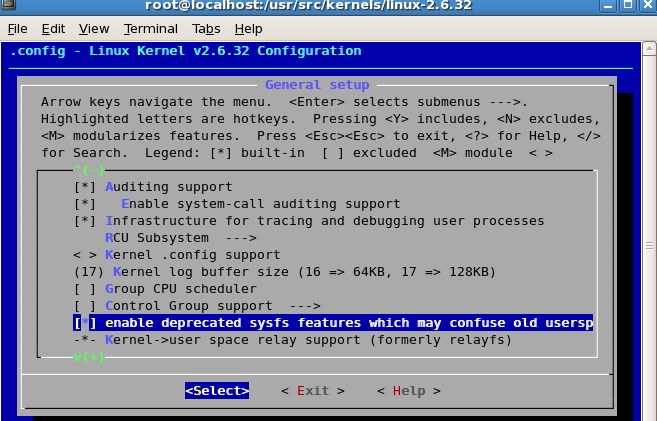
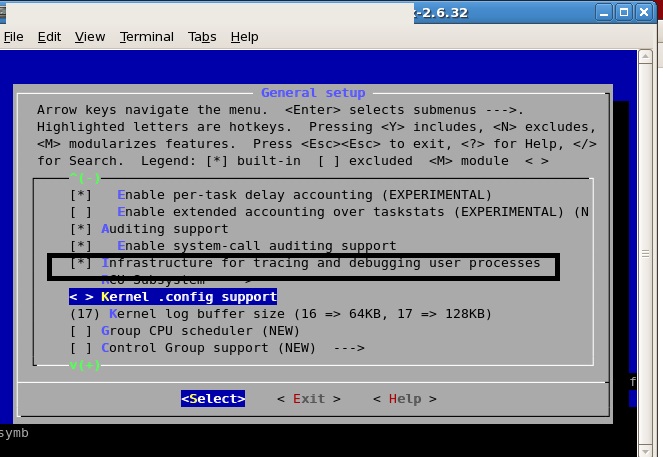
保存退去。
检查 .config 相关参数为 y
[root@localhost linux-3.5]# cat .config | grep CONFIG_DEBUG_INFO
CONFIG_DEBUG_INFO=y
[root@localhost linux-3.5]# cat .config | grep CONFIG_KPROBES
CONFIG_KPROBES=y
[root@localhost linux-3.5]# cat .config | grep CONFIG_RELAY
CONFIG_RELAY=y
[root@localhost linux-3.5]# cat .config | grep CONFIG_DEBUG_FS
CONFIG_DEBUG_FS=y
[root@localhost linux-3.5]# cat .config | grep CONFIG_MODULES
CONFIG_MODULES=y
[root@localhost linux-3.5]# cat .config | grep CONFIG_MODULE_UNLOAD
CONFIG_MODULE_UNLOAD=y
[root@localhost linux-3.5]#cat .config | grep CONFIG_UTRACE (linux 3.5 没有这个选项)
CONFIG_UTRACE=y
[root@localhost linux-3.5]#cat .config | grep CONFIG_SYSFS_DEPRECATED_V2
CONFIG_SYSFS_DEPRECATED_V2=y
5. make
6.make modules_install
7.make install
8.
开机会出现error
方法:
编译2.6.32内核后重启出现
insmod: error inserting '/lib/dm-region-hash.ko' : -1 File exists
解决方法:
1,解压initrd文件
[root@localhost ~]# cp /boot/initrd-2.6.32.img /tmp
[root@localhost ~]# cd /tmp/
[root@localhost tmp]# ls initrd-2.6.32.img
[root@localhosttmp]# mkdir newinitrd
[root@localhost tmp]# cd newinitrd/
[root@localhost newinitrd]# zcat ../initrd-2.6.32.img |cpio -i
11537 blocks 释放之后看到如下内容
[root@localhost newinitrd]# ls
bin dev etc init lib proc sbin sys sysroot
2.编辑init,删掉其中重复的四行中的两行
echo "Loading dm-region-hash.ko module"
insmod /lib/dm-region-hash.ko
echo "Loading dm-region-hash.ko module"
insmod /lib/dm-region-hash.ko
3,重新打包initrd
[root@localhostnewinitrd]# find .|cpio -c -o > ../initrd 11538 blocks
[root@localhost newinitrd]# cd ..
[root@localhost tmp]# gzip -9 < initrd > initrd.img
[root@localhost tmp]# ls
initrd-2.6.32.img initrd initrd.img newinitrd
initrd.img就是重新打包的initrd,然后把initrd.img拷贝到/boot,
更改grub.conf里边的initrd-2.6.32.img为initrd.img,
这样“insmod: error inserting '/lib/dm-region-hash.ko' : -1 File exists” 就不会有了
9.设置 /boot/grub 中的default=0 使其从2.6.32起动
default=0
timeout=5
splashimage=(hd0,0)/grub/splash.xpm.gz
hiddenmenu
title Red Hat Enterprise Linux Server (2.6.32)
root (hd0,0)
kernel /vmlinuz-2.6.32 ro root=LABEL=/ rhgb quiet
initrd /initrd-2.6.32.img
title Red Hat Enterprise Linux Server (2.6.18-128.el5)
root (hd0,0)
kernel /vmlinuz-2.6.18-128.el5 ro root=LABEL=/ rhgb quiet
initrd /initrd-2.6.18-128.el5.img
---------------------------------------------------------------------------------------
10.下载 systemtap-2.8.tar.gz
[root@localhost grub]# /tap/bin/stap -V
Systemtap translator/driver (version 2.8/0.151, non-git sources)
Copyright (C) 2005-2015 Red Hat, Inc. and others
This is free software; see the source for copying conditions.
enabled features: TR1_UNORDERED_MAP NLS
You have new mail in /var/spool/mail/root
方法:
到 官网 http://www.sourceware.org/systemtap/wiki/
Overview
SystemTap provides free software (GPL) infrastructure to simplify the gathering of information about the running Linux system. This assists diagnosis of a performance or functional problem. SystemTap eliminates the need for the developer to go through the tedious and disruptive instrument, recompile, install, and reboot sequence that may be otherwise required to collect data.
SystemTap provides a simple command line interface and scripting language for writing instrumentation for a live running system. We are publishing samples, as well as enlarging the internal "tapset" script library to aid reuse and abstraction.
Archive of SystemTap releases The current release is 2.8, 2015-06-18.
Focus areas for near-future development
选 Archive of SystemTap releases 中选择 2.8的版本,放到LINUX tmp 目录中,解压
-----------------------------------------------------------------------------------------------------------------------
11.下载 elfutils-0.151.tar.bz
https://fedorahosted.org/elfutils/
elfutils
The latest released version of elfutils always appears in Fedora development builds and can be found in http://koji.fedoraproject.org/packages/elfutils/.
Most versions are also released as Fedora updates for the current and one or two prior versions of Fedora.
The source for elfutils is available in http://fedorahosted.org/releases/e/l/elfutils/.
See https://fedorahosted.org/mailman/listinfo/elfutils-devel for the developers' mailing list.
点选 http://fedorahosted.org/releases/e/l/elfutils/. 放到LINUX tmp 目录中解压
12.安装systemtap 2.8
1. cd /
2 . mkdir soft
3. 进入systemtap-2.8.tar.gz的解压目录
执行 ./configure --prefix=/soft/ --with-elfutils=/tmp/elfutils-0.151
4.make
5.make install
---------------------------------------------------------------------------
13.设置PATH路
.bash_profile
设
STAP=/soft/bin/
PATH=$PATH:$HOME/bin
PATH=$STAP:$PATH
export PATH
-------------------------------------------------------------------------------
14.安装内核符号
[root@localhost ~]# stap-prep
Need to install the following packages:
kernel-2.6.32.x86_64
kernel-devel-2.6.32.x86_64
kernel-debuginfo-2.6.32.x86_64
自建内核就不用装了
15.安装其他符号
1.
stap -d /bin/ls --ldd -e 'probe process("ls").function("xmalloc") {print_usyms(ubacktrace())}' -c "ls /"
[root@localhost ~]# rpm -qf /bin/ls
coreutils-debuginfo-5.97-19.el5.x86_64.rpm
安装coreutils对于的debuginfo包.
rpm -ivh coreutils-debuginfo-5.97-19.el5.x86_64.rpm
2
stap -L 'process("/lib64/libc.so.6").function("malloc")'
Missing separate debuginfos, use: debuginfo-install glibc-2.5-123.el5_11.1
[root@localhost ~]# rpm -qf /lib64/libc.so.6
glibc-2.5-123.el5_11.1
安装 rpm -ivh glibc-debuginfo-2.5-123.el5_11.1.x86_64.rpm
16. print_regs() and print _backtrace()
cat bt.stp
probe kernel.function(@){

print("----------------START-------------------------\n")

printf("In process [%s]\n", execname())

print_regs()

print_backtrace()

print("----------------END-------------------------\n")

exit()

}

[root@localhost ~]# stap -v bt.stp "do_fork"

Pass : parsed user script and  library script(s) using 110744virt/34332res/2092shr/32912data kb, in 260usr/60sys/316real ms.

Pass : analyzed script:  probe(s),  function(s),  embed(s),  global(s) using 132840virt/57352res/3104shr/55008data kb, in 460usr/390sys/903real ms.

Pass : translated to C into "/tmp/stapXvhrib/stap_9f09e2f8d05b04c5f922e1fe3470a188_2491_src.c" using 132840virt/57616res/3368shr/55008data kb, in 70usr/220sys/372real ms.

Pass : compiled C into "stap_9f09e2f8d05b04c5f922e1fe3470a188_2491.ko" in 3550usr/5110sys/9158real ms.

Pass : starting run.

----------------START-------------------------

In process [automount]

RIP: ffffffff81040c72

RSP: ffff880047de7f48  EFLAGS:

RAX: 00007f8727af29d0 RBX: 00007f8727af2940 RCX:

RDX: ffff880047de7f58 RSI: 00007f8727af2250 RDI: 00000000003d0f00

RBP:  R08: 00007f8727af29d0 R09: 00007f8727af29d0

R10: 00007f8727af29d0 R11:  R12:

R13:  R14:  R15: 00007f8729970c00

FS:  00007f8729726940() GS:ffff880003400000() knlGS:

CS:   DS:  ES:  CR0:

CR2: 00007fb198462070 CR3: 00000000523f9000 CR4: 00000000000406f0

 0xffffffff81040c72 : do_fork+0x0/0x32c [kernel]

 0xffffffff8100bc13 : stub_clone+0x13/0x20 [kernel]

 0xffffffff8100b92b : system_call_fastpath+0x16/0x1b [kernel] (inexact)

----------------END-------------------------

Pass : run completed in 20usr/80sys/1729real ms.
17.linux 3.2.26 return 探针
linu >=3.5 无return 探针,发 展中
LINUX 3.5
stap -e 'probe process("a.out").function("fun").return {printf("%s",probefunc())}'
error semantic error: process return probes not available with inode-based uprobes
why:
Here is a short history of uprobes (the feature that gives systemtap user probes):
- original uprobes (with both function entry and return probes): RHEL5 era kernels (needs kernel utrace), in an external kernel module
- uprobes v2 (with both function entry and return probes): RHEL6 era kernels (needs kernel utrace), in an external kernel module
- inode uprobes (with function entry probes): current kernels, doesn't need kernel utrace, built into the kernel
Your kernel has inode uprobes, which doesn't support function return probes yet. There have been some work in this area, but I don't believe that functionality has quite made it into the kernel yet.In the meantime, you might be able to switch to the dyninst runtime (--runtime=dyninst or --dyninst). This is a new, somewhat experimental runtime, that does probing purely in userspace. You won't be able to use dyninst if your script uses any kernel probing features (like 'kernel.function').
18.查看RPM包安装了那些文件命令(与 rpm -qf /lib64/libc.so.6 相对)
rpm -ql glibc-2.5-123.el5_11.1
/usr/lib/gconv/gconv-modules
/usr/lib/gconv/gconv-modules.cache
/usr/lib/gconv/libCNS.so
/usr/lib/gconv/libGB.so
/usr/lib/gconv/libISOIR165.so
/usr/lib/gconv/libJIS.so
/usr/lib/gconv/libJISX0213.so
/usr/lib/gconv/libKSC.so
/usr/libexec/getconf
/usr/libexec/getconf/POSIX_V6_ILP32_OFF32
/usr/libexec/getconf/POSIX_V6_ILP32_OFFBIG
/usr/sbin/glibc_post_upgrade.i686
/usr/sbin/iconvconfig
----
内核升极2.6.18 升级到 2.6.32 装systemtap 原创的更多相关文章
- redhat server 5.3内核升极2.6.18 升级到 3.5 装systemtap 原创
1. 在 LINUX 3.5源代码目录下执行 yum install ncurses-devel make menuconfig 2 打开内核跟踪事件,用于SYSTEMTAP跟踪 kern ...
- struts2.3.23升级到struts2.3.32
新的漏洞 3月8号去审计厅培训系统的使用,那边计算机中心的负责人递过来一张如下图所示的文档,意思是发现了struts2的漏洞,需要进行修复. 在培训前,我登录到服务器中,看到了项目中,所有的服务器中应 ...
- Struts2高位漏洞升级到struts2.3.32
Struts2高位漏洞升级到struts2.3.32 3月7日带来了一个高危漏洞Struts2漏洞——CVE编号CVE-2017-5638.其原因是由于Apache Struts2的Jakarta M ...
- Ubuntu中升极下载4.2内核
http://tech.hexun.com/2015-09-11/179027013.html 从这段话中所表达出的意思可以了解,Linux Kernel 4.3版本已经开始进行,Linus Torv ...
- centos2.6.18升级到2.6.39
本来想升级到最新版本4.6的,但是不成功,即使3.4也不成功,暂且先升级到2.x最新版本. 步骤如下: 一 下载源码 https://www.kernel.org/pub/linux/kernel/ ...
- 沧桑巨变中焕发青春活力-记极1s HC5661A 打怪升级之路
最近发现一个新货umaxhosting年付10美元的便宜VPS.2杯喜茶的价格可以让你在国外拥有一个1024MB (1GB) DDR3 RAM.1024MB (1GB) vSwap.70GB RAID ...
- glibc-2.18升级
1.下载文件下载地址:https://mirrors.tuna.tsinghua.edu.cn/gnu/glibc/glibc-2.18.tar.gz 2.安装部署解压tar -zxvf glibc- ...
- react-router 从 v3 版本升到 v4 版本,升级小记
react-router v4 跟 react 一样拆成了两部分,核心的 react-router 和依运行环境而定的 react-router-dom 或 react-router-native(跟 ...
- EPOLL内核原理极简图文解读(转)
预备知识:内核poll钩子原理内核函数poll_wait把当前进程加入到驱动里自定义的等待队列上 当驱动事件就绪后,就可以在驱动里自定义的等待队列上唤醒调用poll的进程 故poll_wait作用:可 ...
随机推荐
- thinkphp框架if标签条件表达式
eq 等于neq 不等于gt 大于egt 大于等于lt 小于elt 小于等于
- Java 容器的打印
Java容器类库中的两种主要类型,它们的区别在于容器中每个"槽"保存的元素个数 Clollection容器只能在保存一个元素,此类容器包括: List,它以特定顺序保存一组元素 S ...
- Codeforces 963A Alternating Sum(等比数列求和+逆元+快速幂)
题目链接:http://codeforces.com/problemset/problem/963/A 题目大意:就是给了你n,a,b和一段长度为k的只有'+'和‘-’字符串,保证n+1被k整除,让你 ...
- Mac OS 下安装mysqlclient报“mysql_config not found”的解决
如问题所示,应该是你没有将mysql_config所在文件夹加入系统的PATH路径,解决方案下: 1.第一步找到你的mysql_config所在位置 1.1. 如果是直接安装mysql,所在位置应该是 ...
- KnockoutJs学习笔记(二)
这篇文章主要用于记录学习Working with observable arrays的测试和体会. Observable主要用于单一个体的修改订阅,当我们在处理一堆个体时,当UI需要重复显示一些样式相 ...
- 【LOJ】#2340. 「WC2018」州区划分
题解 学习一个全世界人都会只有我不会的东西 子集变换! 难道我要把这题当板子讲?等等这题好像是板...WC出板题好刺激啊= = 假装我们都做过HAOI2015的FMT题,我们都知道一些FMT怎么解决或 ...
- Wpf使用Winform控件后Wpf元素被Winform控件遮盖问题的解决
有人会说不建议Wpf中使用Winform控件,有人会说建议使用Winform控件在Wpf下的替代方案,然而在实际工作中由于项目的特殊需求,考虑到时间.成本等因素,往往难免会碰到在WPF中使用Winfr ...
- 【Java网络编程】基于 UDP 的聊天通信
使用 udp 协议,写一个基于命令行的聊天软件:客户端跟服务端分别在命令行启动之后,客户端和服务器端可以互相发送数据. 代码实现如下: 一.创建线程 sendThread 和 receiveThrea ...
- babel使用中不想使用 严格模式 如何去除?
使用babel进行es6转es5时,默认转化之后是严格模式,有些时候我们想去除严格模式. 解决方法如下 安装 babel-plugin-transform-remove-strict-mode 依赖 ...
- 使用GNU工具链进行嵌入式裸机开发
Embedded-Programming-with-the-GNU-Toolchain Vijay Kumar B. vijaykumar@bravegnu.org 翻译整理:thammer gith ...