
Bechmarksql
使用方法
1、配置JDK环境
JDK最好是1.5以上的版本
JAVA_HOME=/usr/java/jdk1.6.0_22
PATH=$PATH:$JAVA_HOME/bin
2.准备工作
把要测试的数据库的JDBC DRIVER放到./BenchmarkSQL-2.3.2/lib目录下
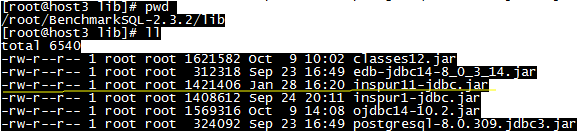
在run/目录下的 runSQL.sh 、 loadData.sh 、 runBenchmark.sh三个文件中加入要测试的数据库的JDBC DRIVER的位置,如下图所示:



3.测试步骤
(1)配置数据库的JDBC连接信息
[root@host3 run]# cp oracle.properties kdbnew.properties
[root@host3 run]# vi kdbnew.properties
driver=com.inspur.jdbc.KdDriver
conn=jdbc:inspur:thin:@localhost:8629:kdb
user=sys
password=kdb
(2)创建初始表
[root@host3 run]# ./runSQL.sh kdbnew.properties sqlTableCreates
(3)添加初始数据
./loadData.sh tibero.properties numWarehouses= 10
注意:等号与后面的数字之间一定要添加一个空格
10warehouse=1G
numWarehouse指的是仓库数(具体含义见上篇博文),默认为1,导入9张表的数据大小大概70多M,当 numWarehouse为10时,数据大小可以近似当作1GB数据。
(4)创建索引
./runSQL.sh kdbnew.properties sqlIndexCreates
(5)开始测试
./runBenchmark.sh kdbnew.properties
在没有建索引的情况下不会产生tpmc值,太慢了
注意:在执行此命令之前,先用root用户执行xhost +,普通用户才可能显示图形界面
不要忘记设置图形界面的仓库数时要与第3步中设置的数量相符;此外,测试的结果报告除了显示在图形界面有显示以外,还在run/reports目录下有备份,随时可以查阅
如果图形化界面无法显示:
[root@host3 ~]# cd /etc/ssh
[root@host3 ssh]# ls
moduli sshd_config ssh_host_dsa_key.pub ssh_host_key.pub ssh_host_rsa_key.pub
ssh_config ssh_host_dsa_key ssh_host_key ssh_host_rsa_key
[root@host3 ssh]# more sshd_config
# The default is to check both .ssh/authorized_keys and .ssh/authorized_keys2
# but this is overridden so installations will only check .ssh/authorized_keys
AuthorizedKeysFile .ssh/authorized_keys
#AllowAgentForwarding yes
#AllowTcpForwarding yes
#GatewayPorts no
X11Forwarding yes
#X11DisplayOffset 10
#X11UseLocalhost yes
#PrintMotd yes
#PrintLastLog yes
#TCPKeepAlive yes
#UseLogin no
UsePrivilegeSeparation sandbox # Default for new installations.
# no default banner path
#Banner none
# override default of no subsystems
Subsystem sftp /usr/libexec/openssh/sftp-server
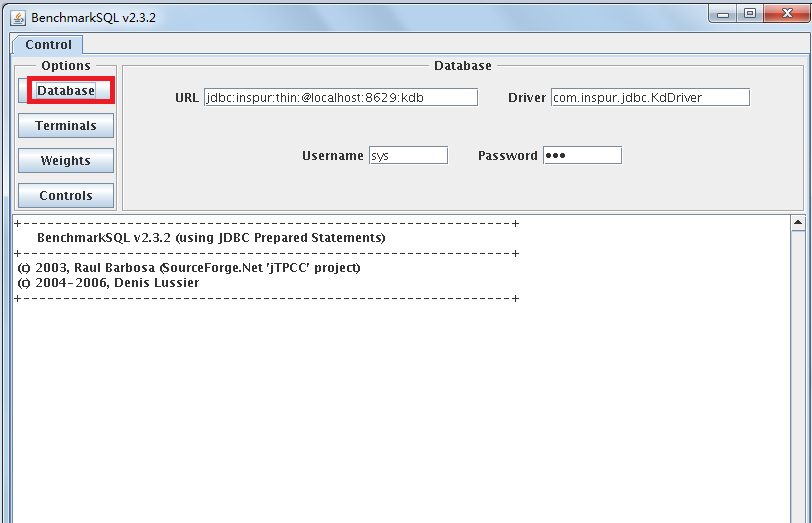
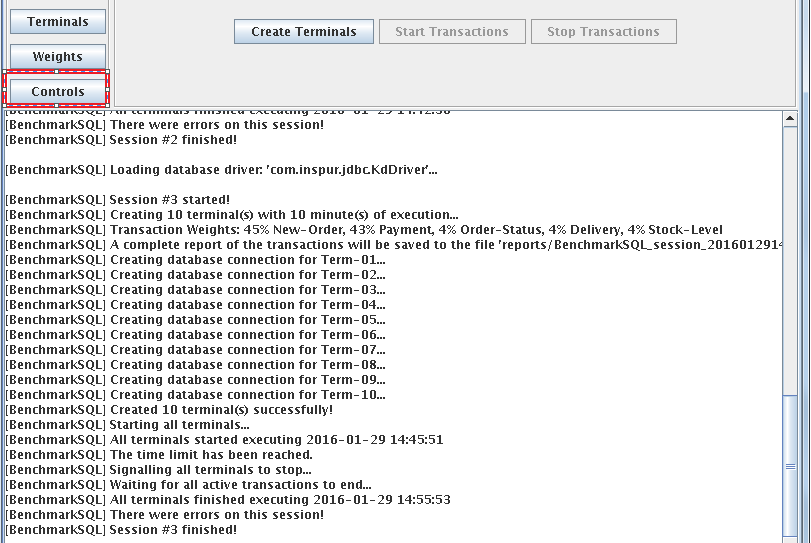
Control-Database:配置所要链接的数据库,默认会读取之前我们修改的配置文件,故此处不用动
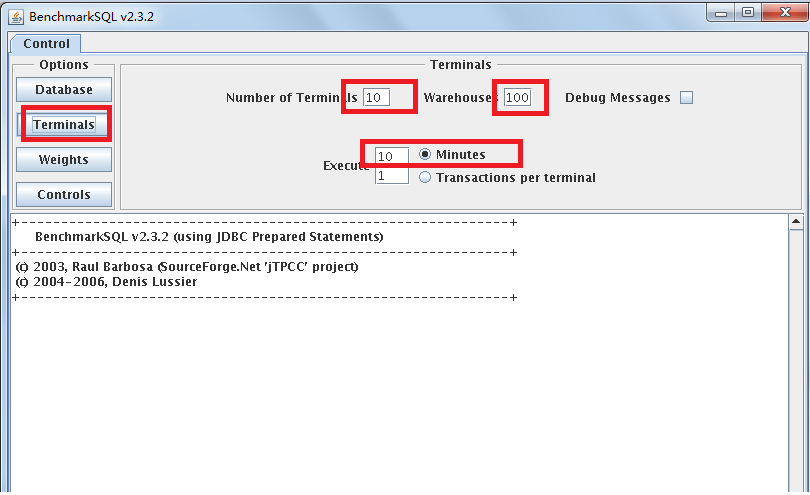
Control-Terminals:配置终端数,仓库数,是否显示Debug信息,选择执行是分钟还是每终端事务数
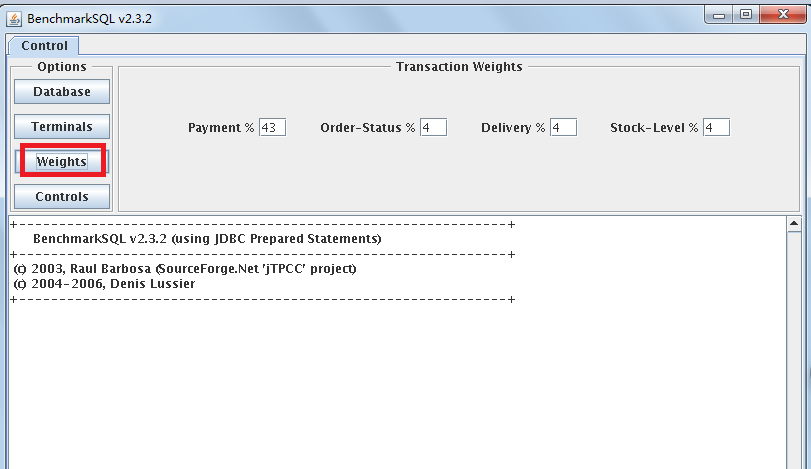
Control-Weights:配置TPC-C测试中五种事务的比重(界面中只要配置4种),一般按默认比例测试即可
[BenchmarkSQL] Session #1 started!
[BenchmarkSQL] Creating 10 terminal(s) with 10 minute(s) of execution...
[BenchmarkSQL] Transaction Weights: 45% New-Order, 43% Payment, 4% Order-Status, 4% Delivery, 4% Stock-Level
[BenchmarkSQL] A complete report of the transactions will be saved to the file 'reports/BenchmarkSQL_session_20160129150651.txt'
[BenchmarkSQL] Creating database connection for Term-01...
[BenchmarkSQL] Creating database connection for Term-02...
[BenchmarkSQL] Creating database connection for Term-03...
[BenchmarkSQL] Creating database connection for Term-04...
[BenchmarkSQL] Creating database connection for Term-05...
[BenchmarkSQL] Creating database connection for Term-06...
[BenchmarkSQL] Creating database connection for Term-07...
[BenchmarkSQL] Creating database connection for Term-08...
[BenchmarkSQL] Creating database connection for Term-09...
[BenchmarkSQL] Creating database connection for Term-10...
[BenchmarkSQL] Created 10 terminal(s) successfully!
[BenchmarkSQL] Starting all terminals...
[BenchmarkSQL] All terminals started executing 2016-01-29 15:06:54
[BenchmarkSQL] The time limit has been reached.
[BenchmarkSQL] Signalling all terminals to stop...
[BenchmarkSQL] Waiting for all active transactions to end...
[BenchmarkSQL] All terminals finished executing 2016-01-29 15:16:54
[BenchmarkSQL] There were errors on this session!
[BenchmarkSQL] Session #1 finished!
run/reports下的后面的截取:
Measured tpmC =60000*149708/600157
Session Start 2016-01-29 15:06:54
Session End 2016-01-29 15:16:54
Transaction Count 333804
注意:
1. 测试完后在界面下方会显示简要的测试结果,包括平均tpmC值(每分钟执行的事务数),当前tpmC值,内存使用情况等等;出结果以后尽量记录下来,因为之后如果乱点界面按钮的话,测试结果将会被重写(感觉是一个bug);
2.运行过程中如果想要修改终端数等参数,最好关闭GUI界面,重新运行runBenchmark.bat
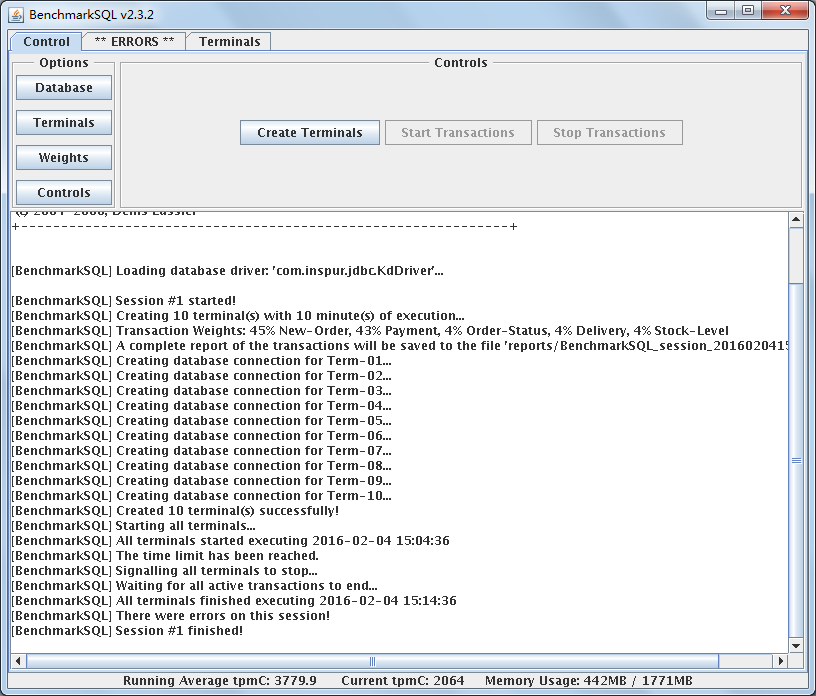
tpmc值越高说明联机处理事务能力越强
导入数据后如果再用原来的导入数据的方法追加数据的话,数据会被覆盖
Bechmarksql的更多相关文章
随机推荐
- angularJS__v1.5.6点击同一个菜单刷新
针对angularjs的1.0版本,点击菜单不刷新问题,只需在配置路由时,路由路径添加“/”,如,点击 标签时,就会刷新,
- [USACO5.3]量取牛奶Milk Measuring
https://daniu.luogu.org/problemnew/show/P2744 滚动数组压去第一维:前i种木桶 f[j] 量取体积j最少需要几种木桶 g[j] 体积j的最优解是否使用了第 ...
- php设计模式之六大设计原则
1.单一职责 定义:不要存在多于一个导致类变更的原因.通俗的说,即一个类只负责一项职责. 场景:类T负责两个不同的职责:职责P1,职责P2.当由于职责P1需求发生改变而需要修改类T时,有可能会导致 ...
- Web API: Client: HttpClient Message Handlers
原文地址: http://www.asp.net/web-api/overview/web-api-clients/httpclient-message-handlers using System; ...
- springmvc转springboot过程中访问jsp报Whitelabel Error Page错误
前言: 虽然springboot内嵌了一个tomcat,但是这个内嵌的tomcat不支持jsp页面,所以需要引入其他包 解决: maven引入以下包即可 <dependency> < ...
- jQuery中的text(),html(),val()的区别
一.jquery中HTML 1. 无参html() 方法用来获取任意元素的HTML内容,如果你调用多个选定元素的.html()方法,那么其读取的只是第一个元素,换句话说:如果选择器匹配多于一个的元素, ...
- python核心编程笔记——Chapter5
好吧,开始第五章习题: 5-2.又是老调重谈,raw_input这个函数真是非常麻烦,返回是str类型,没办法,只能在函数里面使用int内建.(就只是一道简单的两数相乘,哭了) #!/usr/bin/ ...
- 当python模式遇见cedet
TAG: emacs, python, cedet, semantic, ctags DATE: 2013-08-20 我用Emacs 24写python程序. 发现屏幕不时有些闪动,MiniBuff ...
- 一个愚蠢的python逻辑语法错误
这个事情再次佐证了一个莫名其妙的现象背后一定会有一个愚蠢到无以复加的错误的真理. 写python单元测试的时候发现一个莫名其妙的问题: def xmlStandander(self,s): retur ...
- C#中2个日期类型相减
DateTime startTime = Convert.ToDateTime("2017-1-9");DateTime endTime = Convert.ToDateTime( ...