
CAShapeLayer实现音量大小动态改变
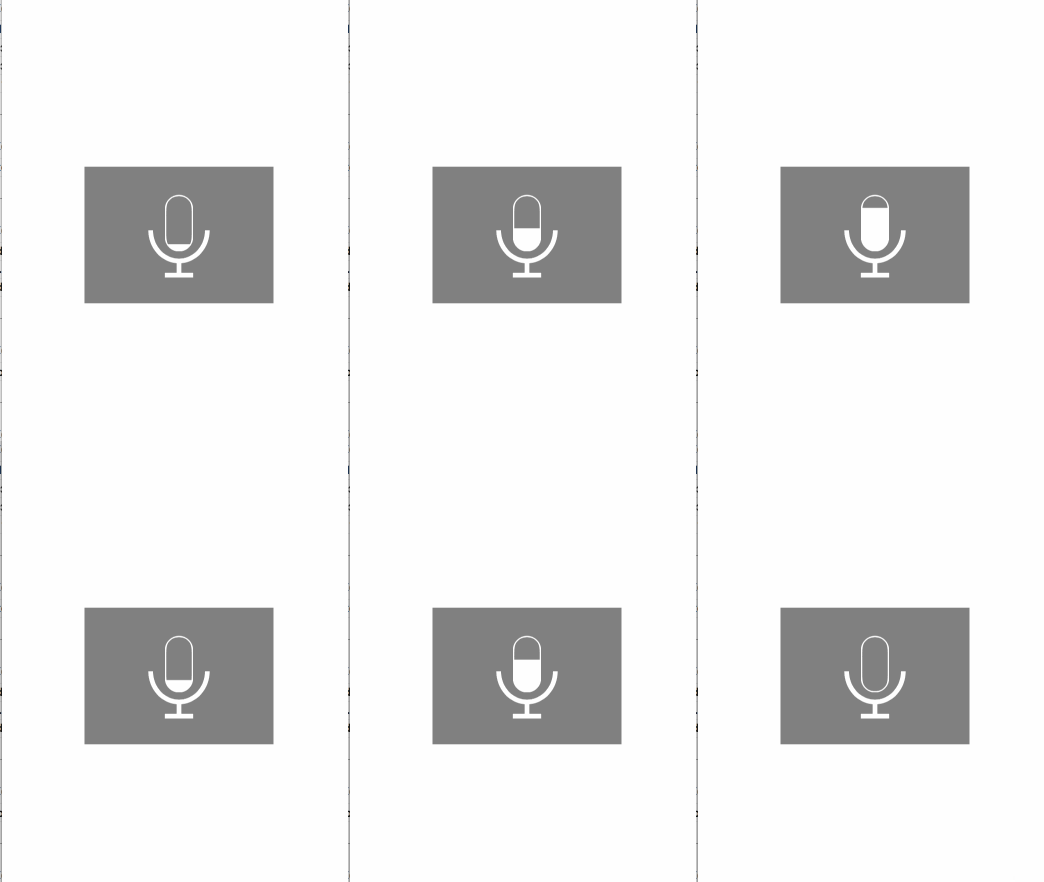
我是效果图
实现如图这效果一般会直接通过多张图进行切换进行完成。但这样的处理,会浪费App的资源存储空间,而且效率也不高。那么今天我们用CAShapeLayer实现以下吧。
拆分:
1.一个椭圆

2.一个矩形, 控制高度实现动画效果

3.一个圆弧

4.横线和竖线
添加图层和视图
CAShapeLayer *_shapeLayer2; // 矩形图层

UIView *_dynamicView; // 放置椭圆外框的视图
实现代码
- (void)voiceAnimation

{

UIView *backView = [[UIView alloc] initWithFrame:CGRectMake(0, 0, 200, 145)];

backView.backgroundColor = [UIColor grayColor];

backView.center = self.view.center;

[self.view addSubview:backView];

// 外部轮廓View

_dynamicView = [[UIView alloc] initWithFrame:CGRectMake(85, 30, 30, 60)];

_dynamicView.layer.cornerRadius = 15;

_dynamicView.layer.masksToBounds = YES;

_dynamicView.clipsToBounds = YES;

[backView addSubview:_dynamicView];

// 添加椭圆

CAShapeLayer *shapeLayer = [CAShapeLayer layer];

UIBezierPath *path = [UIBezierPath bezierPathWithRoundedRect:_dynamicView.bounds cornerRadius:15];

shapeLayer.path = path.CGPath;

shapeLayer.strokeColor = [UIColor whiteColor].CGColor;

shapeLayer.fillColor = [UIColor clearColor].CGColor;

shapeLayer.lineWidth = 3.0f;

[_dynamicView.layer addSublayer:shapeLayer];

// 添加矩形

CGFloat height = 30;

_shapeLayer2 = [CAShapeLayer layer];

UIBezierPath *path2 = [UIBezierPath bezierPathWithRect:CGRectMake(0, 60 - height, 30, height)];

_shapeLayer2.path = path2.CGPath;

_shapeLayer2.fillColor = [UIColor whiteColor].CGColor;

[_dynamicView.layer addSublayer:_shapeLayer2];

// 添加圆弧

CAShapeLayer *shapeLayer3 = [CAShapeLayer layer];

shapeLayer3.frame = backView.bounds;

UIBezierPath *path3 = [UIBezierPath bezierPathWithOvalInRect:CGRectMake(70, 35, 60, 65)];

shapeLayer3.path = path3.CGPath;

shapeLayer3.strokeStart = 0.00f;

shapeLayer3.strokeEnd = 0.50f;

shapeLayer3.fillColor = [UIColor clearColor].CGColor;

shapeLayer3.lineWidth = 5.0f;

shapeLayer3.strokeColor = [UIColor whiteColor].CGColor;

[backView.layer addSublayer:shapeLayer3];

// 添加竖线

CAShapeLayer *shapeLayer4 = [CAShapeLayer layer];

shapeLayer4.frame = backView.bounds;

UIBezierPath *path4 = [UIBezierPath bezierPath];

[path4 moveToPoint:CGPointMake(100, 100)];

[path4 addLineToPoint:CGPointMake(100, 115)];

shapeLayer4.path = path4.CGPath;

shapeLayer4.lineWidth = 5.0f;

shapeLayer4.strokeColor = [UIColor whiteColor].CGColor;

[backView.layer addSublayer:shapeLayer4];

// 画横线

CAShapeLayer *shapeLayer5 = [CAShapeLayer layer];

shapeLayer5.frame = backView.bounds;

UIBezierPath *path5 = [UIBezierPath bezierPath];

[path5 moveToPoint:CGPointMake(85, 115)];

[path5 addLineToPoint:CGPointMake(115, 115)];

shapeLayer5.path = path5.CGPath;

shapeLayer5.lineWidth = 5.0f;

shapeLayer5.strokeColor = [UIColor whiteColor].CGColor;

[backView.layer addSublayer:shapeLayer5];

}
改变大小的代码
- (void)refreshUIWithVoicePower:(CGFloat)voicePower

{

NSLog(@"%f", voicePower);

[_shapeLayer2 removeFromSuperlayer];

_shapeLayer2 = nil;

// 添加矩形

CGFloat height = 60 * voicePower;

_shapeLayer2 = [CAShapeLayer layer];

UIBezierPath *path2 = [UIBezierPath bezierPathWithRect:CGRectMake(0, 60 - height, 30, height)];

_shapeLayer2.path = path2.CGPath;

_shapeLayer2.fillColor = [UIColor whiteColor].CGColor;

[_dynamicView.layer addSublayer:_shapeLayer2];

}
CAShapeLayer实现音量大小动态改变的更多相关文章
- iOS开发笔记-根据frame大小动态调整fontSize的自适应文本及圆形进度条控件的实现
最近同样是新App,设计稿里出现一种圆形进度条的设计,如下: 想了想,圆形进度条实现起来不难,但是其中显示百分比的文本确需要自适应,虽然可以使用时自己设定文本字体的大小,但是这样显得很麻烦,也很low ...
- 模仿iframe框架,由分隔栏动态改变左右两侧div大小———基于jQuery
<!DOCTYPE html><html lang="zh-cn"><head> <meta charset="utf-8&qu ...
- 分享非常有用的Java程序 (关键代码)(四)---动态改变数组的大小
原文:分享非常有用的Java程序 (关键代码)(四)---动态改变数组的大小 /** * Reallocates an array with a new size, and copies the co ...
- 转载 * jQuery实现动态分割div—通过拖动分隔栏实现上下、左右动态改变左右、上下两个相邻div的大小
由jQuery实现上下.左右动态改变左右.上下两个div的大小,需要自己引入jquery1.8.0.min.js包 可用于页面布局. //============================ind ...
- jQuery实现动态分割div—通过拖动分隔栏实现上下、左右动态改变左右、上下两个相邻div的大小
由jQuery实现上下.左右动态改变左右.上下两个div的大小,需要自己引入jquery1.8.0.min.js包 可用于页面布局. //============================ind ...
- 使用jQuery动态改变图片显示大小
当我们要显示后台传过来若干个尺寸不一的图片时,为了保证图片大小的一致性及比例的协调,需要动态改变图片显示尺寸.通过搜索,我们可以从网上找到实现此 功能的jQuery代码如下.这段代码可以使图片的大小保 ...
- android 动态改变控件位置和大小 .
动态改变控件位置的方法: setPadding()的方法更改布局位置. 如我要把Imageview下移200px: ImageView.setPadding( ImageVie ...
- 由一次动态改变font-size的大小引申的一系列困惑补录
以下结论如有错误,欢迎指正 在切入正题之前,先了解下window 和document这两个大对象 我们熟知 JavaScript的组成如下图所示: window对象和document对象分别属于哪个分 ...
- Android中动态改变控件的大小的一种方法
在Android中有时候我们需要动态改变控件的大小.有几种办法可以实现 一是在onMeasure中修改尺寸,二是在onLayout中修改位置和尺寸.这个是可以进行位置修改的,onMeasure不行. ...
随机推荐
- redis基础之redis-cluster(集群)(七)
前言 redis的主流高可用集群模式为redis-cluster.从redis3.0+版本后开始支持,自带集群管理工具redis-trib.rb. 安装redis 参考:https://www.cnb ...
- CTSC 2017 游记
惨啊,弱菜选手只报上了CTSC,去不了APIO. day -1 晚上的时候,坐上了去帝都的卧铺. 由于第二天就是luogu月赛round1,还得在火车上赶工出题... 颓了好长时间,把题面写出来了,用 ...
- 在Ubuntu上安装Redis MySQL MongoDB memcached Nginx
1.安装Redis sudo apt-get install redis-server 2.安装MySQL sudo apt-get install mysql-server 3.安装MongoDB ...
- PHP--- JSON和数组的转换
一.json_encode() <?php $arr =array ('a'=>1,'b'=>2,'c'=>3,'d'=>4,'e'=>5); echo json_ ...
- 1、CentOS 6 安装GitLab
1.安装和配置必需的依赖项 在CentOS上将系统防火墙打开HTTP和SSH访问. sudo yum install -y curl policycoreutils-python openssh-se ...
- 看看PHP迭代器的内部执行过程
class myIterator implements Iterator { private $position = 0; private $array = array( "first_el ...
- 详解Oracle的unlimited tablespace系统权限
1. 系统权限unlimited tablespace是隐含在dba, resource角色中的一个系统权限. 当用户得到dba或resource的角色时, unlimited tablespace系 ...
- plsPlugin
init: 监控目录变化(增删) 监控jar变化,load
- WordPress SMTP发送邮件插件:WP SMTP
对于一个网站而言,发送邮件的功能是必不可少的,现在的主机一般都支持发送邮件,但是不同的主机由于函数限制或者某些其他原因,可能造成没办法正常发送邮件.这时候,我们可能就要借助第三方SMTP发送邮件. 对 ...
- Node.js的Buffer那些你可能不知道的用法
在大多数介绍Buffer的文章中,主要是围绕数据拼接和内存分配这两方面的.比如我们使用fs模块来读取文件内容的时候,返回的就是一个Buffer: fs.readFile('filename', fun ...