
MapReduce实现共同朋友问题
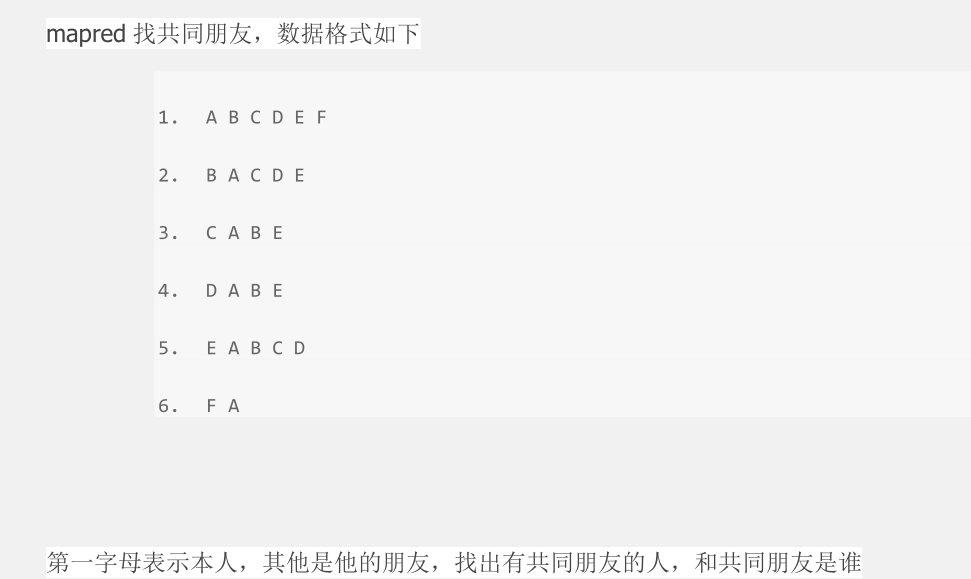
答案:
package com.duking.mapreduce;

import java.io.IOException;

import java.util.Set;

import java.util.StringTokenizer;

import java.util.TreeSet;

import org.apache.hadoop.conf.Configuration;

import org.apache.hadoop.fs.Path;

import org.apache.hadoop.io.Text;

import org.apache.hadoop.mapreduce.Job;

import org.apache.hadoop.mapreduce.Mapper;

import org.apache.hadoop.mapreduce.Reducer;

import org.apache.hadoop.mapreduce.lib.input.FileInputFormat;

import org.apache.hadoop.mapreduce.lib.output.FileOutputFormat;

import org.apache.hadoop.util.GenericOptionsParser;

public class FindFriends {

    /**

     * map方法

     * @author duking

     *

     */

    public static class Map extends Mapper<Object, Text, Text, Text> {

        /**

         * 实现map方法

         */

        public void map(Object key, Text value, Context context) throws IOException, InterruptedException {

                //将输入的每一行数据切分后存到persions中

                StringTokenizer persions = new StringTokenizer(value.toString());

                //定义一个Text 存放本人信息owner

                Text owner = new Text();

                //定义一个Set集合,存放朋友信息

                Set<String> set = new TreeSet<String>();

                //将这一行的本人信息存入owner中

                owner.set(persions.nextToken());

                //将所有的朋友信息存放到Set集合中

                while(persions.hasMoreTokens()){

                    set.add(persions.nextToken());

                }

                //定义一个String数组存放朋友信息

                String[] friends = new String[set.size()];

                //将集合转换为数组,并将集合中的数据存放到friend

                friends = set.toArray(friends);

                //将朋友进行两两组合

                for(int i=0;i<friends.length;i++){

                    for(int j=i+1;j<friends.length;j++){

                        String outputkey = friends[i]+friends[j];

                        context.write(new Text(outputkey), owner);

                    }

                }

        }

    }

    /**

     * Reduce方法

     * @author duking

     *

     */

    public static class Reduce extends Reducer<Text, Text, Text, Text> {

        /**

         * 实现Reduce方法

         */

        public void reduce(Text key, Iterable<Text> values,Context context) throws IOException, InterruptedException {

            String commonfriends = "";

            for (Text val : values){

                if(commonfriends == ""){

                    commonfriends = val.toString();

                }else{

                    commonfriends = commonfriends + ":" +val.toString();

                }

            }

            context.write(key,new Text(commonfriends));

        }

    }

    /**

     * main

     * @param args

     * @throws Exception

     */

    public static void main(String[] args) throws Exception {

        Configuration conf = new Configuration();

        conf.set("mapred.job.tracker", "192.168.60.129:9000");

        //指定待运行参数的目录为输入输出目录

        String[] otherArgs = new GenericOptionsParser(conf, args).getRemainingArgs();

        /*  指定工程目录下的input output为输入输出目录

          String[] ioArgs = new String[] {"input", "output" };

          String[] otherArgs = new GenericOptionsParser(conf, ioArgs).getRemainingArgs();

         */

        if (otherArgs.length != 2) { //判断运行参数个数

            System.err.println("Usage: Data Deduplication <in> <out>");

            System.exit(2);

        }

        // set maprduce job name

        Job job = new Job(conf, "findfriends");

        job.setJarByClass(FindFriends.class);

        // 设置map reduce处理类

        job.setMapperClass(Map.class);

        job.setReducerClass(Reduce.class);

        // 设置输出类型

        job.setOutputKeyClass(Text.class);

        job.setOutputValueClass(Text.class);

        //设置输入输出路径

        FileInputFormat.addInputPath(job, new Path(otherArgs[0]));

        FileOutputFormat.setOutputPath(job, new Path(otherArgs[1]));

        System.exit(job.waitForCompletion(true) ? 0 : 1);

    }

}
结果

MapReduce实现共同朋友问题的更多相关文章
- 【hadoop2.2(yarn)】基于yarn成功执行分布式map-reduce,记录问题解决过程。
hadoop2.x改进了hadoop1.x的架构, 具体yarn如何工作以及改进了什么可以在网上学, 这里仅记录我个人搭建的问题和理解,希望能帮助遇到困难的朋友. 在开始前,必须了解yarn版本的ma ...
- MapReduce实现二度好友关系
一.问题定义 我在网上找了些,关于二度人脉算法的实现,大部分无非是通过广度搜索算法来查找,犹豫深度已经明确了2以内:这个算法其实很简单,第一步找到你关注的人:第二步找到这些人关注的人,最后找出第二步结 ...
- SQL Server优化技巧之SQL Server中的"MapReduce"
日常的OLTP环境中,有时会涉及到一些统计方面的SQL语句,这些语句可能消耗巨大,进而影响整体运行环境,这里我为大家介绍如何利用SQL Server中的”类MapReduce”方式,在特定的统计情形中 ...
- MapReduce:详解Shuffle过程(转)
/** * author : 冶秀刚 * mail : dennyy99@gmail.com */ Shuffle过程是MapReduce的核心,也被称为奇迹发生的地方.要想理解MapRedu ...
- MapReduce:详解Shuffle过程
Shuffle过程是MapReduce的核心,也被称为奇迹发生的地方.要想理解MapReduce, Shuffle是必须要了解的.我看过很多相关的资料,但每次看完都云里雾里的绕着,很难理清大致的逻辑, ...
- [大牛翻译系列]Hadoop(5)MapReduce 排序:次排序(Secondary sort)
4.2 排序(SORT) 在MapReduce中,排序的目的有两个: MapReduce可以通过排序将Map输出的键分组.然后每组键调用一次reduce. 在某些需要排序的特定场景中,用户可以将作业( ...
- mapreduce编程模型你知道多少?
上次新霸哥给大家介绍了一些hadoop的相关知识,发现大家对hadoop有了一定的了解,但是还有很多的朋友对mapreduce很模糊,下面新霸哥将带你共同学习mapreduce编程模型. mapred ...
- 【原创】MapReduce编程系列之二元排序
普通排序实现 普通排序的实现利用了按姓名的排序,调用了默认的对key的HashPartition函数来实现数据的分组.partition操作之后写入磁盘时会对数据进行排序操作(对一个分区内的数据作排序 ...
- MapReduce:Shuffle过程的流程
Shuffle过程是MapReduce的核心,Shuffle描述着数据从map task输出到reduce task输入的这段过程. 1.map端
随机推荐
- authz_core_module
w https://httpd.apache.org/docs/trunk/mod/mod_authz_core.html codeigniter index.html .htaccess <I ...
- 设计模式之——迭代器模式
设计模式是开发者前辈们给我们后背的一个经验总结.有效的使用设计模式,能够帮助我们编写可复用的类.所谓"可复用",就是指将类实现为一个组件,当一个组件发生改变时,不需要对其他组件进行 ...
- android开发笔记(一)Android studio 输入法
以前都是用的时候查资料做些增添即可,现在下决心系统学习下. 首先发现developer.Android.com在开发工具上开始推出了 Android Studio了,不过他自己没有sdk manage ...
- HBase 二次开发 java api和demo
1. 试用thrift python/java以及hbase client api.结论例如以下: 1.1 thrift的安装和公布繁琐.可能会遇到未知的错误,且hbase.thrift的版本 ...
- SpringBean 定义继承
Bean定义继承 bean定义可以包含很多的配置信息,包括构造函数的参数,属性值,容器的具体信息例如初始化方法,静态工厂方法名,等等.子bean的定义继承副定义的配置数据.子定义可以根据需要重写一些值 ...
- CentOS yum 安装node.js
第一步: curl --silent --location https://rpm.nodesource.com/setup_10.x | sudo bash - 第二步: sudo yum -y i ...
- PHP程序执行时间过长,超时了怎么办
解决办法:修改php.ini文件,把最大的执行时间改为0,0表示不限制时间. max_execution_time = 0
- kettle配置命名参数
bat 调度文件如下 cd D:/Program Files/kettle700/data-integrationKitchen.bat /rep repository /dir /TEST /job ...
- Found multiple occurrences of org.json.JSONObject on the class path:
Question: Found multiple occurrences of org.json.JSONObject on the class path: jar:file:/C:/Users/nm ...
- ios极光推送快速集成教程
内容中包含 base64string 图片造成字符过多,拒绝显示