
windows下编译nginx+nginx_rtmp_modue(vs2013)
阅读官方编译windows版本的方法 http://nginx.org/en/docs/howto_build_on_win32.html
我的环境 Windows 7 Ultimate 64,Visual Studio 2013
nginx_rtmp_modue 在nginx 1.7是无法编译(linux就不行),所以获取1.6的版本进行编译:
hg clone http://hg.nginx.org/nginx nginx-1.6 -u release-1.6.1 (必须在命令行下运行)
其他几个下载资源
pre http://ncu.dl.sourceforge.net/project/pcre/pcre/8.35/pcre-8.35.zip
zlib http://cznic.dl.sourceforge.net/project/libpng/zlib/1.2.8/zlib-1.2.8.tar.gz
openssl http://www.openssl.org/source/openssl-1.0.1e.tar.gz
nginx_rtmp_modue https://github.com/arut/nginx-rtmp-module
问题与解决
1,添加nginx_rtmp_module编译选项
auto/configure --with-cc=cl --builddir=objs --prefix= \
--conf-path=conf/nginx.conf --pid-path=logs/nginx.pid \
--http-log-path=logs/access.log --error-log-path=logs/error.log \
--sbin-path=nginx.exe --http-client-body-temp-path=temp/client_body_temp \
--http-proxy-temp-path=temp/proxy_temp \
--http-fastcgi-temp-path=temp/fastcgi_temp \
--with-cc-opt=-DFD_SETSIZE=1024 --with-pcre=objs/lib/pcre-8.35 \
--with-zlib=objs/lib/zlib-1.2.8 --with-openssl=objs/lib/openssl-1.0.1e \
--with-select_module --with-http_ssl_module --with-ipv6 \
--add-module=../nginx-module/nginx-rtmp-module
2, auto/configure 命令需要在MSYS命令行下执行;
3, nmake -f objs/Makefile需要在vs 命令行执行,在c:\Program Files (x86)\Common7\Tools\Shortcuts 可以看到:
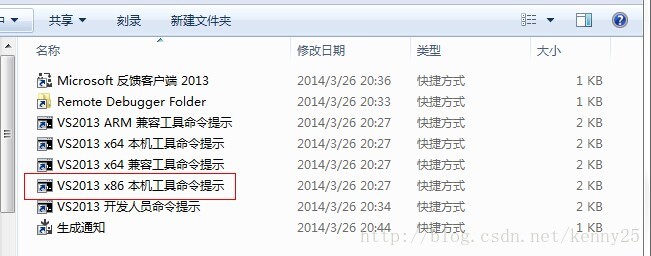
如果你需要编译64位的则选择x64的命令行工具;
3,当执行nmake -f objs/Makefile 时报错
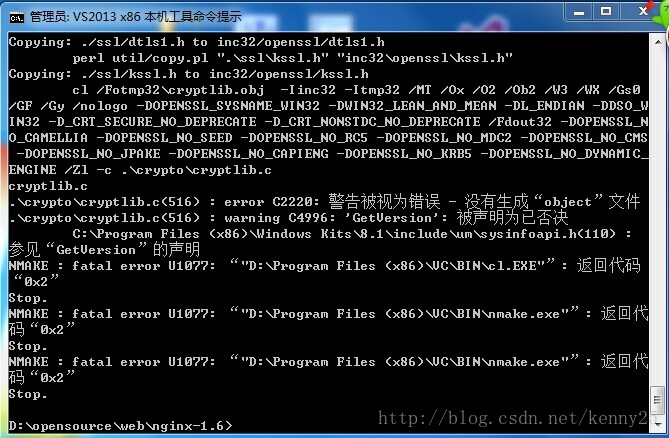
从输出日志看,是编译openssl造成的,从错误信息看到: error C2220 “警告被视为错误”,这里只看到了warning C4996一个警告,所以问题必然出在这了,
那就给openssl加上编译选项忽略掉这个警告:--with-openssl-opt=-wd4996;
将configure命令改成:
auto/configure --with-cc=cl --builddir=objs --prefix= \
--conf-path=conf/nginx.conf --pid-path=logs/nginx.pid \
--http-log-path=logs/access.log --error-log-path=logs/error.log \
--sbin-path=nginx.exe --http-client-body-temp-path=temp/client_body_temp \
--http-proxy-temp-path=temp/proxy_temp \
--http-fastcgi-temp-path=temp/fastcgi_temp \
--with-cc-opt=-DFD_SETSIZE=1024 --with-pcre=objs/lib/pcre-8.35 \
--with-zlib=objs/lib/zlib-1.2.8 --with-openssl=objs/lib/openssl-1.0.1e \
--with-select_module --with-http_ssl_module --with-ipv6 \
--with-openssl-opt=-wd4996 \
--add-module=../nginx-module/nginx-rtmp-module
修改后运行;
(以下方法更简单高效)
也可以直接修改nginx目录下的的objs/Makefile文件,找到这一行:
$(MAKE) -f auto/lib/openssl/makefile.msvcOPENSSL="../lib/openssl-0.9.8r"
然后修改为:
$(MAKE) -f auto/lib/openssl/makefile.msvcOPENSSL="../lib/openssl-0.9.8r" OPENSSL_OPT="-wd4996"
修改完后执行nmake -f objs/Makefile, done!
windows下编译nginx+nginx_rtmp_modue(vs2013)的更多相关文章
- Nginx (一)Windows下编译Nginx源码以及安装 nginx for windows方法步骤
转载自: http://apps.hi.baidu.com/share/detail/11192699#content Nginx介绍: Nginx ("engine x")是一个 ...
- windows下编译调试nginx
typora-copy-images-to: image windows下编译调试nginx linux使用gdb跟踪代码效率不高,在通过跟踪代码进行源码分析,与定位复杂逻辑问题时,如果有一个简单易用 ...
- Windows下编译OpenSSL(使用VS2013)
简述 OpenSSL是一个开源的第三方库,它实现了SSL(Secure SocketLayer)和TLS(Transport Layer Security)协议,被广泛企业应用所采用.对于一般的开发人 ...
- Windows下搭建Nginx图片服务器
在项目最开始,上传图片的时候,服务器先保存原图再使用ImageMagick生成上传图片缩略图,这种方法有很多缺点,例如生成的缩略图的大小是固定的,不能动态请求指定大小的缩略图. 虽然有非常多的图片云存 ...
- 在Windows下编译WebRTC
前言 这篇文章的目的在于为你节省生命中宝贵的10小时(甚至更多),或者浪费你10分钟.作为Google更新频繁的大型跨平台基础库,WebRTC的编译一直被人称为噩梦.如果恰巧你偏要在Windows下编 ...
- windows下编译配置libnet-1.2-rc3
1.下载winpcap(一个底层驱动,可以嗅探.过滤网卡数据包,发包).exe安装包,傻瓜一步式安装 2.下载WpdPack_4_1_2,这个是winpcap的开发者包,解压之后只需要配置相关路径. ...
- [转] Windows下编译OpenSSL
简述 OpenSSL是一个开源的第三方库,它实现了SSL(Secure SocketLayer)和TLS(Transport Layer Security)协议,被广泛企业应用所采用.对于一般的开发人 ...
- windows 下使用Nginx替代apache作为服务器
说实话, 在windows下使用Nginx 着实有点不太方便, 但因项目需求, 又不想换系统(虽然可以搞个虚拟机玩), 只能用Nginx了 好了, 不多说了. 开始... 首先我用的是xampp包(A ...
- windows下安装nginx
说起开发,自己感到非常惭愧,由于公司让我给<绿电侠>项目写整体架构解决方案,才开始接触nginx这个东东,突然觉得它是一把非常好的利器. 本文主要记录在windows下安装nginx,另参 ...
随机推荐
- C++复习13.虚析构函数知识
C++ 虚析构函数 20131010 在C++中的虚函数作用是实现基于继承机制的多态,但是我们好像忽略了一种情况,就是虚析构函数.在C++继承机制中,虽然构造函数是不可以使用虚函数声明,但是析构函数是 ...
- 随机生成验证码及python中的事务
1.随机生成验证码 # import random # print(random.random()) #-1的小数 # print(random.randint(,)) #包括1和3 # print( ...
- week10《java程序设计》作业总结
week10<java程序设计>作业总结 1. 本周学习总结 1.1 以你喜欢的方式(思维导图或其他)归纳总结异常相关内容. 答:: 2. 书面作业 本次PTA作业题集异常 1. 常用异常 ...
- React 与 可视化
一般会想到 canvas 和 svg ; svg更适合画图, 但由于cavans在移动端的良好兼容性, 使用的更广; 什么是svg, scalable vector graphics 全称 可缩放矢 ...
- c# 获取随机数字/字符/时间
using System; using System.Text; namespace HuaTong.General.Utility { /// <summary> /// 随机字符/数字 ...
- 转--ES6 Promise 用法讲解
Promise是一个构造函数,自己身上有all.reject.resolve这几个眼熟的方法,原型上有then.catch等同样很眼熟的方法. 那就new一个 var p = new Promise( ...
- Python中方法的缺省参数问题分析
引言: 在Python中可以缺省给方法制定缺省值,但是这个缺省值在某些情况下确是和我们预期不太一致的-... 这个诡异的问题,曾经困然了我几天时间,才最终定位出来-.. 测试代码 from datet ...
- C# 超级狗 二次开发 读写数据 激活验证 存储数据库连接字符串
本文主要讲解如果使用C#语言来对超级狗进行二次开发,如果仅仅是做个激活的功能,可以参照另一篇博客,地址:http://www.cnblogs.com/dathlin/p/8487842.html 如果 ...
- Office for Mac
前情 真的用不惯Mac上的pages,所以就找Mac版的office.找了一个发觉不对,安装总是出错,当时也没有太大的需求,就把这事搁置了下来.今天要写技术文档的时候才终于下决心要把office下再下 ...
- VMWare安装Ubuntu及配置开发环境遇到的问题集
安装完Ubuntu改为中文,发现是中英文混搭的界面 sudo apt-get install $(check-language-support --language=zh_CN)更新语言包. Ecli ...