
appium在android7.0上无法启动问题
前言
由于最近很多android手机升级到7.0系统了,有些小伙伴的appium版本用的还是1.4版本,在运行android7.0的app自动化时候遇到无法启动问题:WebDriverException: Message: A new session could not be created
我的电脑环境:
- python 3.6
- android 7.0
- appium 1.4.13
android7.0遇到问题
1.执行代码:
# coding:utf-8

# 作者:上海-悠悠

from appium import webdriver

from time import sleep

desired_caps = {

                'platformName': 'Android',

                'deviceName': 'A5RNW18316011440',

                'platformVersion': '7.0',

                'appPackage': 'com.baidu.yuedu',

                'appActivity': 'com.baidu.yuedu.splash.SplashActivity'

                }

driver = webdriver.Remote('http://127.0.0.1:4723/wd/hub', desired_caps)
2.执行后报错如下:A new session could not be created
D:\soft\python3.6\python.exe D:/xcm_app_test/app/test_login.py

Traceback (most recent call last):

  File "D:/xcm_app_test/app/test_login.py", line 11, in <module>

    driver = webdriver.Remote('http://127.0.0.1:4723/wd/hub', desired_caps)

  File "D:\soft\python3.6\lib\site-packages\appium\webdriver\webdriver.py", line 36, in __init__

    super(WebDriver, self).__init__(command_executor, desired_capabilities, browser_profile, proxy, keep_alive)

  File "D:\soft\python3.6\lib\site-packages\selenium\webdriver\remote\webdriver.py", line 90, in __init__

    self.start_session(desired_capabilities, browser_profile)

  File "D:\soft\python3.6\lib\site-packages\selenium\webdriver\remote\webdriver.py", line 177, in start_session

    response = self.execute(Command.NEW_SESSION, capabilities)

  File "D:\soft\python3.6\lib\site-packages\selenium\webdriver\remote\webdriver.py", line 236, in execute

    self.error_handler.check_response(response)

  File "D:\soft\python3.6\lib\site-packages\selenium\webdriver\remote\errorhandler.py", line 192, in check_response

    raise exception_class(message, screen, stacktrace)

selenium.common.exceptions.WebDriverException: Message: A new session could not be created. (Original error: Command failed: )
分析问题
1.遇到无法启动问题,报错都一样:A new session could not be created,看编辑器报错是没啥用的,这个时候就需要打开appium的日志界面,分析走到哪一步报错了,日志太多,就贴一部分了
> info: [debug] Device is at API Level 24

> info: Device API level is: 24

> info: [debug] Extracting strings for language: default

> info: [debug] Apk doesn't exist locally

> info: [debug] Could not get strings, but it looks like we had an old strings file anyway, so ignoring
2.从上面日志可以看出,当前的设备API版本是24,而appium1.4支持的最高API版本是23。打开appium客户端,左上角点机器人图标,点开platformVersion如下图所示
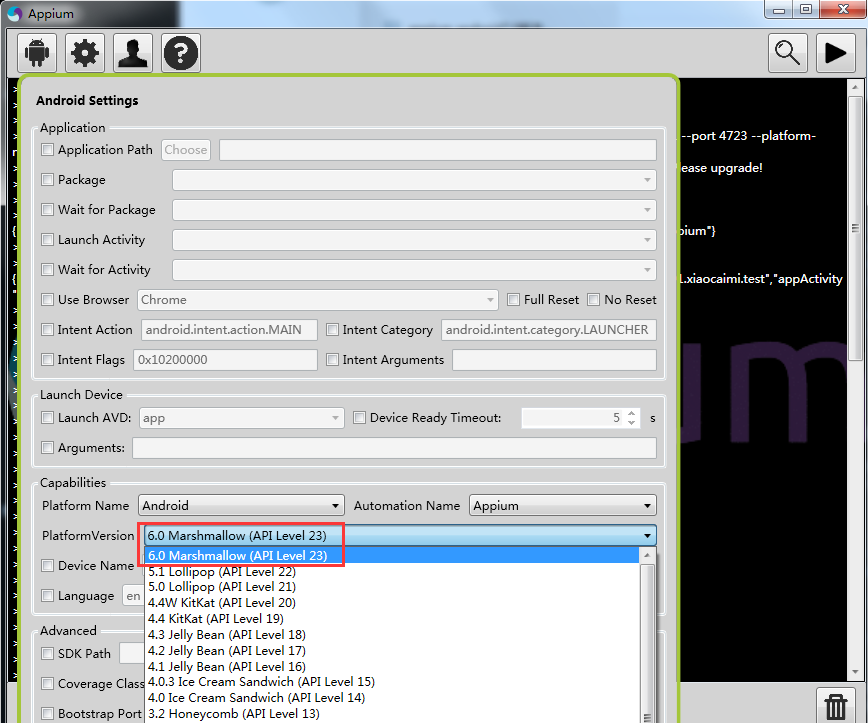
3.也就是说appium1.4支持最高android版本是6.0,查下资料可以知道android7.0需使用appium1.6.3以上版本才能支持。
解决问题
1.重新下载最新版appium,appium1.6以后版本都是以appium-desktop命名的,目前我使用的版本是appium-desktop1.2.2,安装完之后也就是V1.7.1版本
2.appium-desktop所以版本在github都能下载到:
appium-desktop 所有版本下载地址
3.appium-desktop和之前老的appium版本是可以共存的,所有不需要卸载之前的版本,重新打开appium1.7版本,运行代码
4.重新运行时候发现报这个错,从报错信息看是手机上安装的unlock版本不匹配(因为之前运行appium1.4版本有残留),解决办法:手动卸载手机上的appium settings和Unlock就可以了
selenium.common.exceptions.WebDriverException: Message: An unknown server-side error occurred while processing the command. Original error: Error executing adbExec. Original error: 'Command 'D\:\\soft\\Android\\platform-tools\\adb.exe -P 5037 -s A5RNW18316011440 install C\:\\Users\\admin\\AppData\\Local\\Programs\\appium-desktop\\resources\\app\\node_modules\\appium\\node_modules\\appium-unlock\\bin\\unlock_apk-debug.apk' exited with code 1'; Stderr: 'Failed to install C:\Users\admin\AppData\Local\Programs\appium-desktop\resources\app\node_modules\appium\node_modules\appium-unlock\bin\unlock_apk-debug.apk: Failure [INSTALL_FAILED_UPDATE_INCOMPATIBLE: Package io.appium.unlock signatures do not match the previously installed version; ignoring!]'; Code: '1'
备注
1.有些小伙伴可能用的appium1.6版本,可以尝试加上这个参数,用uiautomator2运行
'automationName': 'uiautomator2'
# coding:utf-8

# 作者:上海-悠悠

from appium import webdriver

from time import sleep

desired_caps = {

                'platformName': 'Android',

                'deviceName': 'A5RNW18316011440',

                'platformVersion': '7.0',

                'automationName': 'uiautomator2',

                'appPackage': 'com.baidu.yuedu',

                'appActivity': 'com.baidu.yuedu.splash.SplashActivity'

                }

driver = webdriver.Remote('http://127.0.0.1:4723/wd/hub', desired_caps)
** 在学习过程中有遇到疑问的,可以appium+python QQ群交流:330467341**
appium在android7.0上无法启动问题的更多相关文章
- Appium适配Android7.0以上版本
Appium适配Android7.0以上版本 测试机型: 华为荣耀V9 安卓版本: Android7.0 appium版本: 1.65 说明: 公司新采购了一批安卓机器,拿了其中一台华为荣耀V9跑之前 ...
- [问题解决]Android7.0上PopupWindow的showAsDropDown位置问题
[问题解决]Android7.0上PopupWindow的showAsDropDown位置问题 /** * Created by diql on 2017/02/16. */ 问题说明 我的popup ...
- Appium在Android7.0及以上系统运行时报错的解决方案
背景:在使用Samsung S系列手机进行自动化测试时,发现同样脚本的情况下华为荣耀系列可以正常运行,最终发现差异在于Android7.0及以上系统和appium版本不匹配,需要升级appium.但需 ...
- appium+python自动化60-windows上同时启动多个appium服务,让多个android机器并行运行
前言 做android自动化的时候,启动一个appium服务,只能匹配一个手机去自动化执行.有时候想同一套代码,可以在不同的手机上执行,测下app在不同手机上兼容性. 这就需要启动多个appium服务 ...
- appium desktop v1.2.7在android7.0上运行报错“Error: Error executing adbExec”
1.参考下面链接,https://stackoverflow.com/questions/42283921/unable-to-run-appium-tests-on-android-7-0:得知需要 ...
- 【基础】火狐和谷歌在Selenium3.0上的启动(二)
参考地址:http://www.cnblogs.com/fnng/p/5932224.html https://github.com/mozilla/geckodriver [火狐浏览器] 火狐浏览器 ...
- 【转】Android7.0适配心得
本文出自:贾鹏辉的技术博客(http://www.devio.org) http://www.devio.org/2016/09/28/Android7.0%E9%80%82%E9%85%8D%E5% ...
- Android7.0新特性,及Android N适配
新特性部分 Android 7.0 Nougat 提供新功能以提升性能.生产效率和安全性,主要新增了下面的新特性和优化: 一.新的Notification Android N 添加了很多新的notif ...
- Android7.0 Doze模式分析(一)Doze介绍 & DeviceIdleController
參考:http://blog.csdn.net/gaugamela/article/details/52981984 在Android M中.Google就引入了Doze模式.它定义了一种全新的 ...
随机推荐
- 通过Fegin远程调用 ,返回JPA Page 对象报错
Caused by: com.fasterxml.jackson.databind.JsonMappingException: Can not construct instance of org.sp ...
- Spring核心思想——IOC和DI
基本概念 IOC是什么? IOC(Inversion of Control)控制反转,IOC是一种新的Java编程模式,目前很多轻量级容器都在广泛使用的模式. IOC解决了什么问题? ...
- New Concept English three (23)
31w 45 People become quite illogical when they try to decide what can be eaten and what cannot be ea ...
- Spring核心概念(一)
1.解决JavaEE的轻量级框架. 2.环境搭建 第一步:导入spring的jar包 第二步:导入配置文件(一般写在resource下面) 第三步:创建一个类(bean) 第四步:在主配置文件中注入这 ...
- C++ writestring 为什么不能写进中文 CStdioFile向无法向文本中写入中文【二】
本地化设置需要具备三个条件:a. 语言代码 (Language Code)b. 国家代码 (Country Code) c. 编码(Encoding)本地名字可以用下面这些部分来构造:语言代码_国家代 ...
- React-Native进阶_5.导航 Naviagtion
有这样一个组件 他可以控制页面跳转 返回,在移动端叫做导航控制器, 在RN中叫路由 我们使用的 react-native-navigation 是一个开源组件库介绍:A complete nativ ...
- Android Studio3.0 新特性 ~ New Features in Android Studio Preview (译文)
原文地址:https://developer.android.google.cn/studio/preview/features/index.html 最新Android Studio版本是Andro ...
- iad 集成三两事
1. 好像是随着ios8的beta开始. iad 已经发生了一些变化. 比如找不到enable iad network 的按钮了. 貌似是不需要手动去 enable 了. 只需要嵌入 iad fra ...
- CentOS6 mail邮件服务配置
mail服务配置 环境: [root@m01 ~]# cat /etc/redhat-release CentOS release 6.7 (Final) [root@m01 ~]# uname -m ...
- 实战:向GitHub提交代码时触发Jenkins自动构建
当我们提交代码到GitHub后,可以在Jenkins上执行构建,但是每次都要动手去执行略显麻烦,今天我们就来实战Jenkins的自动构建功能,每次提交代码到GitHub后,Jenkins会进行自动构建 ...