
Hbase的安装与测试
实验环境
虚拟机伪分布式
Ubuntu 17.10
JDK 1.8
Hadoop 2.7.6
Hbase 1.3.3
①安装和配置HBase。
首先从官网http://archive.apache.org/dist/hbase/下载HBase安装包,为了兼容性,这里选择HBase-1.3.3。然后解压到文件夹。
②配置环境变量
将hbase下的bin目录添加到path中
编辑~/.bashrc文件添加 export PATH=$PATH:bin路径
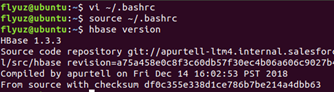
③伪分布式模式配置
配置hbase/conf/hbase-env.sh

配置hbase/conf/hbase-site.xml
假设当前Hadoop集群运行在伪分布式模式下,在本机上运行,且NameNode运行在9000端口。
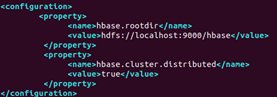
④启动Hadoop

启动Hbase

⑤根据表格,用Hbase Shell命令模式设计student学生表格。
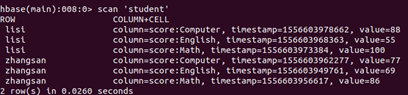
⑥查询zhangsan 的Computer成绩。

⑦修改lisi的Math成绩,改为95。

⑧根据上面的student表,用Hbase Java API编程
新建一个工程,将hbase/lib中的所有jar包添加到项目
a) 添加数据:English:45 Math:89 Computer:100
 import java.io.IOException;

 import org.apache.hadoop.conf.Configuration;

 import org.apache.hadoop.hbase.HBaseConfiguration;

 import org.apache.hadoop.hbase.TableName;

 import org.apache.hadoop.hbase.client.Admin;

 import org.apache.hadoop.hbase.client.Connection;

 import org.apache.hadoop.hbase.client.ConnectionFactory;

 import org.apache.hadoop.hbase.client.Put;

 import org.apache.hadoop.hbase.client.Table;

 public class Hbase {

     public static Configuration configuration;

     public static Connection connection;

     public static Admin admin;

     public static void main(String[] args) {

         configuration = HBaseConfiguration.create();

         configuration.set("hbase.rootdir", "hdfs://localhost:9000/hbase");

         try {

             connection = ConnectionFactory.createConnection(configuration);

             admin = connection.getAdmin();

         } catch (IOException e) {

             e.printStackTrace();

         }

         try {

             insertRow("student", "scofield", "score", "English", "45");

             insertRow("student", "scofield", "score", "Math", "89");

             insertRow("student", "scofield", "score", "Computer", "100");

         } catch (IOException e) {

             e.printStackTrace();

         }

         close();

     }

     public static void insertRow(String tableName, String rowKey, String colFamily, String col, String val)

             throws IOException {

         Table table = connection.getTable(TableName.valueOf(tableName));

         Put put = new Put(rowKey.getBytes());

         put.addColumn(colFamily.getBytes(), col.getBytes(), val.getBytes());

         table.put(put);

         table.close();

     }

     public static void close() {

         try {

             if (admin != null) {

                 admin.close();

             }

             if (null != connection) {

                 connection.close();

             }

         } catch (IOException e) {

             e.printStackTrace();

         }

     }

 }
Hbase添加数据
b) 获取scofield的English成绩信息
 import java.io.IOException;

 import org.apache.hadoop.conf.Configuration;

 import org.apache.hadoop.hbase.Cell;

 import org.apache.hadoop.hbase.CellUtil;

 import org.apache.hadoop.hbase.HBaseConfiguration;

 import org.apache.hadoop.hbase.TableName;

 import org.apache.hadoop.hbase.client.Admin;

 import org.apache.hadoop.hbase.client.Connection;

 import org.apache.hadoop.hbase.client.ConnectionFactory;

 import org.apache.hadoop.hbase.client.Get;

 import org.apache.hadoop.hbase.client.Result;

 import org.apache.hadoop.hbase.client.Table;

 public class GetScofieid {

     public static Configuration configuration;

     public static Connection connection;

     public static Admin admin;

     public static void main(String[] args) {

         configuration = HBaseConfiguration.create();

         configuration.set("hbase.rootdir", "hdfs://localhost:9000/hbase");

         try {

             connection = ConnectionFactory.createConnection(configuration);

             admin = connection.getAdmin();

             getData("student", "scofield", "score", "English");

         } catch (IOException e) {

             e.printStackTrace();

         }

         close();

     }

     public static void getData(String tableName, String rowKey, String colFamily, String col) throws IOException {

         Table table = connection.getTable(TableName.valueOf(tableName));

         Get get = new Get(rowKey.getBytes());

         get.addColumn(colFamily.getBytes(), col.getBytes());

         Result result = table.get(get);

         Cell[] cells = result.rawCells();

         for (Cell cell : cells) {

             System.out.println("RowName:" + new String(CellUtil.cloneRow(cell)));

             System.out.println("timestamp:" + cell.getTimestamp());

             System.out.println("column Family:" + new String(CellUtil.cloneFamily(cell)));

             System.out.println("row Name:" + new String(CellUtil.cloneQualifier(cell)));

             System.out.println("value:" + new String(CellUtil.cloneValue(cell)));

         }

         table.close();

     }

     public static void close() {

         try {

             if (admin != null) {

                 admin.close();

             }

             if (null != connection) {

                 connection.close();

             }

         } catch (IOException e) {

             e.printStackTrace();

         }

     }

 }
Hbase获取数据
⑨关闭所有服务
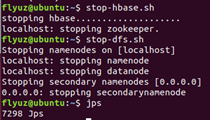
Hbase的安装与测试的更多相关文章
- Hbase的安装测试工作
Hbase的安装测试工作: 安装:http://www.cnblogs.com/neverwinter/archive/2013/03/28/2985798.html 测试:http://www.cn ...
- hadoop2-HBase的安装和测试
在安装和测试HBase之前,我们有必要先了解一下HBase是什么 我们可以通过下面的资料对其有一定的了解: HBase 官方文档中文版 HBase 深入浅出 我想把我知道的分享给大家,方便大家交流. ...
- hbase单机版安装+phoneix SQL on hbase 单节点安装
hbase 单机安装部署及phoneix 单机安装 Hbase 下载 (需先配置jdk) https://www.apache.org/dyn/closer.lua/hbase/2.0.1/hbase ...
- hbase单机版安装
hbase单机版安装 1. hbase单机版安装 HBase的安装也有三种模式:单机模式.伪分布模式和完全分布式模式. hbase依赖于Hadoop和Zookeeper. 这里安装的是单机版 ...
- my SQL下载安装,环境配置,以及密码忘记的解决,以及navicat for mysql下载,安装,测试连接
一.下载 在百度上搜索"mysql-5.6.24-winx64下载" 二.安装 选择安装路径,我的路径“C:\Soft\mysql-5.6.24-winx64” 三.环境配置 计算 ...
- OpenCV2+入门系列(一):OpenCV2.4.9的安装与测试
这里假设看到这篇文章的人都已经对OpenCV以及机器视觉等最基础的概念有了一定的认识,因此本文不会对OpenCV做任何的介绍,而是直接介绍OpenCV2.4.9的安装与测试.此外本文只是简单的介绍如何 ...
- 决战大数据之三-Apache ZooKeeper Standalone及复制模式安装及测试
决战大数据之三-Apache ZooKeeper Standalone及复制模式安装及测试 [TOC] Apache ZooKeeper 单机模式安装 创建hadoop用户&赋予sudo权限, ...
- Hadoop、Zookeeper、Hbase分布式安装教程
参考: Hadoop安装教程_伪分布式配置_CentOS6.4/Hadoop2.6.0 Hadoop集群安装配置教程_Hadoop2.6.0_Ubuntu/CentOS ZooKeeper-3.3 ...
- coreseek实战(一):windows下coreseek的安装与测试
coreseek实战(一):windows下coreseek的安装与测试 网上关于 coreseek 在 windows 下安装与使用的教程有很多,官方也有详细的教程,这里我也只是按着官方提供的教程详 ...
随机推荐
- 第2章地址Address(WCF全面解析3)
WCF顾明思义,就是在Windows平台下解决通信(C,Communication)的基础框架(F,Foundation)问题. 终结点是WCF最为核心的对象,因为它承载了所有通信功能.服务通过相应的 ...
- 在linux下安装并操作tomcat
1.安装tomcat1).下载tomcat从官网http://tomcat.apache.org/下载tomcat,保存在/home目录下.root@ubuntu:/home/ubuntu/Downl ...
- 判断当前Selection是否为prefab
[判断当前Selection是否为prefab] PrefabUtility.GetPrefabParent(target) == null && PrefabUtility.GetP ...
- Kafka介绍及集群搭建
简介 Kafka是一个开源的,分布式的,高吞吐量的消息系统.随着Kafka的版本迭代,日趋成熟.大家对它的使用也逐步从日志系统衍生到其他关键业务领域.特别是其超高吞吐量的特性,在互联网领域,使用越来越 ...
- C#根据url生成唯一的key
根据url生成唯一的idkey,记录并分享: public class UrlToUniqueKey { ); , ] { { 0L, 0L }, { -4611686018427387904L, - ...
- java-tip-关于StringBuilder的使用
当我们需要拼接字符串时,通常会使用StringBuilder,这里简单分析下StringBuilder的内部结构. StringBuilder内部是一个char数组,当调用append方法连接字符串时 ...
- highchart 曲线图
$(function() { Highcharts.setOptions({ global: { useUTC: false } }); var chart = new Highcharts.Char ...
- easyui图标大全
.icon-blank{ background:url('icons/blank.gif') no-repeat; } .icon-add{ background:url('icons/edit_ad ...
- Linux cheat命令
一.简介 cheat是在GNU通用公共许可证下,为Linux命令行用户发行的交互式备忘单应用程序.它提供显示Linux命令使用案例,包括该命令所有的选项和简短但尚可理解的功能. 二.安装配置 安装步骤 ...
- eclipse 按装lombok与注解说明
原文:http://www.cnblogs.com/ywqbj/p/5711691.html 一.安装lombok 1.下载 lombok-1.16.16.jar 包 我的下载完后放到:/root ...