
权限模块_使用权限_实现主页面的效果_显示左侧菜单&只显示有权限的菜单项
权限模块__使用权限__实现主页面的效果

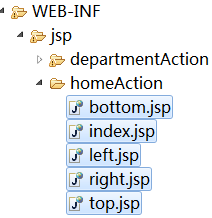
HomeAction.java
public class HomeAction extends ActionSupport {

    public String index() {

        return "index";

    }

    public String top() {

        return "top";

    }

    public String bottom() {

        return "bottom";

    }

    public String leaf() {

        return "leaf";

    }

    public String right() {

        return "right";

    }

}
index.jsp
<%@ page language="java" pageEncoding="UTF-8"%>

<html>

    <head>

        <title>Itcast OA</title>

        <%@ include file="/WEB-INF/jsp/public/commons.jspf"%>

        <script type="text/javascript"

            src="${pageContext.request.contextPath}/script/jquery_treeview/jquery.cookie.js"></script>

    </head>

    <frameset rows="100,*,25" framespacing=0 border=0 frameborder="0">

        <frame noresize name="TopMenu" scrolling="no"

            src="${pageContext.request.contextPath}/home_top.action">

        <frameset cols="180,*" id="resize">

            <frame noresize name="menu" scrolling="yes"

                src="${pageContext.request.contextPath}/home_left.action">

            <frame noresize name="right" scrolling="yes"

                src="${pageContext.request.contextPath}/home_right.action">

        </frameset>

        <frame noresize name="status_bar" scrolling="no"

            src="${pageContext.request.contextPath}/home_bottom.action">

    </frameset>

    <noframes>

        <body>

        </body>

    </noframes>

</html>
top.jsp
bottom.jsp
<%@ page language="java" pageEncoding="UTF-8"%>

<html>

<head>

    <title></title>

    <LINK href="${pageContext.request.contextPath}/style/blue/statusbar.css" type=text/css rel=stylesheet>

</head>

<body leftmargin=0 topmargin=0 marginwidth=0 marginheight=0>

<div id="StatusBar">

    <div id="Online">

        在线人员:共 <span class="OnlineUser" id="onlineUserNum"></span> 人<span class="OnlineView">

        <a href="javascript:void(0)">[查看在线名单]</a>

</span></div>

    <div id="Info">

        <a href="http://www.itcast.cn" title = "传智播客首页" target=_blank >传智播客首页</a> |

        <a href="http://bbs.itcast.cn" title = "传智播客BBS" target=_blank >传智播客BBS</a>

    </div>

    <DIV id=DesktopText>

        <a href="javascript:void(0)"><img border="0" src="${pageContext.request.contextPath}/style/images/top/text.gif"/> 便笺</a>

        <span id=TryoutInfo>

        </span>

        <span id="Version">

            <a href="javascript:void(0)">

                <img border="0" width="11" height="11" src="${pageContext.request.contextPath}/style/images/top/help.gif" />

                <img border="0" width="40" height="11" src="${pageContext.request.contextPath}/style/blue/images/top/version.gif" />

            </a>

        </span>

    </DIV>

</div>

</body>

</html>
left.jsp
right.jsp
<%@ page language="java" pageEncoding="UTF-8"%>

<!DOCTYPE html PUBLIC "-//W3C//DTD XHTML 1.0 Transitional//EN" "http://www.w3.org/TR/xhtml1/DTD/xhtml1-transitional.dtd">

<html xmlns="http://www.w3.org/1999/xhtml">

    <head>

        <meta http-equiv="Content-Type" content="text/html; charset=utf-8" />

        <title>无标题文档</title>

    </head>

    <body>

    </body>

</html>
WebRoot下的index.jsp
<%@ page language="java" import="java.util.*" pageEncoding="UTF-8"%>

<%-- 重定向到指定的页面,访问另外一个地址,request.getContextPath()加上当前应用程序名称

    转发:相当于方法调用,在一个应用程序内执行

--%>

<%

    response.sendRedirect(request.getContextPath() + "/home_index.action");

%>
再次访问首页http://localhost:8080/ItcastOA重定向到了http://localhost:8080/ItcastOA/home_index.action
权限模块_使用权限_显示左侧菜单1
<%@ page language="java" pageEncoding="UTF-8"%>

<html>

    <head>

        <title>导航菜单</title>

        <%@ include file="/WEB-INF/jsp/public/commons.jspf"%>

        <link type="text/css" rel="stylesheet" href="style/blue/menu.css" />

    </head>

    <body style="margin: 0">

        <div id="Menu">

            <ul id="MenuUl">

                <%--显示一级菜单 --%>

                <s:iterator value="#application.topPrivilegeList">

                    <li class="level1">

                        <div onClick="menuClick(this);" class="level1Style">

                            <img src="style/images/MenuIcon/FUNC20082.gif" class="Icon" />

                            ${name}

                        </div>

                        <ul style="display: none;" class="MenuLevel2">

                            <%-- 显示二级菜单 --%>

                            <s:iterator value="children">

                            <li class="level2">

                                <div class="level2Style">

                                    <img src="style/images/MenuIcon/menu_arrow_single.gif" />

                                    <a target="right" href="System_Role/list.html"> 岗位管理</a>

                                </div>

                            </li>

                            </s:iterator>

                        </ul>

                    </li>

                </s:iterator>

            </ul>

        </div>

    </body>

</html>
InitListener.java
public class InitListener implements ServletContextListener {

    //获取容器与相关的Service对象

    public void contextInitialized(ServletContextEvent sce) {

        ApplicationContext ac = WebApplicationContextUtils.getWebApplicationContext(sce.getServletContext());

        PrivilegeService privilegeService = (PrivilegeService) ac.getBean("privilegeServiceImpl");

        //找到所有的顶级列表,放到最大的作用域中

        //准备数据:topPrivilegeList

        List<Privilege> topPrivilegeList = privilegeService.findTopList();

        sce.getServletContext().setAttribute("topPrivilegeList", topPrivilegeList);

        System.out.println("-----------> 已准备数据 <-----------");

    }

    public void contextDestroyed(ServletContextEvent arg0) {

    }

}
PrivilegeService.java
public interface PrivilegeService extends DaoSupport<Privilege> {

    //查询所有顶级的权限

    List<Privilege> findTopList();

}
PrivilegeServiceImpl.java
@Service

@Transactional

public class PrivilegeServiceImpl extends DaoSupportImpl<Privilege> implements PrivilegeService{

    public List<Privilege> findTopList() {

        return getSession().createQuery(//

                "FROM Privilegea p WHERE p.parent IS NULL")//

                .list();

    }

}
web.xml增加
   <!-- 用于做初始化工作的监听器,一定要配置到spring的 contextConfigLocation之后,因为要用到spring的容器对象-->

    <listener>

        <listener-class>cn.itcast.oa.util.InitListener</listener-class>

    </listener>
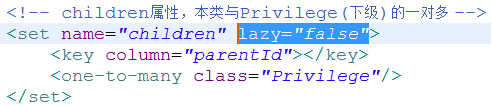
懒加载
登录时加载了用户,用户关联的对象都没有加载,但在第二个请求又访问了用户关联的对象,抛懒加载异常
Privilege.hbm.xml
User.hbm.xml

Role.hbm.xml

访问http://localhost:8080/ItcastOA/home_index.action
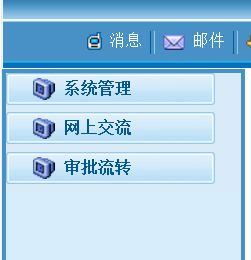
全部显示

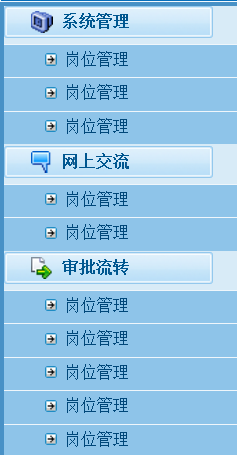
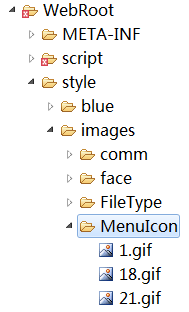
图标问题

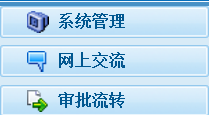
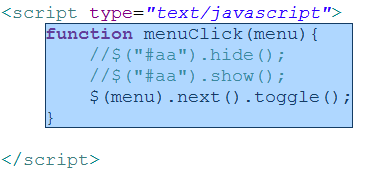
打开收回
权限模块__使用权限__显示左侧菜单2__只显示有权限的菜单项
leaf.jsp
<%@ page language="java" pageEncoding="UTF-8"%>

<html>

    <head>

        <title>导航菜单</title>

        <%@ include file="/WEB-INF/jsp/public/commons.jspf"%>

        <link type="text/css" rel="stylesheet" href="style/blue/menu.css" />

        <script type="text/javascript">

            function menuClick(menu){

                //$("#aa").hide();

                //$("#aa").show();

                $(menu).next().toggle();

            }

        </script>

    </head>

    <body style="margin: 0">

        <div id="Menu">

            <ul id="MenuUl">

                <%--显示一级菜单 --%>

                <s:iterator value="#application.topPrivilegeList">

                    <s:if test="#session.user.hasPrivilegeByName(name)"><!-- ognl表达式中调用方法 -->

                        <li class="level1">

                            <div onClick="menuClick(this);" class="level1Style">

                                <img src="style/images/MenuIcon/${id}.gif" class="Icon" />

                                ${name}

                            </div>

                            <ul style="" class="MenuLevel2" id="aa">

                                <%-- 显示二级菜单 --%>

                                <s:iterator value="children">

                                    <s:if test="#session.user.hasPrivilegeByName(name)">

                                        <li class="level2">

                                            <div class="level2Style">

                                                <img src="style/images/MenuIcon/menu_arrow_single.gif" />

                                                <a target="right" href="${pageContext.request.contextPath }${url}.action"> ${name}</a>

                                            </div>

                                        </li>

                                    </s:if>

                                </s:iterator>

                            </ul>

                        </li>

                    </s:if>

                </s:iterator>

            </ul>

        </div>

    </body>

</html>
User.java中增加
/**

     * 判定本用户是否有指定名称的权限

     * @param name

     * @return

     */

    public boolean hasPrivilegeByName(String name) {

        //超级管理员有所有的权限

        if(ifAdmin()) {

            return true;

        }

        //普通用户要判断是否含有这个权限

        for(Role role : roles) {

            for(Privilege priv : role.getPrivileges()) {

                if(priv.getName().equals(name)) {

                    return true;

                }

            }

        }

        return false;

    }

    /**

     * 判断本用户是否是超级管理员

     */

    public boolean ifAdmin() {

        return "admin".equals(loginName);

    }
权限模块_使用权限_实现主页面的效果_显示左侧菜单&只显示有权限的菜单项的更多相关文章
- AIO5岗位桌面主页【我的收藏夹】只显示8行,怎样增加显示行?
问题: 为什么主页上的收藏夹只能放8个显示?超出部分显示不出来了?应该怎样操作? 解决方案: 原因分析:桌面区域(系统)内的[我的收藏夹]是固定行高的. 解决方案:通用设置里面去设置[桌面系统模块行数 ...
- 系统管理模块_岗位管理_改进_使用ModelDroven方案_套用美工写好的页面效果_添加功能与修改功能使用同一个页面
改进_使用ModelDroven方案 @Controller @Scope("prototype") public class RoleAction extends ActionS ...
- EBS 显示主页面的工作列表和主菜单
EBS环境: R12.1.3 问题描述:如果系统的“个性化页”做了设置,可能出现登录系统后,如果下图红框中的 主菜单和工作列表没有显示的情况,如果需要重新显示“主菜单”和“工作列表”,可参考以下操作 ...
- 权限模块_整体方案说明_设计实体&映射实体_实现初始化权限数据的功能
权限模块_整体方案说明 要点说明 权限就是控制功能的使用(功能对应着URL). 对功能的控制就是对URL的访问控制. 在我们的程序中,一个功能对应一个或两个URL: 1,例如列表或删除功能,只对应一个 ...
- asp.net core权限模块的快速构建
大部分系统都会有权限模块,别人家系统的权限怎么生成的我不知道,我只知道这样做是可以并且挺好的. 文章中只对asp.net core的部分代码进行说明 呃 记录~,mvc版本自行前往仓库查阅 代码中的一 ...
- Django中用户权限模块
Django中用户权限模块 1 auth模块 auth模块是Django提供的标准权限管理系统,可以提供用户身份认证, 用户组和权限管理. auth可以和admin模块配合使用, 快速建立网站的管理系 ...
- 解析大型.NET ERP系统 权限模块设计与实现
权限模块是ERP系统的核心模块之一,完善的权限控制机制给系统增色不少.总结我接触过的权限模块,以享读者. 1 权限的简明定义 ERP权限管理用一句简单的话来说就是:谁 能否 做 那些 事. 文句 含义 ...
- 从零开始编写自己的C#框架(18)——Web层后端权限模块——菜单管理
从本章开始,主要讲解的是页面中对框架相关功能的调用方法,比如列表页面(又分为有层次感列表和普通列表).编辑页面.多标签页面等,只要熟悉了这些函数的使用方法,那么开发起来就会很便捷了. 1.如图先创建菜 ...
- Web应用程序系统的多用户权限控制设计及实现-权限模块【10】
前五章均是从整体上讲述了Web应用程序的多用户权限控制实现流程,本章讲述Web权限管理系统的权限配置模块.页面模块涉及到的数据表为权限表.权限配置模块是按照用户组和页面,栏目结合组成的.通过配置一个用 ...
随机推荐
- 解决在sdk manager中更新文件后出现This Android SDK requires Android Developer Toolkit version 23.1的错误
起因:在sdksdk manager中更新了adt及其它的支持库后,eclipse报错:This Android SDK requires Android Developer Toolkit vers ...
- 最大似然估计(MLE)与最大后验概率(MAP)
何为:最大似然估计(MLE): 最大似然估计提供了一种给定观察数据来评估模型参数的方法,即:“模型已定,参数未知”.可以通过采样,获取部分数据,然后通过最大似然估计来获取已知模型的参数. 最大似然估计 ...
- Solr 搜索功能使用
http://wiki.apache.org/solr/SolrQuerySyntax http://www.solrcn.com/index.php?s=查询
- vsCode 添加浏览器调试和js调试的方法总结
vsCode 添加浏览器调试和js调试的方法 1.直接按F5可以调试的方法或者点击运行按钮(可以直接运行html文件或者js文件) 在launch.json文件中的配置如下: { " ...
- POJ 1321:棋盘问题
棋盘问题 Time Limit: 1000MS Memory Limit: 10000K Total Submissions: 21666 Accepted: 10765 Descriptio ...
- 响应式布局框架 Pure-CSS 5.0 示例中文版-下
10. 表格 Tables 在 table 标签增加 .pure-table 类 <table class="pure-table"> <thead> &l ...
- angular多个控制器如何共享数据
多个控制器之间共享数据,通常两种方式,一种是在控制器里通过$scope.$$prevSibling或$scope.$$nextSibling获得另一个控制器的作用域对象. 第二种是通过服务的方式,也是 ...
- Python @ddt.file_data() 为.yml 文件实例
一,创建login.yml 文件(以登录接口为例) 1,创建 login.yml 文件,内容如下图: 打印login.yml 文件,代码及显示效果如下: 代码: import yaml,jsonf = ...
- RDD缓存学习
首先实现rdd缓存 准备了500M的数据 10份,每份 100万条,存在hdfs 中通过sc.textFile方法读取 val rdd1 = sc.textFile("hdfs://mini ...
- ipipe-3.10
git://git.xenomai.org/ipipe-gch.git for-ipipe-3.10