
0701-spring cloud config-简介、Config Server开发、Config Client开发
一、概述
参看地址:
https://gitee.com/itmuch/spring-cloud-book
1.1、为什么需要统一管理配置
集中管理、不同环境不同配置、运行期间动态调整配置、自动刷新
默认都是配置在配置文件中、数据库等中
1.2、简介
主要有两种分布式配置Zookeeper、Consul。
其实还有许多,如百度的disconf、阿里的diamond、携程的apollo
为分布式系统外部化配置提供了服务器端和客户端的支持。它包括Config Server和Config Client两部分。由于Config Server和Config Client都实现了对Spring Environment 和PropertySource抽象的映射,因此,Spring Cloud Config非常适合Spring应用程序,当然也可以与任何其他语言编写的应用程序配合使用。
Config Server是一个可横向扩展、集中式的配置服务器。它用于集中管理应用程序各个环境下的配置。默认使用Git存储配置内容(也可以使用Subversion,本地文件系统或Vault存储配置。)因此可以方便的实现对配置的版本控制与内容审计等
Config Client是Config Server的客户端,用于操作存储在Config Server中的配置属性。
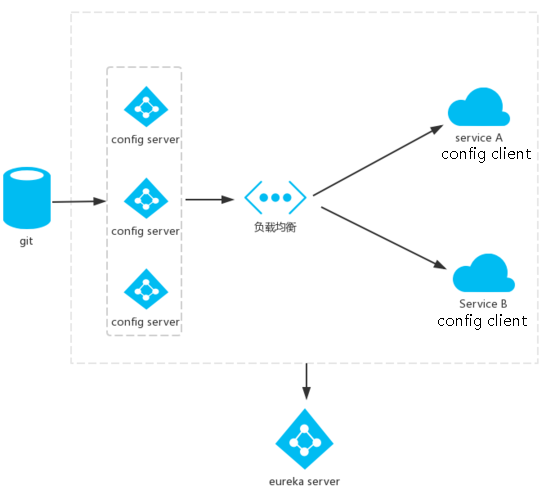
1.3、架构图
在Config Server可以有dev、stage、prod等环境
二、Config Server开发
2.1、项目搭建
如git地址:https://github.com/bjlhx15/spring-cloud.git
增加pom
    <dependencies>

        <dependency>

            <groupId>org.springframework.cloud</groupId>

            <artifactId>spring-cloud-config-server</artifactId>

        </dependency>

    </dependencies>
启动类增加注解
@SpringBootApplication

@EnableConfigServer

public class ConfigServerApplication {

    public static void main(String[] args) {

        SpringApplication.run(ConfigServerApplication.class, args);

    }

}
2.2、增加配置项目git
如:https://github.com/bjlhx15/spring-cloud-config-test-repo.git
2.3、在application.yml中增加
server:

  port:

spring:

  cloud:

    config:

      server:

        git:

          uri: https://github.com/bjlhx15/spring-cloud-config-test-repo
启动项目测试即可.
2.4、访问地址
HTTP服务具有以下形式的资源映射规则:
/{application}/{profile}[/{label}]

/{application}-{profile}.yml

/{label}/{application}-{profile}.yml

/{application}-{profile}.properties

/{label}/{application}-{profile}.properties
其实是按照格式随意拼接即可。如:http://localhost:8080/aa-profile.properties 或者 http://localhost:8080/aa-profile.yml
其中label是git的分支版本。
2.5、测试
增加foobar-dev.yml测试。
访问:http://localhost:8080/foobar-dev.yml,发现是配置的文件,。
即访问优先级:先找到能匹配的文件【label/具体文件名】,如果不匹配即找到application配置文件。
平时使用建议使用一个配置文件即可
三、Config Client开发
3.1、创建项目
git地址:https://github.com/bjlhx15/spring-cloud.git
增加pom【注意是spring-cloud-starter-config】
        <dependency>

            <groupId>org.springframework.cloud</groupId>

            <artifactId>spring-cloud-starter-config</artifactId>

        </dependency>

        <dependency>

            <groupId>org.springframework.boot</groupId>

            <artifactId>spring-boot-starter-web</artifactId>

        </dependency>
配置文件
新增一个bootstrap.yml
spring:

  cloud:

    config:

      uri: http://localhost:8080

      name: foobar

      profile: dev

      label: master   # 当configserver的后端存储是Git时,默认就是master
  application: #和配置文件匹配最好
    name: foobar
在application.yml
server:

  port:
原因是:Spring云上下文
Spring Cloud应用程序通过创建“bootstrap”上下文来运行,该上下文是主应用程序的父上下文。【bootstrap.yml 优先级高于application.yml】开箱即用,它负责从外部源加载配置属性,并且还解密本地外部配置文件中的属性。这两个上下文共享一个环境,它是任何Spring应用程序的外部属性的来源。bootstrap属性以高优先级添加,因此默认情况下它们不能被本地配置覆盖。
bootstrap程序上下文默认约定:使用bootstrap.yml【bootstrap.properties】覆盖application.yml(或.properties)
但是可以使用spring.cloud.bootstrap.enabled=false禁用
bootstrap.*里面的配置→链接Config Server,加载远程配置之后→在加载application.*配置
2.2、增加启动类
@SpringBootApplication

public class ConfigClientApplication {

    public static void main(String[] args) {

        SpringApplication.run(ConfigClientApplication.class, args);

    }

}
2.3、增加测试
@RestController

public class ConfigClientController {

    // 传统方式需要在配置文件加上配置 ,但是优先级低于使用bootstap加载的配置

    @Value("${profile}")

    private String profile;

    @GetMapping("/profile")

    public String getProfile() {

        return this.profile;

    }

}
注意点:
1、pom的spring-cloud-starter-config不要引错;
2、不要不适用bootstrap.yml。否则默认是8888端口
3、如果本地属性也有远端属性,以bootstrap.yml先与本地application为主,故使用远端属性profile
4、注意git上的配置文件如果是yml类型,注意属性“:”后有空格。。
0701-spring cloud config-简介、Config Server开发、Config Client开发的更多相关文章
- Spring Cloud Netflix之Euraka Server注册中心
Spring Cloud简介 Spring Cloud是基于Spring Boot的一套实现微服务架构的生态组件.生态组件中包含Spring Cloud NetFlix,Spring Cloud Fe ...
- spring cloud alibaba 简介
### Spring Cloud Alibaba [官方github地址](https://github.com/alibaba/spring-cloud-alibaba) Spring Cloud ...
- Spring Cloud(3):配置服务(Config)
Spring Cloud Config的目标是在在大量的微服务中,将服务配置信息和和服务的实际物理部署分离,且服务配置服务不应与服务实例一起部署.配置信息应该作为环境变量传递给正在启动的服务,或者在服 ...
- 我们为什么要使用Spring Cloud?简介
转载:https://blog.csdn.net/smallsunl/article/details/78778790 单体架构 在网站开发的前期,项目面临的流量相对较少,单一应用可以实现我们所需要的 ...
- spring cloud要点简介及常用组件
spring cloud基于spring boot spring cloud是通过包装其他技术框架实现的,例如OSS组件,实现了一套通过基于注解.java配置和基于模板开发的微服务框架. spring ...
- Spring Cloud 模块简介2
前面一篇文章谈到微服务基础框架,而Netflix的多个开源组件一起正好可以提供完整的分布式微服务基础架构环境,而对于Spring Cloud正是对Netflix的多个开源组件进一步的封装而成,同时又实 ...
- Spring Cloud Eureka(六):Eureka Client 如何注册到Eureka Server
1.本节概要 根据前文我们对Eureka Server 有了一定的了解,本节我们主要学习Eureka Client 与 Eureka Server 如何通讯的及相关通信机制是什么,本文会弄清楚一下几个 ...
- Spring Cloud Eureka简介及原理
Eureka是Netflix开发的服务发现组件,本身是一个基于REST的服务.Spring Cloud将它集成在其子项目spring-cloud-netflix中,以实现Spring Cloud的服务 ...
- Spring Cloud 模块简介
Spring Cloud Netflix对微服务的支持还有: Hystrix: 断路器和资源隔离 Feign: 声明式HTTP REST请求客户端 Ribbon: 与Eureka结合实现软负载均衡 Z ...
- Spring Cloud Contract简介
转载:https://www.jianshu.com/p/e3277824a10a 和dummy service一样 Spring Cloud Contract是个啥? Spring Cloud Co ...
随机推荐
- wifi设置
1 编辑/etc/init.d/wifi #!/bin/sh case "$1" in start) echo /sbin/mdev > /proc/sys/kern ...
- 一个性能较好的JVM参数配置(转)
一个性能较好的web服务器jvm参数配置: -server//服务器模式-Xmx2g //JVM最大允许分配的堆内存,按需分配-Xms2g //JVM初始分配的堆内存,一般和Xmx配置成一样以避免每次 ...
- js获取textaera对象(object)的值
for(i in pstrWord ){ alert(i); //获得属性 alert(pstrWord[i]); //获得属性值 } 1.js输出object对象方法如下: function wri ...
- 【BZOJ】1676: [Usaco2005 Feb]Feed Accounting 饲料计算(差分)
http://www.lydsy.com/JudgeOnline/problem.php?id=1676 太水的一题了.. 差分直接搞. #include <cstdio> #includ ...
- oracle中恢复删除的表
1.表恢复,如果在删除表的同时删除的数据,那么表恢复也能恢复当时删除时的数据 -----查询删除的表 select * from recyclebin order by droptime desc - ...
- Linux环境下Apache配置多个虚拟主机挂载多站点同时运行
博客地址: http://blog.csdn.net/ClydeKuo/article/details/69569474 这篇博客讲的很详细,很详细.
- Lumen Carbon 日期及时间处理包
用到过的方法: 获取当前Y-m-d H:i:s Carbon::now()->toDateTimeString() 把 Y-m-d H:i:s 转 Y-m-d Carbon::parse('Y- ...
- 编程之美 set 9 字符串移位包含问题
题目 给定字符串 s1 和 s2, 要求判定 s2能否能够被通过 s1 做循环移位得到的字符包含. s1 = AABCD, s2 = CDAA 返回 true. 给定 s1 = ABCD 和 s2 = ...
- 第十三篇:带缓冲的IO( 标准IO库 )
前言 在之前,学习了 read write 这样的不带缓冲IO函数. 而本文将讲解标准IO库中,带缓冲的IO函数. 为什么要有带缓冲IO函数 标准库提供的带缓冲IO函数是为了减少 read 和 wri ...
- 如何正确设置 Informix GLS 及 CSDK 语言环境
本文介绍 GLS 相关知识,说明如何正确设置 Informix GLS 语言环境相关变量(DB_LOCALE,CLIENT_LOCALE),保证 Informix 数据库服务器.客户端能正确的支持中文 ...