
Apicloud_(项目)网上书城02_后端数据获取
Apicloud_(项目)网上书城01_前端页面开发 传送门
Apicloud_(项目)网上书城02_后端数据获取 传送门
Apicloud_(项目)网上书城03_拓展模块实现 传送门
ApiCloud数据云特点
1)无需搭建服务器、设计表结构,并且无需编写任何后端代码
2)默认内置user、file、role等基础数据结构,可以更具应用需求,拓展字段或自定义其它数据模型
3)在线可视化定义数据模型,根据数据模型自动生成RESTful API
4)在移动端通过云API,操作云端数据模型,业务逻辑在App端实现
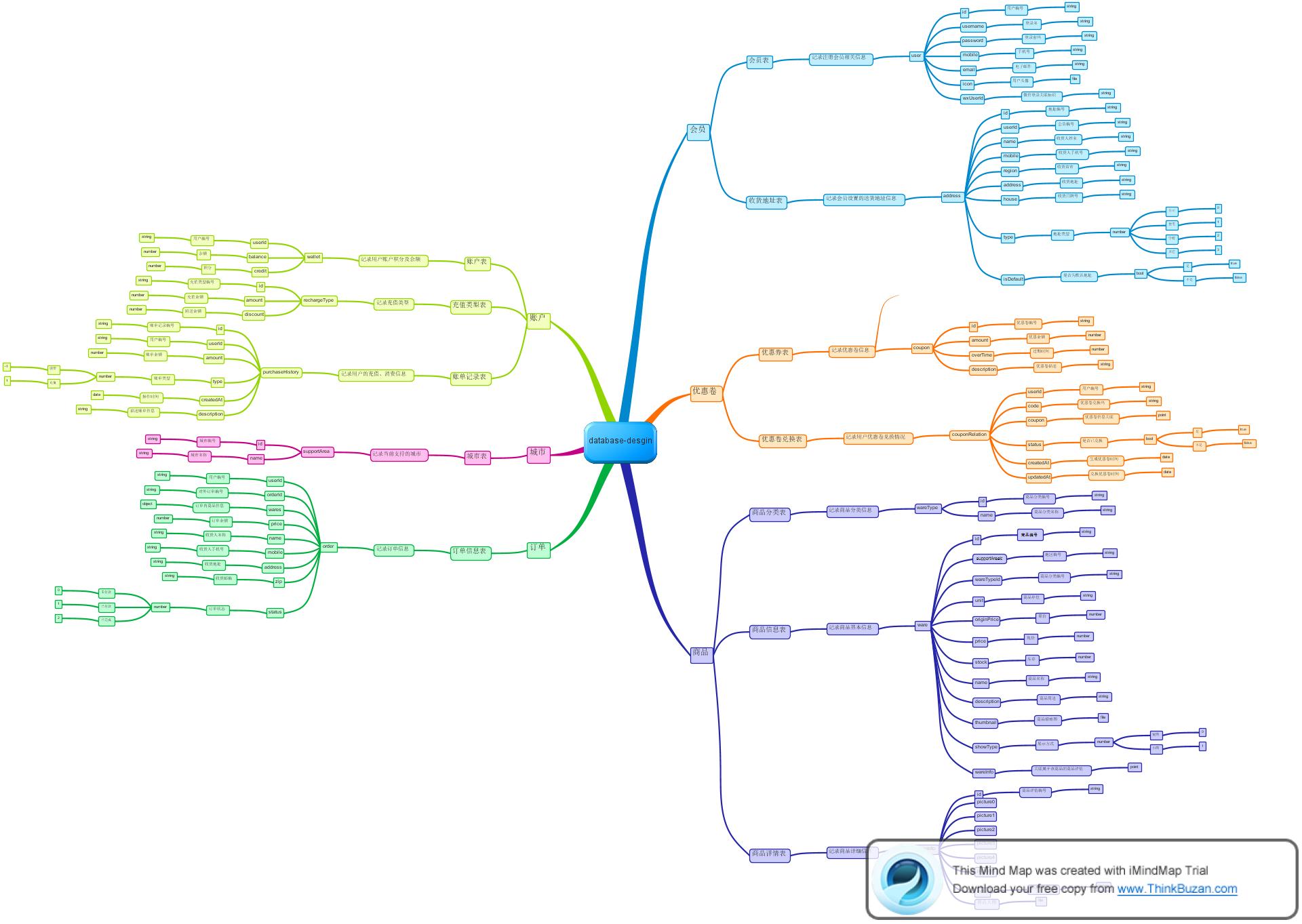
实现用户注册功能
在login.html登陆界面中为注册按钮添加跳转事件
        <h1>用户登录</h1>

        <div class="right" tapmode onclick="fnOpenRegisterWin();">注册</div>
编写跳转页面js代码
// 打开注册Window

function fnOpenRegisterWin () {

    api.openWin({

        name: 'register',

        url: './register.html'

    });

}
在register_frame.html中为注册按钮添加点击事件
<div class="btn" tapmode="highlight" onclick="fnRegister();">注册</div>
在Script标签中添加fnRegister()注册函数
"X-APICloud-AppId":填写自己项目APPID
"X-APICloud-AppKey"生成规则是基于SHA1()算法生成的: 传送门
  // 注册

  function fnRegister() {

      var username = $api.byId("username");

      var password = $api.byId("password");

      var vusername = $api.val(username);

      var vpassword = $api.val(password);

      var now = Date.now();

      var appKey = SHA1("A6099005614565"+"UZ"+"5FB51794-FCDC-1FE9-19E0-A2C449C163AF"+"UZ"+now)+"."+now

      api.ajax({

          url: 'https://d.apicloud.com/mcm/api/user',

          method: 'post',

          headers: {

              "X-APICloud-AppId": "A6099005614565",

              //5FB51794-FCDC-1FE9-19E0-A2C449C163AF

              "X-APICloud-AppKey":appKey,

          },

          data: {

              values: {

                  username:vusername,

                  password:vpassword

              }

          }},

          function (ret,err){

            if(ret&&ret.id){

              alert("注册成功!");

            }else{

              alert("注册失败!");

            }

          }

      );

    }
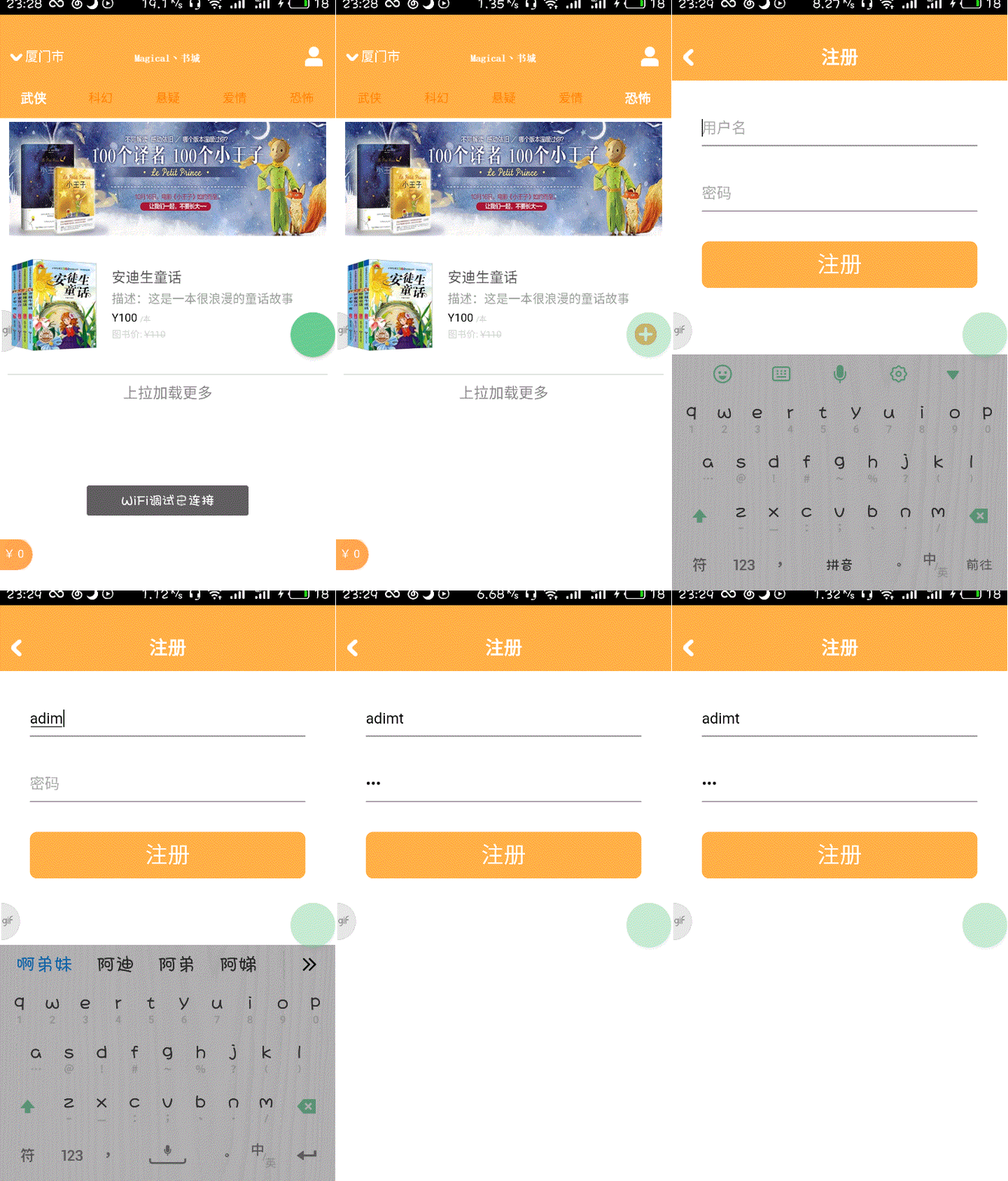
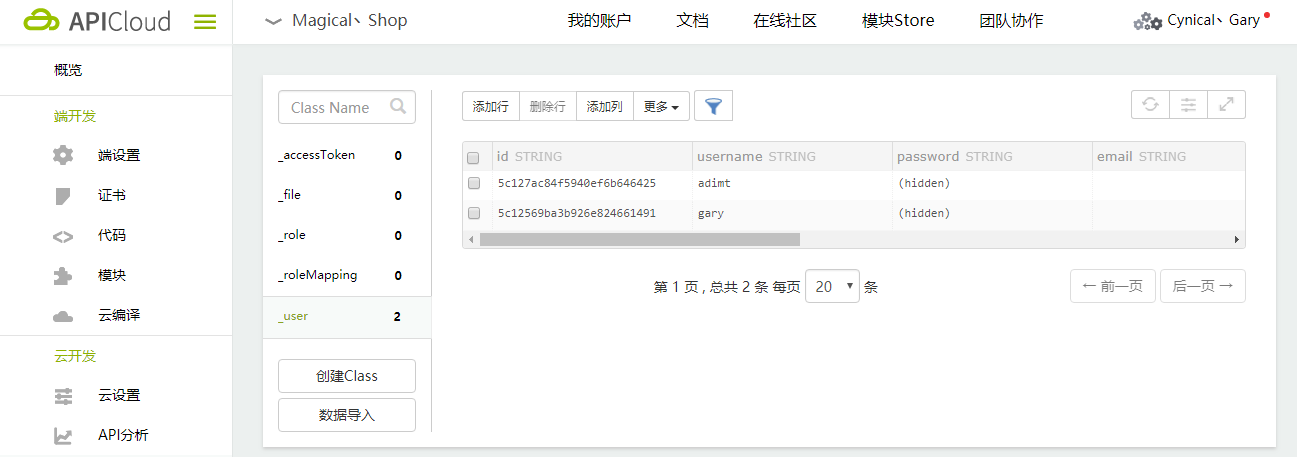
<!DOCTYPE html>

<html>

<head>

    <meta charset="utf-8">

    <meta name="viewport" content="maximum-scale=1.0,minimum-scale=1.0,user-scalable=0,width=device-width,initial-scale=1.0" />

    <meta name="format-detection" content="telephone=no,email=no,date=no,address=no">

    <title>登录</title>

    <link rel="stylesheet" type="text/css" href="../css/api.css" />

    <style>

    header {

        width: 100%;

        height: 50px;

        background-color: #ffaf45

    }

    header .back {

        position: absolute;

        bottom: 0;

        left: 0;

        width: 80px;

        height: 50px;

        background: url(../image/back.png);

        background-position: 12px 16px;

        background-size: 11px 18px;

        background-repeat: no-repeat;

    }

    header h1 {

        width: 100%;

        height: 50px;

        line-height: 50px;

        text-align: center;

        color: #fff;

        font-size: 20px;

    }

    header .right {

        position: absolute;

        bottom: 0;

        right: 0;

        width: 50px;

        height: 50px;

        line-height: 50px;

        color: #fff;

        font-size: 15px;

        text-align: center;

    }

    </style>

</head>

<body>

    <header id="header">

        <!--为返回按钮(左上角)注册点击事件-->

        <div class="back" tapmode onclick="api.closeWin();"></div>

        <h1>用户登录</h1>

        <div class="right" tapmode onclick="fnOpenRegisterWin();">注册</div>

    </header>

</body>

<script type="text/javascript" src="../script/api.js"></script>

<script type="text/javascript">

apiready = function() {

  var header = $api.byId('header');

  $api.fixStatusBar(header);

  var headerH = $api.offset(header).h;

  // 打开注册Frame

  api.openFrame({

      name: 'login_frame',

      url: './login_frame.html',

      rect: {

          marginTop: headerH,

          w: 'auto',

          h: 'auto'

      },

      bgColor:'rgba(0,0,0,0)',

    });

};

// 打开注册Window

function fnOpenRegisterWin () {

    api.openWin({

        name: 'register',

        url: './register.html'

    });

}

</script>

</html>
login.html
<!DOCTYPE html>

<html>

<head>

    <meta charset="utf-8">

    <meta name="viewport" content="maximum-scale=1.0,minimum-scale=1.0,user-scalable=0,width=device-width,initial-scale=1.0" />

    <meta name="format-detection" content="telephone=no,email=no,date=no,address=no">

    <title>注册</title>

    <link rel="stylesheet" type="text/css" href="../css/api.css" />

    <style>

    header {

        width: 100%;

        height: 50px;

        background-color: #ffaf45

    }

    header .back {

        position: absolute;

        bottom: 0;

        left: 0;

        width: 80px;

        height: 50px;

        background: url(../image/back.png);

        background-position: 12px 16px;

        background-repeat: no-repeat;

        background-size: 11px 18px;

    }

    header h1 {

        width: 100%;

        height: 50px;

        line-height: 50px;

        text-align: center;

        color: #fff;

        font-size: 20px;

    }

    </style>

</head>

<body>

    <header id="header">

        <div class="back" tapmode onclick="api.closeWin();"></div>

        <h1>注册</h1>

    </header>

</body>

<script type="text/javascript" src="../script/api.js"></script>

<script type="text/javascript">

apiready = function() {

    var header = $api.byId('header');

    var headerH = $api.fixStatusBar(header);

    api.openFrame({

        name: 'register_frame',

        url: './register_frame.html',

        rect: {

            marginTop: headerH,

            w: 'auto',

            h: 'auto'

        },

        bounces: false,

        softInputBarEnabled: false //不显示键盘上方的工具条

    });

};

</script>

</html>
register.html
<!DOCTYPE html>

<html>

<head>

    <meta charset="utf-8">

    <meta name="viewport" content="maximum-scale=1.0,minimum-scale=1.0,user-scalable=0,width=device-width,initial-scale=1.0" />

    <meta name="format-detection" content="telephone=no,email=no,date=no,address=no">

    <title>注册Frame</title>

    <link rel="stylesheet" type="text/css" href="../css/api.css" />

    <style>

    .row {

        box-sizing: border-box;

        width: auto;

        height: 70px;

        margin-left: 32px;

        margin-right: 32px;

        padding-top: 40px;

        border-bottom: 1px solid #888;

    }

    .input {

        width: 100%;

        height: 20px;

        line-height: 20px;

        border: none;

        outline: none;

        font-size: 16px;

    }

    .btn {

        width: auto;

        height: 50px;

        margin-left: 32px;

        margin-right: 32px;

        margin-top: 32px;

        background-color: #ffaf45;

        color: #fff;

        font-size: 24px;

        line-height: 50px;

        text-align: center;

        border-radius: 8px;

    }

    .highlight {

        opacity: 0.7;

    }

    </style>

</head>

<body>

    <div class="row">

        <input id="username" class="input" type="text" placeholder="用户名">

    </div>

    <div class="row">

        <input id="password" class="input" type="password" placeholder="密码">

    </div>

    <div class="btn" tapmode="highlight" onclick="fnRegister();">注册</div>

</body>

<script type="text/javascript" src="../script/api.js"></script>

<script type="text/javascript" src="../script/APICloud-rest.js"></script>

<script type="text/javascript" src="../script/SHA1.js"></script>

<script type="text/javascript">

apiready = function() {

};

  // 注册

  function fnRegister() {

      var username = $api.byId("username");

      var password = $api.byId("password");

      var vusername = $api.val(username);

      var vpassword = $api.val(password);

      var now = Date.now();

      var appKey = SHA1("A6099005614565"+"UZ"+"5FB51794-FCDC-1FE9-19E0-A2C449C163AF"+"UZ"+now)+"."+now

      api.ajax({

          url: 'https://d.apicloud.com/mcm/api/user',

          method: 'post',

          headers: {

              "X-APICloud-AppId": "A6099005614565",

              //5FB51794-FCDC-1FE9-19E0-A2C449C163AF

              "X-APICloud-AppKey":appKey,

          },

          data: {

              values: {

                  username:vusername,

                  password:vpassword

              }

          }},

          function (ret,err){

            if(ret&&ret.id){

              alert("注册成功!");

            }else{

              alert("注册失败!");

            }

          }

      );

    }

</script>

</html>
register_frame.html
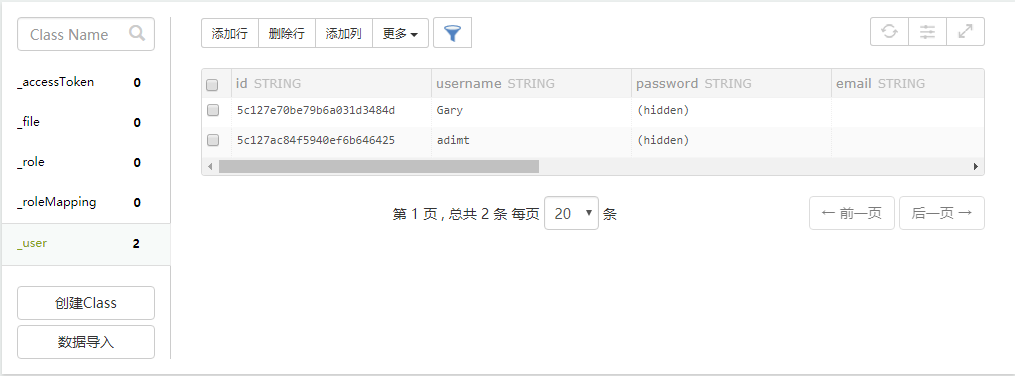
实现用户登陆
在login_frame.html中,为登陆按钮注册点击事件
<body>

    <div class="row">

        <input id="username" class="input" type="text" placeholder="用户名">

    </div>

    <div class="row">

        <input id="password" class="input" type="password" placeholder="密码">

    </div>

    <div class="btn" tapmode="highlight" onclick="fnLogin();">登录</div>

    <div class="btn-third-party">使用微信登录</div>

</body>
编写用户登陆fnLogin()函数
    function fnLogin(){

      var username = $api.byId("username");

      var password = $api.byId("password");

      var vusername = $api.val(username);

      var vpassword = $api.val(password);

      var now = Date.now();

      var appKey = SHA1("A6099005614565"+"UZ"+"5FB51794-FCDC-1FE9-19E0-A2C449C163AF"+"UZ"+now)+"."+now

      api.ajax({

          url: 'https://d.apicloud.com/mcm/api/user/login',

          method: 'post',

          headers: {

              "X-APICloud-AppId": "A6099005614565",

              "X-APICloud-AppKey":appKey,

          },

          data: {

              values: {

                  username:vusername,

                  password:vpassword

              }

          }},

          function (ret,err){

            if(ret&&ret.id){

              alert("登陆成功!");

            }else{

              alert("登陆失败!");

            }

          }

      );

    }
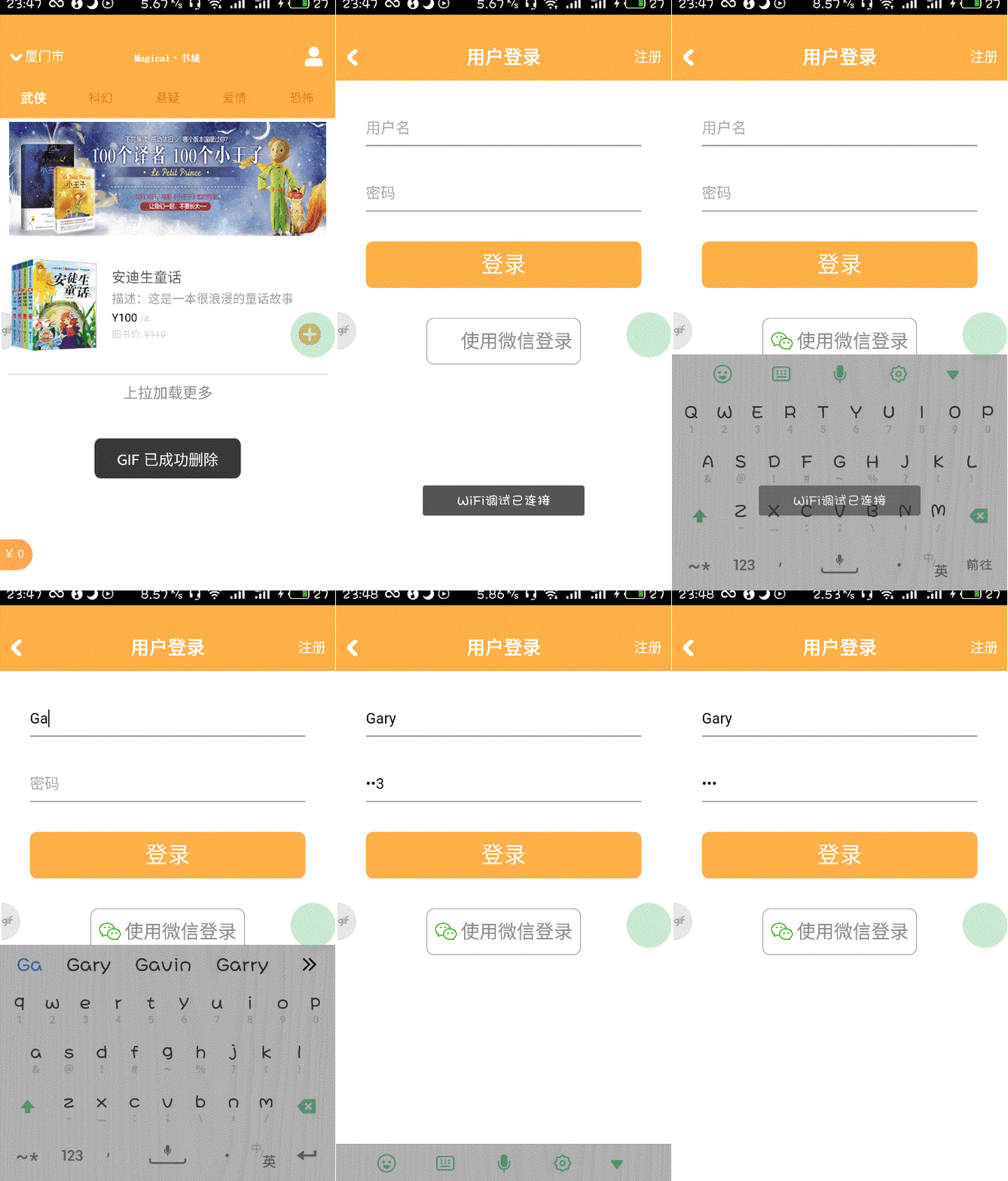
<!DOCTYPE html>

<html>

<head>

    <meta charset="utf-8">

    <meta name="viewport" content="maximum-scale=1.0,minimum-scale=1.0,user-scalable=0,width=device-width,initial-scale=1.0" />

    <meta name="format-detection" content="telephone=no,email=no,date=no,address=no">

    <title>登录</title>

    <link rel="stylesheet" type="text/css" href="../css/api.css" />

    <style>

    header {

        width: 100%;

        height: 50px;

        background-color: #ffaf45

    }

    header .back {

        position: absolute;

        bottom: 0;

        left: 0;

        width: 80px;

        height: 50px;

        background: url(../image/back.png);

        background-position: 12px 16px;

        background-size: 11px 18px;

        background-repeat: no-repeat;

    }

    header h1 {

        width: 100%;

        height: 50px;

        line-height: 50px;

        text-align: center;

        color: #fff;

        font-size: 20px;

    }

    header .right {

        position: absolute;

        bottom: 0;

        right: 0;

        width: 50px;

        height: 50px;

        line-height: 50px;

        color: #fff;

        font-size: 15px;

        text-align: center;

    }

    </style>

</head>

<body>

    <header id="header">

        <!--为返回按钮(左上角)注册点击事件-->

        <div class="back" tapmode onclick="api.closeWin();"></div>

        <h1>用户登录</h1>

        <div class="right" tapmode onclick="fnOpenRegisterWin();">注册</div>

    </header>

</body>

<script type="text/javascript" src="../script/api.js"></script>

<script type="text/javascript">

apiready = function() {

  var header = $api.byId('header');

  $api.fixStatusBar(header);

  var headerH = $api.offset(header).h;

  // 打开注册Frame

  api.openFrame({

      name: 'login_frame',

      url: './login_frame.html',

      rect: {

          marginTop: headerH,

          w: 'auto',

          h: 'auto'

      },

      bgColor:'rgba(0,0,0,0)',

    });

};

// 打开注册Window

function fnOpenRegisterWin () {

    api.openWin({

        name: 'register',

        url: './register.html'

    });

}

</script>

</html>
login.html
<!DOCTYPE html>

<html>

<head>

    <meta charset="utf-8">

    <meta name="viewport" content="maximum-scale=1.0,minimum-scale=1.0,user-scalable=0,width=device-width,initial-scale=1.0" />

    <meta name="format-detection" content="telephone=no,email=no,date=no,address=no">

    <title>登录Frame</title>

    <link rel="stylesheet" type="text/css" href="../css/api.css" />

    <style>

    body {

        text-align: center;

    }

    .row {

        width: auto;

        height: 70px;

        box-sizing: border-box;

        margin-left: 32px;

        margin-right: 32px;

        padding-top: 40px;

        border-bottom: 1px solid #888;

    }

    .input {

        width: 100%;

        height: 20px;

        border: none;

        outline: none;

        font-size: 16px;

        line-height: 20px;

    }

    .btn {

        width: auto;

        height: 50px;

        margin-left: 32px;

        margin-right: 32px;

        margin-top: 32px;

        background-color: #ffaf45;

        line-height: 50px;

        color: #fff;

        font-size: 24px;

        text-align: center;

        border-radius: 8px;

    }

    .btn-third-party {

        display: inline-block;

        width: auto;

        height: 50px;

        box-sizing: border-box;

        margin-top: 32px;

        margin-left: auto;

        margin-right: auto;

        padding: 8px 8px 8px 36px;

        font-size: 20px;

        color: #888;

        line-height: 32px;

        text-align: left;

        border: 1px solid #aaa;

        background-image: url(../image/share_friend.png);

        background-repeat: no-repeat;

        background-size: auto 20px;

        background-position: 8px center;

        border-radius: 8px;

    }

    .highlight {

        opacity: 0.7;

    }

    </style>

</head>

<body>

    <div class="row">

        <input id="username" class="input" type="text" placeholder="用户名">

    </div>

    <div class="row">

        <input id="password" class="input" type="password" placeholder="密码">

    </div>

    <div class="btn" tapmode="highlight" onclick="fnLogin();">登录</div>

    <div class="btn-third-party">使用微信登录</div>

</body>

<script type="text/javascript" src="../script/api.js"></script>

<script type="text/javascript" src="../script/APICloud-rest.js"></script>

<script type="text/javascript" src="../script/SHA1.js"></script>

<script type="text/javascript">

apiready = function() {

};

    function fnLogin(){

      var username = $api.byId("username");

      var password = $api.byId("password");

      var vusername = $api.val(username);

      var vpassword = $api.val(password);

      var now = Date.now();

      var appKey = SHA1("A6099005614565"+"UZ"+"5FB51794-FCDC-1FE9-19E0-A2C449C163AF"+"UZ"+now)+"."+now

      api.ajax({

          url: 'https://d.apicloud.com/mcm/api/user/login',

          method: 'post',

          headers: {

              "X-APICloud-AppId": "A6099005614565",

              "X-APICloud-AppKey":appKey,

          },

          data: {

              values: {

                  username:vusername,

                  password:vpassword

              }

          }},

          function (ret,err){

            if(ret&&ret.id){

              alert("登陆成功!");

            }else{

              alert("登陆失败!");

            }

          }

      );

    }

</script>

</html>
login_frame.html
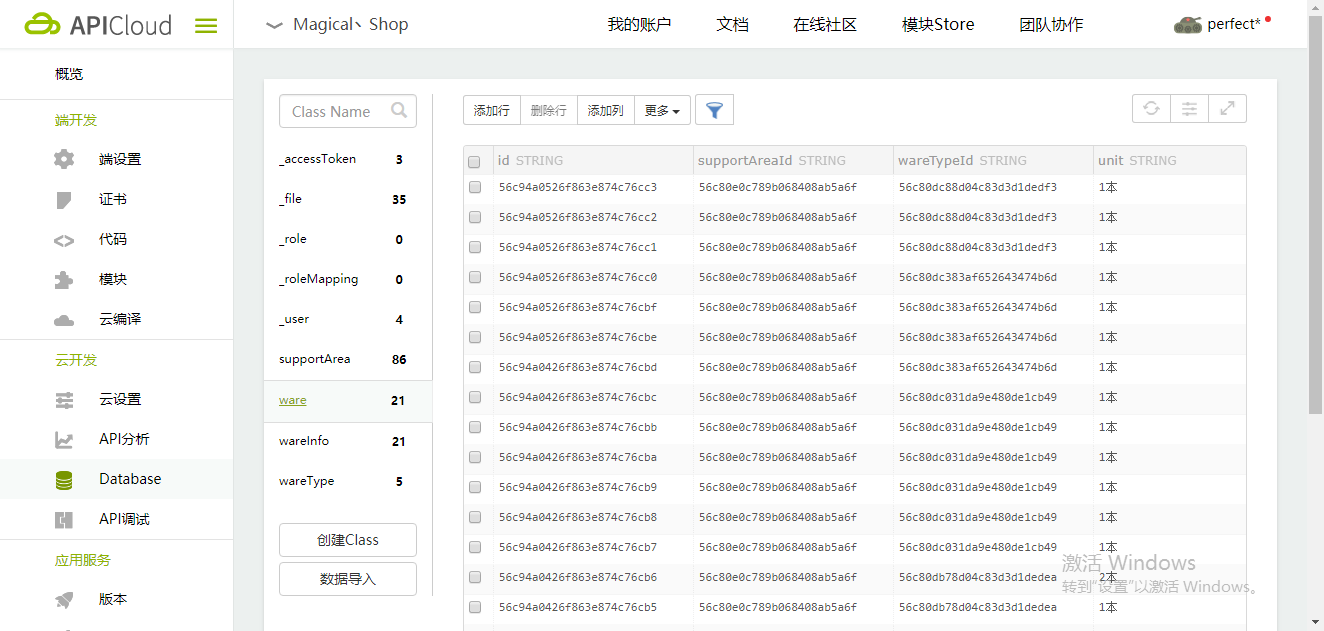
获取商品列表数据
在ApiCloud官网添加书本的数据库
main_frame.html中,在apiready函数中添加代码获得数据库中的书籍
  apiready = function(){

        var now = Date.now();

        var appKey = SHA1("A6099255481782"+"UZ"+"6FAE7BB1-8CFA-5087-1914-CCFB04C5EB85"+"UZ"+now)+"."+now

        var params = {

            fields: {},

            where: {

                supportAreaId: "56c80e0c789b068408ab5a6f",

                wareTypeId: api.pageParam.wareTypeId

            },

            skip: 0,

            limit: 5

        };

        api.ajax({

            url: 'http://d.apicloud.com/mcm/api/ware?filter=' + $api.jsonToStr(params),

            method: 'get',

            headers: {

                "X-APICloud-AppId": "A6099255481782",

                "X-APICloud-AppKey":appKey

            }

        }, function(ret, err) {

            if(ret){

                var list = $api.byId('list');

                list.innerHTML = "";

                for(var i in ret){

                    var ware = ret[i];

                    $api.append(

                      list,

                      '\

                      <div class="ware">\

                      <div class="content">\

                      <img class="thumbnail" src="' +ware.thumbnail.url+'">\

                      <div class="info">\

                      <div class="name">'+ware.name+'</div>\

                      <div class="description">'+ware.description+'</div>\

                      <div class="price-tag">\

                      <span class="price">¥'+ware.price + '</span>\

                      <span class="unit">/本</span>\

                      </div>\

                      <div class="origin-price">书店:\

                      <del>¥'+ware.originPrice+'</del>\

                      </div>\

                      </div>\

                      <div class = "control">\

                      <ima class="add" src="../image/add.png">\

                      </div>\

                      </div>\

                      </div>\

                      ');

                }

            }

            else{

              alert(JSON.stringify(err));

            }

         }

       );

     }
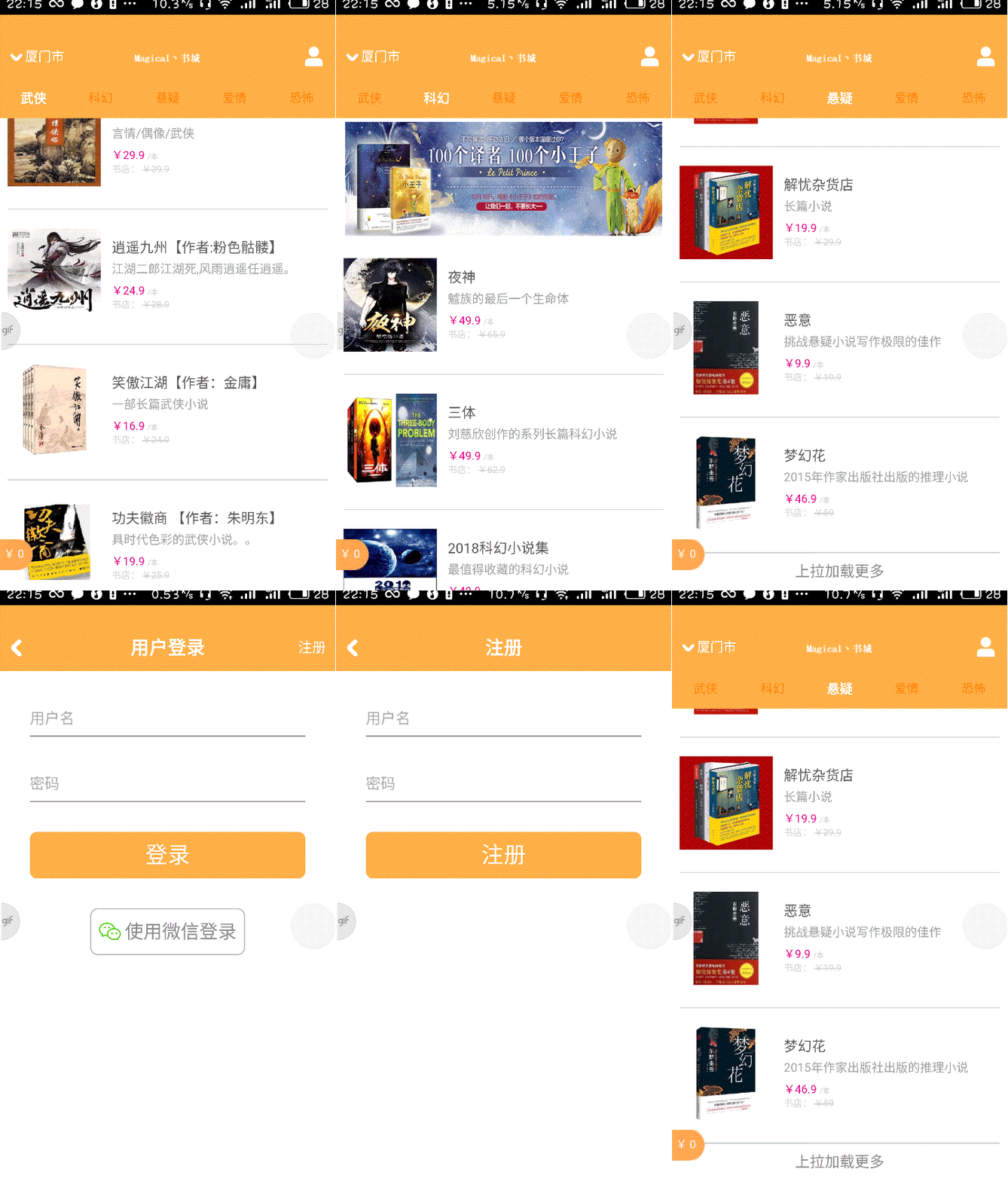
不同书本数据都是从数据库端获取
<!DOCTYPE html>

  <html>

  <head>

      <meta charset="utf-8">

      <meta name="viewport" content="maximum-scale=1.0,minimum-scale=1.0,user-scalable=0,width=device-width,initial-scale=1.0"/>

      <title>title</title>

      <link rel="stylesheet" type="text/css" href="../css/api.css"/>

      <style>

      header {

          width: 100%;

          height: 130px;

          box-sizing: border-box;

          padding: 4px 10px;

      }

      header .banner {

          width: 100%;

          height: 100%;

      }

      section {

          position: relative;

          width: 100%;

          height: auto;

          box-sizing: border-box;

          padding: 0 8px;

      }

      .content {

          width: 100%;

          height: 100%;

      }

      .ware {

          position: relative;

          width: 100%;

          height: 145px;

          box-sizing: border-box;

          padding-top: 15px;

          padding-bottom: 15px;

          border-bottom: 1px solid #d1d1d1;

      }

      .ware .thumbnail {

          position: absolute;

          top: 20px;

          left: 0px;

          height: 100px;

          width: 100px;

      }

      .ware .info {

          width: 100%;

          height: 114px;

          box-sizing: border-box;

          padding-left: 112px;

          padding-right: 28px;

      }

      .ware .info .name {

          width: 100%;

          height: 15px;

          color: #555555;

          margin-top: 14px;

          font-size: 15px;

      }

      .ware .info .description {

          margin-top: 10px;

          width: 100%;

          height: 13px;

          font-size: 13px;

          color: #9d9d9d;

      }

      .ware .info .price-tag {

          margin-top: 10px;

          width: 100%;

          height: 12px;

          font-size: 12px;

          vertical-align: top;

      }

      .ware .info .price-tag .price {

          color: #e3007f;

      }

      .ware .info .price-tag .unit {

          font-size: 8px;

          color: #cbcbcb;

      }

      .ware .info .origin-price {

          margin-top: 5px;

          width: 100%;

          height: 10px;

          font-size: 10px;

          color: #d3d3d3;

      }

      .ware .control {

          position: absolute;

          width: 110px;

          height: 23px;

          right: 8px;

          top:90px;

      }

      .ware .control .add {

          position: absolute;

          top: 0;

          right: 0;

          width: 23px;

          height: 23px;

          z-index: 2;

      }

      .push-status {

          width: 100%;

          height: 40px;

          font-size: 16px;

          color: #888;

          line-height: 40px;

          text-align: center;

          background-color: #fff;

      }

      .active {

          opacity: 0.7;

      }

      </style>

  </head>

  <body>

    <header id="header">

        <img id="banner" class="banner" src="../image/adver2.jpg">

    </header>

    <section id="list">

      <div class="ware">

        <div class="content">

          <img class="thumbnail" src="../image/book1.png">

          <div class="info">

            <div class="name">安迪生童话</div>

            <div class="description">描述:这是一本很浪漫的童话故事</div>

              <div class="price-tag">

                <span class="prive">Y100</span>

                <span class="unit">/本</span>

              </div>

              <div class="origin-price">图书价:

                <del>Y110</del>

              </div>

          </div>

          <div class="control">

            <img class="add" src="../image/add1.png">

          </div>

        </div>

      </div>

    </section>

    <div class="push-status" id="pushStatus">上拉加载更多</div>

  </body>

  <script type="text/javascript" src="../script/api.js"></script>

  <script type="text/javascript" src="../script/APICloud-rest.js"></script>

  <script type="text/javascript" src="../script/SHA1.js"></script>

  <script type="text/javascript" src="../script/doT.min.js"></script>

  <script type="text/javascript">

      apiready = function(){

        var now = Date.now();

        var appKey = SHA1("A6099255481782"+"UZ"+"6FAE7BB1-8CFA-5087-1914-CCFB04C5EB85"+"UZ"+now)+"."+now

        var params = {

            fields: {},

            where: {

                supportAreaId: "56c80e0c789b068408ab5a6f",

                wareTypeId: api.pageParam.wareTypeId

            },

            skip: 0,

            limit: 5

        };

        api.ajax({

            url: 'http://d.apicloud.com/mcm/api/ware?filter=' + $api.jsonToStr(params),

            method: 'get',

            headers: {

                "X-APICloud-AppId": "A6099255481782",

                "X-APICloud-AppKey":appKey

            }

        }, function(ret, err) {

            if(ret){

                var list = $api.byId('list');

                list.innerHTML = "";

                for(var i in ret){

                    var ware = ret[i];

                    $api.append(

                      list,

                      '\

                      <div class="ware">\

                      <div class="content">\

                      <img class="thumbnail" src="' +ware.thumbnail.url+'">\

                      <div class="info">\

                      <div class="name">'+ware.name+'</div>\

                      <div class="description">'+ware.description+'</div>\

                      <div class="price-tag">\

                      <span class="price">¥'+ware.price + '</span>\

                      <span class="unit">/本</span>\

                      </div>\

                      <div class="origin-price">书店:\

                      <del>¥'+ware.originPrice+'</del>\

                      </div>\

                      </div>\

                      <div class = "control">\

                      <ima class="add" src="../image/add.png">\

                      </div>\

                      </div>\

                      </div>\

                      ');

                }

            }

            else{

              alert(JSON.stringify(err));

            }

         }

       );

     }

  </script>

  </html>
main_frame.html
加载更新服务端数据,实现本地的数据存储
使用doT模板引擎显示商品列表,在main_frame.html文件<head></head>标签中映入doT模板引擎
<script type="text/template" id="wareTemplate">

  {{~it:ware:index}}

  <div class="ware">

    <div class="content">

        <img class="thumbnail" src="{{=ware.thumbnail.url}}">

        <div class="info">

        <div class="name">{{=ware.name}}</div>

        <div class="description">{{=ware.description}}</div>

        <div class="price-tag">

            <span class="price">¥{{=ware.price}}</span>

            <span class="unit">/{{=ware.unit}}</span>

        <div>

            <div class="origin-price">书店:

              <del>¥{{=ware.originPrice}}</del>

            </div>

          </div>

          <div class="control">

              <img class="add" src="../image/add.png">

          </div>

        </div>

      </div>

      {{~}}

    </script>
将获取商品信息的回调函数做如下修改
<script type="text/javascript">

      apiready = function(){

        var now = Date.now();

        var appKey = SHA1("A6099255481782"+"UZ"+"6FAE7BB1-8CFA-5087-1914-CCFB04C5EB85"+"UZ"+now)+"."+now

        var params = {

            fields: {},

            where: {

                supportAreaId: "56c80e0c789b068408ab5a6f",

                wareTypeId: api.pageParam.wareTypeId

            },

            skip: 0,

            limit: 5

        };

        api.ajax({

            url: 'http://d.apicloud.com/mcm/api/ware?filter=' + $api.jsonToStr(params),

            method: 'get',

            headers: {

                "X-APICloud-AppId": "A6099255481782",

                "X-APICloud-AppKey":appKey

            }

        }, function(ret, err) {

            if(ret){

              var strTemplate = $api.html

              (

                $api.byId('wareTemplate')

              );

              var fnTemplate = doT.template(strTemplate);

              strTemplate = fnTemplate(ret);

              var list = $api.byId('list');

              $api.html(list, strTemplate);

            }

            else{

              alert(JSON.stringify(err));

            }

         }

       );

     }

  </script>
<!DOCTYPE html>

  <html>

  <head>

      <meta charset="utf-8">

      <meta name="viewport" content="maximum-scale=1.0,minimum-scale=1.0,user-scalable=0,width=device-width,initial-scale=1.0"/>

      <title>title</title>

      <link rel="stylesheet" type="text/css" href="../css/api.css"/>

      <style>

      header {

          width: 100%;

          height: 130px;

          box-sizing: border-box;

          padding: 4px 10px;

      }

      header .banner {

          width: 100%;

          height: 100%;

      }

      section {

          position: relative;

          width: 100%;

          height: auto;

          box-sizing: border-box;

          padding: 0 8px;

      }

      .content {

          width: 100%;

          height: 100%;

      }

      .ware {

          position: relative;

          width: 100%;

          height: 145px;

          box-sizing: border-box;

          padding-top: 15px;

          padding-bottom: 15px;

          border-bottom: 1px solid #d1d1d1;

      }

      .ware .thumbnail {

          position: absolute;

          top: 20px;

          left: 0px;

          height: 100px;

          width: 100px;

      }

      .ware .info {

          width: 100%;

          height: 114px;

          box-sizing: border-box;

          padding-left: 112px;

          padding-right: 28px;

      }

      .ware .info .name {

          width: 100%;

          height: 15px;

          color: #555555;

          margin-top: 14px;

          font-size: 15px;

      }

      .ware .info .description {

          margin-top: 10px;

          width: 100%;

          height: 13px;

          font-size: 13px;

          color: #9d9d9d;

      }

      .ware .info .price-tag {

          margin-top: 10px;

          width: 100%;

          height: 12px;

          font-size: 12px;

          vertical-align: top;

      }

      .ware .info .price-tag .price {

          color: #e3007f;

      }

      .ware .info .price-tag .unit {

          font-size: 8px;

          color: #cbcbcb;

      }

      .ware .info .origin-price {

          margin-top: 5px;

          width: 100%;

          height: 10px;

          font-size: 10px;

          color: #d3d3d3;

      }

      .ware .control {

          position: absolute;

          width: 110px;

          height: 23px;

          right: 8px;

          top:90px;

      }

      .ware .control .add {

          position: absolute;

          top: 0;

          right: 0;

          width: 23px;

          height: 23px;

          z-index: 2;

      }

      .push-status {

          width: 100%;

          height: 40px;

          font-size: 16px;

          color: #888;

          line-height: 40px;

          text-align: center;

          background-color: #fff;

      }

      .active {

          opacity: 0.7;

      }

      </style>

  </head>

  <body>

    <header id="header">

        <img id="banner" class="banner" src="../image/adver2.jpg">

    </header>

    <section id="list">

      <div class="ware">

        <div class="content">

          <img class="thumbnail" src="../image/book1.png">

          <div class="info">

            <div class="name">安迪生童话</div>

            <div class="description">描述:这是一本很浪漫的童话故事</div>

              <div class="price-tag">

                <span class="prive">Y100</span>

                <span class="unit">/本</span>

              </div>

              <div class="origin-price">图书价:

                <del>Y110</del>

              </div>

          </div>

          <div class="control">

            <img class="add" src="../image/add1.png">

          </div>

        </div>

      </div>

    </section>

    <div class="push-status" id="pushStatus">上拉加载更多</div>

  </body>

  <script type="text/template" id="wareTemplate">

  {{~it:ware:index}}

  <div class="ware">

    <div class="content">

        <img class="thumbnail" src="{{=ware.thumbnail.url}}">

        <div class="info">

        <div class="name">{{=ware.name}}</div>

        <div class="description">{{=ware.description}}</div>

        <div class="price-tag">

            <span class="price">¥{{=ware.price}}</span>

            <span class="unit">/{{=ware.unit}}</span>

        <div>

            <div class="origin-price">书店:

              <del>¥{{=ware.originPrice}}</del>

            </div>

          </div>

          <div class="control">

              <img class="add" src="../image/add.png">

          </div>

        </div>

      </div>

      {{~}}

    </script>

  <script type="text/javascript" src="../script/api.js"></script>

  <script type="text/javascript" src="../script/APICloud-rest.js"></script>

  <script type="text/javascript" src="../script/SHA1.js"></script>

  <script type="text/javascript" src="../script/doT.min.js"></script>

  <script type="text/javascript">

      apiready = function(){

        var now = Date.now();

        var appKey = SHA1("A6099255481782"+"UZ"+"6FAE7BB1-8CFA-5087-1914-CCFB04C5EB85"+"UZ"+now)+"."+now

        var params = {

            fields: {},

            where: {

                supportAreaId: "56c80e0c789b068408ab5a6f",

                wareTypeId: api.pageParam.wareTypeId

            },

            skip: 0,

            limit: 5

        };

        api.ajax({

            url: 'http://d.apicloud.com/mcm/api/ware?filter=' + $api.jsonToStr(params),

            method: 'get',

            headers: {

                "X-APICloud-AppId": "A6099255481782",

                "X-APICloud-AppKey":appKey

            }

        }, function(ret, err) {

            if(ret){

              var strTemplate = $api.html

              (

                $api.byId('wareTemplate')

              );

              var fnTemplate = doT.template(strTemplate);

              strTemplate = fnTemplate(ret);

              var list = $api.byId('list');

              $api.html(list, strTemplate);

            }

            else{

              alert(JSON.stringify(err));

            }

         }

       );

     }

  </script>

  </html>
main_frame.html
实现图片缓存
先在模板引擎中将图像utl放入<img>的data-url属性中,在onload函数被调用时读取data-url属性并调用api.imageCache()进行缓存,最后将缓存结果给<img>的src属性来进行图片的加载
修改doT模板中商品图片的代码为
<img onload="fnLoadImage(this)" data-url="{{=ware.thumbnail.url}}" class="thumbnail" src="../image/default_rect.png">
在<script>中实现商品列表的图片缓存函数
  // 实现商品列表的图片缓存

     function fnLoadImage(ele_) {

         var dataUrl = $api.attr(ele_, 'data-url');

         // 缓存data-url所指定的图片

         if (dataUrl) {

             api.imageCache({

                 url: dataUrl

             }, function(ret, err) {

                 if (ret) {

                     ele_.src = ret.url;

                 }

             });

         }
<!DOCTYPE html>

  <html>

  <head>

      <meta charset="utf-8">

      <meta name="viewport" content="maximum-scale=1.0,minimum-scale=1.0,user-scalable=0,width=device-width,initial-scale=1.0"/>

      <title>title</title>

      <link rel="stylesheet" type="text/css" href="../css/api.css"/>

      <style>

      header {

          width: 100%;

          height: 130px;

          box-sizing: border-box;

          padding: 4px 10px;

      }

      header .banner {

          width: 100%;

          height: 100%;

      }

      section {

          position: relative;

          width: 100%;

          height: auto;

          box-sizing: border-box;

          padding: 0 8px;

      }

      .content {

          width: 100%;

          height: 100%;

      }

      .ware {

          position: relative;

          width: 100%;

          height: 145px;

          box-sizing: border-box;

          padding-top: 15px;

          padding-bottom: 15px;

          border-bottom: 1px solid #d1d1d1;

      }

      .ware .thumbnail {

          position: absolute;

          top: 20px;

          left: 0px;

          height: 100px;

          width: 100px;

      }

      .ware .info {

          width: 100%;

          height: 114px;

          box-sizing: border-box;

          padding-left: 112px;

          padding-right: 28px;

      }

      .ware .info .name {

          width: 100%;

          height: 15px;

          color: #555555;

          margin-top: 14px;

          font-size: 15px;

      }

      .ware .info .description {

          margin-top: 10px;

          width: 100%;

          height: 13px;

          font-size: 13px;

          color: #9d9d9d;

      }

      .ware .info .price-tag {

          margin-top: 10px;

          width: 100%;

          height: 12px;

          font-size: 12px;

          vertical-align: top;

      }

      .ware .info .price-tag .price {

          color: #e3007f;

      }

      .ware .info .price-tag .unit {

          font-size: 8px;

          color: #cbcbcb;

      }

      .ware .info .origin-price {

          margin-top: 5px;

          width: 100%;

          height: 10px;

          font-size: 10px;

          color: #d3d3d3;

      }

      .ware .control {

          position: absolute;

          width: 110px;

          height: 23px;

          right: 8px;

          top:90px;

      }

      .ware .control .add {

          position: absolute;

          top: 0;

          right: 0;

          width: 23px;

          height: 23px;

          z-index: 2;

      }

      .push-status {

          width: 100%;

          height: 40px;

          font-size: 16px;

          color: #888;

          line-height: 40px;

          text-align: center;

          background-color: #fff;

      }

      .active {

          opacity: 0.7;

      }

      </style>

  </head>

  <body>

    <header id="header">

        <img id="banner" class="banner" src="../image/adver2.jpg">

    </header>

    <section id="list">

      <div class="ware">

        <div class="content">

          <img class="thumbnail" src="../image/book1.png">

          <div class="info">

            <div class="name">安迪生童话</div>

            <div class="description">描述:这是一本很浪漫的童话故事</div>

              <div class="price-tag">

                <span class="prive">Y100</span>

                <span class="unit">/本</span>

              </div>

              <div class="origin-price">图书价:

                <del>Y110</del>

              </div>

          </div>

          <div class="control">

            <img class="add" src="../image/add1.png">

          </div>

        </div>

      </div>

    </section>

    <div class="push-status" id="pushStatus">上拉加载更多</div>

  </body>

  <script type="text/template" id="wareTemplate">

  {{~it:ware:index}}

  <div class="ware">

    <div class="content">

          <img onload="fnLoadImage(this)" data-url="{{=ware.thumbnail.url}}" class="thumbnail" src="../image/default_rect.png">

        <div class="info">

        <div class="name">{{=ware.name}}</div>

        <div class="description">{{=ware.description}}</div>

        <div class="price-tag">

            <span class="price">¥{{=ware.price}}</span>

            <span class="unit">/{{=ware.unit}}</span>

        <div>

            <div class="origin-price">书店:

              <del>¥{{=ware.originPrice}}</del>

            </div>

          </div>

          <div class="control">

              <img class="add" src="../image/add1.png">

          </div>

        </div>

      </div>

      {{~}}

    </script>

  <script type="text/javascript" src="../script/api.js"></script>

  <script type="text/javascript" src="../script/APICloud-rest.js"></script>

  <script type="text/javascript" src="../script/SHA1.js"></script>

  <script type="text/javascript" src="../script/doT.min.js"></script>

  <script type="text/javascript">

      apiready = function(){

        var now = Date.now();

        var appKey = SHA1("A6099255481782"+"UZ"+"6FAE7BB1-8CFA-5087-1914-CCFB04C5EB85"+"UZ"+now)+"."+now

        var params = {

            fields: {},

            where: {

                supportAreaId: "56c80e0c789b068408ab5a6f",

                wareTypeId: api.pageParam.wareTypeId

            },

            skip: 0,

            limit: 5

        };

        api.ajax({

            url: 'http://d.apicloud.com/mcm/api/ware?filter=' + $api.jsonToStr(params),

            method: 'get',

            headers: {

                "X-APICloud-AppId": "A6099255481782",

                "X-APICloud-AppKey":appKey

            }

        }, function(ret, err) {

            if(ret){

              var strTemplate = $api.html

              (

                $api.byId('wareTemplate')

              );

              var fnTemplate = doT.template(strTemplate);

              strTemplate = fnTemplate(ret);

              var list = $api.byId('list');

              $api.html(list, strTemplate);

            }

            else{

              alert(JSON.stringify(err));

            }

         }

       );

     }

     // 实现商品列表的图片缓存

     function fnLoadImage(ele_) {

         var dataUrl = $api.attr(ele_, 'data-url');

         // 缓存data-url所指定的图片

         if (dataUrl) {

             api.imageCache({

                 url: dataUrl

             }, function(ret, err) {

                 if (ret) {

                     ele_.src = ret.url;

                 }

             });

         }

     }

  </script>

  </html>
main_frame.html
实现下拉刷新
在html_frame中实现下拉刷新api.setRefreshHeaderInfo
      api.setRefreshHeaderInfo({

          loadingImg: 'widget://image/refresh.png',

          bgColor: '#fff',

          textColor: '#e1017e',

          showTime: true

      }, function(ret, err) {

          // 刷新商品列表

          fnLoadWares();

      });
将获取商品列表的代码封装为函数fnLoadWares(),并修改apiready()函数,在apiready()函数中直接调用fnLoadWares()函数
     function fnLoadWares() {

       var now = Date.now();

       var appKey = SHA1("A6099255481782"+"UZ"+"6FAE7BB1-8CFA-5087-1914-CCFB04C5EB85"+"UZ"+now)+"."+now

       var params = {

           fields: {},

           where: {

               supportAreaId: "56c80e0c789b068408ab5a6f",

               wareTypeId: api.pageParam.wareTypeId

           },

           skip: 0,

           limit: 5

       };

       api.ajax({

           url: 'http://d.apicloud.com/mcm/api/ware?filter=' + $api.jsonToStr(params),

           method: 'get',

           headers: {

               "X-APICloud-AppId": "A6099255481782",

               "X-APICloud-AppKey":appKey

           }

       }, function(ret, err) {

         api.refreshHeaderLoadDone();

           if(ret){

             var strTemplate = $api.html

             (

               $api.byId('wareTemplate')

             );

             var fnTemplate = doT.template(strTemplate);

             strTemplate = fnTemplate(ret);

             var list = $api.byId('list');

             $api.html(list, strTemplate);

           }

           else{

             alert(JSON.stringify(err));

           }

        }

      );

     }
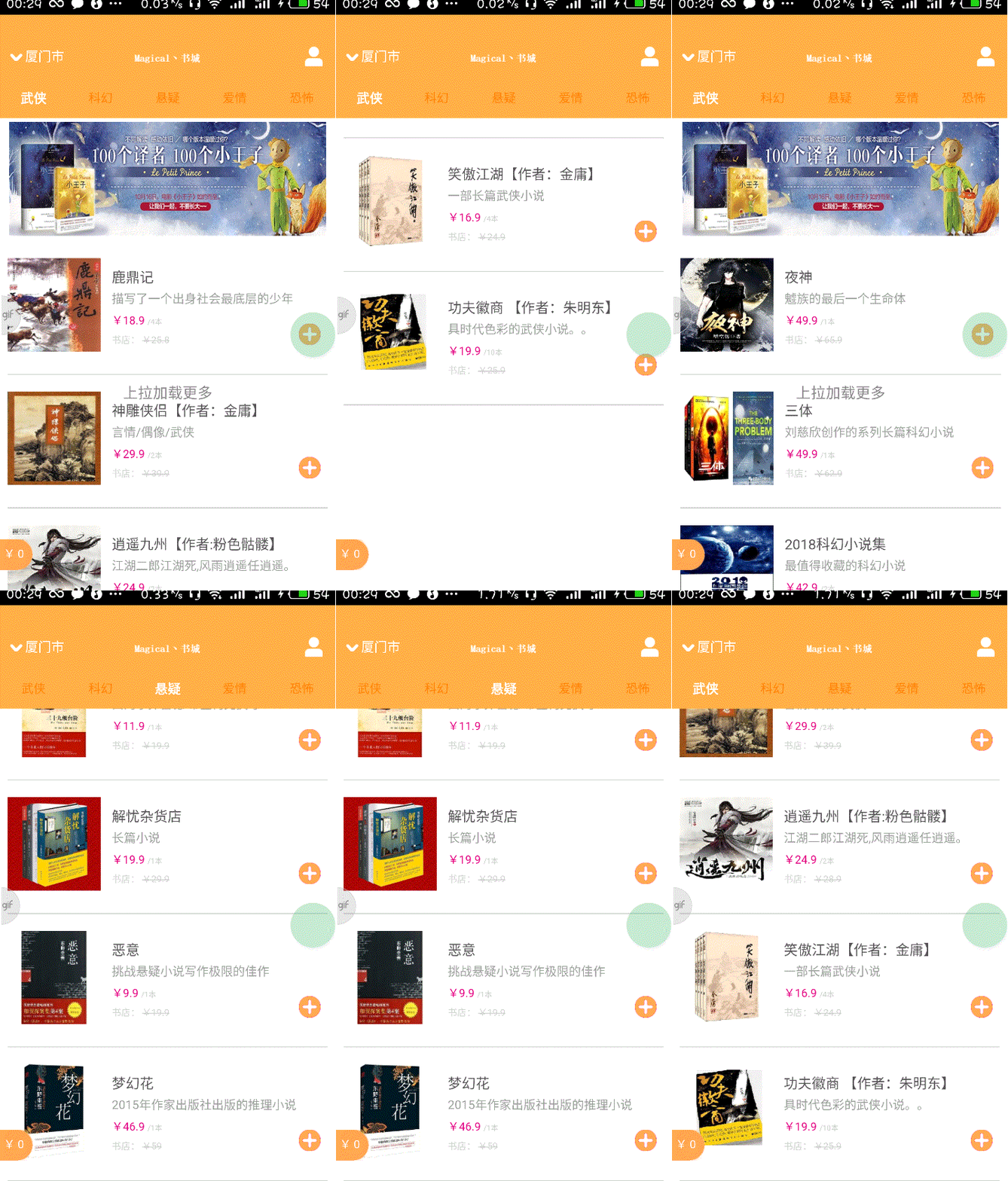
在apiready函数中,页面打开的时候首先会加载一次商品列表,接着会通过api.setRefreshHeaderInfo()设置下拉刷新组件,在下拉进行后(回调函数被执行)会再次加载商品列表。最后修改api.ajax()的回调函数,获取商品列表后通过 api.refreshHeaderLoadDone()关闭下拉刷新组件
<!DOCTYPE html>

  <html>

  <head>

      <meta charset="utf-8">

      <meta name="viewport" content="maximum-scale=1.0,minimum-scale=1.0,user-scalable=0,width=device-width,initial-scale=1.0"/>

      <title>title</title>

      <link rel="stylesheet" type="text/css" href="../css/api.css"/>

      <style>

      header {

          width: 100%;

          height: 130px;

          box-sizing: border-box;

          padding: 4px 10px;

      }

      header .banner {

          width: 100%;

          height: 100%;

      }

      section {

          position: relative;

          width: 100%;

          height: auto;

          box-sizing: border-box;

          padding: 0 8px;

      }

      .content {

          width: 100%;

          height: 100%;

      }

      .ware {

          position: relative;

          width: 100%;

          height: 145px;

          box-sizing: border-box;

          padding-top: 15px;

          padding-bottom: 15px;

          border-bottom: 1px solid #d1d1d1;

      }

      .ware .thumbnail {

          position: absolute;

          top: 20px;

          left: 0px;

          height: 100px;

          width: 100px;

      }

      .ware .info {

          width: 100%;

          height: 114px;

          box-sizing: border-box;

          padding-left: 112px;

          padding-right: 28px;

      }

      .ware .info .name {

          width: 100%;

          height: 15px;

          color: #555555;

          margin-top: 14px;

          font-size: 15px;

      }

      .ware .info .description {

          margin-top: 10px;

          width: 100%;

          height: 13px;

          font-size: 13px;

          color: #9d9d9d;

      }

      .ware .info .price-tag {

          margin-top: 10px;

          width: 100%;

          height: 12px;

          font-size: 12px;

          vertical-align: top;

      }

      .ware .info .price-tag .price {

          color: #e3007f;

      }

      .ware .info .price-tag .unit {

          font-size: 8px;

          color: #cbcbcb;

      }

      .ware .info .origin-price {

          margin-top: 5px;

          width: 100%;

          height: 10px;

          font-size: 10px;

          color: #d3d3d3;

      }

      .ware .control {

          position: absolute;

          width: 110px;

          height: 23px;

          right: 8px;

          top:90px;

      }

      .ware .control .add {

          position: absolute;

          top: 0;

          right: 0;

          width: 23px;

          height: 23px;

          z-index: 2;

      }

      .push-status {

          width: 100%;

          height: 40px;

          font-size: 16px;

          color: #888;

          line-height: 40px;

          text-align: center;

          background-color: #fff;

      }

      .active {

          opacity: 0.7;

      }

      </style>

  </head>

  <body>

    <header id="header">

        <img id="banner" class="banner" src="../image/adver2.jpg">

    </header>

    <section id="list">

      <div class="ware">

        <div class="content">

          <img class="thumbnail" src="../image/book1.png">

          <div class="info">

            <div class="name">安迪生童话</div>

            <div class="description">描述:这是一本很浪漫的童话故事</div>

              <div class="price-tag">

                <span class="prive">Y100</span>

                <span class="unit">/本</span>

              </div>

              <div class="origin-price">图书价:

                <del>Y110</del>

              </div>

          </div>

          <div class="control">

            <img class="add" src="../image/add1.png">

          </div>

        </div>

      </div>

    </section>

    <div class="push-status" id="pushStatus">上拉加载更多</div>

  </body>

  <script type="text/template" id="wareTemplate">

  {{~it:ware:index}}

  <div class="ware">

    <div class="content">

          <img onload="fnLoadImage(this)" data-url="{{=ware.thumbnail.url}}" class="thumbnail" src="../image/default_rect.png">

        <div class="info">

        <div class="name">{{=ware.name}}</div>

        <div class="description">{{=ware.description}}</div>

        <div class="price-tag">

            <span class="price">¥{{=ware.price}}</span>

            <span class="unit">/{{=ware.unit}}</span>

        <div>

            <div class="origin-price">书店:

              <del>¥{{=ware.originPrice}}</del>

            </div>

          </div>

          <div class="control">

              <img class="add" src="../image/add1.png">

          </div>

        </div>

      </div>

      {{~}}

    </script>

  <script type="text/javascript" src="../script/api.js"></script>

  <script type="text/javascript" src="../script/APICloud-rest.js"></script>

  <script type="text/javascript" src="../script/SHA1.js"></script>

  <script type="text/javascript" src="../script/doT.min.js"></script>

  <script type="text/javascript">

      apiready = function(){

      fnLoadWares();

      api.setRefreshHeaderInfo({

          loadingImg: 'widget://image/refresh.png',

          bgColor: '#fff',

          textColor: '#e1017e',

          showTime: true

      }, function(ret, err) {

          // 刷新商品列表

          fnLoadWares();

      });

        api.addEventListener({

              name:'scrolltobottom',

              extra:{

                threshold:300//距离底部患有多少触发scrolltobottom事件

              },function(ret,err){

                //获取更多的商品

                fnLoadWares(true);

              }

        });

     }

     // 实现商品列表的图片缓存

     function fnLoadImage(ele_) {

         var dataUrl = $api.attr(ele_, 'data-url');

         // 缓存data-url所指定的图片

         if (dataUrl) {

             api.imageCache({

                 url: dataUrl

             }, function(ret, err) {

                 if (ret) {

                     ele_.src = ret.url;

                 }

             });

         }

     }

       var skip = 0;

       var limit = 5;

       function fnLoadWares(more){

         if(more){

           skip+=limit;

         }else{

           skip=0;

         }

       var now = Date.now();

       var appKey = SHA1("A6099255481782"+"UZ"+"6FAE7BB1-8CFA-5087-1914-CCFB04C5EB85"+"UZ"+now)+"."+now

       var params = {

           fields: {},

           where: {

               supportAreaId: "56c80e0c789b068408ab5a6f",

               wareTypeId: api.pageParam.wareTypeId

           },

           skip: 0,

           limit: 5

       };

       api.ajax({

           url: 'http://d.apicloud.com/mcm/api/ware?filter=' + $api.jsonToStr(params),

           method: 'get',

           headers: {

               "X-APICloud-AppId": "A6099255481782",

               "X-APICloud-AppKey":appKey

           }

       }, function(ret, err) {

           if(ret){

             var strTemplate = $api.html

             (

               $api.byId('wareTemplate')

             );

             var fnTemplate = doT.template(strTemplate);

             strTemplate = fnTemplate(ret);

             var list = $api.byId('list');

             if(more){

               $api.append(list, strTemplate);

             }else{

                $api.html(list, strTemplate);

             }

            api.refreshHeaderLoadDone();

           }

           else{

             alert(JSON.stringify(err));

           }

        }

      );

     }

  </script>

  </html>
main_frame.html
实现上拉加载更多
在main_frame.html中的apiready函数中添加
        api.addEventListener({

              name:'scrolltobottom',

              extra:{

                threshold:300://距离底部患有多少触发scrolltobottom事件

              },function(ret,err){

                //获取更多的商品

                fnLoadWares(true);

              }

        });
修改fnLoadWares()函数
   var skip = 0;

       var limit = 5;

       function fnLoadWares(more){

         if(more){

           skip+=limit;

         }else{

           skip=0;

         }

       var now = Date.now();

       var appKey = SHA1("A6099255481782"+"UZ"+"6FAE7BB1-8CFA-5087-1914-CCFB04C5EB85"+"UZ"+now)+"."+now

       var params = {

           fields: {},

           where: {

               supportAreaId: "56c80e0c789b068408ab5a6f",

               wareTypeId: api.pageParam.wareTypeId

           },

           skip: 0,

           limit: 5

       };

       api.ajax({

           url: 'http://d.apicloud.com/mcm/api/ware?filter=' + $api.jsonToStr(params),

           method: 'get',

           headers: {

               "X-APICloud-AppId": "A6099255481782",

               "X-APICloud-AppKey":appKey

           }

       }, function(ret, err) {

           if(ret){

             var strTemplate = $api.html

             (

               $api.byId('wareTemplate')

             );

             var fnTemplate = doT.template(strTemplate);

             strTemplate = fnTemplate(ret);

             var list = $api.byId('list');

             if(more){

               $api.append(list, strTemplate);

             }else{

                $api.html(list, strTemplate);

             }

            api.refreshHeaderLoadDone();

           }

           else{

             alert(JSON.stringify(err));

           }

        }

      );

     }
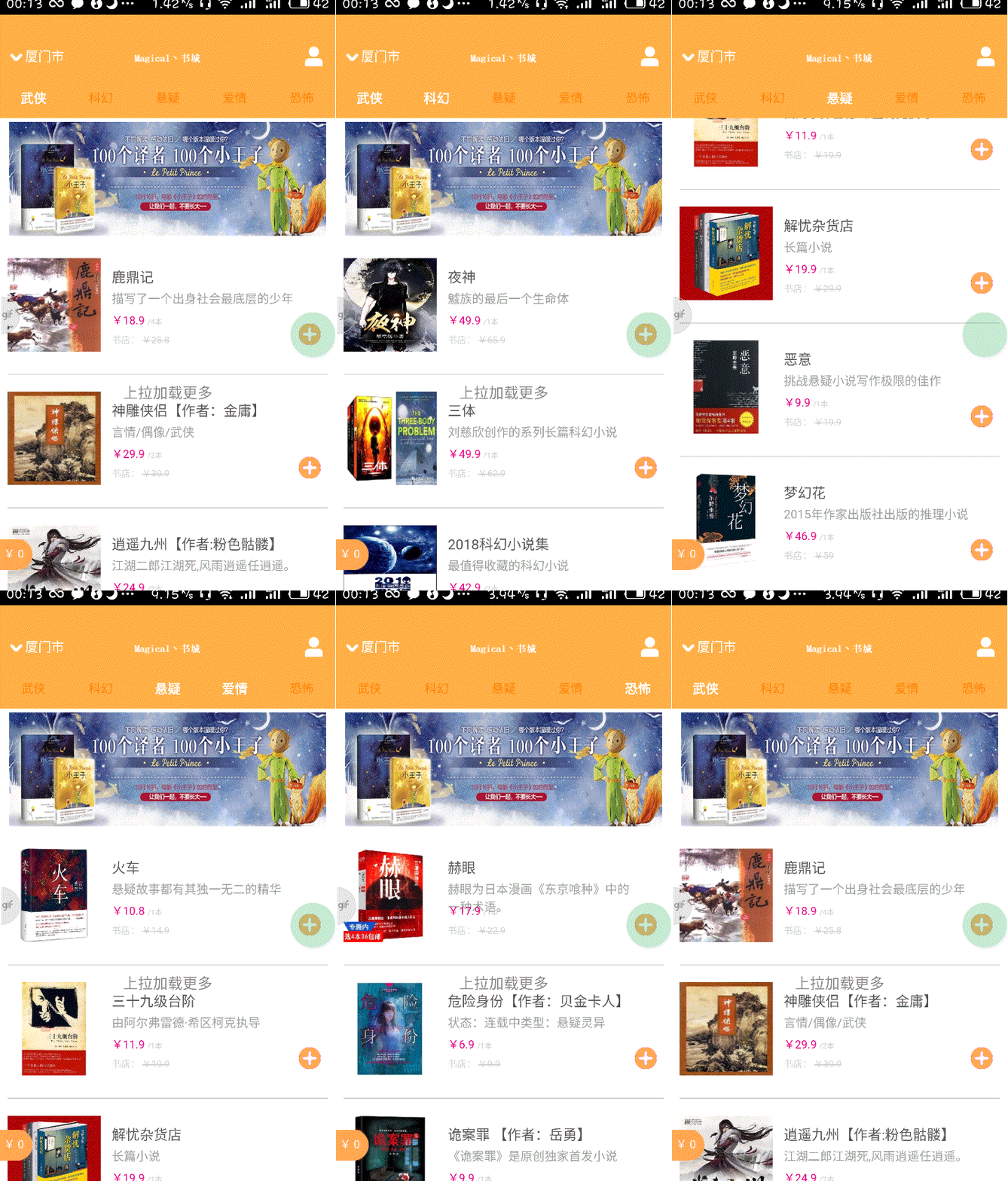
首先通过api.addEventListener()监听scrolltobottom事件,然后再事件触发后调用fnLoadWares(true)来加载更多的商品。fnLoadWares()函数的唯一参数表示是否加载更多。然后将ship和limit字段提出,当加载更多时更新skip的数值即可。最后再输出内容时分别使用$api.html()和$api.append()来处理不同的情况,在“图书”列表下可以体验效果

<!DOCTYPE html>

  <html>

  <head>

      <meta charset="utf-8">

      <meta name="viewport" content="maximum-scale=1.0,minimum-scale=1.0,user-scalable=0,width=device-width,initial-scale=1.0"/>

      <title>title</title>

      <link rel="stylesheet" type="text/css" href="../css/api.css"/>

      <style>

      header {

          width: 100%;

          height: 130px;

          box-sizing: border-box;

          padding: 4px 10px;

      }

      header .banner {

          width: 100%;

          height: 100%;

      }

      section {

          position: relative;

          width: 100%;

          height: auto;

          box-sizing: border-box;

          padding: 0 8px;

      }

      .content {

          width: 100%;

          height: 100%;

      }

      .ware {

          position: relative;

          width: 100%;

          height: 145px;

          box-sizing: border-box;

          padding-top: 15px;

          padding-bottom: 15px;

          border-bottom: 1px solid #d1d1d1;

      }

      .ware .thumbnail {

          position: absolute;

          top: 20px;

          left: 0px;

          height: 100px;

          width: 100px;

      }

      .ware .info {

          width: 100%;

          height: 114px;

          box-sizing: border-box;

          padding-left: 112px;

          padding-right: 28px;

      }

      .ware .info .name {

          width: 100%;

          height: 15px;

          color: #555555;

          margin-top: 14px;

          font-size: 15px;

      }

      .ware .info .description {

          margin-top: 10px;

          width: 100%;

          height: 13px;

          font-size: 13px;

          color: #9d9d9d;

      }

      .ware .info .price-tag {

          margin-top: 10px;

          width: 100%;

          height: 12px;

          font-size: 12px;

          vertical-align: top;

      }

      .ware .info .price-tag .price {

          color: #e3007f;

      }

      .ware .info .price-tag .unit {

          font-size: 8px;

          color: #cbcbcb;

      }

      .ware .info .origin-price {

          margin-top: 5px;

          width: 100%;

          height: 10px;

          font-size: 10px;

          color: #d3d3d3;

      }

      .ware .control {

          position: absolute;

          width: 110px;

          height: 23px;

          right: 8px;

          top:90px;

      }

      .ware .control .add {

          position: absolute;

          top: 0;

          right: 0;

          width: 23px;

          height: 23px;

          z-index: 2;

      }

      .push-status {

          width: 100%;

          height: 40px;

          font-size: 16px;

          color: #888;

          line-height: 40px;

          text-align: center;

          background-color: #fff;

      }

      .active {

          opacity: 0.7;

      }

      </style>

  </head>

  <body>

    <header id="header">

        <img id="banner" class="banner" src="../image/adver2.jpg">

    </header>

    <section id="list">

      <div class="ware">

        <div class="content">

          <img class="thumbnail" src="../image/book1.png">

          <div class="info">

            <div class="name">安迪生童话</div>

            <div class="description">描述:这是一本很浪漫的童话故事</div>

              <div class="price-tag">

                <span class="prive">Y100</span>

                <span class="unit">/本</span>

              </div>

              <div class="origin-price">图书价:

                <del>Y110</del>

              </div>

          </div>

          <div class="control">

            <img class="add" src="../image/add1.png">

          </div>

        </div>

      </div>

    </section>

    <div class="push-status" id="pushStatus">上拉加载更多</div>

  </body>

  <script type="text/template" id="wareTemplate">

  {{~it:ware:index}}

  <div class="ware">

    <div class="content">

          <img onload="fnLoadImage(this)" data-url="{{=ware.thumbnail.url}}" class="thumbnail" src="../image/default_rect.png">

        <div class="info">

        <div class="name">{{=ware.name}}</div>

        <div class="description">{{=ware.description}}</div>

        <div class="price-tag">

            <span class="price">¥{{=ware.price}}</span>

            <span class="unit">/{{=ware.unit}}</span>

        <div>

            <div class="origin-price">书店:

              <del>¥{{=ware.originPrice}}</del>

            </div>

          </div>

          <div class="control">

              <img class="add" src="../image/add1.png">

          </div>

        </div>

      </div>

      {{~}}

    </script>

  <script type="text/javascript" src="../script/api.js"></script>

  <script type="text/javascript" src="../script/APICloud-rest.js"></script>

  <script type="text/javascript" src="../script/SHA1.js"></script>

  <script type="text/javascript" src="../script/doT.min.js"></script>

  <script type="text/javascript">

      apiready = function(){

      fnLoadWares();

      api.setRefreshHeaderInfo({

          loadingImg: 'widget://image/refresh.png',

          bgColor: '#fff',

          textColor: '#e1017e',

          showTime: true

      }, function(ret, err) {

          // 刷新商品列表

          fnLoadWares();

      });

        api.addEventListener({

              name:'scrolltobottom',

              extra:{

                threshold:300//距离底部患有多少触发scrolltobottom事件

              },function(ret,err){

                //获取更多的商品

                fnLoadWares(true);

              }

        });

     }

     // 实现商品列表的图片缓存

     function fnLoadImage(ele_) {

         var dataUrl = $api.attr(ele_, 'data-url');

         // 缓存data-url所指定的图片

         if (dataUrl) {

             api.imageCache({

                 url: dataUrl

             }, function(ret, err) {

                 if (ret) {

                     ele_.src = ret.url;

                 }

             });

         }

     }

       var skip = 0;

       var limit = 5;

       function fnLoadWares(more){

         if(more){

           skip+=limit;

         }else{

           skip=0;

         }

       var now = Date.now();

       var appKey = SHA1("A6099255481782"+"UZ"+"6FAE7BB1-8CFA-5087-1914-CCFB04C5EB85"+"UZ"+now)+"."+now

       var params = {

           fields: {},

           where: {

               supportAreaId: "56c80e0c789b068408ab5a6f",

               wareTypeId: api.pageParam.wareTypeId

           },

           skip: 0,

           limit: 5

       };

       api.ajax({

           url: 'http://d.apicloud.com/mcm/api/ware?filter=' + $api.jsonToStr(params),

           method: 'get',

           headers: {

               "X-APICloud-AppId": "A6099255481782",

               "X-APICloud-AppKey":appKey

           }

       }, function(ret, err) {

           if(ret){

             var strTemplate = $api.html

             (

               $api.byId('wareTemplate')

             );

             var fnTemplate = doT.template(strTemplate);

             strTemplate = fnTemplate(ret);

             var list = $api.byId('list');

             if(more){

               $api.append(list, strTemplate);

             }else{

                $api.html(list, strTemplate);

             }

            api.refreshHeaderLoadDone();

           }

           else{

             alert(JSON.stringify(err));

           }

        }

      );

     }

  </script>

  </html>
main_frame.html
实现保存登陆信息
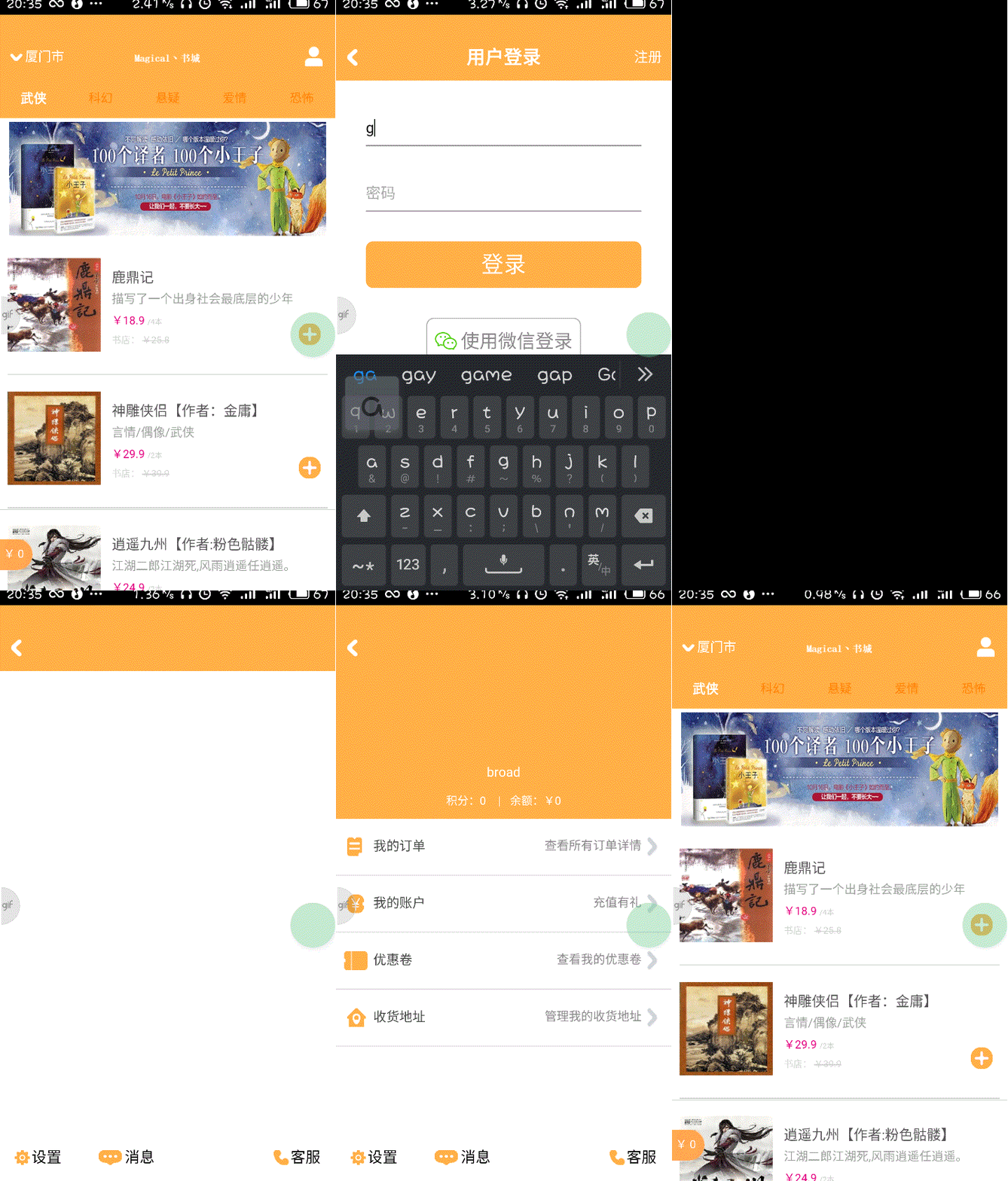
实现保存登陆信息,这里用到本地存储。在用户未登录时如果点击右上角的个人中心按钮,会跳转到登陆页面,如果用户已登陆则会跳转到个人中心页面
添加personalcenter.html和personalcenter_frame.html用户中心的静态界面
<!DOCTYPE html>

<html>

<head>

    <meta charset="utf-8">

    <meta name="viewport" content="maximum-scale=1.0,minimum-scale=1.0,user-scalable=0,width=device-width,initial-scale=1.0" />

    <meta name="format-detection" content="telephone=no,email=no,date=no,address=no">

    <title>title</title>

    <link rel="stylesheet" type="text/css" href="../css/api.css" />

    <style>

    html,

    body {

        display: -webkit-box;

        display: -webkit-flex;

        display: flex;

        -webkit-box-orient: vertical;

        -webkit-flex-flow: column;

        flex-flow: column;

        height: 100%;

    }

    header {

        width: 100%;

        height: 50px;

        background-color: #e3007f

    }

    header .back {

        position: absolute;

        bottom: 0;

        left: 0;

        width: 80px;

        height: 50px;

        background: url(../image/back.png);

        background-position: 12px 16px;

        background-size: 11px 18px;

        background-repeat: no-repeat;

    }

    section {

        -webkit-box-flex: 1;

        -webkit-flex: 1;

        flex: 1;

        overflow: auto

    }

    footer {

        display: -webkit-box;

        display: -webkit-flex;

        display: flex;

        -webkit-box-orient: horizontal;

        -webkit-flex-flow: row;

        flex-flow: row;

        width: 100%;

        height: 50px;

    }

    footer .item {

        -webkit-box-flex: 1;

        -webkit-flex: 1;

        flex: 1;

        width: 100%;

        height: 50px;

    }

    footer .item-service {

        text-align: right;

    }

    footer .item .button {

        display: inline-block;

        width: auto;

        height: 50px;

        box-sizing: border-box;

        line-height: 50px;

        text-align: left;

        font-size: 16px;

        background-size: auto 16px;

        background-position: 16px center;

        background-repeat: no-repeat;

    }

    .setting {

        padding-left: 34px;

        background-image: url(../image/user_setting.png);

    }

    .message {

        padding-left: 44px;

        background-image: url(../image/icon_user_messages.png);

    }

    .service {

        padding-left: 34px;

        padding-right: 16px;

        background-image: url(../image/user_call.png);

    }

    </style>

</head>

<body>

    <header id="header">

        <div class="back" tapmode onclick="api.closeWin();"></div>

    </header>

    <section></section>

    <footer id="footer">

        <div class="item">

            <div class="button setting" tapmode onclick="fnOpenSettingWin();">设置</div>

        </div>

        <div class="item">

            <div class="button message" tapmode onclick="fnOpenMessageWin();">消息</div>

        </div>

        <div class="item"></div>

        <div class="item item-service">

            <div class="button service" tapmode onclick="fnOpenCustomerServiceWin();">客服</div>

        </div>

    </footer>

</body>

<script type="text/javascript" src="../script/api.js"></script>

<script type="text/javascript">

apiready = function() {

    var header = $api.byId('header');

    var footer = $api.byId('footer');

    var headerH = $api.fixStatusBar(header);

    var footerH = $api.fixTabBar(footer);

    api.openFrame({

        name: 'personalcenter_frame',

        url: './personalcenter_frame.html',

        rect: {

            marginTop: headerH,

            marginBottom: footerH,

            w: 'auto'

        },

        bounces: false

    });

};

// 打开设置Window

function fnOpenSettingWin () {

    api.openWin({

        name: 'setting',

        url: './setting.html'

    });

}

// 打开消息Window

function fnOpenMessageWin () {

    api.openWin({

        name: 'message',

        url: './message.html'

    });

}

// 打开客服Window

function fnOpenCustomerServiceWin () {

    api.openWin({

        name: 'customerservice',

        url: './customerservice.html'

    });

}

</script>

</html>
personalcenter.html
<!DOCTYPE html>

<html>

<head>

    <meta charset="utf-8">

    <meta name="viewport" content="maximum-scale=1.0,minimum-scale=1.0,user-scalable=0,width=device-width,initial-scale=1.0" />

    <meta name="format-detection" content="telephone=no,email=no,date=no,address=no">

    <title>个人中心Frame</title>

    <link rel="stylesheet" type="text/css" href="../css/api.css" />

    <style>

    header {

        height: 150px;

        padding-top: 8px;

        background-color: #e3007f;

    }

    header .icon-panel {

        width: 100%;

        height: 86px;

        text-align: center;

    }

    header .icon-panel .icon {

        display: inline-block;

        box-sizing: border-box;

        width: 86px;

        height: 86px;

        border: 3px solid #b10063;

        border-radius: 86px;

        background-image: url(../image/default_square.png);

        background-size: 100% 100%;

        background-position: center center;

        background-repeat: no-repeat;

    }

    header .username {

        height: 30px;

        line-height: 30px;

        font-size: 14px;

        color: #fff;

        text-align: center;

    }

    header .account-info {

        height: 30px;

        line-height: 30px;

        font-size: 12px;

        color: #fff;

        text-align: center;

    }

    .separator {

        margin: auto 10px;

    }

    .option {

        position: relative;

        box-sizing: border-box;

        width: 100%;

        height: 61px;

        border-bottom: 1px solid #ddd;

    }

    .option .icon {

        position: absolute;

        left: 0;

        top: 0;

        width: 40px;

        height: 60px;

        background-repeat: no-repeat;

        background-position: 12px center;

        background-size: auto 20px;

    }

    .option .icon-myorder {

        background-image: url(../image/img_item_myorder.png);

    }

    .option .icon-account {

        background-image: url(../image/icon_user_info_accounts.png);

    }

    .option .icon-coupon {

        background-image: url(../image/icon_user_coupon.png);

        background-position: 8px center;

    }

    .option .icon-address {

        background-image: url(../image/item_user_address.png);

    }

    .option .title {

        position: relative;

        box-sizing: border-box;

        width: 100%;

        height: 60px;

        padding-left: 40px;

        font-size: 14px;

        color: #444;

        text-align: left;

        line-height: 60px;

    }

    .option .arrow-panel {

        position: absolute;

        top: 0;

        right: 12px;

        width: auto;

        height: 60px;

        background-image: url(../image/arrow_right.png);

        background-repeat: no-repeat;

        background-size: 16px 24px;

        background-position: right center;

    }

    .option .arrow-panel .text {

        box-sizing: border-box;

        padding-right: 20px;

        width: auto;

        height: 60px;

        line-height: 60px;

        font-size: 13px;

        color: #888;

        text-align: left;

    }

    .highlight {

        opacity: 0.7;

    }

    </style>

</head>

<body>

    <header>

        <div class="icon-panel" tapmode onclick="fnSetAvatar()">

            <div id="icon" class="icon"></div>

        </div>

        <div id="username" class="username">broad</div>

        <div class="account-info">积分:0 <span class="separator">|</span>余额:¥0</div>

    </header>

    <section>

        <div class="option" tapmode onclick="fnOpenMyOrderWin();">

            <div class="icon icon-myorder"></div>

            <div class="title">我的订单</div>

            <div class="arrow-panel">

                <div class="text">查看所有订单详情</div>

            </div>

        </div>

        <div class="option" tapmode onclick="fnOpenAccountWin();">

            <div class="icon icon-account"></div>

            <div class="title">我的账户</div>

            <div class="arrow-panel">

                <div class="text">充值有礼</div>

            </div>

        </div>

        <div class="option" tapmode onclick="fnOpenCouponWin();">

            <div class="icon icon-coupon"></div>

            <div class="title">优惠卷</div>

            <div class="arrow-panel">

                <div class="text">查看我的优惠卷</div>

            </div>

        </div>

        <div class="option" tapmode onclick="fnOpenAddressWin();">

            <div class="icon icon-address"></div>

            <div class="title">收货地址</div>

            <div class="arrow-panel">

                <div class="text">管理我的收货地址</div>

            </div>

        </div>

    </section>

</body>

<script type="text/javascript" src="../script/api.js"></script>

<script type="text/javascript">

apiready = function() {

    getUserInfo();

};

// 获取个人信息

function getUserInfo() {

    var userInfo = $api.getStorage('userInfo');

    api.ajax({

        url: 'https://d.apicloud.com/mcm/api/user/' + userInfo.userId,

        method: 'get',

        headers: {

            "X-APICloud-AppId": api.appId,

            "X-APICloud-AppKey": 'ea748d4ba21a3c5f861dbade4b98adacf7fa5b6c.1524848071825',

            "Authorization": userInfo.id

        }

    }, function(ret, err) {

        if (ret) {

            fnUpdateLocalAvatar(ret);

        } else {

            alert(JSON.stringify(err));

        }

    });

}

// 更新头像显示

function fnUpdateLocalAvatar(data_) {

    if (!data_.avatar) {

        return;

    }

    // 缓存头像

    var icon = $api.byId('icon');

    api.imageCache({

        url: data_.avatar.url

    }, function(ret, err) {

        if (ret) {

            icon.style.backgroundImage = 'url(' + ret.url + ')';

        } else {

            api.toast({

                msg: '获取头像失败',

                duration: 2000,

                location: 'bottom'

            });

        }

    });

}

// 选择头像

function fnSetAvatar() {

    api.actionSheet({

        title: '选择',

        cancelTitle: '取消',

        buttons: ['拍照', '相册']

    }, function(ret, err) {

        if (ret) {

            var sourceTypes = [

                'camera',

                'album'

            ];

            if (ret.buttonIndex == (sourceTypes.length + 1)) {

                return;

            }

            api.getPicture({

                sourceType: sourceTypes[ret.buttonIndex - 1],

                allowEdit: true,

                quality: 50, // 指定图片质量

                targetWidth: 100, // 指定图片宽度

                targetHeight: 100 // 指定图片宽度

            }, function(ret, err) {

                if (ret) {

                    fnUploadAtavar(ret.data);

                }

            });

        }

    });

}

// 上传头像文件

function fnUploadAtavar(avatarUrl_) {

    api.ajax({

        url: 'https://d.apicloud.com/mcm/api/file',

        method: 'post',

        headers: {

            "X-APICloud-AppId": api.appId,

            "X-APICloud-AppKey": 'ea748d4ba21a3c5f861dbade4b98adacf7fa5b6c.1524848071825'

        },

        data: {

            values: {

                filename: 'icon'

            },

            files: {

                file: avatarUrl_

            }

        }

    }, function(ret, err) {

        if (ret) {

            fnUpdateUserAtavar(ret);

        } else {

            alert(JSON.stringify(err));

        }

    });

}

// 更新用户头像

function fnUpdateUserAtavar(avatar_) {

    var userInfo = $api.getStorage('userInfo');

    api.ajax({

        url: 'https://d.apicloud.com/mcm/api/user/' + userInfo.userId,

        method: 'put',

        headers: {

            "X-APICloud-AppId": api.appId,

            "X-APICloud-AppKey": 'ea748d4ba21a3c5f861dbade4b98adacf7fa5b6c.1524848071825',

            "Authorization": userInfo.id

        },

        data: {

            values: {

                avatar: avatar_

            }

        }

    }, function(ret, err) {

        if (ret) {

            fnUpdateLocalAvatar(ret);

        } else {

            alert(JSON.stringify(err));

        }

    });

}

// 打开我的订单Window

function fnOpenMyOrderWin() {

    api.openWin({

        name: 'myorder',

        url: './myorder.html'

    });

}

// 打开我的账户Window

function fnOpenAccountWin() {

    api.openWin({

        name: 'account',

        url: './account.html'

    });

}

// 打开我的优惠券Window

function fnOpenCouponWin() {

    api.openWin({

        name: 'coupon',

        url: './coupon.html'

    });

}

// 打开收货地址Window

function fnOpenAddressWin() {

    api.openWin({

        name: 'address',

        url: './address.html'

    });

}

</script>

</html>
personalcenter_frame.html
修改login_frame.html中登陆请求的回调函数
      function (ret,err){

            if(ret&&ret.userId){

              $api.setStorage('userInfo', ret);

              api.closeToWin({

                  name: 'main'

              });

            }else{

              alert("登陆失败!");

            }

          }
这里首先将登陆成果返回的结果保存到本地userInfo字段中。接着关闭当前屏幕Window栈里的所有Window,回到名称为main的Window(首页)
  function fnOpenPersonalCenterWin() {

          // 从缓存中获取用户信息

          var userInfo = $api.getStorage('userInfo');

          // 判断当前用户是否登录了

          if (userInfo ) {

              // 登录成功,打开个人中心Window

              api.openWin({

                  name: 'personalcenter',

                  url: './personalcenter.html',

                  pageParam:{

                    userId:userInfo.userId

                  }

              });

          } else {

              // 没有登录,打开登录Window

              api.openWin({

                  name: 'login',

                  url: './login.html'

              });

          }

      }
这里先获得本地存储的userInfo字段,如果找到,则打开个人中心界面,并使用其中的userId作为参数,如果获取不到则打开登陆页面
点击个人中心左下角的设置按钮进入设置页面,完成设置页面的静态页面setting.html和setting_frame.html的编写
<!DOCTYPE html>

<html>

<head>

    <meta charset="utf-8">

    <meta name="viewport" content="maximum-scale=1.0,minimum-scale=1.0,user-scalable=0,width=device-width,initial-scale=1.0" />

    <meta name="format-detection" content="telephone=no,email=no,date=no,address=no">

    <title>设置</title>

    <link rel="stylesheet" type="text/css" href="../css/api.css" />

    <style>

    header {

        width: 100%;

        height: 50px;

        background-color: #e3007f

    }

    header .back {

        position: absolute;

        bottom: 0;

        left: 0;

        width: 80px;

        height: 50px;

        background: url(../image/back.png);

        background-position: 12px 16px;

        background-size: 11px 18px;

        background-repeat: no-repeat;

    }

    header h1 {

        width: 100%;

        height: 50px;

        line-height: 50px;

        text-align: center;

        color: #fff;

        font-size: 20px;

    }

    </style>

</head>

<body>

    <header id="header">

        <div class="back" tapmode onclick="api.closeWin();"></div>

        <h1>设置</h1>

    </header>

</body>

<script type="text/javascript" src="../script/api.js"></script>

<script type="text/javascript">

apiready = function() {

    var header = $api.byId('header');

    $api.fixStatusBar(header);

    var headerH = $api.offset(header).h;

    api.openFrame({

        name: 'setting_frame',

        url: './setting_frame.html',

        rect: {

            x: 0,

            y: headerH,

            w: 'auto',

            h: 'auto'

        },

        bounces: true

    });

};

</script>

</html>
setting.html
<!DOCTYPE html>

<html>

<head>

    <meta charset="utf-8">

    <meta name="viewport" content="maximum-scale=1.0,minimum-scale=1.0,user-scalable=0,width=device-width,initial-scale=1.0" />

    <meta name="format-detection" content="telephone=no,email=no,date=no,address=no">

    <title>设置Frame</title>

    <link rel="stylesheet" type="text/css" href="../css/api.css" />

    <style>

    .option {

        position: relative;

        box-sizing: border-box;

        height: 61px;

        border-bottom: 1px solid #ddd;

    }

    .option .title {

        position: relative;

        width: 100%;

        height: 60px;

        box-sizing: border-box;

        padding-left: 16px;

        line-height: 60px;

        font-size: 14px;

        color: #444;

        text-align: left;

    }

    .option .arrow-panel {

        position: absolute;

        top: 0;

        right: 12px;

        width: auto;

        height: 60px;

        background-image: url(../image/arrow_right.png);

        background-repeat: no-repeat;

        background-size: 16px 24px;

        background-position: right center;

    }

    .option .arrow-panel .text {

        box-sizing: border-box;

        width: auto;

        height: 60px;

        padding-right: 20px;

        line-height: 60px;

        font-size: 13px;

        color: #888;

        text-align: left;

    }

    .button {

        width: auto;

        height: 50px;

        margin-left: 32px;

        margin-right: 32px;

        margin-top: 16px;

        background-color: #f00;

        line-height: 50px;

        color: #fff;

        font-size: 20px;

        text-align: center;

        border-radius: 8px;

    }

    .highlight {

        opacity: 0.7;

    }

    </style>

</head>

<body>

    <section>

        <div class="option" tapmode onclick="fnClearCache();">

            <div class="title">清除缓存</div>

            <div class="arrow-panel">

                <div id="cacheSize" class="text"></div>

            </div>

        </div>

        <div class="option" tapmode onclick="fnOpenAboutWin();">

            <div class="title">关于</div>

            <div class="arrow-panel">

                <div class="text"></div>

            </div>

        </div>

        <div class="button" tapmode onclick="fnLogout();">退出登录</div>

    </section>

</body>

<script type="text/javascript" src="../script/api.js"></script>

<script type="text/javascript">

apiready = function() {

    getCacheSize();

};

function getCacheSize() {

    api.getCacheSize(function(ret) {

        var size = ret.size;

        var cacheSize = $api.byId('cacheSize');

        size = parseInt((size / 1024 / 1024) * 100) / 100;

        cacheSize.innerHTML = size + ' M';

    });

}

function fnClearCache() {

    api.clearCache(function() {

        api.toast({

            msg: '缓存清除完毕'

        });

        setTimeout(function() {

            getCacheSize();

        }, 300);

    });

}

function fnOpenAboutWin () {

    api.openWin({

        name: 'about',

        url: './about.html'

    });

}

function fnLogout() {

    api.confirm({

        title: '提示',

        msg: '是否退出登录',

        buttons: ['确定', '取消']

    }, function(ret, err) {

        if (ret) {

            if (1 == ret.buttonIndex) {

                $api.rmStorage('userInfo');

                api.closeToWin({

                    name: 'main'

                });

            }

        }

    });

}

</script>

</html>
setting_frame.html
打开setting_frame.html,为退出登陆按钮添加点击事件
function fnLogout() {

    api.confirm({

        title: '提示',

        msg: '是否退出登录',

        buttons: ['确定', '取消']

    }, function(ret, err) {

        if (ret) {

            if (1 == ret.buttonIndex) {

                $api.rmStorage('userInfo');

                api.closeToWin({

                    name: 'main'

                });

            }

        }

    });

}
这里使用api.comfirm()来弹出交互对话框。在用户点击某个按钮后会调用回调函数,ret.buttonIndex是用户点击的按钮索引
<!DOCTYPE html>

  <html>

  <head>

      <meta charset="utf-8">

      <meta name="viewport" content="maximum-scale=1.0,minimum-scale=1.0,user-scalable=0,width=device-width,initial-scale=1.0"/>

      <title>title</title>

      <link rel="stylesheet" type="text/css" href="../css/api.css"/>

      <style>

      header {

          position: relative;

          width: 100%;

          height: 50px;

          background-color: #ffaf45;

      }

      header .left {

          position: absolute;

          bottom: 0;

          left: 0;

          width: 100px;

          height: 50px;

      }

      header .left .arrow {

          position: absolute;

          bottom: 21px;

          left: 11px;

          width: 13px;

          height: 8px;

          background: url(../image/arrow_down.png);

          background-size: 13px 8px;

          background-position: center center;

          background-repeat: no-repeat;

          -webkit-transition: 200ms;

          transition: 200ms;

      }

      header .left .arrow.active {

          -webkit-transform: rotate(180deg);

          transform: rotate(180deg);

      }

      header .left .city {

          position: relative;

          z-index: 2;

          width: 100%;

          height: 50px;

          padding-left: 27px;

          box-sizing: border-box;

          line-height: 50px;

          font-size: 14px;

          color: #fff;

          text-align: left;

      }

      header .center {

          position: relative;

          width: 100%;

          height: 100%;

          background: url(../image/book.png);

          background-size: 74px 19px;

          background-position: center center;

          background-repeat: no-repeat;

      }

      header .right {

          position: absolute;

          bottom: 0;

          right: 0;

          width: 40px;

          height: 50px;

          background: url(../image/home_membercenter.png);

          background-size: 30px 30px;

          background-position: center center;

          background-repeat: no-repeat;

      }

      nav {

          display: -webkit-box;

          display: -webkit-flex;

          display: flex;

          -webkit-box-orient: horizontal;

          -webkit-flex-flow: row;

          flex-flow: row;

          position: relative;

          width: 100%;

          height: 40px;

          background-color: #ffaf45;

      }

      nav .menu {

          -webkit-box-flex: 1;

          -webkit-flex: 1;

          flex: 1;

          width: 100%;

          height: 40px;

          line-height: 40px;

          font-size: 13px;

          color: #ff7f00;

          text-align: center;

      }

      nav .menu.selected {

          font-size: 14px;

          color: #fff;

          font-weight: bolder;

      }

      </style>

  </head>

  <body>

    <!--header部分-->

    <header id="header">

          <div class="left" tapmode onclick="fnOpenCitySelectorFrame()">

            <div class="arrow" id="arrow"></div>

            <div class="city" id="city">厦门市</div>

        </div>

        <div class="center"></div>

        <!--右上角注册点击事件-->

        <div class="right" tapmode onclick="fnOpenPersonalCenterWin();"></div>

    </header>

    <nav id="nav">

        <div class="menu selected" tapmode="selected" onclick="fnSetNavMenuIndex(0);">武侠</div>

        <div class="menu" tapmode="selected" onclick="fnSetNavMenuIndex(1);">科幻</div>

        <div class="menu" tapmode="selected" onclick="fnSetNavMenuIndex(2);">悬疑</div>

        <div class="menu" tapmode="selected" onclick="fnSetNavMenuIndex(3);">爱情</div>

        <div class="menu" tapmode="selected" onclick="fnSetNavMenuIndex(4);">恐怖</div>

    </nav>

  </body>

  <script type="text/javascript" src="../script/api.js"></script>

  <script type="text/javascript">

      apiready = function(){

          $api.fixStatusBar(

            $api.byId('header')

          );

          var header = $api.byId('header');

          var nav = $api.byId('nav');

          var headerH = $api.offset(header).h;

          var navH = $api.offset(nav).h;

          var frames = [];

          for (var i = 0; i < 5; i++) {

              frames.push({

                  name: 'main_frame_' + i,

                  url: './main_frame.html',

                  pageParam: {

                      wareTypeIndex: i

                  }

              });

          }

          frames[0].pageParam.wareTypeId = "56c80da883af652643474b6b";

          frames[1].pageParam.wareTypeId = "56c80db78d04c83d3d1dedea";

          frames[2].pageParam.wareTypeId = "56c80dc031da9e480de1cb49";

          frames[3].pageParam.wareTypeId = "56c80dc383af652643474b6d";

          frames[4].pageParam.wareTypeId = "56c80dc88d04c83d3d1dedf3";

          // 打开FrameGroup

          api.openFrameGroup ({

              name: 'mainFrameGroup',

              scrollEnabled: true,      //支持手势滑动

              rect: {

                   x: 0,

                   y: headerH+navH,

                   w: 'auto',          //自动填充所在Window宽度

                   h: 'auto'           //自动填充所在window高度

              },

              index: 0,

              frames: frames,

              preload:frames.length

          }, function(ret, err){        //回调函数

              var menus = $api.domAll($api.byId("nav"),".menu");

              for(var i=0;i<menus.length;i++){

                  $api.removeCls(menus[i], 'selected');

              }

              $api.addCls(menus[ret.index],'selected');

          });

          api.openFrame({

              name: 'minicart_frame',

              url: './minicart_frame.html',

              rect: {

                  x: 0,

                  y: api.winHeight - 55,

                  w: 150,

                  h: 34

              },

              bounces: false // 关闭弹动

          });

          // 将mini购物车Frame放置在首页Window所有Frame的最上层

          api.bringFrameToFront({

              from: 'minicart_frame'

          });

          api.addEventListener({

              name: 'citySelected'

          }, function(ret, err){

              $api.removeCls($api.byId("arrow"),'active');

              $api.html($api.byId("city"),ret.value.cityName);

              api.closeFrame({

                  name:'cityselectorFrame'

              });

              });

      }

      // 分类菜单点击的响应函数,切换Frame

      function fnSetNavMenuIndex(index_) {

          // 首先更新菜单选中状态

          var menus = $api.domAll($api.byId("nav"),".menu");

          $api.addCls(menus[index_], 'selected');

          // 切换FrameGroup中的当前Frame

          api.setFrameGroupIndex({

              name: 'mainFrameGroup',

              index: index_,

              scroll: true

          });

      }

      function fnOpenPersonalCenterWin() {

        api.openWin({

            name: 'login',

            url: './login.html'

        });

      }

      // 打开城市选择Frame

      function fnOpenCitySelectorFrame() {

          var header = $api.byId('header');

          var headerH = $api.offset(header).h;

          // 根据UI架构设计(ui-architecture.xmind),打开城市选择Frame

          api.openFrame({

              name: 'cityselectorFrame',

              url: './cityselector_frame.html',

              rect: {

                  x:  0,

                  y:  headerH,

                  w: 'auto', // 自动填充所在Window的宽度

                  h: 'auto' // 自动填充所在Window的高度

              },

            bgColor:'rgba(0,0,0,0.8)'

          });

          $api.addCls($api.byId("arrow"), 'active');

      }

      function fnOpenPersonalCenterWin() {

          // 从缓存中获取用户信息

          var userInfo = $api.getStorage('userInfo');

          // 判断当前用户是否登录了

          if (userInfo ) {

              // 登录成功,打开个人中心Window

              api.openWin({

                  name: 'personalcenter',

                  url: './personalcenter.html',

                  pageParam:{

                    userId:userInfo.userId

                  }

              });

          } else {

              // 没有登录,打开登录Window

              api.openWin({

                  name: 'login',

                  url: './login.html'

              });

          }

      }

  </script>

  </html>
main.html
<!DOCTYPE html>

<html>

<head>

    <meta charset="utf-8">

    <meta name="viewport" content="maximum-scale=1.0,minimum-scale=1.0,user-scalable=0,width=device-width,initial-scale=1.0" />

    <meta name="format-detection" content="telephone=no,email=no,date=no,address=no">

    <title>登录Frame</title>

    <link rel="stylesheet" type="text/css" href="../css/api.css" />

    <style>

    body {

        text-align: center;

    }

    .row {

        width: auto;

        height: 70px;

        box-sizing: border-box;

        margin-left: 32px;

        margin-right: 32px;

        padding-top: 40px;

        border-bottom: 1px solid #888;

    }

    .input {

        width: 100%;

        height: 20px;

        border: none;

        outline: none;

        font-size: 16px;

        line-height: 20px;

    }

    .btn {

        width: auto;

        height: 50px;

        margin-left: 32px;

        margin-right: 32px;

        margin-top: 32px;

        background-color: #ffaf45;

        line-height: 50px;

        color: #fff;

        font-size: 24px;

        text-align: center;

        border-radius: 8px;

    }

    .btn-third-party {

        display: inline-block;

        width: auto;

        height: 50px;

        box-sizing: border-box;

        margin-top: 32px;

        margin-left: auto;

        margin-right: auto;

        padding: 8px 8px 8px 36px;

        font-size: 20px;

        color: #888;

        line-height: 32px;

        text-align: left;

        border: 1px solid #aaa;

        background-image: url(../image/share_friend.png);

        background-repeat: no-repeat;

        background-size: auto 20px;

        background-position: 8px center;

        border-radius: 8px;

    }

    .highlight {

        opacity: 0.7;

    }

    </style>

</head>

<body>

    <div class="row">

        <input id="username" class="input" type="text" placeholder="用户名">

    </div>

    <div class="row">

        <input id="password" class="input" type="password" placeholder="密码">

    </div>

    <div class="btn" tapmode="highlight" onclick="fnLogin();">登录</div>

    <div class="btn-third-party">使用微信登录</div>

</body>

<script type="text/javascript" src="../script/api.js"></script>

<script type="text/javascript" src="../script/APICloud-rest.js"></script>

<script type="text/javascript" src="../script/SHA1.js"></script>

<script type="text/javascript">

apiready = function() {

};

    function fnLogin(){

      var username = $api.byId("username");

      var password = $api.byId("password");

      var vusername = $api.val(username);

      var vpassword = $api.val(password);

      var now = Date.now();

      var appKey = SHA1("A6099255481782"+"UZ"+"6FAE7BB1-8CFA-5087-1914-CCFB04C5EB85"+"UZ"+now)+"."+now

      api.ajax({

          url: 'https://d.apicloud.com/mcm/api/user/login',

          method: 'post',

          headers: {

              "X-APICloud-AppId": "A6099255481782",

              "X-APICloud-AppKey":appKey,

          },

          data: {

              values: {

                  username:vusername,

                  password:vpassword

              }

          }},

          function (ret,err){

            if(ret&&ret.userId){

              $api.setStorage('userInfo', ret);

              api.closeToWin({

                  name: 'main'

              });

            }else{

              alert("登陆失败!");

            }

          }

      );

    }

</script>

</html>
login_frame.html
<!DOCTYPE html>

<html>

<head>

    <meta charset="utf-8">

    <meta name="viewport" content="maximum-scale=1.0,minimum-scale=1.0,user-scalable=0,width=device-width,initial-scale=1.0" />

    <meta name="format-detection" content="telephone=no,email=no,date=no,address=no">

    <title>设置Frame</title>

    <link rel="stylesheet" type="text/css" href="../css/api.css" />

    <style>

    .option {

        position: relative;

        box-sizing: border-box;

        height: 61px;

        border-bottom: 1px solid #ddd;

    }

    .option .title {

        position: relative;

        width: 100%;

        height: 60px;

        box-sizing: border-box;

        padding-left: 16px;

        line-height: 60px;

        font-size: 14px;

        color: #444;

        text-align: left;

    }

    .option .arrow-panel {

        position: absolute;

        top: 0;

        right: 12px;

        width: auto;

        height: 60px;

        background-image: url(../image/arrow_right.png);

        background-repeat: no-repeat;

        background-size: 16px 24px;

        background-position: right center;

    }

    .option .arrow-panel .text {

        box-sizing: border-box;

        width: auto;

        height: 60px;

        padding-right: 20px;

        line-height: 60px;

        font-size: 13px;

        color: #888;

        text-align: left;

    }

    .button {

        width: auto;

        height: 50px;

        margin-left: 32px;

        margin-right: 32px;

        margin-top: 16px;

        background-color: #A9A9A9;

        line-height: 50px;

        color: #fff;

        font-size: 20px;

        text-align: center;

        border-radius: 8px;

    }

    .highlight {

        opacity: 0.7;

    }

    </style>

</head>

<body>

    <section>

        <div class="option" tapmode onclick="fnClearCache();">

            <div class="title">清除缓存</div>

            <div class="arrow-panel">

                <div id="cacheSize" class="text"></div>

            </div>

        </div>

        <div class="option" tapmode onclick="fnOpenAboutWin();">

            <div class="title">关于</div>

            <div class="arrow-panel">

                <div class="text"></div>

            </div>

        </div>

        <div class="button" tapmode onclick="fnLogout();">退出登录</div>

    </section>

</body>

<script type="text/javascript" src="../script/api.js"></script>

<script type="text/javascript">

apiready = function() {

    getCacheSize();

};

function getCacheSize() {

    api.getCacheSize(function(ret) {

        var size = ret.size;

        var cacheSize = $api.byId('cacheSize');

        size = parseInt((size / 1024 / 1024) * 100) / 100;

        cacheSize.innerHTML = size + ' M';

    });

}

function fnClearCache() {

    api.clearCache(function() {

        api.toast({

            msg: '缓存清除完毕'

        });

        setTimeout(function() {

            getCacheSize();

        }, 300);

    });

}

function fnOpenAboutWin () {

    api.openWin({

        name: 'about',

        url: './about.html'

    });

}

function fnLogout() {

    api.confirm({

        title: '提示',

        msg: '是否退出登录',

        buttons: ['确定', '取消']

    }, function(ret, err) {

        if (ret) {

            if (1 == ret.buttonIndex) {

                $api.rmStorage('userInfo');

                api.closeToWin({

                    name: 'main'

                });

            }

        }

    });

}

</script>

</html>
setting_frame.html
实现清除缓存
通在setting_frame.html的apiready函数中得到缓存大小,并为“清除缓存”按钮添加点击事件
通过api.geyCacheSize()获取缓存大小
通过cnClearCache()函数清除缓存
apiready = function() {

    getCacheSize();

};

function getCacheSize() {

    api.getCacheSize(function(ret) {

        var size = ret.size;

        var cacheSize = $api.byId('cacheSize');

        size = parseInt((size / 1024 / 1024) * 100) / 100;

        cacheSize.innerHTML = size + ' M';

    });

}

function fnClearCache() {

    api.clearCache(function() {

        api.toast({

            msg: '缓存清除完毕'

        });

        setTimeout(function() {

            getCacheSize();

        }, 300);

    });

}

function fnOpenAboutWin () {

    api.openWin({

        name: 'about',

        url: './about.html'

    });

}

function fnLogout() {

    api.confirm({

        title: '提示',

        msg: '是否退出登录',

        buttons: ['确定', '取消']

    }, function(ret, err) {

        if (ret) {

            if (1 == ret.buttonIndex) {

                $api.rmStorage('userInfo');

                api.closeToWin({

                    name: 'main'

                });

            }

        }

    });

}
这里通过api.clearCache()清除缓存,之后弹出提示并在一定事件后重新获取缓存大小
可以看到,清除缓存后,缓存由原来1.75边了0.57,不过清除了缓存后首页图片出现了丢失图片现象
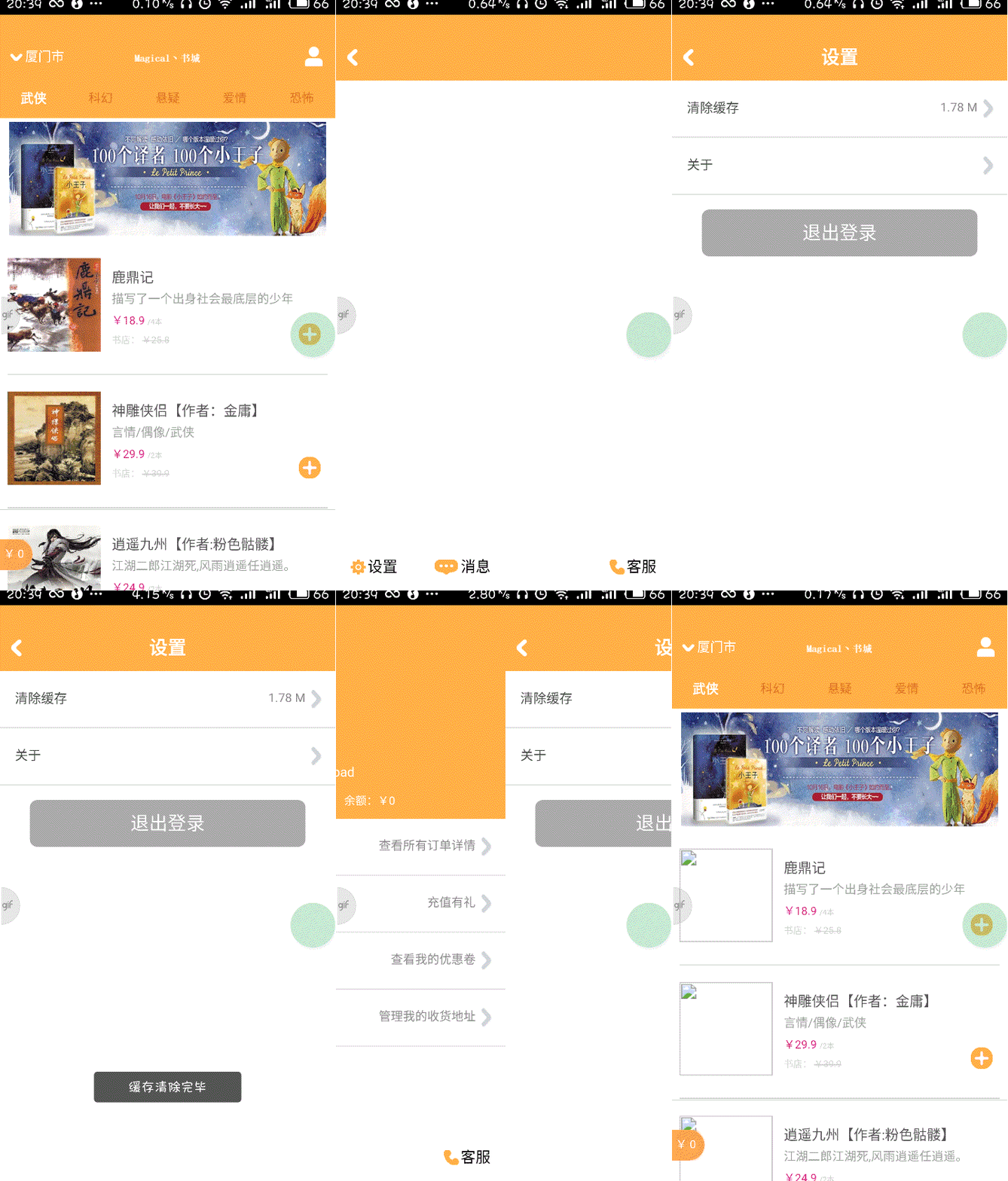
<!DOCTYPE html>

<html>

<head>

    <meta charset="utf-8">

    <meta name="viewport" content="maximum-scale=1.0,minimum-scale=1.0,user-scalable=0,width=device-width,initial-scale=1.0" />

    <meta name="format-detection" content="telephone=no,email=no,date=no,address=no">

    <title>设置Frame</title>

    <link rel="stylesheet" type="text/css" href="../css/api.css" />

    <style>

    .option {

        position: relative;

        box-sizing: border-box;

        height: 61px;

        border-bottom: 1px solid #ddd;

    }

    .option .title {

        position: relative;

        width: 100%;

        height: 60px;

        box-sizing: border-box;

        padding-left: 16px;

        line-height: 60px;

        font-size: 14px;

        color: #444;

        text-align: left;

    }

    .option .arrow-panel {

        position: absolute;

        top: 0;

        right: 12px;

        width: auto;

        height: 60px;

        background-image: url(../image/arrow_right.png);

        background-repeat: no-repeat;

        background-size: 16px 24px;

        background-position: right center;

    }

    .option .arrow-panel .text {

        box-sizing: border-box;

        width: auto;

        height: 60px;

        padding-right: 20px;

        line-height: 60px;

        font-size: 13px;

        color: #888;

        text-align: left;

    }

    .button {

        width: auto;

        height: 50px;

        margin-left: 32px;

        margin-right: 32px;

        margin-top: 16px;

        background-color: #A9A9A9;

        line-height: 50px;

        color: #fff;

        font-size: 20px;

        text-align: center;

        border-radius: 8px;

    }

    .highlight {

        opacity: 0.7;

    }

    </style>

</head>

<body>

    <section>

        <div class="option" tapmode onclick="fnClearCache();">

            <div class="title">清除缓存</div>

            <div class="arrow-panel">

                <div id="cacheSize" class="text"></div>

            </div>

        </div>

        <div class="option" tapmode onclick="fnOpenAboutWin();">

            <div class="title">关于</div>

            <div class="arrow-panel">

                <div class="text"></div>

            </div>

        </div>

        <div class="button" tapmode onclick="fnLogout();">退出登录</div>

    </section>

</body>

<script type="text/javascript" src="../script/api.js"></script>

<script type="text/javascript">

apiready = function() {

    getCacheSize();

};

function getCacheSize() {

    api.getCacheSize(function(ret) {

        var size = ret.size;

        var cacheSize = $api.byId('cacheSize');

        size = parseInt((size / 1024 / 1024) * 100) / 100;

        cacheSize.innerHTML = size + ' M';

    });

}

function fnClearCache() {

    api.clearCache(function() {

        api.toast({

            msg: '缓存清除完毕'

        });

        setTimeout(function() {

            getCacheSize();

        }, 300);

    });

}

function fnOpenAboutWin () {

    api.openWin({

        name: 'about',

        url: './about.html'

    });

}

function fnLogout() {

    api.confirm({

        title: '提示',

        msg: '是否退出登录',

        buttons: ['确定', '取消']

    }, function(ret, err) {

        if (ret) {

            if (1 == ret.buttonIndex) {

                $api.rmStorage('userInfo');

                api.closeToWin({

                    name: 'main'

                });

            }

        }

    });

}

</script>

</html>
setting_frame.html
Apicloud_(项目)网上书城02_后端数据获取的更多相关文章
- Apicloud_(项目)网上书城03_拓展模块实现
Apicloud_(项目)网上书城01_前端页面开发 传送门 Apicloud_(项目)网上书城02_后端数据获取 传送门 Apicloud_(项目)网上书城03_拓展模块实现 传送门 实现商品详情页 ...
- Apicloud_(项目)网上书城01_前端搭建
[本文皆在记录自己开发Apicloud项目过程,不具备教学水平性文章] 参考书籍<30天App开发从0到1> Apicloud_(项目)网上书城01_前端页面开发 传送门 Apicloud ...
- 大项目之网上书城(九)——订单Demo
目录 大项目之网上书城(九)--订单Demo 主要改动 1.OrderServiceImpl 代码 2.OrderDaoImpl 代码 3.OrderitemDaoImpl 代码 4.orderite ...
- 大项目之网上书城(八)——数据库大改&添加图书
目录 大项目之网上书城(八)--数据库大改&添加图书 主要改动 1.数据库新增表 代码 2.数据库新增触发器 3.其他对BookService和BookDao的修改 代码 4.addBook. ...
- 大项目之网上书城(七)——书页面以及加入购物车Servlet
目录 大项目之网上书城(七)--书页面以及加入购物车Servlet 主要改动 1.shu.jsp 代码 效果图 2.shu.js 代码 3.index.jsp 代码 效果图 4.FindBookByC ...
- 大项目之网上书城(六)——个人页面和书页面Demo
目录 大项目之网上书城(六)--个人页面和书页面Demo 主要改动 1.user.jsp 代码 效果图 user.js 代码 3.shu.jsp 代码 效果图 4.其他小改动 LoginServlet ...
- 大项目之网上书城(五)——主页(End)
目录 大项目之网上书城(五)--主页(End) 主要改动 1.主页(终于完成啦) 完整代码 效果图 2.head.jsp的小改动 代码 3.login.jsp ###代码 效果图 4.login.js ...
- WEB 小案例 -- 网上书城(一)
距离上次写博客有两周了吧,最多的原因就是自己期末考试了,上课没听就只能在期末狠狠的复习了,毕竟已经挂科了.当然还是因为自己懒吧!!!废话不多说开始我们今天的正题,网上书城! 一. 新建数据表(MySQ ...
- 前后端分离,如何在前端项目中动态插入后端API基地址?(in docker)
开门见山,本文分享前后端分离,容器化前端项目时动态插入后端API基地址,这是一个很赞的实践,解决了前端项目容器化过程中受制后端调用的尴尬. 尴尬从何而来 常见的web前后端分离:前后端分开部署,前端项 ...
随机推荐
- linux 安装 python 最全教程
环境:centos6.5 centos6.5 自带的 python 版本是 2.6.6,需要重新安装 2.7: centos7 自带的 python 版本是 2.7.5 基本操作 在安装新版本之前,一 ...
- CentOS 7 防火墙常用操作及常见问题处理
一.常用操作 1.启动防火墙: systemctl start firewalld.service 2.关闭防火墙: systemctl stop firewalld.service 3.添加放行端口 ...
- Charles学习(三)之使用Map local代理本地静态资源以及配置网页代理在Mac模拟器调试iOS客户端
前言 问题一:我们在App内嵌H5开发的过程中,肯定会遇到一个问题就是我不想在chrome的控制台中调试,我想要在手机上调试,那么如何解决这个问题呢? 问题二:我们期待调试时达到的效果就是和Charl ...
- 第十六篇 JS实现全选操作
JS实现全选 嗨,同学们好,老师这里是专门教同学解决一些针对性的问题,所以说综合起来,就要靠同学自己了. 这节课我们学一个很实用的东西,全选操作!比如淘宝这种商城对吧,我的购物车,我要全选购买,或 ...
- ubuntu - 如何以root身份使用图形界面管理文件?
nautilus 是gnome的文件管理器,但是如果不是root账号下,权限受限,我们可以通过以下方式以root权限使用! 一,快捷键“ctrl+alt+t”,调出shell. 二,在shell中输入 ...
- Seeker:一款可获取高精度地理和设备信息的工具分析
Seeker是一款可以获取高精度地理和设备信息的工具.其利用HTML5,Javascript,JQuery和PHP来抓取设备信息,以及Geolocation接口实现对设备高精度地理位置的获取. See ...
- monkey基础使用教程,如何安装和monkey分析日志
1.概念 什么是monkey,monkey的作用是什么? Monkey是Android自身提供的,可以通过adb shell模拟用户行为,发送一些伪随机用户事件到目标设备上. Monkey和它的直接意 ...
- 外星人电脑出现the system is running in low graphics mode的解决方法
问题现象: 执行删除GCC5.4.0: sudo apt-get remove gcc gcc-5重启电脑后,就显示the system is running in low graphics mod ...
- ros 配置网卡
#定义lan接口的IP和掩码/ip address add address=192.168.8.254/255.255.255.0 interface=lan#定义网关/ip route add ga ...
- Python代码风格的良好养成
Python 的代码风格由 PEP 8 描述.这个文档描述了 Python 编程风格的方方面面.在遵守这个文档的条件下,不同程序员编写的 Python 代码可以保持最大程度的相似风格.这样就易于阅读, ...