
Java中SSM+Shiro系统登录验证码的实现方法
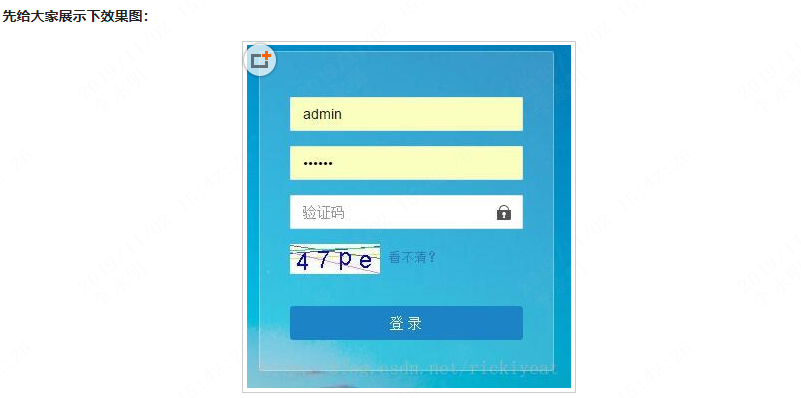
1、验证码生成类:
import java.util.Random;

import java.awt.image.BufferedImage;

import java.awt.Graphics;

import java.awt.Font;

import java.awt.Color;

/**

 * 验证码生成器类,可生成数字、大写、小写字母及三者混合类型的验证码。 支持自定义验证码字符数量; 支持自定义验证码图片的大小; 支持自定义需排除的特殊字符;

 * 支持自定义干扰线的数量; 支持自定义验证码图文颜色

 */

public class ValidateCode {

 /**

  * 验证码类型为仅数字 0~9

  */

 public static final int TYPE_NUM_ONLY = 0;

 /**

  * 验证码类型为仅字母,即大写、小写字母混合

  */

 public static final int TYPE_LETTER_ONLY = 1;

 /**

  * 验证码类型为数字、大写字母、小写字母混合

  */

 public static final int TYPE_ALL_MIXED = 2;

 /**

  * 验证码类型为数字、大写字母混合

  */

 public static final int TYPE_NUM_UPPER = 3;

 /**

  * 验证码类型为数字、小写字母混合

  */

 public static final int TYPE_NUM_LOWER = 4;

 /**

  * 验证码类型为仅大写字母

  */

 public static final int TYPE_UPPER_ONLY = 5;

 /**

  * 验证码类型为仅小写字母

  */

 public static final int TYPE_LOWER_ONLY = 6;

 private ValidateCode() {

 }

 /**

  * 生成验证码字符串

  *

  * @param type

  *   验证码类型,参见本类的静态属性

  * @param length

  *   验证码长度,大于0的整数

  * @param exChars

  *   需排除的特殊字符(仅对数字、字母混合型验证码有效,无需排除则为null)

  * @return 验证码字符串

  */

 public static String generateTextCode(int type, int length, String exChars) {

  if (length <= 0)

   return "";

  StringBuffer code = new StringBuffer();

  int i = 0;

  Random r = new Random();

  switch (type) {

  // 仅数字

  case TYPE_NUM_ONLY:

   while (i < length) {

    int t = r.nextInt(10);

    if (exChars == null || exChars.indexOf(t + "") < 0) {// 排除特殊字符

     code.append(t);

     i++;

    }

   }

   break;

  // 仅字母(即大写字母、小写字母混合)

  case TYPE_LETTER_ONLY:

   while (i < length) {

    int t = r.nextInt(123);

    if ((t >= 97 || (t >= 65 && t <= 90)) && (exChars == null || exChars.indexOf((char) t) < 0)) {

     code.append((char) t);

     i++;

    }

   }

   break;

  // 数字、大写字母、小写字母混合

  case TYPE_ALL_MIXED:

   while (i < length) {

    int t = r.nextInt(123);

    if ((t >= 97 || (t >= 65 && t <= 90) || (t >= 48 && t <= 57))

      && (exChars == null || exChars.indexOf((char) t) < 0)) {

     code.append((char) t);

     i++;

    }

   }

   break;

  // 数字、大写字母混合

  case TYPE_NUM_UPPER:

   while (i < length) {

    int t = r.nextInt(91);

    if ((t >= 65 || (t >= 48 && t <= 57)) && (exChars == null || exChars.indexOf((char) t) < 0)) {

     code.append((char) t);

     i++;

    }

   }

   break;

  // 数字、小写字母混合

  case TYPE_NUM_LOWER:

   while (i < length) {

    int t = r.nextInt(123);

    if ((t >= 97 || (t >= 48 && t <= 57)) && (exChars == null || exChars.indexOf((char) t) < 0)) {

     code.append((char) t);

     i++;

    }

   }

   break;

  // 仅大写字母

  case TYPE_UPPER_ONLY:

   while (i < length) {

    int t = r.nextInt(91);

    if ((t >= 65) && (exChars == null || exChars.indexOf((char) t) < 0)) {

     code.append((char) t);

     i++;

    }

   }

   break;

  // 仅小写字母

  case TYPE_LOWER_ONLY:

   while (i < length) {

    int t = r.nextInt(123);

    if ((t >= 97) && (exChars == null || exChars.indexOf((char) t) < 0)) {

     code.append((char) t);

     i++;

    }

   }

   break;

  }

  return code.toString();

 }

 /**

  * 已有验证码,生成验证码图片

  *

  * @param textCode

  *   文本验证码

  * @param width

  *   图片宽度

  * @param height

  *   图片高度

  * @param interLine

  *   图片中干扰线的条数

  * @param randomLocation

  *   每个字符的高低位置是否随机

  * @param backColor

  *   图片颜色,若为null,则采用随机颜色

  * @param foreColor

  *   字体颜色,若为null,则采用随机颜色

  * @param lineColor

  *   干扰线颜色,若为null,则采用随机颜色

  * @return 图片缓存对象

  */

 public static BufferedImage generateImageCode(String textCode, int width, int height, int interLine,

   boolean randomLocation, Color backColor, Color foreColor, Color lineColor) {

  BufferedImage bim = new BufferedImage(width, height, BufferedImage.TYPE_INT_RGB);

  Graphics g = bim.getGraphics();

  // 画背景图

  g.setColor(backColor == null ? getRandomColor() : backColor);

  g.fillRect(0, 0, width, height);

  // 画干扰线

  Random r = new Random();

  if (interLine > 0) {

   int x = 0, y = 0, x1 = width, y1 = 0;

   for (int i = 0; i < interLine; i++) {

    g.setColor(lineColor == null ? getRandomColor() : lineColor);

    y = r.nextInt(height);

    y1 = r.nextInt(height);

    g.drawLine(x, y, x1, y1);

   }

  }

  // 写验证码

  // g.setColor(getRandomColor());

  // g.setColor(isSimpleColor?Color.BLACK:Color.WHITE);

  // 字体大小为图片高度的80%

  int fsize = (int) (height * 0.8);

  int fx = height - fsize;

  int fy = fsize;

  g.setFont(new Font("Default", Font.PLAIN, fsize));

  // 写验证码字符

  for (int i = 0; i < textCode.length(); i++) {

   fy = randomLocation ? (int) ((Math.random() * 0.3 + 0.6) * height) : fy;// 每个字符高低是否随机

   g.setColor(foreColor == null ? getRandomColor() : foreColor);

   g.drawString(textCode.charAt(i) + "", fx, fy);

   fx += fsize * 0.9;

  }

  g.dispose();

  return bim;

 }

 /**

  * 生成图片验证码

  *

  * @param type

  *   验证码类型,参见本类的静态属性

  * @param length

  *   验证码字符长度,大于0的整数

  * @param exChars

  *   需排除的特殊字符

  * @param width

  *   图片宽度

  * @param height

  *   图片高度

  * @param interLine

  *   图片中干扰线的条数

  * @param randomLocation

  *   每个字符的高低位置是否随机

  * @param backColor

  *   图片颜色,若为null,则采用随机颜色

  * @param foreColor

  *   字体颜色,若为null,则采用随机颜色

  * @param lineColor

  *   干扰线颜色,若为null,则采用随机颜色

  * @return 图片缓存对象

  */

 public static BufferedImage generateImageCode(int type, int length, String exChars, int width, int height,

   int interLine, boolean randomLocation, Color backColor, Color foreColor, Color lineColor) {

  String textCode = generateTextCode(type, length, exChars);

  BufferedImage bim = generateImageCode(textCode, width, height, interLine, randomLocation, backColor, foreColor,

    lineColor);

  return bim;

 }

 /**

  * 产生随机颜色

  *

  * @return

  */

 private static Color getRandomColor() {

  Random r = new Random();

  Color c = new Color(r.nextInt(255), r.nextInt(255), r.nextInt(255));

  return c;

 }

}
2、Controller
/**

 * 生成验证码

 * @param request

 * @param response

 * @throws IOException

 * @ValidateCode.generateTextCode(验证码字符类型,验证码长度,需排除的特殊字符)

 * @ValidateCode.generateImageCode(文本验证码,图片宽度,图片高度,干扰线的条数,字符的高低位置是否随机,图片颜色,字体颜色,干扰线颜色)

 */

@RequestMapping(value = "validateCode")

public void validateCode(HttpServletRequest request, HttpServletResponse response) throws IOException {

 response.setHeader("Cache-Control", "no-cache");

 String verifyCode = ValidateCode.generateTextCode(ValidateCode.TYPE_NUM_LOWER, 4, null);

 request.getSession().setAttribute("validateCode", verifyCode);

 response.setContentType("image/jpeg");

 BufferedImage bim = ValidateCode.generateImageCode(verifyCode, 90, 30, 5, true, Color.WHITE, Color.BLUE, null);

 ImageIO.write(bim, "JPEG", response.getOutputStream());

}

/**

 * 登录请求

 * @param

 */

@RequestMapping(value = "login", method = RequestMethod.POST, produces = "text/html; charset=utf-8")

public String login(HttpServletRequest request, HttpServletResponse response, UserEntity user) {

 //首先进行验证码验证

 Session session = SecurityUtils.getSubject().getSession();

 String code = (String) session.getAttribute("validateCode");

 String submitCode = WebUtils.getCleanParam(request, "validateCode");

 if (StringUtils.isEmpty(submitCode) || !StringUtils.equals(code,submitCode.toLowerCase())) {

  request.setAttribute("LOGIN_ERROR_CODE", LoginConstant.LOGIN_ERROR_CODE_100000);

  request.setAttribute("LOGIN_ERROR_MESSAGE", LoginConstant.LOGIN_ERROR_MESSAGE_VALIDATECODE);

  return "login";

 }

 // 想要得到 SecurityUtils.getSubject() 的对象..访问地址必须跟shiro的拦截地址内.不然后会报空指针

 Subject sub = SecurityUtils.getSubject();

 // 用户输入的账号和密码,,存到UsernamePasswordToken对象中..然后由shiro内部认证对比,

 // 认证执行者交由ShiroDbRealm中doGetAuthenticationInfo处理

 // 当以上认证成功后会向下执行,认证失败会抛出异常

 UsernamePasswordToken token = new UsernamePasswordToken(user.getAccountName(), user.getPassWord());

 try {

  sub.login(token);

 } catch (LockedAccountException lae) {

  token.clear();

  request.setAttribute("LOGIN_ERROR_CODE", LoginConstant.LOGIN_ERROR_CODE_100002);

  request.setAttribute("LOGIN_ERROR_MESSAGE", LoginConstant.LOGIN_ERROR_MESSAGE_SYSTEMERROR);

  return "login";

 } catch (ExcessiveAttemptsException e) {

  token.clear();

  request.setAttribute("LOGIN_ERROR_CODE", LoginConstant.LOGIN_ERROR_CODE_100003);

  request.setAttribute("LOGIN_ERROR_MESSAGE","账号:" + user.getUserName() + LoginConstant.LOGIN_ERROR_MESSAGE_MAXERROR);

  return "login";

 } catch (AuthenticationException e) {

  token.clear();

  request.setAttribute("LOGIN_ERROR_CODE", LoginConstant.LOGIN_ERROR_CODE_100001);

  request.setAttribute("LOGIN_ERROR_MESSAGE", LoginConstant.LOGIN_ERROR_MESSAGE_USERERROR);

  return "login";

 }

 return "redirect:/index.shtml";

}
注意:
登录方法里面一些参数的定义:
public interface LoginConstant

{

 String LOGIN_ERROR_CODE_100000 = "100000";

 String LOGIN_ERROR_MESSAGE_VALIDATECODE = "验证码输入错误,请重新输入!";

 String LOGIN_ERROR_CODE_100001 = "100001";

 String LOGIN_ERROR_MESSAGE_USERERROR = "账号或密码错误,请重新输入!";

 String LOGIN_ERROR_CODE_100002 = "100002";

 String LOGIN_ERROR_MESSAGE_SYSTEMERROR = "用户已经被锁定不能登录,请与管理员联系!";

 String LOGIN_ERROR_CODE_100003 = "100003";

 String LOGIN_ERROR_MESSAGE_MAXERROR = "登录失败次数过多,锁定10分钟!";

 String LOGIN_ERROR_CODE_100004 = "100004";

 String LOGIN_ERROR_MESSAGE_FORCELOGOUT = "您已经被管理员强制退出,请重新登录";

}
3、登录jsp(重要代码)
路径信息:
<%

String path = request.getContextPath();

String basePath = request.getScheme()+"://"+request.getServerName()+":"+request.getServerPort()+path;

%>
js:用于更换验证码图片
<script>

 function reloadValidateCode(){

  $("#validateCodeImg").attr("src","<%=basePath%>/validateCode.shtml?data=" + new Date() + Math.floor(Math.random()*24));

 }

</script>
登录表单里面的标签:
<img id="validateCodeImg" src="<%=basePath%>/validateCode.shtml" /> <a href="#" rel="external nofollow" onclick="javascript:reloadValidateCode();">看不清?</a>
4、Shiro匿名访问配置(不配置无法生成验证码图片)
<!--自定义filterChainDefinitionMap -->

 <bean id="chainDefinitionSectionMetaSource" class="com.collection.shiro.ChainDefinitionSectionMetaSource">

  <property name="filterChainDefinitions">

   <value>

    /validateCode.shtml = anon//添加这行

   </value>

  </property>

 </bean>
以上所述是小编给大家介绍的Java中SSM+Shiro系统登录验证码的实现方法,希望对大家有所帮助,如果大家有任何疑问请给我留言,小编会及时回复大家的。在此也非常感谢大家对脚本之家网站的支持!
原文地址:https://www.jb51.net/article/105481.htm
Java中SSM+Shiro系统登录验证码的实现方法的更多相关文章
- java中的io系统详解 - ilibaba的专栏 - 博客频道 - CSDN.NET
java中的io系统详解 - ilibaba的专栏 - 博客频道 - CSDN.NET 亲,“社区之星”已经一周岁了! 社区福利快来领取免费参加MDCC大会机会哦 Tag功能介绍—我们 ...
- JAVA中获取当前系统时间及格式转换
JAVA中获取当前系统时间 一. 获取当前系统时间和日期并格式化输出: import java.util.Date;import java.text.SimpleDateFormat; publi ...
- Java中取小数点后两位(四种方法)
摘自http://irobot.iteye.com/blog/285537 Java中取小数点后两位(四种方法) 一 Long是长整型,怎么有小数,是double吧 java.text.D ...
- JAVA中获取文件MD5值的四种方法
JAVA中获取文件MD5值的四种方法其实都很类似,因为核心都是通过JAVA自带的MessageDigest类来实现.获取文件MD5值主要分为三个步骤,第一步获取文件的byte信息,第二步通过Messa ...
- JAVA中比较两个文件夹不同的方法
JAVA中比较两个文件夹不同的方法,可以通过两步来完成,首先遍历获取到文件夹下的所有文件夹和文件,再通过文件路径和文件的MD5值来判断文件的异同.具体例子如下: public class TestFo ...
- (转载)Java中如何遍历Map对象的4种方法
在Java中如何遍历Map对象 How to Iterate Over a Map in Java 在java中遍历Map有不少的方法.我们看一下最常用的方法及其优缺点. 既然java中的所有map都 ...
- Java中返回值定义为int类型的 方法return 1返回的是int还是Integer&&finally中return问题
在Java中返回值定义为int类型的 方法return 1:中返回的是Integer值,在返回的时候基本类型值1被封装为Integer类型. 定义一个Test类,在异常处理try中和finally中分 ...
- springboot+mybatis+shiro项目中使用shiro实现登录用户的权限验证。权限表、角色表、用户表。从不同的表中收集用户的权限、
要实现的目的:根据登录用户.查询出当前用户具有的所有权限.然后登录系统后.根据查询到的权限信息进行不同的操作. 以下的代码是在搭好的框架之下进行的编码. 文章目录 核心实现部分. 第一种是将用户表和角 ...
- JAVA中获取当前系统时间
一. 获取当前系统时间和日期并格式化输出: import java.util.Date;import java.text.SimpleDateFormat; public class NowStrin ...
随机推荐
- SpringBoot配置文件值植入
<!‐‐导入配置文件处理器,配置文件进行绑定就会有提示‐‐> <dependency> <groupId>org.springframework.boot</ ...
- 切换windows系统输入法的中英文,可以忽视是哪种打字法
调用windows的API //用户获取当前输入法句柄 [DllImport("imm32.dll")] public static extern IntPtr ImmGetCon ...
- flask add_url_rule的使用
from flask import Flask,url_for #url_for 接受两个参数(endpoint,**value)endpoint没有指定就是默认的函数名,根据 view_func._ ...
- Eclipse注释
首先,Window------>preferences------>java------>Code Style------>Code Templates------>Co ...
- shell作业01
1.判断/etc/inittab文件是否大于100行,如果大于,则显示”/etc/inittab is a big file.”否者显示”/etc/inittab is a small file.” ...
- (已解决)Could not open '/var/lib/nova/mnt/*/volume-*': Permission denied
[问题描述] 创建boot_from_volume的虚机时,磁盘后端为NFS,创建失败. [错误日志] nova-compute模块 Could not open '/var/lib/nova/mnt ...
- 如何在Windows中手动生成SSH密钥?(转)
在Windows上,您可以通过多种方式创建SSH密钥.Windows需要SSH客户端,但在其操作系统上没有默认的SSH客户端.请注意,Windows目前正在测试本机OpenSSH应用程序,一般,不提倡 ...
- Go语言流程控制中的break,continue和goto(七)
break(跳出循环) break用于跳出整个循环,如下: func main() { ;i<;i++{ { break } fmt.Println(i) } } // 0 1 2 3 代码里只 ...
- Go语言流程控制(六)
go语言的流程控制主要有if , for和switch. if else(分支结构) go语言的if判断: func main() { score:=65 if score>=90{ fmt.P ...
- HDU1251 统计难题(字典树|map
Ignatius最近遇到一个难题,老师交给他很多单词(只有小写字母组成,不会有重复的单词出现),现在老师要他统计出以某个字符串为前缀的单词数量(单词本身也是自己的前缀). Input输入数据的第一部分 ...