
Spring mvc 搭建Mybatis
本文建立在spring mvc已经搭建起来的基础上。
首先看要引入的jar包,其中高亮的是为了mybatis新引入的。
- <properties>
- <spring.webmvc.version>4.3.0.RELEASE</spring.webmvc.version>
- <junit.version>4.8.2</junit.version>
- <jedis.version>2.8.1</jedis.version>
- <log4j.version>1.2.16</log4j.version>
- <slf4j.version>1.7.2</slf4j.version>
- <spring.data.redis.version>1.7.2.RELEASE</spring.data.redis.version>
- <spring.data.mongodb.version>1.8.0.RELEASE</spring.data.mongodb.version>
- <mybatis.version>3.2.0</mybatis.version>
- <dbcp.version>1.2.2</dbcp.version>
- </properties>
- <dependencies>
- <dependency>
- <groupId>junit</groupId>
- <artifactId>junit</artifactId>
- <version>${junit.version}</version>
- <scope>test</scope>
- </dependency>
- <dependency>
- <groupId>org.springframework</groupId>
- <artifactId>spring-webmvc</artifactId>
- <version>${spring.webmvc.version}</version>
- </dependency>
- <dependency>
- <groupId>redis.clients</groupId>
- <artifactId>jedis</artifactId>
- <version>${jedis.version}</version>
- </dependency>
- <dependency>
- <groupId>org.springframework.data</groupId>
- <artifactId>spring-data-redis</artifactId>
- <version>${spring.data.redis.version}</version>
- </dependency>
- <dependency>
- <groupId>org.springframework.data</groupId>
- <artifactId>spring-data-mongodb</artifactId>
- <version>${spring.data.mongodb.version}</version>
- </dependency>
- <dependency>
- <groupId>log4j</groupId>
- <artifactId>log4j</artifactId>
- <version>${log4j.version}</version>
- </dependency>
- <dependency>
- <groupId>org.slf4j</groupId>
- <artifactId>slf4j-api</artifactId>
- <version>${slf4j.version}</version>
- </dependency>
- <dependency>
- <groupId>org.slf4j</groupId>
- <artifactId>slf4j-log4j12</artifactId>
- <version>${slf4j.version}</version>
- </dependency>
- <dependency>
- <groupId>org.mybatis</groupId>
- <artifactId>mybatis</artifactId>
- <version>${mybatis.version}</version>
- </dependency>
- <dependency>
- <groupId>org.mybatis</groupId>
- <artifactId>mybatis-spring</artifactId>
- <version>1.2.2</version>
- </dependency>
- <dependency>
- <groupId>mysql</groupId>
- <artifactId>mysql-connector-java</artifactId>
- <version>5.1.30</version>
- </dependency>
- <dependency>
- <groupId>commons-dbcp</groupId>
- <artifactId>commons-dbcp</artifactId>
- <version>${dbcp.version}</version>
- </dependency>
- <dependency>
- <groupId>org.springframework</groupId>
- <artifactId>spring-jdbc</artifactId>
- <version>${spring.webmvc.version}</version>
- </dependency>
- <dependency>
- <groupId>com.fasterxml.jackson.core</groupId>
- <artifactId>jackson-core</artifactId>
- <version>2.4.3</version>
- </dependency>
- <dependency>
- <groupId>com.fasterxml.jackson.core</groupId>
- <artifactId>jackson-databind</artifactId>
- <version>2.4.3</version>
- </dependency>
- </dependencies>
jdbc.properties:
- driver=com.mysql.jdbc.Driver
- url=jdbc:mysql://192.168.1.101:3306/test
- username=root
- password=root
- #\u5B9A\u4E49\u521D\u59CB\u8FDE\u63A5\u6570
- initialSize=0
- #\u5B9A\u4E49\u6700\u5927\u8FDE\u63A5\u6570
- maxActive=20
- #\u5B9A\u4E49\u6700\u5927\u7A7A\u95F2
- maxIdle=20
- #\u5B9A\u4E49\u6700\u5C0F\u7A7A\u95F2
- minIdle=1
- #\u5B9A\u4E49\u6700\u957F\u7B49\u5F85\u65F6\u95F4
- maxWait=60000
mybatis.xml
- <?xml version="1.0" encoding="UTF-8"?>
- <beans xmlns="http://www.springframework.org/schema/beans"
- xmlns:xsi="http://www.w3.org/2001/XMLSchema-instance" xmlns:p="http://www.springframework.org/schema/p"
- xmlns:context="http://www.springframework.org/schema/context"
- xmlns:mvc="http://www.springframework.org/schema/mvc"
- xmlns:cache="http://www.springframework.org/schema/cache"
- xsi:schemaLocation="http://www.springframework.org/schema/beans
- http://www.springframework.org/schema/beans/spring-beans-4.2.xsd
- http://www.springframework.org/schema/context
- http://www.springframework.org/schema/context/spring-context-4.2.xsd
- http://www.springframework.org/schema/mvc
- http://www.springframework.org/schema/mvc/spring-mvc-4.2.xsd
- http://www.springframework.org/schema/cache
- http://www.springframework.org/schema/cache/spring-cache-4.2.xsd ">
- <bean id="dataSource" class="org.apache.commons.dbcp.BasicDataSource"
- destroy-method="close">
- <property name="driverClassName" value="${driver}" />
- <property name="url" value="${url}" />
- <property name="username" value="${username}" />
- <property name="password" value="${password}" />
- <!-- 初始化连接大小 -->
- <property name="initialSize" value="${initialSize}"></property>
- <!-- 连接池最大数量 -->
- <property name="maxActive" value="${maxActive}"></property>
- <!-- 连接池最大空闲 -->
- <property name="maxIdle" value="${maxIdle}"></property>
- <!-- 连接池最小空闲 -->
- <property name="minIdle" value="${minIdle}"></property>
- <!-- 获取连接最大等待时间 -->
- <property name="maxWait" value="${maxWait}"></property>
- </bean>
- <!-- spring和MyBatis完美整合,不需要mybatis的配置映射文件 -->
- <bean id="sqlSessionFactory" class="org.mybatis.spring.SqlSessionFactoryBean">
- <property name="dataSource" ref="dataSource" />
- <!-- 自动扫描mapping.xml文件 -->
- <property name="mapperLocations" value="classpath:com/zjf/**/mybatis_*.xml"></property>
- </bean>
- <!-- DAO接口所在包名,Spring会自动查找其下的类 -->
- <bean class="org.mybatis.spring.mapper.MapperScannerConfigurer">
- <property name="basePackage" value="com.zjf" />
- <property name="sqlSessionFactoryBeanName" value="sqlSessionFactory"></property>
- </bean>
- <!-- (事务管理)transaction manager, use JtaTransactionManager for global tx -->
- <bean id="transactionManager"
- class="org.springframework.jdbc.datasource.DataSourceTransactionManager">
- <property name="dataSource" ref="dataSource" />
- </bean>
- </beans>
java代码目录结构:
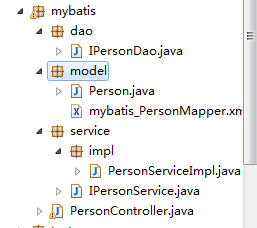
注意:这里没有dao的impl,因为Mybatis会根据mapper.xml去创建一个impl。也就是说,mapper.xml就一个一个impl。
PersonController.java:
- package com.zjf.spring.mybatis;
- import org.springframework.beans.factory.annotation.Autowired;
- import org.springframework.stereotype.Controller;
- import org.springframework.web.bind.annotation.PathVariable;
- import org.springframework.web.bind.annotation.RequestMapping;
- import org.springframework.web.bind.annotation.RequestParam;
- import org.springframework.web.bind.annotation.ResponseBody;
- import com.zjf.spring.mybatis.model.Person;
- import com.zjf.spring.mybatis.service.IPersonService;
- @Controller
- @RequestMapping("person")
- public class PersonController {
- @Autowired
- private IPersonService personService;
- @RequestMapping(value="/get/{id}")
- public @ResponseBody Person get(@PathVariable Integer id)
- {
- Person person = personService.getPersonById(id);
- return person;
- }
- }
PersonServiceImpl.java:
- package com.zjf.spring.mybatis.service.impl;
- import org.springframework.beans.factory.annotation.Autowired;
- import org.springframework.stereotype.Service;
- import com.zjf.spring.mybatis.dao.IPersonDao;
- import com.zjf.spring.mybatis.model.Person;
- import com.zjf.spring.mybatis.service.IPersonService;
- @Service(value="personService")
- public class PersonServiceImpl implements IPersonService {
- @Autowired
- private IPersonDao personDao;
- public Person getPersonById(Integer id) {
- // TODO Auto-generated method stub
- return personDao.selectByPrimaryKey(id);
- }
- }
IPersonDao.java
- package com.zjf.spring.mybatis.dao;
- import com.zjf.spring.mybatis.model.Person;
- public interface IPersonDao {
- int deleteByPrimaryKey(Integer id);
- int insert(Person record);
- int insertSelective(Person record);
- Person selectByPrimaryKey(Integer id);
- int updateByPrimaryKeySelective(Person record);
- int updateByPrimaryKey(Person record);
- }
Person.java:
- package com.zjf.spring.mybatis.model;
- public class Person {
- private Integer id;
- private String name;
- private Integer age;
- private String address;
- public Integer getId() {
- return id;
- }
- public void setId(Integer id) {
- this.id = id;
- }
- public String getName() {
- return name;
- }
- public void setName(String name) {
- this.name = name == null ? null : name.trim();
- }
- public Integer getAge() {
- return age;
- }
- public void setAge(Integer age) {
- this.age = age;
- }
- public String getAddress() {
- return address;
- }
- public void setAddress(String address) {
- this.address = address == null ? null : address.trim();
- }
- }
mybatis_PersonMapper.xml:
- <?xml version="1.0" encoding="UTF-8" ?>
- <!DOCTYPE mapper PUBLIC "-//mybatis.org//DTD Mapper 3.0//EN" "http://mybatis.org/dtd/mybatis-3-mapper.dtd" >
- <mapper namespace="com.zjf.spring.mybatis.dao.IPersonDao" >
- <resultMap id="BaseResultMap" type="com.zjf.spring.mybatis.model.Person" >
- <id column="id" property="id" jdbcType="INTEGER" />
- <result column="name" property="name" jdbcType="VARCHAR" />
- <result column="age" property="age" jdbcType="INTEGER" />
- <result column="address" property="address" jdbcType="VARCHAR" />
- </resultMap>
- <sql id="Base_Column_List" >
- id, name, age, address
- </sql>
- <select id="selectByPrimaryKey" resultMap="BaseResultMap" parameterType="java.lang.Integer" >
- select
- <include refid="Base_Column_List" />
- from t_person
- where id = #{id,jdbcType=INTEGER}
- </select>
- <delete id="deleteByPrimaryKey" parameterType="java.lang.Integer" >
- delete from t_person
- where id = #{id,jdbcType=INTEGER}
- </delete>
- <insert id="insert" parameterType="com.zjf.spring.mybatis.model.Person" >
- insert into t_person (id, name, age,
- address)
- values (#{id,jdbcType=INTEGER}, #{name,jdbcType=VARCHAR}, #{age,jdbcType=INTEGER},
- #{address,jdbcType=VARCHAR})
- </insert>
- <insert id="insertSelective" parameterType="com.zjf.spring.mybatis.model.Person" >
- insert into t_person
- <trim prefix="(" suffix=")" suffixOverrides="," >
- <if test="id != null" >
- id,
- </if>
- <if test="name != null" >
- name,
- </if>
- <if test="age != null" >
- age,
- </if>
- <if test="address != null" >
- address,
- </if>
- </trim>
- <trim prefix="values (" suffix=")" suffixOverrides="," >
- <if test="id != null" >
- #{id,jdbcType=INTEGER},
- </if>
- <if test="name != null" >
- #{name,jdbcType=VARCHAR},
- </if>
- <if test="age != null" >
- #{age,jdbcType=INTEGER},
- </if>
- <if test="address != null" >
- #{address,jdbcType=VARCHAR},
- </if>
- </trim>
- </insert>
- <update id="updateByPrimaryKeySelective" parameterType="com.zjf.spring.mybatis.model.Person" >
- update t_person
- <set >
- <if test="name != null" >
- name = #{name,jdbcType=VARCHAR},
- </if>
- <if test="age != null" >
- age = #{age,jdbcType=INTEGER},
- </if>
- <if test="address != null" >
- address = #{address,jdbcType=VARCHAR},
- </if>
- </set>
- where id = #{id,jdbcType=INTEGER}
- </update>
- <update id="updateByPrimaryKey" parameterType="com.zjf.spring.mybatis.model.Person" >
- update t_person
- set name = #{name,jdbcType=VARCHAR},
- age = #{age,jdbcType=INTEGER},
- address = #{address,jdbcType=VARCHAR}
- where id = #{id,jdbcType=INTEGER}
- </update>
- </mapper>
注:mybatis_PersonMapper.xml中的配置将会映射成它配置的namespace接口的实现,然后每个节点(update select insert)都对应一个接口的方法。名字要与接口的方法名字一致。
最终效果:

Spring mvc 搭建Mybatis的更多相关文章
- 搭建Spring、Spring MVC、Mybatis和Freemarker
搭建Spring.Spring MVC.Mybatis和Freemarker 1.pom文件 <project xmlns="http://maven.apache.org/POM/4 ...
- spring MVC、mybatis配置读写分离
spring MVC.mybatis配置读写分离 1.环境: 3台数据库机器,一个master,二台slave,分别为slave1,slave2 2.要实现的目标: ①使数据写入到master ②读数 ...
- spring mvc与mybatis收集到博客
mybaits-spring 官方教程 http://mybatis.github.io/spring/zh/ SpringMVC 基础教程 框架分析 http://blog.csdn.net/swi ...
- Spring Mvc和Mybatis的多数据库访问配置过程
Spring Mvc 加Mybatis的多数据库访问源配置访问过程如下: 在applicationContext.xml进行配置 <?xml version="1.0" en ...
- Spring、Spring MVC、MyBatis
Spring.Spring MVC.MyBatis整合文件配置详解 使用SSM框架做了几个小项目了,感觉还不错是时候总结一下了.先总结一下SSM整合的文件配置.其实具体的用法最好还是看官方文档. Sp ...
- IDEA下创建Maven项目,并整合使用Spring、Spring MVC、Mybatis框架
项目创建 本项目使用的是IDEA 2016创建. 首先电脑安装Maven,接着打开IDEA新建一个project,选择Maven,选择图中所选项,下一步. 填写好GroupId和ArtifactId, ...
- 转载 Spring、Spring MVC、MyBatis整合文件配置详解
Spring.Spring MVC.MyBatis整合文件配置详解 使用SSM框架做了几个小项目了,感觉还不错是时候总结一下了.先总结一下SSM整合的文件配置.其实具体的用法最好还是看官方文档. ...
- Spring MVC、MyBatis整合文件配置详解
Spring:http://spring.io/docs MyBatis:http://mybatis.github.io/mybatis-3/ Building a RESTful Web Serv ...
- Mybaits-从零开始-Spring、Spring MVC、MyBatis整合(未万待续)
Spring.Spring MVC.MyBatis整合(未万待续)
随机推荐
- Jenkins发布回滚方案
Jenkins回滚可以通过每次发布从主干打tag,然后发布的时候发tag,比如tag, v1, v2,v3 如果我发布了v3,想要回滚回v2,直接在Jenkins中选择v2的tag地址重新构建就可以回 ...
- ControlTemplate in WPF —— ItemsControl
<ItemsControl Margin=" ItemsSource="{Binding Source={StaticResource myTodoList}}"& ...
- Loading——spin.js
官网:[http://spin.js.org/] Github地址:[https://github.com/fgnass/spin.js]
- beego项目部署到nginx(含http转https)
beego项目部署到nginx(含http转https) 之前的程序部署到服务器采用的直接部署,比较方便,现在把它部署到nginx,以便后续的反向代理和负载均衡,同时,因为要接入微信小程序,所以 ...
- gin框架教程一: go框架gin的基本使用
我们在用http的时候一般都会用一些web框架来进行开发,gin就是这样的一个框架,它有哪些特点呢 一:gin特点 1.性能优秀2.基于官方的net/http的有限封装3.方便 灵活的中间件4.数据绑 ...
- centos7 忘记root密码,如何进入单用户模式。
init方法 1.centos7的grub2界面会有两个入口,正常系统入口和救援模式: 2.修改grub2引导 在正常系统入口上按下"e",会进入edit模式,搜寻ro那一行,以l ...
- mac 简洁安装Kafka
Mac 简洁安装Kafka 1.采用homebrew的方式 终端执行命令:brew install kafka 2.修改Kafka服务配置文件server.properties 执行命令: vi /u ...
- IM学习目录
1. 浅谈即时通讯 https://www.cnblogs.com/shoshana-kong/p/9724963.html 2. im即时通讯 https://www.cnblogs.com/sh ...
- java_第一年_JDBC(1)
JDBC(Java Data Base Connectivity),用于实现java语言编程与数据库连接的API. 数据库驱动:应用程序并不能直接使用数据库,而需要通过相应的数据库驱动程序后再操作数据 ...
- java向word中插入Excel附件
1.word中插入对象的原理 编辑word,向word中插入图片.EXCEL.WORD等附件,再将word保存为xml格式,通过XML查看工具打开xml格式的word的源码,通过对比源码, 可以发现平 ...