
python pip报错pip._ vendor.urllib3.exceptions.ReadTimeoutError: HTTPSConnectionPool(host='files.pythonhosted.org', port=443): Read timed out.
AttributeError: module 'pip' has no attribute 'main报错
找到安装目录下 helpers/packaging_tool.py文件,找到如下代码:
def do_install(pkgs):

    try:

        import pip

    except ImportError:

        error_no_pip()

    return pip.main(['install'] + pkgs)

def do_uninstall(pkgs):

    try:

        import pip

    except ImportError:

        error_no_pip()

    return pip.main(['uninstall', '-y'] + pkgs)
修改为如下,保存即可。
def do_install(pkgs):

    try:

        # import pip

        try:

            from pip._internal import main

        except Exception:

            from pip import main

    except ImportError:

        error_no_pip()

    return main(['install'] + pkgs)

def do_uninstall(pkgs):

    try:

        # import pip

        try:

            from pip._internal import main

        except Exception:

            from pip import main

    except ImportError:

        error_no_pip()

    return main(['uninstall', '-y'] + pkgs)
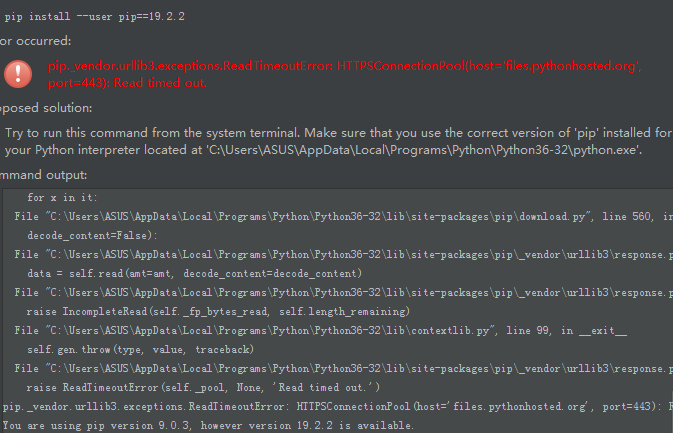
- 在下载python库的时候,由于国内网络原因,python包的下载速度非常慢,查看pip 文档,只要在 pip的时候控制超时即可, 具体参数为 --default-timeout=100, 后面的时间可以自己指定。
- 解决方法
pip --default-timeout=100 install gevent

python pip报错pip._ vendor.urllib3.exceptions.ReadTimeoutError: HTTPSConnectionPool(host='files.pythonhosted.org', port=443): Read timed out.的更多相关文章
- 解决pip._vendor.urllib3.exceptions.ReadTimeoutError: HTTPSConnectionPool(host='files.pythonhosted.org', port=443): Read timed out.
参考链接[侵权删] https://www.jianshu.com/p/3378fa827924 https://yq.aliyun.com/articles/619208 问题描述:在Windows ...
- 错误:pip._vendor.urllib3.exceptions.ReadTimeoutError: HTTPSConnectionPool(host='files.pythonhosted.org', port=443): Read timed out.
pip._vendor.urllib3.exceptions.ReadTimeoutError: HTTPSConnectionPool(host='files.pythonhosted.org', ...
- pip安装超时问题-pip._vendor.urllib3.exceptions.ReadTimeoutError: HTTPSConnectionPool(host='files.pythonhosted.org', port=443): Read timed out.
手动设置延时:(推荐) pip --default-timeout=100 install nibabel --或者不使用缓存pip --no-cache-dir install Pillow 更改 ...
- 解决pip._vendor.urllib3.exceptions.ReadTimeoutError: HTTPSConnectionPool(host='files.pythonhosted.org', port=443): Read timed out.问题
国内的其他镜像源清华大学 https://pypi.tuna.tsinghua.edu.cn/simple/阿里云 http://mirrors.aliyun.com/pypi/simple/中国科技 ...
- 安装SpaCy出现报错:requests.exceptions.ConnectionError: HTTPSConnectionPool(host='raw.githubusercontent.com', port=443):
内含安装步骤及报错解决:https://www.cnblogs.com/xiaolan-Lin/p/13286885.html
- pip pip._vendor.urllib3.exceptions.ReadTimeoutError: HTTPSConnectionPool
设置超时时间: pip --default-timeout=100 install Pillow
- python2.7使用requests时报错SSLError: HTTPSConnectionPool(host='b-ssl.duitang.com', port=443)
import requests url='https://www.duitang.com/napi/blog/list/by_search/?kw=%E6%A0%A1%E8%8A%B1&sta ...
- 解决python爬虫requests.exceptions.SSLError: HTTPSConnectionPool(host='XXX', port=443)问题
爬虫时报错如下: requests.exceptions.SSLError: HTTPSConnectionPool(host='某某某网站', port=443): Max retries exce ...
- 【Selenium】【BugList4】执行pip报错:Fatal error in launcher: Unable to create process using '""D:\Program Files\Python36\python.exe"" "D:\Program Files\Python36\Scripts\pip.exe" '
环境信息: python版本:V3.6.4 安装路径:D:\Program Files\python36 环境变量PATH:D:\Program Files\Python36;D:\Program F ...
随机推荐
- 说明一下 os.path 和 sys.path 分别代表什么?
os.path 主要是用于对系统路径文件的操作. sys.path 主要是对Python解释器的系统环境参数的操作(动态的改变Python解释器搜索路径).
- C#取模的理解:为什么当a<b,a%b=a?
一,取模a%b 1,如果a>b,例如10%7=3,这是什么原因呢?可以根据下面的理解 10 =7*1+3,则模就是3 2,如果a<b,例如7%10 = 7,这时怎么得到的呢?根据下面来理解 ...
- k3 cloud成本调整单
做了成本调整单中的入库调整单或者出库调整单,进行入库成本核算和出库成本核算,做了入库调整单后在存货收发汇总表(按日期报表)中的收入部分会展示出来: 如果做的是期末余额成本调整,核算时会先删除手工新增的 ...
- Git分支操作步骤
学习操作Git分支,具体如下: - 查看分支 - 创建分支 - 切换分支 - 合并分支 - 解决分支的冲突 方案: Git支持按功能模块,时间,版本等标准创建分支; 分支可以让开发分多条主线同时进行, ...
- 吉首大学2019年程序设计竞赛(重现赛)I 滑稽树上滑稽果 (莫队+逆元打表)
链接:https://ac.nowcoder.com/acm/contest/992/I来源:牛客网 时间限制:C/C++ 1秒,其他语言2秒空间限制:C/C++ 32768K,其他语言65536K ...
- 五、Ubuntu 16.04 安装PyCharm
方法一,在终端用指令通过第三方源安装pycharm. 本文通过第三方源安装PyCharm,好处是升级方便. 添加源: $ sudo add-apt-repository ppa:mystic-m ...
- leetcode-167周赛-1292-元素和小于等于阈值的正方形的最大边长
题目描述; 自己的提交:超时 class Solution: def maxSideLength(self, mat: List[List[int]], threshold: int) -> i ...
- 华为RH2288V3服务器部署指南
一.配置好局域网 首先配置好局域网,将电脑和服务器通过网线直连,服务器默认IP192.168.2.100,因此电脑本地的IP需要设置一下改为和服务器同一网段: 二.登录导控制页面 浏览器中输入服务器的 ...
- java匿名内部类 (转载)
匿名内部类也就是没有名字的内部类 正因为没有名字,所以匿名内部类只能使用一次,它通常用来简化代码编写 但使用匿名内部类还有个前提条件:必须继承一个父类或实现一个接口 实例1:不使用匿名内部类来实现抽象 ...
- POJ 3259 Wormholes ( SPFA判断负环 && 思维 )
题意 : 给出 N 个点,以及 M 条双向路,每一条路的权值代表你在这条路上到达终点需要那么时间,接下来给出 W 个虫洞,虫洞给出的形式为 A B C 代表能将你从 A 送到 B 点,并且回到 C 个 ...