
mysql03--误删除了所有用户解决办法
误删除了所有用户解决办法
第一种方法(企业常用)
1.将数据库down掉
[root@db03 mysql]# /etc/init.d/mysqld  stop

Shutting down MySQL.. SUCCESS!

[root@db03 mysql]# mysql

ERROR 2002 (HY000): Can't connect to local MySQL server through socket '/opt/mysql-5.6.44/tmp/mysql.sock' (2)
2.给/opt/目录下所有受mysql用户权限
[root@db03 mysql]# chown -R mysql.mysql /opt/*
3.启动数据库
[root@db03 ~]# mysqld_safe --skip-grant-tables --skip-networking &
4.进入数据库
[root@db03 ~]# mysql
5.初始化
mysql>  flush privileges;

Query OK, 0 rows affected (0.01 sec)
6.设置数据库用户权限和密码
mysql> grant all on *.* to root@'localhost' identified by '1' with grant option;

Query OK, 0 rows affected (0.00 sec)
7.退出重启数据库
mysql> \q

[root@db03 mysql]# /etc/init.d/mysqld restar
8.进入数据库查看
mysql> select user,host from mysql.user;

+------+-----------+

| user | host      |

+------+-----------+

| root | localhost |

+------+-----------+

1 row in set (0.01 sec)
第二种方法
1.down掉数据库
[root@db04 scripts]# /etc/init.d/mysqld stop

Shutting down MySQL.. SUCCESS!
2.启动数据库
[root@db04 scripts]# mysqld_safe --skip-grant-tables --skip-networking & [1] 25934
3.进入数据库
[root@db04 scripts]# mysql
4.使用数据库
mysql> use mysql

Reading table information for completion of table and column names You can turn off this feature to get a quicker startup with -A Database changed
5.创建root用户
mysql> insert into mysql.user values ('localhost','root',PASSWORD('123'),

    -> 'Y',

    -> 'Y',

    -> 'Y',

    -> 'Y',

    -> 'Y',

    -> 'Y',

    -> 'Y',

    -> 'Y',

    -> 'Y',

    -> 'Y',

    -> 'Y',

    -> 'Y',

    -> 'Y',

    -> 'Y',

    -> 'Y',

    -> 'Y',

    -> 'Y',

    -> 'Y',

    -> 'Y',

    -> 'Y',

    -> 'Y',

    -> 'Y',

    -> 'Y',

    -> 'Y',

    -> 'Y',

    -> 'Y',

    -> 'Y',

    -> 'Y',

    -> 'Y',

    -> '',

    -> '',

    -> '',

    -> '',0,0,0,0,'mysql_native_password','','N');
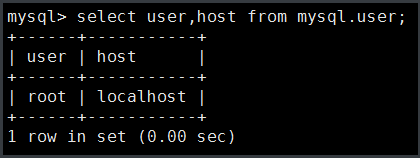
6.查看用户
mysql> select user,host from mysql.user;

+------+-----------+

| user | host      |

+------+-----------+

| root | localhost |

+------+-----------+

1 row in set (0.00 sec)
第三种方法(企业不可用,数据会丢失)
1.down掉数据库
[root@db04 ~]# /etc/init.d/mysqld stop

Shutting down MySQL.. SUCCESS!
2.删除或改名/opt/mysql/data目录
[root@db04 opt]# cd mysql

[root@db04 mysql]# mv data date

[root@db04 mysql]# rm -fr data
3.初始化
[root@db04 scripts]# ./mysql_install_db --datadir=/opt/mysql/data --basedir=/opt/mysql -- user=mysql

[root@db04 scripts]# echo $?

0

4.授权
[root@db04 scripts]# chown -R mysql.mysql /opt/*
5.启动数据库
[root@db04 scripts]# /etc/init.d/mysqld start

Starting MySQL.Logging to '/opt/mysql/data/db04.err'. SUCCESS!
6.进入数据库查看
[root@db04 scripts]# mysql

mysql> select user,host from mysql.user;

+------+-----------+

| user | host      |

+------+-----------+

| root | %         |

| root | 127.0.0.1 |

| root | ::1       |

|      | db02      |

| root | db02      |

|      | localhost |

| root | localhost |

+------+-----------+

7 rows in set (0.00 sec)

mysql03--误删除了所有用户解决办法的更多相关文章
- 误删除 mySQL 用户解决办法
误删除用户解决办法 删除用户 删除用户 mysql> truncate mysql.user;Query OK, 0 rows affected (0.05 sec)mysql> sel ...
- Sql Server 孤立用户解决办法
Sql Server 孤立用户 是我们经常遇到的事情,今天详细的梳理了下,希望能帮到你 当把用户数据库从一台 Sql Server 使用备份和恢复的方式迁移到另一台服务器.数据库恢复以后,原先用户定义 ...
- Oracle 学习笔记3:新建数据库没有scott用户解决办法
新建一个数据库,若选择Oracle组件时,没有选择实例方案,完成后进行口令管理,默认列表中是找不到scott用户解锁的.若要解锁scott用户,可以进行如下操作: 使用system或者sys连接数据库 ...
- centos误删mysql root用户找回办法
一天,我进入mysql后,查看所有用户 select host,user from mysql.user; 发现好多用户名, 太乱了,删除..... delete from user where us ...
- 误删/usr文件夹解决办法
http://blog.chinaunix.net/uid-2623904-id-3044156.html http://www.centoscn.com/CentOS/Intermediate/20 ...
- centos7误删yum源的解决办法 ( -bash: yum: command not found)
这里以安装阿里的yum源为例: 1.查看自己的centos版本 cat /etc/redhat-release 2.进入阿里云源站地址:http://mirrors.aliyun.com/centos ...
- Oracle数据库误删文件导致rman备份报错RMAN-06169解决办法
Oracle数据库误删文件导致rman备份报错RMAN-06169解决办法 可能是误删文件导致在使用rman备份时候出现以下提示 RMAN-06169: could not read file hea ...
- mac 安装mysql + 修改root用户密码 + 及报Access denied for user 'root'@'localhost' (using password:YES)解决办法
1.下载MySQL 到mysql的官网http://dev.mysql.com/downloads/mysql/然后在页面中会看到“MySQL Community Server”下方有一个“downl ...
- "SQLServer无法打开用户默认数据库,登录失败,错误4064"的解决办法
"SQLServer无法打开用户默认数据库,登录失败,错误4064"的解决办法 1.检查登录密码 如果密码错误,修改数据库密码,用windows身份验证登录进去, (1)安全--登 ...
随机推荐
- Ubuntu Server下MySql数据库备份脚本代码
明: 我这里要把MySql数据库存放目录/var/lib/mysql下面的pw85数据库备份到/home/mysql_data里面,并且保存为mysqldata_bak_2012_04_11.tar. ...
- python NameError: name 'file' is not defined
import sys import time import os poem='''\ 测试读写文件 ''' print(os.getcwd()) f=file(os.getcwd()+'/python ...
- VUE 生成二维码插件
原文:https://www.jianshu.com/p/496fd1cbee8d npm install qrcodejs2 --save 页面中引入 dom 结构 JS 方法编写 export d ...
- Test 6.24 T1 购物
问题描述 小 C 今天出去购物,商店里总共有 n 种商品,小 C 的钱够买至多 k 个商品. 小 C 对每种商品都有一个喜爱程度,但如果买了同一种商品很多次,小 C 对这种商品的喜爱程度就会降低. 具 ...
- TreeMap定制排序和自然排序
TreeMap定制排序和自然排序自然排序是实现Comparable接口的方法.代码如下: @Override public int compareTo(Object o) { if (o instan ...
- basic deepwalk
Get to know How deepwalk works by this project. Two steps: 1. gen the graph, and gen the corpus on t ...
- Python全栈开发,Day2
一.Pycharm的使用 1.创建项目 2.python调整字体大小随ctrl+鼠标滚轮上下滚动 3.python新建程序自动补全编码和环境 4.设置断点(在代码前面行号后面单击鼠标左键) 5.调试断 ...
- [CF1056E]Check Transcription
题目:Check Transcription 传送门:http://codeforces.com/contest/1056/problem/E 分析: 1)显然有个$O( \frac{t}{max(c ...
- [CSP-S模拟测试92]题解
A.数列 显然每个数的答案是互相独立的,直接扩欧求解.我们需要最小化$ax+by=gcd(a,b)$中的$|x|+|y|$,而显然当x或y靠近0时答案可能最优,列个不等式求一下即可. 能$O(1)$千 ...
- CSS3中哪些新属性—阴影、文本省略(1)
CSS3中的阴影,我知道的就是盒阴影和文字阴影.两者使用大同小异. 1.文字阴影 不知道为啥阴影会被开发出来,觉得这没啥好用啊.用了之后发现好像还行,使页面更有立体感了那么一点点.看起来趣味性强一点. ...