
重写select
select 模拟
目前仿写select的方式
- 给
tableIndex来使div(无法获取焦点的元素)来获取元素,这样便可以在失去焦点时,是否将下拉框收回 - 通过
document的点击,来判断是否点击了当前元素 - 利用
input的自带click/blur来处理
ui
看了这么多实现方式,我更好奇具体有什么实现方式
| ui | 实现方式 |
|---|---|
| heyui | document -- click/contextmenu |
| iview | tableIndex/document |
| element-ui | document -- mouse |
| fish-ui | document -- click |
| radon-ui | window -- click |
| mdui | document -- click |
开始仿写
要求
- 只实现单选
- 用原生实现,不基于框架
- 没有使用上述中将下拉框独立出来
- 只做向下下拉,没有高度不够时,可以向上或向下
html
<div class="sc-select-content" data-toggle="false">

    <label for="" class="sc-select--label">下拉框</label>

    <div class="sc-input--item">

        <input id="input" type="text" class="sc-input" readonly autocomplete="off" placeholder="请选择">

        <i class="sc-select-icon"></i>

    </div>

    <div class="sc-select-item">

        <ul class="select-container">

            <li class="select-item select-item--1">1</li>

            <li class="select-item">2</li>

            <li class="select-item">3</li>

            <li class="select-item">4</li>

            <li class="select-item">5</li>

        </ul>

        <div class="arrow"></div>

    </div>

</div>
css
* {

    box-sizing: border-box;

}

*::before,

*::after {

    box-sizing: border-box;

}

.sc-select-content {

    position: relative;

    display: inline-block;

    width: 200px;

}

.sc-input {

    width: 100%;

    height: 38px;

    outline: none;

    padding: 0 15px;

    border-radius: 4px;

    transition: border-color .2s cubic-bezier(.645, .045, .355, 1);

    border: 1px solid #ccc;

    padding-right: 34px;

}

.sc-input--item {

    position: relative;

}

.sc-select-icon {

    position: absolute;

    right: 8px;

    top: 16px;

    box-sizing: content-box;

    border-right: 10px solid transparent;

    border-left: 10px solid transparent;

    border-top: 10px solid #ccc;

}

.sc-select-icon::after {

    content: '';

    position: absolute;

    right: -10px;

    bottom: 2px;

    box-sizing: content-box;

    border-right: 10px solid transparent;

    border-left: 10px solid transparent;

    border-top: 10px solid #fff;

}

.sc-input:focus {

    border: 1px solid #FF9310;

    /* box-shadow: 0 0 0 2px rgba(255, 197, 37, 1); */

}

.sc-select-item {

    width: 100%;

    display: none;

}

.sc-select-item.active {

    display: block;

    visibility: hidden;

    opacity: 0;

    transform: translateY(10px);

    transition: all .3s cubic-bezier(.55,0,.1,1);

    position: absolute;

    padding-top: 10px;

}

.sc-select-item.active2 {

    visibility: visible;

    opacity: 1;

    transform: translateY(0);

}

.select-container {

    position: relative;

    padding: 6px 0;

    margin: 0;

    display: flex;

    flex-direction: column;

    border-radius: 4px;

    border: 1px solid #e4e7ed;

    box-shadow: 0 5px 10px rgba(0, 0, 0, .1);

}

.sc-select-item .arrow {

    position: absolute;

    width: 0;

    height: 0;

    border-color: transparent;

    border-style: solid;

    border-width: 6px;

    filter: drop-shadow(0 2px 12px rgba(0,0,0,.03));

    top: 6px;

    left: 20px;

    border-bottom-color: #ebeef5;

    border-top-width: 0;

}

.sc-select-item .arrow::after {

    position: absolute;

    display: block;

    width: 0;

    height: 0;

    border-color: transparent;

    border-style: solid;

    content: " ";

    border-width: 6px;

    top: 1px;

    margin-left: -6px;

    border-bottom-color: #fff;

    border-top-width: 0;

}

.select-item {

    padding: 0 15px;

    height: 38px;

    line-height: 38px;

    white-space: nowrap;

    overflow: hidden;

    text-overflow: ellipsis;

    cursor: pointer;

}

.select-item:hover {

    background-color: #ddd;

}
*注意 **:
js
/**

  * @description: 找到一个符合的parent

  * @param {Note} node 元素

  * @param {string} className 元素class类名

  * @return: Node

  */

function findParent(node, className) {

    let parent = node.parentNode

    while (parent && parent.classList && [].slice.call(parent.classList).indexOf(className) < 0) {

        parent = parent.parentNode

    }

    if (parent && parent.classList && [].slice.call(parent.classList).indexOf(className) > -1) {

        return parent

    }

}

const Input = document.getElementById('input')

Input.addEventListener('click', function (e) {

		const P = findParent(this, 'sc-select-content')

		const Select = findChild(P, 'sc-select-item')

		const toggle = P.dataset.toggle

		if (toggle === 'true') {

				Select.classList.remove('active2')

				setTimeout(function () {

						Select.classList.remove('active')

						P.dataset.toggle = false

				}, 100)

		} else {

				console.log(22)

				Select.classList.add('active')

				setTimeout(function () {

						Select.classList.add('active2')

						P.dataset.toggle = true

				}, 16)

		}

}, false)

Input.addEventListener('blur', function (e) {

		const that = this

		const P = findParent(this, 'sc-select-content')

		const Select = findChild(P, 'sc-select-item')

		document.addEventListener('click', function (e) {

				const isP = findParent(e.target, 'sc-select-content') === P

				if (!isP) {

						Select.classList.remove('active2')

						setTimeout(function () {

								Select.classList.remove('active')

								// 时间需要与 transition的时间相同为好

								P.dataset.toggle = false

						}, 100)

				}

		}, false)

		Select.addEventListener('click', function (e) {

				if (e.target.tagName.toLowerCase() === 'li') {

						that.value =  e.target.innerText

				}

				Select.classList.remove('active2')

				setTimeout(function () {

						Select.classList.remove('active')

						// 时间需要与 transition的时间相同为好

						// toggle = false

						P.dataset.toggle = false

				}, 100)

		}, false)

}, false)
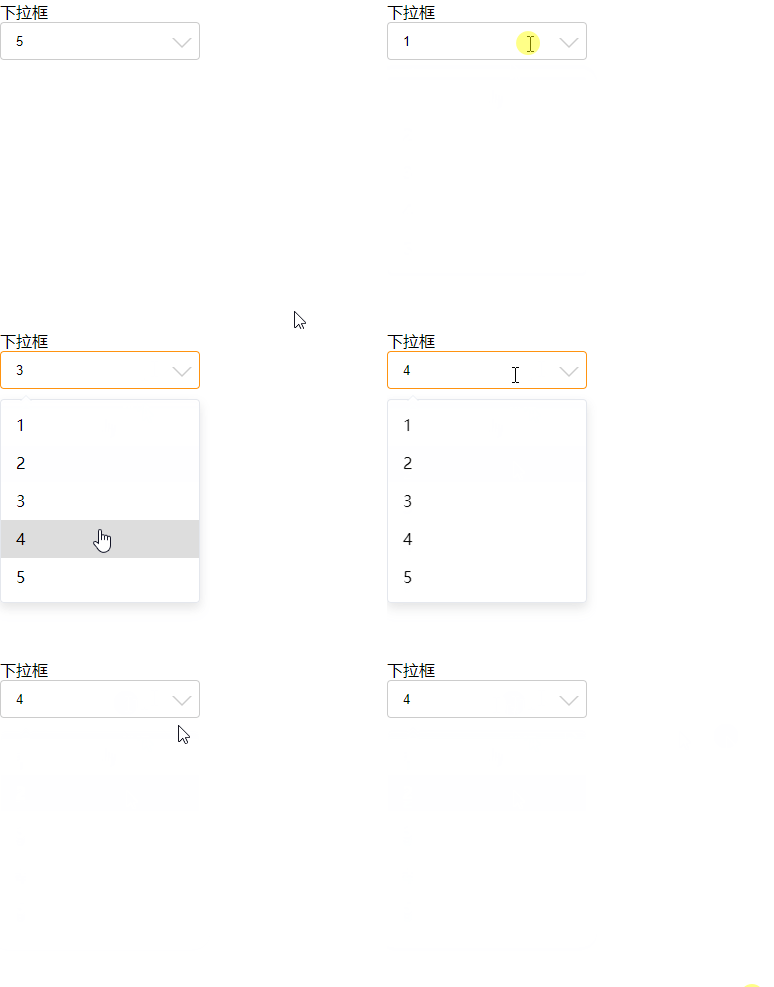
上述方式
- 虽然很low,很多方法可以提出来,偷个懒,先如此写
- 点击,打开关闭
- 主要利用input的
focus和blur方法 - document事件放在里面,是为了拿到上面点击的元素
- 使用
data来存储是否打开还是关闭的boolean
总结
- 虽然实现的很粗糙,但是更多的是为了了解其他ui是如何实现的
- 有机会再细细优化了
重写select的更多相关文章
- 重写select样式
select {/*Chrome和Firefox里面的边框是不一样的,所以复写了一下*/border: solid 1px #000; /*很关键:将默认的select选择框样式清除*/appeara ...
- 自定义属性的时候,尽量不要使用value这个命名
最近我在重写select下拉组件时,使用ul->li来模拟select中的一个个option,并给li添加索引,取名为value. 非IE浏览器下value值工作正常,但是IE下value值工作 ...
- 关于TCP连接建立与终止那点事
0. 前言 最近在处理公司遗留项目的时候发现自己对TCP协议一点都不懂,所以补了点关于TCP连接的建立和终止的内容,这里简单写下自己了解的部分,省略了报文序号确认序号这些无关的字段,主要讨论TCP状态 ...
- ASP.NET Aries 高级开发教程:使用存储过程(番外篇)
前言: 发现这个问题,有不少人提起过,所以就简单写成文章吧. 接下来看如何在Aries 框架中使用存储过程,整体步骤和绑定普通视图差不多. 步骤一:新建一个空视图. 可以在SqlCode管理中,创建一 ...
- 3.2 Zend_Db_Select
10.4. Zend_Db_Select 你能够使用该对象和它的对应方法构建一个select查询语句,然后生成 字符串符用来传送给zend_db_adapter进行查询或者读取结果. 你也能够在你的查 ...
- RocketMQ学习笔记(9)----RocketMQ的Producer 顺序消息
1. 顺序消息原理图 2. 什么是顺序消息? 消费消息的顺序要求同发送消息的顺序一致,在RocketMQ中,主要指的是局部顺序,即一类消息为满足顺序性,必须Producer单线程顺序发送,并且发送给到 ...
- 【转帖】从 Oracle 到 PostgreSQL ,某保险公司迁移实践 技术实践
从 Oracle 到 PostgreSQL ,某保险公司迁移实践 http://www.itpub.net/2019/11/08/4108/ 信泰人寿保险股份有限公司 摘要:去O一直是金融保险行业永恒 ...
- 【Oracle】SQL/92 执行多个表的连接
内连接 外连接 自连接 交叉连接 1.内连接 表名 INNER JOIN 表名 ON 条件 等价于: FROM 表名, 表名 WHERE 条件 SELECT p.name, pt.name, pt.p ...
- Rocket Mq 常用API 及简单运维
RocketMQ 常用API 消息 消息消费模式 消息消费模式由消费者来决定,可以由消费者设置MessageModel来决定消息模式. 消息模式默认为集群消费模式 consumer.setMessag ...
随机推荐
- react样式
https://www.jianshu.com/p/711c596571d6(copy)
- Eclipse通过JDBC连接MySQL数据库的步骤(最原始的几个步骤)
java可以兼容目前市面上所有类型的数据库,主要是因为提供了两个接口,一个用于连接目标数据库,一个用于向数据库中传输SQL命令. Connection接口——连接目标数据库: Statement 接 ...
- wannafly 挑战赛9 B 数一数(kmp)
链接:https://www.nowcoder.com/acm/contest/71/B 时间限制:C/C++ 1秒,其他语言2秒 空间限制:C/C++ 262144K,其他语言524288K 64b ...
- maven 私服的setting.xml配置
<?xml version="1.0" encoding="UTF-8"?> 2 <settings xmlns="http://m ...
- 从头开始学习Vuex
一.前言 当我们的应用遇到多个组件共享状态时,会需要多个组件依赖于同一状态抑或是来自不同视图的行为需要变更同一状态.以前的解决办法: a.将数据以及操作数据的行为都定义在父组件; b.将数据以及操作数 ...
- Oracle诊断:drop table失败[转]
转: From <http://blog.csdn.net/cyxlxp8411/article/details/7775113> 今天在drop一张表的时候报ORA-00054错误 SQ ...
- node.js npm 操作 模块化开发 cnpm镜像安装
模块(包) 传统引入 js 的缺点 整个网页,我们写了一个 js 文件,所有的特效都在里面 耦合度太高,代码之间关联性太强,不便于后期维护 变量容易 全局污染 如果将 复杂的 js 文件,拆成多个功能 ...
- 复选框checked 选中后不显示打钩
复选框checked 选中后不显示打钩 checkbox属性checked="checked"已有,但复选框却不显示打钩的原因 复选框绑定了click事件,点一次选中,再点击取 ...
- [torch] pytorch hook学习
pytorch hook学习 register_hook import torch x = torch.Tensor([0,1,2,3]).requires_grad_() y = torch.Ten ...
- 在windows下使用Mingw搭建模拟Linux
1.到官网下载最新版Mingw 2.点击安装,最好选择默认路径,如果不是的话,路径中一定不能有空格. 3.选择安装,mingw-developer-toolkit.mingw32-base.mingw ...