
该项目不知道如何运行配置文件 IIS Express。The project doesn’t know how to run the profile IIS Express
原文:该项目不知道如何运行配置文件 IIS Express。
方案1(推荐).
可能原因是:禁用掉Microsft ASP.NET和Web工具扩展和微软Azure的应用程序服务工具扩展,恢复启用即可.
I have a couple of computers I work between for the samples I use on this blog and when switching to between of them I got the following error last week.
The project doesn’t know how to run the profile IIS Express.
I verified the project would still run on the other computer with no issues. I also verified that on the computer with the issues the project would still work using dotnet run from the command line still worked.
Next, I went to verify the project properties. Here I noticed a strange thing on the computer with the error the Debug tab of the project properties was missing a lot of setting. The following is a screen shot of the computer with the issues.

And here is the same tab on the same project, but from a different computer.

The cause
After more time that I would like to admit I was able to track down the issue. On the computer with the issue, I often work on projects that are very large which tend to slow down Visual Studio pretty bad. In an effort to speed things up a bit I when through and disabled all the extensions that I could including the Microsoft Azure App Service Tools. Turns out that disabling the previous extension caused the Microsft ASP.NET and Web Tools extension to be disabled as well (with no warning).
The solution
The only way I was able to get the project to work properly was to enable both the Microsft ASP.NET and Web Tools extension AND the Microsoft Azure App Service Tools extension. I am not sure why the Microsft ASP.NET and Web Tools extension need the Microsoft Azure App Service Tools extension but based on my experience they are related in some way.
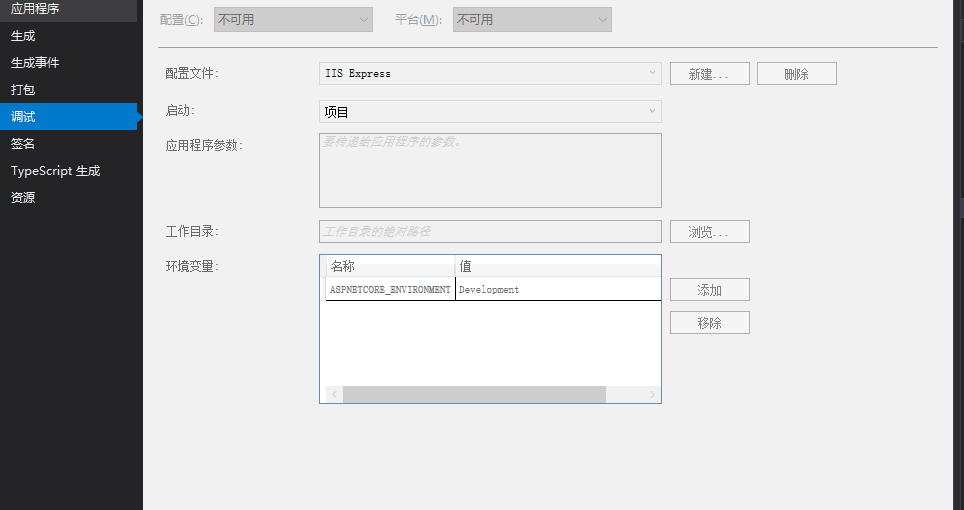
方案2.项目右键属性-->调试 -->启动改为项目即可
该项目不知道如何运行配置文件 IIS Express。The project doesn’t know how to run the profile IIS Express的更多相关文章
- 该项目不知道如何运行配置文件 IIS Express。
项目右键属性-->调试 -->启动改为项目即可
- web项目嵌入Jetty运行的两种方式(Jetty插件和自制Jetty服务器)
在开发Java web项目时候,可以在项目中嵌入Jetty服务的方式来运行web程序. 由于最近开发web项目,自己使用的是比较旧的eclipse不支持导入tomcat来运行项目,于是就学习了下使用项 ...
- Web应用程序项目XXXX已配置为使用IIS。无法访问IIS元数据库。您没有足够的特权访问计算机上的IIS网站
问题:Windows8下直接使用VS打开项目,出现问题:XXXX已配置为使用IIS.无法访问IIS元数据库.您没有足够的特权访问计算机上的IIS网站.解决:1.以“管理员权限”运行VS,在VS菜单打开 ...
- Web 应用程序项目 XXXX 已配置为使用 IIS。 无法访问 IIS 元数据库。您没有足够的特权访问计算机上的 IIS 网站。(转载)
Web 应用程序项目 XXXX 已配置为使用 IIS. 无法访问 IIS 元数据库.您没有足够的特权访问计算机上的 IIS 网站. 2012年05月19日 ⁄ 综合 ⁄ 共 261字 ⁄ 字号 小 中 ...
- ionic ios项目真机运行-不用开发者账号
ionic ios项目真机运行-不用开发者账号 1. 添加ios平台 ionic platform add ios 2.使用XCODE打开项目 3.使用APPID登录XCODE 打开XCODE账号登录 ...
- Java全栈程序员之06:IDEA中MAVEN项目依赖及运行
MAVEN已经成为事实上的企业项目开发中的项目类型.无论是IDEA还是Eclipse,都已经默认支持创建MAVEN项目.严格意义上来说,MAVEN不是一种新的JavaEE项目类型.它凌驾于所以的项目类 ...
- Web应用程序项目XXXX已配置为使用IIS。无法访问IIS 元数据库。您没有足够的特权访问计算机上的IIS
错误图片:
- idea14导入eclipse项目并部署运行完整步骤
idea14导入eclipse项目并部署运行完整步骤 2015年05月12日 14:08:04 阅读数:40456 首先说明一下:idea里的project相当于eclipse里的workspace, ...
- 四、IntelliJ IDEA 之 HelloWorld 项目创建及相关配置文件介绍
咱们通过创建一个 Static Web 项目大致了解了 IntelliJ IDEA 的使用界面,接下来,趁着这个热乎劲,咱们来创建第一个 Java 项目“HelloWorld”,进入如下界面: 如上图 ...
随机推荐
- guava中Multimap、Multiset使用
guava中的Multimap接口 Multimap和java.util.Map接口没有任何继承关系.同Map一样,也是放键值对,但是Multimap的值是一个集合.同样支持泛型,假如键值对的key的 ...
- Python学习:Python设计模式-单例模式
一.单例模式存在的意义 在这里的单例就是只有一个实例(这里的实例就像在面向对象的时候,创建了一个对象也可以说创建了一个实例),只用一个实例进行程序设计,首先我们可以了解一下什么时候不适合使用单例模式, ...
- MySQL的启动关闭及登录退出
1启动和关闭: (1)此电脑->管理->搜索服务->查看本地服务->找到MySQL57然后选择启动 (2)同样步骤进行关闭 作为程序员,打开和关闭的方式当然要更多一点,打开cm ...
- (54)LINUX应用编程和网络编程之九Linux网络通信实践
3.9.1.linux网络编程框架 3.9.1.1.网络是分层的 (1)OSI 7层模型(理论指导) (2)网络为什么要分层 (3)网络分层的具体表现 3.9.1.2.TCP/IP协议引入(网络分层实 ...
- splice()、slice()、split()函数的区分
1.slice(数组) 用法:array.slice(start,end) 解释:该方法是对数组进行部分截取,并返回一个数组副本:参数start是截取的开始数组索引,end参数等于你要取的最后一个字符 ...
- idea使用 git 撤销commit 原
填写commit的id 就可以取消这一次的commit
- SQL server 安装教程
双击sql server 2008的.exe安装文件,进入[SQL Server 安装中心]. 点击界面左侧的[安装],然后点击右侧的[全新SQL Server 独立安装或向现有安装添加功能],进 ...
- @清晰掉 makefile
参阅: http://www.cnblogs.com/wang_yb/p/3990952.html
- legend2---lamp.sh一键安装lamp环境需要爬的坑
legend2---lamp.sh一键安装lamp环境需要爬的坑 一.总结 一句话总结: 1.要记得更改项目权限:chown -R apache:apache /data/www/default/网站 ...
- Window下PHP环境配置使用Redis总结
什么是Redis? Redis是一个开源的使用ANSI C语言编写.支持网络.可基于内存亦可持久化的日志型.Key-Value 数据库,并提供多种语言的API.它和Memcached类似,它支持存储的 ...