
BottomNavigationBar 自定义 底部导航条
在flutter中,BottomNavigationBar 是底部导航条,可以让我们定义底部 Tab 切换,bottomNavigationBar是 Scaffold 组件的参数。
BottomNavigationBar 常见的属性
- items :List底部导航条按钮集合
- iconSize :icon
- currentIndex :默认选中第几个
- onTap:选中变化回调函数
- fixedColor :选中的颜色
- type :BottomNavigationBarType.fixed & BottomNavigationBarType.shifting
基本实现
import 'package:flutter/material.dart';

void main() => runApp(MyApp());

class MyApp extends StatelessWidget {

  @override

  Widget build(BuildContext context) {

    return MaterialApp(

      home:Scaffold(

        appBar: AppBar(

          title: Text("Flutter Demo"),

        ),

        body: Text("tabBar"),

        bottomNavigationBar: BottomNavigationBar(

          items: [

            BottomNavigationBarItem(

              icon: Icon(Icons.home),

              title: Text("首页")

            ),

             BottomNavigationBarItem(

              icon: Icon(Icons.category),

              title: Text("分类")

            ),

             BottomNavigationBarItem(

              icon: Icon(Icons.settings),

              title: Text("设置")

            )

          ],

        ),

      )

    );

  }

}
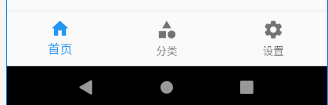
切换选中
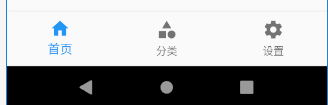
当我们点击按钮,想要切换选中的导航块时,需要监听onTap,然后改变currentIndex。
import 'package:flutter/material.dart';

void main() => runApp(MyApp());

class MyApp extends StatelessWidget {

  @override

  Widget build(BuildContext context) {

    return MaterialApp(

      home:Tabs()

    );

  }

}

class Tabs extends StatefulWidget {

  Tabs({Key key}) : super(key: key);

  _TabsState createState() => _TabsState();

}

class _TabsState extends State<Tabs> {

  int _currentIndex=0;

  @override

  Widget build(BuildContext context) {

    return Scaffold(

        appBar: AppBar(

          title: Text("Flutter Demo"),

        ),

        body: Text("tabBar"),

        bottomNavigationBar: BottomNavigationBar(

          currentIndex: this._currentIndex,

          onTap: (int index){

              setState(() {

                  this._currentIndex=index;

              });

          },

          items: [

            BottomNavigationBarItem(

              icon: Icon(Icons.home),

              title: Text("首页")

            ),

             BottomNavigationBarItem(

              icon: Icon(Icons.category),

              title: Text("分类")

            ),

             BottomNavigationBarItem(

              icon: Icon(Icons.settings),

              title: Text("设置")

            )

          ],

        ),

      );

  }

}

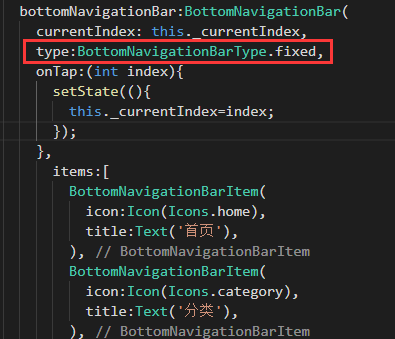
需要特别说明的是,默认可以显示两个或者三个BottomNavigationBarItem,如果有更多的BottomNavigationBarItem需要显示,则需要配置type的为BottomNavigationBarType.fixed,否则样式会出现问题。
页面切换
要实现点击后页面切换的效果,首先需要有三个页面,在flutter中,一切皆组件,页面也是组件。
首先,在lib目录下新建pages文件夹,然后在pages下新建文件夹tabs,并新建上面导航对应的三个页面。
Category.dart
import 'package:flutter/material.dart';

class CategoryPage extends StatefulWidget {

  CategoryPage({Key key}) : super(key: key);

  _CategoryPageState createState() => _CategoryPageState();

}

class _CategoryPageState extends State<CategoryPage> {

  @override

  Widget build(BuildContext context) {

    return Text("分类");

  }

}
Home.dart
import 'package:flutter/material.dart';

class HomePage extends StatefulWidget {

  HomePage({Key key}) : super(key: key);

  _HomePageState createState() => _HomePageState();

}

class _HomePageState extends State<HomePage> {

  @override

  Widget build(BuildContext context) {

    return Text("我是首页组件");

  }

}
Setting.dart
import 'package:flutter/material.dart';

class SettingPage extends StatefulWidget {

  SettingPage({Key key}) : super(key: key);

  _SettingPageState createState() => _SettingPageState();

}

class _SettingPageState extends State<SettingPage> {

  @override

  Widget build(BuildContext context) {

    return ListView(

      children: <Widget>[

        ListTile(

          title: Text("我是一个文本"),

        ),

         ListTile(

          title: Text("我是一个文本"),

        ),

         ListTile(

          title: Text("我是一个文本"),

        ),

         ListTile(

          title: Text("我是一个文本"),

        )

      ],

    );

  }

}
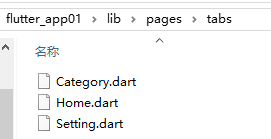
然后,在pages文件夹下新建Tabs.dart文件,并将上面例子中的tabs组件剪切到这个文件中,
import 'package:flutter/material.dart';

class Tabs extends StatefulWidget {

  Tabs({Key key}) : super(key: key);

  _TabsState createState() => _TabsState();

}

class _TabsState extends State<Tabs> {

  int _currentIndex=0;

  @override

  Widget build(BuildContext context) {

    return Scaffold(

        appBar: AppBar(

          title: Text("Flutter Demo"),

        ),

        body: Text("tabBar"),

        bottomNavigationBar: BottomNavigationBar(

          currentIndex: this._currentIndex,

          onTap: (int index){

              setState(() {

                  this._currentIndex=index;

              });

          },

          items: [

            BottomNavigationBarItem(

              icon: Icon(Icons.home),

              title: Text("首页")

            ),

             BottomNavigationBarItem(

              icon: Icon(Icons.category),

              title: Text("分类")

            ),

             BottomNavigationBarItem(

              icon: Icon(Icons.settings),

              title: Text("设置")

            )

          ],

        ),

      );

  }

}
最后,在main.dart中引入Tabs.dart
import 'package:flutter/material.dart';

import 'pages/Tabs.dart';

void main() => runApp(MyApp());

class MyApp extends StatelessWidget {

  @override

  Widget build(BuildContext context) {

    return MaterialApp(

      home:Tabs()

    );

  }

}
此时,仅仅只是实现上面例子中的效果,还不能实现页面的切换,还需要继续修改Tabs.dart文件。
import 'package:flutter/material.dart';

import 'tabs/Home.dart';

import 'tabs/Category.dart';

import 'tabs/Setting.dart';

class Tabs extends StatefulWidget {

  Tabs({Key key}) : super(key: key);

  _TabsState createState() => _TabsState();

}

class _TabsState extends State<Tabs> {

  int _currentIndex=0;

  List _pageList=[

    HomePage(),

    CategoryPage(),

    SettingPage(),

  ];

  @override

  Widget build(BuildContext context) {

    return Scaffold(

        appBar: AppBar(

          title: Text("Flutter Demo"),

        ),

        body: this._pageList[this._currentIndex],

        bottomNavigationBar: BottomNavigationBar(

          currentIndex: this._currentIndex,   //配置对应的索引值选中

          onTap: (int index){

              setState(() {  //改变状态

                  this._currentIndex=index;

              });

          },

          iconSize:36.0,      //icon的大小

          fixedColor:Colors.red,  //选中的颜色

          type:BottomNavigationBarType.fixed,   //配置底部tabs可以有多个按钮

          items: [

            BottomNavigationBarItem(

              icon: Icon(Icons.home),

              title: Text("首页")

            ),

             BottomNavigationBarItem(

              icon: Icon(Icons.category),

              title: Text("分类")

            ),

             BottomNavigationBarItem(

              icon: Icon(Icons.settings),

              title: Text("设置")

            )

          ],

        ),

      );

  }

}
代码下载:点这里 提取码(xsju)
BottomNavigationBar 自定义 底部导航条的更多相关文章
- 15 Flutter BottomNavigationBar自定义底部导航条 以及实现页面切换 以及模块化
效果: /** * Flutter BottomNavigationBar 自定义底部导航条.以及实现页面切换: * BottomNavigationBar是底部导航条,可以让我们定义底部Tab ...
- tab 切换 和 BottomNavigationBar 自定义 底部导航条
BottomNavigationBar 组件 BottomNavigationBar 是底部导航条,可以让我们定义底部 Tab 切换,bottomNavigationBar是 Scaffold ...
- android开发(1):底部导航条的实现 | navigation tab | activity的创建
底部导航条,在iOS中叫tabbar,在android中叫bottombar或bottom navigation,是一个常用的切换页面的导航条. 同样,如果有良好的第三方库,我们应该优先考虑,能用好别 ...
- Android开发关闭虚拟按钮、底部导航条
在Android开发中,遇到了一系列大大小小的问题,其中一个就是屏蔽底部实体键,我找了很多的博客也尝试了许许多多的方法,但始终不能屏蔽 HOME键,后来看见一篇博客说在Android 4.0以后,屏蔽 ...
- 微信小程序-自定义底部导航
代码地址如下:http://www.demodashi.com/demo/14258.html 一.前期准备工作 软件环境:微信开发者工具 官方下载地址:https://mp.weixin.qq.co ...
- VS 2015 开发Android底部导航条----[实例代码,多图]
1.废话背景介绍 在Build 2016开发者大会上,微软宣布,Xamarin将被整合进所有版本的Visual Studio之中. 这也就是说,Xamarin将免费提供给所有购买了Visual ...
- Android 修改TabLayout底部导航条Indicator的长短
关于Tablayout,使用的应该很频繁了,但是底部导航条长短是固定死的,需要自己来改动长短,找了半天没找着方法,看了下官方建议,可以通过映射来修改自己想要的长短,其实也就几行代码的问题,看代码: p ...
- OS开发(2):自定义tabbar | 导航条 | 突显中间按钮
tabbar是放在APP底部的控件,也叫navigationbar或导航条.常见的APP都使用tabbar来进行功能分类的管理,比如微信.QQ等等. 需求是这样的,需要一个特殊一点的tabbar,要求 ...
- 微信小程序自定义底部导航栏组件+跳转
微信小程序本来封装有底部导航栏,但对于想自定义样式和方法的开发者来说,这并不是很好. 参考链接:https://github.com/ljybill/miniprogram-utils/tree/ma ...
随机推荐
- 屏幕适配dip
android适配一般使用dpi 那dpi与分辨率,屏幕尺寸的关系 DPI值计算是屏幕对角线的像素值除以屏幕的大小 dip=/ 屏幕尺寸, 比如:计算WVGA(800*480)分辨率,3.7英寸的密度 ...
- javascript获取select 的id与值
javascript获取select 的id与值 <script type="text/javascript"> function showOptionId () { ...
- 【ABAP系列】SAP ABAP模块-ABAP动态指针写法的精髓部分
公众号:SAP Technical 本文作者:matinal 原文出处:http://www.cnblogs.com/SAPmatinal/ 原文链接:[ABAP系列]SAP ABAP模块-ABAP动 ...
- mooc-IDEA 调试代码--012
mooc-IDEA 调试代码 添加断点快捷键:ctrl+F8 单步运行:F9 <=>resum(从一个断点跳转到下一个断点) 一行一行运行:F8 查看所有断点: 禁止所有断点: 条件断点 ...
- linux 查看 python 安装包路径
[root]# python -c "import fasttext;print(fasttext)"<module 'fasttext' from '/root/anaco ...
- .net 学习官网
https://docs.microsoft.com
- 二叉树BinTree类定义
#include<iostream> using namespace std; template<class T> struct BinTreeNode{//二叉树结点类 T ...
- Pandas案例--人口密度分析
需求: 导入文件,查看原始数据 将人口数据和各州简称数据进行合并 将合并的数据中重复的abbreviation列进行删除 查看存在缺失数据的列 找到有哪些state/region使得state的值为N ...
- redis 不可重入分布式锁(setNx()和getset()方法实现)
通常如果在单机环境,使用synchronized或juc ReentrantLock 实现锁机制,但如果是分布式系统,则需要借助第三方工具实现,比如redis.zookeeper等.redis为单进程 ...
- centos7配置sudo免密
1.chmod +w /etc/sudoers 2.vim /etc/sudoers 在已经有了的root下面加 username ALL=NOPASSWD:ALL (这是所有的命 ...