
Handling Configuration Changes with Fragments
This post addresses a common question that is frequently asked on StackOverflow:
What is the best way to retain active objects—such as running
Threads,Sockets,
andAsyncTasks—across
device configuration changes?
To answer this question, we will first discuss some of the common difficulties developers face when using long-running background tasks in conjunction with the Activity lifecycle. Then, we will describe the flaws of two common approaches to solving the problem.
Finally, we will conclude with sample code illustrating the recommended solution, which uses retained Fragments to achieve our goal.
Configuration Changes & Background Tasks
One problem with configuration changes and the destroy-and-create cycle that Activitys go through as a result stems from the fact that these events are unpredictable and may occur at any time. Concurrent background tasks only add to this problem. Assume, for
example, that an Activity starts an AsyncTask and
soon after the user rotates the screen, causing the Activity to be destroyed and recreated. When the AsyncTask eventually
finishes its work, it will incorrectly report its results back to the old Activity instance, completely unaware that a new Activity has been created. As if this wasn't already an issue, the new Activity instance might waste valuable resources by firing up
the background work again, unaware that the oldAsyncTask is
still running. For these reasons, it is vital that we correctly and efficiently retain active objects across Activity instances when configuration changes occur.
Bad Practice: Retain the Activity
Perhaps the hackiest and most widely abused workaround is to disable the default destroy-and-recreate behavior by setting the android:configChanges attribute
in your Android manifest. The apparent simplicity of this approach makes it extremely attractive to developers; Google
engineers, however, discourage its use. The primary concern is that it requires you to handle device configuration changes manually in code. Handling configuration changes requires you to take many additional steps to ensure that each and every string,
layout, drawable, dimension, etc. remains in sync with the device's current configuration, and if you aren't careful, your application can easily have a whole series of resource-specific bugs as a result.
Another reason why Google discourages its use is because many developers incorrectly assume that settingandroid:configChanges="orientation" (for
example) will magically protect their application from unpredictable scenarios in which the underlying Activity will be destroyed and recreated. This
is not the case. Configuration changes can occur for a number of reasons—not just screen orientation changes. Inserting your device into a display dock, changing the default language, and modifying the device's default font scaling factor are just three
examples of events that can trigger a device configuration change, all of which signal the system to destroy and recreate all currently running Activitys the next time they are resumed. As a result, setting the android:configChanges attribute
is generally not good practice.
Deprecated: Override onRetainNonConfigurationInstance()
Prior to Honeycomb's release, the recommended means of transferring active objects across Activity instances was to override the onRetainNonConfigurationInstance() and getLastNonConfigurationInstance() methods.
Using this approach, transferring an active object across Activity instances was merely a matter of returning the active object inonRetainNonConfigurationInstance() and
retrieving it in getLastNonConfigurationInstance().
As of API 13, these methods have been deprecated in favor of the more Fragment's setRetainInstance(boolean) capability,
which provides a much cleaner and modular means of retaining objects during configuration changes. We discuss this Fragment-based approach in the next section.
Recommended: Manage the Object Inside a Retained Fragment
Ever since the introduction of Fragments in Android 3.0, the recommended means of retaining active objects across Activity instances is to wrap and manage them inside of a retained "worker" Fragment. By default, Fragments are destroyed and recreated along with
their parent Activitys when a configuration change occurs. CallingFragment#setRetainInstance(true) allows
us to bypass this destroy-and-recreate cycle, signaling the system to retain the current instance of the fragment when the activity is recreated. As we will see, this will prove to be extremely useful with Fragments that hold objects like running Threads, AsyncTasks, Sockets,
etc.
The sample code below serves as a basic example of how to retain an AsyncTask across
a configuration change using retained Fragments. The code guarantees that progress updates and results are delivered back to the currently displayed Activity instance and ensures that we never accidentally leak an AsyncTask during
a configuration change. The design consists of two classes, a MainActivity...
|
/** |
...and a TaskFragment...
|
/** |
Flow of Events
When the MainActivity starts
up for the first time, it instantiates and adds the TaskFragment to
the Activity's state. TheTaskFragment creates
and executes an AsyncTask and
proxies progress updates and results back to the MainActivity via
the TaskCallbacks interface.
When a configuration change occurs, the MainActivity goes
through its normal lifecycle events, and once created the new Activity instance is passed to the onAttach(Activity) method,
thus ensuring that theTaskFragment will
always hold a reference to the currently displayed Activity instance even after the configuration change. The resulting design is both simple and reliable; the application framework will handle re-assigning Activity instances as they are torn down and recreated,
and the TaskFragment and
its AsyncTask never
need to worry about the unpredictable occurrence of a configuration change. Note also that it is impossible for onPostExecute() to
be executed in between the calls to onDetach() and onAttach(),
as explained in this
StackOverflow answer and in my reply to Doug Stevenson in this
Google+ post (there is also some discussion about this in the comments below).
Conclusion
Synchronizing background tasks with the Activity lifecycle can be tricky and configuration changes will only add to the confusion. Fortunately, retained Fragments make handling these events very easy by consistently maintaining a reference to its parent Activity,
even after being destroyed and recreated.
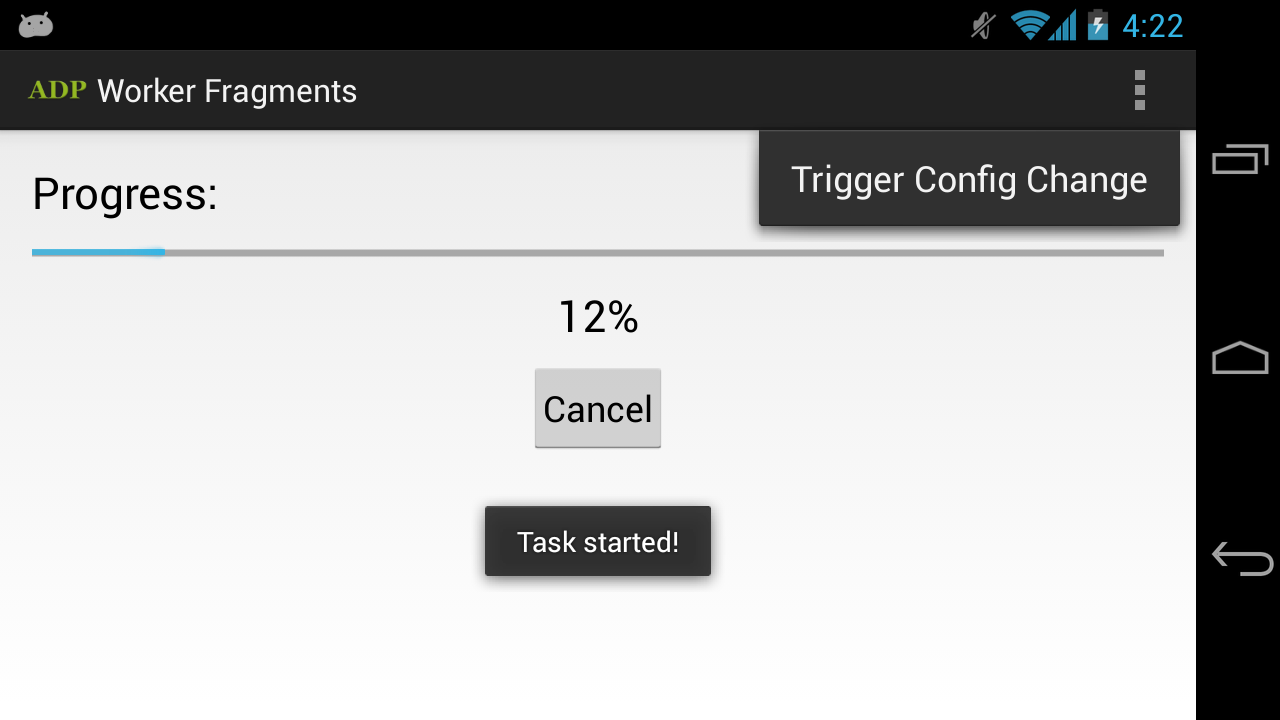
A sample application illustrating how to correctly use retained Fragments to achieve this effect is available for download on the Play
Store. The source code is available on GitHub.
Download it, import it into Eclipse, and modify it all you want!
As always, leave a comment if you have any questions and don't forget to +1 this blog in the top right corner!
Handling Configuration Changes with Fragments的更多相关文章
- 创建一个dynamics 365 CRM online plugin (十一) - Handling Configuration data
Config data 可以在registering step 的时候来配置 配置好的config data 可以使用 constructor 来获取 Secure Config 和 UnSecure ...
- Android Configuration change引发的问题及解决方法(转)
之前在学习Fragment和总结Android异步操作的时候会在很多blog中看到对Configuration Change的讨论,以前做的项目都是固定竖屏的,所以对横竖屏切换以及横竖屏切换对程序有什 ...
- Android Configuration change引发的问题及解决方法
之前在学习Fragment和总结Android异步操作的时候会在很多blog中看到对Configuration Change的讨论,以前做的项目都是固定竖屏的,所以对横竖屏切换以及横竖屏切换对程序有什 ...
- Android Fragment使用(三) Activity, Fragment, WebView的状态保存和恢复
Android中的状态保存和恢复 Android中的状态保存和恢复, 包括Activity和Fragment以及其中View的状态处理. Activity的状态除了其中的View和Fragment的状 ...
- Activity声明周期容易出现的问题
了解activity的生命周期,不仅仅是回答面试官的几个小问题:下面这篇文章不错,截取个人认为优秀的部分分享给大家,欢迎交流.感谢原作者 /** * 示例向我们展示了在 Activity 的配置改变时 ...
- 在Activity中使用Thread导致的内存泄漏
https://github.com/bboyfeiyu/android-tech-frontier/tree/master/issue-7/%E5%9C%A8Activity%E4%B8%AD%E4 ...
- [转]Activitys, Threads, & Memory Leaks
转自:http://www.androiddesignpatterns.com/2013/04/activitys-threads-memory-leaks.html http://www.cnblo ...
- spring configuration 注解
org.springframework.context.annotation @annotation.Target({ElementType.TYPE}) @annotation.Retention( ...
- Annotation Type @bean,@Import,@configuration使用--官方文档
@Target(value={METHOD,ANNOTATION_TYPE}) @Retention(value=RUNTIME) @Documented public @interface Bean ...
随机推荐
- Java基础语法-运算符
1算术运算符 1.1运算符和表达式 运算符:对常量和变量进行操作的符号. 表达式:用运算符把常量或者变量连接起来符合java语法的式子就可以称为表达式. 不同运算符链接的表达式体现的是不同类型的表达式 ...
- 【嵌入式 Linux文件系统】如何使用NFS文件系统
(1)内核配置 取消选项 General setup-->Initial RAM filesystem and RAM disk (initramfs/initrd) support 进入Fil ...
- 2019上海网络赛B题(差分 + 离散化 or 差分 + 思维)
这题.....队里都没怎么训练差分,导致败北...写了一堆线段树嘤嘤嘤,到最后也是超时,比赛结束后看到了差分的思想于是就去学了一手. 其实了解差分思想的一眼就能看出来是差分了.但是如果对n差分的话很明 ...
- div绝对定位居中
绝对定位absolute,left:50%,加上margin-left:-(宽度/2),可以实现绝对位置居中 .list{ width: 1200px; height: 300px; overflow ...
- jquery TAB切换小插件
//tab切换 ;(function($, window, document, undefined) { $.fn.tab = function(options) { var defaults = { ...
- luogu P1399 [NOI2013]快餐店
传送门 注意到答案为这个基环树直径\(/2\) 因为是基环树,所以考虑把环拎出来.如果直径不过环上的边,那么可以在环上每个点下挂的子树内\(dfs\)求得.然后如果过环上的边,那么环上的部分也是一条链 ...
- 03python面向对象编程5
5.1 继承机制及其使用 继承是面向对象的三大特征之一,也是实现软件复用的重要手段.Python 的继承是多继承机制,即一个子类可以同时有多个直接父类. Python 子类继承父类的语法是在定义子类时 ...
- evpp::buffer使用
evpp::Buffer testmsg; const char* buf123 = "12342333333333333333333333333323424324234234"; ...
- linux 性能分析常用命令汇总
CPU性能分析工具: vmstatpssartimestracepstreetop Memory(内存)性能分析工具:vmstatstracetopipcsipcrmcat /proc/meminfo ...
- 过采样算法之SMOTE
SMOTE(Synthetic Minority Oversampling Technique),合成少数类过采样技术.它是基于随机过采样算法的一种改进方案,由于随机过采样采取简单复制样本的策略来增加 ...