
解决码云未配置公钥问题——fatal: Could not read from remote repository.
使用码云,键入“git push -u origin master” ,遇到如下问题:
fatal: Could not read from remote repository.(致命:不能读远端仓库。)

网上查找后,发现都是用github的解决方案,缺少码云的解决方案,在这将解决过程写出来:
A. 如果你也是初次使用码云,且没有设置过ssh key,请按照如下:
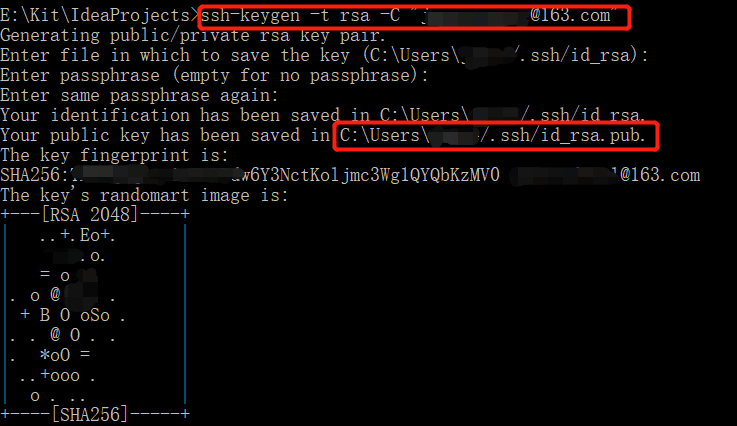
1.键入:ssh-keygen -t rsa -C "你注册码云的邮箱" ,然后一路"Enter”
2.打开:C:\Users\你的用户名/.ssh/id_rsa.pub
3.复制:Notepad++打开上述文件,全部复制
B. 添加公钥
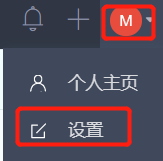
1.在码云,点击右上角“小圆圈”,点击设置
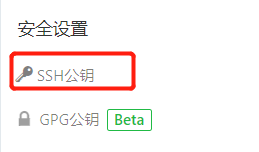
2.左边一侧,点击 SSH公钥
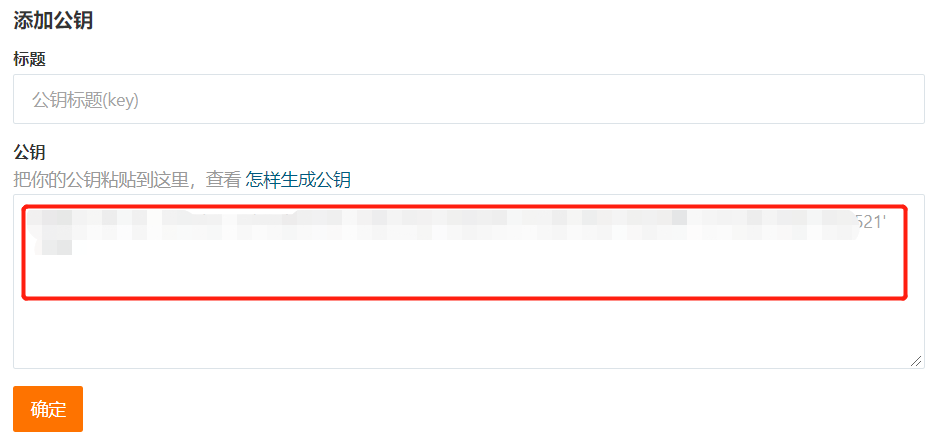
3.将 上述 A.3 复制内容,粘贴到如下方框,点击 确定
4.输入你的码云密码 ,点击 验证

5.验证成功后显示如下(本人就是输入了3次才成功,如果你也失败,多验证几次)

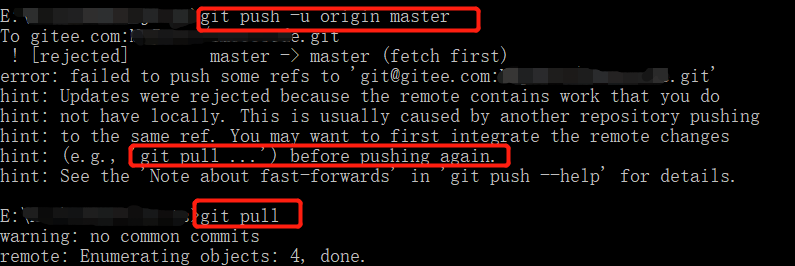
C. 再次键入“git push -u origin master”,若出现如下,git pull, 就OK了
D. 附:可参看 https://gitee.com/help/articles/4191#article-header0
解决码云未配置公钥问题——fatal: Could not read from remote repository.的更多相关文章
- 码云(gitee)配置ssh密钥
创建公钥的目的: 使用SSH公钥可以让你在你的电脑和码云通讯的时候使用安全连接(git的remote要使用SSH地址) git中粘贴右击鼠标选择Paste 步骤: 打开终端(git)进入.ssh目录 ...
- git提示错误关于错误:ssh: Could not resolve hostname github.com: Name or service not known.fatal: Could not read from remote repository.
关于 Git 使用中出现的错误 饥人谷_楠柒 关注 2016.11.02 15:33* 字数 746 阅读 3607评论 5喜欢 10赞赏 1 关于错误:ssh: Could not resolve ...
- github Permission denied (publickey). fatal: Could not read from remote repository.
github Permission denied (publickey).fatal: Could not read from remote repository. ----------------- ...
- fatal: Could not read from remote repository.
fatal: Could not read from remote repository. Please make sure you have the correct access rightsand ...
- fatal:'origin' does not appear to be a git repository fatal:Could not read from remote repository
天gitlab中遇到的问题: 当 git push origin branch_name时遇到报错如下: fatal:'origin' does not appear to be a git repo ...
- gitlab 拉代码提示:Your Account has been blocked. fatal: Could not read from remote repository. 最佳解决方案
今天在脚本服务器上拉取代码,突然发现拉不了代码了,提示: GitLab: Your account has been blocked. fatal: Could not read from remot ...
- git pull 出错 fatal: Could not read from remote repository.Please make sure you have the correct access rights.and the repository exists.
Warning: Permanently added the RSA host key for IP address '192.30.252.131' to the list of known hos ...
- Permission denied (publickey). fatal: Could not read from remote repository.
博主在github上下载tiny face的的源代码的时候,遇到git clone命令为:git clone --recursive git@github.com:peiyunh/tiny.git 而 ...
- 用ssh进行git clone出现 fatal: Could not read from remote repository.
问题:在通过MobaXterm进行ssh连接的服务器上用ssh进行git clone出现 fatal: Could not read from remote repository. 解决方法:prox ...
随机推荐
- android ListView列表显示数据
item.xml <?xml version="1.0" encoding="utf-8"?> <LinearLayout xmlns:and ...
- Flask-SQLAlchemy使用方法
Flask-SQLAlchemy使用起来非常有趣,对于基本应用十分容易使用,并且对于大型项目易于扩展.有关完整的指南,请参阅 SQLAlchemy 的 API 文档. 常见情况下对于只有一个 Flas ...
- 【记录】linux 命令拷贝文件到远程服务器,linux下载文件到本地
Linux scp命令用于Linux之间复制文件和目录 -1 强制scp命令使用协议ssh1 -2 强制scp命令使用协议ssh2 -4 强制scp命令只使用IPv4寻址 -6 强制scp命令只使用I ...
- 使用while循环实现菜单
- go语言从例子开始之Example27.超时处理
超时 对于一个连接外部资源,或者其它一些需要花费执行时间的操作的程序而言是很重要的.得益于通道和 select,在 Go中实现超时操作是简洁而优雅的. Example: package main im ...
- 转载:java面试题(二)
这部分主要是开源Java EE框架方面的内容,包括Hibernate.MyBatis.Spring.Spring MVC等,由于Struts 2已经是明日黄花,在这里就不讨论Struts 2的面试题, ...
- MAVEN项目标准目录结构(转)
转自:http://blog.csdn.net/lengyue_wy/article/details/6718637 版权声明:本文为博主原创文章,未经博主允许不得转载. 1.标准目录结构: s ...
- 【Kickstart】2017 Round (Practice ~ G)
Practice Round Problem A Country Leader (4pt/7pt) Problem B Vote (5pt/8pt) Problem C Sherlock and Pa ...
- Electron-vue实战(三)— 如何在Vuex中管理Mock数据
Electron-vue实战(三)— 如何在Vuex中管理Mock数据 作者:狐狸家的鱼 本文链接:Vuex管理Mock数据 GitHub:sueRimn 在vuex中管理mock数据 关于vuex的 ...
- localstorage sessionstorage和cookie的区别
基本概念 cookie:是网景公司的前雇员在1993年发明.它的主要用于保存登陆信息,比如登陆某个网站市场可以看到'记住密码’,这就是通过在cookie中存入一段辨别用户身份的数据来实现的. sess ...