
echart 折线渐变 加柱形图结合图形,左右纵轴自设置格式,现行图北京渐变 ,x轴字体倾斜
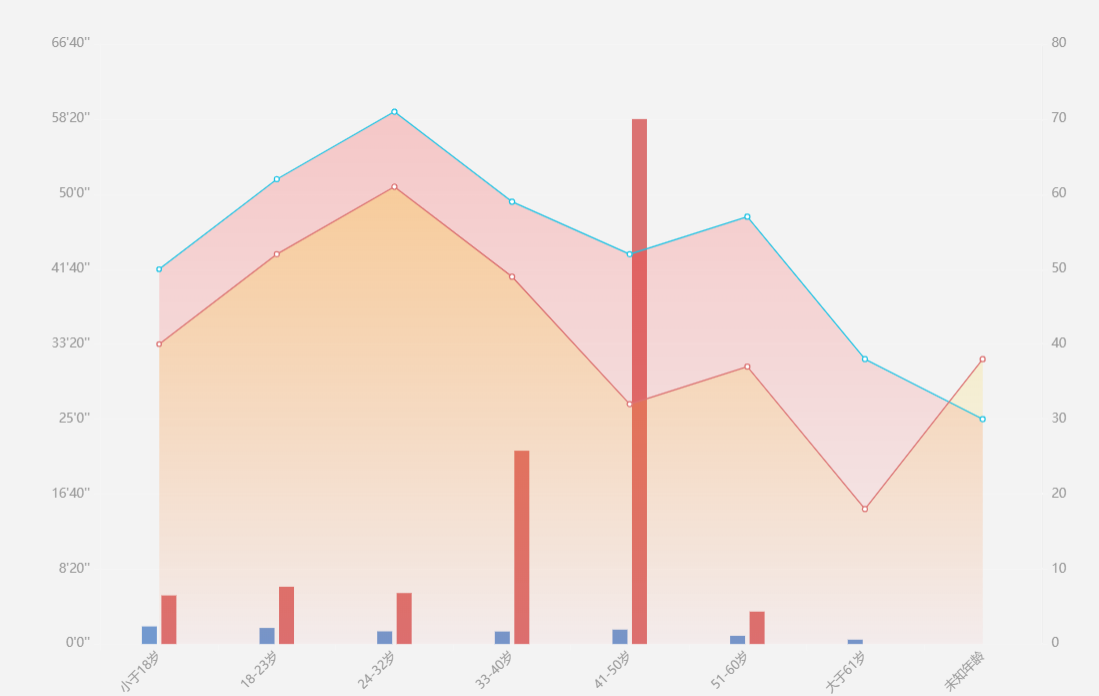
app.title = '折柱混合';

option = {

 grid: {

    left: '5%',   //距离左边的距离

    right: '5%', //距离右边的距离

    top:'8%',

    bottom:'5%',

    containLabel: true

    },

    tooltip: {

      trigger: 'axis',

      backgroundColor:'rgba(0,0,0,0.75)',

      axisPointer: {

        crossStyle: {

          color: '#999'

        },

        label: {

          backgroundColor: 'rgba(0,0,0,0.75)'

        }

      },

    },

    xAxis: [{

      type: 'category',

      data: ["小于18岁", "18-23岁", "24-32岁", "33-40岁", "41-50岁", "51-60岁", "大于61岁", "未知年龄"],

      axisPointer: {

        type: ''

      },

      axisLine: {

        lineStyle: {

          type: 'solid',

          color: '#f5f5f5',//左边线的颜色

          width:'1'//坐标线的宽度

        }

      },

      axisLabel: {

        interval:0,

        rotate:45,

        textStyle: {

          color:'#999',

          fontSize:'10'

        }

      },

    }],

    yAxis: [

      {

        type: 'value',

        name: '',

        splitNumber :8,

        axisPointer: {

          type: ''

        },

        axisLine: {

          lineStyle: {

            type: 'solid',

            color: '#f5f5f5',//左边线的颜色

            width:'1'//坐标线的宽度

          }

        },

        position:'left',

        splitLine: {

          show:false,

          lineStyle: {

            color: ['#f5f5f5']

          }

        },

        axisLabel: {

          textStyle: {

            color:'#999',

            fontSize:'10'

          },

          formatter: function (value) {

            // var hh = Math.floor(value % 3600 / 60 / 60)

            var mm = Math.floor(value % 3600 / 60);

            var ss = Math.floor(value % 60);

            if(value>3500){

              return mm + 60 + "'" + ss + "''";

            }else{

              return mm + "'" + ss + "''";

            }

          }

        }

      },

      {

        type: 'value',

        name: '',

        splitNumber :8,

        axisPointer: {

          type: ''

        },

        axisLine: {

          show:'false',

          lineStyle: {

            type: 'solid',

            color: '#f5f5f5',//左边线的颜色

            width:'1'//坐标线的宽度

          }

        },

        splitLine: {

          show:'false',

          lineStyle: {

            color: ['#f5f5f5']

          }

        },

        axisLabel: {

          textStyle: {

            color:'#999',

            fontSize:'10'

          },

        }

      }

    ],

    series: [

      {

        name:'男',

        type:'bar',

        data: [117.3005, 107.2594, 84.4112, 83.3266, 95.9611, 54.8313, 29.0411, 0],

        barWidth : 12,

        itemStyle: {

          normal: {

              color:'#7299CF'

          }

        }

      },

      {

        name:'女',

        type:'bar',

        data:[324.082, 382.1394, 340.01627, 1289.3278, 3501.2786, 216.18571, 0, 0],

        barWidth : 12,

        itemStyle: {

          normal: {

              color:'#DB7272'

          }

        }

      },

      {

        name:'男',

        type:'line',

        yAxisIndex: 2,

        symbol:'circle',

        yAxisIndex: 1,

        data:[50, 62, 71, 59, 52, 57, 38, 30],

        itemStyle: {

          normal: {

            color: "#fff",

            borderColor: '#1FC3E4',

            borderWidth: 1,

            lineStyle: {

              color:'#1FC3E4',

              width:1

            }

          },

          emphasis:{

            color:'#1FC3E4',

          }

        },

        areaStyle:{

          normal:{

            opacity:'0.3',

            //颜色渐变函数 前四个参数分别表示四个位置依次为左、下、右、上

              color: new echarts.graphic.LinearGradient(0, 0, 0, 1, [{

                offset: 0,

                color: 'rgba(255,0,0,0.6)'

              },{

                offset: 1,

                color: 'rgba(255,0,0,0.1)'

              }])

          }

        }

      },

      {

        name:'女',

        type:'line',

        yAxisIndex: 1,

        symbol:'circle',

        yAxisIndex: 1,

        data:[40, 52, 61, 49, 32, 37, 18,38],

        itemStyle: {

          normal: {

            color: "#fff",

            borderColor: "#DB7272",

            borderWidth: 1,

            lineStyle: {

              color:"#DB7272",

              width:1

            }

          },

          emphasis:{

            color:"#DB7272",

          }

        },

        areaStyle:{

          normal:{

            opacity:'0.3',

            //颜色渐变函数 前四个参数分别表示四个位置依次为左、下、右、上

              color: new echarts.graphic.LinearGradient(0, 0, 0, 1, [{

                offset: 0,

                color: 'rgba(255,203,0,0.8)'

              },{

                offset: 1,

                color: 'rgba(255,203,0,0)'

              }])

          }

        }

      }

    ]

}
echart 折线渐变 加柱形图结合图形,左右纵轴自设置格式,现行图北京渐变 ,x轴字体倾斜的更多相关文章
- 微信小程序echart 折线图legend不显示的问题
最近使用小程序echart折线图,遇到表头一直不显示问题,查询之后解决方案:
- 现代3D图形编程学习-环境设置
本书系列 现代3D图形编程学习 环境设置 由于本书中的例子,均是基于OpenGL实现的,因此你的工作环境需要能够运行OpenGL,为了读者能够更好的运行原文中的示例,此处简单地介绍了linux和win ...
- HighCharts之2D柱状图、折线图的组合多轴图
HighCharts之2D柱状图.折线图的组合多轴图 1.实例源码 SomeAxis.html: <!DOCTYPE html> <html> <head> < ...
- HighCharts之2D柱状图、折线图的组合双轴图
HighCharts之2D柱状图.折线图的组合双轴图 1.实例源码 DoubleAxis.html: <!DOCTYPE html> <html> <head> & ...
- ajax-json,遇到的一个问题,jquery var ,加载顺序。JS对象,json格式转换。
<!DOCTYPE html> <html lang="en"> <head> <meta charset="UTF-8&quo ...
- Highcharts 3D柱形图;Highcharts 堆叠3D柱形图;Highcharts 3D饼图;Highcharts 3D圆环图
Highcharts 3D柱形图 配置 chart.options3d 配置 以下列出了 3D 图的基本配置,设置 chart 的 type 属性为 column,options3d 选项可设置三维效 ...
- R语言与医学统计图形【5】饼图、条件图
R语言基础绘图系统 基础图形--饼图.克利夫兰点图.条件图 6.饼图 pie(rep(1,26),col=rainbow(26), labels = LETTERS[1:26], #标签 radius ...
- 用echartsjs 实现动态绘制折线、柱状等图形,并实现多图联动效果
echarts对于大数据处理后绘制折线图,柱形图等等的效果和速度都很好.下面我们介绍 怎么把封装的数据列表解析出来,动态绘图,并且实现鼠标联动效果引入js文件: <script type=&qu ...
- echart折线图系列一:折线图基本配置
引入echart插件 页面上准备一个容器:<div id="box" style="height:400px;width: 800px;padding: 20px& ...
随机推荐
- linux运维、架构之路-MHA高可用方案
一.软件介绍 MHA(master high availability)目前是MySQL高可用方面是一个相对成熟的解决方案.在切换过程中,mha能做到0-30s内自动完成数据库的 ...
- PHP基础教程 常见PHP错误类型及屏蔽方法
程序只要在运行,就免不了会出现错误,错误很常见,比如Error,Notice,Warning等等.这篇文章兄弟连PHP培训 小编来跟大家具体说一下PHP的错误类型和屏蔽方法.在 PHP 中,主要有以下 ...
- 【rust】Rust变量绑定(3)
Rust 是一个静态类型语言,这意味着我们需要先确定我们需要的类型. 什么是变量绑定? 将一些值绑定到一个名字上,这样可以在之后使用他们. 如何声明一个绑定? 使用 let 关键字: fn main( ...
- 【bzoj3195】【 [Jxoi2012]奇怪的道路】另类压缩的状压dp好题
(上不了p站我要死了) 啊啊,其实想清楚了还是挺简单的. Description 小宇从历史书上了解到一个古老的文明.这个文明在各个方面高度发达,交通方面也不例外.考古学家已经知道,这个文明在全盛时期 ...
- 最短路(模板)【CodeChef CLIQUED,洛谷P3371】
自TG滚粗后咕咕咕了这么久,最近重新开始学OI,也会慢慢开始更博了.... 最短路算法经典的就是SPFA(Bellman-Ford),Dijkstra,Floyd: 本期先讲两个经典的单源最短路算法: ...
- kohana附件上传
try { $upload = Uploader::factory('Picture', $_FILES['Filedata'])->execute();}catch (Exception $e ...
- Internet History, Technology, and Security(week9)——Web Security
Secure Web Connections: Security Public/Private Key - Secure Sockets 凯撒密码容易被破解,后来人们发明了公钥和私钥,由于私钥一定是要 ...
- bootstrap-multiselect 设置单选无效(设置单选依然是复选框)
bootstrap-multiselect 的使用介绍:https://www.cnblogs.com/landeanfen/p/5013452.html bootstrap-multiselect ...
- [洛谷P5106]dkw的lcm:欧拉函数+容斥原理+扩展欧拉定理
分析 考虑使用欧拉函数的计算公式化简原式,因为有: \[lcm(i_1,i_2,...,i_k)=p_1^{q_{1\ max}} \times p_2^{q_{2\ max}} \times ... ...
- @ResponseBody返回4种数据格式的数据
1.返回一个键值对或者集合 前端JS请求: //返回值为map的形式 $(".name").blur(function(){ $.ajax({ type:"Post&qu ...