
Vuex-全局状态管理【传递参数】
由于 async 异步获取数据,加载页面时,页面会感觉一闪而过的抖动,如果想页面不闪,推荐使用 SSR 【vuex】,由服务端 渲染SSR页面出来。此话记于 2020年01月08号,项目nuxt.js 构建 Vue+Koa+MongoDB 全栈美团项目
src根目录
新建store文件夹,新建index.js 作为入口
在store文件夹中 新建modules文件夹
modules文件夹中,新建 a.js b.js 2个文件
a.js
const state = {

  money: 10

}

const mutations = {

  // 我这里收到 参数以后,操作state.money的值改变

  add(state, param) {

    state.money += param

  },

  reduce(state) {

    state.money--

  }

}

const actions = {

  //这里先接收到参数,我在驱动mutation里的add方法,同时传入参数

  Actions_add: ({ commit }, param) => {

    commit('add', param)

  },

  Actions_reduce: ({ commit }) => {

    commit('reduce')

  }

}

export default {

  namespaced: true,//命名空间模块

  state,

  mutations,

  actions

}
b.js
const state = {

  count: 1

}

const mutations = {

  add(state){

    state.count++

  },

  reduce(state) {

    state.count--

  }

}

const actions = {

  Actions_add:({commit})=>{

    commit('add')

  },

  Actions_reduce:({commit})=>{

    commit('reduce')

  }

}

export default {

  namespaced:true,//命名空间模块

  state,

  mutations,

  actions

}
index.js
import Vue from 'vue'

import Vuex from 'vuex'

import money from './modules/a'

import count from './modules/b'

Vue.use(Vuex)

export default new Vuex.Store({

  modules: {

    money,

    count

  }

})
* 记得不要忘记在 main.js 中引入
import Vue from 'vue'

import App from './App.vue'

import store from './store/index'

// import store from './store'

Vue.config.productionTip = false

new Vue({

  store,

  render: h => h(App)

}).$mount('#app')
在新建 a.vue \ b.vue 2个组件
a.vue
<template>

    <div class="container">

      <h1>Money</h1>

      <hr />

      <div class="input-group">

        <span class="input-group-btn">

          <button type="button" class="btn btn-success" @click="Actions_add(2)">增加2</button>

        </span>

        <input type="text" class="form-control"  v-model="money.money" />

        <span class="input-group-btn">

          <button type="button" class="btn btn-danger" @click="Actions_reduce">减少</button>

        </span>

      </div>

    </div>

</template>

<script>

import { mapActions, mapState } from "vuex"

export default {

  methods: {

   ...mapActions('money',["Actions_add", "Actions_reduce"])

  },

  computed: {

    ...mapState([

      'money'

    ])

  }

}

</script>

<style>

</style>
b.vue
<template>

    <div class="container">

      <h1>Count</h1>

      <hr />

      <div class="input-group">

        <span class="input-group-btn">

          <button type="button" class="btn btn-success" @click="Actions_add">增加</button>

        </span>

        <input type="text" class="form-control"  v-model="count.count" />

        <span class="input-group-btn">

          <button type="button" class="btn btn-danger" @click="Actions_reduce">减少</button>

        </span>

      </div>

    </div>

</template>

<script>

import { mapActions, mapState } from "vuex"

export default {

  methods: {

   ...mapActions('count',["Actions_add", "Actions_reduce"])

  },

  computed: {

    ...mapState([

      'count'

    ])

  }

}

</script>

<style>

</style>
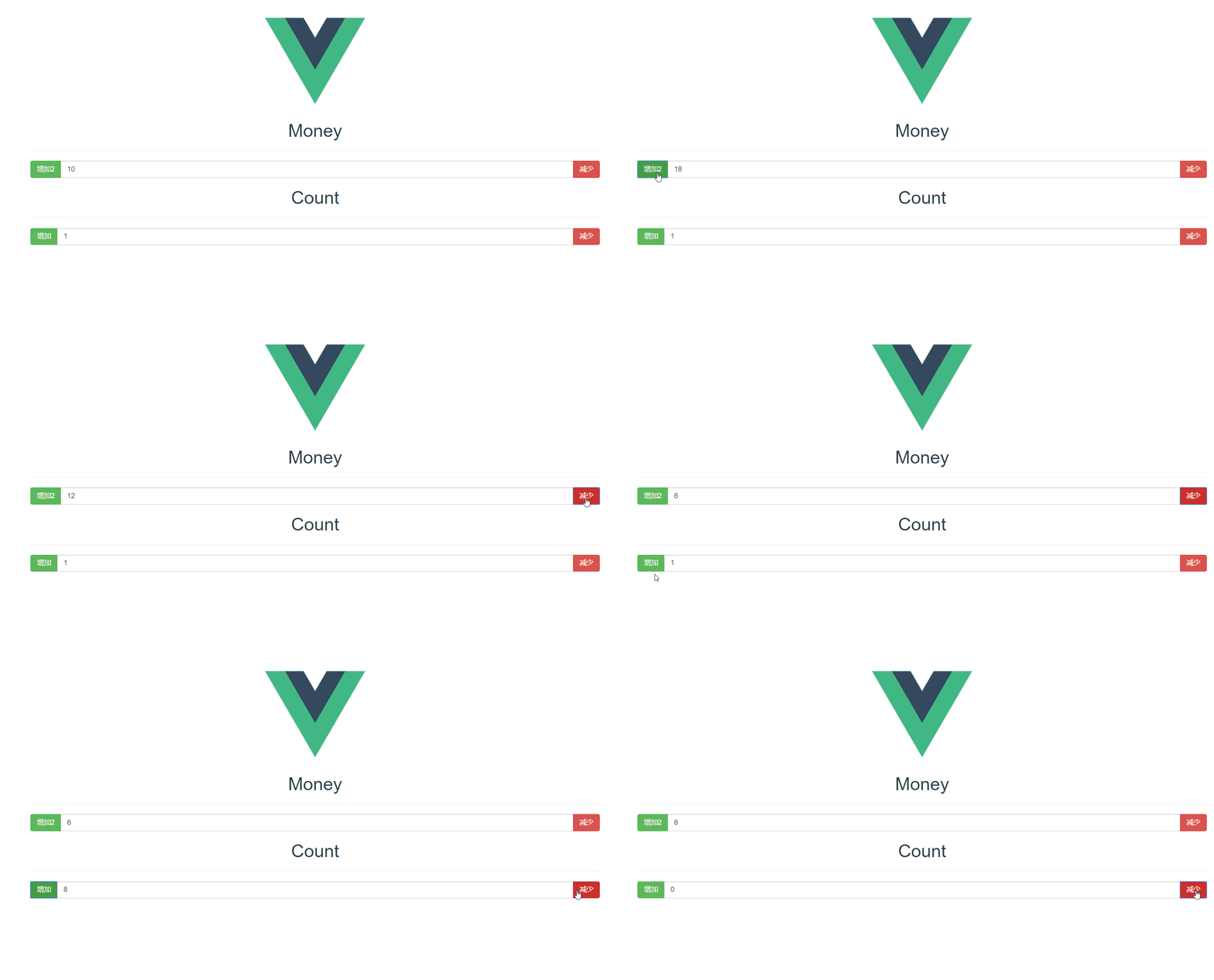
效果图:
Vuex-全局状态管理【传递参数】的更多相关文章
- 理解vuex的状态管理模式架构
理解vuex的状态管理模式架构 一: 什么是vuex?官方解释如下:vuex是一个专为vue.js应用程序开发的状态管理模式.它采用集中式存储管理应用的所有组件的状态,并以相应的规则保证以一种可预测的 ...
- 小程序全局状态管理,在页面中获取globalData和使用globalSetData
GitHub: https://github.com/WozHuang/mp-extend 主要目标 微信小程序官方没有提供类似vuex.redux全局状态管理的解决方案,但是在一个完整的项目中各组件 ...
- 微信小程序全局状态管理 wxscv
微信小程序中,数据状态不同页面中不能跨页面同步更新,也就是缺失类似vuex,mobx,redux全局的数据状态管理功能. 有些人移植了这些库,但是毕竟不是微信小程序生态的东西. Tencent也发布了 ...
- Vuex实现状态管理
Vuex使用总结 1 Vuex简介 Vuex 是一个专为 Vue.js 应用程序开发的状态管理模式,Vuex抽取了各个组件的共享部分,以全局单例模式进行状态的管理.在原生vue中各个组件之间传值使用的 ...
- vuex vue状态管理
第一步安装vuex(安装在生产环境) npm install vuex 第二步 src下新建store文件夹 用来专门放状态管理,store文件夹下新建四个js文件 index.js actions ...
- Vuex,状态管理模式
对于 Vue 本人目前接触不深,只得浅层分析,Vue 是单向数据流, state,驱动应用的数据源: view,以声明方式将 state 映射到视图: actions,响应在 view 上的用户输入导 ...
- vue2.0 仿手机新闻站(三)通过 vuex 进行状态管理
1.创建 store 结构 2.main.js 引入 vuex 3. App.vue 组件使用 vuex <template> <div id="app"&g ...
- Vuex.js状态管理共享数据 - day8
VScode文件目录: amount.vue代码如下: <template> <div> <!-- <h3>{{ $store.state.count }}& ...
- vuex的状态管理模式
1.store.js Vuex 通过 store 选项,提供了一种机制将状态从根组件“注入”到每一个子组件中(需调用 Vue.use(Vuex)) state:存放数据. mutations:提交状态 ...
- 举个例子去理解vuex(状态管理),通俗理解vuex原理,通过vue例子类比
通俗理解vuex原理---通过vue例子类比 本文主要通过简单的理解来解释下vuex的基本流程,而这也是vuex难点之一. 首先我们先了解下vuex的作用vuex其实是集中的数据管理仓库,相当于数 ...
随机推荐
- Jmeter接口测试系列之测试用例编写和调用
在使用Jmeter进行接口测试时,首先需要根据接口定义,编写响应的接口测试用例,在编写接口测试用例时,我们根据测试的侧重点不同,使用不同的方式编译测试用例. 一种是:整个请求参数作为一个变量,进行测试 ...
- Jmeter之Synchronizing Timer(同步集合点)
在性能测试时,需要压测并发,此时就需要用到Synchronizing Timer组件. 一.界面显示 二.配置说明 1.名称:标识 2.注释:备注 3.Grouping (1.Number of si ...
- 【工具使用】kali 安装后要做的事情
日期:2019-07-17 10:43:40 介绍:修改分辨率.修改时区.修改源 0x01. 修改分辨率 kali 在安装完成之后,分辨率过低,需要修改分辨率.  然后依次选择 [settings] ...
- MathType的配置问题;将word中的公式转换为mathtype格式失败,缺少OMML2MML.XSL
安装MathType后打开word报错 打开会出现以下问题: 首先,把startup添加到word的信任中心: 要确保路径被office信任.依次打开word->文件->选项->信任 ...
- 第四周课程总结&第二次实验报告
实验二 Java简单类与对象 实验目的 掌握类的定义,熟悉属性.构造函数.方法的作用,掌握用类作为类型声明变量和方法返回值: 理解类和对象的区别,掌握构造函数的使用,熟悉通过对象名引用实例的方法和属性 ...
- C语言I-博客作业05
这个作业属于那个课程 C语言程序设计II 这个作业要求在哪里 C语言1博客作业05 我在这个课程的目标是 学会运用函数编代码 这个作业在那个具体方面帮助我实现目标 写C语言作业的时候,编代码的实践中 ...
- linux 获取目录中详细信息 -rw-r--r--详解
-rw-r–r– 1 root root 1313 Sep 3 14:59 test.log详解 查询目录中的内容命令 ls [选项] [文件或目录] 选项: -a 显示所有文件.包括隐藏文件 -l ...
- Widget代码讲解
参考:https://zhuanlan.zhihu.com/p/28225011 QT版本为5.12.4 1.main.cpp #include "widget.h" #inclu ...
- CSP-S全国模拟赛第二场 【nan】
A.count 本场比赛最难的题... 隔板法组合数容斥 xjb 搞搞就好了 //by Judge #include<cstdio> #include<iostream> #d ...
- Spring boot项目集成Neo4j
第一步,创建Springboot工程 使用Eclipse 创建Maven项目,并修改pom.xml文件为: <?xml version="1.0" encoding=&quo ...