
Unit Test in SpringBoot
此处的Unit Test in SpringBoot 包括:
SpringApplication Test
Service Test
ControllerTest
测试项目结构如下:
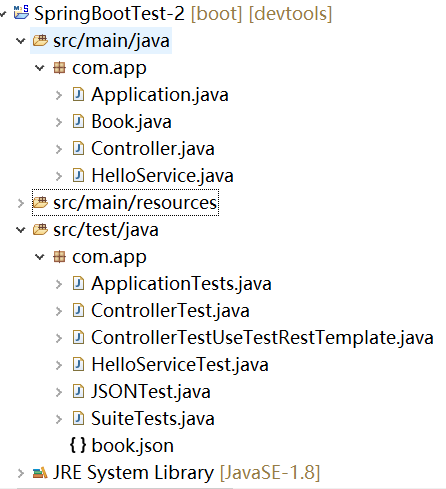
代码如下:
POM.xml
<?xml version="1.0" encoding="UTF-8"?>

<project xmlns="http://maven.apache.org/POM/4.0.0" xmlns:xsi="http://www.w3.org/2001/XMLSchema-instance"

    xsi:schemaLocation="http://maven.apache.org/POM/4.0.0 https://maven.apache.org/xsd/maven-4.0.0.xsd">

    <modelVersion>4.0.0</modelVersion>

    <parent>

        <groupId>org.springframework.boot</groupId>

        <artifactId>spring-boot-starter-parent</artifactId>

        <version>2.0.1.RELEASE</version>

        <relativePath/> <!-- lookup parent from repository -->

    </parent>

    <groupId>com.study</groupId>

    <artifactId>SpringBootTest-2</artifactId>

    <version>0.0.1-SNAPSHOT</version>

    <name>SpringBootTest-2</name>

    <description>Demo project for Spring Boot</description>

    <properties>

        <java.version>1.8</java.version>

    </properties>

    <dependencies>

        <dependency>

            <groupId>org.springframework.boot</groupId>

            <artifactId>spring-boot-starter-web</artifactId>

        </dependency>

        <dependency>

            <groupId>org.springframework.boot</groupId>

            <artifactId>spring-boot-devtools</artifactId>

            <optional>true</optional>

        </dependency>

        <dependency>

            <groupId>org.springframework.boot</groupId>

            <artifactId>spring-boot-starter-test</artifactId>

            <scope>test</scope>

        </dependency>

    </dependencies>

    <build>

        <plugins>

            <plugin>

                <groupId>org.springframework.boot</groupId>

                <artifactId>spring-boot-maven-plugin</artifactId>

            </plugin>

        </plugins>

    </build>

</project>
package com.app;

import org.springframework.boot.SpringApplication;

import org.springframework.boot.autoconfigure.SpringBootApplication;

@SpringBootApplication

public class Application {

    public static void main(String[] args) {

        SpringApplication.run(Application.class, args);

    }

}
package com.app;

public class Book {

    private Integer id;

    private String name;

    private String author;

    public Integer getId() {

    return id;

    }

    public void setId(Integer id) {

    this.id = id;

    }

    public String getName() {

    return name;

    }

    public void setName(String name) {

    this.name = name;

    }

    public String getAuthor() {

    return author;

    }

    public void setAuthor(String author) {

    this.author = author;

    }

    public String toString() {

    return String.format("Book - id: %d, name: %s, author: %s", id,name,author);

    }

}
package com.app;

import java.awt.print.Book;

import org.springframework.beans.factory.annotation.Autowired;

import org.springframework.web.bind.annotation.GetMapping;

import org.springframework.web.bind.annotation.PostMapping;

import org.springframework.web.bind.annotation.RequestBody;

import org.springframework.web.bind.annotation.RestController;

@RestController

public class Controller {

    @Autowired

    HelloService helloService;

    @GetMapping("/hello")

    public String sayHi(String name) {

    return helloService.sayHello(name);

    }

    @PostMapping("/book")

    public String addBook(@RequestBody Book book) {

    return book.toString();

    }

}
package com.app;

import org.springframework.stereotype.Service;

@Service

public class HelloService {

    public String sayHello(String name) {

    return "Hello " + name + "!";

    }

}
UnitTest
package com.app;

import org.junit.Test;

import org.junit.runner.RunWith;

import org.springframework.test.context.junit4.SpringRunner;

@RunWith(SpringRunner.class)

public class ApplicationTests {

    @Test

    public void contextLoads() {

    }

}
package com.app;

import org.junit.Assert;

import org.junit.Before;

import org.junit.Test;

import org.junit.runner.RunWith;

import org.springframework.beans.factory.annotation.Autowired;

import org.springframework.boot.test.context.SpringBootTest;

import org.springframework.http.MediaType;

import org.springframework.test.context.junit4.SpringRunner;

import org.springframework.test.web.servlet.MockMvc;

import org.springframework.test.web.servlet.MvcResult;

import org.springframework.test.web.servlet.request.MockMvcRequestBuilders;

import org.springframework.test.web.servlet.result.MockMvcResultHandlers;

import org.springframework.test.web.servlet.result.MockMvcResultMatchers;

import org.springframework.test.web.servlet.setup.MockMvcBuilders;

import org.springframework.web.context.WebApplicationContext;

import com.fasterxml.jackson.databind.ObjectMapper;

@RunWith(SpringRunner.class)

@SpringBootTest

public class ControllerTest {

    MockMvc mvc;

    @Autowired //模拟ServletContext环境

    WebApplicationContext webApplicationContext;

    @Autowired

    HelloService helloService;

    @Before

    public void before() {

    mvc = MockMvcBuilders.webAppContextSetup(webApplicationContext).build();

    }

    @Test

    public void sayHiTest() throws Exception {

    String uri = "/hello";

    MvcResult mvcResult = mvc

        .perform(MockMvcRequestBuilders.get(uri).contentType(MediaType.APPLICATION_FORM_URLENCODED)

            .param("name", "World"))

        .andExpect(MockMvcResultMatchers.status().isOk()).andDo(MockMvcResultHandlers.print()) // 可以查看Request被处理的细节

        .andReturn();

    String content = mvcResult.getResponse().getContentAsString();

    String expectedContent = "Hello World!";

    Assert.assertEquals("错误,返回值和预期返回值不一致", expectedContent, content);

    }

    @Test

    public void addBookTest() throws Exception {

    ObjectMapper om = new ObjectMapper();

    Book book = new Book();

    book.setAuthor("罗贯中");

    book.setName("三国演义");

    book.setId(1);

    String param = om.writeValueAsString(book);

    String uri = "/book";

    MvcResult mvcResult = mvc

        .perform(MockMvcRequestBuilders.post(uri).contentType(MediaType.APPLICATION_JSON).content(param))

        .andExpect(MockMvcResultMatchers.status().isOk()).andReturn();

    String content = mvcResult.getResponse().getContentAsString();

    System.out.println(content);

    }

}
package com.app;

import org.junit.Assert;

import org.junit.Test;

import org.junit.runner.RunWith;

import org.springframework.beans.factory.annotation.Autowired;

import org.springframework.boot.test.context.SpringBootTest;

import org.springframework.boot.test.web.client.TestRestTemplate;

import org.springframework.http.ResponseEntity;

import org.springframework.test.context.junit4.SpringRunner;

@RunWith(SpringRunner.class)

@SpringBootTest(webEnvironment = SpringBootTest.WebEnvironment.RANDOM_PORT)

public class ControllerTestUseTestRestTemplate {

    /**

     * 如果要使用TestRestTemplate进行测试,需要将@SPringBootTest 中webEnvironment属性的默认值由

     * WebEnvironment.MOCK 修改为 WebEnvironment.DEFINED_PORT 或者 WebEnvironment.RANDOM_PORT

     * 因为这两种都是使用一个真实的Servlet环境而不是模拟的Servlet环境

     */

    @Autowired

    TestRestTemplate restTemplate;

    @Test

    public void sayHiTest2() {

    ResponseEntity<String> response = restTemplate.getForEntity("/hello?name={0}", String.class, "World");

    String expectedContent = "Hello World!";

    String content = response.getBody();

    Assert.assertEquals("错误,返回值和预期返回值不一致", expectedContent, content);

    }

}
package com.app;

import org.junit.Test;

import org.junit.runner.RunWith;

import org.springframework.beans.factory.annotation.Autowired;

import org.springframework.boot.test.context.SpringBootTest;

import org.springframework.test.context.junit4.SpringRunner;

import org.junit.Assert;

@RunWith(SpringRunner.class)

@SpringBootTest

public class HelloServiceTest {

    @Autowired

    HelloService helloService;

    @Test

    public void sayHelloTest() {

    String hello = helloService.sayHello("World");

    Assert.assertEquals(hello, "Hello World!");

    }

}
package com.app;

import java.io.IOException;

import org.assertj.core.api.Assertions;

import org.junit.Test;

import org.junit.runner.RunWith;

import org.springframework.beans.factory.annotation.Autowired;

import org.springframework.boot.test.autoconfigure.json.JsonTest;

import org.springframework.boot.test.json.JacksonTester;

import org.springframework.test.context.junit4.SpringRunner;

@RunWith(SpringRunner.class)

@JsonTest //该注解将自动配置Jackson ObjectMapper @JsonComponent 以及 Jackson Modules

public class JSONTest {

    @Autowired

    JacksonTester<Book> jacksonTester;

    @Test

    public void testSerialize() throws IOException {

    Book book = new Book();

    book.setAuthor("罗贯中");

    book.setName("三国演义");

    book.setId(1);

    Assertions.assertThat(jacksonTester.write(book)).isEqualToJson("book.json");

    Assertions.assertThat(jacksonTester.write(book)).hasJsonPathStringValue("@.name");

    Assertions.assertThat(jacksonTester.write(book)).extractingJsonPathStringValue("@.name").isEqualTo("三国演义");

    }

    @Test

    public void testDeserialize() throws IOException {

    String content = "{ \"id\": 1, \"name\": \"三国演义\", \"author\": \"罗贯中\" }";

        Assertions.assertThat(jacksonTester.parseObject(content).getName()).isEqualTo("三国演义");

    }

}
package com.app;

import org.junit.runner.RunWith;

import org.junit.runners.Suite;

import org.junit.runners.Suite.SuiteClasses;

/**

 * https://www.guru99.com/create-junit-test-suite.html

 *

 */

@RunWith(Suite.class)

@SuiteClasses({ApplicationTests.class, ControllerTest.class, ControllerTestUseTestRestTemplate.class,

    HelloServiceTest.class, JSONTest.class})

public class SuiteTests {

}
book.json
{ "id": 1, "name": "三国演义", "author": "罗贯中" }
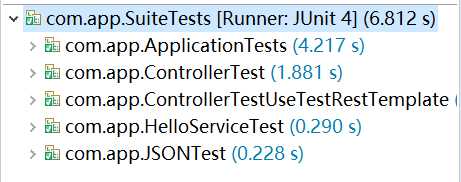
SuiteTests 的测试结果:
Unit Test in SpringBoot的更多相关文章
- SpringBoot vue
springboot 整合vue就行前后端完全分离,监听器,过滤器,拦截器 https://github.com/ninuxGithub/spring-boot-vue-separateA blog ...
- 第三章 springboot + jedisCluster(转载)
本编博客转发自:http://www.cnblogs.com/java-zhao/p/5347703.html 如果使用的是redis2.x,在项目中使用客户端分片(Shard)机制. 如果使用的是r ...
- 第三章 springboot + jedisCluster
如果使用的是redis2.x,在项目中使用客户端分片(Shard)机制.(具体使用方式:第九章 企业项目开发--分布式缓存Redis(1) 第十章 企业项目开发--分布式缓存Redis(2)) 如果 ...
- SpringBoot 整合Ehcache3
SpringBootLean 是对springboot学习与研究项目,是依据实际项目的形式对进行配置与处理,欢迎star与fork. [oschina 地址] http://git.oschina.n ...
- linux小白成长之路10————SpringBoot项目部署进阶
[内容指引] war包部署: jar包部署: 基于Docker云部署. 一.war包部署 通过"云开发"平台初始化的SpringBoot项目默认采用jar形式打包,这也是我们推荐的 ...
- SpringBoot开发案例之多任务并行+线程池处理
前言 前几篇文章着重介绍了后端服务数据库和多线程并行处理优化,并示例了改造前后的伪代码逻辑.当然了,优化是无止境的,前人栽树后人乘凉.作为我们开发者来说,既然站在了巨人的肩膀上,就要写出更加优化的程序 ...
- SpringBoot标准Properties
# =================================================================== # COMMON SPRING BOOT PROPERTIE ...
- springboot application.properties 常用完整版配置信息
从springboot官方文档中扒出来的,留存一下以后应该会用到 # ================================================================= ...
- 将自己的SpringBoot应用打包发布到Linux下Docker中
目录 将自己的SpringBoot应用打包发布到Linux下Docker中 1. 环境介绍 2. 开始前的准备 2.1 开启docker远程连接 2.2 新建SpringBoot项目 3. 开始构建我 ...
随机推荐
- Mysql8 root密码忘记了
需要确定自己的mysql版本是否是8 [root@smonitor ~]# mysql --version mysql Ver 8.0.13 for Linux on x86_64 (MySQL Co ...
- <input> disabled 属性
定义和用法 disabled 属性规定应该禁用输入字段. 被禁用的输入字段是无法使用和无法点击的. 如果使用该属性,则会禁用输入字段. 可以对 disabled 属性进行设置,使用户在满足某些条件时( ...
- java中的包注意事项
1:需要导入包的三个地方 a:需要导入第三方的jar包中的类或接口 b:需要导入除了java.lang包的其他包中的类(jdk中的类) c:需要导入自己写的不同包的类 2:引入包的三种方式 a:imp ...
- sql--index 索引
CREATE INDEX 语句用于在表中创建索引. 在不读取整个表的情况下,索引使数据库应用程序可以更快地查找数据. 索引 您可以在表中创建索引,以便更加快速高效地查询数据. 用户无法看到索引,它们只 ...
- ccs之经典布局(一)(水平垂直居中)
经典的css布局有以下几种,下面分别用不同的方法进行实现且进行对比. 一.水平居中 水平居中布局指的是当前元素在父级元素的容器中,水平方向上显示的是居中的,有以下几种方式来完成布局: 1.margin ...
- Spring Boot 实际操作
1.什么是springboot 2.springboot的很多默认编码方式都是utf-8,真是福利啊. 3.spring boot如何启动和访问和MocMvc测试 4.开发环境的调试热启动 5.app ...
- 基于Zabbix 3.2.6版本的low-level-discover(lld)
个人使用理解: 1.使用一个返回值是JSON的KEY,在Templates或者Hosts中创建一个Discovery规则.该key的返回值类似于: 索引key -- value 类型 ...
- springboot-异步线程调用
启动类:添加@EnableAsync注解 @SpringBootApplication @EnableAsync public class Application{ public static voi ...
- mysql explain解析一 extra中的using index,using where,using index condition
1.简单介绍 using index 和using where只要使用了索引我们基本都能经常看到,而using index condition则是在mysql5.6后新加的新特性,我们先来看看mysq ...
- top 1 1
这个是今天刚发现的,以前都是top 10 这样的用法,今天看到这个用法竟然懵逼了,所以到网站查了一下, 百度上的结果: 这个是SQLSERVER选择表中符合条件的前N行记录的语句.不过,TOP后边跟的 ...