
Compiler25th005: Excel Compiler
Excel Compiler
XCell Compiler, also known as Excel Compiler, offers very strong and hassle free Microsoft Excel workbook copy protection.
You can compile Microsoft Excel spreadsheet (.XLS, .XLSX, .XLSM, .XLSB file) into EXE application with workbook protected formulas in binary format and protected VBA code.
Nobody can see, trace, debug, analyze or copy your Microsoft Excel workbook algorithms.
With registration/license management feature you can protect your compiled Excel workbook from illegal copying from one computer to another by using hardware locking protection.
Excel compiler allows you to create the trial/demo version of your workbook.
The product offers you to add your own splash window image, icon, end user license agreement (EULA) and much more...
Please try the Excel Compiler Free Trial version which is completely functional for calculation.
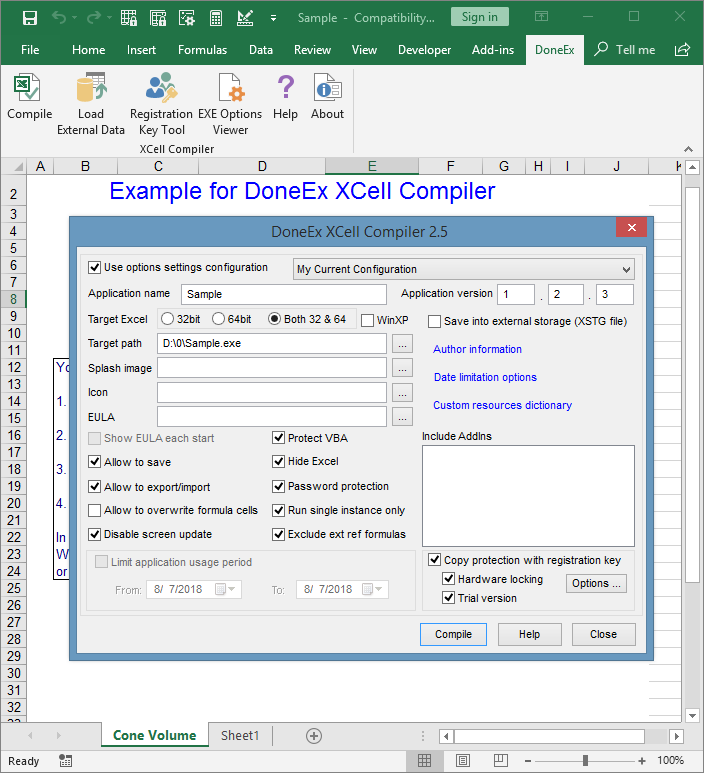
Excel Compiler
Excel Compiler main features:
- Protect Excel formulas by converting them into binary format. Without this feature any kind of Excel file copy protection is useless.
- Excel compiler converts Excel workbook (XLS, XLSX, XLSM, XLSB (aka Excel Binary Workbook) file) into an application (EXE File, which requires Excel to run). You do not need to be a programmer to use the product.
- Compile your spreadsheet to an EXE file which be able to run as with Excel 32-bit as with Excel 64-bit version.
- For advanced Excel customers the Excel Compiler offers strong and reliable VBA protectionwhich allows protecting your VBA code (macros) from viewing, tracing and copying.
- Apply Excel workbook copy protection with registration(activation) key/license to your spreadsheet. Prevent illegal copying of your spreadsheet from one computer to another.
- Protect Excel workbook with hardware locking! Anti-Piracy solution for your workbook. This allows your protected workbook to work on target computer only.
- Royalty free distribution of your compiled EXE, which doesn't require any preinstalled Run-Time libraries.
- Customize as you want or localize (translate to the language of your customer) the compiled workbook run-time messages.
- The excel compiler doesn't modify the original workbook, so the original Excel workbook stays without any changes after compilation.
- The excel compiler allows to limit the time period of usage for your compiled Excel's workbook. Set date when compiled EXE stops to work.
- License expiration warning. The Excel Compiler allows to add your own customized expiration message into your compiled workbook.
- Add your own End User License Agreement (EULA) information. The compiled Excel workbook will not be started until the end user accepts the EULA.
- Create Trial/Demo Excel workbook limited by amount of days and nag window. You may change the content of the trial version warning with your contact information and registration instructions.
- Compiled Excel workbook protection with dongles (USB sticks).
- Save date changed during work session directly into the compiled EXE or into separate .XSTG file by your choice.
- Excel compiler allows to export/import changed data from/to compiled EXE; Import data into original Excel workbook. Also available feature to export all changed data during the all compiled EXE life.
- Run a compiled workbook without a macro security alert.
- Add your own application name, version of the application you compile, contact information as web site link or e-mail address and copyright information.
- Excel compiler allows to add your own splash screen image which will be shown during protected workbook opening on customer's computer.
- Restrict the access only to authorized individuals, and limits users' activities to the minimum required, for business purposes.
- Eliminates the chances of exposure of corporate secrets, breaches in customer confidentiality, and the disruption of business activities.
- Excel编译器 XCell编译器,也称为Excel编译器,提供了非常强大且轻松的Microsoft Excel工作簿复制保护。 您可以将Microsoft Excel电子表格(.XLS,.XLSX,.XLSM,.XLSB文件)编译为具有二进制格式和受保护VBA代码的受工作簿保护的公式的EXE应用程序。 没有人可以看到,跟踪,调试,分析或复制您的Microsoft Excel工作簿算法。 使用注册/许可证管理功能,您可以使用硬件锁定保护保护已编译的Excel工作簿免于从一台计算机非法复制到另一台计算机。 Excel编译器允许您创建工作簿的试用版/演示版。 该产品可为您添加自己的启动窗口图像,图标,最终用户许可协议(EULA)等。 请尝试完全可用于计算的Excel Compiler免费试用版。 Excel编译器 Excel编译器 Excel编译器的主要功能: 通过将Excel公式转换为二进制格式来保护它们。没有此功能,任何类型的Excel文件复制保护都将无效。 Excel编译器将Excel工作簿(XLS,XLSX,XLSM,XLSB(又称为Excel二进制工作簿)文件)转换为应用程序(EXE文件,需要Excel才能运行)。您无需成为程序员即可使用该产品。 将电子表格编译为EXE文件,该文件可以与32位Excel版本和64位Excel版本一样运行。 对于高级Excel客户,Excel编译器提供了强大而可靠的VBA保护,可以保护您的VBA代码(宏)免受查看,跟踪和复制。 将具有注册(激活)密钥/许可证的Excel工作簿复制保护应用于电子表格。防止将电子表格从一台计算机非法复制到另一台计算机。 用硬件锁定保护Excel工作簿!针对您的工作簿的反盗版解决方案。这使受保护的工作簿只能在目标计算机上工作。 编译后的EXE的免版税发行版,不需要任何预安装的运行时库。 根据需要进行自定义或本地化(转换为客户的语言)已编译的工作簿运行时消息。 excel编译器不会修改原始工作簿,因此原始Excel工作簿在编译后保持不变。 excel编译器允许限制已编译的Excel工作簿的使用时间。设置编译的EXE停止工作的日期。 许可证到期警告。 Excel编译器允许将您自己的自定义过期消息添加到已编译的工作簿中。 添加您自己的最终用户许可协议(EULA)信息。最终用户接受EULA之前,不会启动已编译的Excel工作簿。 创建试用/演示Excel工作簿,该工作簿受天数和导航窗口的限制。您可以通过联系信息和注册说明更改试用版警告的内容。 启动时隐藏Microsoft Excel。 带有加密狗(USB记忆棒)的已编译Excel工作簿保护。 根据您的选择,将在工作会话中更改的日期直接保存到编译的EXE或单独的.XSTG文件中。 Excel编译器允许从已编译的EXE导出/导入更改的数据;将数据导入原始Excel工作簿。此功能还可用于在所有已编译的EXE生命期内导出所有更改的数据。 运行没有宏安全警报的已编译工作簿。 添加您自己的应用程序名称,您编译的应用程序版本,联系信息(作为网站链接)或电子邮件地址和版权信息。 Excel编译器允许添加您自己的启动屏幕图像,该图像将在受保护的工作簿在客户计算机上打开时显示。 出于商业目的,仅将访问权限限制为授权人员,并将用户的活动限制在最低限度。 消除了暴露公司机密,破坏客户机密性和破坏业务活动的机会。
Compiler25th005: Excel Compiler的更多相关文章
- TableML Excel编译/解析工具
TableML TableML, Table Markup Language, 基于电子表格的标记语言, 类似JSON, XML, INI,TableML可以作为软件项目的配置标记语言, 与之不同的是 ...
- java 如何将 word,excel,ppt如何转pdf--jacob
问题:java 如果将 word,excel,ppt如何转pdf 我个人的观点:windows server下用 jacob; linux server下 用openoffice. PS:1.本文 ...
- Python官方操作Excel文档
xlwt 1.3.0 Downloads ↓ Library to create spreadsheet files compatible with MS Excel 97/2000/XP/2003 ...
- Java将list数据导出到Excel——(八)
Java实体类 package bean; public class Question { private String timu; //题干 private String leixing; //类型 ...
- java封装实现Excel建表读写操作
对 Excel 进行读写操作是生产环境下常见的业务,网上搜索的实现方式都是基于POI和JXL第三方框架,但都不是很全面.小编由于这两天刚好需要用到,于是就参考手写了一个封装操作工具,基本涵盖了Exce ...
- 【造轮子】打造一个简单的万能Excel读写工具
大家工作或者平时是不是经常遇到要读写一些简单格式的Excel? shit!~很蛋疼,因为之前吹牛,就搞了个这东西,还算是挺实用,和大家分享下. 厌烦了每次搞简单类型的Excel读写?不怕~来,喜欢流式 ...
- excel 日期/数字格式不生效需要但双击才会生效的解决办法
原因: Excel2007设置过单元格格式后,并不能立即生效必须挨个双击单元格,才能生效.数据行很多.效率太低. 原因:主要是一些从网上拷贝过来的日期或数字excel默认为文本格式或特殊-中文数字格式 ...
- C# Excel导入、导出【源码下载】
本篇主要介绍C#的Excel导入.导出. 目录 1. 介绍:描述第三方类库NPOI以及Excel结构 2. Excel导入:介绍C#如何调用NPOI进行Excel导入,包含:流程图.NOPI以及C#代 ...
- Word/Excel 在线预览
前言 近日项目中做到一个功能,需要上传附件后能够在线预览.之前也没做过这类似的,于是乎就查找了相关资料,.net实现Office文件预览大概有这几种方式: ① 使用Microsoft的Office组件 ...
- ASP.NET MVC5+EF6+EasyUI 后台管理系统(63)-Excel导入和导出-自定义表模导入
系列目录 前言 上一节使用了LinqToExcel和CloseXML对Excel表进行导入和导出的简单操作,大家可以跳转到上一节查看: ASP.NET MVC5+EF6+EasyUI 后台管理系统(6 ...
随机推荐
- 前段知识之CSS
目录 CSS层叠样式表 CSS语法结构: CSS注释语法 引入css的多种方式 CSS选择器 1. CSS基本选择器 2. CSS组合选择器 3. 分组与嵌套 4. 属性选择器 5. 伪类选择器 6. ...
- 电脑无法自动获取ip地址
1.按下win+r,输入cmd,打开命令提示符;2.执行ipconfig命令看下能否获取到ip地址:3.若不能,执行ipconfig /renew命令重新获取ip:4.执行ipconfig命令看下能否 ...
- java逻辑运算中 | | 和 | 的区别
本文主要阐明逻辑运算中 | |(短路或) 和 |(逻辑或) 的异同 | | 和 | 的相同之处: 只有二者都是假时,结果才为假,否则结果为true. | | 和 | 的不同之处在于: a | | b: ...
- vue下载与安装
首先安装node.js环境: node.js 安装推荐文章:https://www.cnblogs.com/zhouyu2017/p/6485265.html 基于node.js安装淘宝镜像npm i ...
- 重学c#系列—— 反射的基本理解[三十三]
前言 在上一章中介绍了什么是反射: https://www.cnblogs.com/aoximin/p/16440966.html 正文 上一节讲述反射的基本原理和为什么要用反射,还用反射的优缺点这些 ...
- Ynoi 数据结构题选做
Ynoi 数据结构题选做 前言 我将成为数据结构之神!坚持 lxl 党的领导,紧随 nzhtl1477(女装灰太狼1477)的脚步.无论过去.现在还是未来,分块始终是实现 data structure ...
- 一问读懂Web3 架构
最近看了一些Web3.0的文章,总结了一些个人的理解: Web3.0 通过区块链基础设施管理用户数据,重构用户和互联网平台之间的关系和交互,重新定义了互联网应用的架构方式和交互模式. Web 1.0 ...
- MySQL 日期函数、时间函数在实际场景中的应用
整理日常业务中用到日期函数的一些场景,并对日期函数按照使用类型做了分类,实例也尽可能符合日常需求.为了方便查阅,可以先看目录,再根据需要看具体方法和实例. 首先明确日期和时间类型有哪些,也就是日期函数 ...
- flutter_swiper:Another exception was thrown: ScrollController attached to multiple scroll views.
Another exception was thrown: ScrollController attached to multiple scroll views. 翻译一下:引发了另一个异常:Scro ...
- 让 MSYS2 Bash 像 Git Bash 一样显示 Git 分支名称
Git for Windows 的 Bash 有一个很实用的功能,如果当前目录处于 Git 仓库中,那么命令行中会显示当前 Git 分支的名称(见下图). 然而原版的 MSYS2 Bash 没有这个功 ...