
Spring Boot实现任意位置的properties及yml文件内容配置与获取
〇、参考资料
1、Spring Boot 中文乱码问题解决方案汇总
https://blog.51cto.com/u_15236724/5372824
2、spring boot读取自定义配置properties文件★
https://www.yisu.com/zixun/366877.html
3、spring boot通过配置工厂类,实现读取指定位置的yml文件★
https://blog.csdn.net/weixin_45168162/article/details/125427465
4、springBoot 读取yml 配置文件的三种方式(包含以及非component下)★
https://blog.csdn.net/weixin_44131922/article/details/126866040
5、SpringBoot集成Swagger的详细步骤
https://blog.csdn.net/m0_67788957/article/details/123670244
一、项目介绍
1、项目框架
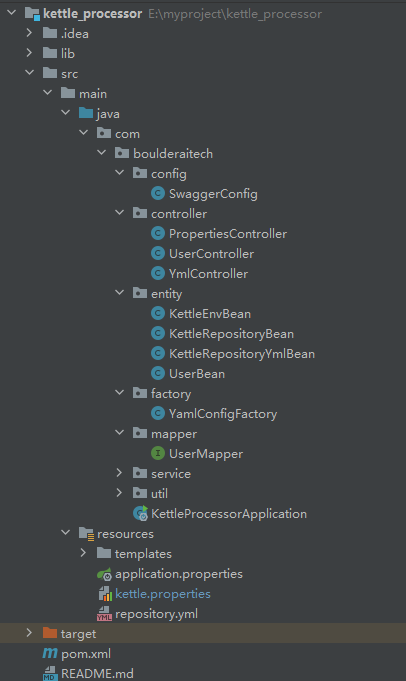
2、技术栈
Spring Boot+Swagger+Lombok+Hutool
3、项目地址
https://gitee.com/ljhahu/kettle_processor.git
需要权限请联系:liujinhui-ahu@foxmail.com
二、properties配置与使用
1、默认配置文件
(1)配置-application.properties
# Spring Boot端口配置

server.port=9088

# spring数据源配置

spring.datasource.driver-class-name=com.mysql.cj.jdbc.Driver

spring.datasource.password=qaz123

spring.datasource.username=root

spring.datasource.url=jdbc:mysql://192.168.40.111:3306/visualization?serverTimezone=UTC&useUnicode=true&characterEncoding=utf-8&useSSL=true

spring.thymeleaf.prefix=classpath:/templates/
(2)读取
Spring Boot自己会读取,配置数据源、thymeleaf等信息
2、自定义配置文件
(1)配置-kettle.properties
# properties  https://blog.csdn.net/weixin_42352733/article/details/121830775

environment=xuelei-www

kettle.repository.type=database

kettle.repository.username=admin

kettle.repository.password=admin
(2)使用-读取单个值-PropertiesController.java
package com.boulderaitech.controller;

import com.boulderaitech.entity.KettleRepositoryBean;

import io.swagger.annotations.Api;

import io.swagger.annotations.ApiImplicitParam;

import io.swagger.annotations.ApiOperation;

import org.springframework.beans.factory.annotation.Autowired;

import org.springframework.beans.factory.annotation.Value;

import org.springframework.context.annotation.PropertySource;

import org.springframework.web.bind.annotation.RequestMapping;

import org.springframework.web.bind.annotation.RestController;

@Api("properties测试")

@RestController //Controller和RestController的区别

@PropertySource("classpath:kettle.properties") //默认是application.properties

//可以将PropertySource注解加入entity,也可以加入controller将bean注入

public class PropertiesController {

    @Value("${environment}")

    private String envName;

    @Autowired

    private KettleRepositoryBean kettleRepositoryBean;

    @RequestMapping("/getEnv")

    @ApiOperation("properties方式获取当前的环境")

    public String getEnv() {

        return "hello " + envName;

    }

    @ApiOperation("properties方式获取当前的环境")

    @RequestMapping("/getRepoInfo")

    public String getRepoInfo() {

        return "hello " + kettleRepositoryBean.toString();

    }

}
(3)使用-读取多个值到对象-KettleRepositoryBean.java
package com.boulderaitech.entity;

import lombok.AllArgsConstructor;

import lombok.Data;

import lombok.NoArgsConstructor;

import org.springframework.boot.context.properties.ConfigurationProperties;

import org.springframework.stereotype.Component;

@Data

@Component

@NoArgsConstructor

@AllArgsConstructor

@ConfigurationProperties(prefix = "kettle.repository")

public class KettleRepositoryBean {

    private String type;

    private String username;

    private String password;

}
三、yml配置
1、默认配置文件
application.yml
2、自定义配置文件
(1)配置-repository.yml
kettle:

  repository:

    repo1:

      type: postgresql

      ip_addr: 192.168.4.68

      port: 5432

      username: admin

      password: admin

      db_name: kettle

  version: 8.0.0
(2)实现任意位置读取的工厂类-YamlConfigFactory.java
package com.boulderaitech.factory;

import org.springframework.beans.factory.config.YamlPropertiesFactoryBean;

import org.springframework.core.env.PropertiesPropertySource;

import org.springframework.core.env.PropertySource;

import org.springframework.core.io.support.DefaultPropertySourceFactory;

import org.springframework.core.io.support.EncodedResource;

import java.io.IOException;

import java.util.Properties;

/**

 * 在任意位置读取指定的yml文件

 * 参考:https://blog.csdn.net/weixin_45168162/article/details/125427465

 */

public class YamlConfigFactory extends DefaultPropertySourceFactory {

    //继承父类,可以重载父类方法@Override

    //实现接口,重写方法@Override

    @Override

    public PropertySource<?> createPropertySource(String name, EncodedResource resource) throws IOException {

        String sourceName = name != null ? name : resource.getResource().getFilename();

        if (!resource.getResource().exists()) {

            return new PropertiesPropertySource(sourceName, new Properties());

        } else if (sourceName.endsWith(".yml") || sourceName.endsWith(".yaml")) {

            Properties propertiesFromYaml = loadYml(resource);

            return new PropertiesPropertySource(sourceName, propertiesFromYaml);

        } else {

            return super.createPropertySource(name, resource);

        }

    }

    private Properties loadYml(EncodedResource resource) throws IOException {

        YamlPropertiesFactoryBean factory = new YamlPropertiesFactoryBean();

        factory.setResources(resource.getResource());

        factory.afterPropertiesSet();

        return factory.getObject();

    }

}
(3)使用-读取单个值-KettleEnvBean.java
package com.boulderaitech.entity;

import com.boulderaitech.factory.YamlConfigFactory;

import lombok.AllArgsConstructor;

import lombok.Data;

import lombok.NoArgsConstructor;

import org.springframework.beans.factory.annotation.Value;

import org.springframework.context.annotation.PropertySource;

import org.springframework.stereotype.Component;

@Data

@Component

@AllArgsConstructor

@NoArgsConstructor

@PropertySource(value = "classpath:repository.yml",factory = YamlConfigFactory.class)//需要通过工厂加载指定的配置文件

public class KettleEnvBean {

    @Value("${kettle.version}")

    private String kettleVersion;

}
(4)使用-读取多个值到对象-KettleRepositoryYmlBean.java
package com.boulderaitech.entity;

import com.boulderaitech.factory.YamlConfigFactory;

import lombok.AllArgsConstructor;

import lombok.Data;

import lombok.NoArgsConstructor;

import org.springframework.boot.context.properties.ConfigurationProperties;

import org.springframework.context.annotation.PropertySource;

import org.springframework.stereotype.Component;

@Data

@AllArgsConstructor

@NoArgsConstructor

@PropertySource(value = "classpath:repository.yml",factory = YamlConfigFactory.class)//需要通过工厂加载指定的配置文件

@ConfigurationProperties(prefix = "kettle.repository.repo1") //需要添加spring boot的注解,才可以使用

//思考:能否通过反射操作修改注解的参数

@Component()

public class KettleRepositoryYmlBean {

    private String type;

    private String ip_addr; //命名只能用下划线

    private String username;

    private String password;

    private String port;

    private String db_name;

}
(5)使用-YmlController.java
package com.boulderaitech.controller;

import com.boulderaitech.entity.KettleEnvBean;

import com.boulderaitech.entity.KettleRepositoryYmlBean;

import org.springframework.beans.factory.annotation.Autowired;

import org.springframework.beans.factory.annotation.Value;

import org.springframework.context.annotation.PropertySource;

import org.springframework.stereotype.Controller;

import org.springframework.web.bind.annotation.GetMapping;

import org.springframework.web.bind.annotation.RequestMapping;

import org.springframework.web.bind.annotation.RequestMethod;

import org.springframework.web.bind.annotation.RestController;

@RestController //使用controller返回的结果会按照template进行解析

//使用RestController则会返回对应的字符串

public class YmlController {

    @Autowired

    private KettleRepositoryYmlBean kettleRepositoryYmlBean;

    @Autowired

    private KettleEnvBean kettleEnvBean;

    @RequestMapping(value = "/getKettleVersion") //默认是get

    public String getKettleVersion() {

        return "hello " + kettleEnvBean.getKettleVersion();

    }

    // @GetMapping("/getRepoInfoYml"),不支持get方法

    //@RequestMapping(value = "/getRepoInfoYml", method = RequestMethod.POST)

    @RequestMapping(value = "/getRepoInfoYml")

    public String getRepoInfoYml() {

        return "hello " + kettleRepositoryYmlBean.toString();

    }

}
Spring Boot实现任意位置的properties及yml文件内容配置与获取的更多相关文章
- Spring Boot笔记二:快速创建以及yml文件自动注入
上个笔记写了如何自己去创建Spring boot,以及如何去打jar包,其实,还是有些麻烦的,我们还自己新建了几个文件夹不是. Idea可以让我们快速的去创建Spring boot应用,来看 一.快速 ...
- Spring Boot项目application.yml文件数据库配置密码加密
在Spring boot开发中,需要在application.yml文件里配置数据库的连接信息,或者在启动时传入数据库密码,如果不加密,传明文,数据库就直接暴露了,相当于"裸奔"了 ...
- Spring Boot 揭秘与实战 自己实现一个简单的自动配置模块
文章目录 1. 实战的开端 – Maven搭建 2. 参数的配置 - 属性参数类 3. 真的很简单 - 简单的服务类 4. 自动配置的核心 - 自动配置类 5. spring.factories 不要 ...
- Spring Boot干货系列:(七)默认日志框架配置
Spring Boot干货系列:(七)默认日志框架配置 原创 2017-04-05 嘟嘟MD 嘟爷java超神学堂 前言 今天来介绍下Spring Boot如何配置日志logback,我刚学习的时候, ...
- Spring Boot 项目学习 (二) MySql + MyBatis 注解 + 分页控件 配置
0 引言 本文主要在Spring Boot 基础项目的基础上,添加 Mysql .MyBatis(注解方式)与 分页控件 的配置,用于协助完成数据库操作. 1 创建数据表 这个过程就暂时省略了. 2 ...
- Spring Boot教程(三十八)使用MyBatis注解配置详解(1)
之前在Spring Boot中整合MyBatis时,采用了注解的配置方式,相信很多人还是比较喜欢这种优雅的方式的,也收到不少读者朋友的反馈和问题,主要集中于针对各种场景下注解如何使用,下面就对几种常见 ...
- 【spring boot】使用@Value映射properties文件属性
描述 使用@Value映射properties文件属性到Java字段 重点 使用@PropertySource 注解指定*.properties文件位置: 使用@Value进行注入: my.prope ...
- 在spring boot中使用自定义的properties
1 在application.properties中添加 android.name=Tim android.password=123456 新建一个保存该Setting的配置类, @Configura ...
- spring boot 在框架中注入properties文件里的值(Spring三)
前一篇博客实现了打开第一个页面 链接:https://blog.csdn.net/qq_38175040/article/details/105709758 本篇博客实现在框架中注入propertie ...
- Spring Boot属性配置文件:application.properties 详解
学习资料 网址 官方说明文档 https://docs.spring.io/spring-boot/docs/current/reference/html/common-application-pro ...
随机推荐
- k8s日志架构和基本日志
如果一个容器崩溃了.一个Pod被驱逐了.或者一个节点停机了,您通常仍然需要访问您应用程序的日志.为此,您需要一个生命周期与节点.Pod.容器相对独立的存储空间来存储应用程序日志和系统日志. 此时,我们 ...
- Centos安装nodejs,npm (压缩包)
下载node阿里云镜像(推荐) 地址:https://npm.taobao.org/mirrors/node/latest-v14.x/ 选择自己要下载的版本,这里我选择的v14.6.0 cd /us ...
- KVM下virtio驱动虚拟机XML配置文件分析
[root@opennebula qemu]# pwd /etc/libvirt/qemu [root@opennebula qemu]# ls networks one-12.xml one-12. ...
- kvm上已安装的虚拟机修改为桥接网络
kvm上安装的虚拟机默认使用的nat网络格式,现在已经调整kvm主机为桥接方式了,但是已经安装的虚拟机还是nat方式,所以需要修改一下 让KVM虚拟主机使用桥接网络br0 修改虚拟机的配置文件,默认存 ...
- 2>&1到底是什么意思?
java -jar snapshot.jar > snapshot.log 2>&1 & 写Java的朋友一定对上面的命令很熟悉,相信大部分人都知道>表示的是重定向, ...
- C++面向对象编程之类模板、函数模板等一些补充
1.static数据 和 static函数: 对于 非static函数 在内存中只有一份,当类对象调用时,其实会有该对象的this pointer传进去,那个函数就知道要对那个对象进行操作: stat ...
- 220722 T3 石子染色 (背包)
序列s中的数就是要选的堆的编号,假设要选的有i个石子,这i个染为红色,剩下j个染为蓝色,i+j=x,i=x-j,那么对答案的贡献是|x-2j|.那么只要我们选的有i个石子,贡献就是这么多,所以我们可以 ...
- Request保存作用域
Request保存作用域,作用范围是在当前请求中有效. 1.客户端重定向 2.服务器内部转发
- C语言------循环结构II
仅供借鉴.仅供借鉴.仅供借鉴(整理了一下大一C语言每个章节的练习题.没得题目.只有程序了) 文章目录 1 .实训名称 2 .实训目的及要求 3 .源代码及运行截图 4 .小结 1 .实训名称 实训6: ...
- JUC中的AQS底层详细超详解
摘要:当你使用java实现一个线程同步的对象时,一定会包含一个问题:你该如何保证多个线程访问该对象时,正确地进行阻塞等待,正确地被唤醒? 本文分享自华为云社区<JUC中的AQS底层详细超详解,剖 ...