
2023-03-23:音视频解混合(demuxer)为PCM和YUV420P,用go语言编写。
2023-03-23:音视频解混合(demuxer)为PCM和YUV420P,用go语言编写。
答案2023-03-23:
大体步骤如下:
1.打开媒体文件,并获取音频和视频流。
2.对于每个流,找到对应的解码器、创建解码上下文并打开解码器。
3.一帧一帧读取压缩的音频或视频数据AVPacket,并调用对应的解码器进行解码。
4.对于音频:重采样成16bit 44100 PCM格式,并将数据写入输出文件或缓冲区。
5.对于视频:转换成YUV420P格式,并将数据写入输出文件或缓冲区。
6.清理已分配的资源。
代码见github/moonfdd/ffmpeg-go库。
执行命令:
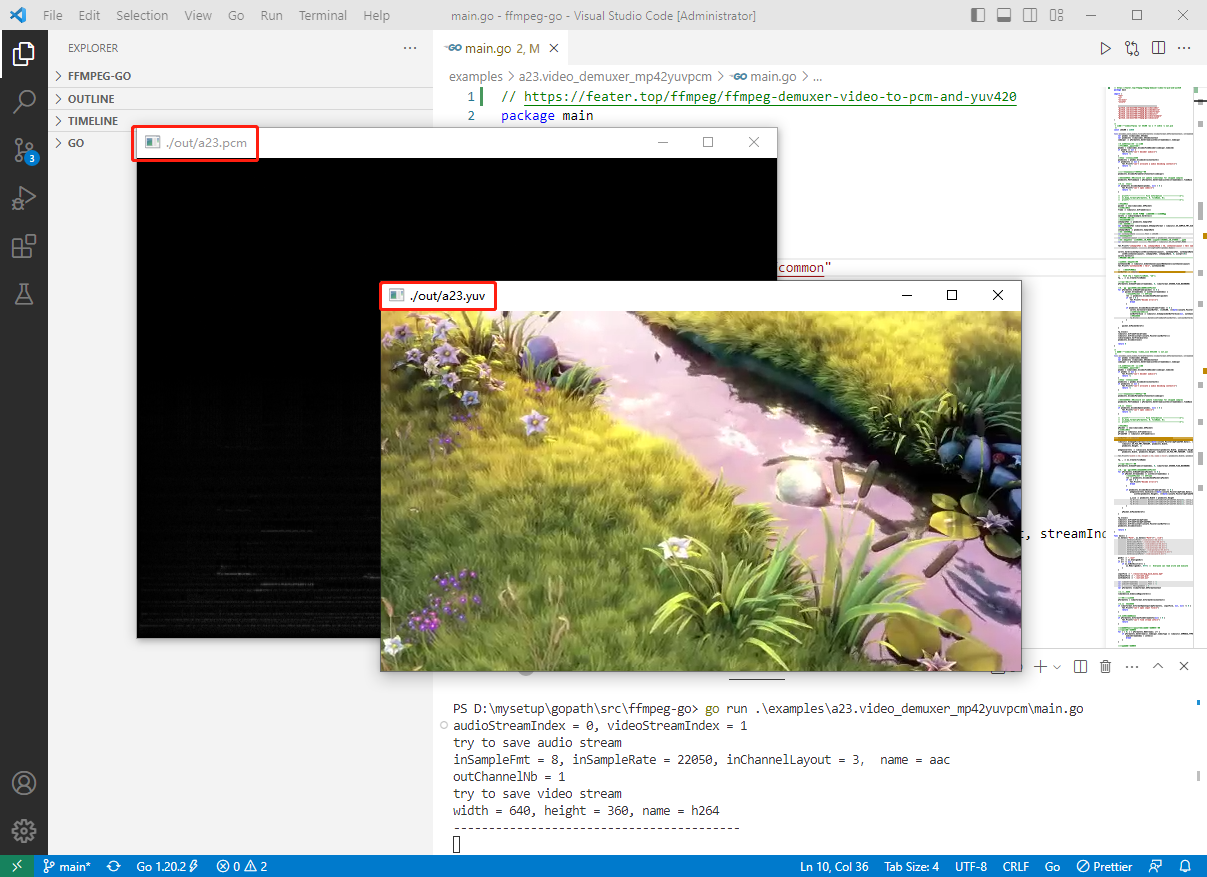
go run ./examples/a23.video_demuxer_mp42yuvpcm/main.go
代码参考23:音视频解混合(demuxer)为PCM和YUV420P,代码如下:
// https://feater.top/ffmpeg/ffmpeg-demuxer-video-to-pcm-and-yuv420

package main

import (

	"fmt"

	"os"

	"os/exec"

	"unsafe"

	"github.com/moonfdd/ffmpeg-go/ffcommon"

	"github.com/moonfdd/ffmpeg-go/libavcodec"

	"github.com/moonfdd/ffmpeg-go/libavdevice"

	"github.com/moonfdd/ffmpeg-go/libavformat"

	"github.com/moonfdd/ffmpeg-go/libavutil"

	"github.com/moonfdd/ffmpeg-go/libswresample"

	"github.com/moonfdd/ffmpeg-go/libswscale"

)

/*

 * 音频播放命令:ffplay -ar 44100 -ac 1 -f s16le -i out.pcm

 */

const i44100 = 22050

func avcodec_save_audio_file(pFormatCtx *libavformat.AVFormatContext, streamIndex ffcommon.FInt, fileName string) ffcommon.FInt {

	var pCodec *libavcodec.AVCodec

	var pCodecCtx *libavcodec.AVCodecContext

	codecpar := pFormatCtx.GetStream(uint32(streamIndex)).Codecpar

	//4.获取解码器(一):音频

	//根据索引拿到对应的流

	pCodec = libavcodec.AvcodecFindDecoder(codecpar.CodecId)

	if pCodec == nil {

		fmt.Printf("can't decoder audio\n")

		return -1

	}

	//申请一个解码上下文

	pCodecCtx = pCodec.AvcodecAllocContext3()

	if pCodecCtx == nil {

		fmt.Printf("can't allocate a audio decoding context\n")

		return -1

	}

	//用流解码信息初始化编码参数

	pCodecCtx.AvcodecParametersToContext(codecpar)

	//没有此句会出现:Could not update timestamps for skipped samples

	pCodecCtx.PktTimebase = pFormatCtx.GetStream(uint32(streamIndex)).TimeBase

	//5.打开解码器

	if pCodecCtx.AvcodecOpen2(pCodec, nil) < 0 {

		fmt.Printf("can't open codec\n")

		return -1

	}

	//	printf("--------------- File Information ----------------\n");

	//	av_dump_format(pFormatCtx, 0, fileName, 0);

	//	printf("-------------------------------------------------\n");

	//编码数据

	packet := new(libavcodec.AVPacket)

	//解压缩数据

	frame := libavutil.AvFrameAlloc()

	//frame->16bit 44100 PCM统一音频采样格式与采样率

	swrCtx := libswresample.SwrAlloc()

	//重采样设置选项-----------------------------------------------------------start

	//输入的采样格式

	inSampleFmt := pCodecCtx.SampleFmt

	//输出的采样格式

	var outSampleFmt libswresample.AVSampleFormat = libavutil.AV_SAMPLE_FMT_S16

	//输入的采样率

	inSampleRate := pCodecCtx.SampleRate

	//输出的采样率

	var outSampleRate ffcommon.FInt = i44100

	//输入的声道布局

	var inChannelLayout ffcommon.FUint64T = pCodecCtx.ChannelLayout

	//输出的声道布局:CHANNEL_IN_MONO为单声道,CHANNEL_IN_STEREO为双声道

	var outChannelLayout ffcommon.FUint64T = libavutil.AV_CH_LAYOUT_MONO

	fmt.Printf("inSampleFmt = %d, inSampleRate = %d, inChannelLayout = %d, name = %s\n", inSampleFmt, inSampleRate,

		inChannelLayout, ffcommon.StringFromPtr(pCodec.Name))

	swrCtx.SwrAllocSetOpts(int64(outChannelLayout), outSampleFmt, outSampleRate,

		int64(inChannelLayout), inSampleFmt, inSampleRate, 0, uintptr(0))

	swrCtx.SwrInit()

	//重采样设置选项-----------------------------------------------------------end

	//获取输出的声道个数

	outChannelNb := libavutil.AvGetChannelLayoutNbChannels(outChannelLayout)

	fmt.Printf("outChannelNb = %d\n", outChannelNb)

	// 	 //存储PCM数据

	outBuffer := (*byte)(unsafe.Pointer(libavutil.AvMalloc(2 * i44100)))

	// 	 FILE *fp = fopen(fileName, "wb");

	fp, _ := os.Create(fileName)

	//回到流的初始位置

	pFormatCtx.AvSeekFrame(streamIndex, 0, libavformat.AVSEEK_FLAG_BACKWARD)

	//6.一帧一帧读取压缩的音频数据AVPacket

	for pFormatCtx.AvReadFrame(packet) >= 0 {

		if packet.StreamIndex == uint32(streamIndex) {

			//解码AVPacket --> AVFrame

			ret := pCodecCtx.AvcodecSendPacket(packet)

			if ret < 0 {

				fmt.Printf("Decode error\n")

				break

			}

			if pCodecCtx.AvcodecReceiveFrame(frame) >= 0 {

				swrCtx.SwrConvert(&outBuffer, 2*i44100, (**byte)(unsafe.Pointer(&frame.Data)), frame.NbSamples)

				//获取sample的size

				outBufferSize := libavutil.AvSamplesGetBufferSize(nil, outChannelNb, frame.NbSamples, outSampleFmt, 1)

				//写入文件

				fp.Write(ffcommon.ByteSliceFromByteP(outBuffer, int(outBufferSize)))

			}

		}

		packet.AvPacketUnref()

	}

	fp.Close()

	libavutil.AvFrameFree(&frame)

	libavutil.AvFree(uintptr(unsafe.Pointer(outBuffer)))

	libswresample.SwrFree(&swrCtx)

	pCodecCtx.AvcodecClose()

	return 0

}

/*

 * 视频播放命令:ffplay -video_size 654x368 -i out.yuv

 */

func avcodec_save_video_file(pFormatCtx *libavformat.AVFormatContext, streamIndex ffcommon.FInt, fileName string) ffcommon.FInt {

	var pCodec *libavcodec.AVCodec

	var pCodecCtx *libavcodec.AVCodecContext

	codecpar := pFormatCtx.GetStream(uint32(streamIndex)).Codecpar

	//4.获取解码器(一):音频

	//根据索引拿到对应的流

	pCodec = libavcodec.AvcodecFindDecoder(codecpar.CodecId)

	if pCodec == nil {

		fmt.Printf("can't decoder audio\n")

		return -1

	}

	//申请一个解码上下文

	pCodecCtx = pCodec.AvcodecAllocContext3()

	if pCodecCtx == nil {

		fmt.Printf("can't allocate a audio decoding context\n")

		return -1

	}

	//用流解码信息初始化编码参数

	pCodecCtx.AvcodecParametersToContext(codecpar)

	//没有此句会出现:Could not update timestamps for skipped samples

	pCodecCtx.PktTimebase = pFormatCtx.GetStream(uint32(streamIndex)).TimeBase

	//5.打开解码器

	if pCodecCtx.AvcodecOpen2(pCodec, nil) < 0 {

		fmt.Printf("can't open codec\n")

		return -1

	}

	//	printf("--------------- File Information ----------------\n");

	//	av_dump_format(pFormatCtx, 0, fileName, 0);

	//	printf("-------------------------------------------------\n");

	//编码数据

	pPacket := new(libavcodec.AVPacket)

	//解压缩数据

	pFrame := libavutil.AvFrameAlloc()

	pFrameYUV := libavutil.AvFrameAlloc()

	outBuffer := (*byte)(unsafe.Pointer(libavutil.AvMalloc(

		uint64(libavutil.AvImageGetBufferSize(libavutil.AV_PIX_FMT_YUV420P, pCodecCtx.Width, pCodecCtx.Height, 1)))))

	libavutil.AvImageFillArrays((*[4]*byte)(unsafe.Pointer(&pFrameYUV.Data)), (*[4]int32)(unsafe.Pointer(&pFrameYUV.Linesize)), outBuffer,

		libavutil.AV_PIX_FMT_YUV420P, pCodecCtx.Width,

		pCodecCtx.Height, 1)

	pImgConvertCtx := libswscale.SwsGetContext(pCodecCtx.Width, pCodecCtx.Height, pCodecCtx.PixFmt,

		pCodecCtx.Width, pCodecCtx.Height, libavutil.AV_PIX_FMT_YUV420P, libswscale.SWS_BICUBIC, nil, nil, nil)

	fmt.Printf("width = %d, height = %d, name = %s\n", pCodecCtx.Width, pCodecCtx.Height, ffcommon.StringFromPtr(pCodec.Name))

	fp, _ := os.Create(fileName)

	//回到流的初始位置

	pFormatCtx.AvSeekFrame(streamIndex, 0, libavformat.AVSEEK_FLAG_BACKWARD)

	//6.一帧一帧读取压缩的视频数据AVPacket

	for pFormatCtx.AvReadFrame(pPacket) >= 0 {

		if pPacket.StreamIndex == uint32(streamIndex) {

			//解码AVPacket --> AVFrame

			ret := pCodecCtx.AvcodecSendPacket(pPacket)

			if ret < 0 {

				fmt.Printf("Decode error\n")

				break

			}

			if pCodecCtx.AvcodecReceiveFrame(pFrame) >= 0 {

				pImgConvertCtx.SwsScale((**byte)(unsafe.Pointer(&pFrame.Data)), (*int32)(unsafe.Pointer(&pFrame.Linesize)), 0,

					uint32(pCodecCtx.Height), (**byte)(unsafe.Pointer(&pFrameYUV.Data)), (*int32)(unsafe.Pointer(&pFrameYUV.Linesize)))

				y_size := pCodecCtx.Width * pCodecCtx.Height

				fp.Write(ffcommon.ByteSliceFromByteP(pFrameYUV.Data[0], int(y_size)))   //Y

				fp.Write(ffcommon.ByteSliceFromByteP(pFrameYUV.Data[1], int(y_size/4))) //U

				fp.Write(ffcommon.ByteSliceFromByteP(pFrameYUV.Data[2], int(y_size/4))) //V

			}

		}

		pPacket.AvPacketUnref()

	}

	fp.Close()

	libavutil.AvFrameFree(&pFrame)

	libavutil.AvFrameFree(&pFrameYUV)

	libavutil.AvFree(uintptr(unsafe.Pointer(outBuffer)))

	pCodecCtx.AvcodecClose()

	return 0

}

func main() {

	os.Setenv("Path", os.Getenv("Path")+";./lib")

	ffcommon.SetAvutilPath("./lib/avutil-56.dll")

	ffcommon.SetAvcodecPath("./lib/avcodec-58.dll")

	ffcommon.SetAvdevicePath("./lib/avdevice-58.dll")

	ffcommon.SetAvfilterPath("./lib/avfilter-56.dll")

	ffcommon.SetAvformatPath("./lib/avformat-58.dll")

	ffcommon.SetAvpostprocPath("./lib/postproc-55.dll")

	ffcommon.SetAvswresamplePath("./lib/swresample-3.dll")

	ffcommon.SetAvswscalePath("./lib/swscale-5.dll")

	genDir := "./out"

	_, err := os.Stat(genDir)

	if err != nil {

		if os.IsNotExist(err) {

			os.Mkdir(genDir, 0777) //  Everyone can read write and execute

		}

	}

	inputFile := "./resources/big_buck_bunny.mp4"

	outAudioFile := "./out/a23.pcm"

	outVideoFile := "./out/a23.yuv"

	var videoStreamIndex ffcommon.FInt = -1

	var audioStreamIndex ffcommon.FInt = -1

	var i ffcommon.FUnsignedInt = 0

	var pFormatCtx *libavformat.AVFormatContext

	//1.注册组件

	libavdevice.AvdeviceRegisterAll()

	//封装格式上下文

	pFormatCtx = libavformat.AvformatAllocContext()

	//2.打开输入文件

	if libavformat.AvformatOpenInput(&pFormatCtx, inputFile, nil, nil) != 0 {

		fmt.Printf("can't open input file\n")

		return

	}

	//3.获取音视频信息

	if pFormatCtx.AvformatFindStreamInfo(nil) < 0 {

		fmt.Printf("can't find stream info\n")

		return

	}

	//音视频编码,找到对应的音视频流的索引位置

	//找到音频流的索引

	for i = 0; i < pFormatCtx.NbStreams; i++ {

		if pFormatCtx.GetStream(i).Codecpar.CodecType == libavutil.AVMEDIA_TYPE_AUDIO {

			audioStreamIndex = int32(i)

			break

		}

	}

	//找到视频流的索引

	for i = 0; i < pFormatCtx.NbStreams; i++ {

		if pFormatCtx.GetStream(i).Codecpar.CodecType == libavutil.AVMEDIA_TYPE_VIDEO {

			videoStreamIndex = int32(i)

			break

		}

	}

	fmt.Printf("audioStreamIndex = %d, videoStreamIndex = %d\n", audioStreamIndex, videoStreamIndex)

	if audioStreamIndex == -1 {

		fmt.Printf("can't find a audio stream\n")

	} else {

		fmt.Printf("try to save audio stream\n")

		avcodec_save_audio_file(pFormatCtx, audioStreamIndex, outAudioFile)

	}

	if videoStreamIndex == -1 {

		fmt.Printf("can't find a video stream\n")

	} else {

		fmt.Printf("try to save video stream\n")

		avcodec_save_video_file(pFormatCtx, videoStreamIndex, outVideoFile)

	}

	libavformat.AvformatCloseInput(&pFormatCtx)

	fmt.Println("-----------------------------------------")

	go func() {

		_, err = exec.Command("./lib/ffplay.exe", "-ar", "22050", "-ac", "1", "-f", "s16le", "-i", outAudioFile).Output()

		if err != nil {

			fmt.Println("play err = ", err)

		}

	}()

	_, err = exec.Command("./lib/ffplay.exe", "-video_size", "640*360", "-i", outVideoFile).Output()

	if err != nil {

		fmt.Println("play err = ", err)

	}

}
2023-03-23:音视频解混合(demuxer)为PCM和YUV420P,用go语言编写。的更多相关文章
- FFmpeg音视频解封装
一 . 解封装用到的函数和结构体 1.av_register_all() : open 一次就调用一次 2.avformat_network_init() : 网络模块初始化 3.avformat_o ...
- 全志Tina_dolphin播放音视频裸流(h264,pcm)验证
最近在验证tina对裸流音视频的支持,主要指h264视频裸流及pcm音频裸流. 在原始sdk中有针对很多video和audio类型的parser,但就是没有找到pcm和h264的parser,所以需要 ...
- 音视频编解码: YUV存储格式中的YUV420P,YUV420SP,NV12, NV21理解(转)
概述 之前介绍了YUV码流的采样格式,下面分析下YUV码流的存储格式,YUV码流的存储格式与采样格式息息相关.总的来讲,YUV存储格式主要分为两种: planar 平面格式 指先连续存储所有像素点的 ...
- Android 音视频深入 二 AudioTrack播放pcm(附源码下载)
本篇项目地址,名字是录音和播放PCM,求starhttps://github.com/979451341/Audio-and-video-learning-materials 1.AudioTrack ...
- Android硬编码——音频编码、视频编码及音视频混合
视频编解码对许多Android程序员来说都是Android中比较难的一个知识点.在Android 4.1以前,Android并没有提供硬编硬解的API,所以之前基本上都是采用FFMpeg来做视频软件编 ...
- Android 音视频开发(七): 音视频录制流程总结
在前面我们学习和使用了AudioRecord.AudioTrack.Camera.MediaExtractor.MediaMuxer API.MediaCodec. 学习和使用了上述的API之后,相信 ...
- moviepy音视频剪辑:视频剪辑基类VideoClip的属性及方法详解
☞ ░ 前往老猿Python博文目录 ░ 一.概述 在<moviepy音视频剪辑:moviepy中的剪辑基类Clip详解>和<moviepy音视频剪辑:moviepy中的剪辑基类Cl ...
- Android 音视频开发(六): MediaCodec API 详解
在学习了Android 音视频的基本的相关知识,并整理了相关的API之后,我们应该对基本的音视频有一定的轮廓了. 下面开始接触一个Android音视频中相当重要的一个API: MediaCodec.通 ...
- 音视频入门-11-PNG文件格式详解
* 音视频入门文章目录 * PNG 文件格式解析 PNG 图像格式文件由一个 8 字节的 PNG 文件署名域和 3 个以上的后续数据块(IHDR.IDAT.IEND)组成. PNG 文件包括 8 字节 ...
- 音视频入门-14-JPEG文件格式详解
* 音视频入门文章目录 * JPEG 文件格式解析 JPEG 文件使用的数据存储方式有多种.最常用的格式称为 JPEG 文件交换格式(JPEG File Interchange Format,JFIF ...
随机推荐
- spring boot 常见问题
什么是 Spring Boot? 简单来说,spring boot 底层就是:spring + spring mvc + tomcat + 其他框架 starter: spring boot 依靠 s ...
- mysql 以自增id等于某个random()函数算出的值为条件查出两条数据
SELECT id FROM users WHERE id = FLOOR( rand() * ( (SELECT max(id) FROM users) - (SELECT min(id) FROM ...
- MySQL 导出单表数据
1.导出指定表的数据 mysqldump -t database -u username -ppassword --tables table_name1 table_name2 table_name3 ...
- 能快速构建和定制网络拓扑图的WPF开源项目-NodeNetwork
大家好,我是沙漠尽头的狼,今天介绍一个WPF开源项目-NodeNetwork,它可以帮助我们快速构建和定制网络拓扑图. 一.前言 在现代软件开发中,数据可视化和可交互性越来越受到关注.为了实现这一点, ...
- AES算法流程
明文分组长度: \(128bit\) 密钥长度: \(128bit\) 迭代轮数: \(10轮\) 加密和解密均在\(4*4\)的矩阵上进行,每个格子\(1\)个字节,共\(16\)个字节\(128b ...
- [ACM]STL-dfs
#include<iostream> using namespace std; int book[101],sum,n,e[101][101]; void dfs(int cur) { c ...
- [ElasticSearch] ES集群状态由非正常状态(red)恢复为正常状态(green)的思路与实践
1 场景描述 1.1 资源与原规划 三台主机组成ES集群的规划: 集群名: xxx_elastic 172.15.3.7 es1 master 172.15.3.8 es2 (非master) 172 ...
- SSM整合的所有配置(配置类)
导入依赖坐标pom.xml <dependencies> <dependency> <groupId>junit</groupId> <artif ...
- 五月十三号Java基础知识点
1.getFields()和getMethods()方法获得权限为public的本类的以及父类继承的成员变量和成员方法2.getDeclaredFields()和getDeclaredMethods( ...
- 由ASP.NET Core读取Response.Body引发的思考
前言 前几天有群友在群里问如何在我之前的文章<ASP.NET Core WebApi返回结果统一包装实践>的时候有点疑问,主要的疑问点就是关于Respouse的读取的问题.在之前的文章&l ...