
主题样式选择效果代码及css样式
先上效果图:
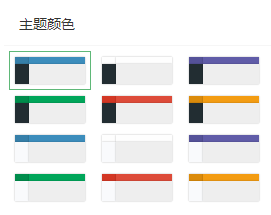
主要页面代码及样式:
<!DOCTYPE html>

<html xmlns="http://www.w3.org/1999/xhtml">

<head runat="server">

    <meta http-equiv="Content-Type" content="text/html; charset=utf-8" />

    <title></title>

    <style type="text/css">

    .tab-pane{

        width:268px;

    }

    .tab-header{

        position: relative;

        height: 42px;

        line-height: 42px;

        padding: 0 15px;

        color: #333;

        border-radius: 2px 2px 0 0;

        font-size: 14px;

        border-bottom: 1px solid #f6f6f6;

    }

    .set-theme {

        padding: 5px;

        overflow-x: hidden;

        position: relative;

        line-height: 24px;

    }

    .set-theme-color {

        list-style: none;

        margin: 0;

        padding: 0;

    }

    .set-theme-color li {

        position: relative;

        display: inline-block;

        vertical-align: top;

        cursor: pointer;

        font-size: 12px;

        color: #666;

        width: 70px;

        padding: 5px;

        border: 1px solid #fff;

    }

    .set-theme-color li.active,

    .set-theme-color li.active:after,

    .set-theme-color li:hover,

    .set-theme-color li:after {

        border-color:#5FB878;

        opacity: 1;

    }

    .set-theme-page {

        display: block;

    }

    .set-theme-logo {

        display: block;

        width: 20%;

        float: left;

        height: 7px;

        box-shadow: 0 0 1px rgba(0,0,0,0.4);

    }

    .set-theme-header {

        display: block;

        width: 80%;

        float: left;

        height: 7px;

        box-shadow: 0 0 1px rgba(0,0,0,0.4);

    }

    .set-theme-side {

        display: block;

        width: 20%;

        float: left;

        height: 20px;

        box-shadow: 0 0 1px rgba(0,0,0,0.4);

    }

    .set-theme-body {

        display: block;

        width: 80%;

        float: left;

        height: 20px;

        box-shadow: 0 0 1px rgba(0,0,0,0.4);

    }

    *[data-skin="skin-blue"] .set-theme-logo {

        background: #367fa9;

    }

    *[data-skin="skin-blue"] .set-theme-header {

        background: #3c8dbc;

    }

    *[data-skin="skin-blue"] .set-theme-side {

        background: #222d32;

    }

    *[data-skin="skin-blue"] .set-theme-body {

        background: #eee;

    }

    *[data-skin="skin-black"] .set-theme-logo {

        background: #fefefe;

    }

    *[data-skin="skin-black"] .set-theme-header {

        background: #fefefe;

    }

    *[data-skin="skin-black"] .set-theme-side {

        background: #222d32;

    }

    *[data-skin="skin-black"] .set-theme-body {

        background: #eee;

    }

    *[data-skin="skin-purple"] .set-theme-logo {

        background: #555299;

    }

    *[data-skin="skin-purple"] .set-theme-header {

        background: #605ca8;

    }

    *[data-skin="skin-purple"] .set-theme-side {

        background: #222d32;

    }

    *[data-skin="skin-purple"] .set-theme-body {

        background: #eee;

    }

    *[data-skin="skin-green"] .set-theme-logo {

        background: #008d4c;

    }

    *[data-skin="skin-green"] .set-theme-header {

        background: #00a65a;

    }

    *[data-skin="skin-green"] .set-theme-side {

        background: #222d32;

    }

    *[data-skin="skin-green"] .set-theme-body {

        background: #eee;

    }

    *[data-skin="skin-red"] .set-theme-logo {

        background: #d33724;

    }

    *[data-skin="skin-red"] .set-theme-header {

        background: #dd4b39;

    }

    *[data-skin="skin-red"] .set-theme-side {

        background: #222d32;

    }

    *[data-skin="skin-red"] .set-theme-body {

        background: #eee;

    }

    *[data-skin="skin-yellow"] .set-theme-logo {

        background: #db8b0b;

    }

    *[data-skin="skin-yellow"] .set-theme-header {

        background: #f39c12;

    }

    *[data-skin="skin-yellow"] .set-theme-side {

        background: #222d32;

    }

    *[data-skin="skin-yellow"] .set-theme-body {

        background: #eee;

    }

    *[data-skin="skin-blue-light"] .set-theme-logo {

        background: #367fa9;

    }

    *[data-skin="skin-blue-light"] .set-theme-header {

        background: #3c8dbc;

    }

    *[data-skin="skin-blue-light"] .set-theme-side {

        background: #f9fafc;

    }

    *[data-skin="skin-blue-light"] .set-theme-body {

        background: #eee;

    }

    *[data-skin="skin-black-light"] .set-theme-logo {

        background: #fefefe;

    }

    *[data-skin="skin-black-light"] .set-theme-header {

        background: #fefefe;

    }

    *[data-skin="skin-black-light"] .set-theme-side {

        background: #f9fafc;

    }

    *[data-skin="skin-black-light"] .set-theme-body {

        background: #eee;

    }

    *[data-skin="skin-purple-light"] .set-theme-logo {

        background: #555299;

    }

    *[data-skin="skin-purple-light"] .set-theme-header {

        background: #605ca8;

    }

    *[data-skin="skin-purple-light"] .set-theme-side {

        background: #f9fafc;

    }

    *[data-skin="skin-purple-light"] .set-theme-body {

        background: #eee;

    }

    *[data-skin="skin-green-light"] .set-theme-logo {

        background: #008d4c;

    }

    *[data-skin="skin-green-light"] .set-theme-header {

        background: #00a65a;

    }

    *[data-skin="skin-green-light"] .set-theme-side {

        background: #f9fafc;

    }

    *[data-skin="skin-green-light"] .set-theme-body {

        background: #eee;

    }

    *[data-skin="skin-red-light"] .set-theme-logo {

        background: #d33724;

    }

    *[data-skin="skin-red-light"] .set-theme-header {

        background: #dd4b39;

    }

    *[data-skin="skin-red-light"] .set-theme-side {

        background: #f9fafc;

    }

    *[data-skin="skin-red-light"] .set-theme-body {

        background: #eee;

    }

    *[data-skin="skin-yellow-light"] .set-theme-logo {

        background: #db8b0b;

    }

    *[data-skin="skin-yellow-light"] .set-theme-header {

        background: #f39c12;

    }

    *[data-skin="skin-yellow-light"] .set-theme-side {

        background: #f9fafc;

    }

    *[data-skin="skin-yellow-light"] .set-theme-body {

        background: #eee;

    }

    </style>

</head>

<body>

<div class="tab-pane">

    <div class="tab-header">主题颜色</div>

    <div class="set-theme">

        <ul class="set-theme-color">

            <li title="Blue" data-skin="skin-blue" class="active">

                <div class="set-theme-page">

                    <div class="set-theme-logo"></div>

                    <div class="set-theme-header"></div>

                    <div class="set-theme-side"></div>

                    <div class="set-theme-body"></div>

                </div>

            </li>

            <li title="Black" data-skin="skin-black">

                <div class="set-theme-page">

                    <div class="set-theme-logo"></div>

                    <div class="set-theme-header"></div>

                    <div class="set-theme-side"></div>

                    <div class="set-theme-body"></div>

                </div>

            </li>

            <li title="Purple" data-skin="skin-purple">

                <div class="set-theme-page">

                    <div class="set-theme-logo"></div>

                    <div class="set-theme-header"></div>

                    <div class="set-theme-side"></div>

                    <div class="set-theme-body"></div>

                </div>

            </li>

            <li title="Green" data-skin="skin-green">

                <div class="set-theme-page">

                    <div class="set-theme-logo"></div>

                    <div class="set-theme-header"></div>

                    <div class="set-theme-side"></div>

                    <div class="set-theme-body"></div>

                </div>

            </li>

            <li title="Red" data-skin="skin-red">

                <div class="set-theme-page">

                    <div class="set-theme-logo"></div>

                    <div class="set-theme-header"></div>

                    <div class="set-theme-side"></div>

                    <div class="set-theme-body"></div>

                </div>

            </li>

            <li title="Yellow" data-skin="skin-yellow">

                <div class="set-theme-page">

                    <div class="set-theme-logo"></div>

                    <div class="set-theme-header"></div>

                    <div class="set-theme-side"></div>

                    <div class="set-theme-body"></div>

                </div>

            </li>

            <li title="Blue Light" data-skin="skin-blue-light">

                <div class="set-theme-page">

                    <div class="set-theme-logo"></div>

                    <div class="set-theme-header"></div>

                    <div class="set-theme-side"></div>

                    <div class="set-theme-body"></div>

                </div>

            </li>

            <li title="Black Light" data-skin="skin-black-light">

                <div class="set-theme-page">

                    <div class="set-theme-logo"></div>

                    <div class="set-theme-header"></div>

                    <div class="set-theme-side"></div>

                    <div class="set-theme-body"></div>

                </div>

            </li>

            <li title="Purple Light" data-skin="skin-purple-light">

                <div class="set-theme-page">

                    <div class="set-theme-logo"></div>

                    <div class="set-theme-header"></div>

                    <div class="set-theme-side"></div>

                    <div class="set-theme-body"></div>

                </div>

            </li>

            <li title="Green Light" data-skin="skin-green-light">

                <div class="set-theme-page">

                    <div class="set-theme-logo" ></div>

                    <div class="set-theme-header"></div>

                    <div class="set-theme-side"></div>

                    <div class="set-theme-body"></div>

                </div>

            </li>

            <li title="Red Light" data-skin="skin-red-light">

                <div class="set-theme-page">

                    <div class="set-theme-logo"></div>

                    <div class="set-theme-header"></div>

                    <div class="set-theme-side"></div>

                    <div class="set-theme-body"></div>

                </div>

            </li>

            <li title="Yellow Light" data-skin="skin-yellow-light">

                <div class="set-theme-page">

                    <div class="set-theme-logo"></div>

                    <div class="set-theme-header"></div>

                    <div class="set-theme-side"></div>

                    <div class="set-theme-body"></div>

                </div>

            </li>

        </ul>

    </div>

</div>

</body>

</html>
主题样式选择效果代码及css样式的更多相关文章
- 3.通过js代码设置css样式
<!DOCTYPE html PUBLIC "-//W3C//DTD XHTML 1.0 Transitional//EN" "http://www.w3.org/ ...
- 5、通过js代码设置css样式
1.页面 <!DOCTYPE html PUBLIC "-//W3C//DTD XHTML 1.0 Transitional//EN" "http://www.w3 ...
- CSS样式----图文详解:css样式表和选择器
主要内容 CSS概述 CSS和HTML结合的三种方式:行内样式表.内嵌样式表.外部样式表 CSS四种基本选择器:标签选择器.类选择器.ID选择器.通用选择器 CSS三种扩展选择器:组合选择器.后代选择 ...
- css样式大全,完整的Css样式大全(整理)
CSS样式被称为为“层叠样式表”,是一种网页制作做不可或缺的技术,是用于装饰网页,达到设计效果的一种样式语言,下面将整理一下css常用样式: 字体属性:(font) 大小 {font-size: x- ...
- 为什么我获取不到这个css样式?js原生获取css样式总结
还是自己遇到的一个坑的总结吧!与其说是坑不如说自己学艺不精,让我先哭一会!! 需求 简单就是获取一个css的height (好吧 就是一个这么简单的需求) 实践 好吧 长时间的JQ 我已经对原生无能了 ...
- LODOP打印超文本字符串拼接2 单选选择css样式表格
之前的相关字符串拼接的博文:LODOP打印超文本字符串拼接1 固定表格填充数值之前博文介绍过,字符串可以随意拼接,只要最后组织成的字符串是自己需要的超文本就可以了,前面还有一篇也是拼接样式的:Lodo ...
- 去除冗余 – 精简您的CSS样式代码
讲讲常见的一些没有必要使用CSS代码情况,而这些不起作用可以去掉的CSS代码可能是我们经常忽视的.越是对CSS理解不够,越容易出现这些问题. 二.一些常见不必要CSS样式 1.与默认CSS样式一致 我 ...
- css样式实现字体删除线效果
<!DOCTYPE html> <html> <head> <meta http-equiv="Content-Type" content ...
- Typora 修改代码块高亮样式
目录 方法一:下载自己喜欢的样式 方法二:获取Typora自制主题 方法三:自己撰写css样式文件 方法一:下载自己喜欢的样式 Typora的代码块语法高亮使用的是CodeMirror实现的,所以需要 ...
- Web前端开发基础 第四课(认识CSS样式)
CSS代码语法 css 样式由选择符和声明组成,而声明又由属性和值组成,如下图所示: 选择符:又称选择器,指明网页中要应用样式规则的元素,如本例中是网页中所有的段(p)的文字将变成蓝色,而其他的元素( ...
随机推荐
- Go语言书籍推荐
附录: 其他书籍的介绍:https://github.com/golang/go/wiki/Books Go程序设计语言 (圣经) 作者 艾伦 A.A.多诺万 Kernighan 下载地址 中文版PD ...
- Mybatis——Plus :表与表之间的关系:1对多和多对一
Mybatis--plus我大致整理出两种方案: 第一种:第三方mybatis-plus 插件,注解式开发 Mybatis-Plus-Relation ( mprelation ) : mybatis ...
- 第2-4-9章 规则引擎Drools实战(2)-信用卡申请
目录 9.2 信用卡申请 9.2.1 计算规则 9.2.2 实现步骤 9.2 信用卡申请 全套代码及资料全部完整提供,点此处下载 本小节我们需要通过Drools规则引擎来根据规则进行申请人的合法性检查 ...
- Node.js躬行记(25)——Web自动化测试
网页在提测流转给 QA 后,如何能帮他们更有效而准确的完成测试,是我一直在思考的一个问题. QA 他们会对网页编写测试用例,在提测之前会让我们将优先级最高的用例跑通,这在一定程度上能够避免频繁的返工, ...
- Gradle 使用maven本地仓库 带来的思考
Gradle 使用maven本地仓库 带来的思考 本篇主要探究一下 在使用Gradle 的时候一般会配置 maven 的本地仓库的,那是不是Gradle 可以直接使用 maven本地仓库的jar呢 ? ...
- 自研分布式高性能RPC框架及服务注册中心实践笔记【原创】【开源】
痛点 1. bsf底层依赖springcloud,影响bsf更新springboot新版本和整体最新技术版本升级. 2. eureka已经闭源,且框架设计较重,同时引入eureka会自行引入较多spr ...
- 计算存储分离在京东云消息中间件JCQ上的应用
作者:田寄远 JCQ 全名 JD Cloud Message Queue,是京东云自研.具有 CloudNative 特性的分布式消息中间件. JCQ 设计初衷即为适应云特性的消息中间件:具有高可用. ...
- Kali Pi 安装 RTL8812AU驱动
今天,我们来实操安装一下昨天的RTL8812的无线网卡驱动. 说明 我们今天使用的网卡是磊科的NW392无线网卡,其主要核心为NW392. 一张32G内存卡 树莓派为树莓派4B 4G-RAM 系统为 ...
- [python] 基于diagrams库绘制系统架构图
Python的Diagrams库允许通过简单的Python代码绘制云系统架构,实现对新的系统架构进行原型设计.Diagrams的官方仓库地址见:diagrams.Diagrams的官方文档和使用示例见 ...
- CentOS7升级Linux内核
CentOS7升级Linux内核 什么是Linux内核 虽然时候使用 Linux 来表示整个操作系统,严格地说,Linux 只是个内核,而发行版的操作系统是一个完整功能的系统,它建立在内核之上,具有各 ...