
前后端分离项目(十):实现"改"功能(前后端)
好家伙,本篇介绍如何实现"改"
我们先来看看效果吧
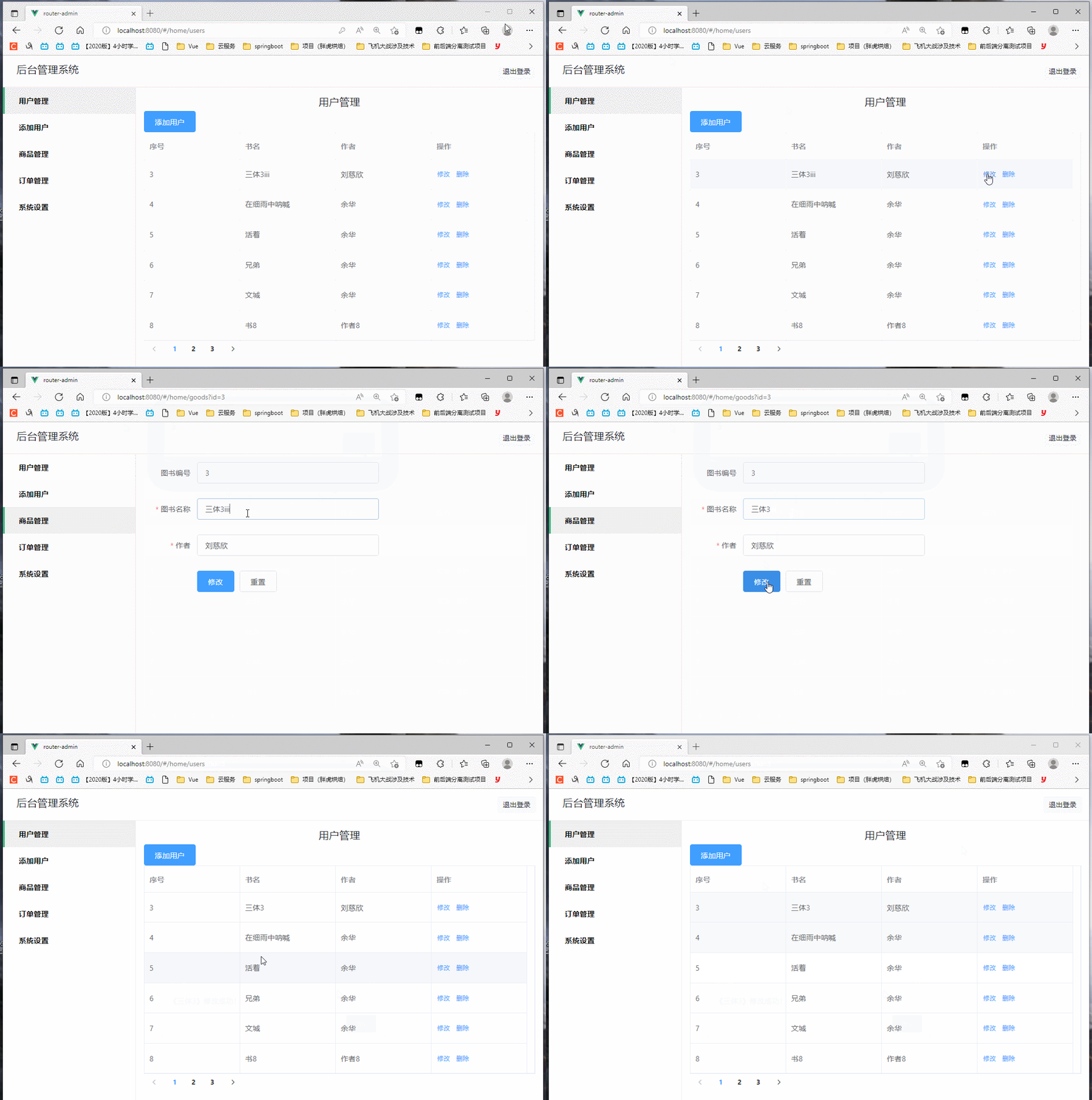
(这可不是假数据哟,这是真数据哟)

(忘记录鼠标了,这里是点了一下刷新)
First Of All
我们依旧先来理一下思路:
首先在"管理"页面中,我能看到所有的书本信息,
随后,在每一个信息后都有对应的"修改按钮"
当我点击这个按钮时,我要①拿到这个这条数据的id($router传参)
然后②跳转到"信息修改界面",(这个界面会像书本添加的那个界面一样,有两个输入框,一个提交按钮,一个重置按钮)
这时,我向后端③请求到当前这条"id"的相关数据(举例:{id:1,name:三体1,auther:刘慈欣})
将它展示到"信息修改界面"的输入框中,随后,你可以将这些数据根据你想要的形状进行修改
最后点击修改数据,④发送axios请求到后端提交更新后的数据
思路清晰,开干
目录如下:
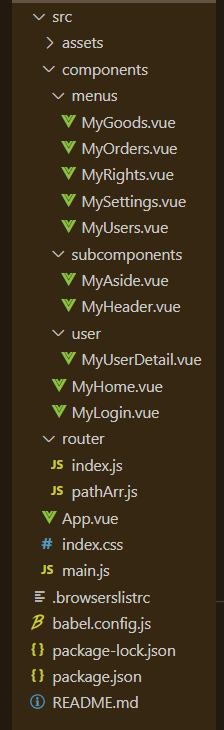
这里我们只需用到MyUsers.vue组件(书本管理页)和MyGoods.vue组件(书本修改页),
当然了,我们要先把这个信息修改界面写(CV)出来
MyGoods组件如下
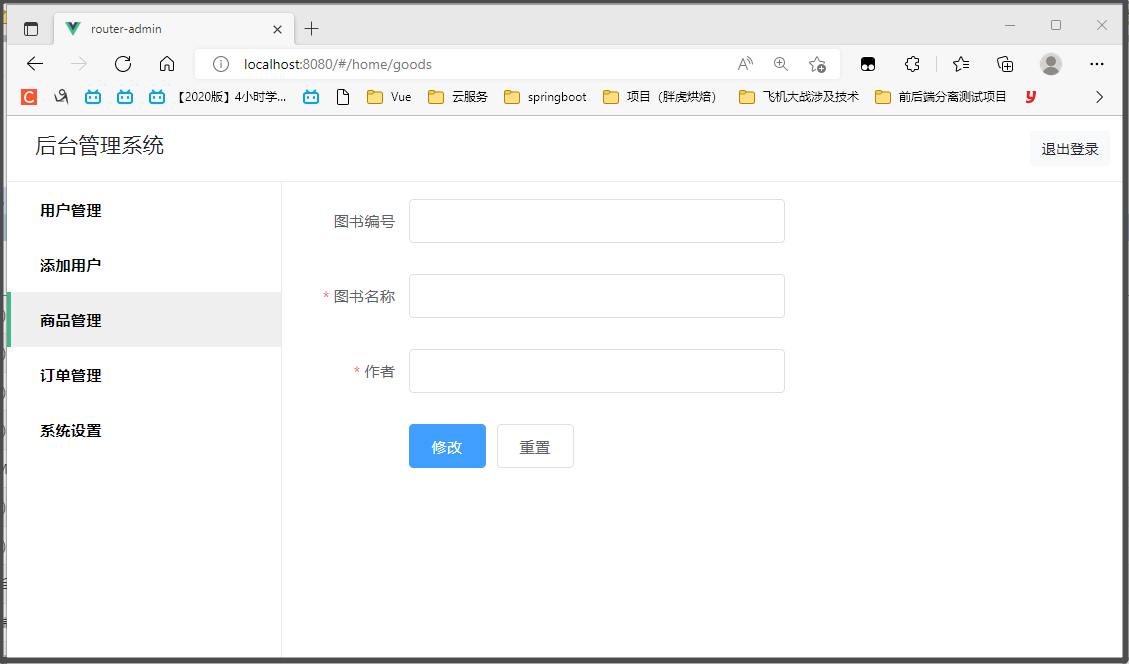
这里我们选择让id只读,不允许修改
MyGoods.vue代码如下:
<!-- 该组件为书本修改功能组件 -->

<template>

  <el-form style="width: 60%" :model="ruleForm" :rules="rules" ref="ruleForm" label-width="100px" class="demo-ruleForm">

      <el-form-item label="图书编号" prop="id">

          <el-input v-model="ruleForm.id" readonly=""></el-input>

      </el-form-item>

      <el-form-item label="图书名称" prop="name">

          <el-input v-model="ruleForm.name"></el-input>

      </el-form-item>

      <el-form-item label="作者" prop="author">

          <el-input v-model="ruleForm.author"></el-input>

      </el-form-item>

      <el-form-item>

          <el-button type="primary" @click="submitForm('ruleForm')">修改</el-button>

          <el-button @click="resetForm('ruleForm')">重置</el-button>

      </el-form-item>

  </el-form>

</template>

<script>

import axios from 'axios'

  export default {

      data() {

          return {

              ruleForm: {

                  id: '',

                  name: '',

                  author: ''

              },

              rules: {

                  name: [

                      { required: true, message: '图书名称不能为空', trigger: 'blur' }

                  ],

                  author:[

                      { required: true, message: '作者不能为空', trigger: 'blur' }

                  ]

              }

          };

      },

      methods: {

          submitForm(formName) {

              const _this = this

              this.$refs[formName].validate((valid) => {

                  if (valid) {

                      axios.put('http://localhost:8011/book/update',this.ruleForm).then(function(resp){

                          if(resp.data == 'success'){

                              _this.$alert('《'+_this.ruleForm.name+'》修改成功!', '消息', {

                                  confirmButtonText: '确定',

                                  callback: action => {

                                      _this.$router.push('/home/users')

                                  }

                              })

                          }

                      })

                  } else {

                      return false;

                  }

              });

          },

          resetForm(formName) {

              this.$refs[formName].resetFields();

          }

      },

      created(){

        const _this=this

        alert(this.$route.query.id)

        axios.get('http://localhost:8011/book/findById/'+this.$route.query.id).then(function(resp){

          _this.ruleForm =resp.data

        })

  }

}

</script>
MyUsers.vue代码如下:
<!-- 该组件为表单主要组件 -->

<template>

  <div>

    <!-- 标题 -->

    <h4 class="text-center">用户管理</h4>

    <!-- 用户添加按钮 -->

    <el-col :span="4">

      <el-button type="primary" @click="addDialogVisible = true">添加用户</el-button>

    </el-col>

    <!-- 用户列表 -->

    <el-table :data="tableData" border style="width: 100%">

      <el-table-column prop="id" label="序号" width="180">

      </el-table-column>

      <el-table-column prop="name" label="书名" width="180">

      </el-table-column>

      <el-table-column prop="author" label="作者" width="180">

      </el-table-column>

      <el-table-column label="操作" width="180">

        <template slot-scope="scope">

          <el-button @click="handleClick(scope.row)" type="text" size="small">修改</el-button>

          <el-button @click="Bookdelete(scope.row)" type="text" size="small">删除</el-button>

        </template>

      </el-table-column>

    </el-table>

    <el-pagination :page-size="6" :pager-count="11" layout="prev, pager, next" :total="total" @current-change="page">

    </el-pagination>

    <!-- <el-pagination :page-size="20"

    :pager-count="11"

    layout="prev, pager, next"

    :total="18"

    @current-change="page" >

    </el-pagination> -->

  </div>

</template>

<script>

import axios from 'axios'

export default {

  name: 'MyUser',

  data() {

    return {

      total: null,

      // 用户列表数据

      tableData: [

        { id: '1', name: '三体1', author: '大刘' },

        { id: '2', name: '三体2', author: '大刘' },

      ],

      addDialogVisible: false, //控制添加用户对话框的显示与隐藏

      addUserForm: {},

      //添加表单的验证规则对象

      addUserFormRules: {

        // username: [{required:true,message:'请输入用户名',trigger:'blur'},

        // {min:3,max:10,message:'用户名长度在3~10个字符',trigger:'blur'}],

        // password: [{required:true,message:'请输入密码',trigger:'blur'},

        // {min:6,max:15,message:'密码长度在6~15个字符',trigger:'blur'}],

        // email: [{required:true,message:'请输入邮箱',trigger:'blur'}],

        // mobile: [{required:true,message:'请输入手机号',trigger:'blur'}]

      }

    }

  },

  methods: {

    //书本删除方法

    Bookdelete(row) {

      const _this = this

      axios.delete('http://localhost:8011/book/deleteById/' + row.id).then(() => {

        _this.$alert('《' + row.name + '》删除成功!', '消息', {

          confirmButtonText: '确定',

          callback: action => {

            window.location.reload()

          }

        })

      })

    },

    //页面点击修改按钮

    handleClick(row) {

      console.log(row);

      this.$router.push({

        path: "goods",

        query: {

          id: row.id

        }

      })

    },

    //分页方法

    page(currentPage) {

      const _this = this;

      axios.get('http://localhost:8011/book/findAll/' + currentPage + '/6').then(function (resp) {

        _this.tableData = resp.data.content

        _this.total = resp.data.totalElements

        console.log(resp.data)

      })

    }

  },

  created() {

    const _this = this;

    axios.get('http://localhost:8011/book/findAll/1/6').then(function (resp) {

      _this.tableData = resp.data.content

      _this.total = resp.data.totalElements

      console.log(resp.data)

    })

  }

}

</script>

<style lang="less" scoped>

</style>
(别忘了配路由,你肯定会的,不用我教了)
后端的接口:
package com.example.demo2.controller;

import com.example.demo2.entity.Book;

import com.example.demo2.repository.BookRepository;

import org.springframework.beans.factory.annotation.Autowired;

import org.springframework.data.domain.Page;

import org.springframework.data.domain.PageRequest;

import org.springframework.web.bind.annotation.*;

@RestController

@RequestMapping("/book")

public class BookHandler {

    @Autowired

    private BookRepository bookRepository;

    @GetMapping("/findAll/{page}/{size}")

    public Page<Book> findAll(@PathVariable("page") Integer page, @PathVariable("size") Integer size){

        PageRequest request = PageRequest.of(page-1,size);

        return bookRepository.findAll(request);

    }

    @PostMapping("/save")

    public String save(@RequestBody Book book){

        Book result = bookRepository.save(book);

        if(result != null){

            return "success";

        }else{

            return "error";

        }

    }

    @GetMapping("/findById/{id}")

    public Book findById(@PathVariable("id") Integer id){

        return bookRepository.findById(id).get();

    }

    @PutMapping("/update")

    public String update(@RequestBody Book book){

        Book result = bookRepository.save(book);

        if(result != null){

            return "success";

        }else{

            return "error";

        }

    }

    @DeleteMapping("/deleteById/{id}")

    public void deleteById(@PathVariable("id") Integer id){

        bookRepository.deleteById(id);

    }

}
来吧
1.拿到这个这条数据的id
<template slot-scope="scope">

          <el-button @click="handleClick(scope.row)" type="text" size="small">修改</el-button>

          <el-button @click="Bookdelete(scope.row)" type="text" size="small">删除</el-button>

</template>
对应方法:
//页面点击修改按钮

    handleClick(row) {

      console.log(row);

      this.$router.push({

        path: "goods",

        query: {

          id: row.id

        }

      })

    },
2.跳转到"信息修改界面"
this.$router.push({

        path: "goods",

        query: {

          id: row.id

        }

      })
query:用来传参的一个属性
3.请求到当前这条"id"的相关数据,并将它展示到"信息修改界面"的输入框中
created(){

        const _this=this

        alert(this.$route.query.id)

        axios.get('http://localhost:8011/book/findById/'+this.$route.query.id).then(function(resp){

          _this.ruleForm =resp.data

        })

  }
4.发送axios请求到后端提交更新后的数据
submitForm(formName) {

              const _this = this

              this.$refs[formName].validate((valid) => {

                  if (valid) {

                      axios.put('http://localhost:8011/book/update',this.ruleForm).then(function(resp){

                          if(resp.data == 'success'){

                              _this.$alert('《'+_this.ruleForm.name+'》修改成功!', '消息', {

                                  confirmButtonText: '确定',

                                  callback: action => {

                                      _this.$router.push('/home/users')

                                  }

                              })

                          }

                      })

                  } else {

                      return false;

                  }

              });

          },
注意此处用的是put请求
搞定啦!(激动)
前后端分离项目(十):实现"改"功能(前后端)的更多相关文章
- 前后端分离项目(十一):实现"删"功能(前后端)
好家伙,本篇介绍如何实现"删"功能 来看效果, 数据库 (自然是没什么毛病) "增"搞定了,其实"删"非常简单 (我不会告诉你我是为了水一 ...
- 前后端分离项目(九):实现"添加"功能(后端接口)
好家伙,来了来了,"查"已经完成了,现在是"增" 前端的视图已经做好了,现在我们来完善后端 后端目录结构 完整代码在前后端分离项目(五):数据分页查询(后端 ...
- 如何使用Spring Securiry实现前后端分离项目的登录功能
如果不是前后端分离项目,使用SpringSecurity做登录功能会很省心,只要简单的几项配置,便可以轻松完成登录成功失败的处理,当访问需要认证的页面时,可以自动重定向到登录页面.但是前后端分离的项目 ...
- Spring-Gateway与Spring-Security在前后端分离项目中的实践
前言 网上貌似webflux这一套的SpringSecurity操作资料貌似很少. 自己研究了一波,记录下来做一点备忘,如果能帮到也在迷惑的人一点点,就更好了. 新项目是前后端分离的项目,前台vue, ...
- List多个字段标识过滤 IIS发布.net core mvc web站点 ASP.NET Core 实战:构建带有版本控制的 API 接口 ASP.NET Core 实战:使用 ASP.NET Core Web API 和 Vue.js 搭建前后端分离项目 Using AutoFac
List多个字段标识过滤 class Program{ public static void Main(string[] args) { List<T> list = new List& ...
- 基于Vue的前后端分离项目实践
一.为什么需要前后端分离 1.1什么是前后端分离 前后端分离这个词刚在毕业(15年)那会就听说过,但是直到17年前都没有接触过前后端分离的项目.怎么理解前后端分离?直观的感觉就是前后端分开去做,即功 ...
- 海纳百川无所不容,Win10环境下使用Docker容器式部署前后端分离项目Django+Vue.js
原文转载自「刘悦的技术博客」https://v3u.cn/a_id_179 随着现代化产品研发的不断推进,我们会发现,几乎每个产品线都会包含功能各异的服务,而且服务与服务之间存在也会存在着错综复杂的依 ...
- 《Spring Boot 入门及前后端分离项目实践》系列介绍
课程计划 课程地址点这里 本课程是一个 Spring Boot 技术栈的实战类课程,课程共分为 3 个部分,前面两个部分为基础环境准备和相关概念介绍,第三个部分是 Spring Boot 项目实践开发 ...
- 《Spring Boot 入门及前后端分离项目实践》目录
开篇词:SpringBoot入门及前后端分离项目实践导读 第02课:快速认识 Spring Boot 技术栈 第03课:开发环境搭建 第04课:快速构建 Spring Boot 应用 第05课:Spr ...
随机推荐
- 使用Fiddler劫持网络资源为前端开发助力(示例:Dynamic CRM 表单开发 也能热更新? )
背景: 使用过vue开发的童鞋应该都知道,在开发vue项目的过程中,有个叫"热更新"的功能特别爽,在传统html开发到初次接触vue时,才发现原来前端开发可以这么香.热更新的表现形 ...
- HCIA-Datacom 2.1 实验一:IPv4编址及IPv4路由基础实验
实验目的 掌握接口IPv4地址的配置方法 理解LoopBack接口的作用与含义 理解直连路由的产生原则 掌握静态路由的配置方法并理解其生效的条件 掌握通过PING工具测试网络层联通性 掌握 ...
- 从零开始Blazor Server(13)--消息通知
我们现在做了用户管理.角色管理.菜单管理. 但是大家有没有发现,我们的菜单要变化的话必须要刷新页面才行.这个体验感觉不太好. 今天我们就用全局通知组件来解决这个问题. 首先我们要改造以下我们的Main ...
- Taurus.MVC 微服务框架 入门开发教程:项目集成:4、默认安全认证与自定义安全认证。
系列目录: 本系列分为项目集成.项目部署.架构演进三个方向,后续会根据情况调整文章目录. 本系列第一篇:Taurus.MVC V3.0.3 微服务开源框架发布:让.NET 架构在大并发的演进过程更简单 ...
- SpringBoot Excel导入导出
一.引入pom.xml依赖 <dependency> <groupId>org.springframework.boot</groupId> <artifac ...
- UOJ#XX A+B Problem (罔烙硫)
题面 背景 题目描述 从前有个 n n n 个方格排成一行,从左至右依此编号为 1 , 2 , ⋯ , n 1,2,⋯,n 1,2,⋯,n. 有一天思考熊想给这 n n n 个方格染上黑白两色. 第 ...
- hadoop 不在 sudoers 文件中,此事将被报告。
问题来源: 使用sudo命令,让hadoop用户使用root身份执行命令时报错: [hadoop@mydocker ~]$ sudo date [sudo] password for hadoop: ...
- NPOI EXECL数据导入,日期格式调用DateCellValue取值时,二次或后续调用出现报错!
NPOI version:2.5.1 EXCEL数据导入功能,第一次调用DateCellValue获得日期值OK,二次或后续调用出现报错"函数求值需要运行所有线程" 初步怀疑是版本 ...
- 在 C# CLR 中学习 C++ 之了解 extern
一:背景 在 CLR 源码中有很多的 extern 和 extern "C" 这样的关键词,比如下面这些代码: extern size_t gc_global_mechanisms ...
- OSI模型 TCP/IP协议
常见术语 网络相关的术语 1.拓扑:物理拓扑-----体现了设备之间的连接关系 逻辑拓扑----设备之间的通信关系 2.数据载荷:传递的实际信息 3.报文(PDU--协议数据单元) 4.数据头部的作用 ...