
Gitlab添加K8S集群
介绍如何在Gitlab项目中添加K8S集群,以便使用K8S集群部署gitlab-runner帮我们运行gitlab的CI/CD。
参考官方文档:https://docs.gitlab.com/ee/user/project/clusters/add_remove_clusters.html#add-existing-cluster
1.登入gitlab后,进入自己的项目主页,菜单栏 Operations => Kubernetes => Add Kubernetes cluster,选择页签 Add existing cluster。
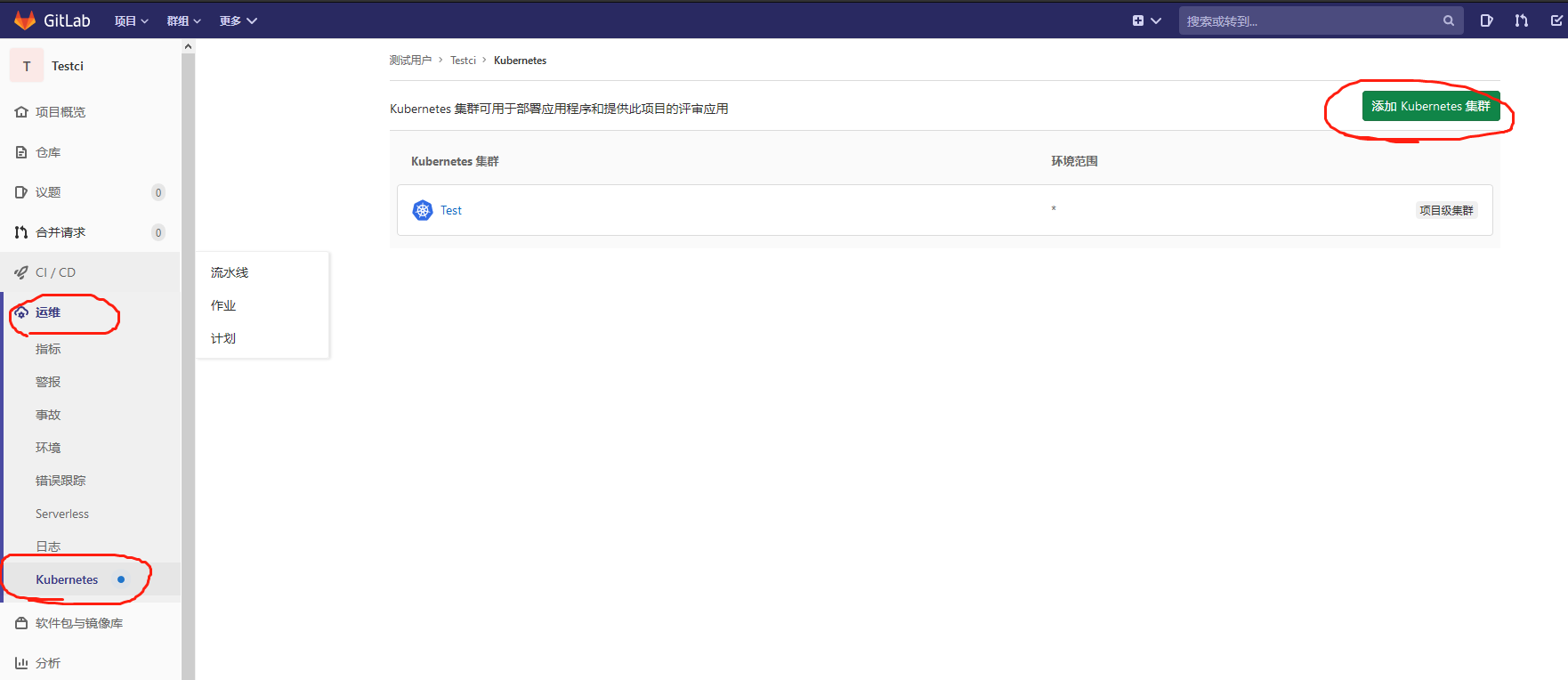

2.只需要获取响应的值填录到该表单即可。Kubernetes cluster name集群名称随意填,Project namespace可不填。

2.1 获取API URL
运行以下命令得到输出值:
kubectl cluster-info | grep 'Kubernetes master' | awk '/http/ {print $NF}'
2.2 获取CA Certificate
运行以下命令得到输出值:
kubectl get secrets # 获取一个类似default-token-xxxxx的名称,填写在下面这个命令<secret name>

kubectl get secret <secret name> -o jsonpath="{['data']['ca\.crt']}" | base64 --decode
2.3 获取Token
创建文件gitlab-admin-service-account.yaml:
vim gitlab-admin-service-account.yaml

apiVersion: v1

kind: ServiceAccount

metadata:

  name: gitlab

  namespace: kube-system

---

apiVersion: rbac.authorization.k8s.io/v1beta1

kind: ClusterRoleBinding

metadata:

  name: gitlab-admin

roleRef:

  apiGroup: rbac.authorization.k8s.io

  kind: ClusterRole

  name: cluster-admin

subjects:

  - kind: ServiceAccount

    name: gitlab

    namespace: kube-system

kubectl apply -f gitlab-admin-service-account.yaml

kubectl -n kube-system describe secret $(kubectl -n kube-system get secret | grep gitlab | awk '{print $1}')
添加完成之后,可以在集群中安装你想用的插件了,例如gitlab-runner。
官方操作步骤:
Add existing cluster
If you have an existing Kubernetes cluster, you can add it to a project, group, or instance.
NOTE: Note: Kubernetes integration is not supported for arm64 clusters. See the issue Helm Tiller fails to install on arm64 cluster for details.
Existing Kubernetes cluster
To add a Kubernetes cluster to your project, group, or instance:
Navigate to your:
- Project's {cloud-gear} Operations > Kubernetes page, for a project-level cluster.
- Group's {cloud-gear} Kubernetes page, for a group-level cluster.
- Admin Area > {cloud-gear} Kubernetes page, for an instance-level cluster.
Click Add Kubernetes cluster.
Click the Add existing cluster tab and fill in the details:
Kubernetes cluster name (required) - The name you wish to give the cluster.
Environment scope (required) - The associated environment to this cluster.
API URL (required) - It's the URL that GitLab uses to access the Kubernetes API. Kubernetes exposes several APIs, we want the "base" URL that is common to all of them. For example,
https://kubernetes.example.comrather thanhttps://kubernetes.example.com/api/v1.Get the API URL by running this command:
kubectl cluster-info | grep 'Kubernetes master' | awk '/http/ {print $NF}'
CA certificate (required) - A valid Kubernetes certificate is needed to authenticate to the cluster. We will use the certificate created by default.
List the secrets with
kubectl get secrets, and one should be named similar todefault-token-xxxxx. Copy that token name for use below.Get the certificate by running this command:
kubectl get secret <secret name> -o jsonpath="{['data']['ca\.crt']}" | base64 --decode
NOTE: Note: If the command returns the entire certificate chain, you need copy the root ca certificate at the bottom of the chain.
Token - GitLab authenticates against Kubernetes using service tokens, which are scoped to a particular
namespace. The token used should belong to a service account with cluster-admin privileges. To create this service account:Create a file called
gitlab-admin-service-account.yamlwith contents:apiVersion: v1
kind: ServiceAccount
metadata:
name: gitlab
namespace: kube-system
---
apiVersion: rbac.authorization.k8s.io/v1beta1
kind: ClusterRoleBinding
metadata:
name: gitlab-admin
roleRef:
apiGroup: rbac.authorization.k8s.io
kind: ClusterRole
name: cluster-admin
subjects:
- kind: ServiceAccount
name: gitlab
namespace: kube-system
Apply the service account and cluster role binding to your cluster:
kubectl apply -f gitlab-admin-service-account.yaml
You will need the
container.clusterRoleBindings.createpermission to create cluster-level roles. If you do not have this permission, you can alternatively enable Basic Authentication and then run thekubectl applycommand as an admin:kubectl apply -f gitlab-admin-service-account.yaml --username=admin --password=<password>
NOTE: Note: Basic Authentication can be turned on and the password credentials can be obtained using the Google Cloud Console.
Output:
serviceaccount "gitlab" created

clusterrolebinding "gitlab-admin" created
Retrieve the token for the
gitlabservice account:kubectl -n kube-system describe secret $(kubectl -n kube-system get secret | grep gitlab | awk '{print $1}')
Copy the
<authentication_token>value from the output:Name: gitlab-token-b5zv4
Namespace: kube-system
Labels: <none>
Annotations: kubernetes.io/service-account.name=gitlab
kubernetes.io/service-account.uid=bcfe66ac-39be-11e8-97e8-026dce96b6e8 Type: kubernetes.io/service-account-token Data
====
ca.crt: 1025 bytes
namespace: 11 bytes
token: <authentication_token>
NOTE: Note: For GKE clusters, you will need the
container.clusterRoleBindings.createpermission to create a cluster role binding. You can follow the Google Cloud documentation to grant access.GitLab-managed cluster - Leave this checked if you want GitLab to manage namespaces and service accounts for this cluster. See the Managed clusters section for more information.
Project namespace (optional) - You don't have to fill it in; by leaving it blank, GitLab will create one for you. Also:
- Each project should have a unique namespace.
- The project namespace is not necessarily the namespace of the secret, if you're using a secret with broader permissions, like the secret from
default. - You should not use
defaultas the project namespace. - If you or someone created a secret specifically for the project, usually with limited permissions, the secret's namespace and project namespace may be the same.
Finally, click the Create Kubernetes cluster button.
After a couple of minutes, your cluster will be ready to go. You can now proceed to install some pre-defined applications.
Gitlab添加K8S集群的更多相关文章
- 使用RKE快速部署k8s集群
一.环境准备 1.1环境信息 IP地址 角色 部署软件 10.10.100.5 K8s Master Etcd.Control 10.10.100.17 K8s Worker1 Worker 10.1 ...
- rancher导入k8s集群后添加监控无数据
1.日志报错 rancher导入k8s集群后添加监控无数据,rancher日志报错: k8s.io/kube-state-metrics/pkg/collectors/builder.go:: Fai ...
- k8s集群节点更换ip 或者 k8s集群添加新节点
1.需求情景:机房网络调整,突然要回收我k8s集群上一台node节点机器的ip,并调予新的ip到这台机器上,所以有了k8s集群节点更换ip一说:同时,k8s集群节点更换ip也相当于k8s集群添加新节点 ...
- kubernetes系列03—kubeadm安装部署K8S集群
本文收录在容器技术学习系列文章总目录 1.kubernetes安装介绍 1.1 K8S架构图 1.2 K8S搭建安装示意图 1.3 安装kubernetes方法 1.3.1 方法1:使用kubeadm ...
- rancher2.X搭建k8s集群平台
一, 新版特性 Rancher 1.6支持多种容器编排框架,包括Kubernetes.Mesos.Docker Swarm,默认的基础编排引擎是Cattle,Cattle极简的操作体验受到了大量开源社 ...
- 关于使用rancher部署k8s集群的一些小问题的解决
问题一: 在rancher的ui上,不能创建k8s的master节点的高可用集群.创建k8s集群,添加节点的时候,可以添加多个master,但是多个master又没有高可用,只要其中一个出问题了,那么 ...
- jenkins流水线部署springboot应用到k8s集群(k3s+jenkins+gitee+maven+docker)(2)
前言:上篇已介绍了jenkins在k3s环境部署,本篇继续上篇讲述流水线构建部署流程 1.从gitlab上拉取代码步骤 在jenkins中,新建一个凭证:Manage Jenkins -> Ma ...
- China Azure中部署Kubernetes(K8S)集群
目前China Azure还不支持容器服务(ACS),使用名称"az acs create --orchestrator-type Kubernetes -g zymtest -n kube ...
- k8s重要概念及部署k8s集群(一)--技术流ken
重要概念 1. cluster cluster是 计算.存储和网络资源的集合,k8s利用这些资源运行各种基于容器的应用. 2.master master是cluster的大脑,他的主要职责是调度,即决 ...
随机推荐
- C++算数运算符和位运算符
C++根据功能和用途将运算符分为算数运算符.位运算符.关系运算符和逻辑运算符等不同类型.四种不同运算符的优先级从大到小依次位算-位-关-逻. 一.算数运算符 1.加减乘除(+ - * /) 加减乘除位 ...
- day11 Java反射机制
java反射机制 反射是java中的动态机制,它允许我们在程序运行期间再确定类的实例化,方法的调用,属性的调用等,而不是传统意义上的在编码期间确定. 因此,反射可以大大的提高代码的灵活度,但是随之而来 ...
- 全民开发!仓库管理者用无代码平台,搭建理想的WMS软件
货在哪儿? 我说过仓库管理不要依赖"老人",因为只有"他"知道货在哪怎么行?也不要完全依赖"系统",因为当前的"系统"并 ...
- ElementUI嵌套页面及关联增删查改实现
@ 目录 前言 一.ElementUI如何在原有页面添加另外一个页面并实现关联增删查改? 二.实现步骤 1.ElementUI代码 2.思路:很简单 1.1 首先通过el-row.el-col.el- ...
- 第十六天python3 文件IO(二)
BytesIO操作 io模块中的类 from io import BytesIO 内存中,开辟的一个二进制模式的buffer,可以像文件对象一样操作它: 当close方法被调用的时候,这个buffer ...
- display: table-cell里面文字打点的方法
<!DOCTYPE html> <html lang="en"> <head> <meta charset="UTF-8&quo ...
- java 向上,向下取整详解
向上取整函数:Math.ceil(double a); 向下取整函数:Math.floor(double a); 需要注意的是:取整是对小数的取整,由于java自动转型机制,两个整数的运算结果依然是整 ...
- YII XSS(跨站脚本攻击)
\Yii::$app->response->headers->add('X-XSS-Protection','0');//表示关闭YII的跨站脚本过滤//http://www.fro ...
- 利用 SonarScanner 静态扫描 Rainbond 上的 Maven 项目
对代码进行静态扫描是一种非常常见的代码质量保证手段,这种扫描不仅仅可以检查到代码中的缺陷,应用各种业界最佳实践,也可以检查出安全方面的漏洞,给予项目代码全方位的提升.在各种代码扫描方案之中,Sonar ...
- [极客大挑战 2019]HardSQL-1
1.打开之后万能密码等均被过滤,那就先确定下过滤的内容,采用brup抓包进行爆破,发现对union进行了过滤,因此这里就没法使用联合注入,结果如下: 爆破得字典: ^ & && ...