
AngularJS with MVC4 CRUD
CRUD using MVC Web API and AngularJS
In this article I am going to demonstrate about how can we create basic crud (create, read, update and delete) using MVC Web API, SQL Server and Angular JS.
In this demo application our main concern will be on Angular JS data-binding and routing. I also used a Entity Framework Code First approach for database operation.
Functionalities present in this application:
a) Data Binding using AngularJS
b) Client side routing using Angular Routing
c) Cascading Dropdown using AngularJS
d) Conditional formatting using Angularjs
e) Select, Insert, Update and Delete record in sql server database.
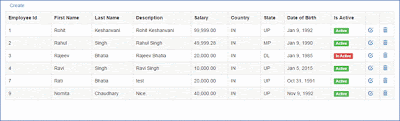
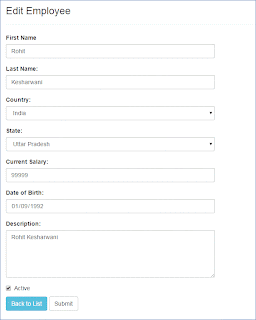
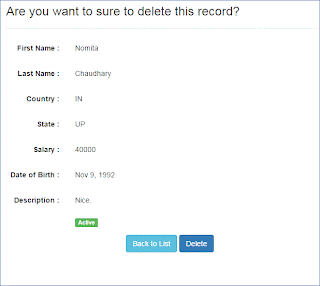
Let’s start step by step so that we can achieve our objective at the end of this article. After completing this demo our application should look like this:
1) Employee List page:
2) Employee Page for Create and Edit a record.
3) Employee Delete Confirmation page with details:
To achieve the above, follow the steps given below:
1) Create a new asp.net mvc empty web application.
2) Add the following package in your application:
a) AngularJS.Core
b) AngularJS.Route
c) Bootstrap
d) EntityFramework
3) Create a Model named Employee in Models folder and replace the code with the following:
public class Employee
{
public int EmployeeId { get; set; }
[Required]
[StringLength(20)]
public string FirstName { get; set; }
[Required]
[StringLength(20)]
public string LastName { get; set; }
[Required]
[StringLength(100)]
public string Description { get; set; }
public float Salary { get; set; }
[Required]
[StringLength(50)]
public string Country { get; set; }
[Required]
[StringLength(50)]
public string State { get; set; }
public DateTime DateofBirth { get; set; }
public bool IsActive { get; set; }
}
public class EmployeeDbContext : DbContext
{
public EmployeeDbContext()
: base()
{
Database.SetInitializer<EmployeeDbContext>(new EmployeeDbContextInitializer());
}
public DbSet<Employee>Employees { get; set; }
}
public class EmployeeDbContextInitializer : DropCreateDatabaseIfModelChanges<EmployeeDbContext>
{
protected override void Seed(EmployeeDbContext context)
{
var list = new List<Employee>
{
new Employee { FirstName = "Rohit", LastName = "Kesharwani", Description = "Rohit Kesharwani", DateofBirth = DateTime.Now.AddYears(-23), Country = "IN", State="UP", Salary = 99999, IsActive = true },
new Employee { FirstName = "Rahul", LastName = "Singh", Description = "Rahul Singh", DateofBirth =DateTime.Now.AddYears(-25), Country = "IN", State="MP", Salary = 49999.28f, IsActive = true }
};
list.ForEach(m =>
{
context.Employees.Add(m);
});
context.SaveChanges();
base.Seed(context);
}
}
4) Add a connection string with same name of EmployeeDbContext in web.config:
<connectionStrings>
<addname="EmployeeDbContext"connectionString="Data Source=(local);Initial Catalog=EmpDb;Integrated Security=true;"providerName="System.Data.SqlClient"/>
</connectionStrings>
5) Now create a Employee API controller to perform crud in database:
public class EmployeeController : ApiController
{
EmployeeDbContext db = new EmployeeDbContext();
// GET api/employee
[ActionName("get"), HttpGet]
public IEnumerable<Employee>Emps()
{
return db.Employees.ToList();
}
// GET api/employee/5
public Employee Get(int id)
{
return db.Employees.Find(id);
}
// POST api/employee
public HttpResponseMessage Post(Employee model)
{
if (ModelState.IsValid)
{
db.Employees.Add(model);
db.SaveChanges();
HttpResponseMessage response = Request.CreateResponse(HttpStatusCode.Created, model);
return response;
}
else
{
return Request.CreateErrorResponse(HttpStatusCode.BadRequest, ModelState);
}
}
// PUT api/employee/5
public HttpResponseMessage Put(Employee model)
{
if (ModelState.IsValid)
{
db.Entry(model).State = System.Data.Entity.EntityState.Modified;
db.SaveChanges();
HttpResponseMessage response = Request.CreateResponse(HttpStatusCode.OK, model);
return response;
}
else
{
return Request.CreateErrorResponse(HttpStatusCode.BadRequest, ModelState);
}
}
// DELETE api/employee/5
public HttpResponseMessage Delete(int id)
{
Employee emp = db.Employees.Find(id);
if (emp == null)
{
return Request.CreateResponse(HttpStatusCode.NotFound);
}
db.Employees.Remove(emp);
db.SaveChanges();
return Request.CreateResponse(HttpStatusCode.OK, emp);
}
6) Also create a Country controller to retrieve country and its states from server side in order to implement cascading dropdown list:
public class CountryController : ApiController
{
// GET api/country
public IEnumerable<System.Web.Mvc.SelectListItem> Get()
{
List<System.Web.Mvc.SelectListItem> countries = new List<System.Web.Mvc.SelectListItem>
{
new System.Web.Mvc.SelectListItem { Text = "India", Value="IN" },
new System.Web.Mvc.SelectListItem { Text = "United States", Value="US" },
new System.Web.Mvc.SelectListItem { Text = "United Kingdom", Value="UK" },
new System.Web.Mvc.SelectListItem { Text = "Australlia", Value="CA" }
};
return countries;
}
// GET api/country/5
public IEnumerable<System.Web.Mvc.SelectListItem> Get(string id)
{
List<System.Web.Mvc.SelectListItem> states = new List<System.Web.Mvc.SelectListItem>();
switch (id)
{
case "IN":
states.Add(new System.Web.Mvc.SelectListItem { Text = "Uttar Pradesh", Value = "UP" });
states.Add(new System.Web.Mvc.SelectListItem { Text = "Madhya Pradesh", Value = "MP" });
states.Add(new System.Web.Mvc.SelectListItem { Text = "Delhi", Value = "DL" });
states.Add(new System.Web.Mvc.SelectListItem { Text = "Kanpur", Value = "KN" });
break;
case "US":
states.Add(new System.Web.Mvc.SelectListItem { Text = "California", Value = "CA" });
states.Add(new System.Web.Mvc.SelectListItem { Text = "Newyork", Value = "NY" });
break;
case "UK":
states.Add(new System.Web.Mvc.SelectListItem { Text = "London", Value = "LN" });
states.Add(new System.Web.Mvc.SelectListItem { Text = "Paris", Value = "PR" });
break;
case "CA":
states.Add(new System.Web.Mvc.SelectListItem { Text = "Sydney", Value = "SD" });
states.Add(new System.Web.Mvc.SelectListItem { Text = "Melbourne", Value = "MB" });
break;
}
return states;
}
}
7) Now create a Home controller and add an Index view and reference some css and JavaScript files of angularjs and bootstrap to create a view and partial views:
public class HomeController : Controller
{
public ActionResult Index()
{
return View();
}
}
8) Index view with js and css references:
@{
Layout = null;
}
<!DOCTYPE html>
<html ng-app="EmpApp">
<head>
<meta name="viewport" content="width=device-width" />
<title>Index</title>
<link href="@Url.Content("~/Content/bootstrap.min.css")" rel="stylesheet" type="text/css" />
<script src="@Url.Content("~/Scripts/angular.min.js")" type="text/javascript"></script>
<script src="@Url.Content("~/Scripts/angular-route.js")" type="text/javascript"></script>
<script src="@Url.Content("~/Scripts/app/app.js")" type="text/javascript"></script>
<script src="@Url.Content("~/Scripts/app/controller.js")" type="text/javascript"></script>
</head>
<body>
<div class="main Container" ng-view>
</div>
</body>
</html>
I have highlighted ng-app and ng-view attribute. This is for initializing module under app and rendering of partial views inside ng-view.
9) Now create an app.js file for configuration of route and controllers. The code of app.js is given below:
var EmpApp = angular.module('EmpApp', [
'ngRoute',
'EmpControllers'
]);
EmpApp.config(['$routeProvider', function ($routeProvider) {
$routeProvider.when('/list', {
templateUrl: 'Employee/list.html',
controller: 'ListController'
}).
when('/create', {
templateUrl: 'Employee/edit.html',
controller: 'EditController'
}).
when('/edit/:id', {
templateUrl: 'Employee/edit.html',
controller: 'EditController'
}).
when('/delete/:id', {
templateUrl: 'Employee/delete.html',
controller: 'DeleteController'
}).
otherwise({
redirectTo: '/list'
});
}]);
10) Now add a folder named Employee under root directory of an application and following three views (html files) list.html, edit.html and delete.html.
a) List.html
<div>
<a href="#/create" class="btn">Create</a>
</div>
<div class="table-responsive">
<table class="table table-striped table-bordered">
<tr>
<th>Employee Id</th>
<th>First Name</th>
<th>Last Name</th>
<th>Description</th>
<th>Salary</th>
<th>Country</th>
<th>State</th>
<th>Date of Birth</th>
<th>Is Active</th>
<th></th>
<th></th>
</tr>
<tr ng-repeat="item in employees">
<td>{{ item.EmployeeId }}</td>
<td>{{ item.FirstName }}</td>
<td>{{ item.LastName }}</td>
<td>{{ item.Description }}</td>
<td>{{ item.Salary | number: 2 }}</td>
<td>{{ item.Country }}</td>
<td>{{ item.State }}</td>
<td>{{ item.DateofBirth | date }}</td>
<td>
<span class="label" ng-class="{true:'label-success', false:'label-danger', '':'hidden'}[item.IsActive]">
{{ item.IsActive ? 'Active' : 'In Active' }}</span>
</td>
<td>
<a href="#/edit/{{item.EmployeeId}}" class="glyphicon glyphicon-edit"></a>
</td>
<td>
<a href="#/delete/{{item.EmployeeId}}" class="glyphicon glyphicon-trash"></a>
</td>
</tr>
</table>
</div>
b) Edit.html
<h3>
{{ title }}</h3>
<hr />
<form role="form" style="max-width: 500px;">
<strong class="error">{{ error }}</strong>
<div class="form-group">
<label for="firstname">
First Name</label>
<input type="text" class="form-control" id="firstname" ng-model="firstname" />
</div>
<div class="form-group">
<label for="lastname">
Last Name:</label>
<input type="text" class="form-control" id="lastname" ng-model="lastname" />
</div>
<div class="form-group">
<label for="country">
Country:</label>
<select class="form-control" id="country" ng-model="country" ng-options="c.Value as c.Text for c in countries"ng-change="getStates()">
<option value="">-- Select Country --</option>
</select>
</div>
<div class="form-group">
<label for="state">
State:</label>
<select class="form-control" id="state" ng-model="state" ng-disabled="!states" ng-options="s.Value as s.Text for s in states">
<option value="">-- Select State --</option>
</select>
</div>
<div class="form-group">
<label for="salary">
Current Salary:</label>
<input type="text" class="form-control" id="salary" ng-model="salary" />
</div>
<div class="form-group">
<label for="dob">
Date of Birth:</label>
<input type="date" class="form-control" id="dob" ng-model="dob" />
</div>
<div class="form-group">
<label for="description">
Description:</label>
<textarea rows="5" cols="10" class="form-control" id="description" ng-model="description"></textarea>
</div>
<div class="form-group checkbox">
<label>
<input type="checkbox" ng-model="active" />Active</label>
</div>
<a href="#/list" class="btn btn-info">Back to List</a>
<button type="submit" class="btn btn-default" ng-click="save()">
Submit</button>
</form>
c) Delete.html
<h3>
Are you want to sure to delete this record?</h3>
<hr />
<form class="form-horizontal" style="max-width: 500px;">
<div class="form-group">
<label class="control-label col-xs-3">
First Name :</label>
<div class="col-xs-9">
<p class="form-control-static">
{{ firstname }}</p>
</div>
</div>
<div class="form-group">
<label class="control-label col-xs-3">
Last Name :</label>
<div class="col-xs-9">
<p class="form-control-static">
{{ lastname }}</p>
</div>
</div>
<div class="form-group">
<label class="control-label col-xs-3">
Country :</label>
<div class="col-xs-9">
<p class="form-control-static">
{{ country }}</p>
</div>
</div>
<div class="form-group">
<label class="control-label col-xs-3">
State :</label>
<div class="col-xs-9">
<p class="form-control-static">
{{ state }}</p>
</div>
</div>
<div class="form-group">
<label class="control-label col-xs-3">
Salary :</label>
<div class="col-xs-9">
<p class="form-control-static">
{{ salary }}</p>
</div>
</div>
<div class="form-group">
<label class="control-label col-xs-3">
Date of Birth :</label>
<div class="col-xs-9">
<p class="form-control-static">
{{ dob | date }}</p>
</div>
</div>
<div class="form-group">
<label class="control-label col-xs-3">
Description :</label>
<div class="col-xs-9">
<p class="form-control-static">
{{ description }}</p>
</div>
</div>
<div class="form-group">
<div class="col-xs-offset-3 col-xs-9">
<span class="label" ng-class="{true:'label-success', false:'label-danger', '':'hidden'}[active]">
{{ active ? 'Active' : 'In Active' }}</span>
</div>
</div>
<div class="form-group">
<div class="col-xs-offset-3 col-xs-9 text-center">
<a href="#/list" class="btn btn-info">Back to List</a>
<button type="submit" class="btn btn-primary" ng-click="delete()">
Delete</button>
</div>
</div>
</form>
We had setup three views for list, create, edit and delete. Now we will implement the functionalities for these three views.
11) Create a controller.js file and add the following code given below:
var EmpControllers = angular.module("EmpControllers", []);
// this controller call the api method and display the list of employees
// in list.html
EmpControllers.controller("ListController", ['$scope', '$http',
function ($scope, $http) {
$http.get('/api/employee').success(function (data) {
$scope.employees = data;
});
} ]
);
// this controller call the api method and display the record of selected employee
// in delete.html and provide an option for delete
EmpControllers.controller("DeleteController", ['$scope', '$http', '$routeParams', '$location',
function ($scope, $http, $routeParams, $location) {
$scope.id = $routeParams.id;
$http.get('/api/employee/' + $routeParams.id).success(function (data) {
$scope.firstname = data.FirstName;
$scope.lastname = data.LastName;
$scope.country = data.Country;
$scope.state = data.State;
$scope.salary = data.Salary;
$scope.active = data.IsActive;
$scope.dob = data.DateofBirth;
$scope.description = data.Description;
});
$scope.delete = function () {
$http.delete('/api/Employee/' + $scope.id).success(function (data) {
$location.path('/list');
}).error(function (data) {
$scope.error = "An error has occured while deleting employee! " + data;
});
};
}
]);
// this controller call the api method and display the record of selected employee
// in edit.html and provide an option for create and modify the employee and save the employee record
EmpControllers.controller("EditController", ['$scope', '$filter', '$http', '$routeParams', '$location',
function ($scope, $filter, $http, $routeParams, $location) {
$http.get('/api/country').success(function (data) {
$scope.countries = data;
});
$scope.id = 0;
$scope.getStates = function () {
var country = $scope.country;
if (country) {
$http.get('/api/country/'+country).success(function (data) {
$scope.states = data;
});
}
else {
$scope.states = null;
}
}
$scope.save = function () {
var obj = {
EmployeeId: $scope.id,
FirstName: $scope.firstname,
LastName: $scope.lastname,
Country: $scope.country,
State: $scope.state,
Salary:$scope.salary,
IsActive: $scope.active,
Description: $scope.description,
DateofBirth: $scope.dob
};
if ($scope.id == 0) {
$http.post('/api/Employee/', obj).success(function (data) {
$location.path('/list');
}).error(function (data) {
$scope.error = "An error has occured while adding employee! " + data.ExceptionMessage;
});
}
else {
$http.put('/api/Employee/', obj).success(function (data) {
$location.path('/list');
}).error(function (data) {
console.log(data);
$scope.error = "An Error has occured while Saving customer! " + data.ExceptionMessage;
});
}
}
if ($routeParams.id) {
$scope.id = $routeParams.id;
$scope.title = "Edit Employee";
$http.get('/api/employee/' + $routeParams.id).success(function (data) {
$scope.firstname = data.FirstName;
$scope.lastname = data.LastName;
$scope.country = data.Country;
$scope.state = data.State;
$scope.salary = data.Salary;
$scope.active = data.IsActive;
$scope.description = data.Description;
$scope.dob = new Date(data.DateofBirth);
$scope.getStates();
});
}
else {
$scope.title = "Create New Employee";
}
}
]);
In this controller.js we have multiple controller for different views. Like ListController for list view (display the list of employees), Edit controller for edit view (create and modify the record), DeleteController for delete view (delete confirmation and delete the record).
Now all we have implement and successfully completed all the steps.
To test the process you can build and run an application. I hope it works fine.
AngularJS with MVC4 CRUD的更多相关文章
- AngularJS入门 & 分页 & CRUD示例
一.AngularJS 简介 AngularJS 诞生于2009年,由Misko Hevery 等人创建,后为Google所收购.是一款优秀的前端JS框架,已经被用于Google的多款产品当中. ...
- AngularJs学习笔记1——总体介绍
这周末在家呆了两天,正好中午闲暇时间继续分享Angularjs相关,今天主要分享Angularjs总体介绍及数据绑定部分内容,下面直接进入主题. 1.基本概念: AngularJS是为了克服HTML在 ...
- 初入AngularJS基础门
作为mvvm 框架过重 不适用于性能比较高的移动端的web栈, ui组建性对复杂,不利于重用 AngularJS 构建一个CRUD ( create retrieve update delete )的 ...
- AngularJS入门之如何快速上手
概述: AngularJS(ng)是一个纯JS框架,AngularJS易于构建CRUD应用(CRUD意思是增删改查) 适用于以数据操作为主的SPA(Single Page Application) ...
- 如何编写Angular指令
[20140917]Angular:如何编写一个指令 *:first-child { margin-top: 0 !important; } body>*:last-child { margin ...
- Angular开发者指南(一)入门介绍
什么是Angular AngularJS是动态Web应用程序的结构框架. 它允许您使用HTML作为模板语言,并允许您扩展HTML的语法以清晰,简洁地表达应用程序的组件.AngularJS的数据绑定和依 ...
- Angular(一)
Angular开发者指南(一)入门介绍 什么是AngularAngularJS是动态Web应用程序的结构框架. 它允许您使用HTML作为模板语言,并允许您扩展HTML的语法以清晰,简洁地表达应用程 ...
- CRUD Operations in MVC4 Using AngularJS and WCF REST Services
Now in this article I will show how to do Create, Retrieve, Update and Delete (CRUD) operations in M ...
- Spring4 MVC+ AngularJS CRUD使用$http实例
这篇文章显示了使用Spring MVC4整合AngularJS.我们将创建一个使用后端和AngularJS作为前端的纯JSP封装Spring REST API一个CRUD应用程序, 使用 $http ...
随机推荐
- Spring Aop实例之xml配置
AOP的配置方式有2种方式:xml配置和AspectJ注解方式.今天我们就来实践一下xml配置方式. 我采用的jdk代理,所以首先将接口和实现类代码附上 package com.tgb.aop; pu ...
- javascript面向对象思想2
上篇说到面向对象可以帮我们梳理页面的逻辑的文章(http://www.cnblogs.com/hetaojs/p/6024013.html),很多朋友看了说我这种写法是初级的面向对象小儿科,确实是初级 ...
- SDIBT 3237 Boring Counting( 划分树+二分枚举 )
http://acm.sdibt.edu.cn/JudgeOnline/problem.php?id=3237 Problem H:Boring Counting Time Limit: 3 Sec ...
- JAVA简单学习
枚举类型:Size s=Size.SMALL; //从字串转换为枚举 枚举可用于for,switch语句中 运行EnumTest.java 枚举类型是引用类型,不属于原始数据类型,可以使用“==”和e ...
- STL,ATL,WTL之间的联系和区别
STL即 Standard Template Library (标准模板库) STL是惠普实验室开发的一系列软件的统称.它是由Alexander Stepanov.Meng Lee和David R M ...
- CodeForces 300A Array
http://codeforces.com/problemset/problem/300/A 题意 :给你n个数字,让你分成3组,第一组各个数之积要小于0,第二组要大于0,第三组要等于0,符合要求的答 ...
- 多线程 (三)iOS中的锁
锁的类别:互斥锁,递归锁,条件锁,自旋锁等 锁的实现方式:NSLock,NSRecursiveLock, NSConditionLock,@synchronized,GCD的信号量等 下面说一下常用的 ...
- Linux系统下如何配置SSH?如何开启SSH?
SSH作为Linux远程连接重要的方式,如何配置安装linux系统的SSH服务,如何开启SSH?下面来看看吧(本例为centos系统演示如何开启SSH服务). 查询\安装SSH服务 1.登陆linux ...
- [itint5]摆放窗口
http://www.itint5.com/oj/#47 一种做法是:把矩形所占的方格都设为-1,就是个最大子矩阵和问题.复杂度o(w^2*h)或o(w*h^2),空间W*H猜想应用场景是:电脑屏幕上 ...
- Repeater, DataList, 和GridView控件的区别
http://blog.sina.com.cn/s/blog_646dc75c0100h5p6.html http://www.cnblogs.com/phone/archive/2010/09/15 ...