
MAC 升级到10.10(OS X Yosemite)下apache+php的配置问题
MAC升级到最新系统后 本地测试的站点不能正常运行,其原因是mac系统升级后 他的apache的版本也随之升级了版本
Server version: Apache/2.4.9 (Unix)
Server built: Sep 9 2014 14:48:20
升级前的版本为 10.9
Server version: Apache/2.2.26 (Unix)

Server built:   Dec 10 2013 22:09:38

基本上之前配置的block都被覆盖了
所以导致站点不能正常工作
解决办法是
1 重新启用php 以避免php的脚本文件直接显示到网页上
|
1
|
sudo mvim /etc/apache2/httpd.conf |
打开文件后 回车 输入
/LoadModule php5_module libexec/apache2/libphp5.so
再文件中找到该行 去掉前面的#
保存即可

2、开启支持用户级目录 http://localhost/~username/

用户级目录不能访问了
Not Found

The requested URL /~zhuzi/ was not found on this server.
配置用户级目录的.conf(一般会在用户级的根目录下有一个~/Sites)的目录 该目录就是用户级的站点
没有的话需要重新创建
sudo mkdir ~/Sites
这时需要配置zhuzi.conf
sudo mvim /etc/apache2/users/zhuzi.conf
添加如下代码(10.10)配置方式
|
1
2
3
4
5
|
<Directory "/Users/zhuzi/Sites/"> Options Indexes MultiViews AllowOverride None Require all granted</Directory> |
然后更改目录权限
sudo chmod 775 /etc/apache3/users/zhuzi.conf
还需要配置 httpd.conf
sudo mvim /etc/apache2/httpd.conf
通过vim的查找命令找到一下几个块去掉前面的#
LoadModule authz_core_module libexec/apache2/mod_authz_core.so

LoadModule authz_host_module libexec/apache2/mod_authz_host.so

LoadModule userdir_module libexec/apache2/mod_userdir.so

Include /private/etc/apache2/extra/httpd-userdir.conf
配置httpd-userdir.conf
|
1
|
sudo nano /etc/apache2/extra/httpd-userdir.conf |
将这个块前的#去掉
|
1
|
Include /private/etc/apache2/users/*.conf |
重启apache
|
1
|
sudo apachectl restart |
这是就能访问
http://localhost/~zhuzi/

最后
<Directory />
AllowOverride none
# Require all denied
Require all granted
</Directory>
How to set up Virtual Hosts in Apache on Mac OSX 10.10 Yosemite
http://coolestguidesontheplanet.com/set-virtual-hosts-apache-mac-osx-10-10-yosemite/
Setting up Virtual Hosts in Apache on Mac OSX 10.10 Yosemite is straight forward after you have your local Web Development environment up and running – get your web development up and running first including Apache, PHP and MySQL following this AMP stack guide here 10.10 if required.
The process of setting up Virtual Hosts is done easier in the Terminal either using nano or viwith sudo or as a root user, or you can you a GUI visual editor like Text Wrangler which allows access to the /private/etc directory by clicking ‘Show Everything” in the open dialog box.
Allow the vhosts configuration from the Apache configuration file httpd.conf
Open the httpd.conf
sudo nano /etc/apache2/httpd.conf
Search for ‘vhosts‘ and uncomment the include line
# Virtual hosts

Include /private/etc/apache2/extra/httpd-vhosts.conf
Also allow another module to run by uncommenting:
LoadModule vhost_alias_module libexec/apache2/mod_vhost_alias.so
Edit the vhosts.conf file
Open this file to add in the vhost.
sudo nano /etc/apache2/extra/httpd-vhosts.conf
An example in the file is given of the format required to add additional domains, just follow this to create your new virtual host:
<VirtualHost *:80>

ServerAdmin webmaster@dummy-host2.example.com

DocumentRoot "/usr/docs/dummy-host2.example.com"

ServerName dummy-host2.example.com

ErrorLog "/private/var/log/apache2/dummy-host2.example.com-error_log"

CustomLog "/private/var/log/apache2/dummy-host2.example.com-access_log" common

</VirtualHost>
We can take this example and extend on it, if you wanted a domain named apple.com for example, you can copy the existing text block and edit to suit:
<VirtualHost *:80>

    ServerName apple.com

    ServerAlias www.apple.com

    DocumentRoot "/Users/USERNAME/Sites/apple"

    ErrorLog "/private/var/log/apache2/apple.com-error_log"

    CustomLog "/private/var/log/apache2/apple.com-access_log" common

    ServerAdmin web@coolestguidesontheplanet.com

</VirtualHost>
So in the example above a vhost for apple.com is created and the document root is in the Sites folder, in the text block above I have also added in some log files, what you need to change is the document root location username and domain name to suit your needs. Finish and save the file.
Now also you need to map the IP address to be the localhost.
Map Your IP address to localhost
sudo nano /etc/hosts
Add the Domain and ‘www‘ alias to resolve to the localhost address
127.0.0.1 apple.com www.apple.com
Restart Apache
sudo apachectl restart
Check out your local vhost domain in the browser
Losing Localhost
One caveat to note about virtual hosts is that once set up you lose your older document root previously at /LIbrary/WebServer/Documents or accessed in the browser athttp://localhost what happens is that you get a 403 Forbidden Error. But the ~/username document root is still compatible.
To get around this, you need to add in a vhost for localhost and declare this vhost before any of the others, in the same file:
sudo nano /etc/apache2/extra/httpd-vhosts.conf
Add in:
<VirtualHost *:80>

ServerName localhost

DocumentRoot /Library/WebServer/Documents/

</VirtualHost>
Restart Apache
sudo apachectl restart
Changing the WebServer Default User
One of the frustrations of using the Users/username/Sites folder for vhosts is the permissions issues with things like updates and authentication.
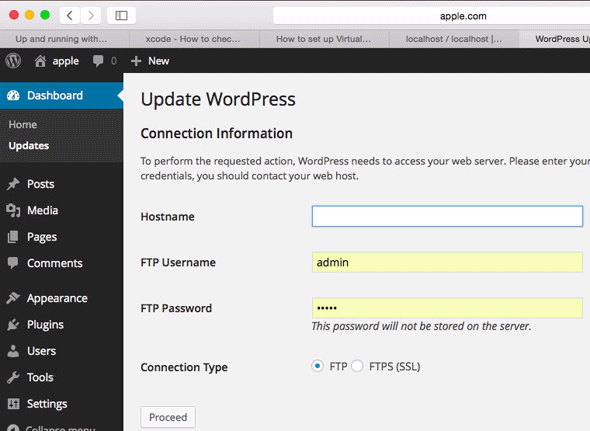
This is because the default webserver user which runs httpd is known as _www, which will not be the user in your local account. If your machine is only in use by you and the webserver will run only under your account then you can change the user.
Find Your User and Group
In the Terminal use the id command to see your username and group
id
You will get a bunch of user groups, you need your primary user uid and group gid names
uid=502(admin) gid=20(staff)
Change this back in /etc/apache2/httpd.conf
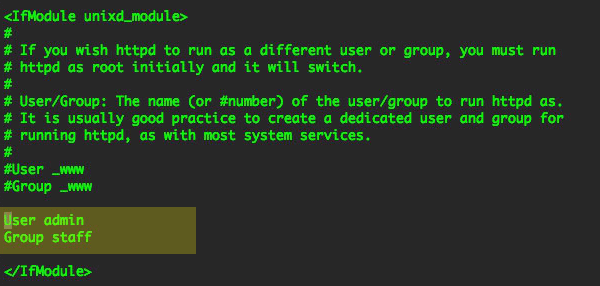
Restart Apache
sudo apachectl restart
Restart Apache and now you are running httpd as your local account.
MAC 升级到10.10(OS X Yosemite)下apache+php的配置问题的更多相关文章
- PHP初步:在Mac OS X Yosemite下搭建Apache+PHP+Mysql
Mac OS X是基于unix的操作系统,很多软件都集成在系统中.所以,对于配置PHP的开发环境相对于windows和Linux更简单. 1. 启动Apache服务器 打开终端(terminal),查 ...
- Mac 软件专题之:OS X Yosemite 精彩应用软件推荐
目前,很多软件都已经发布了针对Yosemite系统的版本,今天和大家分享专题:「OS X Yosemite 精彩应用」,主要分享适配Yosemite系统全新的扁平化界面和新功能的软件,但要知道未在此专 ...
- OS X Yosemite下安装Hadoop2.5.1伪分布式环境
最近开始学习Hadoop,一直使用的是公司配好的环境.用了一段时间后发现对Hadoop还是一知半解,故决定动手在本机上安装一个供学习研究使用.正好自己用的是mac,所以没啥说的,直接安装. 总体流程 ...
- Mac OS X终端下apache操作
重启apache:sudo /usr/sbin/apachectl restart 关闭apache:sudo /usr/sbin/apachectl stop 开启apache:sudo /usr/ ...
- 如何在 OS X Yosemite 中安装 Java
如果你的 Mac 纯净的安装了 OS X Yosemite 的话,其中是不会包含 Java 的,如果你的 Mac 需要安装 Java 环境的话,可以通过下面介绍的两种方法来实现.通过手动安装最新版 J ...
- Mac OS 10.10 Yosemite正式版怎么升级 升级教程
苹果在2014年10月17号凌晨一点召开了新品发布会,推出了新的 iPad.iMac 产品,以及大家一直所期盼的 Mac OS 10.10 正式版系统.个人是从 Mac OS 10.10 的第一个测试 ...
- 简单制作 OS X Yosemite 10.10 正式版U盘USB启动安装盘方法教程 (全新安装 Mac 系统)
原文地址: http://www.iplaysoft.com/osx-yosemite.html 简单制作 Mac OS X Yosemite 正式版 USB 启动盘的方法教程: 其实制作 OS X ...
- 在Mac OS X Yosemite 10.10.3 中搭建第一个 ASP.NET 5 Web 项目
终于有时间在 Mac 上安装一下 ASP.NET 5,网上有许多教程,但是多数的时间比较早了,版本不是最新,搭着 Build 2015 的春风,我也实践一下 Mac OS X 上的 ASP.NET 5 ...
- Mac OS X 10.10.2 Yosemite jdk 环境变量配置
我的Mac系统版本是OS X 10.10.2 Yosemite,为了用Eclipse做android开发,安装了jdk 1.7, 但是如果想使用IntelliJ IDE做android开发的话,就需要 ...
随机推荐
- IE浏览器部分版本不支持opacity透明度属性问题
半透明部分设置样式:opacity:0.7在ie9/ie10/ff/chrome/opera/safari显示正常. 但是这样在ie6-ie8中是不支持的,需要加上下面这句话: filter: pro ...
- 证明Dijkstra中加入S的点已经最优
语言抽象,仅供自用. 证明一个即将加入S集合的点u必然D[u]=最小值min: 假设D[u] != 最小值,那么即说明存在一条最短路径,该路径可以描述为:S集合中的一个点(至少为起始点) + 一个 ...
- jemter转换报告生成html格式报告
前言: 结合上篇,因为使用Jenkins做集成,jmeter的结果肯定需要生产一个报告,如果按原本的jmt格式生成,肯定是不行的,现在就需要对报告格式进行转换 使用工具: ant:jmeter可以通过 ...
- Oracl用代码建标
建标还可以通过编写代码的方式实现,这样在建许多类似的表的时候可以极高建表的效率. create table SCORE --建立表名( ...
- Table of Contents - Handlebars
Getting Started Expressions Precompilation Block Helpers Partials Built-In Helpers API Reference
- JavaScript--DOM事件(笔记)
第1章 事件流1-1.事件冒泡:事件最开始由最具体的元素(文档中嵌套层次最深的那个节点)接收; 然后逐级向上传播至最不具体的那个节点(文档);1-2.事件捕获:不太具体的节点应该更早接收到事件,而最具 ...
- Linux下设置定期执行脚本
下面针对的是非ubuntu环境,会在文章末尾介绍ubuntu的一些区别. 在Linux下,经常需要定期的执行一些脚本从而来实现一些功能. 在Linux下我们用crontab来实现定期的执行脚本这个功能 ...
- 服务器无法播放flv格式的视频解决办法
浏览某个网站时播放视频可能会出现下面的情况: 其实原因很简单,因为国内大多都是Win2003的主机 .默认是没有指定输出FLV这种格式的. 虽然FTP里面可以看见,但无法通过http访问,也就无法播放 ...
- Stack Overflow 2016最新架构探秘
这篇文章主要揭秘 Stack Overflow 截止到 2016 年的技术架构. 首先给出一个直观的数据,让大家有个初步的印象. 相比于 2013 年 11 月,Stack Overflow 在 20 ...
- 什么是GPX
GPX(GPS eXchange Format, GPS交换格式)是一个XML格式,为应用软件设计的通用GPS数据格式. 它可以用来描述路点.轨迹.路程.这个格式是免费的,可以在不需要付任何许可费用的 ...