
[Bootstrap] 8. 'Collapse', data-target, data-toggle & data-parent
Using Bootstrap JavaScript Plugins
If we want to add behavior to our website, which of the following will NOT work?
Updating our HTML with
dataattributes that the Bootstrap JavaScript Library requires.Adding Bootstrap CSS classes to our HTML that the Bootstrap Library requires.
Writing JavaScript to perform the behavior.
Screen Readers
If we have content that we want to be hidden for visual browsers but show up for screen readers, what class should we use?
Answer: sr-only
Accordion to Schedule
The Transportation Safety Board has mandated that we add a few requirements to our site. Apparently it’s some kind of law that we need to disclose safety concerns. Complete the following tasks to implement an Accordion using the Bootstrap Collapse Plugin so we don’t scare people all at once.
<!DOCTYPE html>
<html>
<head>
<title>Blasting Off With Bootstrap</title>
<link href='css/bootstrap.min.css' rel='stylesheet'>
<link href='css/main.css' rel='stylesheet'>
</head>
<body>
<div class='navbar navbar-default navbar-static-top'>
<div class='container'>
<a href='/' class='navbar-brand'>Blasting Off With Bootstrap</a> <ul class='nav navbar-nav navbar-right'>
<li><a href='tickets.html'>Tickets</a></li>
<li><a href='stations.html'>Stations</a></li>
<li><a href='about.html'>About</a></li>
</ul>
</div>
</div>
<div class='container'>
<div class='row well well-lg'>
<div class='col-md-6'>
<h2>The Fastest Way to Space</h2>
<p class='lead'>Make your way to space in the comfort of your own rocket, elevator or transporter.</p>
<button type='button' class='btn btn-lg btn-default'>Take the Tour</button>
<button type='button' class='btn btn-lg btn-primary'>Book Tickets Now</button>
</div>
<div class='col-md-6 visible-md visible-lg'>
<img src='images/img-header.jpg' alt='Blast off with Bootstrap' />
</div>
</div>
<div class='row text-center features'>
<div class='col-sm-4 col-xs-10 col-xs-offset-1 col-sm-offset-0'>
<i class='glyphicon glyphicon-briefcase'></i>
<h3>Book Today!</h3>
<p>Even if you're traveling tomorrow, you can still get tickets today. We have a number of conveniently located ports around the globe to service everyone.</p>
</div> <div class='col-sm-4 col-xs-6'>
<i class='glyphicon glyphicon-random'></i>
<h3>Go Anywhere</h3>
<p>If you need to get to space today, why not try out a transporter? Despite the claims, there are have been no deaths in the last 6 weeks!</p>
</div> <div class='col-sm-4 col-xs-6'>
<i class='glyphicon glyphicon-send'></i>
<h3>RocketBus®</h3>
<p>For cheapest fares, catch the next RocketBus® to the stars. Cheaper on your wallet, and easiest way to make friends.</p>
</div>
</div>
</div>
<div class='quote'>
<div class='container'>
<blockquote>
<p>Any sufficiently advanced technology is indistinguishable from magic.</p>
<footer>Arthur C. Clarke in <cite title="Source Title">Profiles of the Future</cite></footer>
</blockquote>
</div>
</div>
<div class='container transport-systems'>
<div class='row'>
<div class='col-md-10 col-md-offset-1'>
<h2>Our Transport Systems</h2>
<p>Learn more about our transport systems to find out which one is right for you. Pick out the mode of transport that works for your budget and risk level.</p>
</div>
</div> <div class='row text-center'>
<div class='transporter col-md-3 col-md-offset-1 well well-sm'>
<h3>Transporter</h3>
<ul class='list-unstyled'>
<li>8 second travel time</li>
<li>Chance of death only 1 in 7,593</li>
<li>Low price of only $15.99!</li>
</ul>
<p><button class='btn btn-info'><i class='glyphicon glyphicon-transfer'></i> Beam Me Up!</button></p>
</div>
<div class='space-elevator col-md-3 col-md-offset-1 well well-sm'>
<h3>Space Elevator</h3>
<ul class='list-unstyled'>
<li>8 hour scenic ride</li>
<li>Only 1 horrific death per 12,456</li>
<li>Only $45.99 if you book today!</li>
</ul>
<p><button class='btn btn-info'><i class='glyphicon glyphicon-sort'></i> Board the Elevator!</button></p>
</div>
<div class='rocketbus col-md-3 col-md-offset-1 well well-sm'>
<h3>RocketBus</h3>
<ul class='list-unstyled'>
<li>8 minute scenic ride</li>
<li>Plunging death rate of under 1/100k</li>
<li>$74.99 lets you blast off today!</li>
</ul>
<p><button class='btn btn-info'><i class='glyphicon glyphicon-plane'></i> Blast Off!</button></p>
</div>
</div>
</div>
<div class='quote'>
<div class='container'>
<blockquote>
<p>A dream that became a reality and spread throughout the stars.</p>
<footer>Captain Kirk in <cite title="Source Title">Whom Gods Destroy</cite></footer>
</blockquote>
</div>
</div>
<div class='container'>
<div class='row'>
<div class='col-md-8'>
<h2>Plan Your Trip Today!</h2> <ul class='nav nav-tabs'>
<li class='active'><a href='#time'>Todays Times</a></li>
<li><a href='#deals'>Hot Deals</a></li>
<li><a href='#forecast'>Forecast</a></li>
</ul> <div class='tab-content'>
<div class='tab-pane fade active' id='time'>
<p>Todays Time here</p>
</div>
<div class='tab-pane fade' id='deals'>
<p>Deals here</p>
</div>
<div class='tab-pane fade' id='forecast'>
<p>Forecast</p>
</div>
</div>
</div>
<div class='col-md-3 col-md-offset-1'>
<div class='panel-group'>
<div class='panel panel-success'>
<div class='panel-heading'>
<h4 class='panel-title'>
<a href='#systemsOperational'>All Systems Operational</a>
</h4>
</div>
<div id='systemsOperational' class='panel-collapse'>
<div class='panel-body'>
<p>All systems are operational</p>
<ul class='list-unstyled'>
<li><i class='glyphicon glyphicon-ok'></i> Transporters</li>
<li><i class='glyphicon glyphicon-ok'></i> Space Elevator</li>
<li><i class='glyphicon glyphicon-ok'></i> RocketBus</li>
</ul>
</div>
</div>
</div> <div class='panel panel-warning'>
<div class='panel-heading'>
<h4 class='panel-title'>
<a href='#weatherAlert'>Weather Alert</a>
</h4>
</div>
<div id='weatherAlert' class='panel-collapse'>
<div class='panel-body'>
<p>The National Weather Service has issued a solar flare watch for the following time periods. Please plan accordingly:</p>
<ul class='list-unstyled'>
<li><strong>February 9th, 21:43</strong></li>
<li><strong>May 18, 19:82</strong></li>
<li><strong>July 4, 08:42</strong></li>
</ul>
</div>
</div>
</div> <div class='panel panel-danger'>
<div class='panel-heading'>
<h4 class='panel-title'>
<a href='#transportationWarning'>Transportation Generals Warning: Transporters</a>
</h4>
</div>
<div id='transportationWarning' class='panel-collapse'>
<div class='panel-body'>
<p>Technically, transporting means making a clone of yourself and killing off the other one. If you believe in a soul, you should be aware of this fact before attempting travel using a transporter.</p>
</div>
</div>
</div>
</div>
</div>
</div>
</div>
<div class='footer'>
<div class='container'>
<div class='row'>
<div class='col-md-3 col-sm-4 col-xs-6'>
<h4>Who We Are</h4>
<p><i>Blasting Off With Bootstrap</i> is the fastest way to space. <a href='tickets.html'>Book your ticket today</a>!</p>
<p><a href='about.html'>More About Us <i class='glyphicon glyphicon-arrow-right'></i></a></p>
</div> <div class='col-md-offset-1 col-sm-2 col-xs-6'>
<h4>Links</h4>
<ul class='list-unstyled'>
<li><a href='/'>Home</a></li>
<li><a href='tickets.html'>Tickets</a></li>
<li><a href='stations.html'>Stations</a></li>
</ul>
</div> <div class='clearfix visible-xs'></div> <div class='col-sm-2 col-xs-6'>
<h4>Stay in Touch</h4>
<ul class='list-unstyled'>
<li><a href='about.html'>About</a></li>
<li><a href='contact.html'>Contact Us</a></li>
<li><a href='/blog'>Blog</a></li>
<li><a href='http://twitter.com/codeschool'>Twitter</a></li>
<li><a href='http://facebook.com/codeschool'>Facebook</a></li>
</ul>
</div> <div class='col-md-3 col-md-offset-1 col-sm-4 col-xs-6'>
<h4>Contact Us</h4>
<ul class='list-unstyled'>
<li><i class='glyphicon glyphicon-globe'></i> Orlando, FL</li>
<li><i class='glyphicon glyphicon-phone'></i> 1-555-blast-off</li>
<li><i class='glyphicon glyphicon-envelope'></i> <a href='mailto:blastingoff@codeschool.com'>blastingoff@codeschool.com</a></li>
</ul>
<p>Blasting Off With Bootstrap ©2214.</p>
</div>
</div>
</div>
</div> <script src='https://ajax.googleapis.com/ajax/libs/jquery/1.11.1/jquery.min.js'></script>
<script src='js/bootstrap.min.js'></script>
<script>
$(function() {
$('.nav-tabs a').click(function (e) {
e.preventDefault();
$(this).tab('show');
});
});
</script>
</body>
</html>

To start off, let’s hide all the content within each panel for when the page loads. Don’t hide the panel titles though – those are the links. What we need to do is start the body of each accordion item as collapsed.
              <div id='transportationWarning' class='panel-collapse collapse'>

                <div class='panel-body'>

                  <p>Technically, transporting means making a clone of yourself and killing off the other one. If you believe in a soul, you should be aware of this fact before attempting travel using a transporter.</p>

                </div>

              </div>
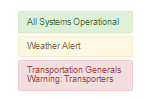
Now all of the panels are collapsed when the page loads! Add a class of in to the body of the "All Systems Operational" panel to make sure it shows when the page loads.
If you're curious how this in class works with the Collapse Plugin, read theBootstrap Collapse Plugin Documentation.
              <div id='systemsOperational' class='panel-collapse collapse in'>

                <div class='panel-body'>

                  <p>All systems are operational</p>
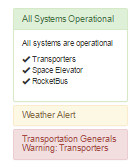
We're getting somewhere! The page looks correct when it loads, but our links don't do anything yet. Let's make the 2nd panel functional first – the "Weather Alert".
Update the "Weather Alert" link to use the Collapse Plugin. You'll need to add 2 data attributes to the link to make this work.
         <div class='panel panel-warning'>

              <div class='panel-heading'>

                 <h4 class='panel-title'>

                   <a href='#weatherAlert' data-toggle="collapse" data-target="#weatherAlert">Weather Alert</a>

                 </h4>

              </div>

              <div id='weatherAlert' class='panel-collapse collapse'>

                <div class='panel-body'>

                  <p>The National Weather Service has issued a solar flare watch for the following time periods. Please plan accordingly:</p>

                  <ul class='list-unstyled'>

                    <li><strong>February 9th, 21:43</strong></li>

                    <li><strong>May 18, 19:82</strong></li>

                    <li><strong>July 4, 08:42</strong></li>

                  </ul>

                </div>

              </div>
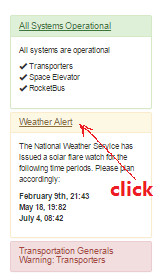
Convert the links for "All Systems Operational" and "Transportation Generals Warning: Transporters" to also use the Collapse Plugin.
 data-toggle="collapse" data-target="#systemsOperational"

 data-toggle="collapse" data-target="#transportationWarning"
--------------
<!DOCTYPE html>
<html>
<head>
<title>Blasting Off With Bootstrap</title>
<link href='css/bootstrap.min.css' rel='stylesheet'>
<link href='css/main.css' rel='stylesheet'>
</head>
<body>
<div class='navbar navbar-default navbar-static-top'>
<div class='container'>
<a href='/' class='navbar-brand'>Blasting Off With Bootstrap</a> <ul class='nav navbar-nav navbar-right'>
<li><a href='tickets.html'>Tickets</a></li>
<li><a href='stations.html'>Stations</a></li>
<li><a href='about.html'>About</a></li>
</ul>
</div>
</div>
<div class='container'>
<div class='row well well-lg'>
<div class='col-md-6'>
<h2>The Fastest Way to Space</h2>
<p class='lead'>Make your way to space in the comfort of your own rocket, elevator or transporter.</p>
<button type='button' class='btn btn-lg btn-default'>Take the Tour</button>
<button type='button' class='btn btn-lg btn-primary'>Book Tickets Now</button>
</div>
<div class='col-md-6 visible-md visible-lg'>
<img src='images/img-header.jpg' alt='Blast off with Bootstrap' />
</div>
</div>
<div class='row text-center features'>
<div class='col-sm-4 col-xs-10 col-xs-offset-1 col-sm-offset-0'>
<i class='glyphicon glyphicon-briefcase'></i>
<h3>Book Today!</h3>
<p>Even if you're traveling tomorrow, you can still get tickets today. We have a number of conveniently located ports around the globe to service everyone.</p>
</div> <div class='col-sm-4 col-xs-6'>
<i class='glyphicon glyphicon-random'></i>
<h3>Go Anywhere</h3>
<p>If you need to get to space today, why not try out a transporter? Despite the claims, there are have been no deaths in the last 6 weeks!</p>
</div> <div class='col-sm-4 col-xs-6'>
<i class='glyphicon glyphicon-send'></i>
<h3>RocketBus®</h3>
<p>For cheapest fares, catch the next RocketBus® to the stars. Cheaper on your wallet, and easiest way to make friends.</p>
</div>
</div>
</div>
<div class='quote'>
<div class='container'>
<blockquote>
<p>Any sufficiently advanced technology is indistinguishable from magic.</p>
<footer>Arthur C. Clarke in <cite title="Source Title">Profiles of the Future</cite></footer>
</blockquote>
</div>
</div>
<div class='container transport-systems'>
<div class='row'>
<div class='col-md-10 col-md-offset-1'>
<h2>Our Transport Systems</h2>
<p>Learn more about our transport systems to find out which one is right for you. Pick out the mode of transport that works for your budget and risk level.</p>
</div>
</div> <div class='row text-center'>
<div class='transporter col-md-3 col-md-offset-1 well well-sm'>
<h3>Transporter</h3>
<ul class='list-unstyled'>
<li>8 second travel time</li>
<li>Chance of death only 1 in 7,593</li>
<li>Low price of only $15.99!</li>
</ul>
<p><button class='btn btn-info'><i class='glyphicon glyphicon-transfer'></i> Beam Me Up!</button></p>
</div>
<div class='space-elevator col-md-3 col-md-offset-1 well well-sm'>
<h3>Space Elevator</h3>
<ul class='list-unstyled'>
<li>8 hour scenic ride</li>
<li>Only 1 horrific death per 12,456</li>
<li>Only $45.99 if you book today!</li>
</ul>
<p><button class='btn btn-info'><i class='glyphicon glyphicon-sort'></i> Board the Elevator!</button></p>
</div>
<div class='rocketbus col-md-3 col-md-offset-1 well well-sm'>
<h3>RocketBus</h3>
<ul class='list-unstyled'>
<li>8 minute scenic ride</li>
<li>Plunging death rate of under 1/100k</li>
<li>$74.99 lets you blast off today!</li>
</ul>
<p><button class='btn btn-info'><i class='glyphicon glyphicon-plane'></i> Blast Off!</button></p>
</div>
</div>
</div>
<div class='quote'>
<div class='container'>
<blockquote>
<p>A dream that became a reality and spread throughout the stars.</p>
<footer>Captain Kirk in <cite title="Source Title">Whom Gods Destroy</cite></footer>
</blockquote>
</div>
</div>
<div class='container'>
<div class='row'>
<div class='col-md-8'>
<h2>Plan Your Trip Today!</h2> <ul class='nav nav-tabs'>
<li class='active'><a href='#time'>Todays Times</a></li>
<li><a href='#deals'>Hot Deals</a></li>
<li><a href='#forecast'>Forecast</a></li>
</ul> <div class='tab-content'>
<div class='tab-pane fade active' id='time'>
<p>Todays Time here</p>
</div>
<div class='tab-pane fade' id='deals'>
<p>Deals here</p>
</div>
<div class='tab-pane fade' id='forecast'>
<p>Forecast</p>
</div>
</div>
</div>
<div class='col-md-3 col-md-offset-1'>
<div class='panel-group'>
<div class='panel panel-success'>
<div class='panel-heading'>
<h4 class='panel-title'>
<a href='#systemsOperational' data-toggle="collapse" data-target="#systemsOperational">All Systems Operational</a>
</h4>
</div>
<div id='systemsOperational' class='panel-collapse collapse in'>
<div class='panel-body'>
<p>All systems are operational</p>
<ul class='list-unstyled'>
<li><i class='glyphicon glyphicon-ok'></i> Transporters</li>
<li><i class='glyphicon glyphicon-ok'></i> Space Elevator</li>
<li><i class='glyphicon glyphicon-ok'></i> RocketBus</li>
</ul>
</div>
</div>
</div> <div class='panel panel-warning'>
<div class='panel-heading'>
<h4 class='panel-title'>
<a href='#weatherAlert' data-toggle="collapse" data-target="#weatherAlert">Weather Alert</a>
</h4>
</div>
<div id='weatherAlert' class='panel-collapse collapse'>
<div class='panel-body'>
<p>The National Weather Service has issued a solar flare watch for the following time periods. Please plan accordingly:</p>
<ul class='list-unstyled'>
<li><strong>February 9th, 21:43</strong></li>
<li><strong>May 18, 19:82</strong></li>
<li><strong>July 4, 08:42</strong></li>
</ul>
</div>
</div>
</div> <div class='panel panel-danger'>
<div class='panel-heading'>
<h4 class='panel-title'>
<a href='#transportationWarning' data-toggle="collapse" data-target="#transportationWarning">Transportation Generals Warning: Transporters</a>
</h4>
</div>
<div id='transportationWarning' class='panel-collapse collapse'>
<div class='panel-body'>
<p>Technically, transporting means making a clone of yourself and killing off the other one. If you believe in a soul, you should be aware of this fact before attempting travel using a transporter.</p>
</div>
</div>
</div>
</div>
</div>
</div>
</div>
<div class='footer'>
<div class='container'>
<div class='row'>
<div class='col-md-3 col-sm-4 col-xs-6'>
<h4>Who We Are</h4>
<p><i>Blasting Off With Bootstrap</i> is the fastest way to space. <a href='tickets.html'>Book your ticket today</a>!</p>
<p><a href='about.html'>More About Us <i class='glyphicon glyphicon-arrow-right'></i></a></p>
</div> <div class='col-md-offset-1 col-sm-2 col-xs-6'>
<h4>Links</h4>
<ul class='list-unstyled'>
<li><a href='/'>Home</a></li>
<li><a href='tickets.html'>Tickets</a></li>
<li><a href='stations.html'>Stations</a></li>
</ul>
</div> <div class='clearfix visible-xs'></div> <div class='col-sm-2 col-xs-6'>
<h4>Stay in Touch</h4>
<ul class='list-unstyled'>
<li><a href='about.html'>About</a></li>
<li><a href='contact.html'>Contact Us</a></li>
<li><a href='/blog'>Blog</a></li>
<li><a href='http://twitter.com/codeschool'>Twitter</a></li>
<li><a href='http://facebook.com/codeschool'>Facebook</a></li>
</ul>
</div> <div class='col-md-3 col-md-offset-1 col-sm-4 col-xs-6'>
<h4>Contact Us</h4>
<ul class='list-unstyled'>
<li><i class='glyphicon glyphicon-globe'></i> Orlando, FL</li>
<li><i class='glyphicon glyphicon-phone'></i> 1-555-blast-off</li>
<li><i class='glyphicon glyphicon-envelope'></i> <a href='mailto:blastingoff@codeschool.com'>blastingoff@codeschool.com</a></li>
</ul>
<p>Blasting Off With Bootstrap ©2214.</p>
</div>
</div>
</div>
</div> <script src='https://ajax.googleapis.com/ajax/libs/jquery/1.11.1/jquery.min.js'></script>
<script src='js/bootstrap.min.js'></script>
<script>
$(function() {
$('.nav-tabs a').click(function (e) {
e.preventDefault();
$(this).tab('show');
});
});
</script>
</body>
</html>
One Accordion at a Time
Our Accordion Component is using the JavaScript Collapse Plugin, but it’s missing something. Clicking on one link in the accordion should collapse the previously open item. In this case, we only want one panel to be open at any given time. Follow the tasks below to make this happen.
It turns out that using the data-target attribute with the Collapse Plugin manages just a single element. If you want to control multiple elements at once that share the same parent, you can instead use the data-parent attribute passing in a shared parent.
Update the "All Systems Operational" link to use this new attribute targeting the parent Panel Group element (.panel-group).
<a data-toggle='collapse' data-parent='.panel-group' href='#systemsOperational'>All Systems Operational</a>
We're on the right track, but the other two panels in our accordion component don't know to collapse when the other ones are clicked. Go ahead and update the other two links to also point to the same parent.
<!DOCTYPE html>
<html>
<head>
<title>Blasting Off With Bootstrap</title>
<link href='css/bootstrap.min.css' rel='stylesheet'>
<link href='css/main.css' rel='stylesheet'>
</head>
<body>
<div class='navbar navbar-default navbar-static-top'>
<div class='container'>
<a href='/' class='navbar-brand'>Blasting Off With Bootstrap</a> <ul class='nav navbar-nav navbar-right'>
<li><a href='tickets.html'>Tickets</a></li>
<li><a href='stations.html'>Stations</a></li>
<li><a href='about.html'>About</a></li>
</ul>
</div>
</div>
<div class='container'>
<div class='row well well-lg'>
<div class='col-md-6'>
<h2>The Fastest Way to Space</h2>
<p class='lead'>Make your way to space in the comfort of your own rocket, elevator or transporter.</p>
<button type='button' class='btn btn-lg btn-default'>Take the Tour</button>
<button type='button' class='btn btn-lg btn-primary'>Book Tickets Now</button>
</div>
<div class='col-md-6 visible-md visible-lg'>
<img src='images/img-header.jpg' alt='Blast off with Bootstrap' />
</div>
</div>
<div class='row text-center features'>
<div class='col-sm-4 col-xs-10 col-xs-offset-1 col-sm-offset-0'>
<i class='glyphicon glyphicon-briefcase'></i>
<h3>Book Today!</h3>
<p>Even if you're traveling tomorrow, you can still get tickets today. We have a number of conveniently located ports around the globe to service everyone.</p>
</div> <div class='col-sm-4 col-xs-6'>
<i class='glyphicon glyphicon-random'></i>
<h3>Go Anywhere</h3>
<p>If you need to get to space today, why not try out a transporter? Despite the claims, there are have been no deaths in the last 6 weeks!</p>
</div> <div class='col-sm-4 col-xs-6'>
<i class='glyphicon glyphicon-send'></i>
<h3>RocketBus®</h3>
<p>For cheapest fares, catch the next RocketBus® to the stars. Cheaper on your wallet, and easiest way to make friends.</p>
</div>
</div>
</div>
<div class='quote'>
<div class='container'>
<blockquote>
<p>Any sufficiently advanced technology is indistinguishable from magic.</p>
<footer>Arthur C. Clarke in <cite title="Source Title">Profiles of the Future</cite></footer>
</blockquote>
</div>
</div>
<div class='container transport-systems'>
<div class='row'>
<div class='col-md-10 col-md-offset-1'>
<h2>Our Transport Systems</h2>
<p>Learn more about our transport systems to find out which one is right for you. Pick out the mode of transport that works for your budget and risk level.</p>
</div>
</div>
<div class='row text-center'>
<div class='transporter col-md-3 col-md-offset-1 well well-sm'>
<h3>Transporter</h3>
<ul class='list-unstyled'>
<li>8 second travel time</li>
<li>Chance of death only 1 in 7,593</li>
<li>Low price of only $15.99!</li>
</ul>
<p><button class='btn btn-info'><i class='glyphicon glyphicon-transfer'></i> Beam Me Up!</button></p>
</div>
<div class='space-elevator col-md-3 col-md-offset-1 well well-sm'>
<h3>Space Elevator</h3>
<ul class='list-unstyled'>
<li>8 hour scenic ride</li>
<li>Only 1 horrific death per 12,456</li>
<li>Only $45.99 if you book today!</li>
</ul>
<p><button class='btn btn-info'><i class='glyphicon glyphicon-sort'></i> Board the Elevator!</button></p>
</div>
<div class='rocketbus col-md-3 col-md-offset-1 well well-sm'>
<h3>RocketBus</h3>
<ul class='list-unstyled'>
<li>8 minute scenic ride</li>
<li>Plunging death rate of under 1/100k</li>
<li>$74.99 lets you blast off today!</li>
</ul>
<p><button class='btn btn-info'><i class='glyphicon glyphicon-plane'></i> Blast Off!</button></p>
</div>
</div>
</div>
<div class='quote'>
<div class='container'>
<blockquote>
<p>A dream that became a reality and spread throughout the stars.</p>
<footer>Captain Kirk in <cite title="Source Title">Whom Gods Destroy</cite></footer>
</blockquote>
</div>
</div>
<div class='container'>
<div class='row'>
<div class='col-md-8'>
<h2>Plan Your Trip Today!</h2> <ul class='nav nav-tabs'>
<li class='active'><a href='#time'>Todays Times</a></li>
<li><a href='#deals'>Hot Deals</a></li>
<li><a href='#forecast'>Forecast</a></li>
</ul> <div class='tab-content'>
<div class='tab-pane fade active' id='time'>
<p>Todays Time here</p>
</div>
<div class='tab-pane fade' id='deals'>
<p>Deals here</p>
</div>
<div class='tab-pane fade' id='forecast'>
<p>Forecast</p>
</div>
</div>
</div>
<div class='col-md-3 col-md-offset-1'>
<div class='panel-group'>
<div class='panel panel-success'>
<div class='panel-heading'>
<h4 class='panel-title'>
<a data-toggle='collapse' data-parent='.panel-group' href='#systemsOperational'>All Systems Operational</a>
</h4>
</div>
<div id='systemsOperational' class='panel-collapse collapse in'>
<div class='panel-body'>
<p>All systems are operational</p>
<ul class='list-unstyled'>
<li><i class='glyphicon glyphicon-ok'></i> Transporters</li>
<li><i class='glyphicon glyphicon-ok'></i> Space Elevator</li>
<li><i class='glyphicon glyphicon-ok'></i> RocketBus</li>
</ul>
</div>
</div>
</div> <div class='panel panel-warning'>
<div class='panel-heading'>
<h4 class='panel-title'>
<a data-toggle='collapse' data-parent='.panel-group' href='#weatherAlert'>Weather Alert</a>
</h4>
</div>
<div id='weatherAlert' class='panel-collapse collapse'>
<div class='panel-body'>
<p>The National Weather Service has issued a solar flare watch for the following time periods. Please plan accordingly:</p>
<ul class='list-unstyled'>
<li><strong>February 9th, 21:43</strong></li>
<li><strong>May 18, 19:82</strong></li>
<li><strong>July 4, 08:42</strong></li>
</ul>
</div>
</div>
</div> <div class='panel panel-danger'>
<div class='panel-heading'>
<h4 class='panel-title'>
<a data-toggle='collapse' data-parent='.panel-group' href='#transportationWarning'>Transportation Generals Warning: Transporters</a>
</h4>
</div>
<div id='transportationWarning' class='panel-collapse collapse'>
<div class='panel-body'>
<p>Technically, transporting means making a clone of yourself and killing off the other one. If you believe in a soul, you should be aware of this fact before attempting travel using a transporter.</p>
</div>
</div>
</div>
</div>
</div>
</div>
</div>
<div class='footer'>
<div class='container'>
<div class='row'>
<div class='col-md-3 col-sm-4 col-xs-6'>
<h4>Who We Are</h4>
<p><i>Blasting Off With Bootstrap</i> is the fastest way to space. <a href='tickets.html'>Book your ticket today</a>!</p>
<p><a href='about.html'>More About Us <i class='glyphicon glyphicon-arrow-right'></i></a></p>
</div> <div class='col-md-offset-1 col-sm-2 col-xs-6'>
<h4>Links</h4>
<ul class='list-unstyled'>
<li><a href='/'>Home</a></li>
<li><a href='tickets.html'>Tickets</a></li>
<li><a href='stations.html'>Stations</a></li>
</ul>
</div> <div class='clearfix visible-xs'></div> <div class='col-sm-2 col-xs-6'>
<h4>Stay in Touch</h4>
<ul class='list-unstyled'>
<li><a href='about.html'>About</a></li>
<li><a href='contact.html'>Contact Us</a></li>
<li><a href='/blog'>Blog</a></li>
<li><a href='http://twitter.com/codeschool'>Twitter</a></li>
<li><a href='http://facebook.com/codeschool'>Facebook</a></li>
</ul>
</div> <div class='col-md-3 col-md-offset-1 col-sm-4 col-xs-6'>
<h4>Contact Us</h4>
<ul class='list-unstyled'>
<li><i class='glyphicon glyphicon-globe'></i> Orlando, FL</li>
<li><i class='glyphicon glyphicon-phone'></i> 1-555-blast-off</li>
<li><i class='glyphicon glyphicon-envelope'></i> <a href='mailto:blastingoff@codeschool.com'>blastingoff@codeschool.com</a></li>
</ul>
<p>Blasting Off With Bootstrap ©2214.</p>
</div>
</div>
</div>
</div> <script src='https://ajax.googleapis.com/ajax/libs/jquery/1.11.1/jquery.min.js'></script>
<script src='js/bootstrap.min.js'></script>
<script>
$(function() {
$('.nav-tabs a').click(function (e) {
e.preventDefault();
$(this).tab('show');
});
});
</script>
</body>
</html>
[Bootstrap] 8. 'Collapse', data-target, data-toggle & data-parent的更多相关文章
- Bootstrap入门(二十四)data属性
Bootstrap入门(二十四)data属性 你可以仅仅通过 data 属性 API 就能使用所有的 Bootstrap 插件,无需写一行 JavaScript 代码.这是 Bootstrap 中的一 ...
- 论文翻译:Data mining with big data
原文: Wu X, Zhu X, Wu G Q, et al. Data mining with big data[J]. IEEE transactions on knowledge and dat ...
- 混合 Data Warehouse 和 Big Data 倉庫的新架構
(讀書筆記)許多公司,儘管想導入 Big Data,仍必須繼續用 Data Warehouse 來管理結構化的營運數據.系統記錄.而 Big Data 的出現,為 Data Warehouse 提供了 ...
- 以Excel 作为Data Source,将data导入db
将Excel作为数据源,将数据导入db,是SSIS的一个简单的应用,下图是示例Excel,数据列是code和name 第一部分,Excel中的数据类型是数值类型 1,使用SSDT创建一个package ...
- 错误描述:请求“System.Data.SqlClient.SqlClientPermission, System.Data, Version=2.0.0.0, Culture=neutral, PublicKeyToken=b77a5c561934e089”类型的权限已失败
错误描述:请求“System.Data.SqlClient.SqlClientPermission, System.Data, Version=2.0.0.0, Culture=neutral, Pu ...
- System.Data.Dbtype转换为System.Data.SqlDbType
最近在做一些OM Mapping的准备工作,新学了一招. 如果要将System.Data.Dbtype转换为System.Data.SqlDbType,以前以为要写Switch Case语句.其实有很 ...
- 17.1.1.6 Creating a Data Snapshot Using Raw Data Files 创建一个数据快照使用 Raw Data Files
17.1.1.6 Creating a Data Snapshot Using Raw Data Files 创建一个数据快照使用 Raw Data Files 如果数据库是大的, 复制raw 数据文 ...
- SQLSTATE[22001]: String data, right truncated: 1406 Data too long for column 'dtdate' 解决方法
小微OAERR: SQLSTATE[22001]: String data, right truncated: 1406 Data too long for column 'mime' at row ...
- git clone时出现 error:inflate:data stream error(incorrect data check)
git clone时出现 error:inflate:data stream error(incorrect data check) fatal:serrious inflate inconsiste ...
- 无法为具有固定名称“MySql.Data.MySqlClient”的 ADO.NET 提供程序加载在应用程序配置文件中注册的实体框架提供程序类型“MySql.Data.MySqlClient.MySqlProviderServices,MySql.Data.Entity.EF6”
"System.InvalidOperationException"类型的未经处理的异常在 mscorlib.dll 中发生 其他信息: 无法为具有固定名称"MySql. ...
随机推荐
- storm - 使用过程中的一点思考
引子 这几天为了优化原有的数据处理框架,比较系统的学习了storm的一些内容,整理一下心得 1. storm提供的是一种数据处理思想,它不提供具体的解决方案 storm的核心是topo的定义,而top ...
- 关于SqlParameter中IN子句查询的问题
今天调试到方法中代码: String hotelCodes =”’’,’’,’’”; string sqltext ="select * from HotelMedalInfo where ...
- Samba 'smbcacls'命令安全绕过漏洞
漏洞版本: Samba 4.x 漏洞描述: Bugtraq ID:66232 CVE ID:CVE-2013-6442 Samba是一款实现SMB协议.跨平台进行文件共享和打印共享服务的程序. 当使用 ...
- 【Pure】
PureA set of small, responsive CSS modules that you can use in every web project.http://purecss.io/
- Mysql主从复制的实现
MySQL是一个开放源码的小型关联式数据库管理系统,开发者为瑞典MySQL AB公司.MySQL被广泛地应用在Internet上的中小型网站中.由于其体积小.速度快.总体拥有成本低,尤其是开放源码这一 ...
- Parallel stepped for loops in .NET C# z
; i < ; i += ) public IEnumerable<int> SteppedIntegerList(int startIndex, int endEndex, int ...
- tap/click on search button on softkeyboard
driver.sendKeyEvent(84);Appium says it successfully sent in the command but 'search' does not get ta ...
- 关于.jar的文件在cmd中无法连接数据库的问题
我使用一个.jar的文件,想在cmd中以“java -jar *.jar”的格式运行,方便system.println()一些信息,该jar包中包含数据库连接内容,在我关闭comodo防火墙和wind ...
- position属性
所有主流浏览器支持position属性: 任何版本的ie浏览器都不支持属性值“inherit”. position属性规定元素的定位类型,任何元素都可以定位,不过绝对定位或固定元素会生成一个块级框,不 ...
- 为zend studio增加Extjs代码提示功能
http://blog.163.com/liuhaijun_83/blog/static/61175622201223114216786/ 需要将其中的http://www.spket.com/upd ...