
Winform合并多个Excel文件到一个文件中(源文件.xls,实际是.xml)
1.下面两个文件.xls是给的文件,实际上是.xml文件

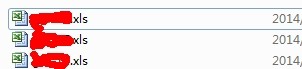
2.具体的代码
  private void btOK_Click(object sender, EventArgs e)

         {

             //0.获取路径文件夹

             this.btOK.Enabled = false;

             this.textBox1.Text = System.Windows.Forms.Application.StartupPath + "\\de";

             strAllFiles = Directory.GetFiles(System.Windows.Forms.Application.StartupPath + "\\de","*.xls");

             showMessage("正在执行修改错误文件格式......");

             System.Windows.Forms.Application.DoEvents();

             Thread.Sleep();

             //1.修改文件扩展名

             EditFileName();

             //2.保存新的扩展名

             CheckExeclEditing();

             //3.读取数据并合并数据

             #region

             //strAllFiles = Directory.GetFiles(this.textBox1.Text);

             strName = new string[strAllFiles.Length * ];

             DataSet[] ds = new DataSet[strAllFiles.Length * ];

             int j = ;

             for (int i = ; i < strAllFiles.Length; i++)

             {

                 string sql = null;

                 System.Data.DataTable TableName = ExcelAPI.LoadDataFromExcel(strAllFiles[i]);

                 if (TableName.Rows.Count > )

                 {

                     foreach (DataRow item in TableName.Rows)

                     {

                         if (!item["TABLE_NAME"].ToString().Contains("Print_Titles"))

                         {

                             sql = string.Format("SELECT * FROM [{0}] WHERE F3 is not null and F3 not like '单位'", item["TABLE_NAME"].ToString());

                             ds[j] = (ExcelAPI.LoadDataFromExcel(strAllFiles[i], sql));

                             strName[j] = System.IO.Path.GetFileNameWithoutExtension(strAllFiles[i]);

                             j++;

                         }

                     }

                 }

                 showMessage("正在执行" + System.IO.Path.GetFileNameWithoutExtension(strAllFiles[i]) + "文件......");

                 System.Windows.Forms.Application.DoEvents();

                 Thread.Sleep();

             }

             string[] st = new string[];

             for (int i = ; i < st.Length; i++)

             {

                 st[i] = i.ToString();

             }

             string path = textBox1.Text.Substring(textBox1.Text.LastIndexOf("\\") + ) + "_" + DateTime.Now.ToString("yyyy年MM月dd日hh点mm分ss秒") + ".xls";

             showMessage("正在执行合并文件......");

             System.Windows.Forms.Application.DoEvents();

             Thread.Sleep();

             bool result = ExcelAPI.WebExportToExcel_1(ds, textBox1.Text, path, strName, , true);

             if (result == true)

             {

                 MessageBox.Show("成功");

                 this.btOK.Enabled = true;

                 System.Windows.Forms.Application.ExitThread();

             }

             else

             {

                 this.btOK.Enabled = true;

                 MessageBox.Show("失败");

             }

             #endregion

         }
  private void EditFileName()

         {

             try

             {

                 strAllFiles = Directory.GetFiles(this.textBox1.Text,"*.xls");

                 for (int i = ; i < strAllFiles.Length; i++)

                 {

                     byte[] bT = File.ReadAllBytes(strAllFiles[i]);

                     FileStream fs = File.Create(strAllFiles[i].Replace(".xls", ".xml"));

                     fs.Write(bT, , bT.Length);

                     fs.Close();

                     File.Delete(strAllFiles[i]);

                 }

             }

             catch (Exception ex)

             {

                 Log.WriteFileError(ex);

             }

         }

         private void CheckExeclEditing()

         {

             try

             {

                 for (int i = ; i < strAllFiles.Length; i++)

                 {

                     string strFileName = strAllFiles[i].Replace(".xls", ".xml");

                     string str = strFileName.Replace(".xml", ".xls");

                     Microsoft.Office.Interop.Excel._Application execl = new Microsoft.Office.Interop.Excel.ApplicationClass();

                     Microsoft.Office.Interop.Excel.Workbook bookDes1t = (Microsoft.Office.Interop.Excel.Workbook)execl.Workbooks.Open(strFileName);

                     bookDes1t.SaveAs(str, Microsoft.Office.Interop.Excel.XlFileFormat.xlWorkbookNormal);

                     bookDes1t.Close();

                     execl.Application.Quit();

                 }

             }

             catch (Exception ex)

             {

                 Log.WriteFileError(ex);

             }

         }
  public class ExcelAPI

  {

 /// <summary>

         /// 获取表名称

         /// </summary>

         /// <param name="filePath">路径</param>

         /// <returns></returns>

         public static System.Data.DataTable LoadDataFromExcel(string filePath)

         {

             try

             {

                 string strConn = "Provider=Microsoft.Jet.OLEDB.4.0;Data Source=" + filePath + ";Extended Properties='Excel 8.0;HDR=False;IMEX=1'";//只能打开2003

                 OleDbConnection OleConn = new OleDbConnection(strConn);

                 OleConn.Open();

                 //string sql=string.Format("SELECT * FROM  [{0}$]", strSheetName);//可更改Sheet名称,比如sheet2,等等

                 System.Data.DataTable DataNames = OleConn.GetOleDbSchemaTable(OleDbSchemaGuid.Tables, null);

                 OleConn.Close();

                 return DataNames;

             }

             catch (Exception err)

             {

                 Log.WriteFileError(err);

                 //MessageBox.Show("数据绑定Excel失败!失败原因:" + err.Message, "提示信息",

                 //    MessageBoxButtons.OK, MessageBoxIcon.Information);

                 return null;

             }

         }

   //加载Excel

         public static DataSet LoadDataFromExcel(string filePath, string sqlCmd)

         {

             try

             {

                 string strConn = "Provider=Microsoft.Jet.OLEDB.4.0;Data Source=" + filePath + ";Extended Properties='Excel 8.0;HDR=False;IMEX=1'";//只能打开2003

                 //strConn = string.Format("Provider=Microsoft.ACE.OLEDB.12.0;Data Source={0};Extended Properties='Excel 12.0 Xml;HDR=YES'", filePath);//可打开2007

                 using (OleDbConnection OleConn = new OleDbConnection(strConn))

                 {

                     //string sql =string.Format("SELECT * FROM  [{0}$]", strSheetName);//可更改Sheet名称,比如sheet2,等等

                     using (OleDbDataAdapter OleDaExcel = new OleDbDataAdapter(sqlCmd, OleConn))

                     {

                         DataSet OleDsExcle = new DataSet();

                         OleDaExcel.Fill(OleDsExcle, sqlCmd);

                         //MessageBox.Show(OleDsExcle.Tables[strSheetName].Rows[3][1].ToString());

                         return OleDsExcle;

                     }

                 }

             }

             catch (Exception err)

             {

                 Log.WriteFileError(err);

                 //MessageBox.Show("数据绑定Excel失败!失败原因:" + err.Message, "提示信息",

                 //    MessageBoxButtons.OK, MessageBoxIcon.Information);

                 return null;

             }

         }

  /// <param name="dv">用于导出的DataSET[数组]</param>

         /// <param name="tmpExpDir">导出的文件夹路径,例如d:/</param>

         /// <param name="refFileName">文件名,例如test.xls</param>

         /// <param name="sheetName">Sheet的名称,如果导出多个Sheet[数租]</param>

         /// <param name="sheetSize">每个Sheet包含的数据行数,此数值不包括标题行。所以,对于65536行数据,请将此值设置为65535</param>

         /// <param name="setBorderLine">导出完成后,是否给数据加上边框线</param>

         public static bool WebExportToExcel_1(DataSet[] dv, string tmpExpDir, string refFileName, string[] strName, int sheetSize, bool setBorderLine)

         {

             try

             {

                 string[] str = { "定额编号", "编号", "人材机名称", "人材机单位", "数量", "人材机单价" };

                 int RowsToDivideSheet = sheetSize;//计算Sheet行数

                 int sheetCount = dv.Length;

                 GC.Collect();// 回收其他的垃圾

                 Microsoft.Office.Interop.Excel.Application excel; _Workbook xBk; _Worksheet xSt = null;

                 excel = new ApplicationClass(); xBk = excel.Workbooks.Add(true);

                 int dvRowEnd; int rowIndex = ; int colIndex = ;

                 xSt = (_Worksheet)xBk.Worksheets.Add(Type.Missing, Type.Missing, , Type.Missing);

                 xSt.Name = "数据信息合并";

                 foreach (string item in str)

                 {

                     //设置标题格式

                     xSt.get_Range(excel.Cells[rowIndex, colIndex], excel.Cells[rowIndex, colIndex]).HorizontalAlignment = XlVAlign.xlVAlignCenter;

                     //设置标题居中对齐

                     xSt.get_Range(excel.Cells[rowIndex, colIndex], excel.Cells[rowIndex, colIndex]).Font.Bold = true;

                     //填值,并进行下一列

                     excel.Cells[rowIndex, colIndex++] = item;

                 }

                 //对全部Sheet进行操作

                 for (int sheetIndex = ; sheetIndex < sheetCount; sheetIndex++)

                 {

                     Log.WriteFile(strName[sheetIndex]);

                     //计算结束行

                     dvRowEnd = RowsToDivideSheet;

                     if (dvRowEnd > dv[sheetIndex].Tables[].Rows.Count)

                     { dvRowEnd = dv[sheetIndex].Tables[].Rows.Count + ; }

                     int i = ;

                     //以下代码就是经过修正后的。上面注释的代码有问题。

                     foreach (DataRow dr in dv[sheetIndex].Tables[].Rows)

                     {

                         //新起一行,当前单元格移至行首

                         rowIndex++;

                         colIndex = ;

                         excel.Cells[rowIndex, colIndex] = strName[sheetIndex];

                         excel.Cells[rowIndex, ++colIndex] = dr[].ToString();

                         excel.Cells[rowIndex, ++colIndex] = dr[].ToString();

                         excel.Cells[rowIndex, ++colIndex] = dr[].ToString();

                         excel.Cells[rowIndex, ++colIndex] = dr[].ToString();

                         excel.Cells[rowIndex, ++colIndex] = dr[].ToString();

                     }

                     Range allDataWithTitleRange = xSt.get_Range(excel.Cells[, ], excel.Cells[rowIndex, colIndex]);

                     allDataWithTitleRange.Select();

                     allDataWithTitleRange.Columns.AutoFit();

                     if (setBorderLine)

                     {

                         allDataWithTitleRange.Borders.LineStyle = ;

                     }

                 }//Sheet循环结束

                 string absFileName = System.IO.Path.Combine(tmpExpDir, refFileName);

                 xBk.SaveCopyAs(absFileName); xBk.Close(false, null, null);

                 excel.Quit();

                 System.Runtime.InteropServices.Marshal.ReleaseComObject(xBk);

                 System.Runtime.InteropServices.Marshal.ReleaseComObject(excel);

                 System.Runtime.InteropServices.Marshal.ReleaseComObject(xSt);

                 xBk = null; excel = null; xSt = null; GC.Collect();

                 return true;

             }

             catch (Exception ex)

             {

                 Log.WriteFileError(ex);

                 //MessageBox.Show("导入Excel出错!错误原因:" + ex.Message, "提示信息",

                 //  MessageBoxButtons.OK, MessageBoxIcon.Information);

                 return false;

             }

         }

 }
3.日志文件
 public class Log

     {

         public static void WriteFileError(Exception ex)

         {

             String sFileName;

             String sFilePath = Path.Combine(Application.StartupPath, @"Log\错误日志文件");

             if (Directory.Exists(sFilePath) == false)

                 Directory.CreateDirectory(sFilePath);

             else

             {

                 DirectoryInfo dInfo = new DirectoryInfo(sFilePath);

                 if (dInfo.GetFiles().Length > )

                     foreach (FileInfo fInfo in dInfo.GetFiles())

                         fInfo.Delete();

             }

             //用当前日期(年月日)作为文件名

             sFileName = DateTime.Now.ToShortDateString().Replace("/", "-") + ".log";  //文件名不能包括:

             sFilePath = Path.Combine(sFilePath, sFileName);

             StreamWriter streamWriter;

             if (File.Exists(sFilePath))

                 streamWriter = File.AppendText(sFilePath);

             else

                 streamWriter = File.CreateText(sFilePath);

             streamWriter.WriteLine();

             streamWriter.WriteLine(DateTime.Now.ToString());

             streamWriter.WriteLine(ex.ToString());

             streamWriter.WriteLine(ex.Message);

             streamWriter.WriteLine(ex.InnerException);

             if (ex is DetailException)

             {

                 streamWriter.Write(((DetailException)ex).additionalMsg);

                 streamWriter.WriteLine();

             }

             streamWriter.Close();

         }

         public static void WriteFile(string exFile)

         {

             String sFileName;

             String sFilePath = Path.Combine(Application.StartupPath, @"Log\操作文件日志");

             if (Directory.Exists(sFilePath) == false)

                 Directory.CreateDirectory(sFilePath);

             else

             {

                 DirectoryInfo dInfo = new DirectoryInfo(sFilePath);

                 if (dInfo.GetFiles().Length > )

                     foreach (FileInfo fInfo in dInfo.GetFiles())

                         fInfo.Delete();

             }

             //用当前日期(年月日)作为文件名

             sFileName = DateTime.Now.ToShortDateString().Replace("/", "-") + ".log";  //文件名不能包括:

             sFilePath = Path.Combine(sFilePath, sFileName);

             StreamWriter streamWriter;

             if (File.Exists(sFilePath))

                 streamWriter = File.AppendText(sFilePath);

             else

                 streamWriter = File.CreateText(sFilePath);

             streamWriter.WriteLine();

             streamWriter.WriteLine(DateTime.Now.ToString());

             streamWriter.WriteLine(exFile);

             streamWriter.Close();

         }

     }
  public class DetailException : Exception

     {

         public Exception exception;

         public string additionalMsg;

         public DetailException(Exception ex, string additionalMsg)

         {

             exception = ex;

             this.additionalMsg = additionalMsg;

         }

     }

     public class ExceptionHandler

     {

         public static StringBuilder strLog = new StringBuilder();

         public static void handlingExcetion(Exception ex)

         {

             if (ex == null) return;

             strLog.Append(DateTime.Now.ToLongDateString() + "  " + DateTime.Now.ToLongTimeString() + "||" + ex.Message);

             strLog.Append("------------------" + ex.StackTrace + "\r\n\r\n");

             Exception finalEx = ex;

             while (ex.InnerException != null && !ex.InnerException.Equals(finalEx))

             {

                 finalEx = ex.InnerException;

             }

             try

             {

                 Log.WriteFileError(finalEx);

             }

             catch (Exception e)

             {

                 System.Diagnostics.Trace.Write(e.Message);

             }

         }

     }
Winform合并多个Excel文件到一个文件中(源文件.xls,实际是.xml)的更多相关文章
- 压缩网站的css和js,合并多个文件到一个文件
压缩网站的css和js,合并多个文件到一个文件uglifyjs index.js html5shiv.min.js -o all.min.jsuglifycss index.min.css web.c ...
- Linux 合并多个txt文件到一个文件
Linux 或 类Unix 下实现合并多个文件内容到一个文件中 代码如下 cat b1.txt b2.txt b3.txt > b_all.txt 或者 cat *.txt > merge ...
- 在Windows下通过命令行或者.bat文件统计一个目录中文件数量
在Windows下面怎样通过命令行统计一个目录中文件的数量,或者说,如果在一个.bat文件中,统计一个目录中的文件数量? 我原来以为是不可能的,要编一个vbs程序什么的,后来到网上找了下,发现还真是可 ...
- python移动多个子文件中的文件到一个文件夹
import os import os.path import shutil def listDir(dirTemp): if None == dirTemp: return global nameL ...
- gcc 将两个文件合成一个文件(c)
一个文件是: 一个文件是: 两个文件的作用是输出一段文字,其中一个文件调用了另一个文件 gcc 命令为: -c 生成了object 文件,-o 生成了可执行文件,并且合成.
- 合并EXCEL文件到一个文件的V宏
我建的宏: Sub 合并文件的VBA() Dim MyPath, MyName, AWbName Dim Wb As Workbook, WbN As String Dim G As Long Dim ...
- python合并多个txt文件成为一个文件
#coding=utf-8 import os import os.path #文件夹遍历函数 #获取目标文件夹的路径 filedir = './data/click_data' #获取当前文件夹中的 ...
- swift 录制多个音频 并将音频转换为mp3 并合成多个mp3文件为一个文件
我的需求是可以录制多个文件,最后生成的文件格式为mp3形式,查了下各种资料,因为swift无法直接将音频录制为mp3格式,所以最后我采取的解决方案为先将每个单独的文件转为mp3,最后逐一合并形成一个m ...
- allegro把formate symbol文件从一个文件拷入另一个文件的方法
allegro画好PCB后经常需要添加一些说明谢谢,比如叠层信息.阻抗表等,但是每次都自己画太麻烦,现在就写下如何重复使用各种格式. 1.打开包含这些信息的板子,FILE-> Export -& ...
随机推荐
- C# 代码生成工具 Millennials
Millennials 是一个可定制的 C# 代码生成工具,支持 MVC 和三层架构.ADO.NET.Nhibernate 和 LINQ. 项目主页:http://www.open-open.com/ ...
- Data Structure 之 二叉树
在计算机科学中,二叉树是每个节点最多有两个子树的树结构.通常子树被称作“左子树”(left subtree)和“右子树”(right subtree).二叉树常被用于实现二叉查找树和二叉堆 ...
- c#基础--常量(const),只读字段(readonly)
1.0:常量 常量被关键字const 所修饰 我们来看看常量的demo class Program { static void Main(string[] args) { const string n ...
- A problem is easy
描述When Teddy was a child , he was always thinking about some simple math problems ,such as “What it’ ...
- oc中的block
#import <Foundation/Foundation.h> int main(int argc, const char * argv[]) { @autoreleasepool { ...
- Unity3D 使用脚本来控制 UI 的 Image 显示的图片。
记录一下这个问题. 原文地址:http://tieba.baidu.com/p/3561719701 object obj = Resources.Load(资源名, typeof(Sprite)); ...
- nodejs的mysql模块学习(八)关闭连接池
关闭连接池 可以用pool.end()关闭连接池 pool.end(function (err) { // 所有的连接都已经被关闭 }); 当关闭之后pool将不可以getconnection()
- mongodb 安装为windows服务
mongodb 安装为windows服务: 以管理员身份运行下面的命令: mongod --install --rest --dbpath e:\data\mongo --logpath e:\dat ...
- iOS 程序启动原理
很多工作一段时间的iOS程序员,总是每天沉浸在代码里,大家总是按照xcode的规定生成项目,然后就开始码代码了,但是大家知道app背后的启动过程吗?当点击程序图标启动程序开始到退出,程序在运行过程中到 ...
- 第03篇. 标准Web项目Jetty9内嵌API简单启动
一直以来,想改变一些自己早已经习惯的事情. 到了一定年龄,便要学会寡言,每一句话都要有用,有重量. 喜怒不形于色,大事淡然,有自己的底线. --胖先生 昨天,简单的说了一下关于Jetty9的配置,大家 ...