
[.NET WebAPI系列01] WebAPI 简单例子
【源】
来自微软WebAPI官方视频,Introduction to the ASP.NET Web API --Uniform Interface -- Demo-Using convention 这一节。
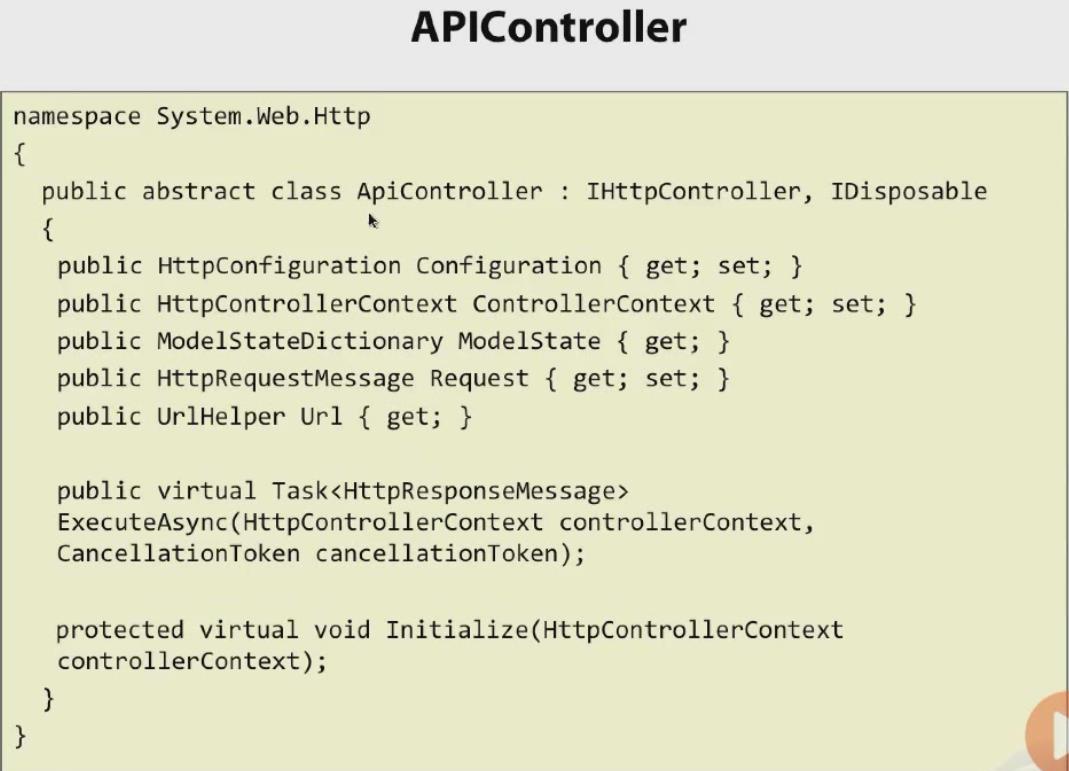
先上一张WebAPI中所有用户Controller都必须继承的ApiController基类代码:
【详】
1.VS 2012中新建一MVC4的WebAPI项目;
2.添加CoursesController空WebAPI控制器,代码如下:
 namespace WebApiDemo.Controllers

 {

     public class course

     {

         public int id;

         public string title;

     }

     public class CoursesController : ApiController

     {

         static List<course> courses = InitCourses();

         private static List<course> InitCourses()

         {

             var ret = new List<course>();

             ret.Add(new course { id = , title = "Web Api" });

             ret.Add(new course { id = , title = "Mobile programing" });

             return ret;

         }

         public IEnumerable<course> Get()

         {

             return courses;

         }

     }

 }
3.在HomeView中呈现:
更改/Views/Home/Index.cshtml代码,使其和下面代码相同;
 <div id="body">

     <ol id="courses">

     </ol>

 </div>

 @section scripts

 {

     <script>

         $.ajax({

             url: '/api/courses',

             success: function (courses) {

                 var list = $('#courses');

                 for (var i = 0; i < courses.length; i++)

                 {

                     var course = courses[i];

                     list.append('<li>' + course.title + '</li>');

                 }

             }

         });

     </script>

  }
注意:
1) 原理:用jQuery代码,指定要访问的url是coursescontroller所在uri,从而获取courses的json数据;
如果获取成功,执行success后代码,通过循环将li添加到指定的ol中。
2)ol标签的id必须为courses,和下面$('#courses')中的相同,否则挂不上;
url、success等关键字也不能写错,否则运行不出,而且jQuery错误比较难查。
【果】
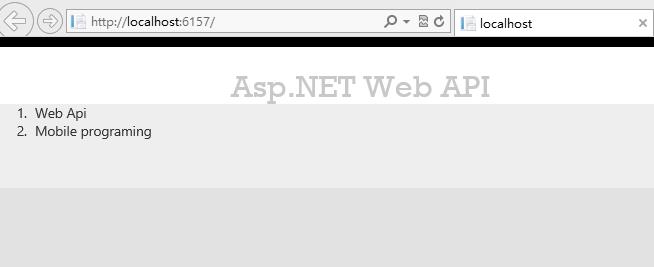
最终效果:
【update】
上面紧紧展示了GETALL的用法,CRUD补全后的Controller如下:
 using System;

 using System.Collections.Generic;

 using System.Linq;

 using System.Net;

 using System.Net.Http;

 using System.Web.Http;

 namespace WebApiDemo.Controllers

 {

     public class course

     {

         public int id;

         public string title;

     }

     public class CoursesController : ApiController

     {

         static List<course> courses = InitCourses();

         private static List<course> InitCourses()

         {

             var ret = new List<course>();

             ret.Add(new course { id = , title = "Web Api" });

             ret.Add(new course { id = , title = "Mobile programing" });

             return ret;

         }

         // GET api/courses

         public IEnumerable<course> Get()

         {

             return courses;

         }

         // GET api/courses/id

         public course Get(int id)

         {

             var ret=(from c in courses

                      where c.id==id

                      select c).FirstOrDefault();

             //todo: if null- should return 404

             return ret;

         }

         // Post api/courses

         public void Post([FromBody]course c)

         {

             c.id = courses.Count;

             courses.Add(c);

             //TODO:: should return a 201 with a location head

         }

         // Put api/courses/id

         public void Put(int id, [FromBody]course c)

         {

             var ret = (from v in courses

                        where v.id == c.id

                        select v).FirstOrDefault();

             ret.title = c.title;

         }

         // Delete api/courses/id

         public void Delete(int id)

         {

             var ret = (from c in courses

                        where c.id == id

                        select c).FirstOrDefault();

             courses.Remove(ret);

         }

     }

 }
在此就不再为每个方法创建视图了,如果想要测试结果,可以使用视频中推荐的"Fiddler Web Debugger",官网:fiddler2.com
另外,如果不想使用Get、Put、Delete、Post作为WebApi Controller CRUD的方法名,就需要在自定义方法明前标注Attribute:
- C :[HttpPost]
- R : [HttpGet]
- U : [HttpPut]
- D : [HttpDelete]
如:
 // GET api/courses

         [HttpGet]

         public IEnumerable<course> AllCourses()

         {

             return courses;

         }
【知识点解析】
1.WebAPi Controller 方法参数中的[FromBody]&[FromUri],称为ModleBinding attribute
参数前缀修饰,用来指定参数值的来源。
FromBody:指示当前参数来源自HTML 的Body中,body只能被读取一次;
FromUri:指示当前参数来源于URL,比如QuerryString。
被修饰的参数,就不需要再给形参赋值,
WebAPI会自动将URI或HTTP Body中符合要求的数据绑定到方法中
[.NET WebAPI系列01] WebAPI 简单例子的更多相关文章
- Spring框架系列(2) - Spring简单例子引入Spring要点
上文中我们简单介绍了Spring和Spring Framework的组件,那么这些Spring Framework组件是如何配合工作的呢?本文主要承接上文,向你展示Spring Framework组件 ...
- [.NET WebAPI系列02] WebAPI 中的HTTP通信
[前言] 本节用于承上启下,通过第一节了解的WebAPI的基本语法,Controller CRUD方法的基本格式: 但很多场合,第一节中的Web API Controller方法返回的信息 过于简单, ...
- [.NET WebAPI系列03] WebAPI Controller 中标准CRUD方法
[因] WebAPI的Controller中,一般都是下面四种方法: 对应于数据操作是我们通常所说的CRUD. C对应post,R对应Get,U对应Put,D对应Delete. 直接模仿VS 2012 ...
- WebApi系列~在WebApi中实现Cors访问
回到目录 说在前 Cors是个比较热的技术,这在蒋金楠的博客里也有体现,Cors简单来说就是“跨域资源访问”的意思,这种访问我们指的是Ajax实现的异步访问,形象点说就是,一个A网站公开一些接口方法, ...
- python3发送邮件01(简单例子,不带附件)
# -*- coding:utf-8 -*-import smtplibfrom email.header import Headerfrom email.mime.text import MIMET ...
- WebApi系列~目录
回到占占推荐博客索引 写了这个系列的文章不少了,也应该为大家写个目录了,最近很刮了很多SOA的风,很多企业都将自己的系统进行分割,通常是按模块进行拆分,为这个模块提供统一的接口提供业务服务,这不紧可以 ...
- 【WebApi系列】浅谈HTTP
[01]浅谈HTTP在WebApi开发中的运用 [02]聊聊WebApi体系结构 [03]详解WebApi如何传递参数 [04]详解WebApi测试和PostMan [05]浅谈WebApi Core ...
- 【WebApi系列】详解WebApi如何传递参数
WebApi系列文章 [01]浅谈HTTP在WebApi开发中的运用 [02]聊聊WebApi体系结构 [03]详解WebApi参数的传递 [04]详解WebApi测试和PostMan [05]浅谈W ...
- 【WebApi系列】浅谈HTTP在WebApi开发中的运用
WebApi系列文章 [01]浅谈HTTP在WebApi开发中的运用 [02]聊聊WebApi体系结构 [03]详解WebApi参数的传递 [04]详解WebApi测试和PostMan [05]浅谈W ...
随机推荐
- python 控制台输出中文乱码问题
乱码原因: 源码文件的编码格式为utf-8,但是window的本地默认编码是gbk,所以在控制台直接打印utf-8的字符串当然是乱码了! 解决方法: 1,print mystr.decode('utf ...
- WPF中Image控件绑定到自定义类属性
首先我们定义一个Student类,有ID,Name,Photo(保存图片路径). using System; using System.Collections.Generic; using Syste ...
- Android中获取应用程序(包)的大小-----PackageManager的使用(二)
通过第一部分<<Android中获取应用程序(包)的信息-----PackageManager的使用(一)>>的介绍,对PackageManager以及 AndroidMani ...
- 另一个 SqlParameterCollection 中已包含 SqlParameter
出处:http://www.cnblogs.com/OldYongs/archive/2011/03/12/1982021.html#2742742 一般情况下,我们定义的一个SqlParameter ...
- 【BZOJ 1022】 [SHOI2008]小约翰的游戏John
Description 小约翰经常和他的哥哥玩一个非常有趣的游戏:桌子上有n堆石子,小约翰和他的哥哥轮流取石子,每个人取的时候,可以随意选择一堆石子,在这堆石子中取走任意多的石子,但不能一粒石子也不取 ...
- submit与button区别提交区别
提交表单时使用submit会自动提交form表单数据, 如果使用jquery的form表单插件时需要将提交按钮改为button时$("#表单id").ajaxSubmit({}); ...
- python学习笔记22(group)
正则表达式中,group()用来提出分组截获的字符串,()用来分组 import re a = "123abc456" print re.search("([0-9]*) ...
- 2326: [HNOI2011]数学作业 - BZOJ
首先是DP,分段DP(按位数讨论) 然后每一段构造出它对应的矩阵,用矩阵快速幂加速 type matrix=..,..]of int64; var n,m:int64; a,b,c,d:matrix; ...
- 团体程序设计天梯赛-练习集L1-014. 简单题
L1-014. 简单题 时间限制 400 ms 内存限制 65536 kB 代码长度限制 8000 B 判题程序 Standard 作者 陈越 这次真的没骗你 —— 这道超级简单的题目没有任何输入. ...
- Akka Stream文档翻译:Quick Start Guide: Reactive Tweets
Quick Start Guide: Reactive Tweets 快速入门指南: Reactive Tweets (reactive tweets 大概可以理解为“响应式推文”,在此可以测试下GF ...