
Design Patterns Simplified - Part 3 (Simple Factory)【设计模式简述--第三部分(简单工厂)】
原文链接:http://www.c-sharpcorner.com/UploadFile/19b1bd/design-patterns-simplified-part3-factory/
Design Patterns Simplified - Part 3 (Simple Factory)【设计模式简述--第三部分(简单工厂)】
I am here to continue the discussion of Design Patterns. Today we will explain another creational design pattern called Simple Factory.
我在这继续来讨论设计模式。今天我将会解释另一个创造性的设计模式,也就是简单工厂模式。
In case you have not had a look at our previous articles, go through the following link:
假设你没有看我之前的文章,请先回去看,下面是链接:
Before talking about its implementation let's begin with some fundamental questions as in the following.
在讨论如何实现简单工厂模式之前,先看下下面一些基本的问题:
Purpose of the Factory pattern【工厂模式的目的】
I can think of two main objectives of using the Factory pattern. One is to achieve loose coupling between the client and business layer, another is to keep all the code for all the object instantiation logic in one place.
我能想到使用工厂模式的两个主要的目的。一个是在客户端和业务层之间达到松耦合,另外一个是确保所有对象的实例化的逻辑代码都在一个位置。
Purpose of loose coupling【松耦合的目的】
In modern software development where changes in existing systems are frequent and software design is expected to be scalable, not having a loosely-coupled design can create many problems.
在现代软件开发的过程中,需求的变更是很频繁的,所以软件的设计应该是要可扩展性好的,没有一个松耦合的设计,可能会有很多问题。
For example, in an application with a 3-layer architecture, if object creation logic is at the client side, for any new addition of concrete classes, the developer needs to modify not just the business but the client layer as well. Think about the maintainability and added testing effort.
例如,在一个简单三层框架的项目中,如果对象的创建是在客户端,那么任何新添加的具体的实体类,开发者,不仅需要去修改业务层还有客户端层。为了考虑可维护性,还需要添加测试的工作。
How about if the client is only aware of the high-level contracts and not about its concreate implementation?
如果客户端只需要关心和高一层次的关系,而不用关心具体的实现呢?
Yes, you got it right! The client just must pass the type of the object it needs and it will get it using the Factory Pattern.
Enough theory. Now let's talk about implementation.
是的,你是对的!客户端仅仅只需要传递对象需要的类型,剩下的就交给工厂模式去做。理论已经足够了,现在我们来讨论一下,如何实现简单工厂模式吧。
How to use the Simple Factory Pattern【怎么样来使用简单工厂模式】
Let's try to understand using a simple example.
Assume the client wants to know the on-road price of various brands of cars and have an interface as in the following.
我们使用一个简单的例子,来理解简单工厂模式吧。假设客户想要知道路上各种品牌汽车的价格,提供了下面一个这样的接口。
我们创建一个控制台程序,来学习简单工厂模式:
using System;

using System.Collections.Generic;

using System.Linq;

using System.Text;

using System.Threading.Tasks;

namespace ConsoleApplication1

{

   public interface ICar

    {

       /// <summary>

       /// 获取汽车价格

       /// </summary>

       /// <param name="model"></param>

       /// <returns></returns>

       string GetOnRoadPrice(string model);

    }

}
We need to create a Factory class now that will sit between the client and business layers and it will provide the required object to the client based on the car brand passed.
我们现在需要去创建一个工厂类,这个工厂类位于客户端和业务层之间,并基于传递的汽车品牌,提供客户端需要的对象。
using System;

using System.Collections.Generic;

using System.Linq;

using System.Text;

using System.Threading.Tasks;

namespace ConsoleApplication1

{

   public class CarFactory

    {

       /// <summary>

       /// 获取汽车对象

       /// </summary>

       /// <param name="carBrand">汽车品牌</param>

       /// <returns></returns>

       public static ICar GetCar(string carBrand)

       {

           if (carBrand.ToLowerInvariant() == "baoma")

           {

               return new BaoMa();

           }

           else if (carBrand.ToLowerInvariant() == "benchi")

           {

               return new BenChi();

           }

           else if (carBrand.ToLowerInvariant() == "aodi")

           {

               return new AoDi();

           }

           else

           {

               return null;

           }

       }

    }

}
And here goes the concreate business classes.
这里接着创建具体的实体类。
using System;

using System.Collections.Generic;

using System.Linq;

using System.Text;

namespace ConsoleApplication1

{

    class AoDi:ICar

    {

        public string GetOnRoadPrice(string model)

        {

            if (model.ToLowerInvariant() == "aodi")

            {

                return "300w 人民币";

            }

            else

            {

                return "你输入的汽车品牌找不到,请重新输入!!!";

            }

        }

    }

}
using System;

using System.Collections.Generic;

using System.Linq;

using System.Text;

namespace ConsoleApplication1

{

    class BaoMa:ICar

    {

        public string GetOnRoadPrice(string model)

        {

            if (model.ToLowerInvariant() == "baoma")

            {

                return "200w 人民币";

            }

            else

            {

                return "你输入的汽车品牌找不到,请重新输入!!!";

            }

        }

    }

}
using System;

using System.Collections.Generic;

using System.Linq;

using System.Text;

namespace ConsoleApplication1

{

    class BenChi:ICar

    {

      public  string GetOnRoadPrice(string model)

        {

            if (model.ToLowerInvariant() == "glc")

            {

                return "550w 人民币";

            }

            else

            {

                return "你输入的汽车品牌找不到,请重新输入!!!";

            }

        }

    }

}
Now let's see how the client can use the setup we have created so far.
现在,我们看看客户端怎么使用我们目前为止创建的对象。
using System;

using System.Collections.Generic;

using System.Linq;

using System.Text;

using System.Threading.Tasks;

namespace ConsoleApplication1

{

    class Program

    {

        static void Main(string[] args)

        {

            //设置控制台标题栏中显示的标题

            Console.Title = "简单工厂模式Demo学习";

            ICar car = null;

            string model = null;

            //奔驰车测试

           car= CarFactory.GetCar("BenChi");

           model = "glc";

           Console.WriteLine("奔驰系列{0}的汽车,售价为{1}",model,car.GetOnRoadPrice(model));

           Console.ReadKey();

        }

    }

}
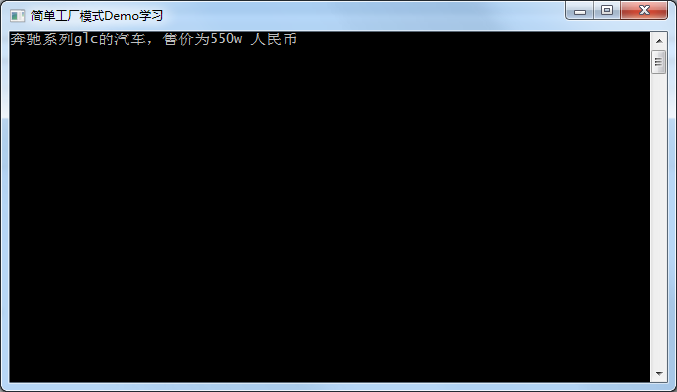
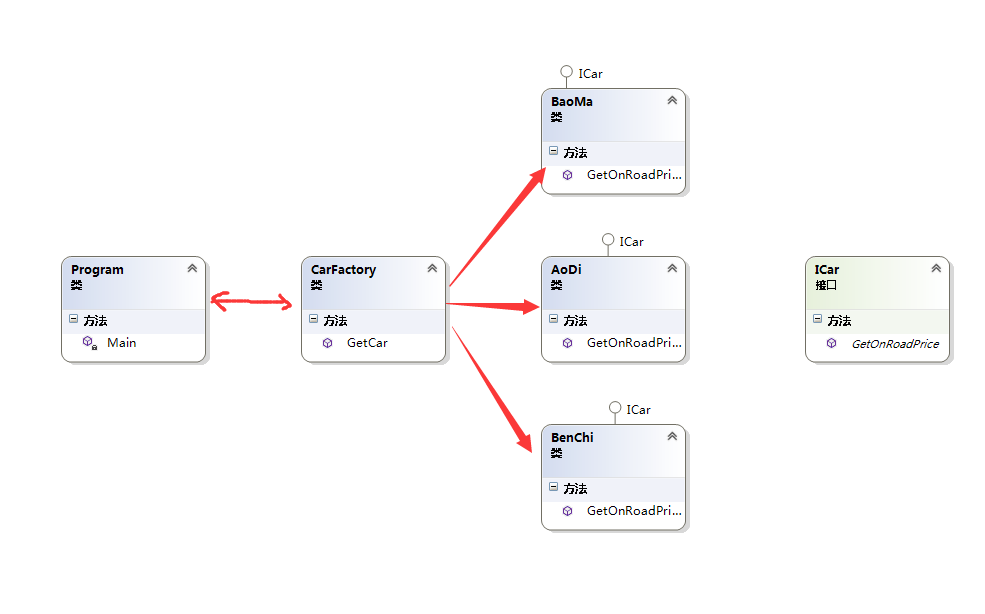
- Loose coupling between client and business layers.【客户端和业务层之间的松耦合。】
- Placed object creation logic at common place.【把对象的创建逻辑,放在了一个公共的地方。】
- Abstracted concreate classes (Maruti, Hyundai) from client.【客户端的类抽象化】
I hope you have liked this article. I look forward to your comments/suggestions.
我希望你喜欢这篇文章,期待你的评论和建议。
Design Patterns Simplified - Part 3 (Simple Factory)【设计模式简述--第三部分(简单工厂)】的更多相关文章
- Design Patterns Simplified - Part 2 (Singleton)【设计模式简述--第二部分(单例模式)】
原文链接: http://www.c-sharpcorner.com/UploadFile/19b1bd/design-patterns-simplified-part-2-singleton/ De ...
- Design Patterns | 01 为什么要尽早掌握设计模式
标题:Design Patterns | 01 为什么要尽早掌握设计模式 链接: 标签:设计模式 摘要:设计模式是前人经验的总结,教大家如何写出可扩展.可读.可维护的高质量代码.设计模式与日常工作中的 ...
- Java 设计模式系列(三)抽象工厂
Java 设计模式系列(三)抽象工厂 每天用心记录一点点.内容也许不重要,但习惯很重要!
- Java 设计模式系列(二)简单工厂模式和工厂方法模式
Java 设计模式系列(二)简单工厂模式和工厂方法模式 实现了创建者和调用者的分离.分为:简单工厂模式.工厂方法模式.抽象工厂模式 简单工厂模式.工厂方法模式都很简单,就不详细介绍了. 一.简单工厂 ...
- 设计模式(C#)——02简单工厂模式
推荐阅读: 我的CSDN 我的博客园 QQ群:704621321 工厂模式主要是为创建对象提供过渡接口,以便将创建对象的具体过程屏蔽隔离起来.通俗来说,你只关心怎么用,不用关心怎么做 ...
- 学习设计模式第二十七 - GoF之外简单工厂模式
示例代码来自<深入浅出设计模式>和<大话设计模式> 概述 简单工厂模式又被称为静态工厂模式,属于类的创建型模式.其实质是由一个工厂类根据传入的参量,动态决定应该创建出哪一个产品 ...
- Javascript设计模式理论与实战:简单工厂模式
通常我们创建对象最常规的方法就是使用new关键字调用构造函数,这会导致对象之间的依赖性.工厂模式是一种有助于消除类之间依赖性的设计模式,它使用一个方法来决定要实例化哪一个类.本文详细介绍了简单工厂模式 ...
- 设计模式(二)——Java简单工厂模式
简单工厂模式 案例: 披萨的项目(要便于披萨种类的扩展,要便于维护) 1)披萨的种类很多(比如 GreekPizz.CheesePizz 等) 2)披萨的制作有 prepare,bake, cut, ...
- [Python设计模式] 第1章 计算器——简单工厂模式
github地址:https://github.com/cheesezh/python_design_patterns 写在前面的话 """ 读书的时候上过<设计模 ...
随机推荐
- .Net 大型分布式基础服务架构横向演变概述
一. 业务背景 构建具备高可用,高扩展性,高性能,能承载高并发,大流量的分布式电子商务平台,支持用户,订单,采购,物流,配送,财务等多个项目的协作,便于后续运营报表,分析,便于运维及监控. 二. 基础 ...
- android 两种实现计时器时分秒的实现,把时间放在你的手中~
可能我们在开发中会时常用到计时器这玩意儿,比如在录像的时候,我们可能需要在右上角显示一个计时器.这个东西其实实现起来非常简单. 只需要用一个控件Chronometer,是的,就这么简单,我都不好意思讲 ...
- 个人网站对xss跨站脚本攻击(重点是富文本编辑器情况)和sql注入攻击的防范
昨天本博客受到了xss跨站脚本注入攻击,3分钟攻陷--其实攻击者进攻的手法很简单,没啥技术含量.只能感叹自己之前竟然完全没防范. 这是数据库里留下的一些记录.最后那人弄了一个无限循环弹出框的脚本,估计 ...
- C# 自定义控件VS用户控件
1 自定义控件与用户控件区别 WinForm中, 用户控件(User Control):继承自 UserControl,主要用于开发 Container 控件,Container控件可以添加其他Con ...
- CommandPattern
/** * 命令模式 * @author TMAC-J * 将调用者和接受者分离 * 可以将一组命令组合在一起,适合很多命令的时候 */ public class CommandPattern { i ...
- Windows 7 上安装Visual Studio 2015 失败解决方案
安装之前先要看看自己的系统支不支持,具体的可以看:https://www.visualstudio.com/en-us/visual-studio-2015-system-requirements-v ...
- 【腾讯Bugly干货分享】WebVR如此近-three.js的WebVR示例解析
本文来自于腾讯bugly开发者社区,非经作者同意,请勿转载,原文地址:http://dev.qq.com/topic/57c7ff1689a6c9121b1adb16 作者:苏晏烨 关于WebVR 最 ...
- 最全的Windows Azure学习教程汇总
Windows Azure 是微软基于云计算的操作系统,能够为开发者提供一个平台,帮助开发可运行在云服务器.数据中心.Web 和 PC 上的应用程序. Azure 是一种灵活和支持互操作的平台,能够将 ...
- 关于安装安卓SDK出现无法更新问题时的解决办法
近日,如果安装过安卓的同学可能知道,大家在使用Android SDK升级或者安装SDK的时候,出现了访问Failed to fetch URL http://dl-ssl.google.com/and ...
- HTML中的拖拉框----在路上(29)
拖拽框---当鼠标按在指定的区域才可进行拖拽 思想:只有当鼠标是按在一个大div里的小div才可拖拽,其他不可:拖拽框有多种方法,这里以其中一种分享:下面使我自己写的demo,简单有效. <!D ...