
【EntityFramwork--处理数据并发问题】
EntityFramwork--处理数据并发问题时支持乐观并发,即假定最佳场景(这里是指数据在更新过程中没有发生变化)
具体看《Beginning ASP.NET 4.5 Databases》P188-189:
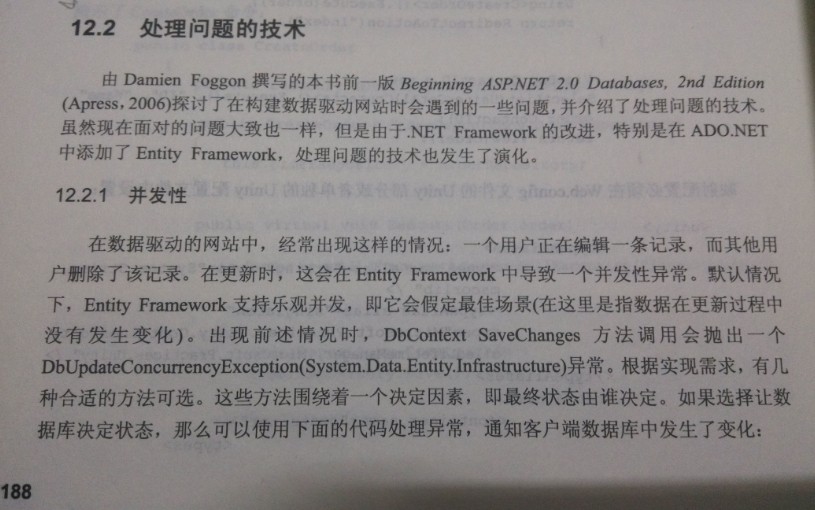
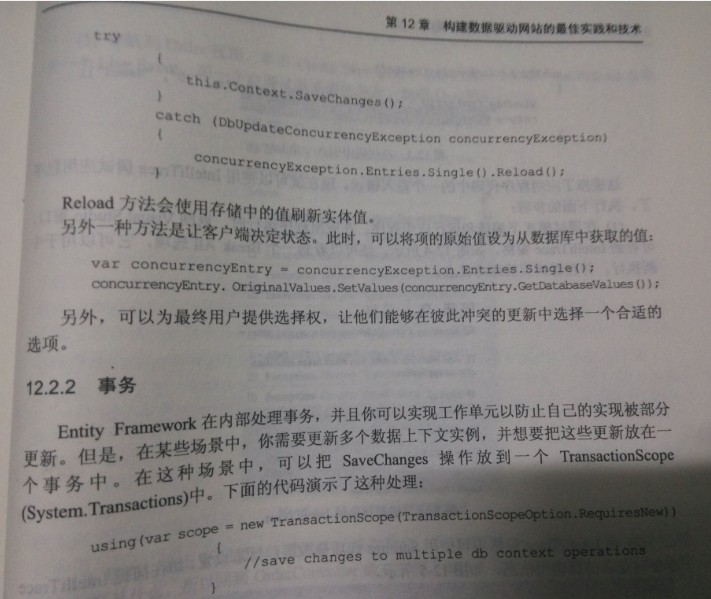
本书源代码下载地址:
http://www.codeplex.com/Download?ProjectName=CommonServiceLocator&DownloadId=45067
以一下是截取源代码的实现Unit of work、并发、事务的BaseRepository:
BaseRepository.cs:
 using System;

 using System.Collections.Generic;

 using System.Data;

 using System.Data.Entity;

 using System.Data.Entity.Infrastructure;

 using System.Linq;

 using System.Text;

 using System.Threading.Tasks;

 using System.Transactions;

 using Repository;

 namespace DataAccess

 {

     public class s : IDisposable

     {

         protected IUnitOfWork UnitOfWork { get; set; }

         private bool disposed = false;

         protected StoreEntities Context

         {

             get { return (EfStoreDataContext)this.UnitOfWork; }

         }

         /// <summary>

         /// .ctor

         /// </summary>

         /// <param name="unitOfWork"></param>

         public BaseRepository(IUnitOfWork unitOfWork)

         {

             if (unitOfWork == null) throw new ArgumentNullException("unitOfWork");

             this.UnitOfWork = unitOfWork;

         }

         public void Save()

         {

             try

             {

                 using(var scope = new TransactionScope(TransactionScopeOption.RequiresNew))

                 {

                     this.Context.SaveChanges();

                     scope.Complete();

                 }

             }

             catch (DbUpdateConcurrencyException concurrencyException)

             {

                 concurrencyException.Entries.Single().OriginalValues.SetValues(concurrencyException.Entries.Single().GetDatabaseValues());

                 throw;

             }

         }

         protected virtual DbSet<TEntity> GetDbSet<TEntity>() where TEntity : class

         {

             return this.Context.Set<TEntity>();

         }

         protected virtual void SetEntityState(object entity, EntityState entityState)

         {

             this.Context.Entry(entity).State = entityState;

         }

         protected virtual void Dispose(bool disposing)

         {

             if (!this.disposed)

             {

                 if (disposing)

                 {

                     this.Context.Dispose();

                 }

             }

             this.disposed = true;

         }

         public void Dispose()

         {

             Dispose(true);

             GC.SuppressFinalize(this);

         }

     }

 }
---------------------------
(一).事务
38                 using(var scope = new TransactionScope(TransactionScopeOption.RequiresNew))

39                 {

40                     this.Context.SaveChanges();

41                     scope.Complete();

42                 }
使用事务的目的:在某个场景中,需要更新多个数据上下文实例,并想要把这些更新放在一个事务中。

2.
---------------
(二)并发
44             catch (DbUpdateConcurrencyException concurrencyException)

45             {

46                 concurrencyException.Entries.Single().OriginalValues.SetValues(concurrencyException.Entries.Single().GetDatabaseValues());

47                 throw;

48             }
EF框架处理并发的方式:
方式1:
让客户端决定状态----让项的原始值设置为从数据库中获取的值:
concurrencyException.Entries.Single().OriginalValues.SetValues(concurrencyException.Entries.Single().GetDatabaseValues());
方式2:
让客户端决定状态----用存储中的值刷新新实体值:
concurrencyException.Entries.Single().Reload();

方式3:
自定义一种方案,选择合适的选项。

---------------------
(三)工作单元 Unit of work
EF中的Unit Of Work机制
(假设StoreEntities 实例的变量名为contexDb)
contexDb.Entry(Order).State = System.Data.EntityState.Modified; //
------------------------------------------------
下面代码是设计一个实现了Unit of work机制和Repository模式的具体实现:
56         protected virtual void SetEntityState(object entity, EntityState entityState)

57         {

58             this.Context.Entry(entity).State = entityState;

59         }
this.Context是
19         protected StoreEntities Context

20         {

21             get { return (EfStoreDataContext)this.UnitOfWork; }
22         }
EfStoreDataContext.cs
     public class EfStoreDataContext : StoreEntities, IUnitOfWork

     {

         public new void SaveChanges()

         {

             base.SaveChanges();

         }

     }
EF生成的访问数据的DbContext
 namespace DataAccess

 {

     using System;

     using System.Data.Entity;

     using System.Data.Entity.Infrastructure;

     using Entities;

     public partial class StoreEntities : DbContext

     {

         public StoreEntities()

             : base("name=StoreEntities")

         {

         }

         protected override void OnModelCreating(DbModelBuilder modelBuilder)

         {

             throw new UnintentionalCodeFirstException();

         }

         public DbSet<Contact> Contacts { get; set; }

         public DbSet<Order> Orders { get; set; }

     }

 }
IUnitofWork.cs
 using System;

 using System.Collections.Generic;

 using System.Linq;

 using System.Text;

 using System.Threading.Tasks;

 namespace Repository

 {

     public interface IUnitOfWork

     {

         void SaveChanges();

     }

 }
使用了工作单元 (Unit of work)机制的OrderReposiory:
OrderReposiory.cs:
 using System;

 using System.Collections.Generic;

 using System.Linq;

 using System.Text;

 using System.Threading.Tasks;

 using Entities;

 using Repository;

 namespace DataAccess.Repositories

 {

     public class OrderRepository : BaseRepository, IOrderRepository

     {

         public OrderRepository(IUnitOfWork unitOfWork)

             : base(unitOfWork)

         {

         }

         public IEnumerable<Order> GetAllOrders()

         {

             return this.GetDbSet<Order>();

         }

         public Order GetByOrderId(int orderId)

         {

             return this.GetDbSet<Order>().Find(orderId);

         }

         public void Create(Order order)

         {

             this.GetDbSet<Order>().Add(order);

         }

         public void Update(Order order)

         {

             this.SetEntityState(order, System.Data.EntityState.Modified);

         }

         public void Delete(int orderId)

         {

             var order = this.GetDbSet<Order>().Find(orderId);

             this.GetDbSet<Order>().Remove(order);

         }

     }

 }
根据上面的设计,这行代码:
37             this.SetEntityState(order, System.Data.EntityState.Modified);
最终调用EF框架生成的
  public partial class StoreEntities : DbContext
的方法
contexDb.Entry(Order).State = System.Data.EntityState.Modified; //EF中的Unit Of Work机制
假设StoreEntities 实例的变量名为contexDb
【EntityFramwork--处理数据并发问题】的更多相关文章
- python导出zabbix数据并发邮件脚本
Zabbix没有报表导出的功能,于是通过编写脚本导出zabbix数据并发邮件.效果如下: 下面是脚本,可根据自己的具体情况修改: #!/usr/bin/python #coding:utf-8 imp ...
- EF|CodeFirst数据并发管理
在项目开发中,我们有时需要对数据并发请求进行处理.举个简单的例子,比如接单系统中,AB两个客服同时请求处理同一单时,应该只有一单请求是处理成功的,另外一单应当提示客服,此单已经被处理了,不需要再处理. ...
- Oracle的数据并发与一致性详解(下)
上篇介绍了数据并发与一致性的相关概念.以及oracle的事务隔离级别等内容,本篇继续介绍锁机制.自动锁.手动锁.用户自定义锁的相关内容. 请尊重作者劳动成果,转载请标明原文链接: https://ww ...
- Oracle的数据并发与一致性详解(上)
今天想了解下oracle中事务与锁的原理,但百度了半天,发现网上介绍的内容要么太短,要么版本太旧,而且抄袭现象严重,所以干脆查官方帮助文档(oracle 11.2),并将其精华整理成中文,供大家一起学 ...
- js获取cookie数据并发送给服务端
js获取cookie数据并发送给服务端 <!DOCTYPE html> <html lang="en"> <head> <meta cha ...
- ADO.NET 中的数据并发
当多个用户试图同时修改数据时,需要建立控制机制来防止一个用户的修改对同时操作的其他用户所作的修改产生不利的影响.处理这种情况的系统叫做“并发控制”.并发控制的类型通常,管理数据库中的并发有三种常见的方 ...
- sqlserver用timestamp帮助解决数据并发冲突 转【转】
http://blog.csdn.net/u011014032/article/details/42936783 关于并发请求,网上很多朋友都说的很详细了,我就不在这里献丑了.这里只记录下刚刚完工的那 ...
- Entity Framework 数据并发访问错误原因分析与系统架构优化
博客地址 http://blog.csdn.net/foxdave 本文主要记录近两天针对项目发生的数据访问问题的分析研究过程与系统架构优化,我喜欢说通俗的白话,高手轻拍 1. 发现问题 系统新模块上 ...
- html 获取数据并发送给后端方式
一.方式一 使用ajax提交 function detailed() { var date = $("#asset_ip").text() $.ajax({ url: " ...
随机推荐
- UI1_HTTP下载
// DataModel.h // UI1_HTTP下载 // // Created by zhangxueming on 15/7/17. // Copyright (c) 2015年 zhangx ...
- 【OSG细节实现】节点围绕位于axisPos平行于axis的轴进行旋转
//绕着与axis平行的任意轴旋转 void rotate(const std::string& name, float angle, osg::Vec3 axisPos, osg::Vec3 ...
- Poj OpenJudge 百练 1062 昂贵的聘礼
1.Link: http://poj.org/problem?id=1062 http://bailian.openjudge.cn/practice/1062/ 2.Content: 昂贵的聘礼 T ...
- 《DNS加密更新》RHEL6
DNS加密更新: 继DNS更新之后,现在又玩DNS加密更新,差不多. DNS更新指定一台主机,那台主机或多台主机来更新它,其他主机没权限. DNS加密更新,谁有密码说就可以更新. 做过上次的更新之后, ...
- 【Qt】Qt之进程间通信(Windows消息)【转】
简述 通过上一节的了解,我们可以看出进程通信的方式很多,今天分享下如何利用Windows消息机制来进行不同进程间的通信. 简述 效果 发送消息 自定义类型与接收窗体 发送数据 接收消息 设置标题 重写 ...
- net.sf.json.JSONException: java.lang.NoSuchMethodException
在尝试将json对象转换为list时候出现了如下错误 Exception in thread "main" net.sf.json.JSONException: java.lang ...
- 使用awstats分析iis站点的日志
环境:win7 + iis7 + perl(ActivePerl-5.20.1.2000) + awstats 7.3 一.找到iis日志所在目录 建议全部都打勾 二.安装perl AWStats是p ...
- EcilpsePHP studio 3.0 运行(run)环境配置
EcilpsePHP studio 3.0的界面与 MyEclipse操作界面基本一样,熟悉后者的对于EcilpsePHP studio 的使用学习就不会太难了. 安装好EPP后,新建项目--> ...
- NavigationBar的简单设置
http://blog.csdn.net/hufeng825/article/details/7643532#) .Label属性设置 titleLabel = [[UILabel alloc] in ...
- C# 查处出现次数最多的元素
LINQ var str= str.ToCharArray() .GroupBy(x => x) .OrderByDescending(x => x.Count()) .First() . ...