
Google Authenticator(谷歌身份验证器)C#版
Google Authenticator(谷歌身份验证器)
什么是认证器?怎么对接?
Google Authenticator(谷歌身份验证器)是微软推出的一个动态密令工具,它有两种密令模式。分别是“TOTP 基于时间”、“HOTP 基于计数器”,通过手机上 简单的设置就可以设定自己独一的动态密令, 那么我们怎么将我们的程序和认证器进行对接呢?其实谷歌认证器并不是需要我们对接这个工具的API而是通过算法来决定,谷歌使用使用HMAC算法生成密令,通过基于次数或者基于时间两个模板进行计算,因此在程序中只需要使用相同的算法即可与之匹配。
TOTP 基于时间
- HMAC算法使用固定为HmacSHA1
- 更新时长固定为30秒
- APP端输入数据维度只有两个:账户名称(自己随意填写方便自己查看)和base32格式的key
HOTP 基于计数器
基于计数器模式是根据一个共享秘钥K和一个C计数器进行算法计算
认证器安装
效果图
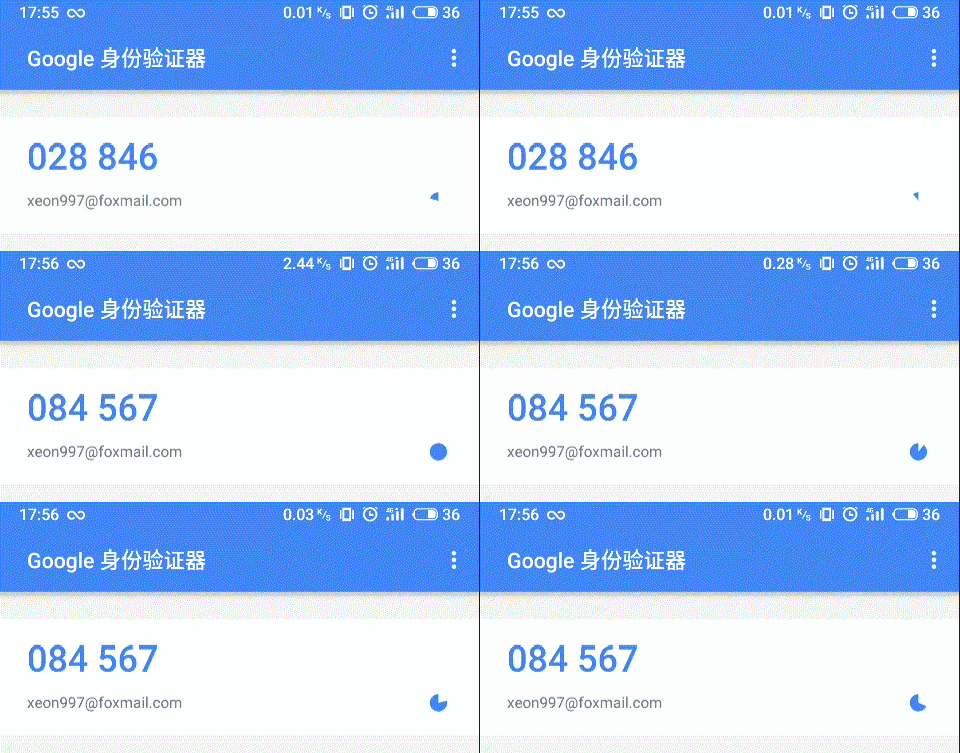
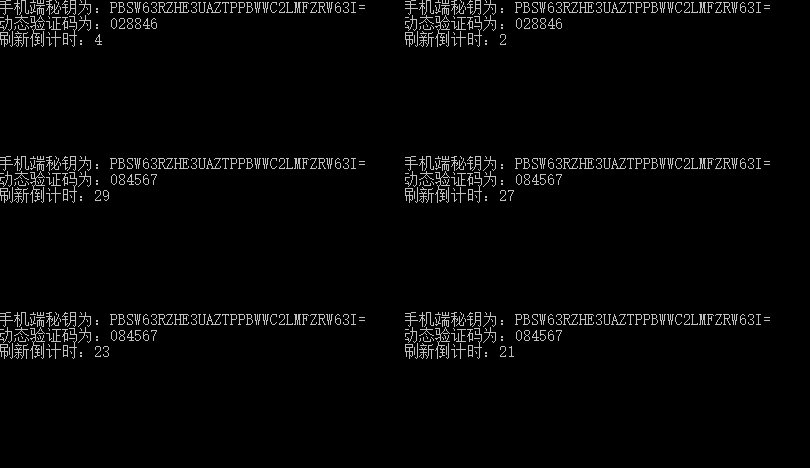 容
容
案例
控制台
 using System;

 using System.Collections.Generic;

 using System.Linq;

 using System.Text;

 namespace GoogleAuthenticator

 {

     class Program

     {

         static void Main(string[] args)

         {

             long duration = ;

             string key = "xeon997@foxmail.com";

             GoogleAuthenticator authenticator = new GoogleAuthenticator(duration, key);

             var mobileKey = authenticator.GetMobilePhoneKey();

             while (true)

             {

                 Console.WriteLine("手机端秘钥为:" + mobileKey);

                 var code = authenticator.GenerateCode();

                 Console.WriteLine("动态验证码为:" + code);

                 Console.WriteLine("刷新倒计时:" + authenticator.EXPIRE_SECONDS);

                 System.Threading.Thread.Sleep();

                 Console.Clear();

             }

         }

     }

 }
认证器类
 using GoogleAuthorization;

 using System;

 using System.Security.Cryptography;

 using System.Text;

 namespace GoogleAuthenticator

 {

     public class GoogleAuthenticator

     {

         /// <summary>

         /// 初始化验证码生成规则

         /// </summary>

         /// <param name="key">秘钥(手机使用Base32码)</param>

         /// <param name="duration">验证码间隔多久刷新一次(默认30秒和google同步)</param>

         public GoogleAuthenticator(long duration = , string key = "xeon997@foxmail.com")

         {

             this.SERECT_KEY = key;

             this.SERECT_KEY_MOBILE = Base32.ToString(Encoding.UTF8.GetBytes(key));

             this.DURATION_TIME = duration;

         }

         /// <summary>

         /// 间隔时间

         /// </summary>

         private long DURATION_TIME { get; set; }

         /// <summary>

         /// 迭代次数

         /// </summary>

         private long COUNTER

         {

             get

             {

                 return (long)(DateTime.UtcNow - new DateTime(, , , , , , DateTimeKind.Utc)).TotalSeconds / DURATION_TIME;

             }

         }

         /// <summary>

         /// 秘钥

         /// </summary>

         private string SERECT_KEY { get; set; }

         /// <summary>

         /// 手机端输入的秘钥

         /// </summary>

         private string SERECT_KEY_MOBILE { get; set; }

         /// <summary>

         /// 到期秒数

         /// </summary>

         public long EXPIRE_SECONDS

         {

             get

             {

                 return (DURATION_TIME - (long)(DateTime.UtcNow - new DateTime(, , , , , , DateTimeKind.Utc)).TotalSeconds % DURATION_TIME);

             }

         }

         /// <summary>

         /// 获取手机端秘钥

         /// </summary>

         /// <returns></returns>

         public string GetMobilePhoneKey()

         {

             if (SERECT_KEY_MOBILE == null)

                 throw new ArgumentNullException("SERECT_KEY_MOBILE");

             return SERECT_KEY_MOBILE;

         }

         /// <summary>

         /// 生成认证码

         /// </summary>

         /// <returns>返回验证码</returns>

         public string GenerateCode()

         {

             return GenerateHashedCode(SERECT_KEY, COUNTER);

         }

         /// <summary>

         /// 按照次数生成哈希编码

         /// </summary>

         /// <param name="secret">秘钥</param>

         /// <param name="iterationNumber">迭代次数</param>

         /// <param name="digits">生成位数</param>

         /// <returns>返回验证码</returns>

         private string GenerateHashedCode(string secret, long iterationNumber, int digits = )

         {

             byte[] counter = BitConverter.GetBytes(iterationNumber);

             if (BitConverter.IsLittleEndian)

                 Array.Reverse(counter);

             byte[] key = Encoding.ASCII.GetBytes(secret);

             HMACSHA1 hmac = new HMACSHA1(key, true);

             byte[] hash = hmac.ComputeHash(counter);

             int offset = hash[hash.Length - ] & 0xf;

             int binary =

                 ((hash[offset] & 0x7f) << )

                 | ((hash[offset + ] & 0xff) << )

                 | ((hash[offset + ] & 0xff) << )

                 | (hash[offset + ] & 0xff);

             int password = binary % (int)Math.Pow(, digits); // 6 digits

             return password.ToString(new string('', digits));

         }

     }

 }
Base32转码类
 using System;

 namespace GoogleAuthorization

 {

     public static class Base32

     {

         public static byte[] ToBytes(string input)

         {

             if (string.IsNullOrEmpty(input))

             {

                 throw new ArgumentNullException("input");

             }

             input = input.TrimEnd('=');

             int byteCount = input.Length *  / ;

             byte[] returnArray = new byte[byteCount];

             byte curByte = , bitsRemaining = ;

             int mask = , arrayIndex = ;

             foreach (char c in input)

             {

                 int cValue = CharToValue(c);

                 if (bitsRemaining > )

                 {

                     mask = cValue << (bitsRemaining - );

                     curByte = (byte)(curByte | mask);

                     bitsRemaining -= ;

                 }

                 else

                 {

                     mask = cValue >> ( - bitsRemaining);

                     curByte = (byte)(curByte | mask);

                     returnArray[arrayIndex++] = curByte;

                     curByte = (byte)(cValue << ( + bitsRemaining));

                     bitsRemaining += ;

                 }

             }

             if (arrayIndex != byteCount)

             {

                 returnArray[arrayIndex] = curByte;

             }

             return returnArray;

         }

         public static string ToString(byte[] input)

         {

             if (input == null || input.Length == )

             {

                 throw new ArgumentNullException("input");

             }

             int charCount = (int)Math.Ceiling(input.Length / 5d) * ;

             char[] returnArray = new char[charCount];

             byte nextChar = , bitsRemaining = ;

             int arrayIndex = ;

             foreach (byte b in input)

             {

                 nextChar = (byte)(nextChar | (b >> ( - bitsRemaining)));

                 returnArray[arrayIndex++] = ValueToChar(nextChar);

                 if (bitsRemaining < )

                 {

                     nextChar = (byte)((b >> ( - bitsRemaining)) & );

                     returnArray[arrayIndex++] = ValueToChar(nextChar);

                     bitsRemaining += ;

                 }

                 bitsRemaining -= ;

                 nextChar = (byte)((b << bitsRemaining) & );

             }

             if (arrayIndex != charCount)

             {

                 returnArray[arrayIndex++] = ValueToChar(nextChar);

                 while (arrayIndex != charCount) returnArray[arrayIndex++] = '=';

             }

             return new string(returnArray);

         }

         private static int CharToValue(char c)

         {

             var value = (int)c;

             if (value <  && value > )

             {

                 return value - ;

             }

             if (value <  && value > )

             {

                 return value - ;

             }

             if (value <  && value > )

             {

                 return value - ;

             }

             throw new ArgumentException("Character is not a Base32 character.", "c");

         }

         private static char ValueToChar(byte b)

         {

             if (b < )

             {

                 return (char)(b + );

             }

             if (b < )

             {

                 return (char)(b + );

             }

             throw new ArgumentException("Byte is not a value Base32 value.", "b");

         }

     }

 }
总结
需要注意的坑
移动端下载的认证器的秘钥key是通过base32转码得到的,而程序端是直接输入源码。
如原秘钥为xeon997@foxmail.com生成的base32码PBSW63RZHE3UAZTPPBWWC2LMFZRW63I=才是移动端需要输入的秘钥。
在网上找了很多资料没有发现关于C#的案例,所以在此记录一下自己遇到的坑,让更多的人能够跳过这个坑。
案例地址:
git:https://github.com/CN-Yi/GoogleAuthenticator
gitee:https://gitee.com/hsyi/GoogleAuthenticator
在此感谢提供学习资料的大神们,如果有错误的地方欢迎留言。
Google Authenticator(谷歌身份验证器)C#版的更多相关文章
- Google Authenticator(谷歌身份验证器)
<!DOCTYPE html>Google Authenticator(谷歌身份验证器) ] Google Authenticator(谷歌身份验证器) Google Authentica ...
- Google authenticator 谷歌身份验证,实现动态口令
Google authenticator 谷歌身份验证,实现动态口令 google authenticator php 服务端 使用PHP类 require_once '../PHPGangsta/G ...
- 七牛云如何绑定二次验证码_虚拟MFA_两步验证_谷歌身份验证器?
一般情况下,点账户名——账户设置——安全设置,即可开通两步验证 具体步骤见链接 七牛云如何绑定二次验证码_虚拟MFA_两步验证_谷歌身份验证器? 二次验证码小程序(官网)对比谷歌身份验证器APP ...
- humlbe bundle如何绑定二次验证码_虚拟MFA_两步验证_谷歌身份验证器?
一般点账户名——设置——安全设置中开通虚拟MFA两步验证 具体步骤见链接 humlbe bundle如何绑定二次验证码_虚拟MFA_两步验证_谷歌身份验证器? 二次验证码小程序于谷歌身份验证器APP的 ...
- R星游戏如何绑定二次验证码_虚拟MFA_两步验证_谷歌身份验证器?
一般点账户名——设置——安全设置中开通虚拟MFA两步验证 具体步骤见链接 R星游戏如何绑定二次验证码_虚拟MFA_两步验证_谷歌身份验证器? 二次验证码小程序于谷歌身份验证器APP的优势 1.无需下载 ...
- WBF交易所如何使用二次验证码/谷歌身份验证器
一般点账户名——设置——安全设置中开通虚拟MFA两步验证 具体步骤见链接 WBF交易所如何使用二次验证码/谷歌身份验证器 二次验证码小程序于谷歌身份验证器APP的优势 1.无需下载app 2.验证码 ...
- 关于虎信如何绑定二次验证码_虚拟MFA_两步验证_谷歌身份验证器?
一般点账户名——设置——安全设置中开通虚拟MFA两步验证 具体步骤见链接 虎信如何绑定二次验证码_虚拟MFA_两步验证_谷歌身份验证器? 二次验证码小程序于谷歌身份验证器APP的优势 1.无需下载ap ...
- paypal支付平台如何使用二次验证码_虚拟MFA_两步验证_谷歌身份验证器?
一般点账户名——设置——安全设置中开通虚拟MFA两步验证 具体步骤见链接 paypal支付平台如何使用二次验证码_虚拟MFA_两步验证_谷歌身份验证器? 二次验证码小程序于谷歌身份验证器APP的优势 ...
- SmartMS如何使用二次验证码/虚拟MFA/两步验证/谷歌身份验证器?
一般点账户名——设置——安全设置中开通虚拟MFA两步验证 具体步骤见链接 SmartMS如何使用二次验证码/虚拟MFA/两步验证/谷歌身份验证器? 二次验证码小程序于谷歌身份验证器APP的优势 1.无 ...
随机推荐
- 二、React中的更新
创建更新的方式:ReactDOM.render||hydrate 初次渲染,然后是setState.forceUpdate 一.React.render() 步骤:创建ReactRoot.创建Fibe ...
- python decorator 用法
https://www.zhihu.com/question/31265857 http://www.cnblogs.com/huxi/archive/2011/03/01/1967600.html ...
- Spring Boot : Swagger 2
每次修改完代码需要找原本的API时楼主的内心是痛苦的,因为一般情况下都找不到,需要重新写一份.如果使用Swagger的话,只要加几个注解就可以实时生成最新的在线API文档,而且不仅仅是文档,同时支持A ...
- C#访问修改符
修饰符可以指定访问的可见性,还可以指定其本质.(文章摘自<C#高级编程(第9版)>以及Microsoft) 1. 可见性修饰符 public:应用于所有类型或成员,即任何代码均可以访问该项 ...
- python 学习之FAQ:find 与 find_all 使用
FAQ记录 1. 错误源码 错误源码如下 def fillUnivList(_html,_ulist): soup =BeautifulSoup(_html,'html.parser') fo ...
- jenkins代码自动部署
jenkins是一个广泛用于持续构建的可视化web工具,持续构建说得更直白点,就是各种项目的"自动化"编译.打包.分发部署.jenkins可以很好的支持各种语言(比如:java, ...
- jQuery_2_常规选择器-高级选择器2
属性选择器 <a title="num1">num1</a> <a title="num-ad">num2</a> ...
- UOJ#122【NOI2013】树的计数
[NOI2013]树的计数 链接:http://uoj.ac/problem/122 按BFS序来,如果$B_i$与$B_{i-1}$必须在同一层,那么贡献为0,必须在不同层那么贡献为1,都可以贡献为 ...
- Coursera 算法二 week 4 Boggle
这次的作业主要用到了单词查找树和深度优先搜索. 1.在深度优先搜索中,在当前层的递归调用前,将marked数组标记为true.当递归调用返回到当前层时,应将marked数组标记为false.这样既可以 ...
- linux 命令——42 kill (转)
Linux 中的kill命令用来终止指定的进程(terminate a process)的运行,是Linux下进程管理的常用命令.通常,终止一个前台进程可以 使用Ctrl+C键,但是,对于一个后台进程 ...