
OpenResty安装与hello world
安装环境:CentOS 7.0
1、 安装编译工具、依赖库
yum -y install readline-devel pcre-devel openssl-devel gcc
2、 下载openresty-1.13.6.1.tar.gz 源码包,并解压;下载ngx_cache_purge模块,该模块用于清理nginx缓存;下载nginx_upstream_check_module模块,该模块用于ustream健康检查
wget https://openresty.org/download/openresty-1.13.6.1.tar.gz

tar -zxvf openresty-1.13.6.1.tar.gz

cd openresty-1.13.6.1/bundle

wget http://labs.frickle.com/files/ngx_cache_purge-2.3.tar.gz

tar -zxvf ngx_cache_purge-2.3.tar.gz

wget https://github.com/yaoweibin/nginx_upstream_check_module/archive/v0.3.0.tar.gz

tar -zxvf v0.3.0.tar.gz
3、配置需安装的模块
./configure --prefix=/usr/local/openresty --with-luajit --with-http_ssl_module --user=root --group=root --with-http_realip_module --add-module=./bundle/ngx_cache_purge-2.3/ --add-module=./bundle/nginx_upstream_check_module-0.3./
4、编译安装
make -j2 && make install
5、编写nginx配置文件
cd /usr/local/openresty/nginx/conf/

vim nginx.conf
添加这一段
   location /hello {

            default_type text/html;

            content_by_lua '

                ngx.say("<p>hello, world</p>")

            ';

        }
然后测一下
[root@VM_0_10_centos conf]# curl 127.0.0.1/hello

<p>hello, world</p>
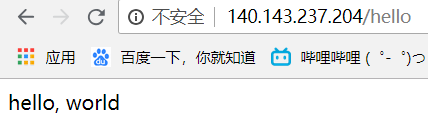
6、还有另一种方式,使用lua文件
继续编写nginx配置文件
location /hello {
content_by_lua_file /usr/local/openresty/nginx/conf/lua/hello.lua;
}
编写hello.lua文件
ngx.say('<p>hello world!</p>')
检查语法
./nginx -t -c /usr/local/openresty/nginx/conf/nginx.conf
重启nginx
./nginx -s reload -c /usr/local/openresty/nginx/conf/nginx.conf
测试一下
[root@VM_0_10_centos conf]# curl 127.0.0.1/hello
<p>hello world!</p>
成功输出了hello world!
OpenResty安装与hello world的更多相关文章
- mac下openresty安装
//openresty安装 http://openresty.org/ brew updatebrew install pcre openssl ./configure --prefix=/usr/l ...
- OpenResty 安装 drizzle-nginx-module
1.下载drizzle模块 wget http://openresty.org/download/drizzle7-2011.07.21.tar.gz 2.安装drizzle模块 tar zxvf d ...
- Openresty安装及使用配置(OPENRESTY+NGINX)
Openresty 简介 Openresty是一个基于NGINX和Lua的高性能Web平台,内部有大量的Lua库和第三方模块,能够很方便的搭建处理高并发,扩展性高的Web平台和动态网关,充分利用 Ng ...
- Openresty 安装第三方插件
Openresty 安装第三方插件 程序媛没有夜生活 2016.08.02 15:33* 字数 167 阅读 1283评论 0喜欢 2 在安装之前,我们先来看一下我们现有的模块. 1.将需要安装的插件 ...
- OpenResty 安装配置
0. 说明 1. Windows 下安装 下载软件包 openresty-1.13.6.1-win32.zip ,解压即可食用. [开启] 直接运行 nginx.exe 在 Windows 的命令窗口 ...
- openresty安装文档
一.OpenResty简介 OpenResty是一个基于 Nginx与 Lua的高性能 Web平台,其内部集成了大量精良的 Lua 库.第三方模块以及大多数的依赖项.用于方便地搭建能够处理超高并 ...
- CentOS7上OpenResty安装
1,OpenResty安装 通过repl源安装: sudo yum-config-manager --add-repo https://openresty.org/yum/cn/centos/Open ...
- openresty安装笔记
目录 安装步骤: openresty安装在ubuntu下的安装 参考 安装OpenResty(Nginx+Lua)开发环境 安装步骤: # 创建目录/usr/servers,以后我们把所有软件安装在此 ...
- OpenResty 安装及使用(第一篇安装)
OpenResty搭建 1.openResty介绍 OpenResty (也称为 ngx_openresty)是一个全功能的 Web 应用服务器.它打包了标准的 Nginx 核心,很多的常用的第三方模 ...
- Openresty 安装教程
Openresty的简单安装方法,如需高级编译安装,请参照安装选项 1.安装配置好Yum源,不赘述此步骤 2.安装必要组件 yum install pcre-devel openssl-devel g ...
随机推荐
- hibernate课程 初探单表映射1-8 hibernate持久化类
java beans 的设计原则 1 公有的类 2 共有不带参数构造方法 3 私有属性 4 属性setter/getter方法 Studnet类: package com.ddwei.student; ...
- flask之jinja2模板语言
一.jinja2简单介绍 Jinja2是Python里一个被广泛应用的模版引擎,他的设计思想来源于Django的模板引擎,并扩展了其语法和一系列强大的功能.其中最显著的一个是增加了沙箱执行功能和可选的 ...
- Nobody gives away anything valuable for free.
Nobody gives away anything valuable for free.没人会给你免费的午餐.
- Spring之IOC核心模块详解
Spring IOC简述 IOC称为控制反转,也有一种说法叫DI(依赖注入).IOC也是spring最核心的模块,Spring的所有工作几乎都围绕着IOC展开. 什么是控制反转呢?简单的说,控制反转就 ...
- linux 命令——56 netstat(转)
netstat命令用于显示与IP.TCP.UDP和ICMP协议相关的统计数据,一般用于检验本机各端口的网络连接情况.netstat是在内核中访问网络及相关信息的程序,它能提供TCP连接,TCP和UDP ...
- C++各大有名科学计算库(转)
在 C++中,库的地位是非常高的.C++之父 Bjarne Stroustrup先生多次表示了设计库来扩充功能要好过设计更多的语法的言论.现实中,C++的库门类繁多,解决的问题也是极其广泛,库从轻量级 ...
- Android(java)学习笔记90:TextView 添加超链接(两种实现方式)
1. TextView添加超链接: TextView添加超链接有两种方式,它们有区别于WebView: (1)方式1: LinearLayout layout = new LinearLayout(t ...
- iOS开发学习之大牛们的博客
http://blog.csdn.net/iosbird/article/details/51981023 唐巧:http://blog.devtang.com/blog/archives/ 王巍:h ...
- 使用RichTextBox控件保存文件
实习效果: 知识运用: RichTextBox控件的SaveFile方法 SaveFileDialog对象的ShowDialog方法 实现代码: private void 打开RTF文件ToolStr ...
- 在C++类中使用dllimport和dllexport导出,
在Windows平台下: 您可以使用dllimport或dllexport属性声明C ++类.这些形式意味着导入或导出整个类.以这种方式导出的类称为可导出类. 以下示例定义可导出的类.导出其所有成员函 ...