
可执行Jar包调用动态链接库(DLL/SO)
踩过了很多的坑,查了很多资料,在此记录一下,以SpringBoot项目为基础。
Maven加入JNA依赖
<!-- JNA start -->

<dependency>

  <groupId>com.sun.jna</groupId>

  <artifactId>jna</artifactId>

</dependency>

<!-- JNA end -->
动态链接库放在classpath下的natives文件夹下
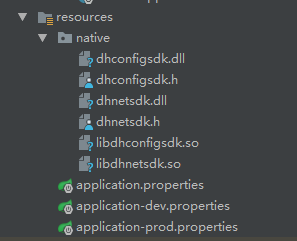
主入口中的代码
@ServletComponentScan

@SpringBootApplication

@ComponentScan("com.yunzhitx.sdy")

@MapperScan(basePackages = "com.yunzhitx.sdy.core.**.infra")

public class TaskApplication {

    @Bean

    public RestTemplate restTemplate() {

        return new RestTemplate();

    }

    public static void main(String[] args) {

        //加载动态链接库,注意和SpringBoot的启动

        String systemType = System.getProperty("os.name");

        if (systemType.toLowerCase().indexOf("win") != -1)

            loadNative("dhnetsdk");

        else

            loadNative("libdhnetsdk");

        SpringApplication.run(TaskApplication.class);

    }

    private synchronized static void loadNative(String nativeName) {

        String systemType = System.getProperty("os.name");

        String fileExt = (systemType.toLowerCase().indexOf("win") != -1) ? ".dll" : ".so";

//        String sysUserTempDir = System.getProperty("java.io.tmpdir");

        /*String javaLibraryPath = System.getProperty("java.library.path");

        String sysUserTempDir = "" ;

        if(systemType.toLowerCase().indexOf("win") != -1) {

            String[] dirs = javaLibraryPath.split(";");//分号

            sysUserTempDir = dirs[0];

        }else {

            String[] dirs = javaLibraryPath.split(":"); //冒号

            sysUserTempDir = dirs[0];

        }*/

        File path = new File(".");

        //将所有动态链接库dll/so文件都放在一个临时文件夹下,然后进行加载

        //这是应为项目为可执行jar文件的时候不能很方便的扫描里面文件

        //此目录放置在与项目同目录下的natives文件夹下

        String sysUserTempDir = path.getAbsoluteFile().getParent() + File.separator + "natives";

        System.out.println("------>>native lib临时存放目录 : " + sysUserTempDir);

        String fileName = nativeName + fileExt;

        InputStream in = null;

        BufferedInputStream reader = null;

        FileOutputStream writer = null;

        File tempFile = new File(sysUserTempDir + File.separator + fileName);

        if(!tempFile.getParentFile().exists())

            tempFile.getParentFile().mkdirs() ;

        if (tempFile.exists()) {

            tempFile.delete();

        }

        try {

            //读取文件形成输入流

            in = TaskApplication.class.getResourceAsStream("/native/" + fileName);

            if (in == null)

                in = TaskApplication.class.getResourceAsStream("native/" + fileName);

            TaskApplication.class.getResource(fileName);

            reader = new BufferedInputStream(in);

            writer = new FileOutputStream(tempFile);

            byte[] buffer = new byte[1024];

            while (reader.read(buffer) > 0) {

                writer.write(buffer);

                buffer = new byte[1024];

            }

        } catch (IOException e) {

            e.printStackTrace();

        } finally {

            try {

                if (in != null)

                    in.close();

                if (writer != null)

                    writer.close();

            } catch (IOException e) {

                e.printStackTrace();

            }

        }

        System.load(tempFile.getPath());

        System.out.println("------>> 加载native文件 :" + tempFile + "成功!!");

    }

}
主入口函数的代码主要是进行加载操作,当然也可以在需要使用到的地方在进行加载。
加载的时候进行了如下操作,1、将所有动态链接库dll/so文件都放在一个临时文件夹下。2、读取临时文件IO流进行加载。
这是应为项目为可执行jar文件的时候不能很方便的扫描里面文件
此目录代码放置在与项目同目录下的natives文件夹下。
在通过编写好的接口类进行实例化操作:
NetSDKLib monitorNetSdk = (NetSDKLib) Native.loadLibrary("dhnetsdk", NetSDKLib.class);
Linux系统下,需要将放置dll/so文件的文件夹加入到环境变量中,否则依然会提示找不到文件的错误:
export LD_LIBRARY_PATH=/home/sdy_task/natives

但是这种方式是临时性的,一旦重启就将失效,所有建议写入配置文件中:
修改/etc/profile,添加如下代码
LD_LIBRARY_PATH=/home/sdy_task/natives

export LD_LIBRARY_PATH

升级版
package org.yoki.edu.image.utils;

import java.io.*;

import java.net.JarURLConnection;

import java.net.URL;

import java.util.Enumeration;

import java.util.jar.JarEntry;

import java.util.jar.JarFile;

/**

 * @author Sky$

 * @Description: TODO

 * @date 2018/2/8$ 17:55$

 */

public class NativeLoader {

    /**

     * 加载项目下的native文件,DLL或SO

     *

     * @param dirPath 需要扫描的文件路径,项目下的相对路径

     * @throws IOException

     * @throws ClassNotFoundException

     */

    public synchronized static void loader(String dirPath) throws IOException, ClassNotFoundException {

        Enumeration<URL> dir = Thread.currentThread().getContextClassLoader().getResources(dirPath);

        // 获取操作系统类型

        String systemType = System.getProperty("os.name");

        String systemArch = System.getProperty("os.arch");

        // 获取动态链接库后缀名

        String ext = (systemType.toLowerCase().indexOf("win") != -1) ? ".dll" : ".so";

        while (dir.hasMoreElements()) {

            URL url = dir.nextElement();

            String protocol = url.getProtocol();

            if ("jar".equals(protocol)) {

                JarURLConnection jarURLConnection = (JarURLConnection) url.openConnection();

                JarFile jarFile = jarURLConnection.getJarFile();

                // 遍历Jar包

                Enumeration<JarEntry> entries = jarFile.entries();

                while (entries.hasMoreElements()) {

                    JarEntry jarEntry = entries.nextElement();

                    String entityName = jarEntry.getName();

                    if (jarEntry.isDirectory() || !entityName.startsWith(dirPath)) {

                        continue;

                    }

                    if (entityName.endsWith(ext)) {

                        loadJarNative(jarEntry);

                    }

                }

            } else if ("file".equals(protocol)) {

                File file = new File(url.getPath());

                loadFileNative(file, ext);

            }

        }

    }

    private static void loadFileNative(File file, String ext) {

        if (null == file) {

            return;

        }

        if (file.isDirectory()) {

            File[] files = file.listFiles();

            if (null != files) {

                for (File f : files) {

                    loadFileNative(f, ext);

                }

            }

        }

        if (file.canRead() && file.getName().endsWith(ext)) {

            try {

                System.load(file.getPath());

                System.out.println("加载native文件 :" + file + "成功!!");

            } catch (UnsatisfiedLinkError e) {

                System.out.println("加载native文件 :" + file + "失败!!请确认操作系统是X86还是X64!!!");

            }

        }

    }

    /**

     * @throws IOException

     * @throws ClassNotFoundException

     * @Title: scanJ

     * @Description 扫描Jar包下所有class

     */

    /**

     * 创建动态链接库缓存文件,然后加载资源文件

     *

     * @param jarEntry

     * @throws IOException

     * @throws ClassNotFoundException

     */

    private static void loadJarNative(JarEntry jarEntry) throws IOException, ClassNotFoundException {

        File path = new File(".");

        //将所有动态链接库dll/so文件都放在一个临时文件夹下,然后进行加载

        //这是应为项目为可执行jar文件的时候不能很方便的扫描里面文件

        //此目录放置在与项目同目录下的natives文件夹下

        String rootOutputPath = path.getAbsoluteFile().getParent() + File.separator;

        String entityName = jarEntry.getName();

        String fileName = entityName.substring(entityName.lastIndexOf("/") + 1);

        System.out.println(entityName);

        System.out.println(fileName);

        File tempFile = new File(rootOutputPath + File.separator + entityName);

        // 如果缓存文件路径不存在,则创建路径

        if (!tempFile.getParentFile().exists()) {

            tempFile.getParentFile().mkdirs();

        }

        // 如果缓存文件存在,则删除

        if (tempFile.exists()) {

            tempFile.delete();

        }

        InputStream in = null;

        BufferedInputStream reader = null;

        FileOutputStream writer = null;

        try {

            //读取文件形成输入流

            in = NativeLoader.class.getResourceAsStream(entityName);

            if (in == null) {

                in = NativeLoader.class.getResourceAsStream("/" + entityName);

                if (null == in) {

                    return;

                }

            }

            NativeLoader.class.getResource(fileName);

            reader = new BufferedInputStream(in);

            writer = new FileOutputStream(tempFile);

            byte[] buffer = new byte[1024];

            while (reader.read(buffer) > 0) {

                writer.write(buffer);

                buffer = new byte[1024];

            }

        } catch (IOException e) {

            e.printStackTrace();

        }

        try {

            if (in != null) {

                in.close();

            }

            if (writer != null) {

                writer.close();

            }

        } catch (IOException e) {

            e.printStackTrace();

        }

        try {

            System.load(tempFile.getPath());

            System.out.println("加载native文件 :" + tempFile + "成功!!");

        } catch (UnsatisfiedLinkError e) {

            System.out.println("加载native文件 :" + tempFile + "失败!!请确认操作系统是X86还是X64!!!");

        }

    }

}
可执行Jar包调用动态链接库(DLL/SO)的更多相关文章
- 【java-console】如何双击运行可执行jar包及遇到依赖dll报错问题的解决办法
如何配置双击运行可执行jar包的步骤,请移步到 这里 查看具体的操作,此处不再介绍. 本文主要解决如何处理依赖dll报错的问题解决办法. 我有一个jar包可执行文件运行需要依赖第三方的dll文 ...
- Jar包转成Dll的方式(带嵌套的jar也能做) (转)
研究很好几天,终于成功了.因为写了一个Java的项目,现在要求要改写成C#版本的.但是其中用到了svnkit,svnkit是java平台的.改写成C#的话,要使用SharpSVN,但是SharpSVN ...
- Jar包转成Dll的方式(带嵌套的jar也能做)
研究很好几天,终于成功了.因为写了一个Java的项目,现在要求要改写成C#版本的.但是其中用到了svnkit,svnkit是java平台的.改写成C#的话,要使用SharpSVN,但是SharpSVN ...
- SpringBoot+Maven多模块项目(创建、依赖、打包可执行jar包部署测试)完整流程
一,创建Maven多模块项目先建立外层父工程 File →new →project 选择Spring Initializr Next下一步到以下页面 工程结构如下 ...
- JAVA生成(可执行)Jar包的全面详解说明 [打包][SpringBoot][Eclipse][IDEA][Maven][Gradle][分离][可执行]
辛苦所得,转载还请注明: https://www.cnblogs.com/applerosa/p/9739007.html 得空整理了关于java 开发中,所有打包方式的 一个操作方法, 有基于ID ...
- eclipse导出maven工程的可执行jar包
一.eclipse导出maven工程的可执行jar包 建立两个maven工程 ZKServer 和ZKClient 注意:用maven进行开发管理的话,默认的打出来的jar包是不能运行的,需要在pom ...
- IDEA 直接点击运行执行正常,命令行下面执行Jar包出现部分乱码的情况。
解决方案如上: 有个Springboot项目为了测试方便,模型类用中文作为字段属性,封装成Odata格式,在通过Springboot发布并打成jar包. 通过命令行启动jar包里面的Springweb ...
- Spring Boot可执行Jar包运行原理
目录 1. 打可执行Jar包 2. 可执行Jar包内部结构 3. JarLauncher 4. 简单总结 5. 远程调试 Spring Boot有一个很方便的功能就是可以将应用打成可执行的Jar.那么 ...
- Unity通过Jar包调用Android
Unity通过Jar包调用Android 我们会需要面对下面几个问题,我们一个一个来解决: 怎样在Android Studio中打Jar包 怎样打一个Unity使用的Jar包 怎样在Unity工程中使 ...
随机推荐
- Controller方法返回值
1. 返回ModelAndView controller方法中定义ModelAndView对象并返回,对象中可添加model数据.指定view. //入门程序 第一 包类 + 类包 + 方法名 @Re ...
- bjam.exe 各个参数(转)
原文转自 http://m.blog.csdn.net/article/details?id=42265605 bjam.exe stage --toolset=msvc-12.0 --without ...
- hdu 4541(麻烦的模拟)
Ten Googol Time Limit: 500/200 MS (Java/Others) Memory Limit: 65535/32768 K (Java/Others)Total Su ...
- UVA - 294 Divisors【数论/区间内约数最多的数的约数个数】
Mathematicians love all sorts of odd properties of numbers. For instance, they consider to be an int ...
- SpringBoot第十一篇:SpringBoot+MyBatis+Thymelaf实现CRUD
作者:追梦1819 原文:https://www.cnblogs.com/yanfei1819/p/10936304.html 版权声明:本文为博主原创文章,转载请附上博文链接! 引言 总结前面几 ...
- 洛谷——P1098 字符串的展开
P1098 字符串的展开 题目描述 在初赛普及组的“阅读程序写结果”的问题中,我们曾给出一个字符串展开的例子:如果在输入的字符串中,含有类似于“d-h”或者“4-8”的字串,我们就把它当作一种简写,输 ...
- ssh免秘钥登陆实现
1.用处 搭建集群或者工作中登陆跳板机经常需要做免秘钥互相登陆彼此服务器. 2. 准备工作 假设A主机10.20.0.1想通过ssh登录到B主机10.20.0.2上. 那么客户端(A主机)需要 ...
- go语言学习之路六:接口详解
Go语言没有类和继承的概念,但是接口的存在使得它可以实现很多面向对象的特性.接口定义了一些方法,但是这些方法不包含实现的代码.也就是说这些代码没有被实现(抽象的方法).同时接口里面也不包含变量. 看一 ...
- Mac 奇淫巧技 哈哈
1. 设置别名 sudo vim ~/.bash_profile alias ll='ls -lhF' alias la='ls -hlAF' alias c='clear' alias rm='ls ...
- Scut游戏服务器引擎6.1.5.6发布,直接可运行,支持热更新
1. 增加exe版(console),web版本(IIS)的游戏服宿主程序 2. 增加Model支持脚本化,实现不停服更新 3. 增加Language支持脚本化 4. 修改Sns与Pay Center ...