
android 之 Dialog
Android平台下对话框主要有普通对话框、选项对话框、单选多选对话框、进度对话框、日期对话框、时间对话框等。
在程序中通过开发回调方法onCreateDialog来完成对话框的创建,该方法需要传入代表对话框id参数。如果要显示对话框,则调用showDialog方法传入对话框的id来显示指定对话框。
当对话框第一次被显示时,会调用onCreateDialog方法来创建对话框实例,之后将不再重复创建该实例。每次对话框在被显示之前都会调用onPrepareDialog方法,如不重写该方法,每次显示的对话框都将是最初创建的那个。
关闭对话框可用dismiss方法实现。但如果需要让对话框在关闭之后彻底被清除,要调用removeDialog方法并传入dialog的id来彻底释放对话框。
onDismissListener方法可在关闭对话框时执行一些特定工作。
例子如下:
界面上放置四个按钮:
<?xml version="1.0" encoding="utf-8"?>
<LinearLayout xmlns:android="http://schemas.android.com/apk/res/android"
android:orientation="vertical" android:layout_width="fill_parent"
android:layout_height="fill_parent">
<TextView android:id="@+id/tv01" android:layout_width="fill_parent"
android:layout_height="wrap_content" android:text="@string/hello" />
<Button android:id="@+id/bt01" android:layout_width="fill_parent"
android:layout_height="wrap_content" android:text="普通对话框" />
<Button android:id="@+id/bt02" android:layout_width="fill_parent"
android:layout_height="wrap_content" android:text="列表对话框" />
<Button android:id="@+id/bt03" android:layout_width="fill_parent"
android:layout_height="wrap_content" android:text="单选按钮对话框" />
<Button android:id="@+id/bt04" android:layout_width="fill_parent"
android:layout_height="wrap_content" android:text="复选按钮对话框" />
<Button android:id="@+id/bt05" android:layout_width="fill_parent"
android:layout_height="wrap_content" android:text="日期对话框" />
<Button android:id="@+id/bt06" android:layout_width="fill_parent"
android:layout_height="wrap_content" android:text="时间对话框" />
<Button android:id="@+id/bt07" android:layout_width="fill_parent"
android:layout_height="wrap_content" android:text="进度条对话框" />
<DigitalClock android:text="DigitalClock"
android:textSize="20dip" android:gravity="center" android:id="@+id/dclock01"
android:layout_width="fill_parent" android:layout_height="wrap_content" />
<AnalogClock android:text="AnalogClock" android:textSize="20dip"
android:gravity="center" android:id="@+id/aclock01"
android:layout_width="fill_parent" android:layout_height="wrap_content" />
</LinearLayout>
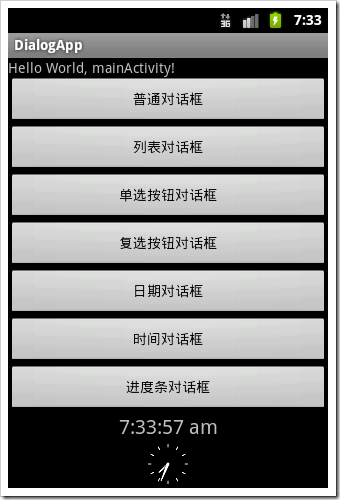
为每个按钮绑定OnClikListener,其中用showDialog(id)方法显示对话框:
bt01.setOnClickListener(new Button.OnClickListener(){
@Override
public void onClick(View v) {
// TODO Auto-generated method stub
showDialog(COMMON_DIALOG);
}});
覆写onCreateDialog方法:
@Override
protected Dialog onCreateDialog(int id) {
// TODO Auto-generated method stub
Dialog dialog = null;
switch (id) {
case COMMON_DIALOG:
Builder b1 = new AlertDialog.Builder(this);
b1.setIcon(R.drawable.img01);
b1.setTitle("普通对话框标题");
b1.setMessage("普通对话框内容");
b1.setPositiveButton("确定", new OnClickListener() {@Override
public void onClick(DialogInterface dialog, int which) {
// TODO Auto-generated method stub
tv.setText("您选择了普通对话框");
}
});
dialog = b1.create();
break;
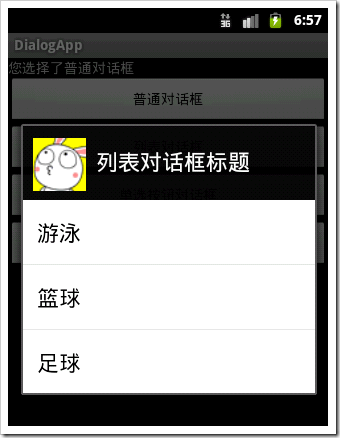
case LIST_DIALOG:
Builder b2 = new AlertDialog.Builder(this);
b2.setIcon(R.drawable.img01);
b2.setTitle("列表对话框标题");
b2.setItems(R.array.msa, new DialogInterface.OnClickListener() {
@Override
public void onClick(DialogInterface dialog, int which) {
// TODO Auto-generated method stub
tv.setText("您选择了:"+getResources().getStringArray(R.array.msa)[which]);
}
});
dialog = b2.create();
break;/*其中R.array.msa在res/values下array.xml中:
<?xml version="1.0" encoding="utf-8"?>
<resources>
<string-array name="msa">
<item>游泳</item>
<item>篮球</item>
<item>足球</item>
</string-array>
</resources>*/
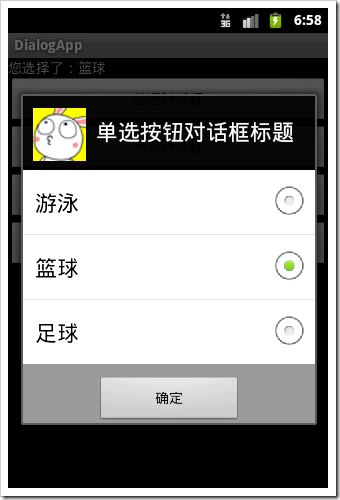
case LIST_DIALOG_SINGLE:
Builder b3 = new AlertDialog.Builder(this);
b3.setIcon(R.drawable.img01);
b3.setTitle("单选按钮对话框标题");
b3.setSingleChoiceItems(R.array.msa, 0,new DialogInterface.OnClickListener() {
@Override
public void onClick(DialogInterface dialog, int which) {
// TODO Auto-generated method stub
tv.setText("您选择了:"+getResources().getStringArray(R.array.msa)[which]);
}
});
b3.setPositiveButton("确定", new DialogInterface.OnClickListener() {
@Override
public void onClick(DialogInterface dialog, int which) {
// TODO Auto-generated method stub
}
});
dialog = b3.create();
break;
case LIST_DIALOG_MULTIPLE:

Builder b4 = new AlertDialog.Builder(this);
b4.setIcon(R.drawable.img01);
b4.setTitle("复选按钮对话框标题");
b4.setMultiChoiceItems(R.array.msa, mulFlags,new DialogInterface.OnMultiChoiceClickListener() {
@Override
public void onClick(DialogInterface dialog, int which, boolean isChecked) {
// TODO Auto-generated method stub
mulFlags[which]=isChecked;
String result="您选择了:";
for(int i=0;i<mulFlags.length;i++){
if(mulFlags[i]){
result+=items[i]+"、";
}
}
tv.setText(result.substring(0, result.length()-1));
}
});
b4.setPositiveButton("确定", new DialogInterface.OnClickListener() {
@Override
public void onClick(DialogInterface dialog, int which) {
// TODO Auto-generated method stub
}
});
dialog = b4.create();
break;
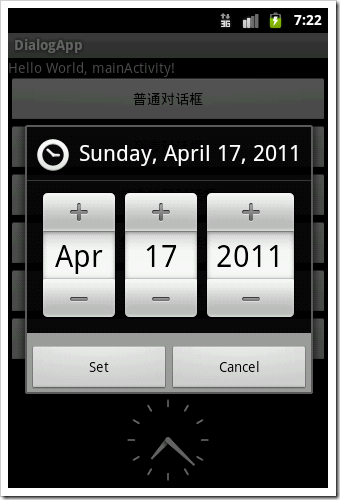
case DATE_DIALOG:
c=Calendar.getInstance();
dialog=new DatePickerDialog(this, new DatePickerDialog.OnDateSetListener() {
@Override
public void onDateSet(DatePicker view, int year, int monthOfYear,
int dayOfMonth) {
// TODO Auto-generated method stub
tv.setText("您选择了"+year+"年"+monthOfYear+"月"+dayOfMonth+"日");
}
}, c.get(Calendar.YEAR), c.get(Calendar.MONTH), c.get(Calendar.DAY_OF_MONTH));
case TIME_DIALOG:
c=Calendar.getInstance();
dialog=new TimePickerDialog(this, new TimePickerDialog.OnTimeSetListener() {@Override
public void onTimeSet(TimePicker view, int hourOfDay, int minute) {
// TODO Auto-generated method stub
tv.setText("您选择了"+hourOfDay+"时"+minute+"分");
}
}, c.get(Calendar.HOUR_OF_DAY), c.get(Calendar.MINUTE),false);
case PROGRESS_DIALOG:
pd = new ProgressDialog(this);
pd.setMax(100);
pd.setProgressStyle(ProgressDialog.STYLE_HORIZONTAL);
pd.setTitle("安装进度");
pd.setCancelable(false);
dialog=pd;
break;
default:
break;
}
return dialog;
}



显示进度进度条需要时刻更新进度条进度,因此需要覆写onPrepareDialpg方法:
@Override
protected void onPrepareDialog(int id, Dialog dialog) {
// TODO Auto-generated method stub
super.onPrepareDialog(id, dialog);
switch (id) {
case PROGRESS_DIALOG:
pd.incrementProgressBy(-pd.getProgress());
new Thread() {//该线程负责进度对话框的进度,并发送消息至主Activity的handler对象进行更新。
public void run() {
while (true) {
myHandler.sendEmptyMessage(INCREASE);
if (pd.getProgress() >= 100) {
break;
}
try {
Thread.sleep(40);
} catch (Exception e) {
e.printStackTrace();
}
}
}
}.start();
}
}
主函数中myhandler:
myHandler = new Handler() {
@Override
public void handleMessage(Message msg) {
// TODO Auto-generated method stubswitch (msg.what) {
case INCREASE:
pd.incrementProgressBy(1);
if (pd.getProgress() >= 100) {
pd.dismiss();
}
break;
}
super.handleMessage(msg);
}};
android 之 Dialog的更多相关文章
- Android PopupWindow Dialog 关于 is your activity running 崩溃详解
Android PopupWindow Dialog 关于 is your activity running 崩溃详解 [TOC] 起因 对于 PopupWindow Dialog 需要 Activi ...
- Android 自定义Dialog类,并在Activity中实现按钮监听。
实际开发中,经常会用到Dialog,比如退出时候会弹出是否退出,或者还有一些编辑框也会用Dialog实现,效果图如下: 开发中遇到的问题无非在于如果在Activity中监听这个Dialog中实现的 ...
- Android 对话框(Dialog)大全 建立你自己的对话框
Android 对话框(Dialog)大全 建立你自己的对话框 原文地址: http://www.cnblogs.com/salam/archive/2010/11/15/1877512.html A ...
- Android自定义Dialog
Android开发过程中,常常会遇到一些需求场景——在界面上弹出一个弹框,对用户进行提醒并让用户进行某些选择性的操作, 如退出登录时的弹窗,让用户选择“退出”还是“取消”等操作. Android系统提 ...
- Android中Dialog
在Android中,Dialog是一个非常重要的UI, 它可以方便的给用户提示,用最简洁的方式向用户展示信息, 以下的图片是Dialog的一个整体架构,通过它,可以总体对Dialog有一个很清晰的认识 ...
- android之dialog
先编写activity_main.xml文件 代码如下: <LinearLayout xmlns:android="http://schemas.android.com/apk/res ...
- Android之Dialog详解
Android中的对话框形式大致可分为五种:分别是一般对话框形式,列表对话框形式,单选按钮对话框,多选按钮对话框,自定义对话框. 在实际开发中,用系统的对话框会很少,因为太丑了,美工不愿意,多是使用自 ...
- Android 封装Dialog
package com.example.myandroid01; import android.support.v7.app.ActionBarActivity; import android.os. ...
- Android中Dialog对话框
布局文件xml: <LinearLayout xmlns:android="http://schemas.android.com/apk/res/android" xmlns ...
- Android中Dialog的使用
上一篇博文讲到对话框popWindow的使用,这篇博文主要解说Dialog的使用. 1.什么是Dialog? Dialog就是对话框的一种方式! 在Android开发中.我们常常会须要在Android ...
随机推荐
- IIS+PHP访问量大时内存爆满等性能问题解决方案
如今还是有许多人在用老掉牙的 IIS6 + PHP.本文解决方法适用于使用 FastCGI 运行 PHP 的用户. 问题原因: 你可以试一试,你在 VPS 上用 IIS6 安装 FastCGI 跑 P ...
- Notepad++ 安装 Zen Coding / Emmet 插件
Zen Coding 插件 ============== 下载: Zen.Coding-Notepad++.v0.7.zip ==Installation== 1. Copy contents of ...
- Django模板导入及母版继承和自定义返回Html片段
1.ROOT_URLCONF = '总路由所在路径(比如untitled.urls)'<===默认情况是这样 根路由的路径是可以修改的:ROOT_URLCONF = app01.urls< ...
- Android实现按钮点击效果(第一次点击变色,第二次恢复)
1.首先创建一个按钮 <Button android:id="@+id/click" android:layout_width="fill_parent" ...
- COGS 1144. [尼伯龙根之歌] 精灵魔法
★ 输入文件:alfheim.in 输出文件:alfheim.out 简单对比时间限制:1 s 内存限制:128 MB [题目背景] 『谜题在丛林中散发芳香绿叶上露珠跳跃着歌唱火焰在隐 ...
- iOS7.1企业应用"无法安装应用程序 因为证书无效"的解决方案
今天升级了iOS7.1后发现通过之前的url无法安装企业应用了,一直提示“无法安装应用程序 因为http://xxx.xxx.xxx证书无效”,折腾了一番,终于在StackOverFlow上找到了答案 ...
- ftl-server静态资源服务器
ftl-server 是一前端开发工具,支持解析freemarker模板,模拟后端接口,反向代理等功能. 特性 解析freemarker模板 静态资源服务 mock请求 代理请求 livereload ...
- C# 队列Queue
using System; using System.Collections.Generic; using System.Linq; namespace Queue测试 { class Program ...
- Linux下MongoDB的安装、配置、启动
下载 MongoDB下载地址为 https://www.mongodb.org/downloads 安装 将文件放到/usr/local/目录下并解压 tar -zxvf mongodb-linux- ...
- 连接器前置挂载U盾
连接器前置挂载U盾 1. 宿主机配置及其信息 虚拟化软件版本 主机名 宿主机IP 账号及其密码 WorkStation windows idca- vm01 172.16.6.30 * Qemu-kv ...