
向现有mvc程序中加入devexpress report
Open your ASP.NET MVC project. In the main menu of Visual Studio, click the DEVEXPRESS submenu and select ASP.NET Controls v17.1 | Run Wizard to Update Project....
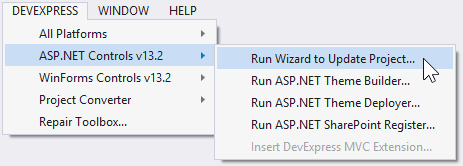
2.This invokes the DevExpress ASP.NET MVC Project Wizard. This wizard allows you to customize the settings specific to DevExpress ASP.NET MVC Extensions (e.g., you can select the required theme or select the localization). After the required settings have been specified, click Update Project.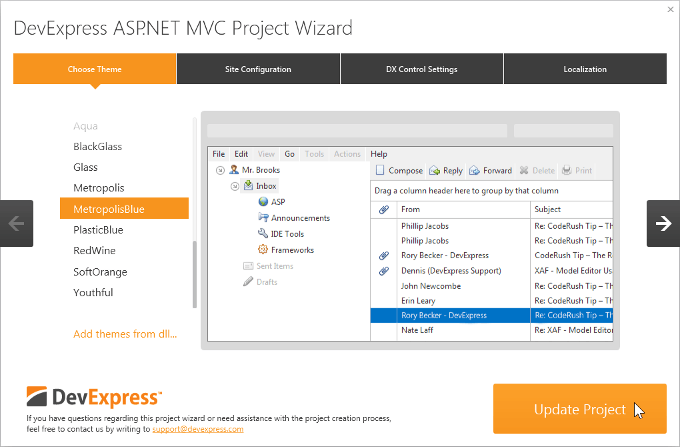
3.Attach the required JavaScript files.
All the DevExpress ASP.NET MVC extensions require attaching the jQuery library and some of them also require attaching additional libraries.
- Important
If you attach the jQuery scripts manually, the jQuery script must be attached before attaching the DevExpress client script files, in order to avoid possible errors.
If you bundled your JavaScript files, the bundle with jQuery library must be attached before attaching the DevExpress client script files. By default, the standard ASP.NET MVC 4 and 5 projects locate reference to the JavaScript bundle at the bottom of the "_Layout.cshtml" page.
For an ASP.NET MVC extension to work properly, you either need to manually add the required external libraries, or enable the control to load them automatically by adding the following references to the "resources" section in the Web.config file.
<devExpress>

    <!-- ... -->

    <resources>

        <add type="ThirdParty" />

        <add type="DevExtreme" />

    </resources>

</devExpress>
<configuration>

  <configSections>

    <sectionGroup name="devExpress">

      <!-- ...  -->

      <section name="resources" type="DevExpress.Web.ResourcesConfigurationSection, DevExpress.Web.v17.1, Version=17.1.2.0, Culture=neutral, PublicKeyToken=b88d1754d700e49a" requirePermission="false" />

    </sectionGroup>

  </configSections>

<!-- ...  -->

</configuration>
<!DOCTYPE html>
<html>
<head>
<script src="~/Scripts/jquery-1.12.4.js"></script>
<script src="~/Scripts/jquery-ui-1.12.1.min.js"></script>
<script src="~/Scripts/dev/knockout-3.3.0.js"></script>
<script src="~/Scripts/dev/globalize.min.js"></script>
@Html.DevExpress().GetStyleSheets(
new StyleSheet { ExtensionSuite = ExtensionSuite.NavigationAndLayout },
new StyleSheet { ExtensionSuite = ExtensionSuite.Editors },
new StyleSheet { ExtensionSuite = ExtensionSuite.HtmlEditor },
new StyleSheet { ExtensionSuite = ExtensionSuite.GridView },
new StyleSheet { ExtensionSuite = ExtensionSuite.PivotGrid },
new StyleSheet { ExtensionSuite = ExtensionSuite.Chart },
new StyleSheet { ExtensionSuite = ExtensionSuite.Report },
new StyleSheet { ExtensionSuite = ExtensionSuite.Scheduler },
new StyleSheet { ExtensionSuite = ExtensionSuite.TreeList },
new StyleSheet { ExtensionSuite = ExtensionSuite.RichEdit },
new StyleSheet { ExtensionSuite = ExtensionSuite.Spreadsheet },
new StyleSheet { ExtensionSuite = ExtensionSuite.SpellChecker },
new StyleSheet { ExtensionSuite = ExtensionSuite.Report }
)
@Html.DevExpress().GetScripts(
new Script { ExtensionSuite = ExtensionSuite.NavigationAndLayout },
new Script { ExtensionSuite = ExtensionSuite.HtmlEditor },
new Script { ExtensionSuite = ExtensionSuite.GridView },
new Script { ExtensionSuite = ExtensionSuite.PivotGrid },
new Script { ExtensionSuite = ExtensionSuite.Editors },
new Script { ExtensionSuite = ExtensionSuite.Chart },
new Script { ExtensionSuite = ExtensionSuite.Report },
new Script { ExtensionSuite = ExtensionSuite.Scheduler },
new Script { ExtensionSuite = ExtensionSuite.TreeList },
new Script { ExtensionSuite = ExtensionSuite.RichEdit },
new Script { ExtensionSuite = ExtensionSuite.Spreadsheet },
new Script { ExtensionSuite = ExtensionSuite.SpellChecker },
new Script { ExtensionSuite = ExtensionSuite.Report }
)
</head>
<body>
<div>
@RenderBody()
<hr />
</div>
</body>
</html>
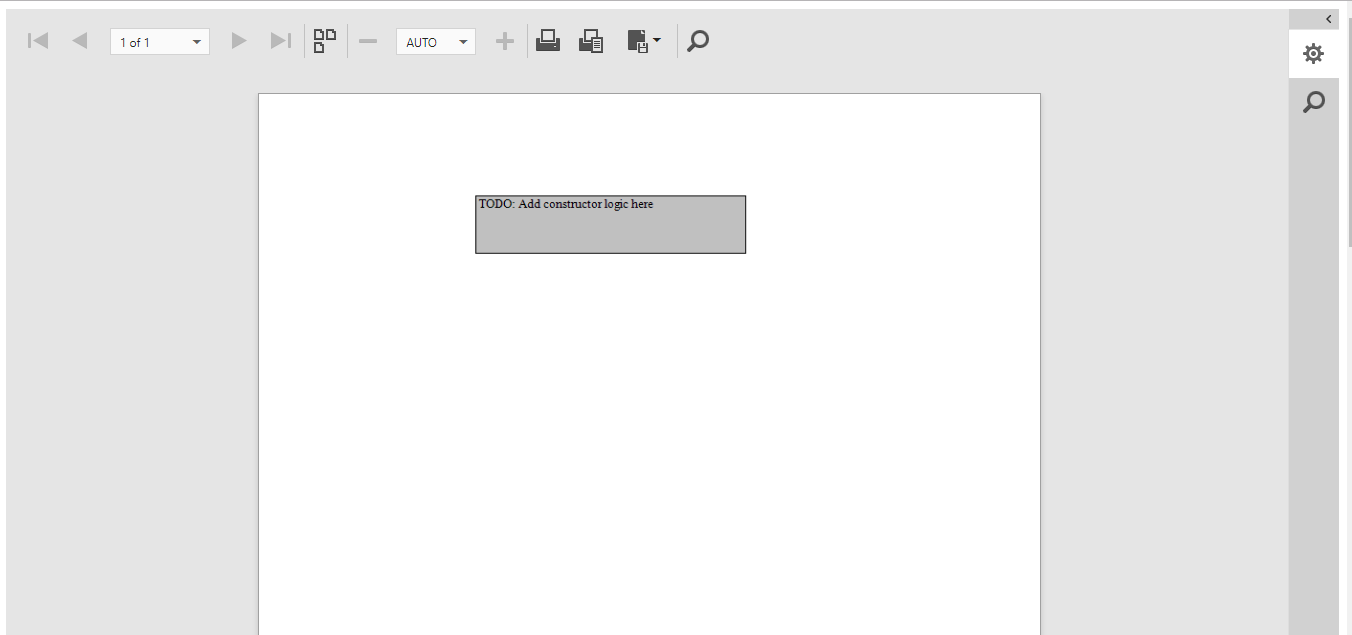
https://documentation.devexpress.com/XtraReports/115657/Getting-Started/ASP-NET-MVC-Reports-Lessons/Lesson-1-Publish-a-Report-in-an-ASP-NET-MVC-Application
https://documentation.devexpress.com/AspNet/114491/ASP-NET-MVC-Extensions/Report-Extensions/Document-Viewer/HTML5-Document-Viewer
https://documentation.devexpress.com/AspNet/8162/ASP-NET-MVC-Extensions/Getting-Started/Integration-into-ASP-NET-MVC-Project/Integration-into-an-Existing-Project-Using-Wizards
向现有mvc程序中加入devexpress report的更多相关文章
- [渣译文] 使用 MVC 5 的 EF6 Code First 入门 系列:MVC程序中实体框架的连接恢复和命令拦截
这是微软官方教程Getting Started with Entity Framework 6 Code First using MVC 5 系列的翻译,这里是第四篇:MVC程序中实体框架的连接恢复和 ...
- 用 MVC 5 的 EF6 Code First 入门 系列:MVC程序中实体框架的Code First迁移和部署
用 MVC 5 的 EF6 Code First 入门 系列:MVC程序中实体框架的Code First迁移和部署 这是微软官方SignalR 2.0教程Getting Started with En ...
- MVC程序中实体框架的连接恢复和命令拦截
MVC程序中实体框架的连接恢复和命令拦截 这是微软官方SignalR 2.0教程Getting Started with Entity Framework 6 Code First using MVC ...
- Spring MVC程序中得到静态资源文件css,js,图片文件的路径问题总结
上一篇 | 下一篇 Spring MVC程序中得到静态资源文件css,js,图片 文件的路径 问题总结 作者:轻舞肥羊 日期:2012-11-26 http://www.blogjava.net/fi ...
- 在Asp.net Razor Pages/MVC程序中集成Blazor
今天试了一下在Asp.net core Razor Pages/MVC程序中集成Blazor(Server-side),还是可以完美整合的,这里以Razor Pages为例(.net core 3.1 ...
- Spring MVC程序中得到静态资源文件css,js,图片
转载自:http://www.blogjava.net/fiele/archive/2014/08/24/417283.html 用 Spring MVC 开发应用程序,对于初学者有一个很头疼的问题, ...
- Spring MVC程序中怎么得到静态资源文件css,js,图片文件的路径问题
问题描述 在用springmvc开发应用程序的时候.对于像我一样的初学者,而且还是自学的人,有一个很头疼的问题.那就是数据都已经查出来了,但是页面的样式仍然十分简陋,加载不了css.js,图片等资源文 ...
- MVC程序中实体框架的Code First迁移和部署
01. 启用迁移 [在控制台中,输入以下命令:]enable-migrations //命令将在项目中创建一个迁移文件夹.同时文件夹中包含一个Configuration.cs文件,你可以编辑该文件来 ...
- ASP.NET MVC程序中动态修改form的Action值
在练习ASP.NET MVC时,为了实现一个小功能,POST数据至服务器执行时,需要动态修改form的action值. 下面Insus.NET列举一个例子来演示它.让它简单,明白易了解. 你可以在控制 ...
随机推荐
- Jquery查询分析器
find() 方法获得当前元素集合中每个元素的后代,通过选择器.jQuery 对象或元素来筛选.$(this).find("ul[index=1] div input:radio:check ...
- Azure继续降价云 价格战就此终结?
[TechTarget中国原创] 刚刚跨入2016年,就听到了云降价这样一个消息,但是我们却不要期望降价之风如去年一样呼呼不绝. 微软公司在本周宣称,他们将在下个月对其D系列虚拟机实施高达17%的降价 ...
- 图说不为人知的IT传奇故事-1-计算机新生
此系列文章为“图说不为人知的IT传奇故事”,各位大忙人可以在一分钟甚至几秒内了解把握整个内容,真可谓“大忙人的福利”呀!!希望各位IT界的朋友在钻研技术的同时,也能在文学.历史上有所把握.了解这些故事 ...
- chrome浏览器设置自动切换代理上网的方法
利用shadowsocks代理软件实现FQ时,如果都走代理模式,流量肯定不够.可以利用chrome的SwitchyOmega插件实现自动根据URL来决定是否使用代理.设置如下: 1.安装Switchy ...
- HTTP-响应状态
响应状态 有多种响应状态,如:200代表成功,301跳转,404找不到页面,502服务器错误 1xx消息 —— 请求已被服务器接收,继续处理 2xx成功 —— 请求已成功被服务器接收.理解.并接受 3 ...
- Java学习4之抽象类
在面向父类编程的过程中,抽象出来的父类具有一般化特质.父类函数只是一个抽象化的概念,只是为了在面向对象编程时统一接口服务. example: 有时父类会定义出一些无法实现的行为: public voi ...
- 课堂笔记III
- java中使用二进制进行权限控制
基本概念 package test; publicclass Rights { publicstaticvoid main(String[] args) { int a=1; // 001 状态a i ...
- [CQOI2015][bzoj3930] 选数 [杜教筛+莫比乌斯反演]
题面: 传送门 思路: 首先我们把区间缩小到$\left[\lfloor\frac{L-1}{K}\rfloor,\lfloor\frac{R}{K}\rfloor\right]$ 这道题的最特殊的点 ...
- 刷题总结——Genghis Khan the Conqueror (hdu4126)
题目: Genghis Khan(成吉思汗)(1162-1227), also known by his birth name Temujin(铁木真) and temple name Taizu(元 ...