
向现有mvc程序中加入devexpress report
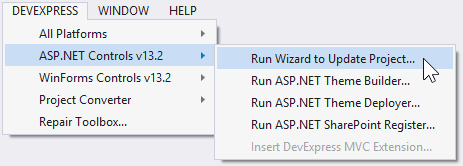
Open your ASP.NET MVC project. In the main menu of Visual Studio, click the DEVEXPRESS submenu and select ASP.NET Controls v17.1 | Run Wizard to Update Project....
2.This invokes the DevExpress ASP.NET MVC Project Wizard. This wizard allows you to customize the settings specific to DevExpress ASP.NET MVC Extensions (e.g., you can select the required theme or select the localization). After the required settings have been specified, click Update Project.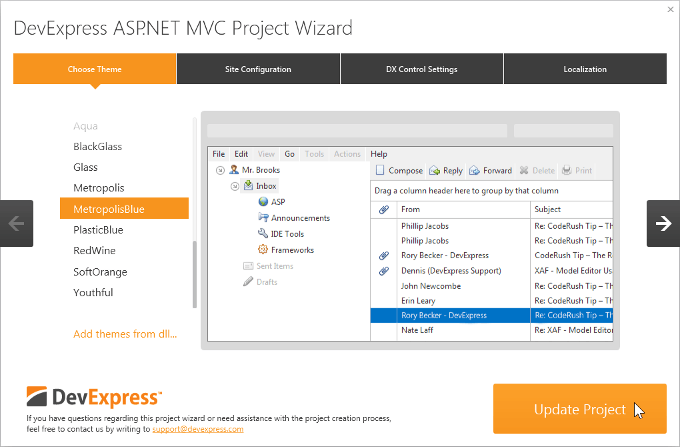
3.Attach the required JavaScript files.
All the DevExpress ASP.NET MVC extensions require attaching the jQuery library and some of them also require attaching additional libraries.
- Important
If you attach the jQuery scripts manually, the jQuery script must be attached before attaching the DevExpress client script files, in order to avoid possible errors.
If you bundled your JavaScript files, the bundle with jQuery library must be attached before attaching the DevExpress client script files. By default, the standard ASP.NET MVC 4 and 5 projects locate reference to the JavaScript bundle at the bottom of the "_Layout.cshtml" page.
For an ASP.NET MVC extension to work properly, you either need to manually add the required external libraries, or enable the control to load them automatically by adding the following references to the "resources" section in the Web.config file.
<devExpress>

    <!-- ... -->

    <resources>

        <add type="ThirdParty" />

        <add type="DevExtreme" />

    </resources>

</devExpress>
<configuration>

  <configSections>

    <sectionGroup name="devExpress">

      <!-- ...  -->

      <section name="resources" type="DevExpress.Web.ResourcesConfigurationSection, DevExpress.Web.v17.1, Version=17.1.2.0, Culture=neutral, PublicKeyToken=b88d1754d700e49a" requirePermission="false" />

    </sectionGroup>

  </configSections>

<!-- ...  -->

</configuration>
<!DOCTYPE html>
<html>
<head>
<script src="~/Scripts/jquery-1.12.4.js"></script>
<script src="~/Scripts/jquery-ui-1.12.1.min.js"></script>
<script src="~/Scripts/dev/knockout-3.3.0.js"></script>
<script src="~/Scripts/dev/globalize.min.js"></script>
@Html.DevExpress().GetStyleSheets(
new StyleSheet { ExtensionSuite = ExtensionSuite.NavigationAndLayout },
new StyleSheet { ExtensionSuite = ExtensionSuite.Editors },
new StyleSheet { ExtensionSuite = ExtensionSuite.HtmlEditor },
new StyleSheet { ExtensionSuite = ExtensionSuite.GridView },
new StyleSheet { ExtensionSuite = ExtensionSuite.PivotGrid },
new StyleSheet { ExtensionSuite = ExtensionSuite.Chart },
new StyleSheet { ExtensionSuite = ExtensionSuite.Report },
new StyleSheet { ExtensionSuite = ExtensionSuite.Scheduler },
new StyleSheet { ExtensionSuite = ExtensionSuite.TreeList },
new StyleSheet { ExtensionSuite = ExtensionSuite.RichEdit },
new StyleSheet { ExtensionSuite = ExtensionSuite.Spreadsheet },
new StyleSheet { ExtensionSuite = ExtensionSuite.SpellChecker },
new StyleSheet { ExtensionSuite = ExtensionSuite.Report }
)
@Html.DevExpress().GetScripts(
new Script { ExtensionSuite = ExtensionSuite.NavigationAndLayout },
new Script { ExtensionSuite = ExtensionSuite.HtmlEditor },
new Script { ExtensionSuite = ExtensionSuite.GridView },
new Script { ExtensionSuite = ExtensionSuite.PivotGrid },
new Script { ExtensionSuite = ExtensionSuite.Editors },
new Script { ExtensionSuite = ExtensionSuite.Chart },
new Script { ExtensionSuite = ExtensionSuite.Report },
new Script { ExtensionSuite = ExtensionSuite.Scheduler },
new Script { ExtensionSuite = ExtensionSuite.TreeList },
new Script { ExtensionSuite = ExtensionSuite.RichEdit },
new Script { ExtensionSuite = ExtensionSuite.Spreadsheet },
new Script { ExtensionSuite = ExtensionSuite.SpellChecker },
new Script { ExtensionSuite = ExtensionSuite.Report }
)
</head>
<body>
<div>
@RenderBody()
<hr />
</div>
</body>
</html>
https://documentation.devexpress.com/XtraReports/115657/Getting-Started/ASP-NET-MVC-Reports-Lessons/Lesson-1-Publish-a-Report-in-an-ASP-NET-MVC-Application
https://documentation.devexpress.com/AspNet/114491/ASP-NET-MVC-Extensions/Report-Extensions/Document-Viewer/HTML5-Document-Viewer
https://documentation.devexpress.com/AspNet/8162/ASP-NET-MVC-Extensions/Getting-Started/Integration-into-ASP-NET-MVC-Project/Integration-into-an-Existing-Project-Using-Wizards
向现有mvc程序中加入devexpress report的更多相关文章
- [渣译文] 使用 MVC 5 的 EF6 Code First 入门 系列:MVC程序中实体框架的连接恢复和命令拦截
这是微软官方教程Getting Started with Entity Framework 6 Code First using MVC 5 系列的翻译,这里是第四篇:MVC程序中实体框架的连接恢复和 ...
- 用 MVC 5 的 EF6 Code First 入门 系列:MVC程序中实体框架的Code First迁移和部署
用 MVC 5 的 EF6 Code First 入门 系列:MVC程序中实体框架的Code First迁移和部署 这是微软官方SignalR 2.0教程Getting Started with En ...
- MVC程序中实体框架的连接恢复和命令拦截
MVC程序中实体框架的连接恢复和命令拦截 这是微软官方SignalR 2.0教程Getting Started with Entity Framework 6 Code First using MVC ...
- Spring MVC程序中得到静态资源文件css,js,图片文件的路径问题总结
上一篇 | 下一篇 Spring MVC程序中得到静态资源文件css,js,图片 文件的路径 问题总结 作者:轻舞肥羊 日期:2012-11-26 http://www.blogjava.net/fi ...
- 在Asp.net Razor Pages/MVC程序中集成Blazor
今天试了一下在Asp.net core Razor Pages/MVC程序中集成Blazor(Server-side),还是可以完美整合的,这里以Razor Pages为例(.net core 3.1 ...
- Spring MVC程序中得到静态资源文件css,js,图片
转载自:http://www.blogjava.net/fiele/archive/2014/08/24/417283.html 用 Spring MVC 开发应用程序,对于初学者有一个很头疼的问题, ...
- Spring MVC程序中怎么得到静态资源文件css,js,图片文件的路径问题
问题描述 在用springmvc开发应用程序的时候.对于像我一样的初学者,而且还是自学的人,有一个很头疼的问题.那就是数据都已经查出来了,但是页面的样式仍然十分简陋,加载不了css.js,图片等资源文 ...
- MVC程序中实体框架的Code First迁移和部署
01. 启用迁移 [在控制台中,输入以下命令:]enable-migrations //命令将在项目中创建一个迁移文件夹.同时文件夹中包含一个Configuration.cs文件,你可以编辑该文件来 ...
- ASP.NET MVC程序中动态修改form的Action值
在练习ASP.NET MVC时,为了实现一个小功能,POST数据至服务器执行时,需要动态修改form的action值. 下面Insus.NET列举一个例子来演示它.让它简单,明白易了解. 你可以在控制 ...
随机推荐
- angular用$sce服务来过滤HTML标签
angular js的强大之处之一就是他的数据双向绑定这一牛B功能,我们会常常用到的两个东西就是ng-bind和针对form的ng-model.但在我们的项目当中会遇到这样的情况,后台返回的数据中带有 ...
- 设计模式之第19章-中介者模式(Java实现)
设计模式之第19章-中介者模式(Java实现) “测试妹纸找你,你的代码出问题了.”“美工妹纸让你看看界面怎么样.”身为程序员总要和各种人打交道,但是如果再分为前端.后端工程师的话,那么关系就会错综复 ...
- ios开发学习笔记003-流程控制和类型转换
流程控制 顺序结构.选择结构.循环结构 1.顺序结构 程序默认是顺序执行的. 2.选择结构 if选择语句 第一种情况 if(条件)//条件成立执行下面语句 { //语句 } 第二种情况 if(条件)/ ...
- Pass Data Between ASP.NET Pages
There is the data to send in current page <asp:TextBox ID="DataToSendTextBox" runat=&qu ...
- apizza导出为html后,从中提取api_name/api_path/api_method,保存到本地,方便根据接口名称得到接口路径与请求方法
import re import os def open_file(file='c:/newcrm.html'): f=open(file,'r',encoding='utf-8') return f ...
- python-day4-装饰器的使用
摘要:某公司的基础开发平台,有大概N多个函数,boss要求小A,为每个函数添加权限验证功能,而且要求不得修改函数内部结构,让小A尝试从代码外部入手,作为新手小A来讲,这无疑是一个巨大的工作量,难道TM ...
- SDRAM学习(二)之初始化
目录 1.SDRAM初始化的内容(结合英文数据手册) 2.SDRAM初始化的时序 3.代码的编写 4.modesim的仿真 SDRAM初始化的内容 SDRAMs must be powered up ...
- [python][django学习篇][12]继续设计博客首页,点击博客标题能显示文章的详情
回顾一下开发流程:配置url, 编写视图函数,编写对应模板 配置URL 首页视图匹配的 URL 去掉域名后,是一个空的字符串.每篇文章的详情有着不同的 URL,因此可以设计文章详情页面URl:< ...
- Box 类
public class Box extends JComponent implements Accessible使用 BoxLayout 对象作为其布局管理器的一个轻量级容器.Box 提供几个对使用 ...
- Python flask几个小问题
1.这句是个重定向,如果sse_id为空,定向到StudentScoreCenter()这个函数返回的uURL中(就是回到学生分数中心). 2.g是flask一个固定的用法,用来存登陆信息的,你可以简 ...