
PYTHON 爬虫笔记五:BeautifulSoup库基础用法
知识点一:BeautifulSoup库详解及其基本使用方法
什么是BeautifulSoup
灵活又方便的网页解析库,处理高效,支持多种解析器。利用它不用编写正则表达式即可方便实现网页信息的提取库。
BeautifulSoup中常见的解析库
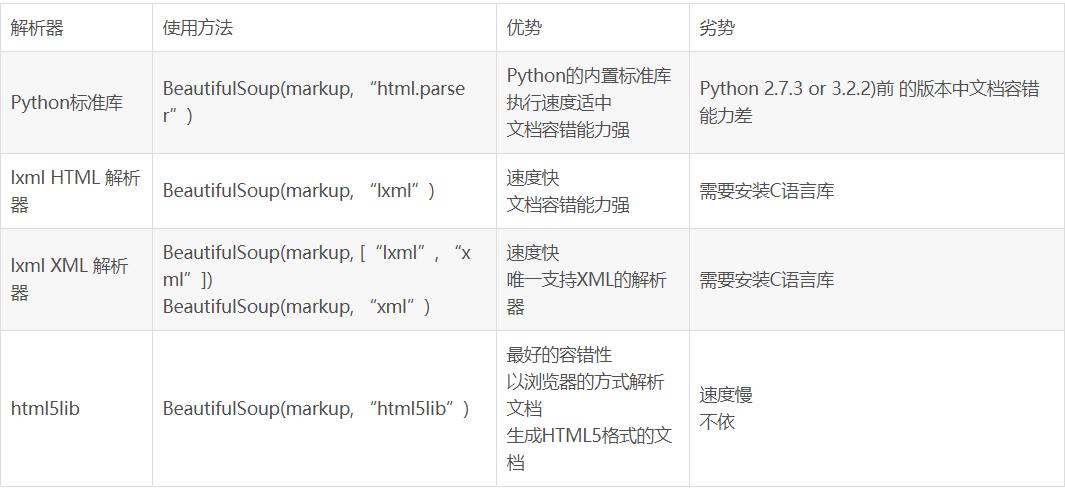
基本用法:
html = '''

<html><head><title>The Domouse's story</title></head>

<body>

<p class="title"name="dromouse"><b>The Dormouse's story</b></p>

<p class="story">Once upon a time there were little sisters;and their names were

<a href="http://example.com/elsie"class="sister"id="link1"><!--Elsie--></a>

<a hred="http://example.com/lacle"class="sister"id="link2">Lacle</a>and

<a hred="http://example.com/tilie"class="sister"id="link3">Tillie</a>

and they lived at bottom of a well.</p>

<p class="story">...</p>

'''

from bs4 import BeautifulSoup

soup= BeautifulSoup(html,'lxml')

print(soup.prettify())#格式化代码,打印结果自动补全缺失的代码

print(soup.title.string)#文章标题
<html>
<head>
<title>
The Domouse's story
</title>
</head>
<body>
<p class="title" name="dromouse">
<b>
The Dormouse's story
</b>
</p>
<p class="story">
Once upon a time there were little sisters;and their names were
<a class="sister" href="http://example.com/elsie" id="link1">
<!--Elsie-->
</a>
<a class="sister" hred="http://example.com/lacle" id="link2">
Lacle
</a>
and
<a class="sister" hred="http://example.com/tilie" id="link3">
Tillie
</a>
and they lived at bottom of a well.
</p>
<p class="story">
...
</p>
</body>
</html>
The Domouse's story获得的结果
标签选择器
选择元素
html = '''

<html><head><title>The Domouse's story</title></head>

<body>

<p class="title"name="dromouse"><b>The Dormouse's story</b></p>

<p class="story">Once upon a time there were little sisters;and their names were

<a href="http://example.com/elsie"class="sister"id="link1"><!--Elsie--></a>

<a hred="http://example.com/lacle"class="sister"id="link2">Lacle</a>and

<a hred="http://example.com/tilie"class="sister"id="link3">Tillie</a>

and they lived at bottom of a well.</p>

<p class="story">...</p>

'''

from bs4 import BeautifulSoup

soup = BeautifulSoup(html,'lxml')

print(soup.title)

        #<title>The Domouse's story</title>

print(type(soup.title))

        #<class 'bs4.element.Tag'>

print(soup.head)

        #<head><title>The Domouse's story</title></head>

print(soup.p)#当出现多个时,只返回第一个

        #<p class="title" name="dromouse"><b>The Dormouse's story</b></p>
获取标签名称
html = '''

<html><head><title>The Domouse's story</title></head>

<body>

<p class="title"name="dromouse"><b>The Dormouse's story</b></p>

<p class="story">Once upon a time there were little sisters;and their names were

<a href="http://example.com/elsie"class="sister"id="link1"><!--Elsie--></a>

<a hred="http://example.com/lacle"class="sister"id="link2">Lacle</a>and

<a hred="http://example.com/tilie"class="sister"id="link3">Tillie</a>

and they lived at bottom of a well.</p>

<p class="story">...</p>

'''

from bs4 import BeautifulSoup

soup = BeautifulSoup(html,'lxml')

print(soup.title.name)

        #title
获取属性
html = '''

<html><head><title>The Domouse's story</title></head>

<body>

<p class="title"name="dromouse"><b>The Dormouse's story</b></p>

<p class="story">Once upon a time there were little sisters;and their names were

<a href="http://example.com/elsie"class="sister"id="link1"><!--Elsie--></a>

<a hred="http://example.com/lacle"class="sister"id="link2">Lacle</a>and

<a hred="http://example.com/tilie"class="sister"id="link3">Tillie</a>

and they lived at bottom of a well.</p>

<p class="story">...</p>

'''

from bs4 import BeautifulSoup

soup = BeautifulSoup(html,'lxml')

print(soup.p.attrs['name'])

        #dromouse

print(soup.p['name'])

        #dromouse
获取标签内容
html = '''

<html><head><title>The Domouse's story</title></head>

<body>

<p class="title"name="dromouse"><b>The Dormouse's story</b></p>

<p class="story">Once upon a time there were little sisters;and their names were

<a href="http://example.com/elsie"class="sister"id="link1"><!--Elsie--></a>

<a hred="http://example.com/lacle"class="sister"id="link2">Lacle</a>and

<a hred="http://example.com/tilie"class="sister"id="link3">Tillie</a>

and they lived at bottom of a well.</p>

<p class="story">...</p>

'''

from bs4 import BeautifulSoup

soup = BeautifulSoup(html,'lxml')

print(soup.p.string)

        #The Dormouse's story
嵌套选择
html = '''

<html><head><title>The Domouse's story</title></head>

<body>

<p class="title"name="dromouse"><b>The Dormouse's story</b></p>

<p class="story">Once upon a time there were little sisters;and their names were

<a href="http://example.com/elsie"class="sister"id="link1"><!--Elsie--></a>

<a hred="http://example.com/lacle"class="sister"id="link2">Lacle</a>and

<a hred="http://example.com/tilie"class="sister"id="link3">Tillie</a>

and they lived at bottom of a well.</p>

<p class="story">...</p>

'''

from bs4 import BeautifulSoup

soup = BeautifulSoup(html,'lxml')

print(type(soup.title))

        #<class 'bs4.element.Tag'>

print(soup.head.title.string)#观察html的代码,其中有一层包含的关系:head(title),那我们就可以用嵌套的形式将其内容打印出来;body(p或是a)

        #The Domouse's story
子节点和子孙节点
#获取标签的子节点

html2 = '''

<html>

    <head>

        <title>The Domouse's story</title>

    </head>

    <body>

    <p class="story">

        Once upon a time there were little sisters;and their names were

        <a href="http://example.com/elsie" class="sister"id="link1">

        <span>Elsle</span>

        </a>

        <a hred="http://example.com/lacle"class="sister" id="link2">Lacle</a>

        and

        <a hred="http://example.com/tilie"class="sister" id="link3">Tillie</a>

        and they lived at bottom of a well.

        </p>

        <p class="story">...</p>

'''

from bs4 import BeautifulSoup

soup2 = BeautifulSoup(html2,'lxml')

print(soup2.p.contents)
['\n Once upon a time there were little sisters;and their names were\n ', <a class="sister" href="http://example.com/elsie" id="link1">
<span>Elsle</span>
</a>, '\n', <a class="sister" hred="http://example.com/lacle" id="link2">Lacle</a>, '\n and\n ', <a class="sister" hred="http://example.com/tilie" id="link3">Tillie</a>, '\n and they lived at bottom of a well.\n ']获得的内容
另一中方法:
#获取标签的子节点

html2 = '''

<html>

    <head>

        <title>The Domouse's story</title>

    </head>

    <body>

    <p class="story">

        Once upon a time there were little sisters;and their names were

        <a href="http://example.com/elsie" class="sister"id="link1">

        <span>Elsle</span>

        </a>

        <a hred="http://example.com/lacle"class="sister" id="link2">Lacle</a>

        and

        <a hred="http://example.com/tilie"class="sister" id="link3">Tillie</a>

        and they lived at bottom of a well.

        </p>

        <p class="story">...</p>

'''

from bs4 import BeautifulSoup

soup = BeautifulSoup(html2,'lxml')

print(soup.children)#不同之处:children实际上是一个迭代器,需要用循环的方式才能将内容取出

for i,child in enumerate(soup.p.children):

    print(i,child)
<list_iterator object at 0x00000208F026B400>
0
Once upon a time there were little sisters;and their names were 1 <a class="sister" href="http://example.com/elsie" id="link1">
<span>Elsle</span>
</a>
2 3 <a class="sister" hred="http://example.com/lacle" id="link2">Lacle</a>
4
and 5 <a class="sister" hred="http://example.com/tilie" id="link3">Tillie</a>
6
and they lived at bottom of a well.获得的结果
不同之处:children实际上是一个迭代器,需要用循环的方式才能将内容取出,而子节点只是一个列表
#获取标签的子孙节点

html2 = '''

<html>

    <head>

        <title>The Domouse's story</title>

    </head>

    <body>

    <p class="story">

        Once upon a time there were little sisters;and their names were

        <a href="http://example.com/elsie" class="sister"id="link1">

        <span>Elsle</span>

        </a>

        <a hred="http://example.com/lacle"class="sister" id="link2">Lacle</a>

        and

        <a hred="http://example.com/tilie"class="sister" id="link3">Tillie</a>

        and they lived at bottom of a well.

        </p>

        <p class="story">...</p>

'''

from bs4 import BeautifulSoup

soup = BeautifulSoup(html2,'lxml')

print(soup2.p.descendants)#获取所有的子孙节点,也是一个迭代器

for i,child in enumerate(soup2.p.descendants):

    print(i,child)
子孙节点
<generator object descendants at 0x00000208F0240AF0>

0

        Once upon a time there were little sisters;and their names were

1 <a class="sister" href="http://example.com/elsie" id="link1">

<span>Elsle</span>

</a>

2

3 <span>Elsle</span>

4 Elsle

5

6

7 <a class="sister" hred="http://example.com/lacle" id="link2">Lacle</a>

8 Lacle

9

        and

10 <a class="sister" hred="http://example.com/tilie" id="link3">Tillie</a>

11 Tillie

12

        and they lived at bottom of a well.
--->获得的结果
父节点和祖先节点
#父节点

html = '''

<html>

    <head>

        <title>The Domouse's story</title>

    </head>

    <body>

    <p class="story">

        Once upon a time there were little sisters;and their names were

        <a href="http://example.com/elsie" class="sister"id="link1">

        <span>Elsle</span>

        </a>

        <a hred="http://example.com/lacle"class="sister" id="link2">Lacle</a>

        and

        <a hred="http://example.com/tilie"class="sister" id="link3">Tillie</a>

        and they lived at bottom of a well.

        </p>

        <p class="story">...</p>

'''

from bs4 import BeautifulSoup

soup = BeautifulSoup(html,'lxml')

print(soup.a.parent)
父节点
<p class="story">

        Once upon a time there were little sisters;and their names were

        <a class="sister" href="http://example.com/elsie" id="link1">

<span>Elsle</span>

</a>

<a class="sister" hred="http://example.com/lacle" id="link2">Lacle</a>

        and

        <a class="sister" hred="http://example.com/tilie" id="link3">Tillie</a>

        and they lived at bottom of a well.

        </p>
--->获得的结果
#获取祖先节点

html = '''

<html>

    <head>

        <title>The Domouse's story</title>

    </head>

    <body>

    <p class="story">

        Once upon a time there were little sisters;and their names were

        <a href="http://example.com/elsie" class="sister"id="link1">

        <span>Elsle</span>

        </a>

        <a hred="http://example.com/lacle"class="sister" id="link2">Lacle</a>

        and

        <a hred="http://example.com/tilie"class="sister" id="link3">Tillie</a>

        and they lived at bottom of a well.

        </p>

        <p class="story">...</p>

'''

from bs4 import BeautifulSoup

soup = BeautifulSoup(html,'lxml')

print(list(enumerate(soup.a.parents)))#所有祖先节点(爸爸也算)
祖先节点
[(0, <p class="story">

        Once upon a time there were little sisters;and their names were

        <a class="sister" href="http://example.com/elsie" id="link1">

<span>Elsle</span>

</a>

<a class="sister" hred="http://example.com/lacle" id="link2">Lacle</a>

        and

        <a class="sister" hred="http://example.com/tilie" id="link3">Tillie</a>

        and they lived at bottom of a well.

        </p>), (1, <body>

<p class="story">

        Once upon a time there were little sisters;and their names were

        <a class="sister" href="http://example.com/elsie" id="link1">

<span>Elsle</span>

</a>

<a class="sister" hred="http://example.com/lacle" id="link2">Lacle</a>

        and

        <a class="sister" hred="http://example.com/tilie" id="link3">Tillie</a>

        and they lived at bottom of a well.

        </p>

<p class="story">...</p>

</body>), (2, <html>

<head>

<title>The Domouse's story</title>

</head>

<body>

<p class="story">

        Once upon a time there were little sisters;and their names were

        <a class="sister" href="http://example.com/elsie" id="link1">

<span>Elsle</span>

</a>

<a class="sister" hred="http://example.com/lacle" id="link2">Lacle</a>

        and

        <a class="sister" hred="http://example.com/tilie" id="link3">Tillie</a>

        and they lived at bottom of a well.

        </p>

<p class="story">...</p>

</body></html>), (3, <html>

<head>

<title>The Domouse's story</title>

</head>

<body>

<p class="story">

        Once upon a time there were little sisters;and their names were

        <a class="sister" href="http://example.com/elsie" id="link1">

<span>Elsle</span>

</a>

<a class="sister" hred="http://example.com/lacle" id="link2">Lacle</a>

        and

        <a class="sister" hred="http://example.com/tilie" id="link3">Tillie</a>

        and they lived at bottom of a well.

        </p>

<p class="story">...</p>

</body></html>)]
--->获得的内容
兄弟节点
#获取前兄弟节点

html = '''

<html>

    <head>

        <title>The Domouse's story</title>

    </head>

    <body>

    <p class="story">

        Once upon a time there were little sisters;and their names were

        <a href="http://example.com/elsie" class="sister"id="link1">

        <span>Elsle</span>

        </a>

        <a hred="http://example.com/lacle"class="sister" id="link2">Lacle</a>

        and

        <a hred="http://example.com/tilie"class="sister" id="link3">Tillie</a>

        and they lived at bottom of a well.

        </p>

        <p class="story">...</p>

'''

from bs4 import BeautifulSoup

soup = BeautifulSoup(html,'lxml')

#兄弟节点(与之并列的节点)

print(list(enumerate(soup.a.previous_siblings)))#前面的兄弟节点
前兄弟节点
[(0, '\n Once upon a time there were little sisters;and their names were\n ')]
--->获得的内容
html = '''

<html>

    <head>

        <title>The Domouse's story</title>

    </head>

    <body>

    <p class="story">

        Once upon a time there were little sisters;and their names were

        <a href="http://example.com/elsie" class="sister"id="link1">

        <span>Elsle</span>

        </a>

        <a hred="http://example.com/lacle"class="sister" id="link2">Lacle</a>

        and

        <a hred="http://example.com/tilie"class="sister" id="link3">Tillie</a>

        and they lived at bottom of a well.

        </p>

        <p class="story">...</p>

'''

from bs4 import BeautifulSoup

soup = BeautifulSoup(html,'lxml')

#兄弟节点(与之并列的节点)

print(list(enumerate(soup.a.next_siblings)))#后面的兄弟节点
后面兄弟节点
[(0, '\n'), (1, <a class="sister" hred="http://example.com/lacle" id="link2">Lacle</a>), (2, '\n and\n '), (3, <a class="sister" hred="http://example.com/tilie" id="link3">Tillie</a>), (4, '\n and they lived at bottom of a well.\n ')]
--->获得的结果
标准选择器
find_all(name,attrs,recursive,text,**kwargs)
可以根据标签名,属性,内容查找文档
根据name查找
html = '''

<div class="panel">

    <div class="panel-heading"name="elements">

        <h4>Hello</h4>

    </div>

    <div class="panel-body">

        <ul class="list"Id="list-1">

            <li class="element">Foo</li>

            <li class="element">Bar</li>

            <li class="element">Jay</li>

        </ul>

        <ul class="list list-small"Id="list-2">

            <li class="element">Foo</li>

            <li class="element">Bar</li>

        </ul>

    </div>

<div>

'''

from bs4 import BeautifulSoup

soup = BeautifulSoup(html,'lxml')

print(soup.find_all('ul'))#列表类型

print(type(soup.find_all('ul')[0]))
[<ul class="list" id="list-1">
<li class="element">Foo</li>
<li class="element">Bar</li>
<li class="element">Jay</li>
</ul>, <ul class="list list-small" id="list-2">
<li class="element">Foo</li>
<li class="element">Bar</li>
</ul>]
<class 'bs4.element.Tag'>获得的结果
html = '''

<div class="panel">

    <div class="panel-heading"name="elements">

        <h4>Hello</h4>

    </div>

    <div class="panel-body">

        <ul class="list"Id="list-1">

            <li class="element">Foo</li>

            <li class="element">Bar</li>

            <li class="element">Jay</li>

        </ul>

        <ul class="list list-small"Id="list-2">

            <li class="element">Foo</li>

            <li class="element">Bar</li>

        </ul>

    </div>

<div>

'''

from bs4 import BeautifulSoup

soup = BeautifulSoup(html,'lxml')

for ul in soup.find_all('ul'):

    print(ul.find_all('li'))#层层嵌套的查找
[<li class="element">Foo</li>, <li class="element">Bar</li>, <li class="element">Jay</li>]
[<li class="element">Foo</li>, <li class="element">Bar</li>]获得的结果
根据attrs查找
html = '''
<div class="panel">
<div class="panel-heading">
<h4>Hello</h4>
</div>
<div class="panel-body">
<ul class="list"id="list-1" name="elements">
<li class="element">Foo</li>
<li class="element">Bar</li>
<li class="element">Jay</li>
</ul>
<ul class="list list-small"id="list-2">
<li class="element">Foo</li>
<li class="element">Bar</li>
</ul>
</div>
<div>
'''
from bs4 import BeautifulSoup
soup = BeautifulSoup(html,'lxml') print(soup.find_all(attrs={'id':'list-1'}))
print(soup.find_all(attrs={'name':'elements'}))[<ul class="list" id="list-1" name="elements">
<li class="element">Foo</li>
<li class="element">Bar</li>
<li class="element">Jay</li>
</ul>]
[<ul class="list" id="list-1" name="elements">
<li class="element">Foo</li>
<li class="element">Bar</li>
<li class="element">Jay</li>
</ul>]获得的结果
另一种方式
html = '''
<div class="panel">
<div class="panel-heading">
<h4>Hello</h4>
</div>
<div class="panel-body">
<ul class="list"id="list-1">
<li class="element">Foo</li>
<li class="element">Bar</li>
<li class="element">Jay</li>
</ul>
<ul class="list list-small"id="list-2">
<li class="element">Foo</li>
<li class="element">Bar</li>
</ul>
</div>
<div>
'''
from bs4 import BeautifulSoup
soup = BeautifulSoup(html,'lxml') print(soup.find_all(id='list-1'))
print(soup.find_all(class_='element'))另一种方式
[<ul class="list" id="list-1">
<li class="element">Foo</li>
<li class="element">Bar</li>
<li class="element">Jay</li>
</ul>]
[<li class="element">Foo</li>, <li class="element">Bar</li>, <li class="element">Jay</li>, <li class="element">Foo</li>, <li class="element">Bar</li>]--->获得的结果
根据text查找
#text
html = '''
<div class="panel">
<div class="panel-heading">
<h4>Hello</h4>
</div>
<div class="panel-body"name="elelments">
<ul class="list"Id="list-1">
<li class="element">Foo</li>
<li class="element">Bar</li>
<li class="element">Jay</li>
</ul>
<ul class="list list-small"Id="list-2">
<li class="element">Foo</li>
<li class="element">Bar</li>
</ul>
</div>
<div>
'''
from bs4 import BeautifulSoup
soup = BeautifulSoup(html,'lxml') print(soup.find_all(text='Foo'))
#['Foo', 'Foo']find(name,attrs,recursive,text,**kwargs)返回单个元素,find_all返回所有元素
html = '''
<div class="panel">
<div class="panel-heading">
<h4>Hello</h4>
</div>
<div class="panel-body"name="elelments">
<ul class="list"Id="list-1">
<li class="element">Foo</li>
<li class="element">Bar</li>
<li class="element">Jay</li>
</ul>
<ul class="list list-small"Id="list-2">
<li class="element">Foo</li>
<li class="element">Bar</li>
</ul>
</div>
<div>
'''
from bs4 import BeautifulSoup
soup = BeautifulSoup(html,'lxml') print(soup.find('ul'))
print(type(soup.find('ul')))
print(soup.find('page'))<ul class="list" id="list-1">
<li class="element">Foo</li>
<li class="element">Bar</li>
<li class="element">Jay</li>
</ul>
<class 'bs4.element.Tag'>
None获得的结果
其他方法
如果使用find方法,返回单个元素 find_parents()返回所有祖先节点
find_parent()返回直接父节点
find_next_siblings()返回后面所有兄弟节点
find_next_sibling()返回后面第一个兄弟节点
find_previous_siblings()返回前面所有的兄弟节点
find_previous_sibling()返回前面第一个的兄弟节点
find_all_next()返回节点后所有符合条件的节点
find_next()返回节点后第一个符合条件的节点
find_all_previous()返回节点后所有符合条件的节点
find_previous()返回第一个符合条件的节点
CSS选择器(通过select()直接传入CSS选择器即可完成选择)
html = '''
<div class="panel">
<div class="panel-heading">
<h4>Hello</h4>
</div>
<div class="panel-body"name="elelments">
<ul class="list"id="list-1">
<li class="element">Foo</li>
<li class="element">Bar</li>
<li class="element">Jay</li>
</ul>
<ul class="list list-small"id="list-2">
<li class="element">Foo</li>
<li class="element">Bar</li>
</ul>
</div>
<div>
'''
from bs4 import BeautifulSoup
soup = BeautifulSoup(html,'lxml') print(soup.select('.panel .panel-heading')) #class就需要加一个“.”
print(soup.select('ul li')) #选择标签
print(soup.select('#list-2 .element'))
print(type(soup.select('ul')[0]))[<div class="panel-heading">
<h4>Hello</h4>
</div>]
[<li class="element">Foo</li>, <li class="element">Bar</li>, <li class="element">Jay</li>, <li class="element">Foo</li>, <li class="element">Bar</li>]
[<li class="element">Foo</li>, <li class="element">Bar</li>]
<class 'bs4.element.Tag'>获得的结果
另一种方法:
html = '''
<div class="panel">
<div class="panel-heading">
<h4>Hello</h4>
</div>
<div class="panel-body"name="elelments">
<ul class="list"Id="list-1">
<li class="element">Foo</li>
<li class="element">Bar</li>
<li class="element">Jay</li>
</ul>
<ul class="list list-small"Id="list-2">
<li class="element">Foo</li>
<li class="element">Bar</li>
</ul>
</div>
<div>
''' from bs4 import BeautifulSoup
soup = BeautifulSoup(html,'lxml') for ul in soup.select('ul'):#直接print(soup.select('ul li'))
print(ul.select('li'))另一种方法
[<li class="element">Foo</li>, <li class="element">Bar</li>, <li class="element">Jay</li>]

[<li class="element">Foo</li>, <li class="element">Bar</li>]--->获得的结果
获取属性
html = '''

<div class="panel">

    <div class="panel-heading">

        <h4>Hello</h4>

    </div>

    <div class="panel-body"name="elelments">

        <ul class="list"id="list-1">

            <li class="element">Foo</li>

            <li class="element">Bar</li>

            <li class="element">Jay</li>

        </ul>

        <ul class="list list-small"id="list-2">

            <li class="element">Foo</li>

            <li class="element">Bar</li>

        </ul>

    </div>

<div>

'''

from bs4 import BeautifulSoup

soup = BeautifulSoup(html,'lxml')

for ul in soup.select('ul'):

    print(ul['id'])#直接用[]

    print(ul.attrs['id'])#或是attrs+[]
list-1
list-1
list-2
list-2获得的结果
获取内容
html = '''

<div class="panel">

    <div class="panel-heading">

        <h4>Hello</h4>

    </div>

    <div class="panel-body"name="elelments">

        <ul class="list"Id="list-1">

            <li class="element">Foo</li>

            <li class="element">Bar</li>

            <li class="element">Jay</li>

        </ul>

        <ul class="list list-small"Id="list-2">

            <li class="element">Foo</li>

            <li class="element">Bar</li>

        </ul>

    </div>

<div>

'''

from bs4 import BeautifulSoup

soup = BeautifulSoup(html,'lxml')

for li in soup.select('li'):

    print(li['class'], li.get_text())
['element'] Foo
['element'] Bar
['element'] Jay
['element'] Foo
['element'] Bar获得的结果
总结
推荐使用'lxml'解析库,必要时使用html.parser
标签选择器筛选功能但速度快
建议使用find(),find_all()查询匹配单个结果或者多个结果
如果对CSS选择器熟悉建议选用select()
记住常用的获取属性和文本值得方法
PYTHON 爬虫笔记五:BeautifulSoup库基础用法的更多相关文章
- PYTHON 爬虫笔记七:Selenium库基础用法
知识点一:Selenium库详解及其基本使用 什么是Selenium selenium 是一套完整的web应用程序测试系统,包含了测试的录制(selenium IDE),编写及运行(Selenium ...
- PYTHON 爬虫笔记六:PyQuery库基础用法
知识点一:PyQuery库详解及其基本使用 初始化 字符串初始化 html = ''' <div> <ul> <li class="item-0"&g ...
- Python爬虫进阶五之多线程的用法
前言 我们之前写的爬虫都是单个线程的?这怎么够?一旦一个地方卡到不动了,那不就永远等待下去了?为此我们可以使用多线程或者多进程来处理. 首先声明一点! 多线程和多进程是不一样的!一个是 thread ...
- Python爬虫利器:BeautifulSoup库
Beautiful Soup parses anything you give it, and does the tree traversal stuff for you. BeautifulSoup ...
- PYTHON 爬虫笔记三:Requests库的基本使用
知识点一:Requests的详解及其基本使用方法 什么是requests库 Requests库是用Python编写的,基于urllib,采用Apache2 Licensed开源协议的HTTP库,相比u ...
- Python爬虫利器五之Selenium的用法
1.简介 Selenium 是什么?一句话,自动化测试工具.它支持各种浏览器,包括 Chrome,Safari,Firefox 等主流界面式浏览器,如果你在这些浏览器里面安装一个 Selenium 的 ...
- 吴裕雄--天生自然python学习笔记:beautifulsoup库的使用
Beautiful Soup 库简介 Beautiful Soup提供一些简单的.python式的函数用来处理导航.搜索.修改分析树等功能.它是一个工具箱,通过解析文档为用户提供需要抓取的数据,因为简 ...
- 芝麻HTTP: Python爬虫利器之Requests库的用法
前言 之前我们用了 urllib 库,这个作为入门的工具还是不错的,对了解一些爬虫的基本理念,掌握爬虫爬取的流程有所帮助.入门之后,我们就需要学习一些更加高级的内容和工具来方便我们的爬取.那么这一节来 ...
- python爬虫笔记----4.Selenium库(自动化库)
4.Selenium库 (自动化测试工具,支持多种浏览器,爬虫主要解决js渲染的问题) pip install selenium 基本使用 from selenium import webdriver ...
随机推荐
- 【Python数据分析】魔术命令(Magic Command)
IPython有一些特殊的命令(被称为魔术命令),他们有的为常见的任务提供便利,有的则使你能够轻松的控制IPython系统的行为 魔术命令是以百分号%为前缀的命令 常用的IPython魔术命令 命令 ...
- spring-struts-mybatis整合错误集锦
尽管三大框架特别特别的好用,可是,当我第一次把这三个框架用maven整合到一起的时候.各种错误接踵而至,以下来做一下三大框架整合的总结: 首先是在导入三大框架的各种依赖包的时候,由于我用的是j2ee ...
- Struts2学习八----------接收参数
© 版权声明:本文为博主原创文章,转载请注明出处 接收参数 - 使用Action的属性接收参数 - 使用Domain Model接收参数 - 使用ModelDriven接收参数 实例 1.项目结构 2 ...
- Qt中的对象类型转换
char * 与 const char *的转换 char *ch1="hello11"; const char *ch2="hello22"; ch2 = c ...
- HDFS源码分析心跳汇报之整体结构
我们知道,HDFS全称是Hadoop Distribute FileSystem,即Hadoop分布式文件系统.既然它是一个分布式文件系统,那么肯定存在很多物理节点,而这其中,就会有主从节点之分.在H ...
- MongoDB的选举过程(转)
转自:http://www.mongoing.com/archives/295 MongoDB的复制集具有自动容忍部分节点宕机的功能,在复制集出现问题时时,会触发选举相关的过程,完成主从节点自动切换. ...
- iOS项目 -- 模仿花椒直播做的第一层次界面
公最近直播比较火爆,我也跟跟风,自己做一个直播app, 现在打算用金山云直播的,但是去注册的时候,联系那边的工作人员,他们讲使用金山云直播要有公司和他们线下签约才能授权开放直播平台. 怎么办呢?于是我 ...
- java ResultSet获得总行数
在Java中,获得ResultSet的总行数的方法有以下几种. 第一种:利用ResultSet的getRow方法来获得ResultSet的总行数 Statement stmt = con.create ...
- Android 事件分发机制 图解
在Android 开发中事件分发是比较重要的,也是比较难理解的,之前看过这方面的东西,以为自己弄懂了,也就没太注意,最近面试呢,想着肯定要问到这一块的东西,回顾的时候发现又忘了,真是好记性不如烂笔头啊 ...
- iOS界面-仿网易新闻左侧抽屉式交互 续(添加新闻内容页和评论页手势)
本文转载至 http://blog.csdn.net/totogo2010/article/details/8637430 1.介绍 有的博友看了上篇博文iOS界面-仿网易新闻左侧抽屉 ...