
Spark Streaming之二:StreamingContext解析
1.1 创建StreamingContext对象
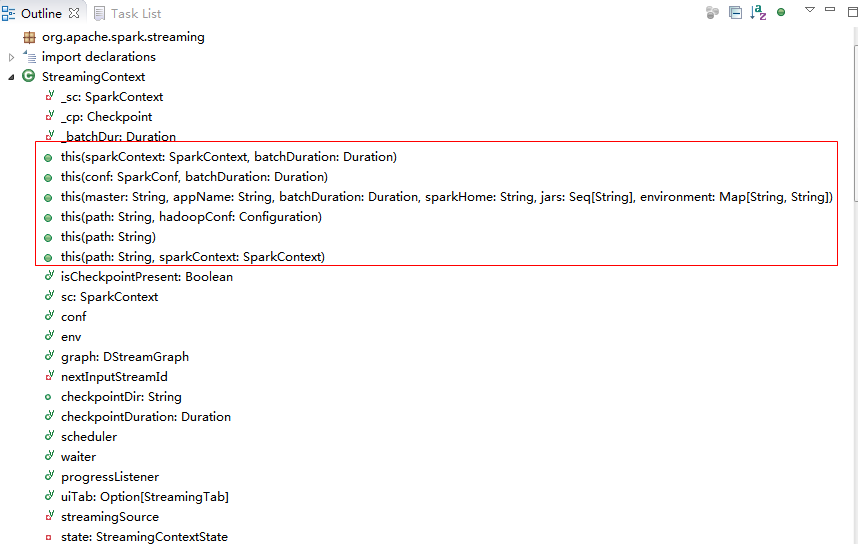
1.1.1通过SparkContext创建
源码如下:
def this(sparkContext: SparkContext, batchDuration: Duration) = {

    this(sparkContext, null, batchDuration)

  }
第一参数为sparkContext对象,第二个参数为批次时间;
创建实例:
val ssc = new StreamingContext(sc, Seconds(5))
1.1.2通过SparkConf创建
源码如下:
def this(conf: SparkConf, batchDuration: Duration) = {

    this(StreamingContext.createNewSparkContext(conf), null, batchDuration)

  }
第一参数为SparkConf对象,第二个参数为批次时间;
创建实例:
val conf =new SparkConf().setAppName("StreamTest")
val ssc = new StreamingContext(conf,Seconds(5))
1.1.3通过SparkConf参数创建
源码如下:
def this(

      master: String,

      appName: String,

      batchDuration: Duration,

      sparkHome: String = null,

      jars: Seq[String] = Nil,

      environment: Map[String, String] = Map()) = {

    this(StreamingContext.createNewSparkContext(master, appName, sparkHome, jars, environment),

         null, batchDuration)

  }
第一参数为需要创建SparkConf对象的详细参数,master-spark地址,appName-对象名称,sparkHome- sparkHome环境变量,jars, environment,第二个参数为批次时间;
创建实例:
val ssc = newStreamingContext(“ spark://host:port”, "StreamTest", Seconds(5), System.getenv("SPARK_HOME"),StreamingContext.jarOfClass(this.getClass))
1.1.4通过checkpointfile参数创建
源码如下:
def this(path: String, hadoopConf: Configuration) =

    this(null, CheckpointReader.read(path, new SparkConf(), hadoopConf).orNull, null)
第一参数为checkpoint file的路径,第二个参数为haoop的配置
1.2创建Dstream监听对象
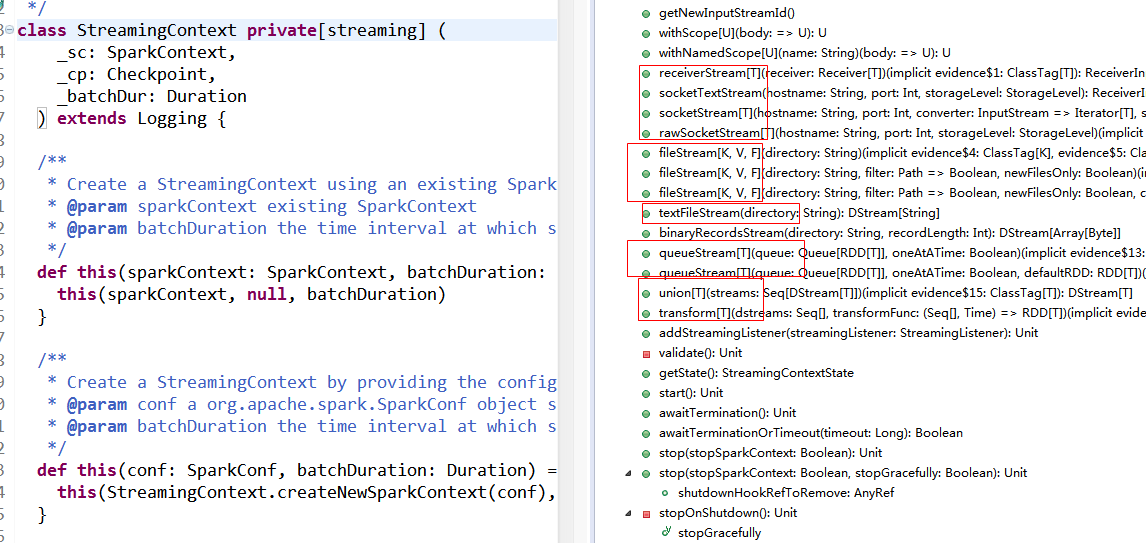
1.2.1 fileStream
val ssc = new StreamingContext(sparkConf, Seconds(10))

    ssc.fileStream(directory)
源码如下:
/**

   * Create an input stream that monitors a Hadoop-compatible filesystem

   * for new files and reads them using the given key-value types and input format.

   * Files must be written to the monitored directory by "moving" them from another

   * location within the same file system. File names starting with . are ignored.

   * @param directory HDFS directory to monitor for new file

   * @tparam K Key type for reading HDFS file

   * @tparam V Value type for reading HDFS file

   * @tparam F Input format for reading HDFS file

   */

  def fileStream[

    K: ClassTag,

    V: ClassTag,

    F <: NewInputFormat[K, V]: ClassTag

  ] (directory: String): InputDStream[(K, V)] = {

    new FileInputDStream[K, V, F](this, directory)

  }
参数:K-读入HDFS的Key的类型,V-读入HDFS的Value的类型,F-读入HDFS的类型;directory-监听HDFS的路径,filter-对监听HDFS的文件进行过滤的函数,newFilesOnly-是否只监听新增文件;
fileStream可以通过设置filter函数,对监听目录下的文件进行过滤,只对满足条件的文件进行监听和处理;
默认过滤方法:
def defaultFilter(path: Path): Boolean = !path.getName().startsWith(".")
该方法是过滤以隐藏文件。
fileStream可以通过设置newFilesOnly为TRUE或者FALES,是否处理监听目录下已存在的文件,默认是不处理已存在文件,只处理新增加文件,如果设置为FALES,可以处理前一个窗口时间内的老文件。
源码如下:在class FileInputDStream里:
private val initialModTimeIgnoreThreshold = if (newFilesOnly) clock.getTimeMillis() else 0L
private def findNewFiles(currentTime: Long): Array[String] = {

    try {

      lastNewFileFindingTime = clock.getTimeMillis()

      // Calculate ignore threshold

      val modTimeIgnoreThreshold = math.max(

        initialModTimeIgnoreThreshold,   // initial threshold based on newFilesOnly setting

        currentTime - durationToRemember.milliseconds  // trailing end of the remember window

      )

...
modTimeIgnoreThreshold是时间窗口过滤条件,通过newFilesOnly值来取的是当前时间或者前一个窗口时间。
创建实例:
// 创建新过滤函数
def myFilter(path:Path): Boolean = path.getName().contains("data")
// 创建fileStream
val data1 = ssc.fileStream[LongWritable,Text, TextInputFormat](Spath1, pa => myFilter(pa),false).map(_._2.toString)
1.2.2 textFileStream
val ssc = new StreamingContext(sparkConf, Seconds(10))

    ssc.textFileStream(directory)
源码如下:
/**

   * Create an input stream that monitors a Hadoop-compatible filesystem

   * for new files and reads them as text files (using key as LongWritable, value

   * as Text and input format as TextInputFormat). Files must be written to the

   * monitored directory by "moving" them from another location within the same

   * file system. File names starting with . are ignored.

   * @param directory HDFS directory to monitor for new file

   */

  def textFileStream(directory: String): DStream[String] = withNamedScope("text file stream") {

    fileStream[LongWritable, Text, TextInputFormat](directory).map(_._2.toString)

  }
参数:directory监听的目录;
其实textFileStream是fileStream的一个实例。
创建实例:
val StreamFile1=ssc.textFileStream(Spath1)
1.2.3 socketTextStream
val ssc = new StreamingContext(sparkConf, Seconds(10))

    ssc.socketStream(hostname, port, converter, storageLevel)
源码如下:
/**

   * Creates an input stream from TCP source hostname:port. Data is received using

   * a TCP socket and the receive bytes it interpreted as object using the given

   * converter.

   * @param hostname      Hostname to connect to for receiving data

   * @param port          Port to connect to for receiving data

   * @param converter     Function to convert the byte stream to objects

   * @param storageLevel  Storage level to use for storing the received objects

   * @tparam T            Type of the objects received (after converting bytes to objects)

   */

  def socketStream[T: ClassTag](

      hostname: String,

      port: Int,

      converter: (InputStream) => Iterator[T],

      storageLevel: StorageLevel

    ): ReceiverInputDStream[T] = {

    new SocketInputDStream[T](this, hostname, port, converter, storageLevel)

  }
参数:hostname是主机IP,port是端口号,storageLevel数据的存储级别,默认2份MEMORY_AND_DISK;
创建实例:
val lines = ssc.socketTextStream(serverIP, serverPort);
1.2.4 rawSocketStream
val ssc = new StreamingContext(sparkConf, Seconds(10))

    ssc.rawSocketStream(hostname, port, storageLevel)
源码如下:
/**

   * Create an input stream from network source hostname:port, where data is received

   * as serialized blocks (serialized using the Spark's serializer) that can be directly

   * pushed into the block manager without deserializing them. This is the most efficient

   * way to receive data.

   * @param hostname      Hostname to connect to for receiving data

   * @param port          Port to connect to for receiving data

   * @param storageLevel  Storage level to use for storing the received objects

   *                      (default: StorageLevel.MEMORY_AND_DISK_SER_2)

   * @tparam T            Type of the objects in the received blocks

   */

  def rawSocketStream[T: ClassTag](

      hostname: String,

      port: Int,

      storageLevel: StorageLevel = StorageLevel.MEMORY_AND_DISK_SER_2

    ): ReceiverInputDStream[T] = withNamedScope("raw socket stream") {

    new RawInputDStream[T](this, hostname, port, storageLevel)

  }
rawSocketStream类似于socketTextStream;参照socketTextStream。
1.2.5 networkStream
源码如下:
/**
* Create an input stream with any arbitrary user implemented receiver.
* Find more details at:http://spark.apache.org/docs/latest/streaming-custom-receivers.html
* @param receiver Custom implementation of Receiver
*/
@deprecated("Use receiverStream","1.0.0")
def networkStream[T: ClassTag](
receiver: Receiver[T]): ReceiverInputDStream[T] = {
receiverStream(receiver)
}
创建实例:
参照:http://spark.apache.org/docs/latest/streaming-custom-receivers.html
1.2.6 receiverStream
val ssc = new StreamingContext(sparkConf, Seconds(10))

    ssc.receiverStream(receiver)
源码如下:
/**

   * Create an input stream with any arbitrary user implemented receiver.

   * Find more details at http://spark.apache.org/docs/latest/streaming-custom-receivers.html

   * @param receiver Custom implementation of Receiver

   */

  def receiverStream[T: ClassTag](receiver: Receiver[T]): ReceiverInputDStream[T] = {

    withNamedScope("receiver stream") {

      new PluggableInputDStream[T](this, receiver)

    }

  }
参照:http://spark.apache.org/docs/latest/streaming-custom-receivers.html
1.2.7 actorStream
源码如下:
/**
* Create an input stream with any arbitrary user implemented actorreceiver.
* Find more details at:http://spark.apache.org/docs/latest/streaming-custom-receivers.html
* @param props Props object defining creation of the actor
* @param name Name of the actor
* @param storageLevel RDD storage level (default:StorageLevel.MEMORY_AND_DISK_SER_2)
*
* @note An important point to note:
* Since Actor may exist outsidethe spark framework, It is thus user's responsibility
* to ensure the type safety,i.e parametrized type of data received and actorStream
* should be same.
*/
defactorStream[T: ClassTag](
props: Props,
name: String,
storageLevel: StorageLevel = StorageLevel.MEMORY_AND_DISK_SER_2,
supervisorStrategy: SupervisorStrategy =ActorSupervisorStrategy.defaultStrategy
): ReceiverInputDStream[T] = {
receiverStream(new ActorReceiver[T](props, name, storageLevel, supervisorStrategy))
}
创建实例:
val StreamFile1 = ssc.actorStream[String](Props(newCustomActor()),"CustomReceiver")
参照:http://spark.apache.org/docs/latest/streaming-custom-receivers.html
1.2.8 queueStream
val ssc = new StreamingContext(sparkConf, Seconds(10))

    ssc.queueStream(queue, oneAtATime)
源码如下:
/**

   * Create an input stream from a queue of RDDs. In each batch,

   * it will process either one or all of the RDDs returned by the queue.

   *

   * NOTE: Arbitrary RDDs can be added to `queueStream`, there is no way to recover data of

   * those RDDs, so `queueStream` doesn't support checkpointing.

   *

   * @param queue      Queue of RDDs. Modifications to this data structure must be synchronized.

   * @param oneAtATime Whether only one RDD should be consumed from the queue in every interval

   * @tparam T         Type of objects in the RDD

   */

  def queueStream[T: ClassTag](

      queue: Queue[RDD[T]],

      oneAtATime: Boolean = true

    ): InputDStream[T] = {

    queueStream(queue, oneAtATime, sc.makeRDD(Seq[T](), 1))

  }
1.2.9 union DStream
val ssc = new StreamingContext(sparkConf, Seconds(10))

    ssc.union(streams)
源码如下:
/**

   * Create a unified DStream from multiple DStreams of the same type and same slide duration.

   */

  def union[T: ClassTag](streams: Seq[DStream[T]]): DStream[T] = withScope {

    new UnionDStream[T](streams.toArray)

  }
对同一类型的DStream进行合并,生成一个新的DStream,其中要求DStream的数据格式一致,批次时间间隔一致。
1.2.10 transform DStream
val ssc = new StreamingContext(sparkConf, Seconds(10))

    ssc.transform(dstreams, transformFunc)
源码如下:
/**

   * Create a new DStream in which each RDD is generated by applying a function on RDDs of

   * the DStreams.

   */

  def transform[T: ClassTag](

      dstreams: Seq[DStream[_]],

      transformFunc: (Seq[RDD[_]], Time) => RDD[T]

    ): DStream[T] = withScope {

    new TransformedDStream[T](dstreams, sparkContext.clean(transformFunc))

  }
对Dstream进行transform操作生成一个新的Dstream。
1.3 Checkpointing
状态的操作是基于多个批次的数据的。它包括基于window的操作和updateStateByKey。因为状态的操作要依赖于上一个批次的数据,所以它要根据时间,不断累积元数据。为了清空数据,它支持周期性的检查点,通过把中间结果保存到hdfs上。因为检查操作会导致保存到hdfs上的开销,所以设置这个时间间隔,要很慎重。对于小批次的数据,比如一秒的,检查操作会大大降低吞吐量。但是检查的间隔太长,会导致任务变大。通常来说,5-10秒的检查间隔时间是比较合适的。
实例:
ssc.checkpoint("hdfs://192.168.1.100:9000/check")
val StreamFile1=ssc.textFileStream(Spath1)
StreamFile1.checkpoint(Seconds(30))
转载请注明出处:
http://blog.csdn.net/sunbow0/article/details/42966467
Spark Streaming之二:StreamingContext解析的更多相关文章
- Spark Streaming揭秘 Day25 StreamingContext和JobScheduler启动源码详解
Spark Streaming揭秘 Day25 StreamingContext和JobScheduler启动源码详解 今天主要理一下StreamingContext的启动过程,其中最为重要的就是Jo ...
- Spark Streaming之三:DStream解析
DStream 1.1基本说明 1.1.1 Duration Spark Streaming的时间类型,单位是毫秒: 生成方式如下: 1)new Duration(milli seconds) 输入毫 ...
- spark streaming 使用geoIP解析IP
1.首先将GEOIP放到服务器上,如,/opt/db/geo/GeoLite2-City.mmdb 2.新建scala sbt工程,测试是否可以顺利解析 import java.io.Fileimpo ...
- Spark Streaming源码解读之数据清理内幕彻底解密
本期内容 : Spark Streaming数据清理原理和现象 Spark Streaming数据清理代码解析 Spark Streaming一直在运行的,在计算的过程中会不断的产生RDD ,如每秒钟 ...
- 通过案例对 spark streaming 透彻理解三板斧之一: spark streaming 另类实验
本期内容 : spark streaming另类在线实验 瞬间理解spark streaming本质 一. 我们最开始将从Spark Streaming入手 为何从Spark Streaming切入 ...
- Spark Streaming no receivers彻底思考
数据接入Spark Streaming的二种方式:Receiver和no receivers方式 建议企业级采用no receivers方式开发Spark Streaming应用程序,好处: 1.更优 ...
- spark系列-8、Spark Streaming
参考链接:http://spark.apache.org/docs/latest/streaming-programming-guide.html 一.Spark Streaming 介绍 Spark ...
- Spark入门实战系列--7.Spark Streaming(上)--实时流计算Spark Streaming原理介绍
[注]该系列文章以及使用到安装包/测试数据 可以在<倾情大奉送--Spark入门实战系列>获取 .Spark Streaming简介 1.1 概述 Spark Streaming 是Spa ...
- Spark入门实战系列--7.Spark Streaming(下)--实时流计算Spark Streaming实战
[注]该系列文章以及使用到安装包/测试数据 可以在<倾情大奉送--Spark入门实战系列>获取 .实例演示 1.1 流数据模拟器 1.1.1 流数据说明 在实例演示中模拟实际情况,需要源源 ...
随机推荐
- PS 基础知识 什么是Adobe Bridge
Adobe Bridge是什么 悬赏分:0 - 解决时间:2007-2-23 10:50 下载的PS中附带了Adobe Bridge,可我不知道它是干什么用的?如何使用??? 谢谢! 提问者: Car ...
- node开发自动刷新网页中的css和javascript
在已有node的环境下,安装browser-sync: npm install -g browser-sync 然后运行,默认本目录下(最后填写要监听的文件--本实例监听了css文件夹下面的所有css ...
- struts1.3中使用DispatchAction的一个问题
近期做项目发现我们公司的项目是用struts1写的,在多方百度下,总有理解了struts1.3的DispatchAction的使用方法 一:struts.xml文件的配置 <?xml versi ...
- oracle sqlplus 常用操作
命令 含义 / 运行 SQL 缓冲区 ? [关键词] 对关键词提供 SQL 帮助 @[@] [文件名] [参数列表] 通过指定的参数,运行指定的命令文件 ACC[EPT] 变量 [DEF[AULT] ...
- sublime 快捷键 汇总--长期
Ctrl+P 输入当前项目中的文件名,快速搜索文件 Ctrl+G 输入数字跳转到该行代码 Ctrl+R 输入关键字,查找文件中的函数名 Ctrl+: 输入关键字,查找文件中的变量名.属性名等 Ctrl ...
- C# WPF DataGrid控件实现三级联动
利用DataGrid控件实现联动的功能,在数据库客户软件中是随处可见的,然而网上的资料却是少之又少,令人崩溃. 本篇博文将介绍利用DataGrid控件模板定义的三个ComboBox实现“省.市.区”的 ...
- Windows8-x64 VMWare安装Linux CentOS6-x64
本文參考了:http://www.cnblogs.com/seesea125/archive/2012/02/25/2368255.html 其内容相当具体,以至于我还没依照其步骤做完.系统就已经安装 ...
- NoSQL的四大类型
1 键值数据库 相关产品:Redis.Riak.SimpleDB.Chordless.Scalaris.Memcached 应用:内容缓存 优点:扩展性好.灵活性好.大量写操作时性能高 缺点:无法存储 ...
- 项目中一个普通的Java类如何获取serviceimpl实现类(二)
HbOnLineConfigServiceImpl hbOnlineService=(HbOnLineConfigServiceImpl) WebContextFactoryUtil.getBean( ...
- qt使用中的一些问题(linux)
ui_xxx.h的问题 工程中(工作空间)中包含的ui_xxx.h文件是系统自动生成的.这个是xxx.ui的创建文件来的,xxx.ui界面上的都是ui_xxx.h在控制的,在项目里是不显示这个头文件的 ...