
httpclient:实现有验证码的模拟登陆
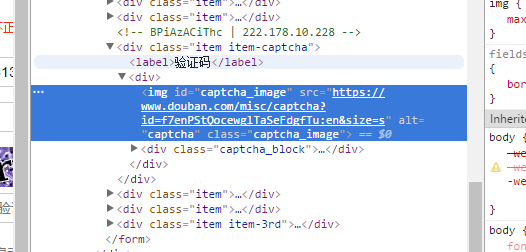
//1、这种方式是先把验证码的图片下载到本地、并且根据网页解析获得token值
//2、手动在控制台输入验证码
//3、因为验证码图片已经下载下来,后面就可以使用图像文字识别
package DoubanSimulate;

import java.io.BufferedReader;

import java.io.File;

import java.io.FileOutputStream;

import java.io.IOException;

import java.io.InputStream;

import java.io.InputStreamReader;

import java.util.ArrayList;

import java.util.List;

import org.apache.http.HttpEntity;

import org.apache.http.HttpResponse;

import org.apache.http.NameValuePair;

import org.apache.http.client.ClientProtocolException;

import org.apache.http.client.HttpClient;

import org.apache.http.client.ResponseHandler;

import org.apache.http.client.entity.UrlEncodedFormEntity;

import org.apache.http.client.methods.HttpGet;

import org.apache.http.client.methods.HttpPost;

import org.apache.http.impl.client.BasicResponseHandler;

import org.apache.http.impl.client.DefaultHttpClient;

import org.apache.http.message.BasicNameValuePair;

import org.apache.http.util.EntityUtils;

import org.jsoup.Jsoup;

import org.jsoup.nodes.Document;

public class DoubanSimulate {

    private static HttpClient httpClient = new DefaultHttpClient();

    // 登陆入口

    public static void loginDouban() {

        String login_src = "https://accounts.douban.com/login";

        // 输入用户名及密码

        String form_email = "2692613726@qq.com";

        String form_password = "0315209X";

        String captcha_solution = "";

        // 获取验证码

        String captcha_id = getImgID();

        String login = "登录";

        // 输入验证码

        System.out.println("请输入验证码:");

        BufferedReader buff = new BufferedReader(new InputStreamReader(

                System.in));

        try {

            captcha_solution = buff.readLine();

        } catch (IOException e) {

            e.printStackTrace();

        }

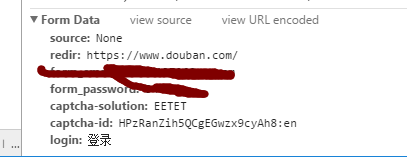
        // 构造参数,即模拟需要输入的参数

        List<NameValuePair> list = new ArrayList<NameValuePair>();

        list.add(new BasicNameValuePair("form_email", form_email));

        list.add(new BasicNameValuePair("form_password", form_password));

        list.add(new BasicNameValuePair("captcha-solution", captcha_solution));

        list.add(new BasicNameValuePair("captcha-id", captcha_id));

        list.add(new BasicNameValuePair("login", login));

        HttpPost httpPost = new HttpPost(login_src);

        try {

            // 向后台请求数据,登陆网站

            httpPost.setEntity(new UrlEncodedFormEntity(list));

            HttpResponse response = httpClient.execute(httpPost);

            HttpEntity entity = response.getEntity();

            String result = EntityUtils.toString(entity, "utf-8");

        } catch (Exception e) {

            // TODO: handle exception

        }

    }

    // 获取验证码图片“token”

    private static String getImgID() {

        String src = "https://www.douban.com/accounts/login";

        HttpGet httpGet = new HttpGet(src);

        String url = "";

        String token="";

        try {

            HttpResponse response = httpClient.execute(httpGet);

            HttpEntity entity = response.getEntity();

            String content = EntityUtils.toString(entity, "utf-8");

            Document doc = Jsoup.parse(content);

            url = doc.select("div[class=item item-captcha]").select("div")

                    .select("img[id=captcha_image]").attr("src");

            int start = url.indexOf("=");

            int end = url.indexOf("&");

            token = url.substring(start+1, end);

            // 下载验证码并存储到本地

            downImg(url);

        } catch (IOException e) {

            // TODO Auto-generated catch block

            e.printStackTrace();

        }

        //https://www.douban.com/misc/captcha?id=f7enPStQocewglTaSeFdgfTu:en&size=s

        return token;

    }

    private static void downImg(String src) throws IOException {

        File fileDir = new File("D:\\IdentifyingCode");

        if (!fileDir.exists()) {

            fileDir.mkdirs();

        }

        // 图片下载保存地址

        File file = new File("D:\\IdentifyingCode\\yzm.png");

        if (file.exists()) {

            file.delete();

        }

        InputStream input = null;

        FileOutputStream out = null;

        HttpGet httpGet = new HttpGet(src);

        try {

            HttpResponse response = httpClient.execute(httpGet);

            HttpEntity entity = response.getEntity();

            input = entity.getContent();

            int i = -1;

            byte[] byt = new byte[1024];

            out = new FileOutputStream(file);

            while ((i = input.read(byt)) != -1) {

                out.write(byt);

            }

            System.out.println("图片下载成功!");

        } catch (ClientProtocolException e) {

            e.printStackTrace();

        } catch (IOException e) {

            e.printStackTrace();

        }

        out.close();

    }

      //登陆后,便可以输入一个或者多个url,进行请求

    public static String gethtml(String redirectLocation) {

        HttpGet httpget = new HttpGet(redirectLocation);

        // Create a response handler

        ResponseHandler<String> responseHandler = new BasicResponseHandler();

        String responseBody = "";

        try {

            responseBody = httpClient.execute(httpget, responseHandler);

        } catch (Exception e) {

            e.printStackTrace();

            responseBody = null;

        } finally {

            httpget.abort();

//            httpClient.getConnectionManager().shutdown();

        }

        return responseBody;

    }

    //一个实例,只请求了一个url

    public static void main(String[] args) throws ClientProtocolException, IOException {

        loginDouban();

        String redir="https://www.douban.com/people/conanemily/contacts";

//      System.out.println(gethtml(redir));

        String cc=gethtml(redir);

        System.out.println(cc);

    }

}
httpclient:实现有验证码的模拟登陆的更多相关文章
- 爬虫之 cookie , 验证码,模拟登陆,线程
需求文档的定制 糗事百科的段子内容和作者(xpath的管道符)名称进行爬取,然后存储到mysql中or文本 http://sc.chinaz.com/jianli/free.html爬取简历模板 HT ...
- Python爬虫实战点触验证码, 模拟登陆bilibili
爬虫思路如下: 利用自动化爬虫工具 Selenium 模拟点击输入等操作来进行登录 分析页面,获取点触验证码的点触图片,通过将图片发送给超级鹰打码平台识别后获取坐标信息 根据超级鹰返回的数据,模拟坐标 ...
- python+requests模拟登陆 学校选课系统
最近学校让我们选课,每天都有不同的课需要选....然后突发奇想试试用python爬学校选课系统的课程信息 先把自己的浏览器缓存清空,然后在登陆界面按f12 如图: 可以看到登陆时候是需要验证码的,验证 ...
- HttpClient+Jsoup模拟登陆贺州学院教务系统,获取学生个人信息
前言 注:可能学校的教务系统已经做了升级,当前的程序不知道还能不能成功获取信息,加上已经毕业,我的账户已经被注销,试不了,在这里做下思路跟过程的记录. 在我的毕业设计中”基于SSM框架贺州学院校园二手 ...
- 使用webdriver+urllib爬取网页数据(模拟登陆,过验证码)
urilib是python的标准库,当我们使用Python爬取网页数据时,往往用的是urllib模块,通过调用urllib模块的urlopen(url)方法返回网页对象,并使用read()方法获得ur ...
- 第三百四十三节,Python分布式爬虫打造搜索引擎Scrapy精讲—scrapy模拟登陆和知乎倒立文字验证码识别
第三百四十三节,Python分布式爬虫打造搜索引擎Scrapy精讲—scrapy模拟登陆和知乎倒立文字验证码识别 第一步.首先下载,大神者也的倒立文字验证码识别程序 下载地址:https://gith ...
- c# 使用 HttpWebRequest模拟登陆(附带验证码)
在C#中,可以使用HttpWebRequest进行相关的模拟登陆,登陆后进行相关的操作,比如抓取数据,页面分析,制作相关登陆助手等等. 先说下流程 1.使用httpwebrequest先进入你要登录的 ...
- 用session模拟登陆,手动输入验证码
# 本练习是模拟登陆及验证码处理(把验证码下载到本地后手动输入) # 1 通过分析页面获得form表单的登陆接口为 action="https://www.douban.com/accoun ...
- 验证码破解 | Selenium模拟登陆微博
模拟登陆微博相对来说,并不难.验证码是常规的5个随机数字字母的组合,识别起来也比较容易.主要是用到许多Selenium中的知识,如定位标签.输入信息.点击等.如对Selenium的使用并不熟悉,请先移 ...
随机推荐
- 利用泛型和反射,管理配置文件,把Model转换成数据行,并把数据行转换成Model
利用泛型和反射,管理配置文件,把Model转换成数据行,并把数据行转换成Model 使用场景:网站配置项目,为了便于管理,网站有几个Model类来管理配置文件, 比如ConfigWebsiteMo ...
- Python+Selenium框架-unittest执行脚本方法之addTest
本文开始介绍如何通过unittest来管理和执行测试用例,这一篇介绍unittest下addTest()方法来加载测试用例到测试套件中去.为了演示效果,我在前面文章的脚本基础上,新建了一个测试脚本,这 ...
- Android通过JNI实现与C语言的串口通讯操作蓝牙硬件模块
一直想写一份技术文档,但因为自感能力有限而无从下笔,近期做了个关于Android平台下实现与C语言的通讯来操作蓝牙模块的项目,中间碰到了很多问题,也在网上查了很多资料,在完毕主要功能后.也有一些人在网 ...
- 英特尔和Red Hat合作实现Gnome桌面的Wayland支持
在发布支持XMir的Linux图形驱动程序xf86-video-intel 2.99.901后数天,英特尔宣布撤回对XMir的支持,XMir补丁不会合并到上游项目.XMir是Mir显示服务器的X11兼 ...
- (9)launcher3 之 外部 更换主题Theme APP demo 实现原理以及demo
先说下我的思路: luancher3里面更换图标的逻辑例如以下: 先从APP资源包里查询--数据库查询--其它地方查询ICON 因此,我们仅仅须要把 从数据库获取ICON 代码提前到 从APP资源包 ...
- vue入门-常用指令操作
指令:v-xx组成的特殊指令,如果一个标签中有指令会默认替换原有的书 v-model:实现数据和视图的双向绑定 v-text:在元素中插入值 v-html:在元素中插入标签或者插入文本 v-if:根据 ...
- 为公司做crm资产管理
一.实现会议室预定 二.实现调查问卷 三.项目背景初始化分析 四.简单的登陆注册 五.学生管理 六.老师管理 七.销售管理 八.客户关系管理 九.抢单管理 十.微信发消息发邮件管理 补充:数据表设计. ...
- # kubernetes调度之nodeName与NodeSelector
系列目录 Kubernetes的调度有简单,有复杂,指定NodeName和使用NodeSelector调度是最简单的,可以将Pod调度到期望的节点上. 本文主要介绍kubernetes调度框架中的No ...
- cerery
cerery http://docs.celeryproject.org/en/latest/userguide/index.html
- iOS开发过程中 xcode文件与Finder中文件保持一致 + 支付宝集成出错
目录 环境 前言 1.使用 Gem 安装 synx 2.直接在终端 Terminal 中开始使用 3.在使用的时候还可以加参数来实现不同的功能 4.解决项目中出现的一些 error 环境 OS X 1 ...