
python网络爬虫之如何识别验证码
有些网站的登录方式是验证码登录的方式,比如今天我们要测试的网站专利检索及分析。
http://www.pss-system.gov.cn/sipopublicsearch/portal/uilogin-forwardLogin.shtml
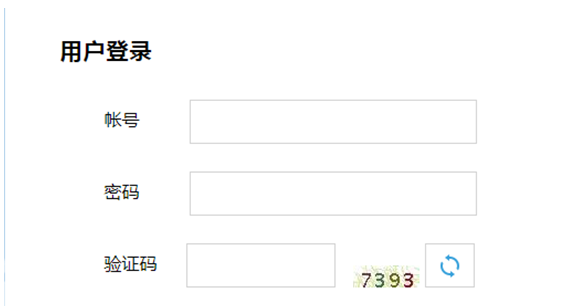
登录此类网站的关键是识别其中的验证码。那么如何识别验证码呢。我们首先来看下网页源代码。在网页中,验证码的是通过下载一个图片得到的。图片的下载地址是src=/sipopublicsearch/portal/login-showPic.shtml

我们从实际的fiddler抓包来看,也是通过请求上面的图片源地址得到了JPEG的图片并显示在浏览器上
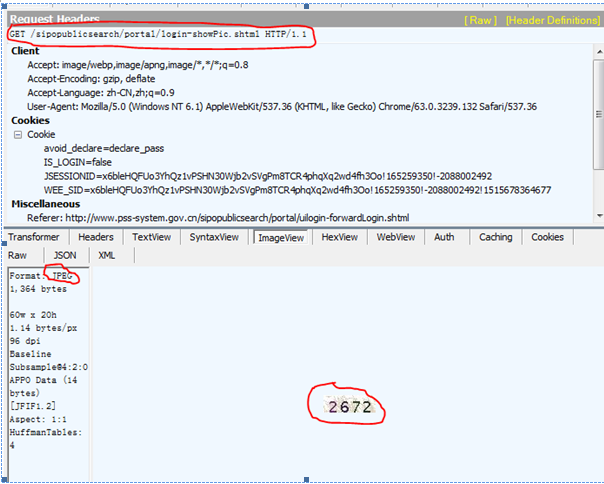
那么在scrapy中我们首先就要将图片下载到本地,然后进行识别
def parse(self,response):

    ret=response.xpath('//*[@id="codePic"]/@src').extract()

    image_source=ret[0]

    image_url=response.urljoin(image_source)

    r=requests.get(image_url)

    with open('E://scrapy_project/image2.JPEG',"wb") as code:

        code.write(r.content)
首先提取src的值出来,然后使用requests的方法进行图片下载并保存。打开文件如下。

下一步就是开始识别图片中的验证码了,这就需要用到pytesser以及PIL库了。
首先是安装Tesseract-OCR,在网上下载后进行安装。默认安装路径是C:\Program Files\Tesseract-OCR。将该路径添加到 系统属性的path路径里面。
然后再通过pip安装pytesseract以及PIL。下面来看下如何使用。代码如下:
im=Image.open('E:\\scrapy_project\\image2.JPEG')

im.convert('L')

ret=image_to_string(im,config='-psm 7’)

print ret
结果如下:图片中的验证码已经被识别出来了
image_to_string要配置psm N,参数解释如下,一般我们选择第7个
-psm N
Set Tesseract to only run a subset of layout analysis and assume a certain form of image. The options for N are:
0 = Orientation and script detection (OSD) only.
1 = Automatic page segmentation with OSD.
2 = Automatic page segmentation, but no OSD, or OCR.
3 = Fully automatic page segmentation, but no OSD. (Default)
4 = Assume a single column of text of variable sizes.
5 = Assume a single uniform block of vertically aligned text.
6 = Assume a single uniform block of text.
7 = Treat the image as a single text line.
8 = Treat the image as a single word.
9 = Treat the image as a single word in a circle.
10 = Treat the image as a single character.
E:\python2.7.11\python.exe E:/py_prj/test3.py
8227
python网络爬虫之如何识别验证码的更多相关文章
- Python网络爬虫学习总结
1.检查robots.txt 让爬虫了解爬取该网站时存在哪些限制. 最小化爬虫被封禁的可能,而且还能发现和网站结构相关的线索. 2.检查网站地图(robots.txt文件中发现的Sitemap文件) ...
- 《实战Python网络爬虫》- 感想
端午节假期过了,之前一直在做出行准备,后面旅游完又休息了一下,最近才恢复状态. 端午假期最后一天收到一个快递,回去打开,发现是微信抽奖中的一本书,黄永祥的<实战Python网络爬虫>. 去 ...
- Python 网络爬虫干货总结
Python 网络爬虫干货总结 爬取 对于爬取来说,我们需要学会使用不同的方法来应对不同情景下的数据抓取任务. 爬取的目标绝大多数情况下要么是网页,要么是 App,所以这里就分为这两个大类别来进行了介 ...
- Python网络爬虫与信息提取
1.Requests库入门 Requests安装 用管理员身份打开命令提示符: pip install requests 测试:打开IDLE: >>> import requests ...
- 《精通Python网络爬虫》|百度网盘免费下载|Python爬虫实战
<精通Python网络爬虫>|百度网盘免费下载|Python爬虫实战 提取码:7wr5 内容简介 为什么写这本书 网络爬虫其实很早就出现了,最开始网络爬虫主要应用在各种搜索引擎中.在搜索引 ...
- 《精通python网络爬虫》笔记
<精通python网络爬虫>韦玮 著 目录结构 第一章 什么是网络爬虫 第二章 爬虫技能概览 第三章 爬虫实现原理与实现技术 第四章 Urllib库与URLError异常处理 第五章 正则 ...
- Python网络爬虫与信息提取笔记
直接复制粘贴笔记发现有问题 文档下载地址//download.csdn.net/download/hide_on_rush/12266493 掌握定向网络数据爬取和网页解析的基本能力常用的 Pytho ...
- 关于Python网络爬虫实战笔记③
Python网络爬虫实战笔记③如何下载韩寒博客文章 Python网络爬虫实战笔记③如何下载韩寒博客文章 target:下载全部的文章 1. 博客列表页面规则 也就是, http://blog.sina ...
- 关于Python网络爬虫实战笔记①
python网络爬虫项目实战笔记①如何下载韩寒的博客文章 python网络爬虫项目实战笔记①如何下载韩寒的博客文章 1. 打开韩寒博客列表页面 http://blog.sina.com.cn/s/ar ...
随机推荐
- (持续集成)win7上部署Jenkins+MSBuild+Svn+SonarQube+SonarQube Scanner for MSBuild (第二发)
这一篇进入实战,走起.... 登录jenkins,如下图 点击上图中的“新建”按钮,进入下图 输入项目名称,选择“构建一个自由风格的软件项目”即可,点击“ok”,跳转到下图 svn源代码管理(选择代码 ...
- wpa破解学习
TENDA 159031106A iPhone 192.168.0.11 90:27:E4:53:49:D6 18:58:52 PC-201211262044 192.168.0.12 00:F1: ...
- Protel中的快捷键使用(网上资源)
使用快捷键之前,将输入法切换至中文(中国)状态 Enter——选取或启动 Esc——放弃或取消 F1——启动在线帮助窗 Tab——启动浮动图件的属性窗口 Page Up——放大窗口显示比例 Page ...
- CentOS6.5环境配置笔记
CentOS6.5环境配置笔记 一.概述 服务器系统重装,配置应用运行环境 CentOS6.5 x64 二.修改密码 重新设置登录密码 $passwd 或 $passwd root 三.配置端口号及防 ...
- 转: php实现的开源电商网站
转:http://www.magentochina.org/what-is-magento
- [javase学习笔记]-8.5 statickeyword的使用场景
这一节我们来看一下在我们开发的过程中,在什么时候我们要用到statickeyword进行静态修饰. 我们这里所说的静态.无非就是两种.一种是静态变量,一种是静态函数,我们分这两种情况进行说明stati ...
- maven打包时出现no compiler is provided in this environment
我是使用maven打jar包时出现的问题,与我问题不同的可以查看下面链接是否有棒状 http://blog.csdn.net/lslk9898/article/details/73836745 可以确 ...
- 微信小程序 - 答题进度条
关于进度条的话,我是使用官方原生的progress的. 关于进度progress接受保留2位小数(从后端获取到平均值,再item循环出来) js wxml
- eletron 播放rtmp flash 播放器问题
1 安装 flash https://www.flash.cn/ 2 man.js 配置 参考 https://newsn.net/say/electron-flash-win.html 3 播放器 ...
- TP框架中多条件筛选
$pid =I('pid'); $year = I('year'); $productType = I('productType'); ...