
如何创建一个AJAX-Enabled WCF Service
原创地址:http://www.cnblogs.com/jfzhu/p/4041638.html
转载请注明出处
前面的文章中介绍过《Step by Step 创建一个WCF Service 》以及《如何使用WCF的Trace与Message Log功能》,本文介绍如何创建一个AJAX-Enabled WCF Service。
(一)创建一个WCF AJAX-enabled service
1. 打开Visual Studio 2012,创建一个ASP.NET Empty Web Application Project,命名为SandwichServices。这时Visual Studio的web.config文件内容为:
<?xml version="1.0"?>

<configuration>

  <system.web>

    <compilation debug="true" targetFramework="4.0" />

  </system.web>

</configuration>
2. 添加一个AJAX-enabled WCF Service,命名为CostService.svc
using System.ServiceModel;

using System.ServiceModel.Activation;

namespace SandwichServices

{

    [ServiceContract(Namespace = "SandwichServices")]

    [AspNetCompatibilityRequirements(RequirementsMode = AspNetCompatibilityRequirementsMode.Allowed)]

    public class CostService

    {

        // To use HTTP GET, add [WebGet] attribute. (Default ResponseFormat is WebMessageFormat.Json)

        // To create an operation that returns XML,

        //     add [WebGet(ResponseFormat=WebMessageFormat.Xml)],

        //     and include the following line in the operation body:

        //         WebOperationContext.Current.OutgoingResponse.ContentType = "text/xml";

        [OperationContract]

        public void DoWork()

        {

            // Add your operation implementation here

            return;

        }

    }

}
因为我们不打算使用TCP等HTTP之外的Protocol,所以设置为AspNetCompatibilityEnabled。
3. 修改Namespace ServiceContractAttribute,并添加一个CostOfSandwiches方法
using System.ServiceModel;

using System.ServiceModel.Activation;

namespace SandwichServices

{

    [ServiceContract(Namespace = "SandwichServices")]

    [AspNetCompatibilityRequirements(RequirementsMode = AspNetCompatibilityRequirementsMode.Allowed)]

    public class CostService

    {

        // To use HTTP GET, add [WebGet] attribute. (Default ResponseFormat is WebMessageFormat.Json)

        // To create an operation that returns XML,

        //     add [WebGet(ResponseFormat=WebMessageFormat.Xml)],

        //     and include the following line in the operation body:

        //         WebOperationContext.Current.OutgoingResponse.ContentType = "text/xml";

        [OperationContract]

        public void DoWork()

        {

            // Add your operation implementation here

            return;

        }

        [OperationContract]

        public double CostOfSandwiches(int quantity)

        {

            return 1.25 * quantity;

        }

    }

}
4. 这时Visual Studio生成的web.config文件
<?xml version="1.0"?>

<configuration>

  <system.web>

    <compilation debug="true" targetFramework="4.0" />

  </system.web>

  <system.serviceModel>

    <behaviors>

      <endpointBehaviors>

        <behavior name="SandwichServices.CostServiceAspNetAjaxBehavior">

          <enableWebScript />

        </behavior>

      </endpointBehaviors>

    </behaviors>

    <serviceHostingEnvironment aspNetCompatibilityEnabled="true"

        multipleSiteBindingsEnabled="true" />

    <services>

      <service name="SandwichServices.CostService">

        <endpoint address="" behaviorConfiguration="SandwichServices.CostServiceAspNetAjaxBehavior"

            binding="webHttpBinding" contract="SandwichServices.CostService" />

      </service>

    </services>

  </system.serviceModel>

</configuration>
如果在浏览器中访问CostService.svc,得到如下错误
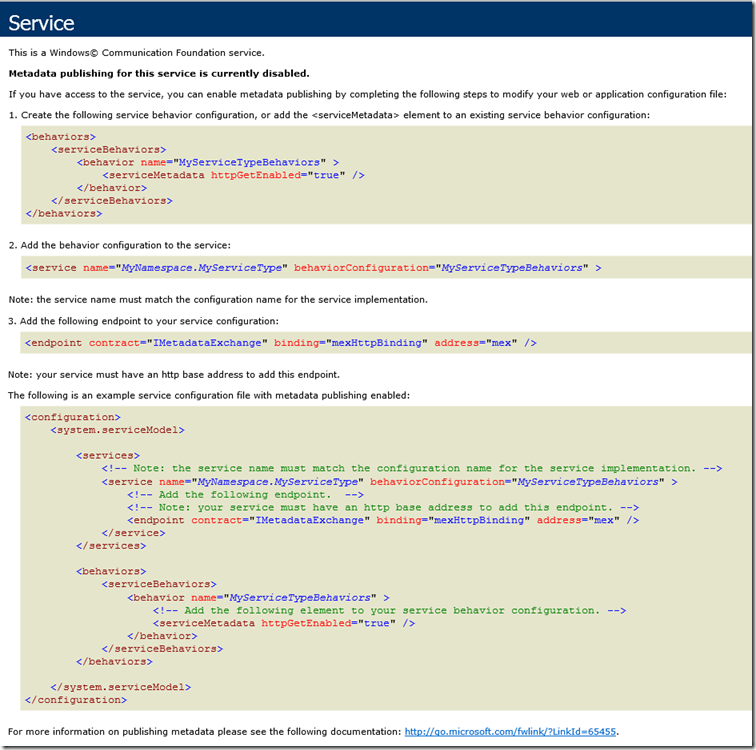
5. 修改web.config文件
<?xml version="1.0"?>

<configuration>

  <system.web>

    <compilation debug="true" targetFramework="4.0" />

  </system.web>

  <system.serviceModel>

    <behaviors>

      <endpointBehaviors>

        <behavior name="SandwichServices.CostServiceAspNetAjaxBehavior">

          <enableWebScript />

        </behavior>

      </endpointBehaviors>

      <serviceBehaviors>

        <behavior name="SandwichServices.CostServiceServiceBehavior" >

          <serviceMetadata httpGetEnabled="true" />

        </behavior>

      </serviceBehaviors>

    </behaviors>

    <serviceHostingEnvironment aspNetCompatibilityEnabled="true"

        multipleSiteBindingsEnabled="true" />

    <services>

      <service name="SandwichServices.CostService" behaviorConfiguration="SandwichServices.CostServiceServiceBehavior">

        <endpoint address="" behaviorConfiguration="SandwichServices.CostServiceAspNetAjaxBehavior"

            binding="webHttpBinding" contract="SandwichServices.CostService" />

        <endpoint contract="IMetadataExchange" binding="mexHttpBinding" address="mex" />

      </service>

    </services>

  </system.serviceModel>

</configuration>
再次在浏览器中打开CostService.svc,可以正常访问了。
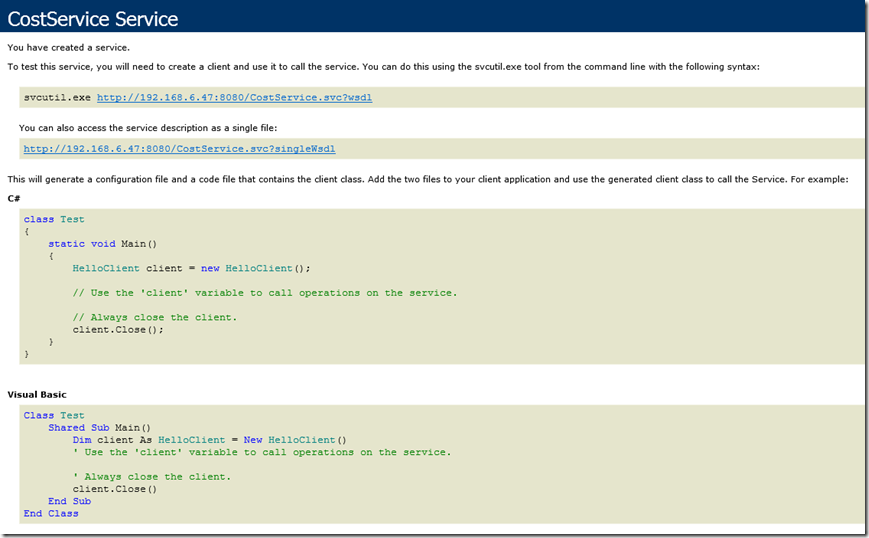
(二)创建Client端,调用WCF Service
1. 创建一个aspx Page
<%@ Page Language="C#" AutoEventWireup="true" CodeBehind="WebForm2.aspx.cs" Inherits="WebClient.WebForm2" %>

<!DOCTYPE html>

<html xmlns="http://www.w3.org/1999/xhtml">

<head runat="server">

    <title></title>

    <script language="javascript" type="text/javascript">

        function Button1_onclick() {

            var service = new SandwichServices.CostService();

            service.CostOfSandwiches(3, onSuccess, null, null);

        }

        function onSuccess(result) {

            alert(result);

        }

    </script>

</head>

<body>

    <form id="form1" runat="server">

    <div>

        <p>

        <input id="Button1" type="button" value="Price for 3 Sandwiches" onclick="return Button1_onclick()" />

        </p>

    </div>

        <asp:ScriptManager ID="ScriptManager1" runat="server">

            <Services>

                <asp:ServiceReference Path="http://192.168.6.47:8080/CostService.svc" />

            </Services>

        </asp:ScriptManager>

    </form>

</body>

</html>
2. 在浏览器中打开该页面,然后用F12工具可以看到加载进来的JavaScript,是WCF Service生成的。
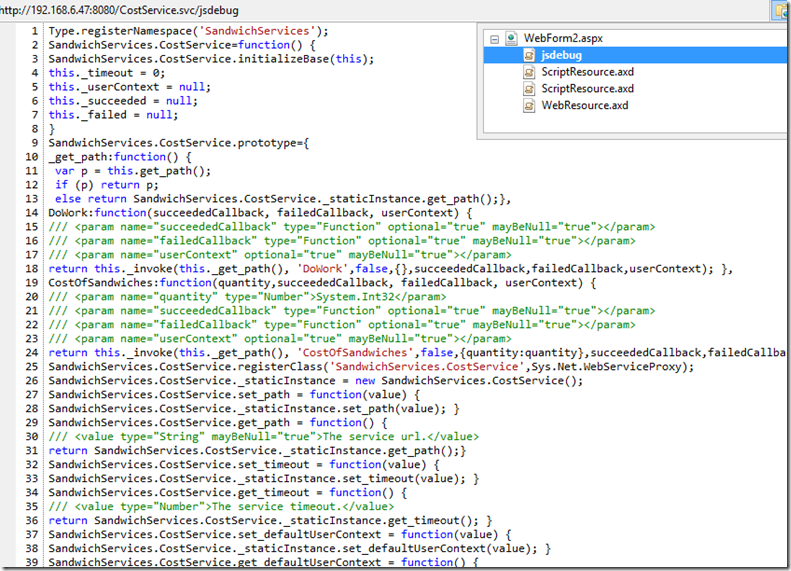
Fiddler
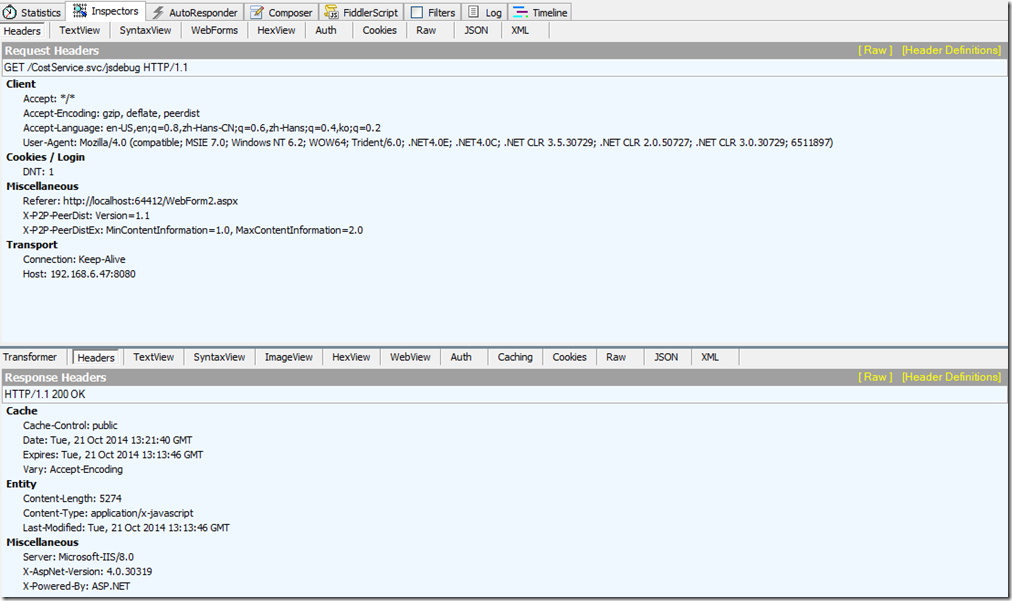
3. 点击按钮调用WCF Service

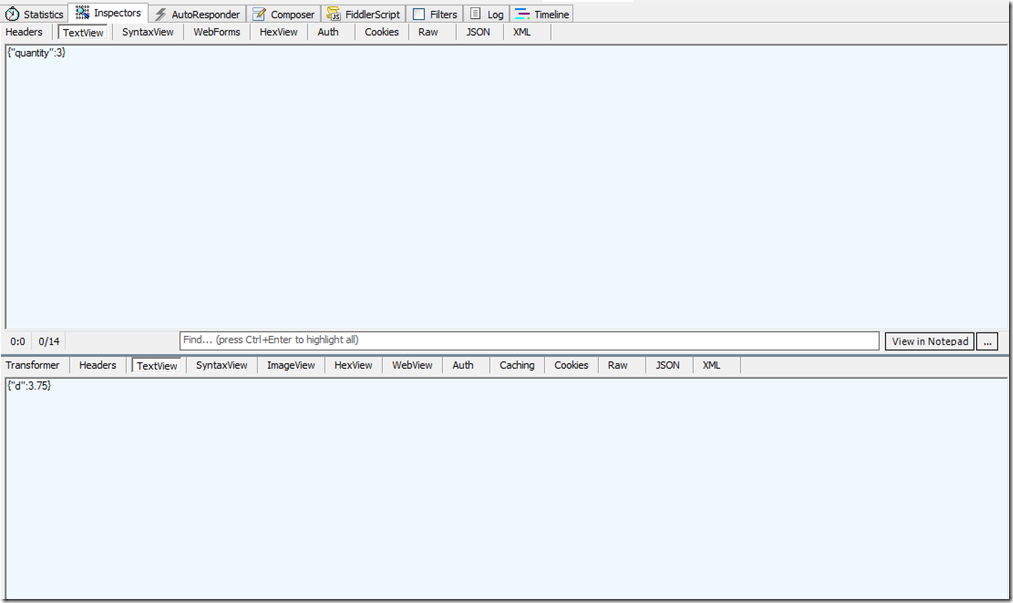
(三) 总结
WCF Service的配置文件中的endpoint的binding要使用webHttpBinding,endpointBehavior要设置成enableWebScript。
WebForm中要在ScriptManager中添加WCF Service的引用。

如何创建一个AJAX-Enabled WCF Service的更多相关文章
- [转载]我的WCF之旅(1):创建一个简单的WCF程序
为了使读者对基于WCF的编程模型有一个直观的映像,我将带领读者一步一步地创建一个完整的WCF应用.本应用功能虽然简单,但它涵盖了一个完整WCF应用的基本结构.对那些对WCF不是很了解的读者来说,这个例 ...
- 我的WCF之旅(1):创建一个简单的WCF程序
为了使读者对基于WCF的编程模型有一个直观的映像,我将带领读者一步一步地创建一个完整的WCF应用.本应用功能虽然简单,但它涵盖了一个完整WCF应用的基本结构.对那些对WCF不是很了解的读者来说,这个例 ...
- [WCF学习笔记] 我的WCF之旅(1):创建一个简单的WCF程序
近日学习WCF,找了很多资料,终于找到了Artech这个不错的系列.希望能从中有所收获. 本文用于记录在学习和实践WCF过程中遇到的各种基础问题以及解决方法,以供日后回顾翻阅.可能这些问题都很基础,可 ...
- 创建一个简单的WCF程序2——手动开启/关闭WCF服务与动态调用WCF地址
一.创建WCF服务器 1.创建WCF服务器的窗体应用程序 打开VS2010,选择文件→新建→项目菜单项,在打开的新建项目对话框中,依次选择Visual C#→Windows→Windows窗体应用程序 ...
- jQuery.Ajax()执行WCF Service的方法
Insus.NET有在上一篇<ASP.NET MVC呼叫WCF Service的方法>http://www.cnblogs.com/insus/p/3720547.html 直接呼叫WCF ...
- WCF服务二:创建一个简单的WCF服务程序
在本例中,我们将实现一个简单的计算服务,提供基本的加.减.乘.除运算,通过客户端和服务端运行在同一台机器上的不同进程实现. 一.新建WCF服务 1.新建一个空白解决方案,解决方案名称为"WC ...
- WCF入门, 到创建一个简单的WCF应用程序
什么是WCF? WCF, 英文全称(windows Communication Foundation) , 即为windows通讯平台. windows想到这里大家都知道了 , WCF也正是由微软公 ...
- Ajax 是什么? 如何创建一个Ajax?
ajax的全称:Asynchronous Javascript And XML. 异步传输+js+xml. 所谓异步,在这里简单地解释就是:向服务器发送请求的时候,我们不必等待结果,而是可以同时做其他 ...
- 创建一个简单的WCF程序
1.创建WCF服务库 打开VS2010,选择文件→新建→项目菜单项,在打开的新建项目对话框中,依次选择Visual C#→WCF→WCF服务库,然后输入项目名称(Name),存放位置(Location ...
- 使用 PHP SOAP 来创建一个简单的 Web Service。
访问: http://www.debug.com/php-soap-demo.php?client=22 结果: apache: <VirtualHost _default_:80> Do ...
随机推荐
- Ubuntu菜鸟入门(六)—— 有道词典安装
一.在有道辞掉官网上下载安装包: youdao-dict_1.1.0-0-ubuntu_amd64.deb 二.安装 1.打开下载目录,进行安装 sudo dpkg -i youdao-dict_1. ...
- js数组操作大全
原文(http://www.cnblogs.com/webhotel/archive/2010/12/21/1912732.html) 用 js有很久了,但都没有深究过js的数组形式.偶尔用用也就是简 ...
- GIT版本管理工具
原文:http://blog.csdn.net/ithomer/article/details/7527877 Git 是一个分布式版本控制工具,它的作者 Linus Torvalds 是这样给我们介 ...
- Codeforces Round #388 (Div. 2) - C
题目链接:http://codeforces.com/contest/749/problem/C 题意:给定一个长度为n的D/R序列,代表每个人的派别,然后进行发表意见,顺序是从1到n.每个人到他的回 ...
- Python 学习手册, char 14 - 15
Char 14 迭代器和解析器 可迭代的 : 支持iter的一个对象 迭代器 : iter 所返回的一个支持next(I)的对象 Python迭代工具会自动调用这些函数,我们也可以手动地应用迭代协议 ...
- 服务升级中的zookeeper
服务升级中zookeeper可以管理服务中的配置以及作为leader选举以及分布式事务等, 在这次主要用于配置管理,关于配置管理主要设计如下,通过zookeeper管理配置项,通过 管理界面来管理数据 ...
- 【算法杂谈】Miller-Rabin素性测试算法
额,我们今天来讲一讲Miller-Rabin素性测试算法. 读者:怎么又是随机算法!!!(⊙o⊙)… [好了,言归正传] [费马小定理] 费马小定理只是个必要条件,符合费马小定理而非素数的数叫做Car ...
- 2016-1-30 Servlet中Session管理(Sesssion追踪)
Session管理(Sesssion追踪)是Web应用程序开发中非常重要的一个主题.这是因为HTTP是无状态的,在默认情况下,Web服务器不知道一个HTTP请求是来自初次用户,还是来自之前已经访问过的 ...
- XmlRpc.net 入参结构体嵌套的转义操作
项目使用C#开发,需要使用XmlRpc和Linux服务器端交互,用的是XmlRpc.net. 普通的程序调用入参和出差都没有问题,今天遇到入参结构体嵌套,结果 args 入参在服务器端不能解析.抓包数 ...
- [SE0]简单的搜索引擎原理
1.简单了解搜索引擎收录的原理 包括baidu. google .yahoo 在内的各大搜索引擎在内基本上搜录网站的原理大致相同(除了国内某些网站 网1新 l 等采取人工登记的办法),搜索引擎都是采 ...